
Your accounts package freezes while someone is invoicing. Microsoft 365 signs a member of staff out halfway through a client call. A director asks whether backups are working, and nobody in the room can answer with confidence. By lunch, your team has lost time, patience, and trust in the systems they rely on.
That's a familiar pattern for many East Midlands businesses. A company in Nottingham or Leicester doesn't usually wake up one morning and decide its IT is failing. It happens gradually. Devices get older, permissions become messy, cloud services are added without a clear plan, and support turns into a string of one-off fixes.
The result is that technology starts acting like a drag on the business instead of support for it. Good IT infrastructure support changes that. It gives you stable foundations, clear ownership, and a practical route from firefighting to control.
Is Your IT Holding Your Business Back
A typical mid-sized business in Nottingham often looks fine from the outside. Staff are busy, orders are moving, customers are being served. Underneath, the day can be held together by workarounds.
A finance manager exports data manually because the system link keeps failing. A sales team member stores files on a local machine because shared access is too slow. Someone in operations delays a software update because the last one caused disruption. None of these problems sound dramatic on their own. Together, they create risk, wasted time, and constant frustration.
What the day actually feels like
If you run a business in the East Midlands, the signs are usually practical rather than technical:
- Staff lose momentum: Logging in takes too long, shared folders lag, and routine tasks need extra clicks or manual steps.
- Leaders lose visibility: You don't know which systems are patched, which devices are near end of life, or whether backups would restore properly.
- Security worries increase: Access rights drift over time, old accounts remain open, and nobody is fully accountable for reviewing the setup.
- Projects stall: You want to move further into Microsoft 365, Azure, Dynamics 365, or Copilot AI, but the base environment isn't ready.
Businesses rarely ask for better IT because they want new jargon. They ask because they want fewer interruptions, clearer accountability, and systems that don't get in the way.
Why ad-hoc support stops working
Ad-hoc troubleshooting can carry a small business for a while. It doesn't scale well. Once you depend on cloud platforms, remote access, integrated applications, and mobile users, every weak point becomes connected to another one.
That's where proper IT infrastructure support matters. It isn't just a helpdesk answering calls. It's the organised management of the systems, connectivity, security controls, updates, monitoring, and escalation paths that keep the business running.
In practice, that means fewer recurring faults, better decisions about cloud and hardware, and a support model built for business continuity rather than patching over the same issue every month.
Understanding Your Business's Digital Skeleton
On a Monday morning in Leicester, the phones are live, the warehouse team is waiting on stock updates, and two people cannot get into the system they need. Nothing looks dramatic. The business still opens. But delays like that usually point to the same problem. The underlying setup has grown in pieces, and nobody has reviewed how those pieces work together.
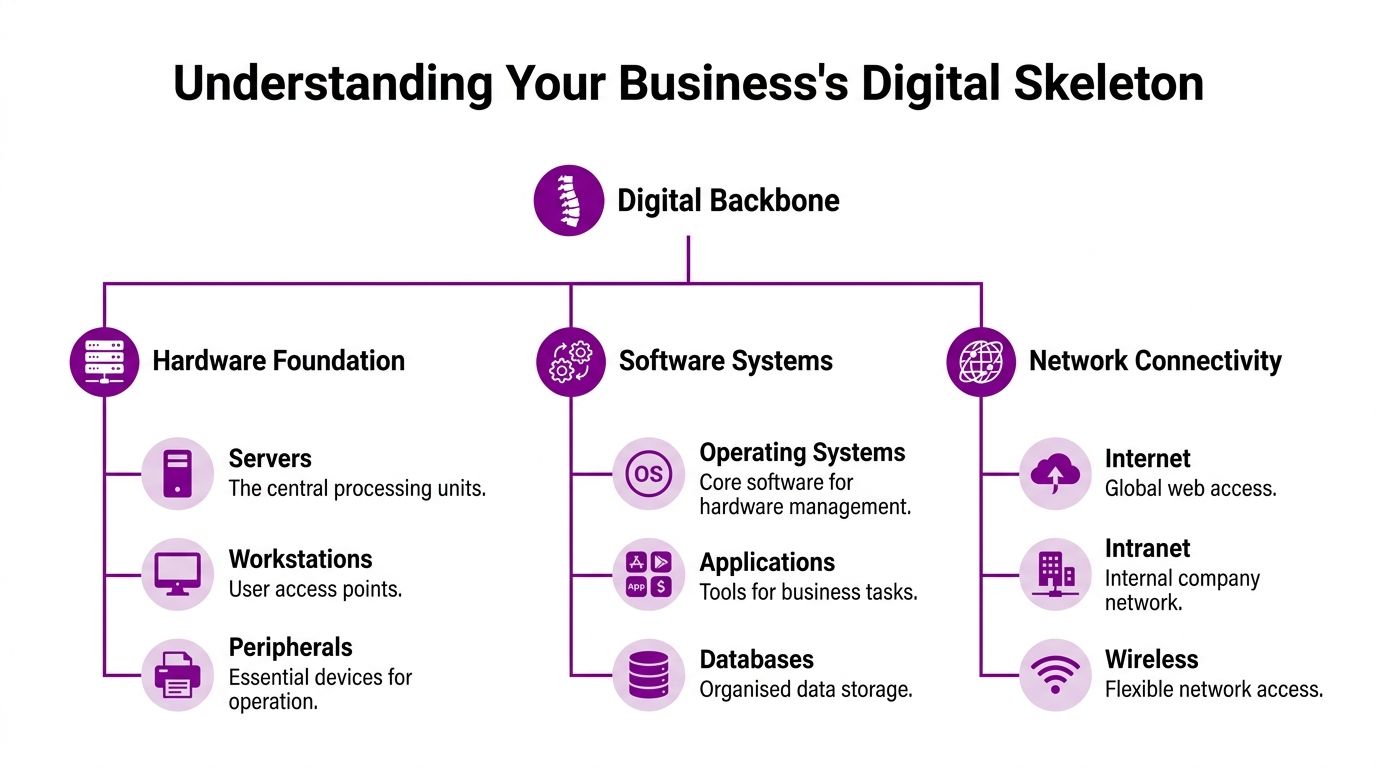
Your infrastructure is the operating base for the whole business. It covers the devices people rely on, the network carrying traffic between sites and cloud services, the identity controls that decide who gets access, and the platforms holding email, files, finance systems, and customer data. If those layers have been added at different times by different suppliers, cracks show up in daily work long before they show up on a formal risk report.
The parts that actually matter
For most East Midlands SMEs, four areas deserve attention first.
Endpoints and on-site hardware. Laptops, desktops, servers, firewalls, switches, printers, and wireless access points still matter, even in a cloud-first business. Old kit does not just run slowly. It creates support overhead, compatibility issues, and avoidable security gaps.
Connectivity. Your internet line, internal network, Wi-Fi coverage, VPN or remote access, and site-to-site links all affect how well staff can work. A firm with an office in Nottingham and a second location in Lincoln will feel poor network design quickly, especially once Microsoft 365, Teams calling, cloud backups, and shared systems all depend on stable access.
Identity and access. This is one of the most overlooked layers. Microsoft 365, Azure, and line-of-business applications all rely on clean user accounts, sensible permissions, and joined-up access policies. If starters, leavers, and role changes are handled inconsistently, the environment becomes messy and risky.
Core platforms and data. File storage, email, business applications, databases, and backups sit here. These are the systems staff notice first, but their reliability depends on everything underneath being set up and maintained properly.
Support means ownership, standards, and planning
Good infrastructure support is ongoing operational control. It includes patching, monitoring, asset tracking, licence management, backup checks, security reviews, documentation, supplier coordination, and a clear process for change.
That changes the conversation with business owners.
Instead of asking why the Wi-Fi keeps dropping or why a server filled up again, you start asking better questions. Which systems are old enough to become a risk this year? Are Microsoft 365 licences aligned to what staff use? Would the backup restore cleanly if a file share or Azure workload failed? Is there one accountable partner who can answer those questions without guesswork?
At F1Group, we see this regularly with growing firms across Lincoln, Nottingham, and Leicester. The issue is rarely one dramatic failure. It is usually a collection of small decisions made over several years that now need proper standards and clear ownership.
Practical rule: Repeated faults usually point to a design gap, an unmanaged process, or unclear ownership.
Why the wider infrastructure picture matters
Local businesses also depend on infrastructure beyond their own walls. Cloud platforms, off-site backups, hosted applications, and business continuity plans all rely on the strength of the UK data centre sector. The UK data centre sector report 2022 published on GOV.UK sets out the sector's economic contribution and role in supporting jobs and digital services across the country. For an SME, the practical point is simple. Your move into Microsoft 365, Azure, or hosted systems only works if the surrounding ecosystem is reliable.
For a business owner in Newark, Lincoln, or Leicester, that usually comes down to four checks:
- Can staff work without delay across sites, home, and mobile devices
- Are Microsoft 365 and Azure set up to fit the business, rather than left on default settings
- Do backups, access controls, and patching have clear ownership
- Can your support partner get on site quickly when a problem needs hands-on work
Businesses that understand their digital skeleton make better decisions on spend, risk, and growth. They stop buying isolated fixes and start building an environment that supports the way they operate.
Choosing Your Infrastructure Model On-Premise Cloud or Hybrid
The right infrastructure model depends less on fashion and more on how your business operates. For an SME in Lincoln or Nottingham, the choice usually comes down to on-premise, cloud, or hybrid. Each can work. Each comes with trade-offs.
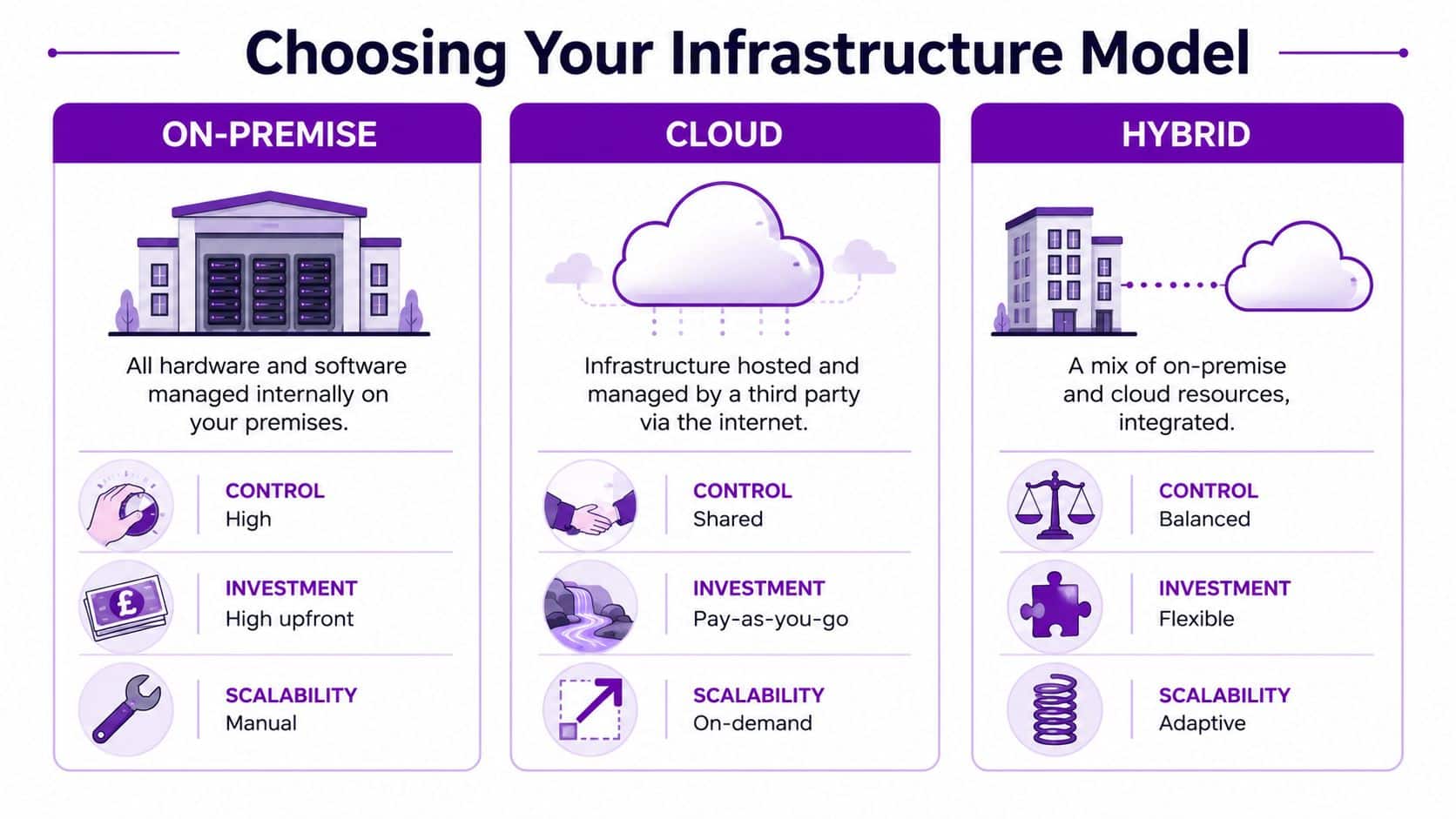
What each model looks like in practice
On-premise means the core systems and data sit on equipment you manage on your own site or in a dedicated hosted environment you control closely. This often suits organisations with legacy applications, strict internal policies, or specialist equipment that isn't easy to move.
Cloud means most of your infrastructure is delivered through online services such as Microsoft 365 and Azure. You're consuming services rather than maintaining as much physical kit yourself. This usually improves flexibility, especially for growing firms or businesses with remote teams.
Later in the decision process, it helps to see the comparison visually:
Hybrid combines both. You might keep a local line-of-business application or data set on-site while shifting collaboration, identity, backup, or disaster recovery into Azure and Microsoft 365.
The practical trade-offs
| Model | Initial cost | Ongoing costs | Scalability | Security control | Maintenance burden |
|---|---|---|---|---|---|
| On-premise | Usually higher upfront because you’re buying and refreshing hardware | More predictable in some areas, but support and replacement costs can build up | Slower to expand because changes often need new hardware or setup work | Direct control over infrastructure decisions | Heavier internal or outsourced maintenance requirement |
| Cloud | Lower upfront entry for many SMEs because services are subscription-based | Ongoing operational spend needs active management | Easier to scale up or down as staffing and workload change | Shared responsibility model, so governance matters | Lower hardware burden, but cloud administration still needs expertise |
| Hybrid | Flexible, but can become expensive if designed badly | Mixed cost profile across subscriptions and retained infrastructure | Good fit for phased change and mixed workloads | Balanced control with more complexity to manage | Highest design discipline needed because two worlds must work together |
What works and what doesn't
Cloud-first often works well when a business wants mobility, faster deployment, and cleaner integration with Microsoft tools. It doesn't work well if people assume the provider handles everything automatically. Someone still needs to manage permissions, policies, licensing, backup decisions, and security settings.
On-premise can still be the right call for specific operational systems. It doesn't work when businesses keep ageing servers solely because moving feels uncomfortable. That's not strategy. That's delay.
Hybrid is usually the most realistic path for established SMEs. It works when there's a clear reason for each workload to stay or move. It fails when businesses drift into it accidentally and end up supporting duplicate systems, duplicate costs, and unclear ownership.
A sensible decision lens
Ask these questions before choosing:
- How quickly do we need to scale
- Which applications can't easily move
- Who will manage security and day-to-day administration
- Do we need tighter local control, or better flexibility across sites and remote users
- Are we simplifying the environment, or just adding another layer
A good infrastructure model should make your business easier to run. If it creates confusion, hidden cost, or support gaps, it needs redesigning.
The Real ROI of Professional IT Infrastructure Support
A manufacturing firm in Leicester loses access to shared files for half a day. A professional services team in Nottingham cannot send quotes because Microsoft 365 sign-ins keep failing. A retailer with sites across Lincolnshire spends a director's afternoon chasing a printer issue that should never have reached the boardroom. That is where return on investment shows up. In lost hours, delayed revenue, and management time pulled away from the work that grows the business.
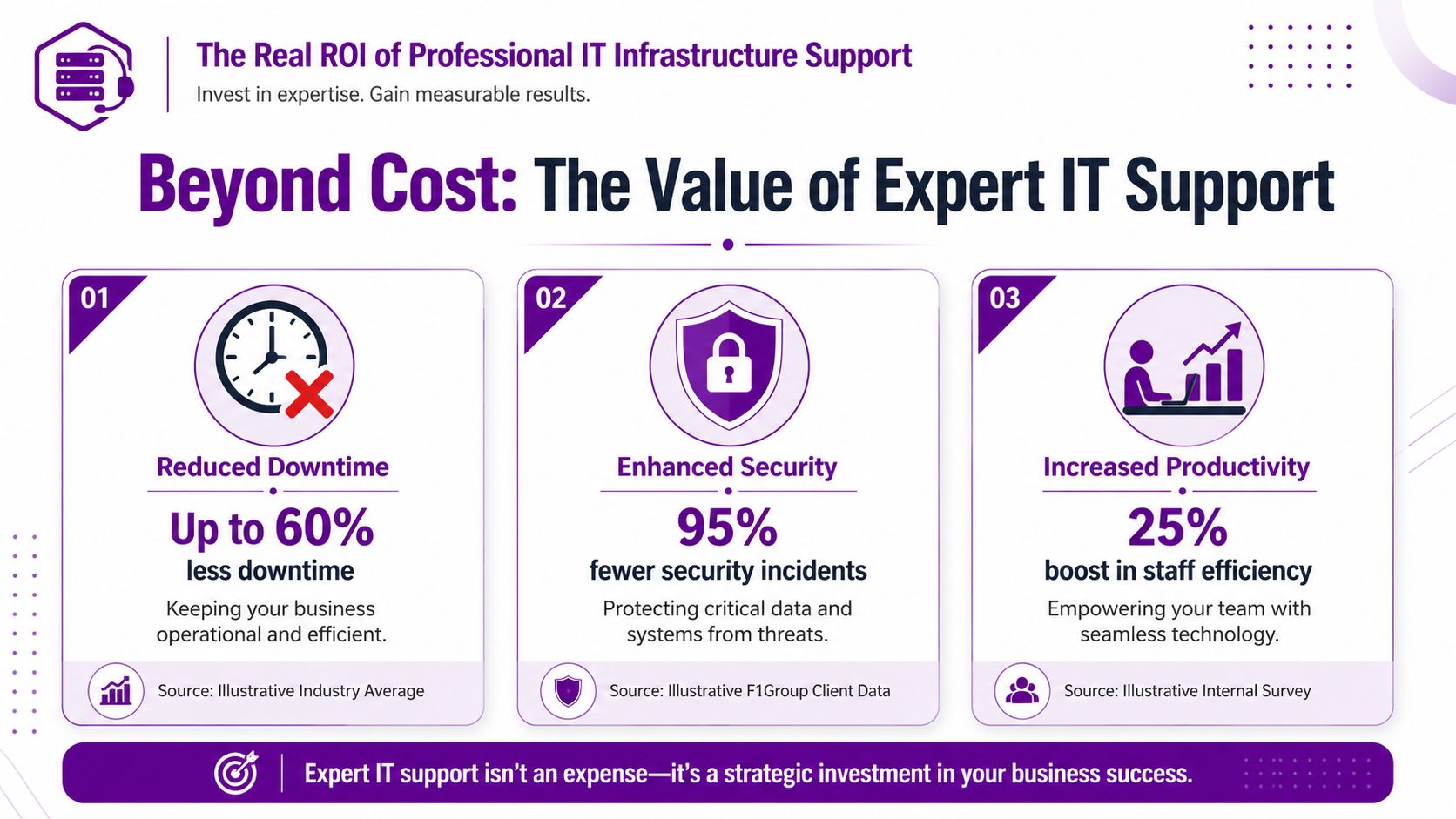
Support pays back when it reduces disruption and gives the business a more predictable operating environment. That means fewer repeated incidents, faster recovery when something does go wrong, and clearer ownership of updates, backups, user access, and device health.
Downtime is only the visible part of the cost. The larger loss often sits in the background. Staff wait. Workarounds spread. Data ends up in the wrong place. Small faults stay open long enough to affect customers.
What that looks like in business terms
A good support model improves daily performance across the organisation, not just inside IT.
- Sales teams keep momentum: Email, CRM access, shared documents, and Teams calls stay available when they are needed.
- Finance keeps control: Month-end work, approvals, and payment runs are less likely to stall because of login issues, sync failures, or unsupported devices.
- Customer-facing teams respond faster: Staff can work through enquiries without apologising for slow systems or missing information.
- Leaders get time back: Directors and office managers stop acting as the default escalation route for avoidable problems.
For East Midlands SMEs, this matters even more when teams are spread across offices, home working, warehouses, and field sites. Support has to cover the whole operating model, not just the head office network.
Where businesses misread the return
Ticket numbers on their own tell very little. A support provider can close tickets quickly and still leave the same faults coming back every week.
The stronger measure is whether support improves the environment itself. Repeated account lockouts should be investigated, not just reset. Backup failures should be fixed before a restore is needed. New starters should receive the right Microsoft 365 access on day one, and leavers should be removed cleanly so licences, security, and data stay under control.
I have seen businesses carry a low-cost contract for years, then discover they were paying twice. Once in monthly fees, and again in wasted staff time, delayed projects, and avoidable risk.
What good ROI usually includes
You should expect to see several practical outcomes:
- Fewer recurring faults
- Faster resolution because systems are documented properly
- Clear responsibility for patching, monitoring, and user administration
- Better control of Microsoft licensing, identities, and devices
- More confidence in backup, recovery, and security settings
- Support that fits how the business operates across places like Lincoln, Nottingham, and Leicester
That last point matters. Local context helps. An SME with a small internal IT presence often needs a partner who can advise on Microsoft 365, Azure, connectivity, and user support in one joined-up service, while still being close enough to understand site realities and respond when a hands-on issue cannot be solved remotely.
Return on investment comes from stability, control, and fewer distractions. If your people can work without repeated interruption, your systems are easier to manage, and your leadership team spends less time firefighting, support is doing its job.
Leveraging Microsoft's Ecosystem for Business Growth
A typical East Midlands SME starts with Microsoft 365 for email and files, adds Teams for meetings, then brings in Azure for backup, hosting, or remote access. Later, someone introduces Power BI dashboards, a few Power Automate workflows, or a Dynamics 365 module. The problem is not the tools. It is the gaps between them.

Used properly, Microsoft's platform gives a growing business one operating environment for communication, identity, security, reporting, and process management. Used poorly, it becomes a patchwork of licences, duplicated data, and unclear ownership. For firms in Lincoln, Nottingham, and Leicester, the commercial difference often comes down to whether the underlying setup was planned to support growth or just assembled over time.
How the Microsoft stack works in practice
Microsoft 365 sits closest to your users. It covers email, Teams, SharePoint, OneDrive, Entra ID, and device management. Day-to-day productivity depends on it, but so do security basics such as authentication, access control, and data handling.
Azure supports the services behind the scenes. That may include virtual servers, backup, disaster recovery, application hosting, networking, security tools, and integration services. If Azure is overbuilt, costs rise fast. If it is under-managed, performance, resilience, and recovery all suffer.
Dynamics 365 brings customer, finance, service, and operational data into the same wider Microsoft environment. That matters because disconnected systems create manual rekeying, reporting delays, and inconsistent information across departments.
Power Platform helps remove repetitive work. Power BI can improve reporting. Power Apps can replace spreadsheets and paper-based steps. Power Automate can reduce admin effort. None of that stays useful for long without control over permissions, connectors, ownership, and change management.
Copilot only works as well as the environment behind it
Copilot gets attention because the benefits are easy to picture. Faster drafting. Better meeting summaries. Quicker access to internal knowledge. Businesses often want those gains immediately.
The constraint is rarely the AI tool itself. It is the condition of the Microsoft estate underneath it.
If file permissions are loose, Copilot can expose information to the wrong people. If documents are stored across personal drives, old SharePoint sites, and unmanaged Teams, responses become unreliable. If naming, retention, and ownership are inconsistent, staff spend more time checking outputs than using them. That is why Copilot readiness is mostly an infrastructure and governance question before it becomes a user adoption project.
What capable support looks like in a Microsoft-first business
Good support does more than keep services available. It should help your business use Microsoft tools in a way that is controlled, supportable, and financially sensible.
For most SMEs, that means:
- Access based on job role, with regular review of who can reach what
- Azure oversight covering cost, resilience, backup, and performance
- Change control for Dynamics 365 and Power Platform, so fixes and new workflows do not break live processes
- Clear data structure in Microsoft 365, including ownership, retention, and sensible permissions
- Copilot preparation focused on information quality, not just licence purchase
There are trade-offs here. A tightly governed environment can feel slower when teams want to create apps or automate work quickly. A looser setup gives people freedom, but usually creates support problems later. The right balance depends on your size, risk profile, and internal capability.
For East Midlands organisations, local support also matters at this stage. A provider that understands how your sites operate, whether that is a single office in Nottingham or a multi-site business across Leicester, Lincoln, and surrounding areas, will usually make better decisions about rollout, escalation, and hands-on support.
The businesses that get most value from Microsoft are usually the ones that set standards early, keep the environment tidy, and treat the platform as part of operations rather than a collection of separate apps.
A Buyer's Checklist for East Midlands Organisations
A server fails at 8:15 on a Monday. Orders stop flowing, phones start ringing, and your team wants one answer. Who owns the fix?
That is the true test of an IT support partner. Price matters, but support quality shows up under pressure, not in a proposal. For an East Midlands SME, the right provider should understand your business, your sites, and the practical difference between remote help and someone turning up in Lincoln, Nottingham, Leicester, Derby, Newark, Scunthorpe, or Grimsby when the situation calls for it.
Local presence on its own is not enough. You also need clear escalation, solid Microsoft capability, sensible security discipline, and a service desk that communicates properly when something goes wrong.
What to test before you sign anything
One of the clearest warning signs is vagueness around serious incidents. A provider may sound convincing on password resets and device setup, then struggle to explain who takes over when Microsoft 365 fails, Azure performance drops, or a business-critical integration breaks. If they cannot describe that process clearly before you sign, do not expect clarity during an outage.
Ask direct questions and listen for direct answers.
Ask this plainly: Describe your escalation process for a critical system failure involving Microsoft 365, Azure, or an integration issue.
A strong provider should be able to explain who handles first response, when senior engineers step in, when Microsoft or another vendor is engaged, how updates are issued, and who stays accountable until service is restored. At F1Group, we find that business owners usually care less about job titles than about whether there is a defined route to resolution and one team coordinating the whole incident.
IT Support Partner Evaluation Checklist
| Criteria | What to Ask / Look For | Why It Matters |
|---|---|---|
| Escalation model | Ask them to describe Tier 1 through senior engineering or vendor escalation in plain English | Complex faults need a clear route to deeper expertise |
| Microsoft capability | Ask which Microsoft technologies they actively support, including Microsoft 365, Azure, Dynamics 365, and Power Platform | A general helpdesk may struggle with connected Microsoft environments |
| Security practice | Ask who manages patching, access reviews, device standards, and incident response | Security gaps often sit in unclear ownership |
| On-site support | Ask how they cover your location and what situations trigger a site visit | Remote support works for many issues, but not all of them |
| DBS and trust checks | Ask whether field engineers and relevant personnel are DBS-checked | This matters in schools, charities, healthcare, and other sensitive settings |
| Documentation | Ask what documentation they maintain and whether you can review key records | Good records reduce recovery time and dependence on one individual |
| Service desk quality | Ask how tickets are logged, prioritised, updated, and closed | You need visibility throughout an incident |
| Commercial clarity | Ask what is included in the monthly fee and what falls outside it | Hidden exclusions usually appear at the worst moment |
| Project capability | Ask whether they can support migrations, integrations, and improvements as well as day-to-day incidents | Many SMEs need one partner to run and improve the estate |
| Ownership mindset | Ask for examples of how they handle third-party software or connectivity issues | You want coordination and follow-through, not blame passed between suppliers |
One more point is often missed. Ask how they support standardisation across your estate. East Midlands businesses with a head office in Nottingham, a warehouse near Leicester, and smaller satellite sites often end up with mixed devices, inconsistent Wi-Fi, and local workarounds that make support slower and security harder to control. A good partner will push for standard builds, clear documentation, and repeatable processes, even if that means saying no to a few one-off exceptions.
A simple way to separate strong providers from weak ones
Strong providers answer with process, examples, and trade-offs. They can explain how they triage incidents, what they monitor, how they communicate with your staff, and where their responsibility starts and ends. They should also be honest about limits. For example, if you rely heavily on Microsoft technologies, ask whether they can support Azure governance, Microsoft 365 administration, and business application issues in-house, or whether those jobs are passed elsewhere.
Weak providers usually rely on broad promises. They say they are responsive or proactive, but cannot show what happens when your finance team loses access to a cloud system on month-end morning.
Choose the partner that gives you operational confidence. For most East Midlands SMEs, that means a provider with Microsoft depth, local reach, clear accountability, and the discipline to keep the environment supportable as your business grows.
Secure Your Future Take the Next Step Today
If your systems feel unreliable, slow, hard to manage, or difficult to scale, that isn't just an IT irritation. It's a business constraint. Staff work around the problem for a while, but those workarounds become cost, risk, and frustration.
Strong IT infrastructure support changes the position. It gives you stable foundations, a sensible infrastructure model, better use of Microsoft technologies, and a support structure that can resolve routine faults without losing sight of strategic priorities. It also helps you make cleaner decisions about what to keep, what to modernise, and what to retire.
For East Midlands SMEs, that matters more than ever. Many businesses are trying to support hybrid working, tighten security, improve customer service, and get more value from Microsoft 365, Azure, Dynamics 365, Power Platform, and Copilot AI at the same time. None of that works well when the underlying environment is inconsistent.
The right support partner won't just answer tickets. They'll help you reduce repeat issues, improve resilience, and create an estate that's easier to run month after month. That's the difference between technology that consumes management attention and technology that supports growth.
If you're in Lincoln, Nottingham, Leicester, Newark, Scunthorpe, Grimsby, or elsewhere in the East Midlands, now is the time to review whether your current setup is giving you control or just keeping you busy.
If you want practical advice on improving your infrastructure, speak to F1Group today. Phone 0845 855 0000 today or Send us a message.