
If you're looking for an it service provider, you're probably not starting from a blank sheet. More often, you're dealing with the same frustrations every week. Staff complain that systems are slow. Teams lose time chasing passwords, broken printers, patchy Wi-Fi, and files that won't sync properly. Senior leaders are left wondering whether the business is one phishing email away from a very bad month.
That pressure is familiar across the East Midlands. In Nottingham, Leicester, Lincoln, Newark, Scunthorpe, and Grimsby, businesses are trying to modernise while still keeping day-to-day operations moving. The difficulty isn't deciding whether technology matters. It's finding a partner who can keep things stable, secure, and commercially sensible without drowning you in jargon.
Is Your IT Holding Your Business Back
A typical situation looks like this. A finance director signs off a cloud project because the business needs better collaboration. A few months later, the migration is technically complete, but staff are still working around old problems. Shared folders are messy, Teams is underused, nobody is sure who owns security settings, and every urgent issue turns into a chase for an external support number.
The true cost isn't just the support invoice. It's the friction. Sales teams wait for systems. Operations teams invent manual workarounds. Managers postpone improvement projects because they don't trust the underlying setup. That is when IT stops being an enabler and starts becoming a brake on the business.
In my experience, companies usually notice the pattern before they know what to call it. They don't ask for an it service provider straight away. They say things like:
- "We keep fixing the same problems" and nothing seems to stay resolved.
- "Our provider is fine until something serious happens" and then response becomes vague.
- "We need better security" but no one has taken ownership of the whole environment.
- "We've bought Microsoft licences" yet the business still isn't getting real value from Microsoft 365, Azure, Dynamics 365, or Power Platform.
A good IT partner doesn't just close tickets. They remove recurring causes of disruption.
That distinction matters. A supplier waits to be told what is broken. A proper partner looks at the wider picture: devices, identity, backups, access control, cloud configuration, user behaviour, and the business process behind the complaint.
If your systems are causing delay, uncertainty, or avoidable risk, the issue usually isn't just technology. It's the absence of clear ownership.
What an IT Service Provider Actually Does
IT support is commonly viewed as someone you ring when something breaks. That model still exists, but it isn't enough for a business running on cloud apps, remote access, Microsoft 365, mobile devices, and hybrid working.
A modern it service provider takes responsibility before the problem becomes visible to users.

Break fix versus managed service
The easiest way to explain it is with a motoring analogy.
A break-fix provider is like a local garage you call after the car has already failed. They might sort the immediate issue, and that's useful, but the vehicle is still off the road and your day is already disrupted.
A managed service provider is closer to a Formula 1 pit crew. They monitor performance, spot warning signs early, replace worn parts before failure, and keep the whole system tuned for reliability. The aim isn't to repair damage after the fact. The aim is to stop the failure from happening in the first place.
That change in mindset is the whole point of managed services. If you'd like a plain-English explanation of that operating model, this guide to what a managed service provider is is a useful reference.
What that looks like in practice
A capable provider usually covers several layers of responsibility at once:
- Helpdesk support for user issues such as login failures, printer faults, Outlook problems, Teams access, and device setup.
- Monitoring and maintenance across servers, endpoints, updates, storage, backups, and security alerts.
- Cloud administration for Microsoft 365, Azure, Microsoft Entra ID, SharePoint, Exchange Online, and Teams.
- Security operations such as MFA policy, endpoint protection, access reviews, patching, email security, and incident response.
- Planning and governance so technology decisions support the business instead of drifting from one urgent fix to the next.
What doesn't work is a provider who only handles the symptom in front of them. If a laptop keeps falling off the network, the answer may be the laptop. It may also be wireless design, device policy, conditional access, a poor Windows build, or a user profile issue. Businesses lose time when nobody looks beyond the immediate fault.
Ownership is the real service
The strongest providers act as an extension of your management team and internal IT function, not just a remote call centre. They document the estate, standardise setups, challenge risky shortcuts, and tell you when a plan will create problems later.
Practical rule: If a provider can't explain who owns security, backups, user onboarding, leaver processes, Microsoft licensing, and escalation paths, they aren't managing your environment. They're only touching parts of it.
That is why the term it service provider can be misleading. True value isn't in the label. It's in whether the provider prevents disruption, reduces risk, and gives the business confidence to move forward.
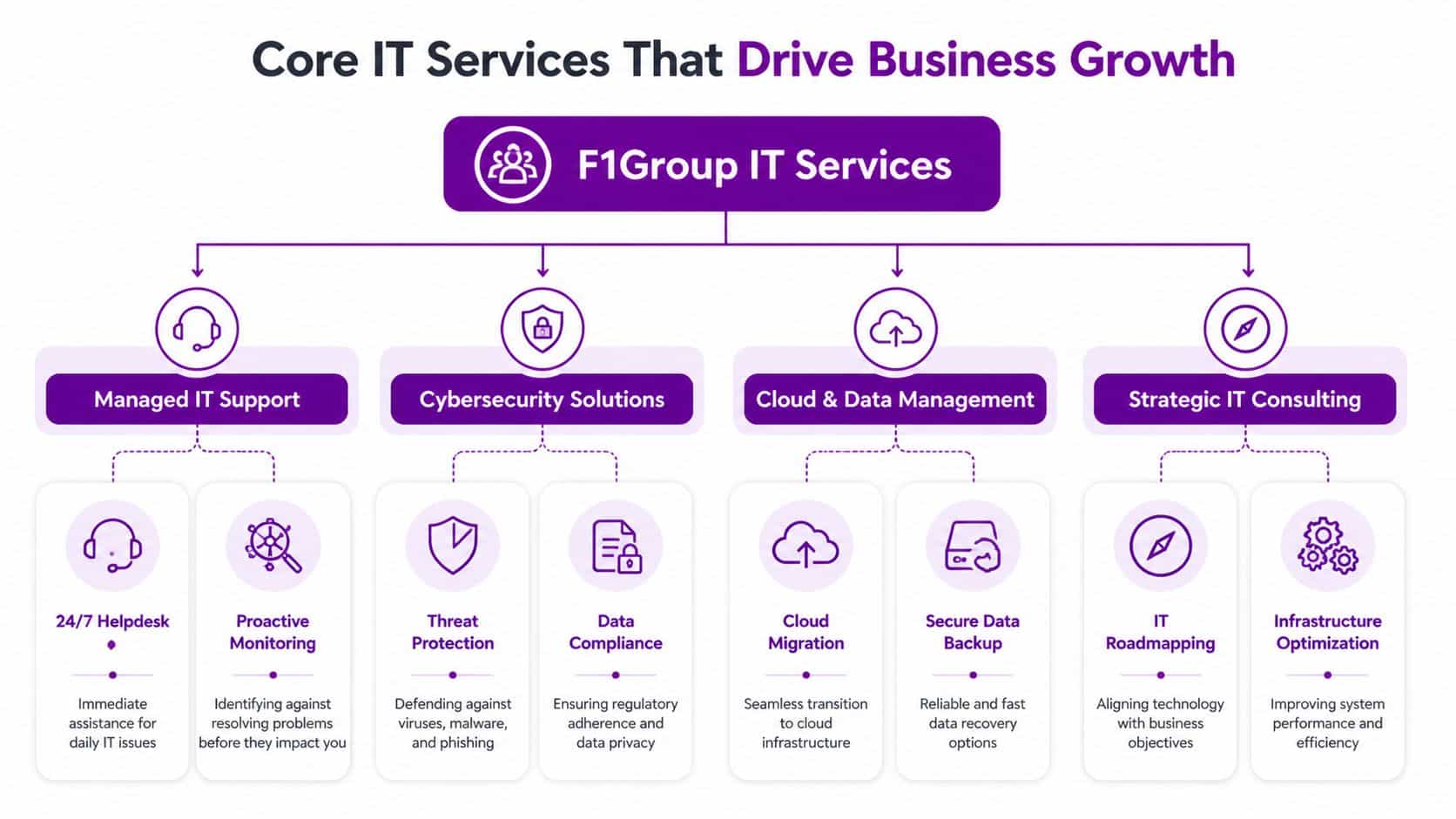
Core Services That Drive Business Growth
The strongest IT services don't sit in a technical silo. They support revenue, compliance, staff productivity, and operational control. When a business chooses an it service provider well, the result isn't just fewer faults. It's faster decision-making, more consistent delivery, and fewer avoidable delays.
Managed support as the foundation
Before any transformation project succeeds, the basics need to work properly. That means stable devices, predictable updates, secure access, reliable backups, documented processes, and a helpdesk that resolves issues without endless hand-offs.
This isn't glamorous work, but it's the layer that determines whether the rest of your investment pays off. Businesses often buy new tools before they've fixed inconsistent user setups, weak identity controls, or poor endpoint management. The result is frustration disguised as modernisation.
A sound managed support service should cover:
- User support that closes issues properly rather than repeatedly treating the same symptoms.
- Device and patch management so laptops and desktops don't become a patchwork of exceptions.
- Backup and recovery planning that matches the reality of how the business operates.
- Joiner, mover, leaver controls so access and permissions stay organised.
Microsoft 365 done properly
For many East Midlands businesses, Microsoft 365 is now the operational core. Email, files, meetings, collaboration, document control, and identity all sit inside one ecosystem. When it's configured well, teams work faster and with less friction. When it's configured badly, confusion spreads across every department.
In the UK, managed Microsoft 365 providers deliver 99.9% platform uptime through Microsoft's SLAs, helping reduce disruption for small and mid-sized businesses. Expert migrations can reduce tenant-to-tenant migration downtime to under 4 hours, and proactive monitoring through M365 Defender can mitigate ransomware risks by 75%, according to managed M365 service benchmarks.
That matters because migration quality is often where businesses either gain confidence or lose it. A rushed move that ignores permissions, metadata, version history, and identity design can create months of operational drag after the cutover.
Azure, Dynamics 365, Power Platform, and Copilot
Once the core is stable, growth usually depends on how well systems connect.
Azure gives businesses room to scale infrastructure, host applications, extend disaster recovery, and support hybrid environments without clinging to ageing on-premise kit.
Dynamics 365 matters when customer service, sales, HR, or operational workflows have outgrown spreadsheets and disconnected databases. A provider that understands both the application and the business process can stop teams from building workarounds outside the system.
Power Platform is where many firms start seeing practical gains. Power Apps, Power Automate, and Power BI can remove repetitive admin, reduce duplicate data entry, and make reporting more useful for managers who need decisions quickly.
Copilot is useful when the data, permissions, and policies behind it are already in good shape. If they aren't, AI tends to expose existing disorder rather than solve it.
One provider working in this Microsoft-focused space is F1Group, which supports businesses across the East Midlands with managed IT services, Microsoft 365 and Azure, Dynamics 365, Power Platform, custom app development, and cyber security.
Cloud tools don't create efficiency on their own. Good structure, sensible permissions, and clear user adoption do.
Cyber security isn't a bolt-on
Cyber security should sit inside every service decision, not beside it. Email security, endpoint protection, MFA, device compliance, privileged access, log review, backup integrity, and response processes all need to line up.
A lot of avoidable risk comes from basic gaps. Shared accounts remain active. Old devices keep access longer than they should. External sharing is left too open. Phishing controls are weak. Backups exist, but no one has tested the restore process under pressure.
One simple and practical check is email authentication. If your domain configuration is weak, messages may be easier to spoof and legitimate mail can struggle with deliverability. It helps to check SPF and DKIM records during a wider security review, especially after a Microsoft 365 migration or email platform change.
Bespoke development where off-the-shelf stops short
Not every organisation fits a standard workflow. Charities, manufacturers, distributors, professional services firms, and small PLCs often have processes that don't map neatly to generic software.
That is where bespoke app development can make commercial sense. The right project isn't about building software for the sake of it. It's about solving a known bottleneck such as field data capture, approval routing, reporting gaps, or integration between Microsoft systems and a line-of-business application.
A useful way to think about core IT services is this:
| Service area | What it should improve | What happens when it’s weak |
|---|---|---|
| Managed support | Stability and day-to-day productivity | Repeated disruption and user frustration |
| Microsoft 365 | Collaboration and control | Sprawl, confusion, and patchy adoption |
| Azure and cloud | Scalability and resilience | Ageing infrastructure and fragile recovery |
| Dynamics and Power Platform | Process efficiency | Manual workarounds and poor visibility |
| Cyber security | Risk reduction and response readiness | Exposure, downtime, and compliance pressure |
The best providers don't sell these services as separate boxes. They align them around business outcomes.
Why East Midlands Businesses Need a Local Partner
A Nottingham firm loses internet access the morning after an office move. The lines are live, but staff still cannot reach key systems, phones are unstable, and nobody is sure whether the fault sits with the firewall, the handover, or internal switching. In that moment, a provider three counties away with a generic helpdesk script is far less useful than a team that can get on site, trace the problem properly, and coordinate the fix.

Local context changes the service
The East Midlands is not one market with one set of pressures. A manufacturer near Lincoln may care most about plant connectivity, ageing infrastructure, and shift patterns. A Leicester professional services firm may be more concerned with Microsoft 365 governance, secure remote access, and response times during client deadlines. A Nottingham charity may need tighter budget control, better reporting, and practical support for a lean internal team.
This local understanding is important because the provider sees the operating conditions: office layouts, patchy connectivity in some locations, site access rules, shared buildings, multi-site travel time, and the pace at which local management teams make decisions. Those details affect project planning, support quality, and how quickly issues get resolved.
It also changes the quality of project delivery. Office relocations, Microsoft 365 rollouts, Wi-Fi upgrades, device deployments, and cyber security remediation usually need a mix of remote work and hands-on presence. Providers who know the region can plan around business parks, city-centre access, local suppliers, and the practical constraints that slow projects down.
The wider market reflects that demand. According to Statista data on the UK IT services market, the UK IT services sector was valued at £55.7 billion in 2023. The same data shows a market shaped by growing demand for outsourced support and cloud services, which matches what many East Midlands firms are dealing with in practice: more Microsoft 365 dependency, more security pressure, and less tolerance for downtime.
Remote-only support has limits
Remote support should handle a large share of day-to-day issues. Password resets, licensing changes, endpoint alerts, patching, and many Microsoft 365 admin tasks do not need a site visit.
Physical faults do.
A failed switch, a cabling issue, poor wireless coverage, a damaged firewall, or a comms room problem needs somebody who can attend, assess, and take ownership. The same applies when user adoption stalls on site and managers need practical help, not another link to a knowledge base. Businesses reviewing providers should look for a local-and-remote mix, as shown in these IT support services for East Midlands businesses.
Local presence also sharpens accountability. Decision-makers know who owns the issue, where the team is based, and whether they understand how the business operates.
When support is local, escalation is often faster because the provider already knows your sites, your users, and the people who need to make decisions.
Shared regional priorities
Across Nottingham, Leicester, Lincoln, Derby, and the wider region, the priorities are broadly similar. Businesses want stable systems, secure Microsoft platforms, better visibility, cleaner processes, and support that holds up during change. The gap is rarely ambition. The gap is execution.
Choosing a local partner is not just about geography. It is about getting a provider who can turn advice into action, balance remote efficiency with on-site support, and work in a way that fits the realities of East Midlands businesses.
How to Evaluate and Select Your IT Service Provider
A finance director in Nottingham signs with a cheaper provider on a Friday. By Tuesday, a mailbox compromise turns into a wider permissions issue, nobody is clear who owns Microsoft 365, the firewall, or the user accounts, and the old supplier is already out of contract. That is how poor provider selection usually shows up. Not in a meeting room, but in lost time, confused accountability, and avoidable risk.
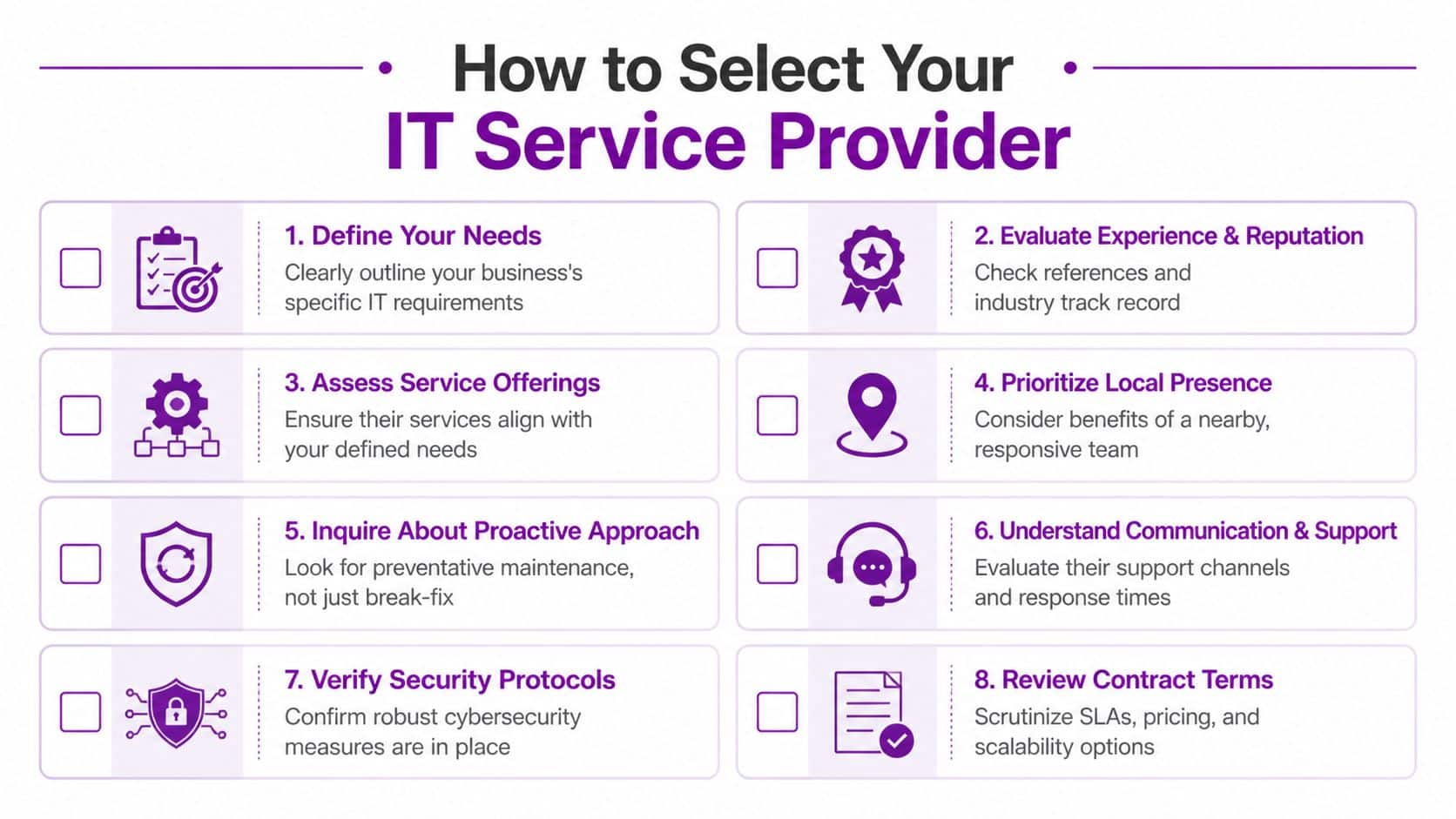
Choosing an it service provider means checking how they operate under pressure, how they document responsibility, and how well they fit the way your business runs across the East Midlands. A polished proposal helps. Clear ownership matters more.
The questions that reveal competence
Start with questions that expose process, not marketing.
- Who leads the incident if the issue spans devices, Microsoft 365, networking, and access control?
- How do you run onboarding and offboarding so licences, permissions, MFA, and device setup stay consistent?
- What happens when an urgent ticket needs escalation outside normal helpdesk flow?
- How is our estate documented, and who updates that record after changes?
- Which security tasks are included in the monthly service, and which sit outside scope?
- How do you deliver project work such as tenant migrations, Azure changes, site moves, or Dynamics 365 updates?
- How do you report outcomes such as recurring faults removed, risks reduced, and user experience improved?
If you already have internal IT staff, test that relationship early. A capable provider should slot into your existing team, fill gaps, and respect internal ownership. If the answers sound territorial or vague, problems usually follow.
SLA terms that matter
The contract shows what the provider is prepared to own.
Do not get distracted by broad promises about fast support. Read the detail. Check response targets, resolution expectations, out-of-hours cover, on-site attendance rules, security responsibilities, and the point where project work becomes chargeable. Businesses in Leicester, Lincoln, Derby, and Nottingham often discover too late that their "fully managed" agreement excludes patch governance, third-party liaison, or incident coordination.
The practical issue is simple. When a problem gets messy, somebody needs to stay in charge from start to finish.
What to look for: Defined response times, named escalation paths, clear service boundaries, and a written incident lead for major issues.
A useful comparison point is this guide to what a managed IT services firm should include. It helps separate genuine managed support from old-style break-fix dressed up as a monthly contract.
Watch how they communicate
Provider failure is often operational before it is technical.
Look at how they write, how they update, and whether they can explain a decision to a non-technical manager without hiding behind jargon. Good providers state the risk, explain the options, and recommend a course of action. They also challenge poor choices when needed, whether that is delaying MFA rollout, cutting backup scope, or keeping unsupported hardware in service to save money this quarter.
Ask for examples from businesses similar to yours in the region. A manufacturer near Newark, a charity in Nottingham, and a professional services firm in Leicester will all use Microsoft tools differently. The provider should be able to explain how their support model changes by site count, compliance needs, internal IT maturity, and dependence on cloud platforms.
This short video is a helpful prompt for what businesses should think about during provider selection.
Comparing IT support pricing models
Price matters, but pricing structure matters just as much. The cheapest monthly figure can become the most expensive option if every change request, site visit, and security task lands as an extra charge.
| Model | How It Works | Best For | Typical Cost (GBP) |
|---|---|---|---|
| Per user | Fixed monthly fee for each user, usually covering helpdesk, device management, and core support | Businesses with stable headcount and hybrid working | Varies by scope and security requirements |
| Per device | Monthly charge for each supported laptop, desktop, or server | Environments with shared devices or lower user count per device | Varies by device mix and support level |
| Tiered support | Different service levels with different inclusions and response commitments | Firms needing a choice between baseline and strategic support | Varies by SLA and included services |
| Break-fix | Ad hoc billing when issues arise | Very small firms with minimal reliance on IT | Unpredictable and often poor value over time |
Judge the model against total cost, not the invoice line alone. Downtime, repeated faults, weak change control, and poor project delivery all cost more than they first appear.
Red flags worth taking seriously
Some warning signs appear before the contract is signed.
- Unclear ownership across Microsoft, networking, endpoints, and security.
- "Best effort" wording where you need defined commitments.
- Weak handover planning from the current provider.
- Limited Microsoft depth despite a heavy reliance on Microsoft 365, Azure, Dynamics 365, or Power Platform.
- No business-level discussion about risk, process, growth, or future change.
- Reporting built around ticket volume only, with no view of recurring issues or service improvement.
A good provider makes the environment easier to understand, easier to support, and easier to improve. That is the standard worth buying.
Real-World Impact and Your Onboarding Plan
Monday morning in Nottingham. Your phones are live, your teams are logged in, and a password reset request turns into a wider problem because nobody is sure who owns admin access, where the backups stand, or which supplier holds the Microsoft tenancy. That is the point where businesses find out whether they bought support or proper operational control.

The difference between a supplier and a partner shows up in day-to-day operations. It shows in handovers, reporting, access control, and how quickly the business can get back to work when something goes wrong.
Example one with a mid-sized PLC
A mid-sized PLC in Leicester had a common problem. Sales, service, and back-office teams were all using Microsoft tools, but the work between them was disjointed. Staff were rekeying information, tracking progress in spreadsheets, and chasing approvals by email.
The answer started with process, not products. The provider mapped the workflow, found where data was being duplicated, and used the Microsoft estate already in place to improve it. In that type of environment, Dynamics 365 and Power Platform capability matters because it lets the provider build a Power App, automate routine steps, and connect systems without forcing the business into another disconnected tool.
What changed first was speed. Requests moved with fewer delays. Managers had clearer reporting. Staff spent less time hunting for updates and more time dealing with customers and suppliers.
Example two with a large charity
A large charity in Nottingham faced a different issue. Trustees needed confidence that security, access, and compliance were being managed consistently across users, devices, and cloud services. The risk came from gaps between systems and responsibilities, not from one dramatic outage.
A proactive cyber security service reviews identity, endpoint protection, device compliance, conditional access, admin rights, email security, and recovery planning as one joined-up system. That approach gives leadership a clearer picture of risk and gives internal teams fewer blind spots to manage.
According to benchmarks from Synergy Technical, providers with Microsoft 20/20 Security Deployment awards have reported ransomware detection rates of over 95%. The same benchmark source says Azure Virtual Desktop projects delivered by certified partners have reduced on-premises hardware costs by 50 to 70% in some 100-seat environments, with annual savings of £20,000 to £50,000 in the right scenario, according to Microsoft-focused managed services benchmarks.
Those figures are not a promise. They show what specialist capability can achieve when the environment is complex, Microsoft is central to operations, and the provider knows how to design around the business rather than around a product sheet.
That matters across the East Midlands. Firms in Lincoln, Derby, Leicester, and Nottingham often need a partner who can work locally, meet on site when required, and still bring proper Microsoft depth to security, data, and workflow design.
Better onboarding reduces risk before the service has even started.
A sensible onboarding checklist
Provider changes worry business owners because poor handovers create downtime, confusion, and blame. A well-run onboarding is structured, documented, and calm.
-
Discovery and audit
The incoming provider reviews users, devices, networks, the Microsoft tenancy, backups, security controls, licences, third-party suppliers, and support history. -
Documentation and risk review
They identify missing information, single points of failure, legacy access problems, and unsupported systems before the handover date. -
Access transfer
Administrative accounts, portals, licences, warranties, and supplier relationships are transferred in a controlled way, with clear ownership at each step. -
Support alignment
Helpdesk routes, named contacts, escalation paths, and reporting expectations are agreed with your team, so staff know what happens from day one. -
Immediate stabilisation
High-risk issues are handled first. Common examples include MFA gaps, weak backup coverage, out-of-date devices, and poor patching discipline. -
Roadmap after go-live
Once the environment is stable, the provider should propose phased improvements tied to business priorities, budget, and operational risk.
Good onboarding rarely feels dramatic. In practice, that is usually a sign that the provider has done the hard work properly behind the scenes.
Your Next Step Towards Strategic IT
It is 8:15 on a Monday in Nottingham. Staff are logging in, a sales report will not load properly from Dynamics 365, someone in finance is chasing a Microsoft 365 permissions issue, and your current provider is still treating each problem as a separate ticket. That is usually the point where directors realise the issue is not support volume. It is the lack of a clear IT strategy tied to how the business operates.
A good it service provider helps you make better decisions before small technical faults turn into delays, security exposure, or wasted spend. For East Midlands firms, that often means choosing a partner close enough to understand the pressures on local manufacturers, professional services teams, charities, and multi-site businesses across Leicester, Lincoln, Derby, and Nottingham.
Microsoft capability matters here. So does local accountability. If your business relies on Microsoft 365, Azure, Dynamics 365, Power Platform, Copilot, or cyber security support, you need a provider that can connect those tools to day-to-day operations, budget limits, compliance demands, and growth plans.
If your current setup feels reactive, unclear, or stretched, review it properly. Look for a partner that can explain priorities in plain English, take ownership of problems, and give your team a practical plan, not just a queue number.
If you want to discuss your current environment, risks, or plans, contact F1Group or call 0845 855 0000.