
Running a business in Nottingham often means working around software that was never designed to work together. Sales might live in one system, finance in another, project notes in spreadsheets, and customer history in inboxes. Staff spend time retyping the same information, checking which version is current, and chasing updates that should already be visible.
That’s usually the point where owners start hearing the phrase “digital transformation”. It sounds grand, but the day-to-day problem is much simpler. You need software that helps people do their jobs properly, without creating extra admin, extra risk, or extra cost.
The difficulty isn’t finding software. There’s plenty of it. The difficulty is choosing the right combination, introducing it without disruption, and making sure it supports the way your business operates. For East Midlands firms, that decision is often made harder by a mix of older systems, lean internal IT teams, sector-specific compliance needs, and the pressure to improve service without adding headcount.
Good solutions in software don’t start with technology. They start with a business problem. A slow onboarding process. Poor reporting. Weak visibility across departments. Manual tasks that keep swallowing hours. If the software doesn’t solve those issues, it isn’t a solution. It’s just another system to manage.
Introduction Navigating the Maze of Modern Business Software
A common scenario looks like this. A growing company has decent people, a strong service, and customers who want more. But the business is still being held together by shared drives, manual reports, and a patchwork of applications added over several years.
One system handles accounts. Another stores customer contacts. Staff use Teams for messages, but key decisions still disappear into email chains. Someone keeps a “master spreadsheet” because nobody fully trusts the data elsewhere. That spreadsheet effectively becomes the system, even though it was never meant to be.
The result is friction in places that matter. New starters wait too long for access. Managers can’t get a clear view of workload. Directors get reports late, or don’t believe the figures. Customer service suffers because staff can’t see the full picture quickly enough.
Practical rule: if your team spends more time moving information between systems than using it, the problem isn’t staff effort. It’s software design.
Many business owners often get stuck. They know the current setup isn’t good enough, but every option seems to come with jargon, cost, and risk. Cloud, ERP, CRM, low-code, integration, migration, licensing. It’s easy to feel as though you need to become an IT specialist just to make a sensible decision.
You don’t. You do need a clear way to look at the choices, though. The right approach is practical. Define what’s broken, identify what has to improve, and then choose software around that reality. That’s how software becomes useful, rather than becoming another expensive distraction.
What Are Software Solutions Really?
A software product and a software solution aren’t the same thing. That distinction matters.
A product is the tool itself. Microsoft 365, Dynamics 365, Xero, a scheduling app, a document management platform. A solution is the combination of tools, setup, integrations, security controls, support, and user processes that solves a business problem.

Think in terms of a business toolkit
The easiest way to understand solutions in software is to think of a workshop.
Some tools are general-purpose. Microsoft 365 is a good example. It gives you email, file storage, collaboration, meetings, and document creation. It’s like a well-stocked tool chest. Most businesses need it, and teams widely use it daily.
Other tools are specialised. A CRM system handles sales pipelines, customer records, and service interactions. An ERP platform manages finance, stock, operations, or supply chain. These are more like precision tools. They do a narrower job, but they do it properly when selected well.
Then there’s the bench itself. That’s your underlying environment. Where the systems live, how users sign in, how data moves, what security controls exist, and who maintains it all. If the bench is unstable, even good tools become frustrating to use.
Software should solve a named problem
When owners say they “need better software”, what they usually mean is one of these:
- Too much manual work. Staff re-enter data, chase approvals, or build reports by hand.
- No single version of the truth. Sales, finance, operations, and leadership all see different figures.
- Poor customer visibility. Teams can’t quickly see history, status, or next steps.
- Weak control. Access rights, document handling, and reporting are inconsistent.
- Growth pressure. The business has outgrown a setup that worked when the team was smaller.
If the proposed system doesn’t clearly answer one of those problems, be cautious. Plenty of software looks impressive in a demonstration but adds complexity in practice.
A solution should make work simpler for the people doing it, not just look good in a procurement document.
On-premise and cloud in plain English
Owners are often told they must choose between “on-premise” and “cloud”. In business terms, the distinction is straightforward.
| Model | What it means in practice | Best fit |
|---|---|---|
| On-premise | Software and data sit on equipment you manage directly | Legacy systems, specialist operational setups, businesses with specific technical constraints |
| Cloud | The software runs in a provider-managed environment and is accessed over the internet | Businesses that want flexibility, easier updates, remote access, and simpler scaling |
| Hybrid | Some systems stay on-site while others move to the cloud | Organisations that need gradual change rather than a full replacement |
Most East Midlands SMBs don’t need an ideological answer. They need a practical one. A hybrid arrangement is often the right stepping stone, especially where an older finance package, manufacturing system, or custom database still plays a critical role.
The Spectrum of Software Solutions for SMBs
There isn’t one category of business software. There’s a range, and each part solves a different type of problem. The mistake is treating every requirement as though it needs the same answer.
Off-the-shelf SaaS tools
Software as a Service is usually the quickest starting point. You pay a monthly subscription, users log in through a browser or app, and updates happen in the background.
This category suits common business functions such as accounting, project management, e-signatures, ticketing, and HR admin. It’s usually lower risk than a custom build because the software is already proven, support materials exist, and rollout is faster.
The trade-off is fit. Off-the-shelf tools work well when your process is fairly standard. They become awkward when your business relies on unusual approval flows, niche reporting, or tight links between departments.
Microsoft 365 and Azure
For many SMBs, Microsoft provides the foundation rather than a single application. Microsoft 365 covers productivity and collaboration. Azure provides cloud infrastructure, identity, storage, and hosting options.
That combination matters because it can standardise how staff work. Files sit in the right place. Identity is managed consistently. Security controls are clearer. Access can be governed properly across office and remote users. If you’re weighing broader cloud solutions for business, Microsoft’s ecosystem is often the most practical place to start because it supports both day-to-day productivity and longer-term platform decisions.
A useful outside perspective on the wider stack is this guide to essential business IT solutions for SMBs, which shows how different categories fit together at a business level.
Business applications such as Dynamics 365
When a company needs stronger process control, reporting, and cross-department visibility, business applications come into play. Dynamics 365 is a common Microsoft route because it spans sales, customer service, finance, marketing, HR, and operations in a connected way.
This suits firms that have moved beyond basic apps and now need structured workflows. For example, a service-based business might want enquiries, quotations, client records, and support history in one place. A distribution business may need customer activity linked more closely to finance and stock movements.
The value isn’t in having more screens. The value is in reducing duplication and giving teams a shared operating picture.
Power Platform and low-code automation
Not every problem needs a major software project. Some issues sit in the gaps between systems. That’s where Power Automate, Power Apps, and Power BI often help.
A manager might need approval flows that currently run through email. A field team may need a simple mobile form. Leadership might need reporting pulled from several systems into one dashboard. Low-code tools can solve those targeted problems faster than a full redevelopment.
They do require discipline. A poorly governed low-code estate can become messy quickly if every department builds its own apps without standards.
Bespoke applications
Sometimes the software you need doesn’t exist in a form that suits the business. That’s when a custom application becomes sensible.
This is usually appropriate when your process is central to your competitive advantage, or when several legacy systems can’t realistically be forced into one off-the-shelf package. Bespoke software can fit the business properly, but it needs strong requirements, sensible governance, and a plan for support after launch.
Custom software is worth considering when the process itself matters strategically. It’s not worth doing just because a team dislikes change.
Integration as a solution category in its own right
Integration often gets treated as a technical afterthought. It shouldn’t. In many organisations, the primary win comes not from replacing every system, but from connecting the important ones properly.
That may mean linking CRM to finance, tying forms into document libraries, or synchronising user data across systems. Good integration cuts rekeying, improves data quality, and prevents teams from operating in silos.
For a non-technical owner, that’s the key point. You’re not always choosing one piece of software. Often, you’re choosing how several systems will work together.
The Business Case for Strategic Software Investment
Software shouldn’t be justified because it feels modern. It should be justified because it removes waste, improves control, and gives the business room to grow.

Cost isn’t just licence spend
Many owners focus first on subscription fees. That’s understandable, but it’s only part of the picture. The full cost of weak software includes duplicate work, delayed reporting, manual corrections, poor visibility, slower decisions, and avoidable risk.
For East Midlands mid-sized businesses, moving ERP or CRM workloads to Microsoft Azure can reduce IT infrastructure costs by 40-60% annually, because the pay-as-you-go model removes large server procurement costs and reduces the need for dedicated maintenance teams, according to New Era Technology’s discussion of digital transformation with Microsoft technologies. That matters because it shifts spending away from hardware ownership and towards systems that can adapt as the business changes.
Better software improves everyday work
The strongest business case is often operational, not theoretical. Teams stop wasting time switching between disconnected tools. Managers get cleaner reporting. Customer-facing staff can respond faster because they’re not piecing information together from several places.
A strategic investment usually improves these areas:
- Operational efficiency. Routine admin can be standardised and reduced.
- Decision-making. Leadership gets access to clearer, more timely information.
- Scalability. Systems can support growth without a matching rise in manual effort.
- Resilience. Cloud platforms and managed services provide a more stable operating base.
- Security posture. Access, devices, data handling, and reporting become easier to govern.
The financial return rarely comes from one dramatic feature. It comes from hundreds of small frictions being removed.
Growth is easier when systems stop fighting the business
A software estate that worked for twenty users often struggles badly at eighty. Informal workarounds start to break. One person becomes the only individual who understands a key spreadsheet. Reporting takes longer because more departments are involved. Access control becomes inconsistent because nobody built it to scale.
That’s where strategic investment earns its place. It gives structure before growth creates operational drag.
This short video gives a helpful view of how modern software and cloud thinking support that shift in practice.
Businesses rarely regret making systems clearer, safer, and easier to manage. They do regret waiting until the pain is severe enough to disrupt customers.
Security is part of the business case
Security often gets pushed into a separate conversation. It shouldn’t be. If software allows inconsistent access, poor audit trails, or weak data handling, it creates commercial risk as much as technical risk.
That’s especially true for charities, regulated firms, and organisations managing sensitive personal or financial information. Secure software design protects operations, reputation, and client confidence. In practical terms, that means software investment isn’t just about doing more. It’s also about reducing the chance of expensive disruption.
How to Choose the Right Software Path for Your Business
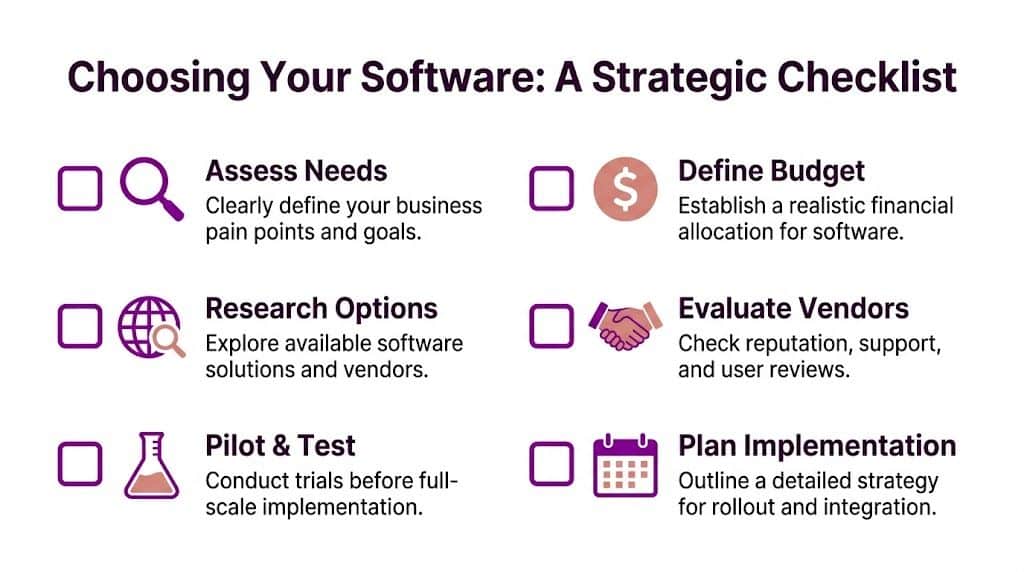
Most poor software decisions happen before anyone signs a contract. They happen when a business buys around features instead of buying around needs.
The right path usually becomes clearer when leadership asks better questions. Not abstract questions about transformation. Practical ones about work, people, cost, and risk.
Start with the operational pain, not the vendor pitch
Write down the process that causes the most friction. Be specific. “We need a better CRM” is too vague. “Sales and service teams can’t see the same customer history, so handovers fail” is useful.
That framing changes the discussion. It helps you test whether the software addresses the issue, rather than whether a demonstration looked polished.
A simple check is to ask:
- What task currently takes too long?
- What errors happen repeatedly?
- Where do staff rely on spreadsheets or email because systems don’t help?
- Which delay harms customers or cash flow most?
Decide what kind of spend suits the business
Some firms prefer a predictable monthly model. Others are comfortable with a larger project cost where the value is long-term fit. Neither is automatically right.
A subscription approach can reduce upfront strain and speed adoption. A bespoke development route may involve more planning but solve a more valuable process properly. The question is whether the software supports the business over time, not whether one invoice format feels easier in the short term.
Be honest about internal capability
A common mistake is buying flexible software and then assuming the team will somehow configure, secure, govern, train, and maintain it without dedicated time or experience.
Use this reality check:
- Strong internal IT capacity. You may be able to support broader configuration and integration in-house.
- Lean internal resource. Choose platforms with clearer support models and lower operational burden.
- No specialist application ownership. Avoid buying something that needs constant tuning unless external support is part of the plan.
Check what must stay and what can change
Very few established SMBs start with a blank sheet. There’s usually a finance package, a document store, a legacy database, or a line-of-business application that can’t be switched off overnight.
That doesn’t mean progress stops. It means the roadmap has to reflect reality.
| Question | Why it matters |
|---|---|
| What must integrate from day one? | Prevents key processes from breaking during rollout |
| What can remain manual temporarily? | Helps control complexity and cost |
| What data is worth migrating? | Stops old clutter from polluting the new system |
| Who owns process decisions? | Avoids endless technical debates with no business direction |
Owner’s test: if nobody can clearly explain which process the software is meant to improve, pause the project.
Buy for the next stage, not just today’s pain
Good software should support where the business is heading. If you expect new sites, more remote staff, larger reporting demands, or tighter compliance requirements, factor that in early.
That doesn’t mean overbuying. It means avoiding software that only works while the business stays small and simple. The best-fit choice is often the one that solves today’s issue cleanly while leaving room for future integration, automation, or reporting.
Run a pilot before a broad rollout
Pilots expose weak assumptions. They show whether staff will use the system, whether the data structure works, and whether the process is realistic in practice.
A sensible pilot usually includes a limited group, a defined process, success measures, and a review point. That’s far safer than trying to transform every team at once and discovering the design doesn’t hold up.
Navigating Software Implementation and Security
Choosing software is only the beginning. Most of the true value, or most of the damage, happens during implementation.
Businesses often underestimate this stage because the hard work is less visible. Data has to be cleaned. Permissions have to be designed. Old processes need to be challenged. Staff need training that makes sense in their role, not generic product walkthroughs. Security settings need to be applied properly from the outset.

Migration problems usually start with assumptions
A familiar pattern goes like this. The software is selected, the launch date is agreed, and everyone assumes the old data can be moved across. Then records are found to be duplicated, naming conventions vary, key fields are missing, and nobody agrees which version is correct.
That’s not a software fault. It’s a planning fault.
A good implementation starts with decisions about what data deserves to move, what needs cleaning first, and what should be archived rather than dragged into the new environment. The same applies to process. If a workflow is poor now, automating it won’t fix it. It will just make the poor workflow run faster.
Identity and access need proper design
One of the most practical examples is user access in Microsoft 365 environments. When identity is set up properly using Azure AD Connect or Microsoft Entra ID with hybrid identity and Single Sign-On, organisations can automate user onboarding, policy enforcement, and licence assignment across on-premises and cloud systems.
According to TierPoint’s overview of managed Microsoft 365 benefits, expert implementation can reduce user provisioning time by 60-70% compared to manual processes. For a business owner, the business meaning is simple. New starters get access faster, leavers are handled more cleanly, admin overhead drops, and security controls are easier to maintain.
User adoption is where projects often wobble
Even strong technical projects fail if staff don’t understand the change. People revert to spreadsheets, side conversations, and old habits if the new process feels slower or unclear.
That’s why implementation has to include more than setup. It needs role-specific training, visible leadership support, and a realistic transition period. Teams need to know not just how to click through screens, but why the process is changing and what “good” now looks like.
A useful external read on that side of delivery is this guide to a winning CRM implementation strategy, especially if customer-facing teams are central to the project.
Integration and governance matter after go-live
The launch date isn’t the finish line. It’s the point where real operating behaviour becomes visible.
Post-launch governance should cover:
- Access reviews. Check that users only have what they need.
- Change control. Stop ad hoc alterations from undermining consistency.
- Monitoring. Watch for failed automations, sync issues, or reporting gaps.
- Ownership. Name the people responsible for process, data, and support.
- Integration reviews. Confirm connected systems still behave as intended.
If your estate includes several connected applications, a practical approach to integrating software systems helps avoid the common trap of solving one problem while creating two more elsewhere.
The safest implementation isn’t the one with the shortest timeline. It’s the one where access, data, and process are controlled from day one.
Your Local Partner for Solutions in the East Midlands
National software advice often assumes a clean slate. Many East Midlands businesses don’t have one. They’re running live operations, managing older systems, dealing with limited internal capacity, and trying to improve without disrupting customers.
That local reality changes what works.
A manufacturer in Leicester may still rely on an older operational database. A charity in Lincoln may need stronger governance but can’t justify a complete rebuild. A service firm in Nottingham may want Microsoft Copilot but finds that its existing Dynamics setup and on-premise dependencies make adoption awkward. Generic guidance rarely deals with those complications in a useful way.
Regional context matters more than most vendors admit
In the East Midlands, 45% of mid-sized firms using Dynamics 365 face unresolved compatibility issues with Copilot AI, and a phased augmentation approach using Power Automate for selective AI overlays can deliver a 30% faster ROI, according to the verified brief citing this reference source. The practical takeaway isn’t that AI should be avoided. It’s that many firms need a staged path rather than an all-at-once rollout.
That matters because “switch on Copilot everywhere” sounds attractive, but it isn’t always the right operational answer. If data quality is uneven, connectors are incomplete, or process ownership is weak, selective automation often produces better business value first.
Security-first support is not optional
There’s another issue that gets ignored in broad software conversations. Low-code platforms are useful, but they can create governance problems if businesses build quickly without controls.
For charities and small PLCs in parts of the East Midlands, that’s a real concern. The verified brief highlights regional issues around Power Platform security, governance gaps, and skills shortages. In practice, that means app permissions, audit trails, data handling, and change control need to be designed properly before low-code usage expands.
The businesses that handle this well don’t treat security as a later tidy-up job. They set standards early, decide who can build what, and keep clear ownership over app sprawl, data access, and approvals.
Local support changes the delivery model
A remote-only provider can be fine for straightforward licensing questions. It’s less useful when a software issue touches process design, user behaviour, legacy integration, and on-site operational reality all at once.
That’s why local delivery still matters. Someone has to sit with the finance lead, the operations manager, and the department owner and work out where the process is breaking. Someone has to trace the dependency that never appears in the original project notes. Someone has to own the outcome when a rollout affects several teams at once.
One practical route for firms that need that blend of day-to-day support and project delivery is a managed partner with broad IT support services, especially where Microsoft 365, Azure, Dynamics 365, Power Platform, and security all overlap.
What local businesses usually need help with
The pattern across Nottingham, Lincoln, Newark, Scunthorpe, Grimsby, and Leicester is fairly consistent. The question isn’t whether software can help. It’s which software should come first, what needs integrating, and how to deliver it without unnecessary disruption.
Here’s a plain view of where support tends to matter most:
| Regional Challenge | F1Group Solution |
|---|---|
| Legacy systems still support critical work | Assess what should stay, what should integrate, and what can be replaced in phases |
| Copilot interest but weak readiness | Use a phased augmentation approach with selective Power Automate and Microsoft-based improvements |
| Disconnected reporting across departments | Build clearer data flows and dashboards around existing operational needs |
| Low-code adoption with governance concerns | Apply controls around permissions, ownership, data handling, and change management |
| Limited in-house IT capacity | Provide hands-on implementation, support, and issue ownership across cloud and business systems |
| Security pressure in regulated or sensitive environments | Align software rollout with access control, policy enforcement, and practical cyber security measures |
Local knowledge matters when software decisions are tied to real operational constraints, not idealised diagrams.
What works and what doesn’t
What works is usually incremental, governed, and tied to a business process. Replace a broken handover. Improve reporting for directors. Automate a repeatable approval flow. Secure user access properly. Connect the systems that already matter.
What doesn’t work is buying a large platform because it promises everything, then expecting the business to reshape itself around unfinished planning. It also doesn’t work to launch automation without ownership, or to introduce AI before the underlying data and permissions are reliable.
That’s the core point about solutions in software. They’re not products you collect. They’re operating choices you make deliberately. When those choices reflect the realities of your business, software becomes a source of control and momentum rather than confusion.
If you want practical advice on the right software path for your organisation, speak to F1Group. We help East Midlands businesses make sensible decisions around Microsoft 365, Azure, Dynamics 365, Power Platform, bespoke applications, integration, and security. Phone 0845 855 0000 today or Send us a message.