
You’ve gone live with Business Central. Sales orders are flowing in, finance can post, stock looks cleaner than it did in the old system, and the project team has finally stopped living in meeting rooms.
Then the actual work starts.
A user can’t release a purchase order. A month-end report runs slowly. A warehouse process that looked fine in testing now falls over when everyone is using it at once. Someone asks for a Power BI dashboard, someone else wants approvals changed, and your internal IT team is suddenly expected to support an ERP platform, Microsoft 365, Power Platform, integrations, security, and user training at the same time.
That’s the point where business central support stops being an afterthought. It becomes part of how the business runs.
For East Midlands firms, especially those with lean IT teams, support choices matter more than most implementation plans admit. Generic support can keep the lights on. The right partner can do more than that. They can help you stabilise the system, deal with updates, improve adoption, and keep Business Central aligned with how the business works in Lincoln, Nottingham, Leicester, and beyond.
Your Business Central Go-Live Is Just the Beginning
The first few weeks after go-live usually expose the difference between a successful implementation and a genuinely usable system. Training covers the basics, but real users don’t work in neat test scripts. They post the wrong document, use old habits, ask for shortcuts, and find process gaps very quickly.

That’s why business central support needs to be treated as an operational function, not a warranty period. If support only exists to log tickets after something breaks, the business spends too much time reacting. If support is handled properly, it becomes a steady process of fixing issues, improving workflows, and keeping users productive.
What support looks like after launch
In practice, support usually falls into three layers:
- User support: Login issues, permissions, posting errors, document corrections, and questions about standard screens.
- Application support: Workflows, reports, role centres, approval chains, extension behaviour, and third-party app issues.
- Platform support: Performance, update testing, integration monitoring, environment management, and security oversight.
A lot of organisations only plan for the first layer. The second and third are where cost and disruption usually appear.
Practical rule: If your support model only answers “how do I do this?”, it won’t hold up when the real question is “why did this process fail and who owns the fix?”
Support affects value, not just uptime
A healthy support model protects the value of the ERP investment. It helps finance close on time, operations trust the data, managers get usable reporting, and leadership avoid the slow drift back to spreadsheets.
That’s especially important with Business Central because the system doesn’t stand still. Updates arrive, the Microsoft stack changes, and your business changes with it. New sites, new compliance demands, new apps, and new reporting requirements all land after go-live, not before it.
Businesses that treat support as a strategic relationship usually get more from the platform. Businesses that treat it as a last resort often end up blaming the software for problems caused by weak ownership.
The Two Paths of Business Central Support Microsoft vs Partner
Every Business Central customer eventually has to decide who carries day-to-day responsibility when things go wrong, or when things need to improve. In simple terms, there are two routes. You rely mainly on Microsoft’s standard support model, or you work with a dedicated partner who knows your setup, your users, and your wider Microsoft estate.
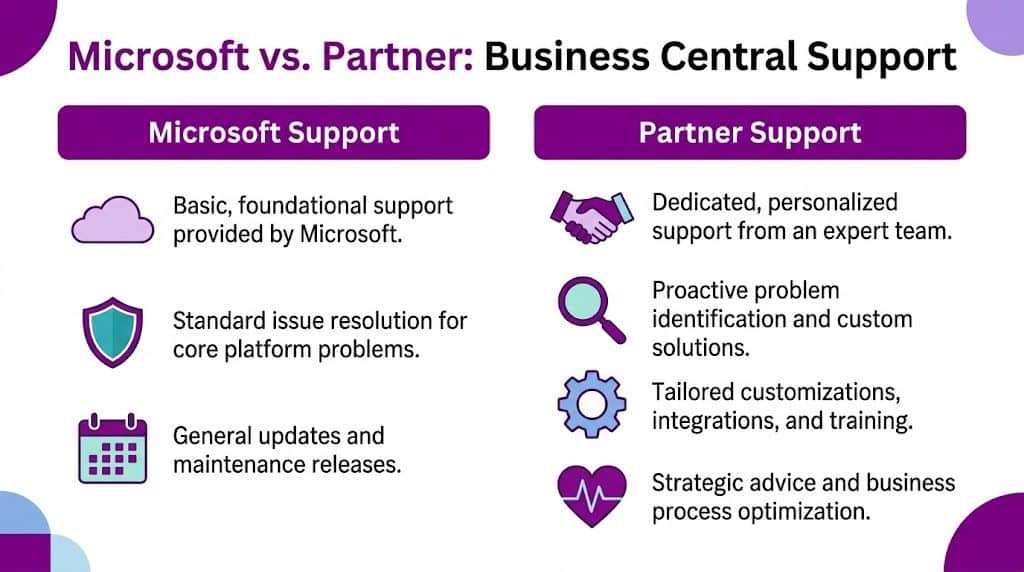
Neither route is automatically wrong. They solve different problems. Microsoft supports the platform. A partner supports your business use of the platform.
Where Microsoft support fits
Microsoft’s support makes sense for core product issues, service availability, and platform-level incidents. If there’s a fault in the underlying service, or a recognised issue in the product itself, Microsoft is the right authority to resolve it.
That model works best if your use of Business Central is fairly standard, your internal team is technically strong, and you’re comfortable coordinating the moving parts yourself. That includes user management, extensions, reporting, training, and third-party integrations.
Where a partner earns their place
A dedicated partner sits much closer to the actual operation of the system. They know which extensions are installed, how your finance team processes month-end, where your warehouse users struggle, and which integration is likely to be the source of an error.
That matters because most support issues aren’t pure platform defects. They’re combinations of process, permissions, customisation, data, and user behaviour. A local support partner also tends to understand how regional businesses operate, including the practicalities of site visits, face-to-face reviews, and support for broader Microsoft services. For firms reviewing that wider Microsoft relationship, a Microsoft Cloud Solution Provider service often sits alongside ERP support rather than apart from it.
Microsoft support vs partner-managed support
| Feature | Microsoft Standard Support | Dedicated Partner Support (e.g., F1Group) |
|---|---|---|
| Primary focus | Core product and platform issues | Business process continuity and system ownership |
| Knowledge of your setup | Limited to what is provided in the case | Built around your configuration, users, integrations, and extensions |
| Customisation support | Narrower and more platform-led | Typically includes extension, workflow, report, and integration troubleshooting |
| Proactive monitoring | Usually limited at customer-specific level | Often includes health checks, review meetings, and early warning of issues |
| User training support | Basic documentation-led guidance | Tailored coaching, refresher sessions, and adoption help |
| Ownership of third-party issues | Often shared or referred elsewhere | More likely to coordinate across vendors and take the lead |
| Commercial model | Included or attached to Microsoft arrangements | Usually a managed support agreement with defined service scope |
| Local presence | Not location-based | Can include on-site support in the East Midlands |
A support provider should be judged by what they own, not only by how they answer tickets.
The real trade-off
The trade-off is control versus convenience. If you keep support fragmented, you may pay less directly for some elements, but your team carries the burden of chasing suppliers, translating business issues into technical language, and deciding where each fault belongs.
A partner-managed model costs more than doing the minimum, but it usually reduces the hidden cost of delay, confusion, and repeated hand-offs. For most SMEs, that’s the point. ERP support fails less often because the partner has magic tools. It fails less often because someone is accountable.
Why Your Support Partner Matters for Growth
Growth puts stress on an ERP system long before anyone says the words “digital transformation”. It shows up as more transactions, more users, tighter reporting deadlines, and more pressure for systems to join up properly. Business Central can handle that, but only if someone keeps the environment disciplined and moving in the right direction.
For East Midlands firms, the evidence for partner-led support is strong. UK-specific data shows that 68% of mid-sized firms in the East Midlands using Business Central reported a 25-35% improvement in operational efficiency post-implementation, with an average ROI achieved within 9 months when supported by a dedicated partner, according to Business Central statistics for UK adoption and outcomes. The same source states that F1Group-like partners resolve 92% of Dynamics support tickets within 4 hours, and notes that 40% of East Midlands charities and PLCs adopt the platform for GDPR and Making Tax Digital compliance.
Those numbers matter because they tie support to operational results, not just service desk activity. Better support means users get unstuck faster, month-end friction drops, and the business gains confidence to expand its use of the platform.
Growth creates support pressure in predictable places
Support tends to become more valuable as the business adds complexity:
- More departments use the same data: Sales, finance, purchasing, stock, and operations all start relying on one source of truth.
- More Microsoft tools are connected: Power BI, Power Apps, Power Automate, and Microsoft 365 create opportunities, but they also create dependencies.
- Update risk becomes business risk: The two release waves each year need planning, testing, and clear ownership.
- Leaders expect more from reporting: Once the core ERP is stable, demand shifts quickly towards dashboards, automation, and margin visibility.
A weak support arrangement struggles here because it stays reactive. It waits for tickets. A strong partner helps the business use the platform with intent.
Good support changes the conversation
The best support relationships eventually stop sounding like support. The conversations become:
- Which process should be automated next?
- Which extension is still earning its place?
- Are users bypassing the system anywhere?
- What should be tested before the next release wave?
- Can this requirement be met with Power Platform rather than bespoke development?
That’s why many growing businesses prefer working with a specialist Dynamics 365 partner in the UK rather than relying only on broad platform support. They need someone who can connect the software to practical business decisions.
Growth doesn’t usually break Business Central. Unmanaged change does.
What doesn’t work
Three things tend to fail repeatedly.
First, assuming the internal IT manager can absorb ERP ownership on top of everything else. They may be excellent, but Business Central support requires application knowledge, finance process awareness, and integration experience.
Second, leaving every enhancement request until it becomes urgent. That creates rushed changes, poor testing, and avoidable frustration.
Third, treating support and improvement as separate. In reality, the same team that fixes recurring problems is often best placed to remove the cause altogether.
Typical Support Tasks and Common Issues Solved
Most business central support work isn’t dramatic. It’s the steady removal of friction that stops users losing time and confidence in the system. A good support desk can deal with a posting error in minutes, but the stronger support teams also ask why that issue keeps appearing and whether the process needs changing.

On a normal week, support requests often come from finance, operations, warehouse teams, and managers who need reporting to work without delay.
The support jobs that come up again and again
Here are the areas that typically generate the most day-to-day work:
- Posting and transaction errors: Sales invoices that won’t post, purchase documents with blocked dimensions, VAT setup issues, and unexpected validation messages.
- Permissions and role problems: Users can see too much, too little, or the wrong tasks in the wrong role centre.
- Report fixes: Financial statements, document layouts, Jet Reports outputs, and export formatting that no longer matches what the team needs.
- Workflow issues: Approvals not triggering, notifications going to the wrong users, or automated actions failing.
- Integration failures: Power BI refresh issues, payroll file problems, API errors, and mismatched data between systems.
- Performance concerns: Slow searches, delayed posting, long-running reports, and month-end bottlenecks.
- Change requests: New fields, simple automations, revised stock handling, or process changes driven by growth.
These tickets don’t all require the same skill set. Some are pure application support. Others need SQL awareness, extension knowledge, or enough business understanding to tell whether the process itself is wrong.
A common on-premises problem
On-premises Business Central still exists in plenty of UK organisations, especially where there are legacy integrations, internal hosting policies, or older NAV-era decisions still influencing the estate. That setup can work well, but only if the server is specified properly.
Microsoft’s Business Central system requirements for version 25 state that insufficient RAM below 8 GB can cause SQL Server query timeouts and increase error rates by up to 40% during peak usage. The same source notes that a support partner can benchmark concurrent usage and target query response times under 2 seconds, and that 70% of UK on-premises installations that fail do so because servers are under-specced.
That isn’t an abstract infrastructure problem. It usually appears as user complaints. Month-end reports hang. Posting slows down. Warehouse users think the system is frozen. Finance reruns jobs because results look incomplete.
How a capable partner handles that issue
A generic helpdesk may restart services and call it a day. A proper Business Central support partner does more:
- They review the application tier, SQL behaviour, and workload pattern.
- They benchmark the system against realistic concurrent usage.
- They identify whether the bottleneck is memory, storage performance, query design, or a custom process.
- They recommend a fix that addresses the cause rather than the symptom.
If the same process is slow every month-end, treat it as an engineering problem, not a user complaint.
This kind of work also highlights why internal documentation matters. Teams that are serious about reducing repeated issues often start building a knowledge base so recurring fixes, workarounds, and user guidance don’t live only in one consultant’s inbox.
What works and what doesn’t
What works is triage with context. The support team needs to know which users are affected, what changed, whether the issue is new, and what business deadline is at risk.
What doesn’t work is pushing every problem into the same queue with no priority and no ownership. ERP issues aren’t equal. A blocked invoice posting on the last day of the month is not the same as a cosmetic field request.
The strongest support teams know the difference. They fix the immediate issue, then look for the pattern underneath it.
The Support Onboarding and Handover Process
Changing support provider can feel risky, especially if your system includes customisations, older integrations, or knowledge that exists mainly in the heads of a few long-serving users. A proper onboarding process removes that risk by making the incoming partner responsible for understanding the environment before the first urgent ticket lands.
The handover should start with a technical and operational review. That means access to environments, extension lists, integrations, admin settings, reporting tools, and any known problem areas. If the outgoing provider has documented properly, that helps. If they haven’t, the new partner needs to rebuild the picture methodically.
What a solid handover should include
A good onboarding process usually covers:
- System audit: Review of environments, custom apps, interfaces, permissions, update status, and support history.
- Access and security setup: Named contacts, admin access, escalation routes, and safe control of credentials.
- Process discovery: How finance closes the month, how sales and purchasing flow, what warehouse teams rely on, and where users currently struggle.
- Support model definition: What counts as critical, who can raise tickets, and how response and escalation work.
- Known issue register: Existing bugs, unstable processes, postponed enhancements, and integration concerns.
Without this groundwork, the first month of support becomes guesswork. That’s when clients start hearing “we need to investigate your setup” in the middle of an urgent problem. The investigation should already have happened.
The part most providers underplay
The handover isn’t only technical. It also needs to cover user adoption and change management. Microsoft’s technical support guidance for Business Central highlights a significant gap in standard support around structured change management for SMEs, and notes that a proactive partner fills that gap with customized internal training programmes and user adoption guidance, especially for organisations with limited IT staff.
That gap is real. Many support arrangements assume the project training was enough. It rarely is. Users need refreshers, process clarification, and practical coaching once they start using the system under normal business pressure.
The best handovers don’t end with “who supports the software?”. They answer “how will our people use it properly from now on?”
Signs the onboarding is being done well
You should expect the incoming partner to ask awkward but useful questions. Which reports are business critical? Which customisations nobody fully trusts? Which users create workarounds outside the system? Which update are you delaying because nobody wants to test it?
That level of curiosity is a good sign. It shows they’re not just taking over a ticket queue. They’re taking responsibility for the service.
A weak onboarding looks tidy on paper but leaves too much unsaid. A strong one gives both sides clarity about the system, the users, and the risks that need managing from day one.
Understanding Support Pricing and Service Level Agreements
Support pricing is often judged too quickly. Businesses compare monthly figures without looking closely at what the agreement covers. The cheaper contract can cost more if it excludes update testing, report support, training, or help with integrations. The more expensive contract can save money if it prevents recurring disruption and reduces the need for bespoke development.
In the UK market, pricing models vary. Some providers work on a fixed managed service. Others use pre-paid blocks of time or a mixed arrangement where core support is covered and projects are priced separately. The right model depends on how complex your Business Central estate is, how many users need help, and whether you expect proactive service or a break-fix response.
What you are actually buying
A support agreement usually combines several things:
- Access to specialist people: Functional consultants, technical consultants, developers, and service coordinators.
- Defined response commitments: How quickly the provider acknowledges a critical, high, medium, or low priority issue.
- Operational ownership: Who chases Microsoft, third-party vendors, and internal stakeholders when a problem crosses boundaries.
- Service management: Ticket reviews, trend analysis, governance meetings, and recommendations for improvement.
- Change capacity: Minor amendments, light configuration work, and advice on whether something belongs in support or in project delivery.
If those points aren’t clear, the contract isn’t clear enough.
Reading the SLA properly
The most misunderstood part of any support agreement is the SLA. A response time is not the same thing as a fix. Four-hour response for a critical issue means someone starts handling it within that window. It does not automatically mean the issue will be resolved in four hours.
The useful questions are practical ones:
| SLA question | Why it matters |
|---|---|
| What counts as critical? | Stops every ticket being raised as urgent |
| Is the SLA for response or resolution? | Prevents false expectations |
| Who can log a priority incident? | Protects the process from confusion |
| Are updates and regression checks included? | Reduces risk around release waves |
| Are extension and integration issues covered? | Clarifies ownership beyond the core platform |
For organisations looking at formal procurement standards, the G-Cloud Business Central support service example is useful because it sets out a more structured benchmark. It states that UK G-Cloud certified Business Central support services mandate 4-hour response times for critical incidents. It also notes that this level of support can reduce custom development costs by 50%, for example turning a £20,000 bespoke app into a £10,000 Power App, and that organisations with dedicated support often see a 35% faster month-end close cycle, falling from 10 days to 6.5.
Pricing should be tied to outcomes
Those numbers show why support shouldn’t be priced in isolation. If a provider can help you replace bespoke development with Power Apps, avoid repeated month-end disruption, and bring structure to incident handling, the contract is doing more than paying for tickets.
This is also where procurement discipline helps. If you’re comparing providers, using a structured brief such as an IT support RFP template makes it easier to compare like with like instead of relying on vague promises.
The strongest contracts are usually the clearest ones. They define what is included, what is not, what urgency means, and who is accountable when several technologies are involved.
A Checklist for Choosing Your East Midlands Support Partner
Choosing a support partner is partly about technical capability and partly about fit. Plenty of providers can say they support Business Central. Fewer can show that they understand how your finance team works, how your warehouse users behave under pressure, or what matters to a multi-site organisation across the East Midlands.
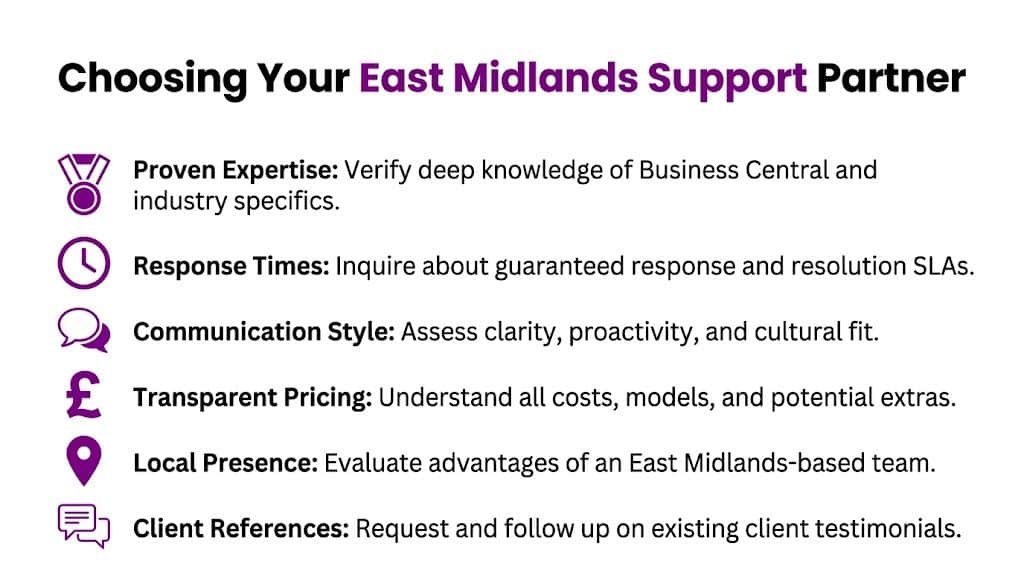
The selection process gets better when you move past “do you support Business Central?” and ask narrower questions that reveal how the provider works.
Questions worth asking
- How do you support customisations and third-party apps? If the answer sounds hesitant, expect hand-offs when issues span more than the standard platform.
- What happens in the first month of handover? Good providers can describe the audit, access setup, risk review, and communication plan in concrete terms.
- Who owns update readiness? You want a clear answer on testing, extension review, and how release changes are managed.
- Can you provide on-site support in the East Midlands if needed? Remote support is efficient, but some issues and review sessions are easier face to face.
- How do you prioritise tickets with financial impact? The provider should distinguish between operational irritation and business-critical blockage.
- What do your service reviews cover? Mature support includes trends, recurring issues, adoption concerns, and improvement opportunities.
A practical shortlist test
A strong partner should be able to explain recent work in plain English. Not marketing language. Real support language. They should be comfortable discussing permissions, posting failures, extensions, Power Platform, and reporting without making everything sound like a development project.
Use this quick shortlist as a final sense check:
- Proven expertise: Ask who will support you, not only who sold the contract.
- Response discipline: Check whether SLAs are written clearly and whether escalation paths are visible.
- Communication style: Notice whether they answer directly or bury simple points in jargon.
- Transparent pricing: Make sure project work, minor changes, and out-of-hours support are explained.
- Local presence: Confirm whether they can be on site in Lincoln, Nottingham, Leicester, or nearby when the situation calls for it.
- References you can trust: Ask for relevant clients with similar complexity, sector, or operating model.
Local presence only matters if it comes with accountability. A nearby supplier who doesn’t own the outcome isn’t an advantage.
What local knowledge changes
A partner with East Midlands experience often understands the practical environment better. They know many firms run lean internal teams. They know site visits still matter. They know charities, manufacturers, PLCs, and growing SMEs have different support rhythms and governance expectations.
That local understanding won’t replace technical skill. It does make the relationship easier to run. And support relationships live or die on how easy they are to run when pressure hits.
F1Group Support Putting Theory into Practice
Good business central support is part technical service, part operational discipline, and part business awareness. The software matters, but the day-to-day experience of using it matters more. If users trust the system, leaders get cleaner reporting, and your team knows who owns problems, Business Central becomes far more valuable.
That’s where a local support partner can make the biggest difference. Not by replacing Microsoft, but by standing between the business and avoidable disruption. The practical gains usually come from consistent ownership, sensible prioritisation, and a support team that can handle Business Central alongside Microsoft 365, Azure, Power Platform, reporting, and security.
F1Group applies that model in the East Midlands with hands-on support, on-site availability, and a Microsoft-focused team that understands how regional organisations operate. We’ve supported businesses across Lincoln, Nottingham, Leicester, Scunthorpe, Grimsby, and Newark since 1995, combining technical depth with direct accountability. Vendor-certified and DBS-checked, we work as an extension of your team rather than a distant ticket queue.
If you want support that keeps Business Central usable, stable, and aligned with the rest of your Microsoft estate, that conversation is worth having.
For proactive, local Business Central support from F1Group, phone 0845 855 0000 today or Send us a message.