
Yammer is Microsoft's enterprise social network for organisation-wide communication, launched in September 2008, acquired by Microsoft in 2012, and folded into Office 365 in 2014. Today, the name most businesses need to know is Viva Engage, which is the current Microsoft 365 home for what many people still call Yammer.
If you're asking what Yammer is, there's a fair chance your business already has too many places for internal communication. Email for announcements. Teams for project chat. SharePoint for documents. Then someone mentions Yammer, and the immediate reaction is usually, “Isn't that an old Microsoft tool?”
That's the main confusion to clear up first. Yammer still matters, but it now sits under the Viva Engage name inside Microsoft 365. For a business leader in Lincoln, Nottingham, Leicester or elsewhere in the East Midlands, that makes the question less about an old product and more about whether this part of your Microsoft 365 estate has a practical role in your day-to-day operations.
For some organisations, it absolutely does. For others, it becomes yet another place people ignore. The difference comes down to use case, governance and whether you're trying to solve a real communication problem rather than switching on another app.
Beyond the Inbox What Is Yammer and Viva Engage
Most businesses don't suffer from a lack of communication tools. They suffer from having too many, used badly. Important updates get buried in inboxes, project chat never reaches the wider business, and the same question gets asked repeatedly because the answer lives in one team's private thread.
That's where Yammer, now Viva Engage, fits. Microsoft renamed Yammer to Viva Engage in 2023 and positioned it inside Microsoft 365 rather than as a standalone social network, which is why older articles often feel out of date when you compare them with what users see today in the Microsoft environment (BrainStorm's Viva Engage overview).

The simplest way to think about it
Viva Engage is the company-wide conversation layer in Microsoft 365. It's closer to a corporate social network or digital noticeboard than a task management tool.
It isn't built for tight project delivery. It's built for broader visibility.
That distinction matters. A leadership update, a cross-department question, a recognition post, or a discussion that should stay searchable and visible across the business all suit Viva Engage far better than an email chain or a private Teams chat.
Where it came from and why that still matters
Yammer launched in September 2008, was acquired by Microsoft in 2012, and became part of Office 365 in 2014 (ClaySys background on Yammer). For UK organisations, especially those already standardised on Microsoft 365, that history matters because Yammer was absorbed into the wider Microsoft stack rather than left as a disconnected social app.
In practice, that means businesses don't need to treat it as a separate digital island. It sits alongside the tools staff already use.
Practical rule: If your communication needs to reach beyond one team and remain visible after the day it was posted, Viva Engage is often a better fit than email or chat.
What businesses often get wrong
The biggest mistake is assuming it should replace Teams. It shouldn't.
The second mistake is launching it with no purpose. If staff can't tell why a post belongs in Viva Engage instead of Teams or SharePoint, adoption drifts quickly into noise. The platform works best when leaders and managers use it for a defined set of organisation-wide conversations, not as a dumping ground for miscellaneous updates.
For a smaller or mid-sized company, that usually means starting with a few clear community types:
- Leadership communication for visible updates and questions
- Knowledge sharing for recurring operational queries
- Culture and recognition for wins, welcomes and internal engagement
- Cross-site communication where different offices or locations need the same information
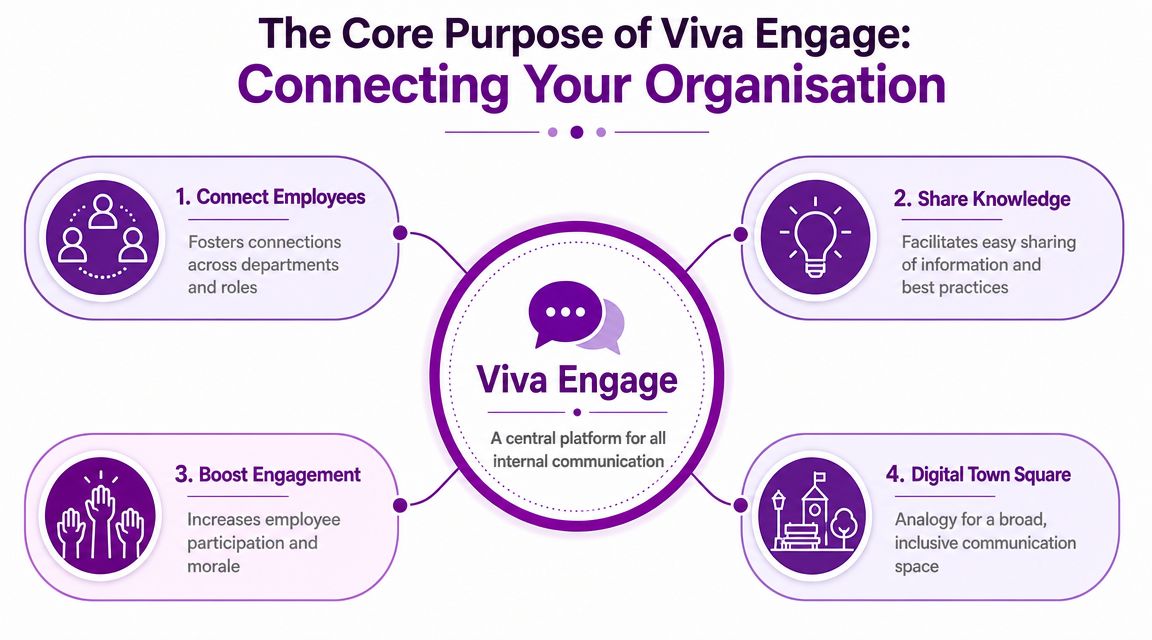
The Core Purpose of Viva Engage Connecting Your Organisation
The most useful description of Viva Engage is this. It's the digital town square inside Microsoft 365.
That doesn't mean it's informal or trivial. It means the platform is designed for communication that should travel across reporting lines, departments and locations. Microsoft's own adoption material positions Yammer and Viva Engage around organisation-wide conversations, leadership engagement and knowledge sharing, not task-level collaboration (Microsoft Yammer Lookbook).
Why it exists alongside Teams and email
Viva Engage is a broadcast-and-community system. That's the core idea many firms miss.
Teams is where smaller groups get work done together. Email is still useful for direct messages, formal communication and external correspondence. Viva Engage sits in a different space. It supports searchable, open discussion that lets people discover answers and expertise outside their immediate team.
That's valuable in businesses where the same knowledge exists in several places but stays trapped in local conversations.
A policy question from HR. A service update from IT. A client insight from sales that might help operations. A health and safety reminder relevant to multiple sites. Those are all stronger when discussed in a visible, reusable space.
What good use looks like
In practical terms, Viva Engage works when communication has one or more of these characteristics:
- Broad audience. More than one team needs to see it.
- Lasting value. The post should still be useful later.
- Open discussion. Replies from across the business add value.
- Leadership visibility. Senior people want a direct communication channel.
- Knowledge discovery. Staff benefit from seeing questions and answers publicly.
That's why Microsoft positions the platform around connecting people and information across the organisation and helping employees and leaders create culture.
A good Viva Engage post doesn't just inform the original audience. It helps the next person who searches for the same topic.
The features only matter if the purpose is clear
Businesses often get distracted by feature names. Communities, storylines and leadership communication all sound promising, but they only matter if tied to a business outcome.
A few practical examples:
| Feature | Best business use |
|---|---|
| Communities | Cross-department topics such as wellbeing, onboarding, safety, mentoring or service updates |
| Leadership communication | Senior updates, strategy messages, visible Q&A |
| Storylines and posts | Knowledge sharing, recognition, lessons learnt, internal visibility |
| Announcements | Broad updates that need attention beyond one team |
Value isn't the feature list. It's that people can ask, answer and learn in a shared environment rather than repeating the same information in separate inboxes and chats.
For East Midlands organisations with multiple sites, hybrid teams or operational staff who don't all sit in one office, that can make internal communication feel less fragmented and more intentional.
Viva Engage vs Teams vs SharePoint When to Use Which Tool
Most Microsoft 365 roll-outs get messy when businesses buy a capable toolset, then create confusion as no one defines which platform should be used for what.
If you want Viva Engage to work, you need plain rules. Not a twenty-page policy document. A practical usage model people can remember.
The easiest decision test
Ask one question first. Is this conversation for a team, a department, or the whole organisation?
If it's mainly for a working group doing active tasks, start with Teams. If it's content that needs structure, publishing control or document management, SharePoint usually makes more sense. If it's a broad conversation, announcement or reusable discussion across the business, Viva Engage becomes the better option.
Common scenarios and the right tool
Here's how I'd advise a typical SMB to decide.
Announcing a new company-wide policy
Use Viva Engage for the discussion layer, especially if staff may ask follow-up questions or need visibility across locations. Use SharePoint if the formal policy document needs a permanent home with version control. In many cases, the best result is SharePoint for the document and Viva Engage for the conversation around it.
Collaborating on a project report
Use Microsoft Teams. The work is usually task-focused, time-sensitive and handled by a defined group. Viva Engage is too broad for that type of day-to-day collaboration.
Sharing a team success story
Use Viva Engage if the aim is recognition beyond the immediate team. Teams works if the update is only relevant inside a project group. SharePoint can archive case studies or polished news content, but it isn't the first place for lively internal engagement.
Asking a technical question to a broad audience
Use Viva Engage if someone in another team, office or discipline might have the answer. That's one of its strongest use cases. It surfaces expertise outside reporting lines.
Maintaining a department intranet page
Use SharePoint. It's the right place for structured pages, controlled content and document libraries.
If your teams still need sharper guidance on chat-based collaboration, this guide on how to use Microsoft Teams effectively is a useful companion to a wider Microsoft 365 usage policy.
Viva Engage vs Teams vs SharePoint At a Glance
| Aspect | Viva Engage (Yammer) | Microsoft Teams | SharePoint |
|---|---|---|---|
| Primary use | Organisation-wide conversation and community | Team collaboration and day-to-day work | Structured content, documents and intranet pages |
| Communication style | Open, visible, discussion-led | Fast, focused, group-based | Published, managed, reference-led |
| Best audience size | Broad groups, multiple departments, whole business | Defined teams and project groups | Readers of formal content and documents |
| Content lifespan | Useful when posts stay searchable over time | Often short-lived and task-driven | Long-term reference and document control |
| Leadership communication | Strong fit | Limited unless team-specific | Better for formal pages than discussion |
| Knowledge discovery | Strong for open Q&A and visible answers | Good within a team, weaker across the wider business | Strong for storing knowledge, weaker for conversation |
| Project delivery | Poor fit | Strong fit | Supporting role |
| Formal policy storage | Not ideal as primary store | Not ideal as primary store | Best fit |
Where SMBs should be cautious
Independent guidance often draws the same line. Viva Engage is strongest for large-group, cross-department discussions and broad engagement, while Teams is better for day-to-day team collaboration (Powell Software's comparison of Yammer and Teams scenarios).
That's why SMBs shouldn't deploy Viva Engage merely because it exists in the licence estate. If your business is very small, tightly knit and already handles most communication cleanly in Teams, the extra channel may add clutter rather than value.
Use it when you have one of these conditions:
- Multiple locations that need a shared conversation space
- Department silos that stop knowledge moving
- Leadership communication gaps across the business
- Repeated questions that would benefit from visible answers
- A growing workforce where culture and communication need more structure
If people can't explain in one sentence why a post belongs in Viva Engage, they probably shouldn't be posting it there.
Real-World Use Cases for UK Small and Mid-Sized Businesses
A lot of Yammer content assumes a huge global enterprise. That's where many UK SMBs switch off. The better question is simpler. Will Viva Engage solve a communication problem you already have?

A manufacturing firm with multiple sites
Think about a manufacturer in Lincolnshire with office staff, warehouse staff and production teams. Safety updates, process reminders and lessons learnt often need to travel wider than one supervisor's inbox.
A Safety First or Operational Improvements community in Viva Engage can work well here. Staff can post practical questions, managers can share reminders, and recurring issues become visible across sites rather than staying local. That kind of setup is especially useful when one team solves a problem that another site hasn't yet encountered.
The point isn't to replace toolbox talks or operational briefings. It's to create a searchable business-wide layer that helps useful information travel.
A charity spread across the East Midlands
Charities often have a different problem. Staff, volunteers and service teams may feel disconnected because they work in different locations and don't always see the bigger picture.
Viva Engage can give them a place for:
- Campaign updates that reach everyone
- Fundraising wins that build morale
- Leadership visibility beyond formal meetings
- Volunteer stories that reinforce purpose
- Cross-site questions that don't belong in one team's chat
In that setting, the tool is less about social networking and more about organisational cohesion. It gives people a shared space to see what the rest of the organisation is doing.
A professional services firm trying to share expertise
A Nottingham-based accountancy, legal or consultancy firm may already use Teams heavily, yet still struggle to spread knowledge across departments. Partner-level insights stay in one practice area. Junior staff ask the same onboarding questions repeatedly. Useful guidance sits in folders people forget to search.
That's where a Mentoring, Business Development Ideas or Ask the Specialists community can make sense. The answer to one question becomes visible to everyone, not just the original requester.
This short overview gives a useful visual example of the platform in action:
When it works and when it doesn't
The practical test for an SMB is straightforward.
It works when the business needs broad engagement and cross-department discussion, and when Teams alone keeps information too enclosed. It doesn't work when leaders expect staff to maintain another channel without clear purpose or behavioural rules.
A smaller business can get real value from Viva Engage, but only with a nuanced model. Teams handles the daily work. Viva Engage handles the broader organisational conversation.
Smaller firms don't need more platforms. They need clearer boundaries between the ones they already have.
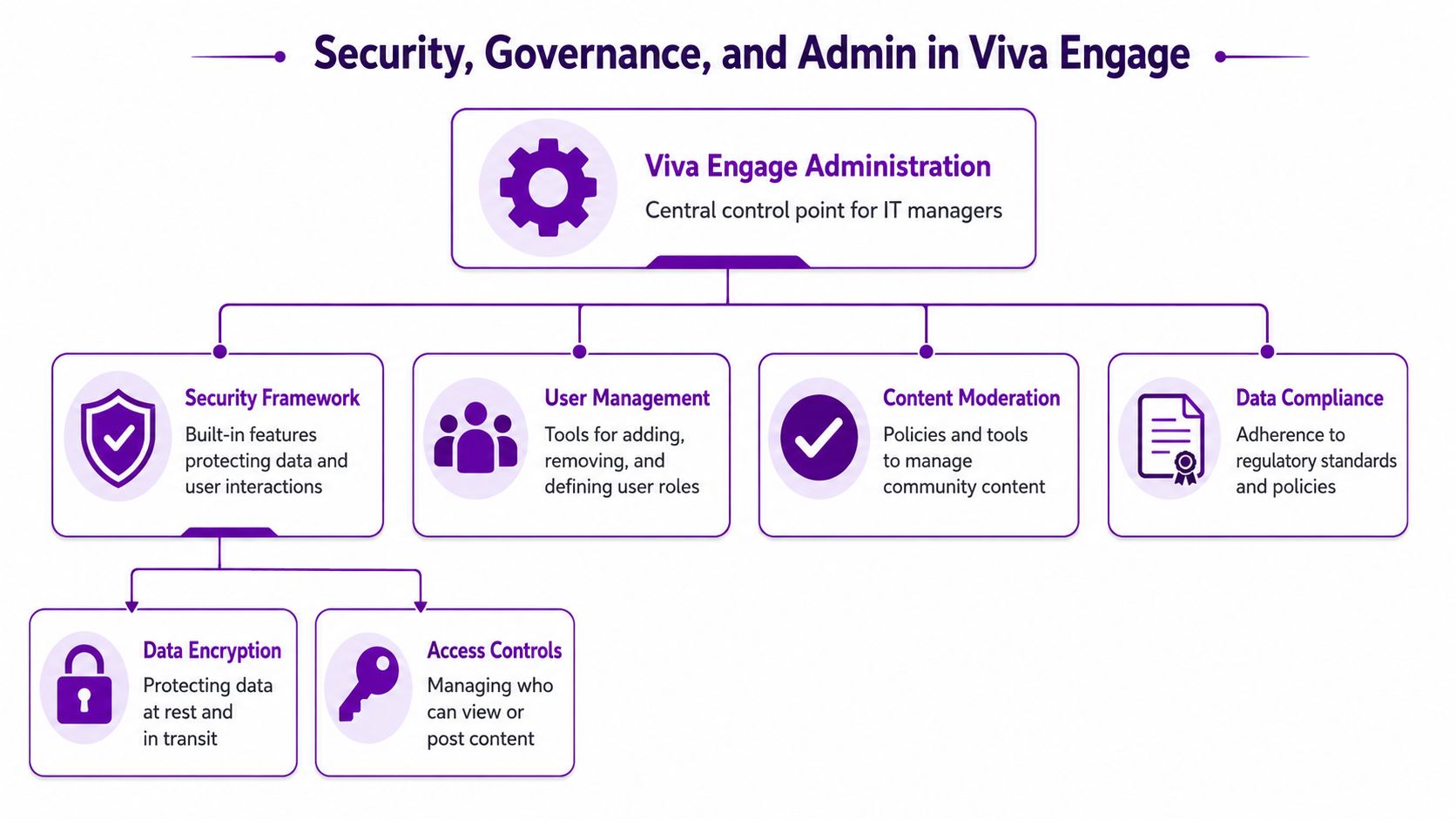
Security Governance and Admin in Viva Engage
Viva Engage may feel social to end users, but admins shouldn't treat it as casual. From a Microsoft compliance perspective, the platform has to protect authorisation tokens and personally identifiable information with encryption, and it requires secure controls around integrations and retained customer data (Microsoft's Yammer app security requirements).
That's the key governance point. This isn't just a chat feed. It's a regulated collaboration platform inside your Microsoft 365 estate.
What IT and compliance teams need to control
A sensible deployment starts with a few essential elements:
- Access and identity. Decide who can create communities, who moderates them and how external access is handled.
- Content standards. Set clear rules for acceptable use, sensitive information and escalation routes.
- Integration review. Any archive tool, workflow or custom app connected to Viva Engage needs proper security review.
- Retention and oversight. Treat discussions as business records where appropriate, not disposable chatter.
That's particularly important in regulated sectors, professional services, education and charities handling sensitive information.
Reporting and adoption measurement
One practical advantage is that admins can review usage across 7, 30, 90, or 180 days, including unique users, posts, reads and likes, which makes the platform measurable as a business communication channel rather than just a vague engagement tool (Microsoft 365 reporting and analytics model for Yammer).
Those reporting windows help answer useful management questions:
| Admin question | What to look for |
|---|---|
| Are people using it at all? | Unique users and activity over time |
| Are communities active or dead? | Posts, reads and visible engagement patterns |
| Is leadership communication landing? | Whether broad posts are being viewed and discussed |
| Do we need fewer communities? | Low-activity spaces that should be merged or retired |
If your Microsoft 365 estate is already hard to track, it's also worth understanding how wider licence and usage visibility fits into governance. A practical reference point is this guide to cloud software asset management, which helps frame how collaboration tools should be monitored as part of a broader software control model.
Governance that actually works
The strongest Viva Engage environments usually have a lightweight but explicit model:
- Define purpose first. State when to use Viva Engage, Teams and SharePoint.
- Limit community sprawl. Don't let every well-meaning idea become a new space.
- Nominate owners. Every active community should have a responsible business owner.
- Review usage regularly. Remove dead spaces and support the useful ones.
- Tie security to Microsoft 365 policy. Governance should align with your wider tenant controls.
For firms reviewing the broader security position around Microsoft 365, this checklist on Microsoft 365 security best practices is a sensible place to align collaboration governance with the rest of the platform.
A provider such as F1Group can support that kind of Microsoft 365 governance work where internal IT teams need help with policy design, rollout controls and tenant-level administration.
Adopting Viva Engage and How F1Group Can Help
Most failed Viva Engage deployments don't fail because the software is poor. They fail because nobody defined the job it was meant to do.
For an East Midlands SMB, the sensible approach is usually modest. Start with a few business-led use cases, not a platform-wide launch full of generic communities. If leadership won't post, if managers won't guide use, or if no one explains the boundaries with Teams and SharePoint, staff won't build lasting habits.
A practical adoption checklist
- Pick two or three clear use cases. Leadership updates, cross-site questions and recognition are common starting points.
- Name community owners. Someone has to prompt discussion, moderate content and keep the space useful.
- Write simple tool rules. Staff need plain guidance on what belongs in Viva Engage and what doesn't.
- Use a pilot first. Test with a function, site group or management community before wider rollout.
- Measure and adjust. Use engagement reporting to decide what should expand, merge or close.
Successful adoption is part communication strategy, part governance exercise and part user behaviour change. That's why many businesses treat it as a change programme rather than a switch to flick on in Microsoft 365. If that's the stage you're at, this guide to change management in digital transformation is relevant because the main challenge is usually adoption, not licensing.
For organisations across Lincoln, Nottingham, Leicester, Newark, Grimsby and the wider East Midlands, the practical goal is simple. Use Viva Engage where broad communication and shared knowledge need a home. Don't force it into roles already handled better by Teams or SharePoint.
If your organisation wants a clearer Microsoft 365 communication model, F1Group can help you assess whether Viva Engage belongs in your setup, define governance, and support rollout in a way that fits how your teams work. Ready to improve your organisation's communication? Phone 0845 855 0000 today or Send us a message.