
If you're running a business in Lincoln, Nottingham, Newark, Grimsby or Scunthorpe, you probably already know where your software is letting you down. Staff are rekeying the same data into three systems. Someone still runs a critical process from an Excel file on a shared drive. A manager waits for weekly updates because the information isn't available in one place. None of that feels dramatic day to day, but it drags the business down.
That's usually the moment when custom business app development starts to make sense. Not because it sounds modern. Because your team has hit the limit of patching together off-the-shelf tools that were never built around the way your business operates.
The mistake I see most often is this. Owners focus on features, screens and integrations before they've answered the harder question: will anyone use the app once it goes live? That's where return on investment is won or lost.
Why Your Business Might Need a Custom App
A typical East Midlands business doesn't wake up wanting an app. It wants fewer delays, fewer mistakes and less dependence on manual workarounds.
Take a common scenario. A service business has enquiries in Outlook, job updates in spreadsheets, documents in SharePoint, and customer notes split between two different systems. The office team can cope, but only because a handful of people know the unofficial process. When one person is off, everything slows down. When the business grows, the cracks widen.
That's the point where a custom app stops being a “nice to have”. It becomes an operational fix.
The pressure usually starts with process friction
You might need a custom app if any of this sounds familiar:
- Your team duplicates work: Staff enter the same information more than once because systems don't talk to each other.
- Approvals are slow: Requests sit in inboxes, then disappear into follow-up emails.
- Reporting is unreliable: Figures differ depending on who exported the spreadsheet.
- Customer experience is inconsistent: Clients get updates late because internal information is scattered.
- Growth exposes weak systems: What worked for ten staff doesn't work for thirty.
A good app doesn't have to be huge. Sometimes it's just one focused tool that handles job requests, stock checks, inspections, field updates, onboarding, or service approvals properly.
Practical rule: Build a custom app when the cost of doing nothing shows up every day in staff time, avoidable errors and missed opportunities.
There's a wider business shift behind this as well. The UK custom software development market is projected to grow at a 20.2% CAGR from 2025 to 2030, reflecting a move towards bespoke tools as businesses try to improve security and efficiency, according to Grand View Research's UK custom software market outlook.
Not every app is customer-facing
Many of the most valuable apps are internal. They remove admin, standardise work and give people one place to complete a task properly. If you're trying to pin down where an app would help, it's worth reviewing PinDrop's diverse use cases, which show the kind of operational and location-based workflows businesses often struggle to handle with generic software.
That's the key reason to invest. Not to “go digital”. To make the business easier to run.
Understanding Custom Apps vs Off-the-Shelf Software
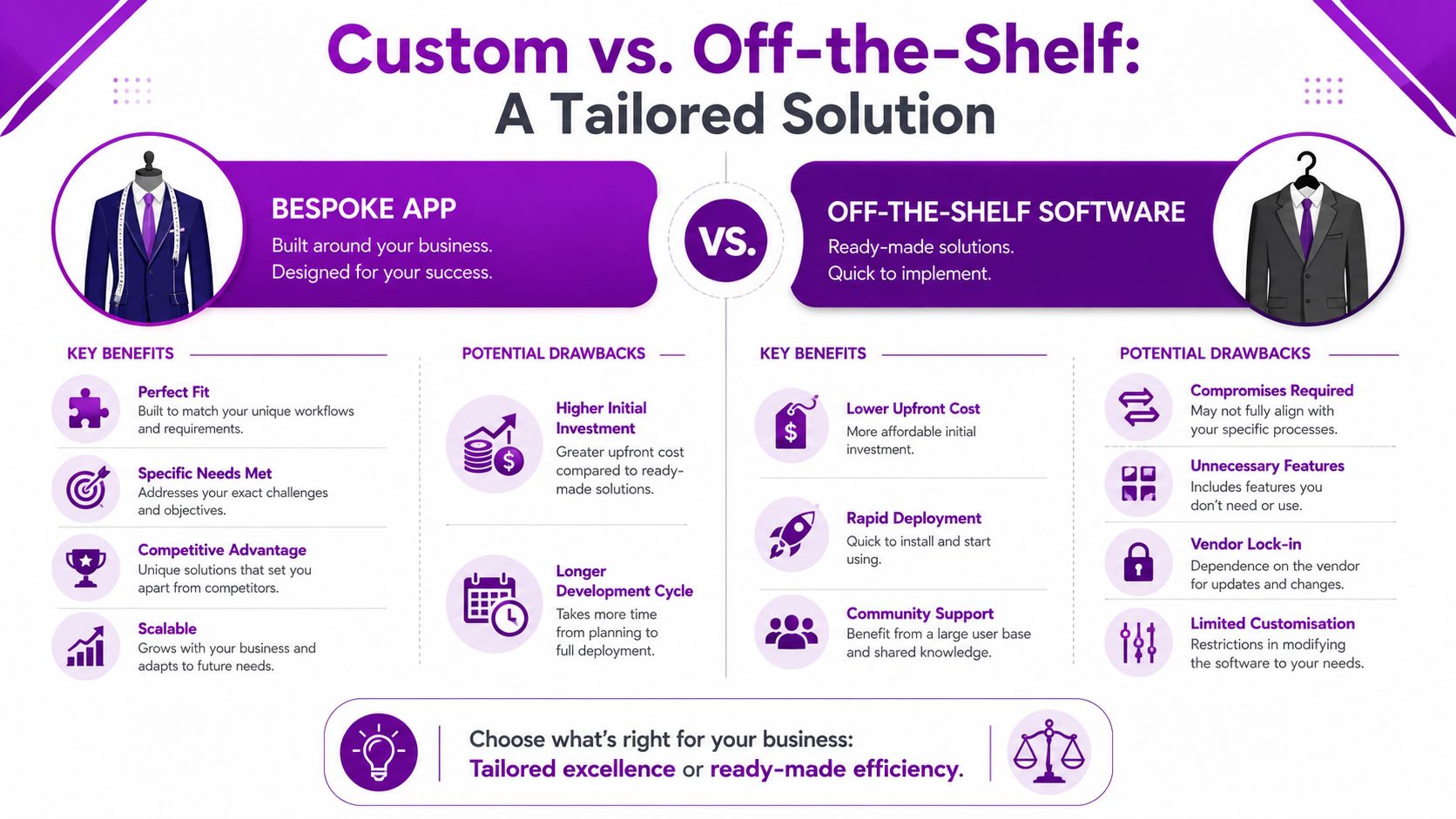
Off-the-shelf software is like buying a suit from a rail. If your shape roughly matches what the manufacturer had in mind, it works well enough. If not, you spend your time adjusting.
A custom app is purpose-built. It's built around your workflow, your users, your approvals, your data and your reporting needs.
What off-the-shelf does well
Ready-made platforms still have a place. They're often sensible when your process is standard and speed matters more than fit.
Use off-the-shelf software when:
- The process is common: Accounting, payroll and basic CRM are obvious examples.
- You need something live quickly: A subscription tool can be switched on faster than a bespoke build.
- You can adapt your process: If the software works well enough without awkward workarounds, that's fine.
The problem starts when the software dictates how your staff must work, even when that structure doesn't match the reality of the job.
What a custom app changes
With custom business app development, you decide what the process should look like first. Then the app supports it.
That usually means:
- Only relevant fields appear: Staff aren't forced through screens built for other industries or use cases.
- Approvals follow your chain of responsibility: Not a generic model someone else invented.
- Integrations happen where they matter: Microsoft 365, Dynamics 365, SharePoint, SQL databases and email flows can be connected around the work itself.
- Reporting reflects the business: You see what matters, not a standard dashboard that almost fits.
In the UK, web application development accounts for an estimated 45–50% of the custom application development service market, making it the dominant model for bespoke business apps, as noted in this UK market overview on custom application development services. That makes sense. For many firms, a browser-based app is the fastest route to broad access without the overhead of managing full native mobile deployment.
The best app is rarely the most complicated one. It's the one your team can open, understand and use without training fatigue.
Not every build needs a full-code project
There's now a wider middle ground between buying a licence and commissioning a complex software platform. Low-code tools, internal portals and guided app builders can solve narrower business problems quickly if they're used with proper controls. If you want a sense of how this space is evolving, this guide to AI app builder tools for non-developers is useful background.
Still, don't confuse speed with fit. A fast app that doesn't reflect the actual process just creates a new layer of frustration.
Measuring the Real Return on Your Investment
Most app projects are judged the wrong way.
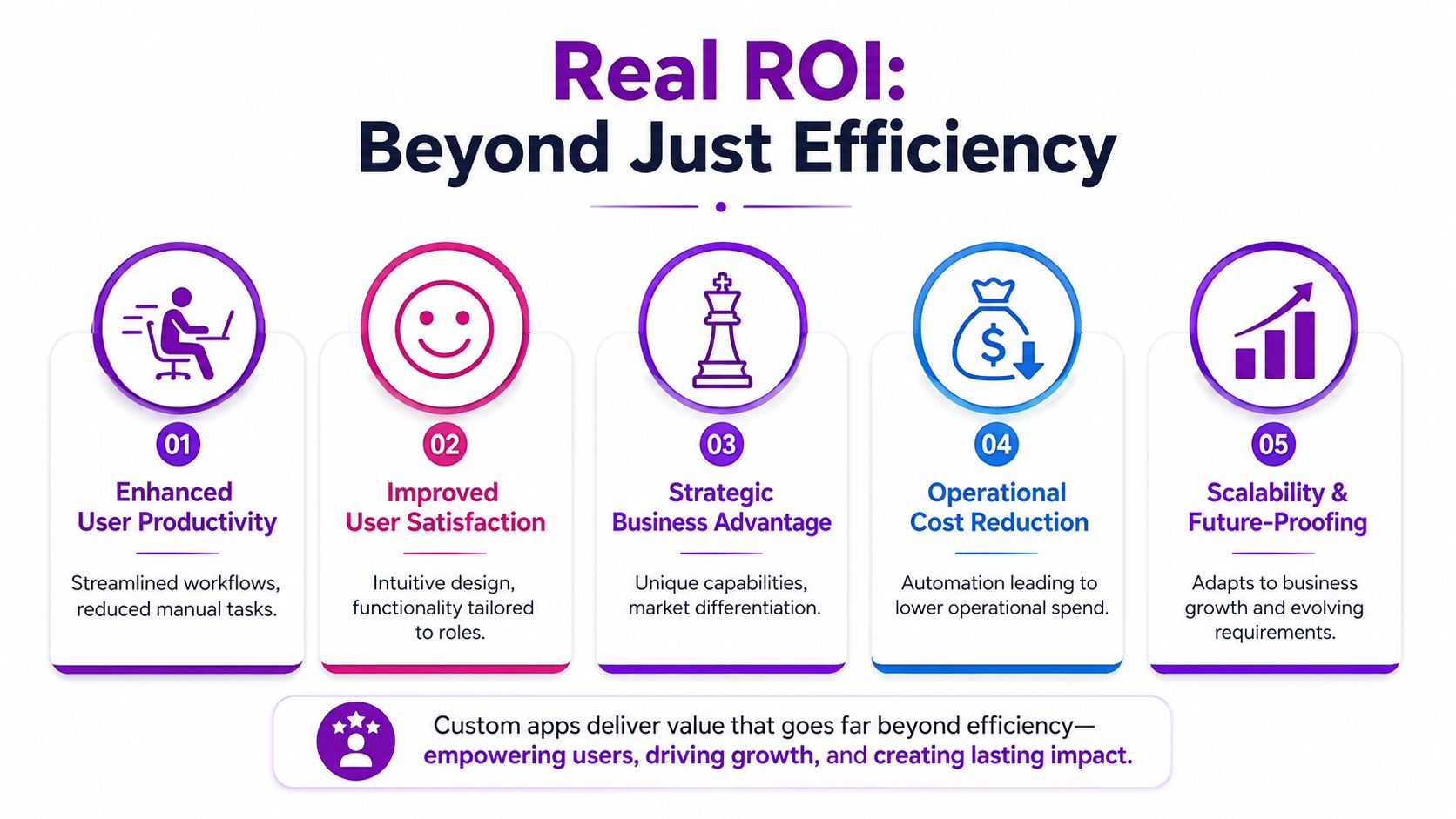
They're judged by whether the feature list got delivered, whether the launch happened on time, or whether the interface looks polished. None of those things proves business value. If staff avoid the system, your project failed.
That's why I push clients to focus on adoption first. An app only delivers return when people use it as part of their normal working day.
Features don't equal value
UK custom app development can cost £200k+, yet 70% of UK digital projects fail to deliver expected business outcomes, often because people don't adopt the tool properly rather than because the technology itself is broken, according to this article on UK app development companies and project outcomes.
That should change how you buy software.
If one app has every bell and whistle but nobody trusts it, it becomes shelfware. If another app handles one workflow cleanly and the team uses it every day, that app creates actual value.
What to measure before development starts
Set success criteria before anyone designs a screen. Keep it tied to business outcomes, not technical language.
A useful shortlist looks like this:
- Task completion: Can a user finish the job faster and with fewer handoffs?
- Data quality: Are errors, omissions and duplicated entries reduced?
- Process consistency: Does every branch, site or department follow the same method?
- Management visibility: Can leaders see current status without chasing updates?
- User adoption: Are the intended users choosing the app instead of falling back to email, spreadsheets or paper?
For businesses already trying to streamline internal work, this article on improving operational efficiency is worth reading alongside any app discussion, because the app should support a better process rather than automate a bad one.
Hard truth: If your contract only defines features and deadlines, you're buying output. If it defines usage and business outcomes, you're buying value.
How to avoid the usual ROI trap
Ask these questions before signing off a project:
| Question | Why it matters |
|---|---|
| Who will use this every day? | If ownership is vague, adoption will be weak |
| What process are we replacing? | You need a clear before-and-after |
| What will users stop doing? | New tools fail when old habits stay in place |
| How will we know it’s working? | Success needs visible measures |
| What happens after launch? | Training, support and iteration decide long-term value |
The return on custom business app development doesn't come from commissioning software. It comes from changing behaviour in a useful, measurable way.
The Six Stages of the Development Lifecycle
Business owners often worry that app development is a black box. It doesn't need to be. A sensible project follows a clear path, and you should know what happens at each point.
A structured delivery process also protects you from one of the most common problems in bespoke projects: building too much, too early.
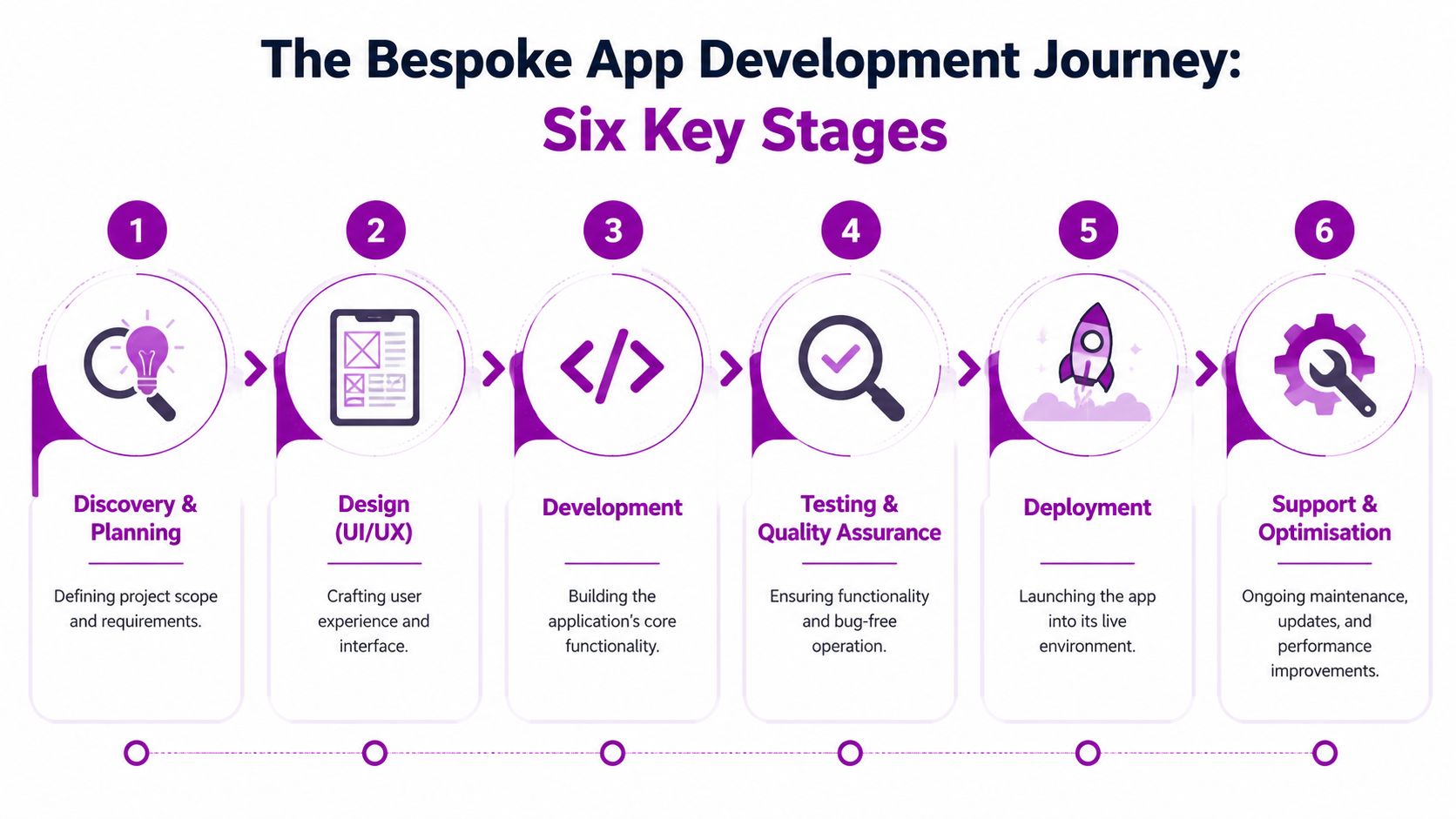
1. Discovery and planning
The project succeeds or starts drifting at this stage.
The right partner should map the current process, identify pain points, define users, and agree what the app must achieve. That includes working out which systems need to integrate, what data matters, and what can be left out of phase one.
Your role here is simple but important. Be honest about how the business works, not how you wish it worked.
2. Design and user experience
At this point, the team turns requirements into screen flows, layouts and prototypes. This isn't decoration. It's where usability is tested before costly build work begins.
A strong design phase should answer practical questions:
- What does the user see first?
- Which fields are mandatory?
- Where do approvals sit?
- What happens when data is missing or incorrect?
If those answers aren't clear, development starts too soon.
A short visual explanation can help clarify how this usually flows in practice.
3. Development and build
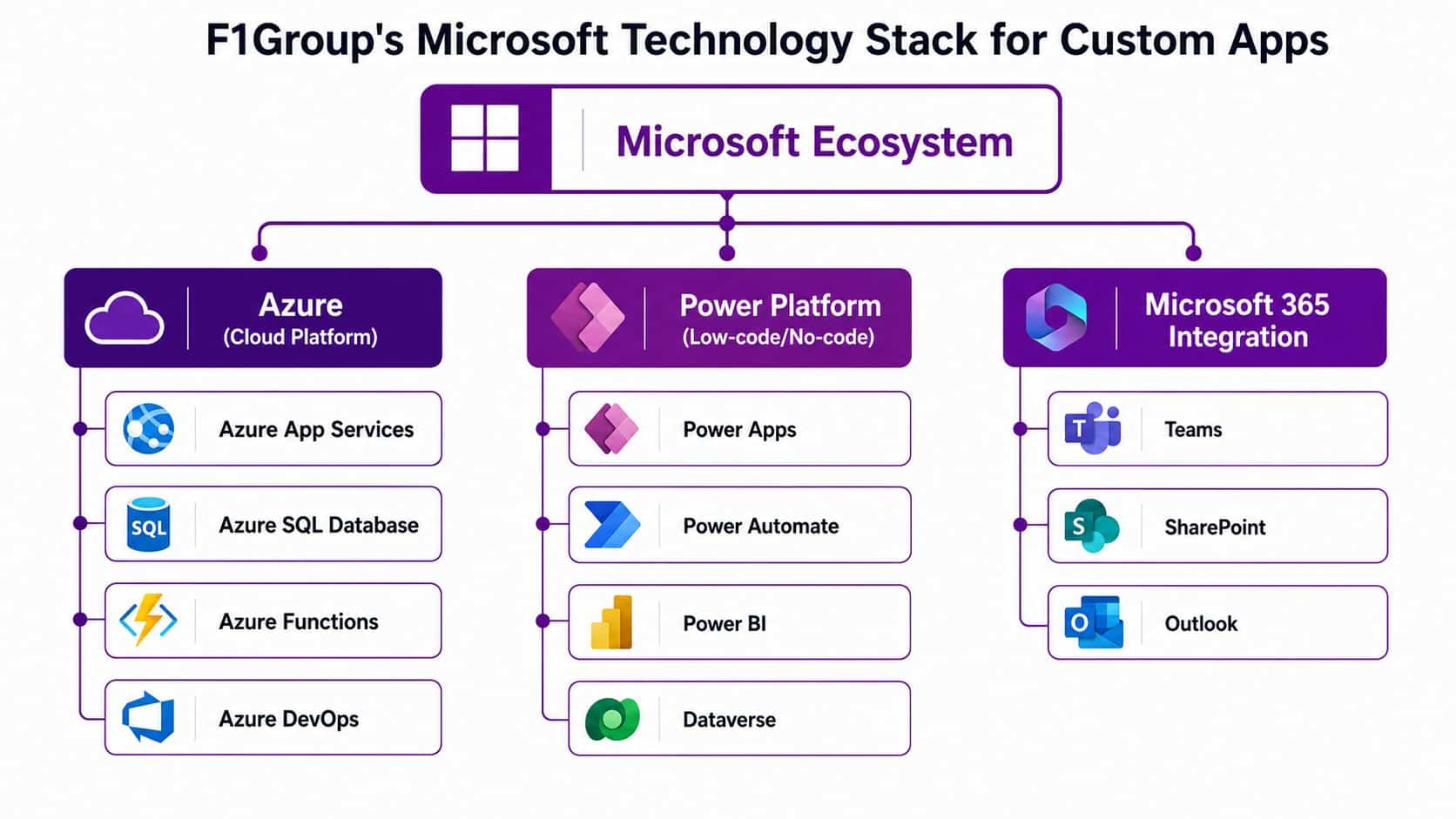
Now the app gets built. Depending on the project, that might involve Power Apps, Azure services, custom code, Dataverse, SharePoint, SQL or API connections into existing line-of-business platforms.
This stage should be iterative. You want regular demos, visible progress and early feedback. Don't wait until the end to discover that a key assumption was wrong.
A sensible build shows working software early. It doesn't disappear for months and reappear with a surprise.
4. Testing and quality assurance
Testing isn't just about bugs. It's about proving the app works for real users doing real jobs.
That usually includes:
- Functional testing: Does each feature behave as expected?
- User acceptance testing: Can staff complete their tasks without confusion?
- Security and permissions checks: Can the right people access the right information?
- Integration testing: Does data move properly between connected systems?
If users aren't involved here, expect trouble after launch.
5. Deployment and launch
Launch should be controlled, not dramatic. Good deployment means preparing users, confirming access, migrating any necessary data, and deciding whether the app goes live all at once or in stages.
The most successful launches are usually boring. That's a compliment.
6. Support and optimisation
The first live version is the start, not the finish. People use software in ways that no workshop fully predicts. That's why support matters.
After launch, pay attention to:
- Usage patterns
- Bottlenecks
- Requested changes
- Training needs
- Performance and reliability
An app becomes valuable when the business keeps refining it based on how people work.
Choosing the Right Microsoft Technology Stack
A lot of East Midlands firms make the same mistake. They approve a custom app, get the features they asked for, then wonder why staff still fall back to email, spreadsheets and phone calls. The stack is often part of the problem. If the app sits outside the Microsoft tools your team already uses every day, adoption drops and so does the return.
If you already run on Microsoft 365, start there. That cuts down duplicate logins, reduces support overhead, and makes the app feel familiar from day one. Familiar systems get used. Used systems produce value.
Power Apps for fast internal solutions
Power Apps suits internal apps that need to solve a clear business problem quickly. Typical examples include approval workflows, site inspections, service handovers, stock checks, and replacing messy spreadsheet processes with proper forms and validation.
It is a strong fit when you need to:
- Replace spreadsheets with structured forms
- Give field staff mobile access
- Standardise approvals and handoffs
- Surface data from Microsoft systems in one place
If you need a practical overview before deciding, read what Power Platform is and how it fits business use cases.
Power Apps is not automatically the right answer for every project. If the process is highly specialised, customer-facing, or likely to grow into a broader platform, forcing it into a low-code app can create limits later.
Azure for scale and control
Azure is the better choice when you need custom logic, stronger integration, more control over hosting, or an app that has to support heavier workloads. That usually applies to customer portals, operational systems, API-driven platforms, and apps with more complex rules behind the screen.
Choose Azure when the business needs more than a digital form. It handles the foundation work properly, including databases, background processing, identity, security controls and integrations with other systems. That matters because feature delivery on its own is not the win. The app has to stay reliable, fast and easy to use, or staff will avoid it.
Dynamics 365 and Microsoft 365 for connected data
The stack should match where your people already work. If sales teams live in Dynamics 365, documents sit in SharePoint, communication runs through Outlook and Teams, and reporting depends on Microsoft data, your app should connect to that environment instead of creating another silo.
That decision affects ROI more than many businesses expect. Staff adoption improves when users can complete a task inside familiar tools, with the right data already available, instead of copying information between systems. Fewer clicks, fewer workarounds, fewer excuses.
F1Group builds custom apps around tools such as Power Platform, Azure and Dynamics 365 for East Midlands organisations already invested in Microsoft. That kind of Microsoft-first approach usually makes sense for firms that want maintainability, sensible support arrangements and better uptake from users.
If you are still weighing up platform scope against cost, this guide can help you estimate app creation budget.
Choose the stack that gives your team the best chance of using the app properly. That is what drives return. A technically impressive system that people ignore is just an expensive side project.
Budgeting for Your Custom App Project
Let's deal with the question most owners ask early. What does a custom app cost in the UK?
The honest answer is that price follows complexity. A simple internal workflow app is not priced like a regulated platform with complex security, multiple integrations and deeper business logic.
According to this UK app development cost breakdown, a standard SME production app typically costs £30,000 to £80,000 and takes 12 to 24 weeks. Simpler MVPs can be delivered for £8,000 to £30,000, while more complex applications can exceed £80,000 and take 6 to 12+ months.
Estimated Custom App Costs & Timelines in the UK (2026)
| App Complexity | Estimated Cost (GBP) | Estimated Timeline |
|---|---|---|
| Simple MVP or single-process app | £8,000 to £30,000 | 8 to 12 weeks |
| Standard SME production app | £30,000 to £80,000 | 12 to 24 weeks |
| Complex or regulated app | £80,000+ | 6 to 12+ months |
What pushes the cost up
The biggest pricing factors are usually straightforward:
- Integrations: Connecting to multiple systems takes time and care.
- Security requirements: Sensitive data and role-based access increase complexity.
- Workflow depth: Multi-stage approvals, exceptions and conditional logic add effort.
- Platform needs: Web, mobile, tablet and customer-facing access all affect scope.
- Reporting and data model design: Good data structure is part of the build, not an add-on.
A lot of disappointment starts with vague budgeting. Owners ask for “an app” without defining the process, users or required outcomes. Then every idea gets added to the same quote.
If you need a rough planning reference before speaking to suppliers, this guide on how to estimate app creation budget can help frame the discussion. Just keep your focus on business priority. The first version should solve the most painful problem, not every possible one.
Selecting Your Development Partner in the East Midlands
The wrong partner can sink a good app idea. Not because they can't code, but because they don't understand the business problem, they communicate poorly, or they disappear when things get awkward.
Technical skill matters. It isn't enough.
What to check before you sign
Start with the basics:
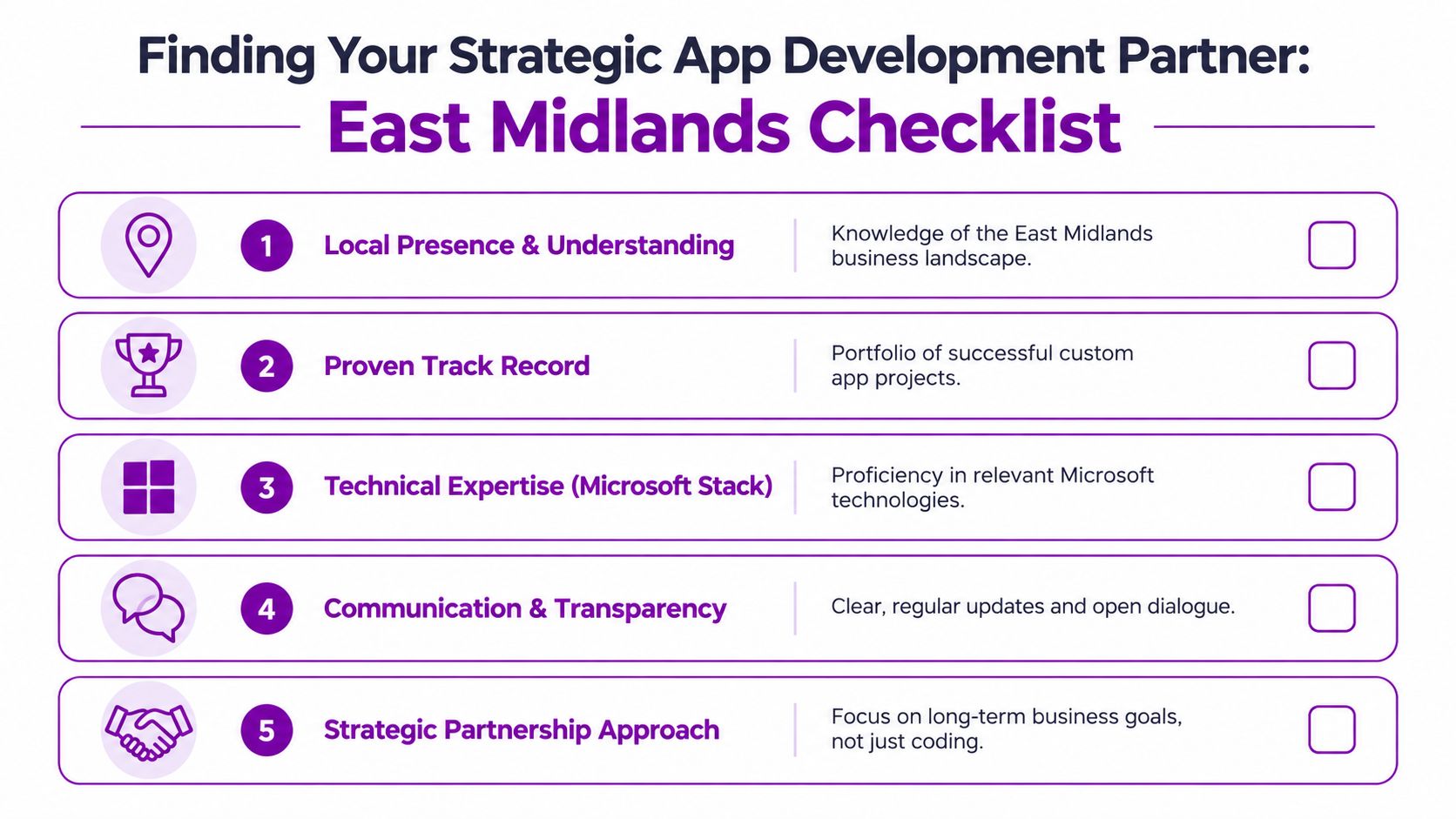
- Relevant Microsoft capability: If your business uses Microsoft 365, Azure or Dynamics 365, the partner should be comfortable in that stack.
- Clear process: You want a defined delivery approach, not hand-waving.
- Communication habits: Ask how often you'll see progress, who owns the relationship, and how change requests are handled.
- Post-launch support: Launch day is not the end of the job.
- Local understanding: A nearby team won't guarantee success, but local support does make workshops, on-site visits and practical collaboration easier.
A useful checkpoint when reviewing credentials is whether the provider works within recognised Microsoft standards and certifications. This overview of Microsoft certified partners gives some context on what that should look like.
Don't ignore insolvency risk
This is the point most buyers miss. A critical but overlooked risk in UK custom app projects is vendor insolvency. Businesses should check a developer's financial health because a rising trend in software house failures can leave projects stranded mid-build, as discussed in this article on selecting a good custom mobile app development company.
That means you should ask direct questions about stability, support continuity and who owns the code and documentation if the relationship ends.
Cheap quotes can be expensive decisions. If a supplier collapses halfway through the project, your “saving” disappears immediately.
Pick a partner that treats the app as part of your business operations, not just a development job. That's the difference between software that launches and software that lasts.
Ready to explore how a custom app could transform your business? Contact F1Group to discuss what's practical, what's worth automating first, and how to build for real adoption rather than a feature list. Phone 0845 855 0000 today or Send us a message.