
In the 2025 Cyber Security Breaches Survey, 43% of UK businesses reported a cyber security breach or attack in the previous 12 months, equivalent to about 612,000 businesses. The same survey recorded attacks affecting 30% of UK charities, so this isn't a problem reserved for large corporations. The UK Government's 2025 survey shows why vulnerability assessment belongs in the routine operating cycle of every East Midlands organisation with internet-facing systems, cloud services, staff devices or sensitive information.
A scan on its own won't protect your business. The useful work starts when you know what you own, identify which weaknesses create genuine business exposure, assign each issue to someone who can fix it, and check that the fix worked. This guide sets out a practical, NCSC-aligned approach for turning vulnerability assessment from a one-off compliance exercise into a manageable security discipline.
Why Vulnerability Assessment Matters for UK Businesses
A vulnerability assessment shows where attackers could gain access before a weakness becomes an incident. It examines missing security updates, unsafe configurations, exposed services, weak authentication and other conditions across your technology estate. The result should guide action, not bury the team in technical output. It should state which asset is affected, why the issue matters, who owns the fix and what action comes next.
The historical baseline remains uncomfortable. The 2022 Cyber Security Breaches Survey infographic found that 17% of UK businesses had undertaken a cyber vulnerability audit in the previous 12 months, while 39% had identified a cyber attack during the previous year. Testing was relatively uncommon despite attacks already affecting a substantial share of businesses.
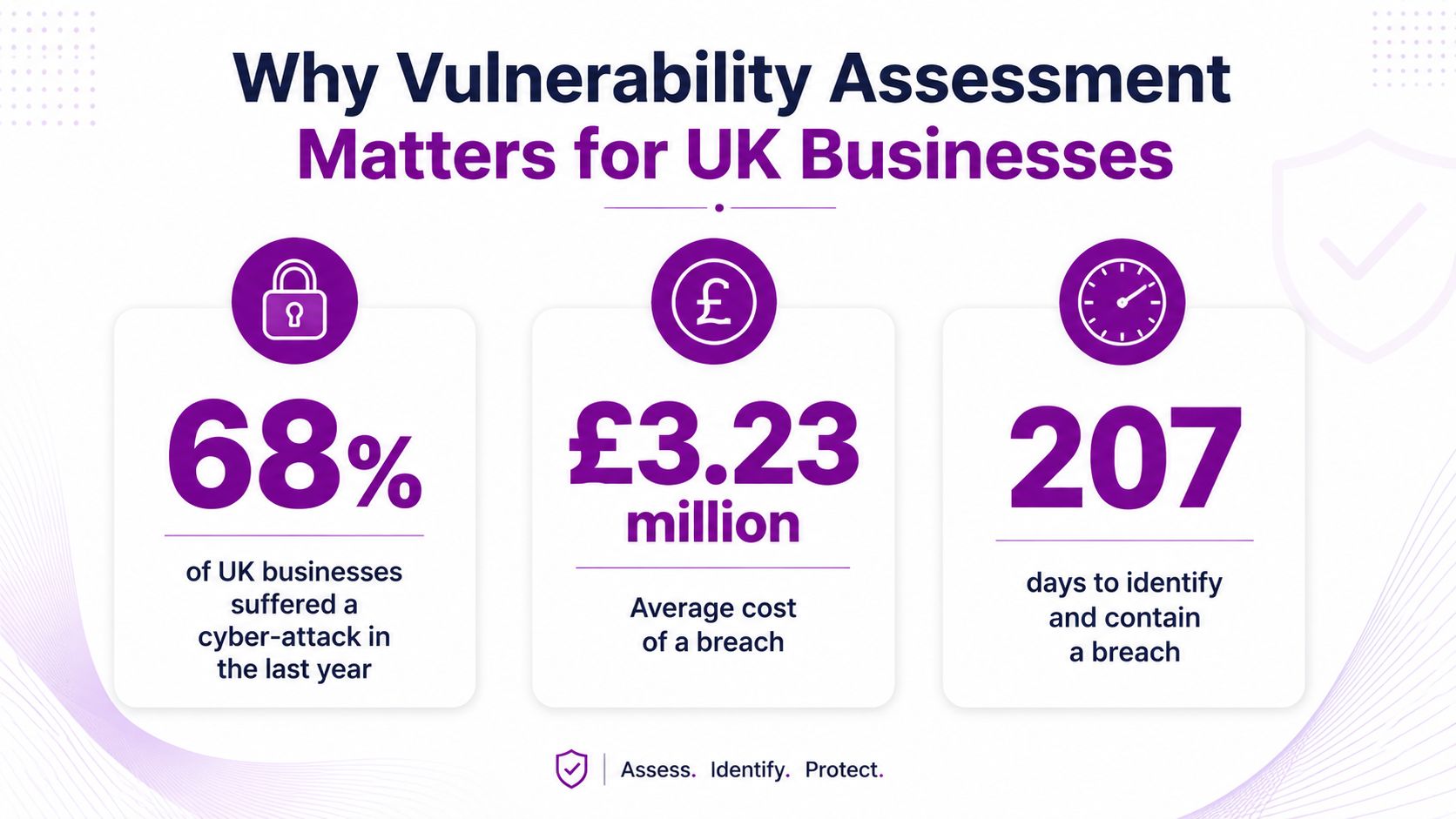
It is a business control, not a technical ritual
For a manufacturer near Derby, a professional services firm in Nottingham or a charity in Lincolnshire, the concern extends beyond a technically vulnerable server. One weakness can interrupt operations, expose client information, damage customer trust or provide a route into Microsoft 365 and Azure resources.
Assessment should operate as a repeatable cycle. Record the assets, assess their weaknesses, set priorities, assign owners, verify remediation and review the result after meaningful changes. That approach gives an SMB a maintainable control rather than a report purchased for an audit.
Compliance may ask whether a control exists. Assessment identifies where current weaknesses sit and what needs attention. It supports secure configuration, patching, access control, backup testing and incident response, but it does not replace them.
Practical rule: A report without an owner, an action and a review date is not a finished assessment. It is scan output.
The 2025/2026 UK survey release kept the proportion of affected businesses high at 43% and estimated approximately 5.19 million cyber crimes affecting UK businesses in the previous 12 months. That persistence reinforces the need for a recurring process. Exposure changes as systems are deployed, software is updated, permissions drift and suppliers connect to your environment, so an old report cannot represent today's risk. Use NCSC-aligned prioritisation to address exposed, exploitable weaknesses first, then track every decision through the next review.
Types of Vulnerability Assessment and When to Use Each
Different layers require different assessments. A network scan won't tell you whether a customer portal handles authentication safely, and an application review won't reveal every unsafe setting on an employee laptop. Match the assessment to the asset and the threat rather than buying the broadest service by default.
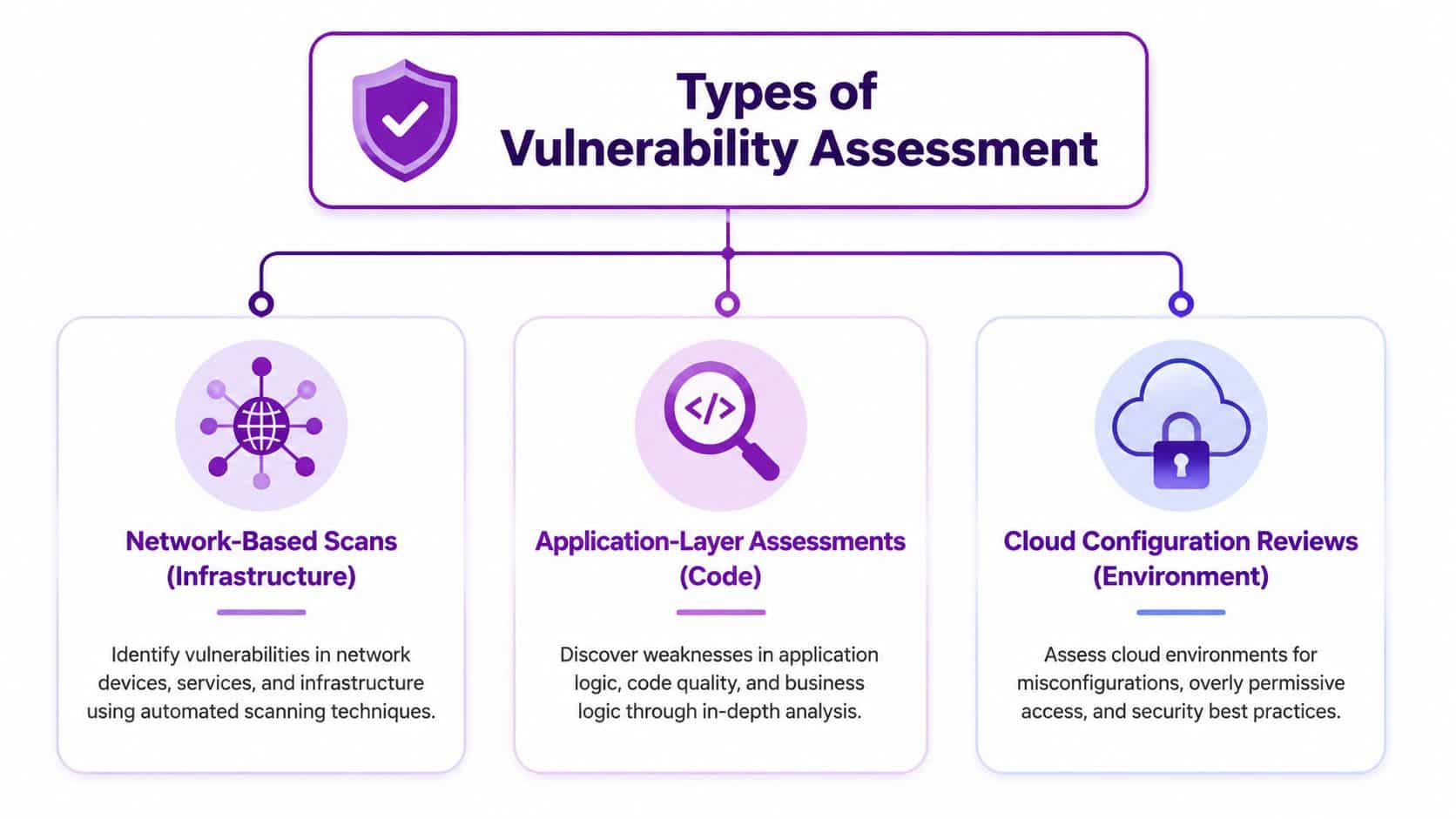
Network and host coverage
Network-based assessment looks at reachable infrastructure, services, firewall exposure and unsafe protocols. It's the sensible starting point for an organisation that needs visibility of its external perimeter, office network and infrastructure devices. External scanning can identify unnecessary exposure, while internal scanning helps reveal weaknesses that could matter after an attacker gains a foothold.
Host-based assessment examines servers, workstations and other endpoints more closely, often using authenticated access. It can identify missing updates and local configuration problems that a remote network scan may not be able to confirm. Use it for Windows estates, Linux servers and critical endpoints where accurate software and configuration information matters.
Application and cloud assessment
A customer-facing web portal, booking system or bespoke application needs an application-layer assessment. Review the application itself, its authentication and authorisation controls, input handling, dependencies and deployment configuration. For a development team, this may involve security checks within the software lifecycle as well as testing the live service.
Cloud configuration review examines the environment around Microsoft 365, Azure or other hosted services. Look at identity permissions, storage exposure, logging, conditional access, security groups and other configuration decisions. Cloud services can be well maintained while still being dangerously configured, so infrastructure patching alone won't close this gap.
Wireless assessment suits organisations that depend on office Wi-Fi, guest access or connected equipment. It can examine encryption, access separation, rogue access points and the boundary between guest and corporate networks.
| Assessment type | Best suited to | Main question |
|---|---|---|
| Network-based | External and internal infrastructure | What services and weaknesses are exposed? |
| Host-based | Servers and endpoints | Are systems patched and securely configured? |
| Application-layer | Web portals and bespoke software | Can application logic or controls be abused? |
| Cloud configuration | Microsoft 365, Azure and hosted platforms | Are identities and services configured safely? |
| Wireless | Office and guest networks | Can wireless access bypass intended boundaries? |
Start with the areas that carry the greatest operational or data risk. Then expand coverage as your inventory and remediation process mature.
Vulnerability Assessment vs Penetration Testing
Vulnerability assessment and penetration testing answer different questions. Assessment provides broad, repeatable visibility of known weaknesses. Penetration testing uses human-led investigation and controlled exploitation to establish whether selected weaknesses can be chained into meaningful impact.
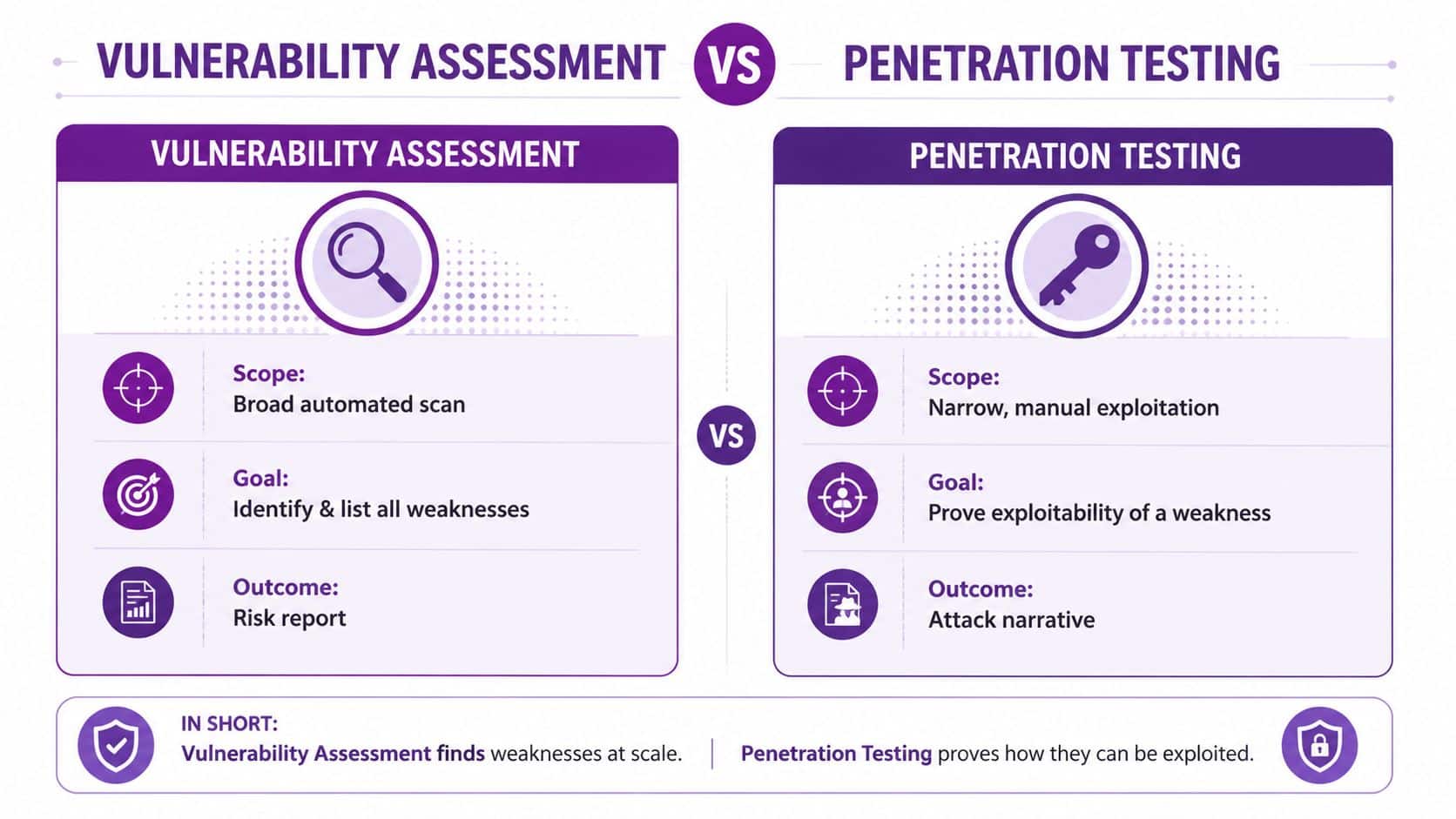
Use the right service for the decision you need to make
Choose a vulnerability assessment when you need regular coverage across infrastructure, endpoints, applications or cloud services. It helps your IT team maintain visibility and create a ranked remediation queue.
Choose penetration testing when you need to test a defined target in depth. It can validate the practical impact of a weakness, explore attack paths and identify logic flaws that automated tools may not recognise. A pentest is particularly valuable before a major launch, after substantial architectural change or when a customer or assurance requirement calls for independent testing.
The UK Government service guidance on vulnerability and penetration testing treats the activities as complementary. Government guidance also supports carrying out assessments frequently and alongside penetration testing as systems are built, rather than treating either activity as a single compliance event.
| Aspect | Vulnerability Assessment | Penetration Testing |
|---|---|---|
| Scope | Broad automated scan | Narrower manual investigation |
| Goal | Identify and list weaknesses | Prove exploitability and potential impact |
| Coverage | Repeatable across many assets | Deeper review of selected targets |
| Output | Prioritised risk report | Attack narrative and evidence |
| Best use | Ongoing exposure management | Validation of defensive controls |
The common mistake is commissioning a pentest when the asset estate hasn't been inventoried or patched, or treating a scanner report as proof that an application is secure. Establish routine assessment first, then use penetration testing to challenge the controls that matter most.
For a focused explanation of the second activity, see penetration testing in the UK.
The video is useful for reinforcing the distinction, but procurement should still begin with a clear scope, written permission and an agreed process for handling urgent findings.
A Practical Vulnerability Assessment Process for SMBs
Small and mid-sized businesses don't need an elaborate security department to build a useful assessment cycle. They do need ownership, a complete enough inventory and a schedule that survives normal IT pressures.
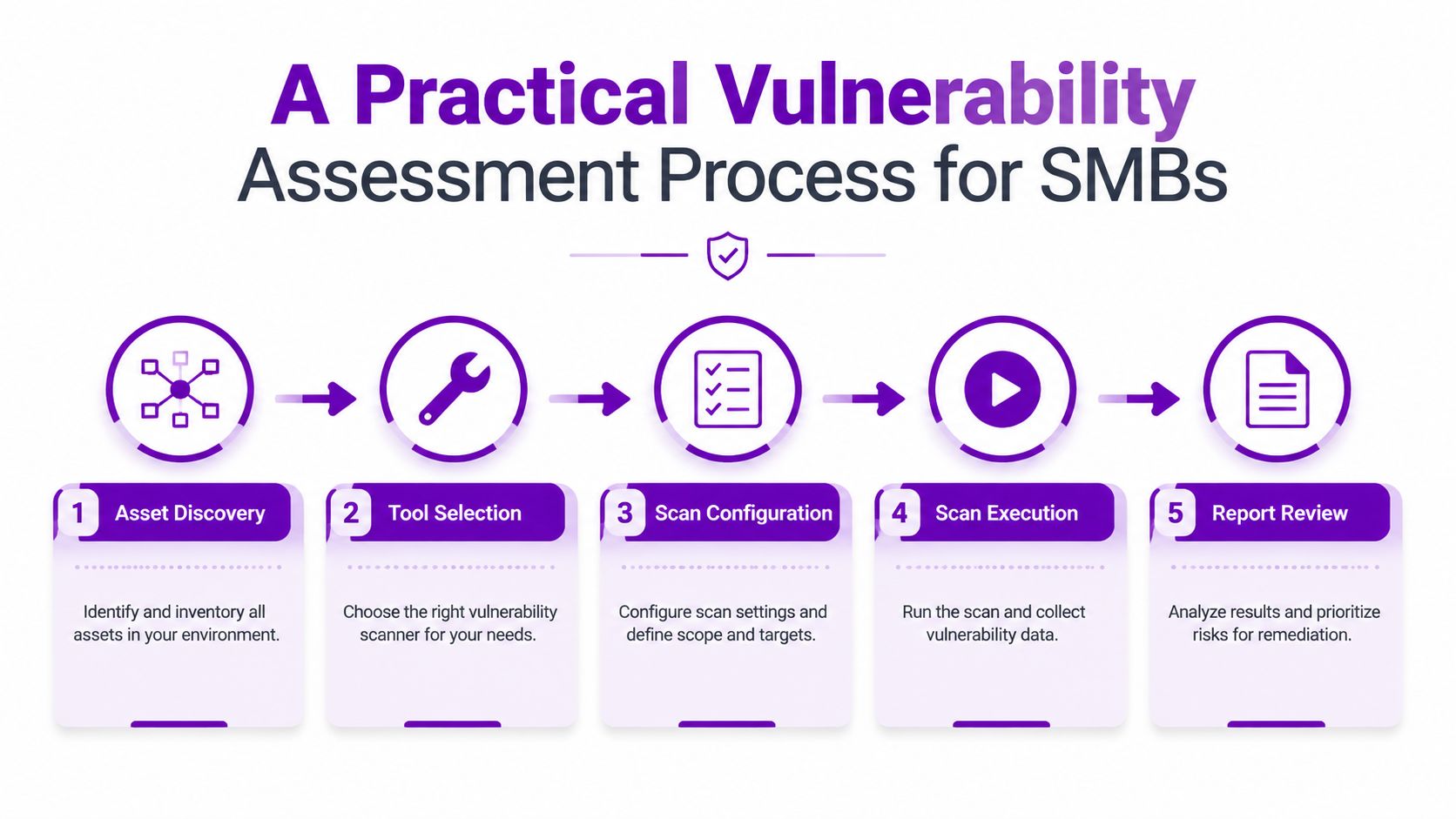
Start with visibility
1. Discover assets. Record servers, laptops, network devices, applications, domains, cloud resources and important third-party connections. Include Microsoft 365 and Azure services, development environments and equipment managed outside the central IT team. You can't assess an asset that nobody knows exists.
2. Select suitable tools. Use network scanning for infrastructure, authenticated host scanning for systems, application testing for web services and configuration review for cloud environments. Ask the provider how the tool confirms findings and how it handles systems where active scanning could disrupt operations.
3. Configure carefully. Define scope, exclusions, credentials, scan windows and notification contacts. Authenticated scanning often gives better information, but production systems need coordination. Use read-only service accounts where appropriate and make sure the scan won't lock accounts or interrupt a critical process.
Make the cycle operational
4. Run the assessment. The NCSC guidance on carrying out vulnerability assessments recommends assessing the entire estate at least every month. The NCSC also says scanning should happen regularly, at least monthly, and immediately after changes made to remediate a critical issue, as set out in its vulnerability scanning guidance.
The Ministry of Justice gives more demanding indicative minimum frequencies for live services. Its vulnerability scanning guide specifies every week for internet-facing websites, infrastructure devices and server applications, and every two weeks for end-user clients. Those intervals are a useful reference for higher-risk services, even when your organisation isn't part of government.
5. Review and assign. Put findings into the same workflow used for IT changes and service tickets. Assign the system owner, record the proposed fix, agree a timeline, document exceptions and rescan after remediation. Don't wait for a perfect process. Clear the most important backlog first, then improve coverage and automation.
Operational test: If a new Azure resource or business application can go live without entering your asset inventory, your assessment cycle has a visibility gap.
Prioritising Remediation Without Getting Overwhelmed
A scanner may produce more findings than your team can fix immediately. Trying to close every item in severity order creates delay and frustration. Prioritise based on the relationship between business impact, likelihood and exploitability, then record the decision so the risk doesn't disappear into an inbox.
Put business context beside technical severity
The UK Government guidance on assessing vulnerability risk recommends assessing impact against likelihood and refining the result by asking whether exploitation is remote, authenticated, automated or dependent on specialist effort. That approach is more useful than treating the highest CVSS score as an automatic first choice.
Use a short risk register with fields that force a decision:
- Asset criticality: Identify the service, information or operational process the asset supports.
- Technical severity: Record the scanner's severity and the conditions required for exploitation.
- Exposure: Note whether the weakness is reachable remotely, restricted to an internal segment or protected by another control.
- Action and owner: Name the person or team responsible for patching, reconfiguration, isolation or further investigation.
- Review date: Set a deadline for remediation or a documented risk decision.
Make triage decisions explicit
A remote weakness on a customer-facing authentication service deserves urgent attention when exploitation can be automated and the service handles sensitive information. A similarly severe finding on an isolated test system may still need fixing, but its immediate business priority could be lower.
That doesn't mean ignoring difficult issues. If a legacy system can't be patched without threatening production, record the constraint, apply compensating controls such as segmentation or restricted access, assign an owner and set a review date. Risk acceptance should be a named management decision, not the default outcome of an unattended report.
The NCSC vulnerability management principles include updating by default, identifying assets, triaging and prioritising vulnerabilities, owning the risk of not updating, and regularly reviewing the process. Together, these principles turn remediation into governance rather than a technical firefight.
Consultant's view: CVSS is an input to prioritisation, not the prioritisation policy. Your business context decides what gets fixed first.
For a wider operational view, use vulnerability management guidance for UK organisations.
Common Tools and What Their Outputs Mean
The tool matters less than the coverage, configuration and human review around it. A network scanner can identify exposed services and known weaknesses. A web application scanner can test application behaviour. A configuration auditor can compare cloud or endpoint settings against an expected baseline.
Read the report as a decision document
Look for the affected asset, evidence supporting the finding, severity, exposure, recommended action and ownership. A report that lists a vulnerability without showing how it was detected leaves your IT team to investigate the scanner's conclusion from scratch.
Authenticated and unauthenticated scans answer different questions. An unauthenticated scan shows what an outsider may infer or reach, while an authenticated scan can inspect software and configuration details more accurately. Use both where the scope and safety controls permit.
False positives are inevitable, but they shouldn't be ignored. Ask the provider to validate disputed findings, record accepted suppressions with an expiry or review date, and distinguish between a confirmed weakness, a suspected issue and an item requiring manual investigation.
The report should also separate technical urgency from business urgency. A high-severity issue on a non-critical internal asset may not outrank a lower-severity weakness on a public service that supports daily operations.
Before selecting a service, review vulnerability scanning services and ask how findings become tickets, who validates them and how the provider verifies remediation.
Choosing a Vulnerability Assessment Provider or Building Internal Capability
An internal team can run automated tools, but buying a scanner isn't the same as operating a vulnerability assessment programme. Someone still needs to maintain the asset inventory, schedule safe scans, interpret findings, coordinate remediation and report unresolved risk to leadership.
Decide between outsourced, internal and hybrid models
Internal capability suits organisations with experienced IT staff, stable ownership and enough time to manage the process. It gives your team direct control, but the work can slip when operational incidents and projects take priority.
Outsourcing provides specialist coverage and an independent perspective. It works best when the provider offers more than a recurring PDF, including scope management, finding validation, remediation advice and rescan evidence.
A hybrid model often suits East Midlands SMBs. Internal staff retain ownership of systems and business decisions, while a managed partner supplies scanning, analysis, reporting and support when remediation requires specialist knowledge.
Questions to ask before signing
- What is included: Confirm whether the service covers external infrastructure, internal systems, endpoints, applications, Microsoft 365 and Azure resources that matter to your business.
- How are findings validated: Ask how the provider reduces false positives and what evidence appears in each report.
- Who owns remediation: Make sure the service includes practical guidance and clear hand-off, not just detection.
- How often does it run: The proposed schedule should reflect NCSC guidance and your exposure, not the provider's convenience.
- What happens after changes: Critical fixes should trigger verification, rather than waiting for the next scheduled review.
- How is risk reported: Leadership needs business impact, ownership and outstanding decisions, not an unexplained list of technical identifiers.
Organisations comparing service models can also review IT Cloud Global vulnerability scanning for context on how a specialist scanning service may be structured.
F1Group can integrate vulnerability scanning and remediation support into managed IT operations for organisations across Lincoln, Nottingham, Leicester, Scunthorpe, Grimsby and Newark. The practical next step is a scoped conversation about your assets, current assessment frequency, outstanding findings and the systems that would cause the greatest disruption if compromised.
F1Group provides managed IT support, Microsoft 365 and Azure assistance, vulnerability scanning and cyber security services for East Midlands businesses. Visit F1Group to discuss your current exposure and build a vulnerability assessment cycle your team can maintain, then phone 0845 855 0000 today or send us a message.