
A growing organisation may be ready for Microsoft 365, Azure and Dynamics 365, yet still hesitate before making the move. Its finance system depends on an old database, key staff understand the legacy environment better than anyone else, internal IT capacity is stretched, and nobody can confidently predict what the Azure bill will look like after go-live. Security teams are concerned about identity, backups and data location, while business users want the benefits without disruption.
That situation is normal. Cloud migration is a governed business change, not a server relocation exercise. The UK government's own journey illustrates the point. The UK adopted a Cloud First policy in 2013, and its Cloud Challenge Book 2026 reports that 60% of government digital services had moved to cloud by July 2026, while 28% of the estate remained legacy. The same guidance says the shift had taken 13 years, and warns that many migrations replicate systems with minimal reengineering.
The practical sequence is clear: assess readiness, choose workloads deliberately, establish identity and security controls, protect data, prepare people, plan recovery, monitor performance and improve the operating model after migration. These cloud migration best practices are most effective when each stage produces evidence for the next decision.
All financial examples in this article use GBP UK pricing. Responsibilities should also be explicit: the executive sponsor owns the business case, the migration lead coordinates delivery, technical owners validate applications, the security lead controls risk, the finance representative governs costs, and business champions support adoption.
1. Conduct a Comprehensive Cloud Readiness Assessment
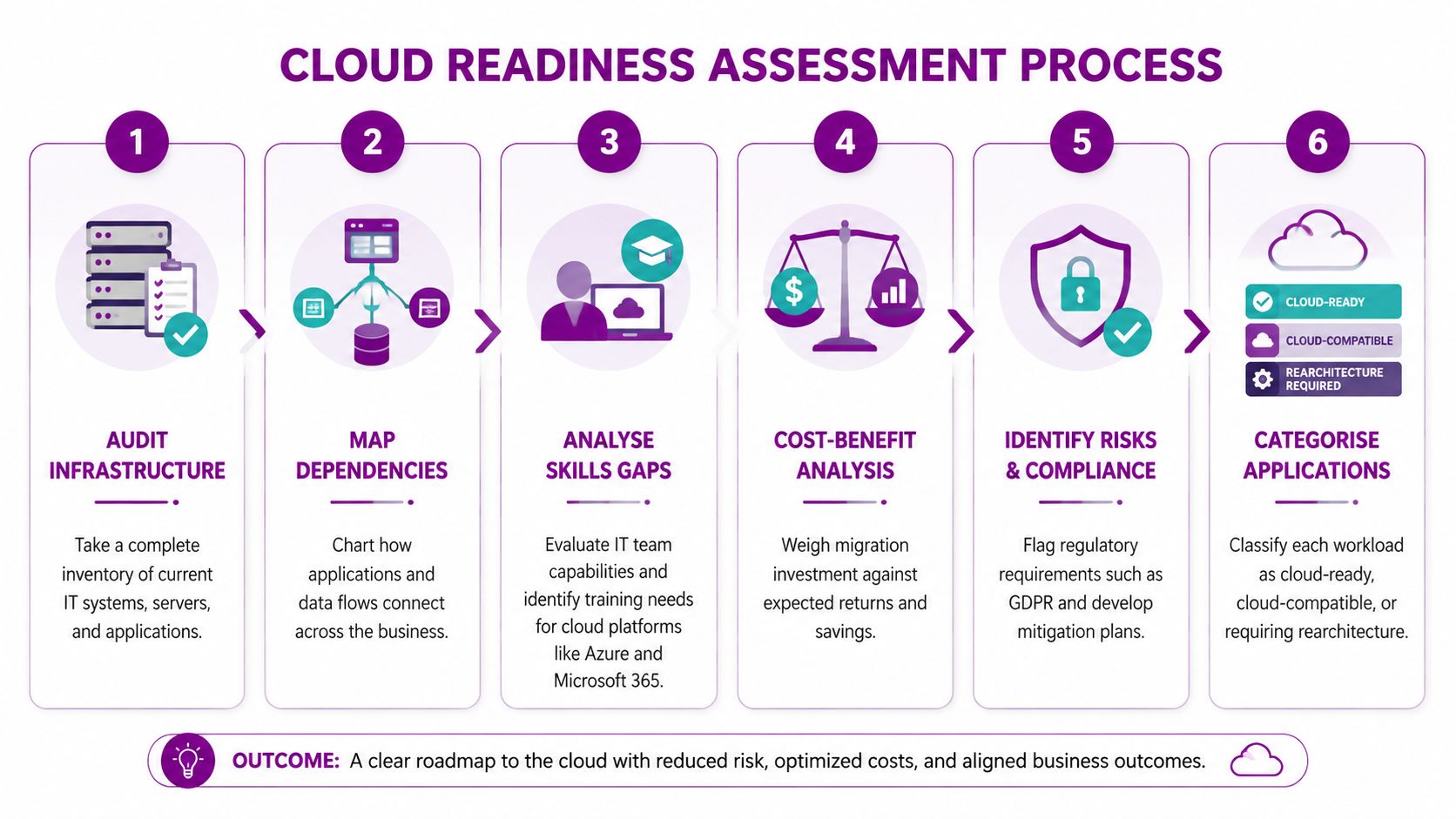
A migration plan built on an incomplete inventory will fail at the first serious dependency. Before selecting an Azure service or booking a cutover, document the organisation's applications, servers, databases, integrations, identities, data classifications and operational processes. The assessment should show not only what exists, but also who depends on it and what breaks if it becomes unavailable.
Azure Migrate is useful for infrastructure discovery and analysis. It can help technical owners build an evidence base for server sizing, dependency mapping and migration suitability. The migration lead should combine that technical view with interviews involving operations, finance and business teams. A charity may discover that its finance application is connected to fundraising and payroll workflows. A manufacturer may find that a legacy production system requires refactoring before it can run reliably in Azure. A professional services firm may uncover shared data repositories that make apparently separate applications inseparable.
Create a decision-ready inventory
Every workload needs an owner, a business criticality rating, a data classification, a dependency record and a proposed treatment. Categorise applications as cloud-ready, cloud-compatible with changes, or requiring rearchitecture. Some may be retired or retained temporarily rather than migrated.
Record the following before approving the first wave:
- Technical condition: Identify unsupported operating systems, obsolete databases, hard-coded addresses and undocumented integrations.
- Business importance: Record trading hours, operational deadlines, user groups and the consequence of downtime.
- People capability: Assess Azure administration, Microsoft 365 governance, identity management and user training needs.
- Success measures: Define service availability, user experience, recovery evidence, adoption and cost-control measures.
A readiness report should be signed off by the technical owner, security lead and business owner. HR and transformation leaders may also benefit from this digital transformation readiness guide, particularly when skills, roles and working practices are part of the change.
2. Develop a Phased Migration Strategy
A big-bang migration creates too many unknowns at once. UK evidence supports a more controlled approach. A 2024 report on UK multicloud adoption found that 87% of UK organisations had moved or migrated applications across environments in the previous 12 months, while 85% cited application migration support as a key criterion. It also reported that hybrid multicloud use was expected to rise from 19% to 26% over the following three years, and that use of multiple public clouds was forecast to increase from 11% to 46%.
Those figures describe a more complicated operating environment, not a reason to add platforms indiscriminately. Dependency mapping, governance and portability must influence the sequence. An East Midlands organisation might begin with Microsoft 365 identity and collaboration, then move selected Azure infrastructure, before addressing Dynamics 365 or more complex line-of-business applications.
Assign the right treatment to each workload
Use the six Rs as a decision framework: rehost, replatform, refactor, repurchase, retire or retain. Rehosting can reduce initial change, but it may preserve technical debt. Refactoring can deliver a better long-term design, but it requires more time, testing and specialist capability. Repurchasing may replace a custom system with SaaS, while retiring removes a workload that no longer earns its place.
Start with a low-risk workload that has a clear business benefit. Stabilise it before beginning the next major phase, and keep a written record of the assumptions that proved wrong. Pilot groups should include users who understand real operational exceptions, not only enthusiastic early adopters.
Practical rule: Every wave needs a go-live decision, a rollback trigger, named approvers and a period of enhanced support.
Use a documented Azure migration services approach to connect assessment, sequencing, security, cost management and post-migration ownership rather than treating each workload as an isolated technical task.
3. Prioritise Data Security and Compliance Throughout Migration
Security must be designed into the migration path, not checked after production traffic has moved. The NCSC's guidance on lifting and shifting successfully states that the cloud platform should be securely configured in line with its separate cloud security guidance. In practice, that means the landing zone, identities, network controls, logging and policy enforcement belong in the migration plan itself.
Start by classifying data. A legal firm may need tighter controls around confidential case material. A healthcare charity may need a documented decision for sensitive records. A financial services organisation may need additional approval for regulated information. Encryption in transit and at rest is important, but encryption alone doesn't resolve excessive permissions, weak authentication or poor retention controls.
Make sovereignty a workload decision
“Keep everything in the UK” is simple to communicate, but it may not answer every resilience or service-design requirement. “Cloud anywhere” is equally inadequate. The right policy should assess each workload's legal obligations, supplier contracts, processing locations, backup design and recovery requirements.
Official UK multi-region cloud guidance recommends using regions in a controlled and considered way that is compatible with UK law. The security lead should therefore approve region choice, replication, support access and disaster recovery locations before technical deployment.
Useful controls include:
- Identity protection: Use Microsoft Entra ID, multifactor authentication, conditional access and privileged access controls.
- Configuration governance: Apply Azure Policy to enforce approved regions, encryption, tagging and secure configurations.
- Threat monitoring: Configure Microsoft Defender for Cloud and Microsoft Defender services where they match the workload's risk.
- Evidence management: Retain access reviews, policy results, test records and supplier documentation for audit.

A specialist cloud security solutions service can help an organisation turn these controls into an operating process, provided the customer retains clear ownership of risk decisions.
4. Establish Clear Governance and Cloud Cost Management
Cloud cost control starts before the first production resource is deployed. UK mid-market evidence shows why. A UK survey of mid-market firms reported that 80% encountered unexpected costs during public cloud migrations, while 40% felt rushed through the process. That points to a practical conclusion: FinOps, tagging, budget ownership and licence review are migration prerequisites, not clean-up work for later.
The finance representative and migration lead should agree how Azure spending will be forecast, approved, allocated and reviewed. Azure Cost Management and Billing can provide the operational view, but the tool won't decide whether a workload is oversized, duplicated or no longer needed. A technical owner must connect consumption to business value.
Set rules that engineers can follow
A small organisation doesn't necessarily need a separate FinOps department. It does need named responsibility and a repeatable rhythm. Finance can review trends, while IT controls resource design and business owners approve exceptions.
- Resource structure: Use management groups, subscriptions, resource groups and naming standards that reflect ownership.
- Mandatory metadata: Require tags for department, application, environment, owner and cost centre.
- Approval controls: Restrict provisioning rights and define the evidence required for exceptions.
- Budget alerts: Configure alerts against approved budgets, then assign someone to investigate them.
- Licence hygiene: Review Microsoft 365, Azure and Dynamics 365 licences together, removing unsuitable or unused allocations.
- Architecture review: Challenge always-on resources, unnecessary duplication, oversized virtual machines and avoidable data transfer.
Public sector organisations are expected to default to Public Cloud First for new or existing services unless another route is justified, as described in the UK government Cloud First policy. For private organisations, the same discipline is useful. Choose the service that fits the workload, document the business case, and don't confuse cloud adoption with automatic savings.
5. Invest in Comprehensive Staff Training and Change Management
Users don't experience a migration as an architecture diagram. They experience changed sign-in steps, unfamiliar Teams arrangements, new document locations, different approval workflows and altered support routes. A technically sound deployment can still underperform if staff don't know what has changed or why.
Training should begin early enough for people to practise with realistic tasks. IT administrators need role-based learning for Azure, Microsoft 365 administration, Entra ID and security operations. End users need short guidance for the work they perform. Managers need to understand how data ownership, collaboration and approval processes will change.
Give adoption named owners
Business champions work best when they have credibility within their teams and a direct route to the migration lead. A Leicester professional services firm might use champions to gather feedback on Teams and SharePoint structures. A charity may need extra support for volunteers and part-time staff. A manufacturing organisation may need separate training for office teams and operational users who have limited access to standard desktop tools.
Use a practical support model:
- Before launch: Provide role-specific sessions, quick-reference guides and test accounts.
- During launch: Keep floor-walking or remote support available and publish clear escalation routes.
- After launch: Monitor recurring questions, update the knowledge base and target refresher content.
- For leaders: Share adoption signals and unresolved process issues, not just attendance records.
Microsoft Learn provides accessible training material, but self-study won't replace local process guidance. Teams and SharePoint can host support communities, recorded demonstrations and approved answers. Managers should reinforce the new way of working through normal meetings and procedures rather than treating training as a one-off event.
6. Implement Robust Backup and Disaster Recovery Planning
Microsoft operates the underlying cloud service, but that doesn't mean the customer automatically has a complete recovery plan. Accidental deletion, ransomware, corrupted data, compromised accounts and application failure still require customer-owned controls. Backup and disaster recovery should be designed per application, with business owners agreeing acceptable data loss and recovery time.
A UK Cloud Industry Forum study reported that 88% of UK organisations used at least one cloud service, but only 15% were cloud-exclusive, while 58% described their setup as hybrid. It also found that the average cloud application migration took 15 months, and that 90% experienced difficulties. The most common blockers were migration complexity at 43%, lack of internal skills or knowledge at 32%, and internet dependency at 31%. For a hybrid East Midlands environment, recovery planning must include both cloud and remaining on-premises dependencies.
Prove that recovery works
Azure Backup can protect suitable virtual machines and databases, while Azure Site Recovery can support failover for critical workloads where the design fits. Geo-redundant storage may be appropriate for critical data, but region selection must align with legal and contractual requirements. Immutable backups can add protection against ransomware, yet they still need monitoring, access controls and restoration tests.
Document an RTO and RPO for each application, then test restoration and failover against those targets. A runbook should identify the decision-maker, technical sequence, communications plan and rollback conditions. Backup costs belong in the Azure budget from the beginning.
A managed disaster recovery service can provide operational support, but the customer should still approve recovery priorities and participate in exercises.
7. Establish Performance Monitoring and Optimisation Practices
Go-live is a transition point, not the finish line. The technical owner should capture a baseline before migration, including application response, error rates, infrastructure utilisation, network behaviour and user-facing service measures. Without that baseline, a team may argue about whether the new environment is better while lacking evidence.
Azure Monitor, Application Insights and Log Analytics can provide different views of the same service. Azure Monitor helps track resource health and metrics. Application Insights can help technical teams investigate application behaviour. Log Analytics supports structured analysis across collected logs. The important decision is not which dashboard looks most impressive, but who responds when a threshold is breached.
Monitor the service users depend on
A charity may discover that an Azure workload has been sized for peak assumptions and is rarely used at that level. A retailer may need to trace slow transactions across an application, database and network path. A manufacturer may use performance evidence to decide whether additional capacity is justified. These examples require business context, not infrastructure metrics alone.
Set up separate views for engineers, service owners and executives. Engineers need diagnostic detail. Business owners need service impact and unresolved risk. Executives need trends tied to agreed outcomes.
- Baseline first: Record current behaviour before changing the platform.
- Alert selectively: Set thresholds that trigger action, or alert fatigue will hide genuine incidents.
- Review frequently after cutover: Examine performance and user reports closely during early operation.
- Optimise deliberately: Right-size resources, improve queries, review architecture and remove unnecessary components.
- Retain evidence: Keep dashboards and incident records so later changes can be assessed against the original position.
Optimisation shouldn't mean constant alteration. Each change needs an owner, a reason, a test and a way to reverse it.
8. Plan for Vendor Lock-in and Maintain Cloud Flexibility
Choosing Microsoft as the primary cloud partner can be sensible for an organisation already using Windows, Microsoft 365, Entra ID or Dynamics 365. The mistake is treating flexibility as an excuse to avoid useful platform capabilities, or treating integration as permission to ignore exit risk.
The trade-off should be explicit. Azure-native services can reduce operational work and integrate closely with Microsoft identity, security and data tools. At the same time, proprietary dependencies may make a later move harder. A Nottingham firm with a portable application may use containers and standard interfaces, while keeping Microsoft-managed services for identity and monitoring. A charity may choose a standard relational database where portability matters more than a specialised feature.
Design for informed dependency
Portability is an architectural choice, not a slogan. Document which services are critical, which interfaces are standard, and what would be needed to rebuild the workload elsewhere. Keep source code in controlled repositories and manage environments through Infrastructure as Code using tools such as Bicep or Terraform where appropriate.
Practical safeguards include:
- Standard interfaces: Prefer REST APIs, SQL and established protocols for integrations where they meet requirements.
- Dependency records: Document subscriptions, services, data stores, identities, certificates, scripts and third-party connections.
- Reproducible deployment: Define infrastructure and configuration in version-controlled files.
- Exit assumptions: Record data export formats, contract obligations, migration effort and recovery alternatives.
- Regular review: Compare the value of a managed service with the dependency it creates.
The right outcome isn't a perfectly provider-neutral estate. It's a deliberate Microsoft-first design in which the organisation knows where it benefits from integration and where it needs a credible alternative.
9. Utilise Existing Microsoft Investments and Ecosystem
A Microsoft-first strategy should begin with the estate the organisation already owns. Existing Windows devices, Microsoft 365 licences, Active Directory, Exchange, SharePoint and line-of-business integrations may provide a practical route to cloud adoption. Ignoring those investments can create unnecessary licensing, training and integration work.
Identity is usually the foundation. Microsoft Entra ID can connect cloud access with existing directory arrangements, subject to careful design and security review. Microsoft 365 can support collaboration and document management, while Azure can host suitable infrastructure and data services. Dynamics 365 may provide a route to modernise sales, customer service or HR processes. Power Platform can support targeted workflows and applications, but citizen development still needs governance.
Audit before buying
A licence audit should cover current entitlements, actual usage, renewal dates, security requirements and future workloads. Don't assume a bundle is cheaper or that every user needs the same service. Finance, the technical owner and procurement should agree the commercial baseline before adding products.
A connected Microsoft estate can include:
- Identity: Entra ID, multifactor authentication, conditional access and lifecycle controls.
- Collaboration: Teams, SharePoint and OneDrive, with clear ownership and information architecture.
- Business applications: Dynamics 365 for defined customer, sales or service processes.
- Automation: Power Automate for controlled workflows linked to approved data.
- Reporting: Power BI with governed datasets and named data owners.
- Custom solutions: Power Apps or bespoke development where requirements aren't met by configuration alone.
Copilot for Microsoft 365 may be relevant for organisations exploring AI-powered productivity, but its introduction should follow information governance and access review. AI doesn't fix poorly structured permissions or unreliable data. Existing Microsoft support agreements can also provide a starting point for escalation, provided service boundaries are documented.
10. Establish Post-Migration Support and Continuous Improvement Processes
The first support tickets after migration often reveal more than the project team's test scripts. Users may find an overlooked permission issue, a slow integration, a confusing Teams structure or a business process that was never represented in the design. The organisation needs a support model that can capture those signals without allowing temporary workarounds to become permanent architecture.
A UK cloud adoption study shows that hybrid operation remains common, so support teams must understand the connections between on-premises systems, Microsoft 365 and Azure. The study's reported average migration duration of 15 months also reinforces the need to plan for a transition period in which old and new operating practices coexist. This source has already been cited above, so no separate repeated link is needed here.
Turn lessons into operating standards
Support ownership should be visible to users and technical teams. Define service levels by business criticality rather than applying one promise to every system. A critical production integration may need a different escalation route from a low-risk internal application.
Use a 30-, 90- and 180-day review cycle to assess:
- Service stability: Review incidents, recurring faults, capacity and unresolved risks.
- User experience: Analyse support themes, feedback and adoption barriers.
- Security posture: Check access reviews, policy compliance, alerts and outstanding remediation.
- Financial control: Review consumption, licences, tagging and approved exceptions.
- Business value: Compare outcomes with the measures agreed during readiness assessment.
- Future change: Prioritise refactoring, automation, retirement and further migration waves.
Keep the migration team's documentation after handover. Runbooks, architecture diagrams, dependency records and rollback procedures are operational assets, not project paperwork. Monthly optimisation meetings can bring finance, IT, security and business owners together to decide which improvements are worth funding.
10-Point Cloud Migration Best Practices Comparison
| Item | Implementation complexity | Resource requirements | Expected outcomes | Ideal use cases | Key advantages |
|---|---|---|---|---|---|
| Conduct a Comprehensive Cloud Readiness Assessment | Medium–High (detailed audits, dependency mapping) | Specialist consultants, assessment tools, time | Clear gap analysis, realistic timelines & budgets, risk register | Pre-migration planning, legacy environments | Reduces migration risk, informs platform decisions |
| Develop a Phased Migration Strategy | Medium (wave planning, coordination) | Project managers, migration tools, cross-team coordination | Staged migrations, measurable progress, lower disruption | Large/complex portfolios, enterprise rollouts | Minimises downtime, enables iterative learning |
| Prioritise Data Security and Compliance Throughout Migration | High (security configuration, governance) | Security specialists, monitoring & DLP tools, compliance frameworks | Encrypted data, regulatory compliance, auditability | Healthcare, finance, regulated organisations | Protects data, reduces legal and breach risk |
| Establish Clear Governance and Cloud Cost Management | Medium (policy + tooling) | FinOps/finance and IT collaboration, cost tooling, tagging | Controlled spend, cost attribution, improved ROI | Organisations with variable or growing cloud spend | Prevents budget overruns, identifies waste |
| Invest in Comprehensive Staff Training and Change Management | Medium (ongoing programmes) | Training providers, time from staff, change champions | Faster user adoption, reduced support load, higher ROI | Large user bases, new collaboration platform rollouts | Accelerates adoption, builds internal capability |
| Implement Robust Backup and Disaster Recovery Planning | Medium–High (design & testing) | Backup/DR solutions, geo‑redundancy, testing resources | Defined RTO/RPO, recoverability, business continuity | Mission‑critical systems, high‑availability needs | Ensures recoverability, limits downtime and data loss |
| Establish Performance Monitoring and Optimisation Practices | Medium (tooling & analysis) | Monitoring platforms, analysts, dashboards | Proactive issue detection, performance baselines, cost optimisation | Production apps, customer‑facing services | Prevents outages, informs capacity and cost decisions |
| Plan for Vendor Lock-in and Maintain Cloud Flexibility | Medium (architecture choices) | DevOps, containers/IaC, documentation efforts | Improved portability, exit strategies, negotiation leverage | Organisations seeking multi‑cloud or portability | Preserves flexibility, reduces vendor dependence |
| Utilise Existing Microsoft Investments and Ecosystem | Low–Medium (integration work) | Microsoft licences, Azure/AD integration, Power Platform resources | Rapid adoption, unified identity, integrated workflows | Organisations already invested in Microsoft stack | Seamless integration, lower training overhead |
| Establish Post-Migration Support and Continuous Improvement Processes | Medium (process & people) | Support teams, SLAs, review cycles, feedback channels | Sustained service quality, ongoing optimisation, lessons learned | Any organisation after go‑live | Maintains continuity, drives continuous value improvement |
Turn Migration into a Managed Advantage
The strongest cloud migration programmes follow a connected delivery sequence. They assess the current estate before selecting workloads, then choose a treatment for each application instead of applying lift-and-shift everywhere. They establish identity, data protection and policy controls before production use. They prepare users before changing their tools, prove recovery rather than assuming backups are sufficient, and measure both technical performance and business outcomes after go-live.
That discipline matters for UK organisations operating across hybrid and multicloud environments. The evidence shows that adoption is widespread, but cloud-exclusive operation is not the norm. The practical implication is that migration teams must plan around dependencies, network readiness, internal capability and support ownership. A Microsoft-first strategy can provide a coherent route through Microsoft 365, Azure, Dynamics 365 and Power Platform, but integration doesn't remove the need for governance.
Sovereignty and resilience need the same level of attention. UK guidance supports a controlled multi-region approach where it is compatible with UK law. That doesn't create a universal rule for every workload. The security and legal owners should decide where primary data, replicas, backups and disaster recovery services sit, based on the information involved and the recovery requirement.
Cost control also belongs in the delivery sequence. Unexpected public cloud costs and rushed migrations are reported challenges in the UK mid-market. Azure Cost Management is useful, but it only becomes effective when finance and IT agree budgets, tags, approval rights, licence responsibilities and review dates. A monthly review should produce decisions, not just a report.
Before approving a production cutover, the executive sponsor should require evidence that the following points have been completed:
- Named ownership: The business owner, technical owner, security lead, finance representative, migration lead and support escalation contacts are recorded.
- Success measures: Availability, performance, adoption, security, recovery and cost measures have agreed baselines and acceptance criteria.
- Testing evidence: Functional, integration, access, security, performance, backup restoration and user acceptance tests are complete.
- Cutover decision: The approvers understand the deployment sequence, communications plan, maintenance window and outstanding risks.
- Rollback trigger: The team has defined what failure looks like, who can stop the cutover and how the previous service will be restored.
- Support readiness: The service desk has runbooks, known issues, escalation paths and access to the people who can resolve cloud incidents.
- Cost review: Budgets, tags, licence assignments, alerts and ownership are active before production consumption begins.
- Post-migration reviews: Reviews are booked for 30, 90 and 180 days after go-live, with actions assigned to named owners.
F1Group provides Microsoft-focused support for organisations across Lincoln, Nottingham, Leicester, Scunthorpe, Grimsby and Newark, including managed IT, Microsoft 365, Azure, Dynamics 365, Power Platform, Copilot AI, bespoke application development and cyber security. For a small or mid-sized organisation without enough internal capacity to manage every workstream, a partner can help coordinate planning, controls, migration delivery and post-go-live support while keeping business decisions with the customer.
Phone 0845 855 0000 today or Send us a message: https://www.f1group.com/contact/
F1Group can help East Midlands organisations assess readiness, plan Microsoft 365 and Azure migrations, manage security and costs, and support Dynamics 365 or Power Platform transformation. Visit F1Group to discuss a practical migration plan with managed support from assessment through continuous improvement.