
Why do so many teams buy another chat app when the core problem is that work is scattered across emails, spreadsheets, shared drives, and half-finished meetings?
Team collaboration tools are not just software for messages and video calls. In a modern UK business, they're the layer that connects people, files, decisions, and delivery into one controlled working environment. That matters because collaboration breaks down fast when the tools don't match the way the business runs.
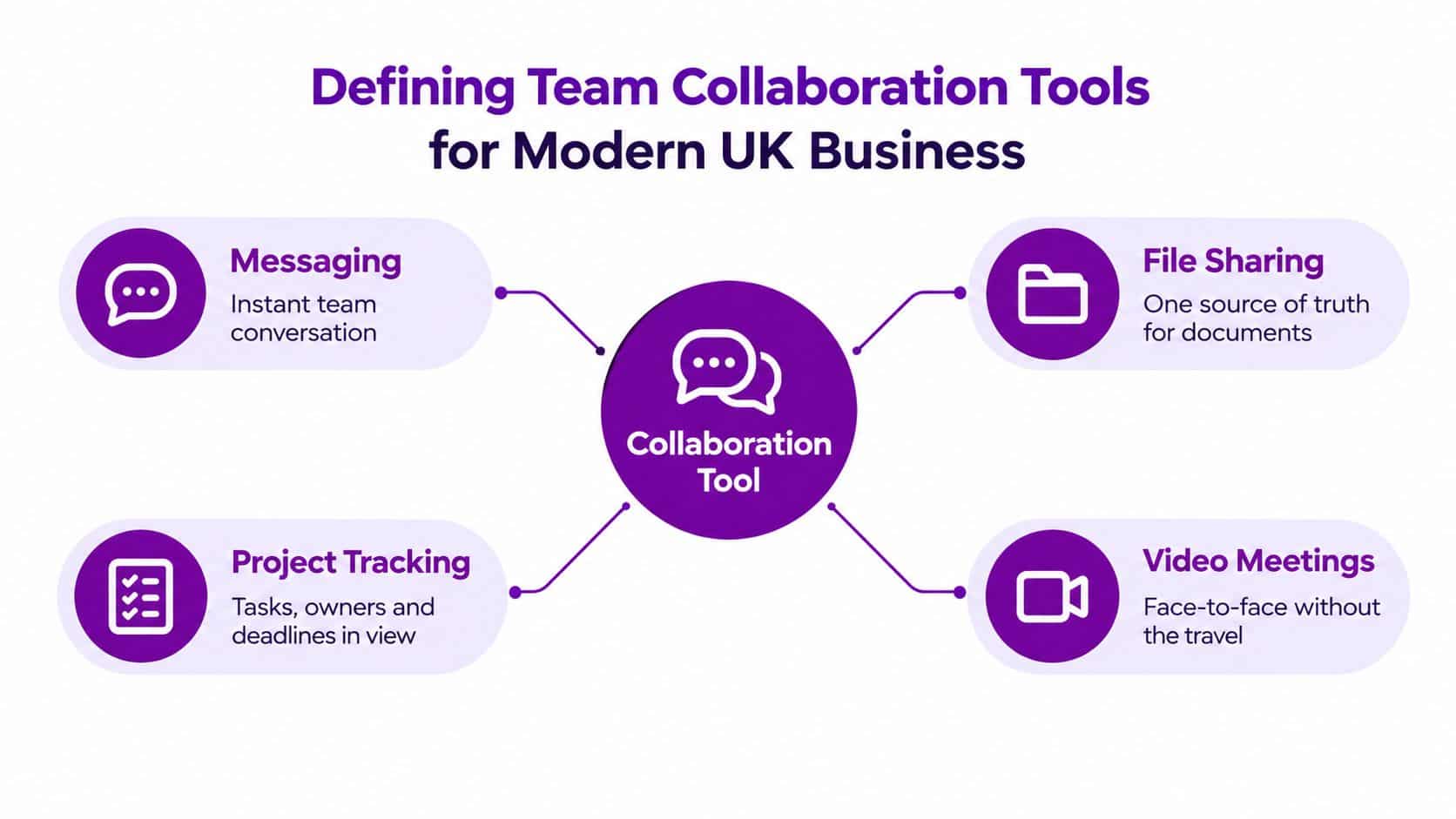
Defining Team Collaboration Tools for Modern UK Business
A proper collaboration platform does more than move messages around. It gives your team one place to talk, store working documents, track actions, and hold meetings without losing the thread every time someone switches app or device.
In practice, that means the tool becomes part of your operating model, not a side utility. If your staff can't find the latest version of a file, don't know who owns the next step, or keep repeating the same discussion in different channels, you haven't got collaboration. You've got noise.
Collaboration is a working system, not a feature list
The useful way to think about team collaboration tools is as a digital workspace with four moving parts. Messaging keeps the conversation moving, file sharing gives everyone one source of truth, project tracking shows who owns what, and video meetings handle the live conversations that still need face-to-face discussion.
Practical rule: if a collaboration tool doesn't improve decision flow, document control, and accountability, it's not solving your business problem.
That's the point many mid-market firms miss during a Microsoft 365 migration. They assume the tool choice is the whole story, then leave process design to chance. In reality, the software only works when permissions, document structure, and usage rules are clear.
What this means for East Midlands businesses
For an East Midlands SME, the question isn't whether staff can chat or join calls. It's whether the business can keep work moving when people are hybrid, travelling, or sitting in different offices. That's where integration matters more than features.
A good platform gives you searchable conversations, controlled document ownership, and a clear place for work to live. A bad one creates another inbox, another shared drive, and another reason for people to bypass the system.
If you want a broader practical view of how remote teams stay aligned, the guide on gestire la comunicazione nei team remoti is a useful reference point. The lesson is the same whatever the platform, collaboration only improves when the workflow is designed properly.
Why UK Small and Medium Businesses Are Adopting Collaborative Software
The adoption curve is already here, and it's not being driven only by tech-first firms. The British Business Bank's SME Finance Monitor reports that 51% of SMEs use collaborative-work software, rising to 62% among medium-sized businesses and 41% among microbusinesses British Business Bank SME Finance Monitor. That tells you collaboration software has moved from optional to normal.
For leaders in the East Midlands, the message is blunt. Your competitors are already using these systems to coordinate teams, reduce delays, and keep work visible across sites. If your business still relies on disconnected email threads and ad hoc file sharing, you're taking on avoidable friction every day.
Hybrid working changed the operating model
UK working patterns also explain why collaboration has become more important. 28% of working adults in Great Britain worked in a hybrid arrangement between January and March 2025 ONS-cited market report. That means collaboration has to function across locations, not just inside a central office.
Many businesses get the buying decision wrong. They look for a tool that suits one department, then discover the rest of the organisation works differently. Medium-sized firms usually need a platform that supports governance, not just convenience. Microbusinesses often need something simpler and easier to adopt.
Adoption is a signal, not the goal
The fact that adoption is higher in larger SMEs also points to something important. Collaboration tools are rarely a standalone purchase. They're usually part of a wider cloud and digital-transformation effort, especially where the business is trying to standardise file storage, approvals, and team communication in one place.
The real buying decision is not “Do we need collaboration software?” It's “Can we run the business cleanly without it?”
If the answer is no, then the job isn't to add another app. It's to choose a platform that fits your size, workflow complexity, and security requirements. That's the difference between a software purchase and an operational improvement.
Core Features That Drive Real Productivity and Engagement
Which collaboration features remove friction from daily work? Persistent chat, video meetings, shared documents, and task visibility matter because they keep context, decisions, and next actions connected. Used separately, they make staff switch between tools and recreate the same information. Used together, they give teams one working record.
Videoconferencing is now standard business infrastructure. The UK Government's United Kingdom Innovation Survey 2023 reported that videoconferencing software was the second most widely used management technology category, used by 57% of broader innovators and 37% of non-innovators UK Government survey summary. For UK SMEs, the practical question is whether meetings connect to files, decisions, and accountable actions.
What good collaboration actually feels like
Good collaboration feels uneventful. Staff know where to post an update, where the current file is stored, and where a decision has been recorded. Managers spend less time chasing status, while teams avoid duplicate work.
Test a platform against context switching. A sales manager should be able to move from meeting notes to the relevant document and then to the next action within the same workspace. If that journey requires several unrelated applications, the business has bought another place for information to disappear.
Use the right tool for the right kind of conversation
Chat suits short operational questions. Formal decisions, customer issues, and project records need a durable location with clear ownership and retention rules. Cloud storage and structured task tracking provide that record.
Set a simple channel discipline. Use live meetings for complex discussion, chat for quick coordination, and document spaces for the working record. Teams that need practical advice on gestionar la comunicación en equipos remotos should apply the same principle to hybrid working: every conversation needs an appropriate place and a clear follow-up route.
Don't overvalue the feature checklist
A long feature list does not prove a good fit. Messaging, calls, and file sharing can still leave a business with weak ownership and inconsistent processes. Microsoft 365 migrations across the East Midlands regularly expose the same issue: the organisation buys the suite before agreeing how channels, files, permissions, and meeting actions should be managed.
Judge the platform by operational outcomes. Does it help people decide faster, keep documents controlled, assign follow-up work, and reduce repeat entry? If it cannot do those jobs in the way your teams operate, extra features add cost and administration rather than productivity.
Connecting Collaboration Tools to Operational Workflows
Why do collaboration tools still leave work stuck in spreadsheets, inboxes, and manual handoffs? The bottleneck is usually process fragmentation. Chat and meetings may work well, yet nobody has defined how information becomes an owned task, an approved decision, or an updated business record.
A British Chambers of Commerce finding illustrates the gap. In 2025 research based on 1,558 UK business leaders, only 11% said they use technology to a “great extent” to automate or streamline operations BT business report. UK SMEs do not need another disconnected app. They need collaboration tools connected to the work they already perform.

More features won't fix broken handoffs
When collaboration tools sit outside operational processes, staff build workarounds. They copy information into spreadsheets, forward screenshots, and request approvals by email because the main system does not support the job. The result is hidden administration, inconsistent records, and weak accountability.
Connect the collaboration layer to CRM, finance, HR, service management, and reporting. A sales update should create the next internal action. A support issue should enter the correct queue. A policy document should live in a controlled, searchable location rather than on an employee's desktop.
Workflow integration is where the gains come from
A 2025 academic review reported that teams using collaboration tools achieved productivity improvements of up to 25%, while 82% reported improved communication Springer review. Those results depend on implementation. A platform delivers value only when it forms part of the organisation's working method.
Define the routes between conversations, files, tasks, and business records before adding more applications. Decide which information belongs in a discussion and which belongs in a system of record. Without that boundary, collaboration software becomes another inbox with a cleaner interface.
Measure the handoff, not the licence. If work still stalls between teams, the platform hasn't fixed the underlying bottleneck.
For Microsoft-heavy environments, automation is usually the practical starting point. Power Automate, structured SharePoint libraries, and defined approval routes can remove repetitive administration while preserving clear ownership. F1Group's guide to Power Automate workflows provides a relevant model for connecting routine actions across Microsoft 365.
Collaboration must follow the process
Unclear processes create unclear tool requirements. Set the process first, then configure the platform around orders, cases, projects, and decisions.
For East Midlands mid-market businesses, start with one workflow that causes visible delay. Map its handoffs, assign ownership, remove duplicate entry, and automate the predictable steps. That approach produces a controlled improvement and exposes the next integration worth funding.
Mapping Microsoft 365 Capabilities to Your Security Needs
Which collaboration platform will protect operational information without slowing the people who need it? For most mid-market UK firms, Microsoft 365 is the practical baseline because it connects email, identity, files, and meetings. The risk sits in the configuration. Poor control of identity, access, and sharing creates a quicker route for sensitive information to leave the business.
UK communication already runs across several channels. The Great British Switch Off study reported that mobile use among SMEs for communicating with colleagues had risen to 79%, compared with 72% in 2020, while 17% used newer platforms including WhatsApp, Slack, and Skype. Your security design must account for that behaviour, not assume staff will use one approved application for every conversation.
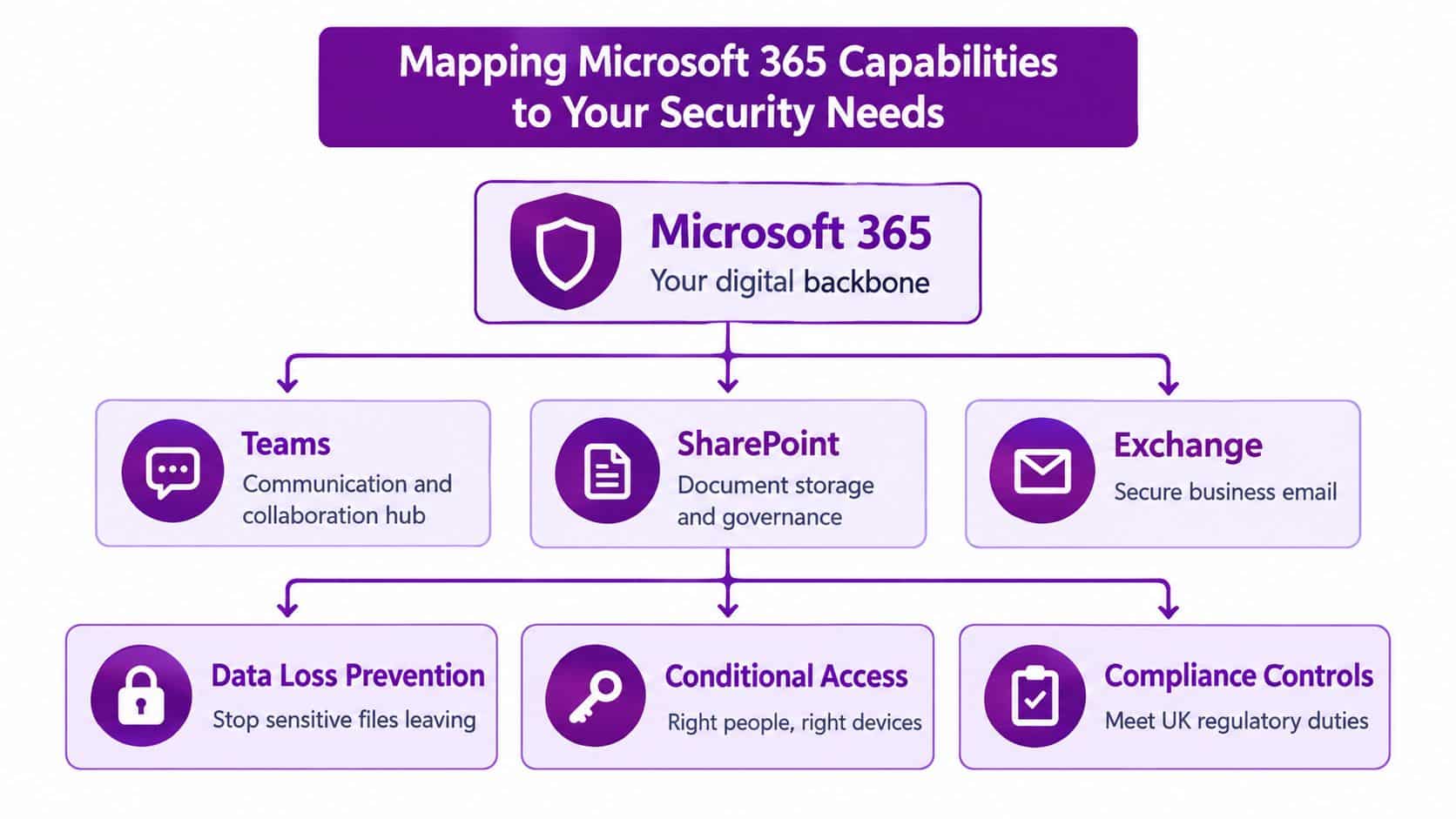
Give Teams, SharePoint, and Exchange distinct jobs
Teams should manage live communication and working discussions. It should not become the permanent home for every file, decision, or customer record. SharePoint should store controlled documents and governance-heavy content. Exchange remains the business email layer. Clear boundaries reduce duplicate records, make ownership visible, and give administrators something specific to protect.
Licensing also needs checking before approval. Microsoft UK lists Microsoft 365 Business Standard at £10.80 per user per month when paid annually, excluding VAT, and notes that some Teams functionality requires a Teams licence Microsoft UK pricing. Budget against the work users must perform, not the product name alone.
Build security into the operating model
A properly configured Microsoft 365 environment needs conditional access, multifactor authentication, data-loss controls, and sensible device rules. Add retention policies and firm external-sharing boundaries. These controls protect collaboration while keeping documents, approvals, and business records connected to the processes they support.
Security creates a design trade-off. Fewer checks make work faster, but increase exposure. Tighter controls reduce risk, but can push frustrated employees towards personal email or unsanctioned messaging. Set policies around real workflows, test them with staff, and remove unnecessary friction rather than weakening protection.
Secure collaboration should feel firm, not clumsy. If employees keep finding unofficial ways around your controls, the design is wrong.
For a Microsoft-focused rollout, align the plan with F1Group's Microsoft 365 security best practices. The practical test is whether security rules hold across office, home, and mobile working without breaking access to the information each role requires.
Buy for governance, not convenience
Treat Microsoft 365 as a governed workspace, not a collection of loosely connected applications. Define who owns each team, where files belong, who can invite guests, which records require retention, and how access changes when someone moves role or leaves.
That discipline connects the platform to operational resilience. Without it, businesses accumulate unused teams, duplicated documents, uncontrolled guest access, and unclear accountability. Those failures come from the operating model, not from a missing chat or video feature.
Implementing Your New Collaboration Strategy Successfully
What breaks collaboration rollouts in UK SMEs: the software, or the fragmented process around it? A platform will not fix scattered approvals, duplicate files, or informal messaging on its own. Leaders need a controlled rollout, clear ownership, and managers who enforce the agreed way of working.
Start by auditing current practice. Identify where teams chat, store documents, request approvals, and hand work between departments. Then remove unnecessary overlap before adding another application. The aim is a connected operating process, not a longer feature list.
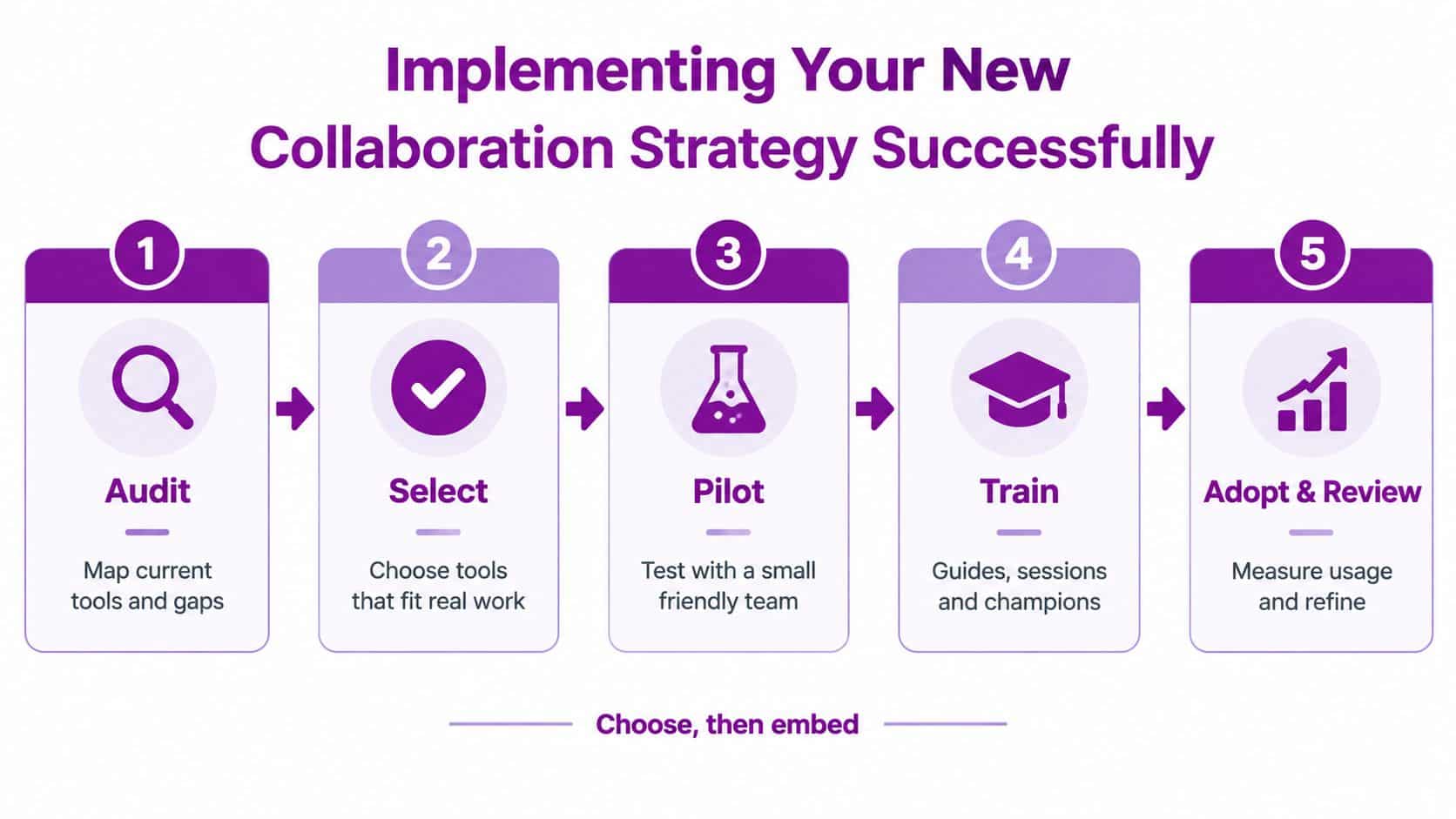
Roll out in the right order
Audit first. Map existing tools, channels, file locations, and approval routes. Record where work stalls and which unofficial methods staff rely on. Without that baseline, new software just sits on top of old habits.
Select carefully. Choose a platform that matches the operating model. A mid-market firm with structured approvals and shared records needs stronger governance than a small service business focused mainly on messaging and meetings. Hybrid teams also need consistent access and clear ownership across office, home, and mobile work.
Pilot with a small team. Select users who will follow the proposed process and report friction openly. Test a complete workflow, such as a request, approval, document update, and handover. Fix the weak points before expanding the rollout.
Train with purpose. Show staff where files belong, which channel serves each task, how approvals are recorded, and which behaviours are prohibited. People follow rules when those rules remove uncertainty from daily work.
Adopt and review. Monitor usage alongside operational results. Check whether handovers are clearer, approvals move faster, and staff have stopped relying on side channels. Continued workarounds indicate a process problem, not a finished implementation.
Budget and licensing need a clear check
At the Business Standard baseline discussed earlier, licensing still varies once you add telephony, meeting requirements, or extra security controls. Do not assume the base plan covers every collaboration need.
Match licensing to roles and workflows rather than the product brochure. Buying a broader licence will not repair unclear ownership, duplicated documents, or a disconnected approval process.
Change management is the part people ignore
Behaviour determines whether the rollout lasts. Staff need to know what changes, why the change matters, and what happens when old channels remain outside the agreed process. Without firm direction, the business ends up supporting two operating models at once.
The internal guide on change management in digital transformation provides useful context. Technology changes stick when managers back the new rules and frontline users understand them.
Choose the tool, define the workflow, secure the environment, train the team, and review adoption. That sequence gives leaders a practical way to reduce process fragmentation instead of adding another disconnected system.
F1Group helps East Midlands businesses bring Microsoft 365, security, and workflow automation into one workable collaboration model. For practical support with Teams, SharePoint, Power Platform, or a wider rollout, visit F1Group or call 0845 855 0000. You can also send a message at https://www.f1group.com/contact/.