
Your sales team has confirmed an order, but finance is waiting for someone to copy the details into the accounts package. Meanwhile, operations is checking a spreadsheet to work out what's been promised. Everyone has software, yet people are still carrying information between systems by hand.
System integration benefits start with removing those handovers. But connecting applications won't automatically fix unclear responsibilities or unreliable records. The sensible starting point is the bottleneck you can measure, not the connector you can buy.
Benefits of System Integration at a Glance
| Benefit area | What changes | Typical evidence |
|---|---|---|
| Operational efficiency | Data moves between systems without manual re-entry | Several hours a week saved on administrative work |
| Data accuracy | Each record is entered once and shared | Fewer financial-record errors reported by businesses |
| Reporting speed | Management sees current figures without manual compilation | Better visibility of live information |
| Workforce productivity | Staff stop switching between tools to find or copy data | Productivity uplift reported in UK business surveys |
| Cost control | Duplicate licences, manual fixes and reconciliations fall away | Lower operating costs, quantified per business |
| Customer experience | Sales, service and finance work from one customer record | Faster response times, measured locally |
Operational efficiency is usually the first visible change. Staff spend less time transferring information, so measure administrative effort rather than counting completed automations.
Data accuracy improves when colleagues stop making separate copies of the same record. Correction logs and reconciliation queries help establish whether that improvement is happening.
Practical rule: Treat these benefits as outcomes to test, not promises attached to a software purchase.
Reporting speed matters when managers currently wait for someone to assemble spreadsheets. Measure the delay between a business event and its appearance in a usable report. Current information doesn't necessarily mean instantaneous information, so agree an acceptable update interval.
Workforce productivity means employees can complete useful work with fewer searches and screen changes. Look at task completion times alongside staff feedback, rather than assuming every automated action saves meaningful effort.
Separate financial gains from service improvements
Cost control requires an actual change in spending or workload. Redundant licences only save money when they're cancelled, and released staff capacity isn't automatically a payroll saving.
Customer experience improves when colleagues can answer questions without passing the customer between departments. Track response times, repeated requests for information and avoidable handovers.
Mark the benefit areas that match your biggest bottlenecks. Those are the outcomes to baseline first, because results depend on how the integration is designed, adopted and maintained.
What System Integration Means in Plain Terms
Think of a business where every department has its own filing cabinet. Sales holds customer details, finance holds billing information, and operations holds delivery instructions. Nobody can see the complete file without asking colleagues.
An integrated business works more like a shared records room. Each team can find the information it needs, subject to access permissions, without creating another disconnected copy.
The diagram shows that shift from departmental files to shared records.
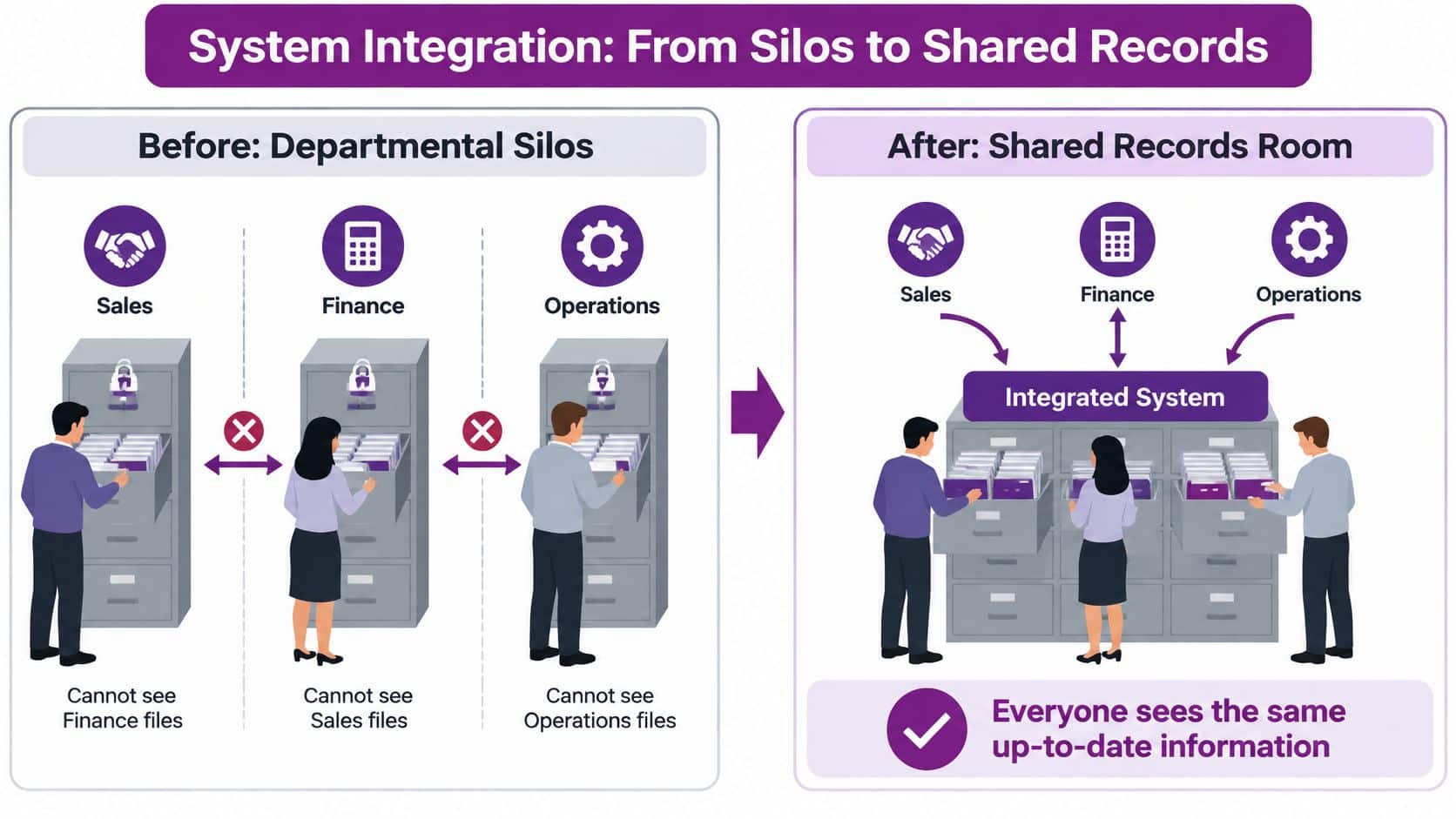
System integration connects applications so that data and workflows pass between them automatically instead of being copied by hand. It doesn't necessarily replace the applications or move everything into a single database.
The building blocks
- Applications: The systems involved might include a CRM, an accounting package, an HR platform and Microsoft 365.
- Connector or API: This provides a defined way for an application to send information or request it from another system.
- Field mapping: This matches information between systems, such as translating a CRM's billing address into the accounting package's address fields.
- Trigger: An event, such as an approved customer record, starts the agreed workflow.
- Shared identifier: A stable customer or employee reference keeps the same person or organisation recognisable everywhere.
At the centre is a connected record, with applications, mapping, triggers, identifiers and exchange rules arranged around it. Matching names alone isn't enough, because different customers can have similar names.
The UK Innovation Diffusion and Adoption Survey found that 16% of businesses cited the ease of integrating technologies as a barrier. Compatibility therefore deserves attention before purchasing another application.
A plain definition to share with colleagues is: integration lets business systems exchange agreed information and start agreed actions without someone carrying the details between them.
Integration Methods Compared, From Simple Links to API-Led Design
The right method depends on which applications need to communicate, how quickly information must arrive and who will maintain the connection. Start with those questions rather than a preferred platform.
| Method | How it connects | Best for | Main drawback |
|---|---|---|---|
| Point-to-point | Direct link between two systems | Two systems with a simple, stable data flow | Each new link adds maintenance and becomes hard to scale |
| Native connector | Built-in link supplied by the software vendor | Common pairings such as Microsoft 365 and Dynamics 365 | Limited to the fields and data the connector supports |
| Middleware or integration platform | Hosted platform routes data between many systems | Several systems across cloud and on-site environments | Ongoing platform cost and skills needed to manage it |
| API-led integration | Reusable services built for each system and process | Growing businesses that expect new systems and processes | Higher upfront design effort before the first connection |
| Data warehouse with ETL | Copies data into a central store on a schedule | Reporting across systems rather than live updates | Figures can be out of date between data loads |
A direct link is straightforward until other applications need the same information. Native connectors reduce development work for supported pairings, but check whether they expose the specific fields and actions your process requires.
Middleware provides a central place to route and monitor exchanges. API-led integration adds reusable interfaces, so future workflows don't each need a fresh connection to the underlying application.
Choose by situation, not fashion
For a simple exchange between a pair of applications, start by assessing the native connector. For a growing collection of systems with changing processes, consider middleware or API-led design; for reporting without operational updates, a warehouse may be sufficient.
- System scope: List every application involved, including on-site software and third-party dependencies.
- Timing: Decide whether updates must arrive immediately or can run overnight.
- Maintenance skills: Identify who can diagnose failures, manage credentials and test changes.
For Microsoft environments, the Power Automate versus Logic Apps comparison helps frame the platform decision. Where IT service tools are involved, Vight's PSA vs RMM differences explained helps distinguish service-business workflows from device monitoring before deciding what to connect.
Don't assume the lowest setup price means the lowest overall cost. Compare maintenance, licensing, monitoring and change work over an illustrative three-year planning period before choosing.
How Integration Removes Duplicate Work and How to Prove It
Say a sales team wins an order in its CRM. Someone then re-keys the customer, product and value into the accounting package, followed by another entry into the service system so engineers can schedule the work. A single business event has created repeated handling and separate opportunities for mistakes.
The following diagram contrasts those manual handovers with an integrated route.

Respondents to the UK Government's business-systems integration call for evidence reported several hours per week saved on administration, fewer financial-record errors and better visibility of current information through automatic transfers, including real-time financial updates. The same evidence warns that integration can introduce complexity and ongoing maintenance.
For an East Midlands organisation linking Dynamics 365, Microsoft 365, finance, CRM, HR or line-of-business applications, the useful outcome is controlled reduction in duplicate handling. Connectivity alone isn't the objective.
Follow the transaction
When an opportunity changes to won, an integration could create an invoice draft in finance and a service task for operations. Draft status preserves the finance team's approval step rather than treating a sales decision as permission to issue an invoice.
- Source event: The CRM records the approved change.
- Mapping and validation: The workflow checks customer identifiers, product references, required fields and permitted values.
- Target transfer: Valid information creates the appropriate records in finance and service.
- Exception handling: Failed records enter a queue with a named person responsible for correction and resubmission.
Fewer re-keying steps reduce transcription risk. Automatic synchronisation shortens the wait between systems, while current records let managers prepare reports without chasing separate updates.
As a hypothetical workload calculation, 40 orders a week at 10 minutes of re-keying each would consume roughly seven hours. That's an illustration, not a benchmark, and approval or exception work may remain after integration.
The accompanying video offers another way to explore the workflow.
Establish the baseline before building
Use a practical measurement plan, adjusting the sample to your transaction volume:
- Define the process and list every system it touches.
- Count manual entries and staff hours, for example over four working weeks.
- Record corrections and errors, using an illustrative sample of at least 50 records.
- Measure reporting delay from the original event to its appearance in management information.
- Assign ownership for each exchanged field and agree its meaning.
- Set targets and a review date, such as halving re-keying.
- Repeat the measurements, for example at a 90-day review, using the same method.
The Government's digital functional standard supports authoritative data sources, common models and governed interfaces. Translate those principles into an operational checklist:
- Authoritative matching: Percentage of records matched to the agreed source.
- Failures: Integration failure rate and unresolved exceptions.
- Latency: Time between source changes and target updates.
- Duplicates: Duplicate-record rate.
- Insight: Time needed to produce management information.
If saved hours remain flat at review, inspect adoption and exception handling before blaming the technology. Specify shared identifiers, validation, monitoring and recovery rules before connecting systems, and assess whether reusable API-led interfaces are justified.
Productivity and Cost Gains Businesses Can Expect
The UK Government's small-business evidence annex, citing Office for National Statistics findings, reports 25% productivity gains for firms using at least two technologies and technology-related improvements of 7% to 18% among microbusinesses, depending on the technology adopted.
| Figure | What it measures |
|---|---|
| 25% | Productivity gain for firms using at least two technologies |
| 7% to 18% | Technology-related productivity improvement among microbusinesses, depending on technology adopted |
These are associations with technology use, not an isolated measure of integration's contribution. They don't establish that connecting applications will produce the same improvement in your organisation, or that every combination of tools is equally useful.
The visual highlights the relationship between technology adoption and productivity; its broader integration message should be read with that distinction in mind.

Turn capacity into a credible business case
Sue Tomlinson of Unison, Lincolnshire, describes the outcome of a wider technology partnership:
“Our long-term relationship with the F1 Group and their introduction of new technologies into our schools has enabled me to reduce our IT spending whilst increasing our availability and network speed.”
That testimony illustrates how lower spending and stronger reliability can coexist. It isn't a quantified integration case study, so don't use it to forecast your return.
Build your own calculation using hours saved per role, licences removed, outage minutes avoided and time taken to close the month. The guide to improving operational efficiency provides further context for choosing operational measures.
For an illustrative costing assumption, seven hours saved each week across 52 weeks equals 364 hours, worth £9,100 at an assumed loaded staff rate of £25 per hour. Replace that rate and working-year assumption with your own figures, and distinguish released capacity from cash savings.
Give the finance director a baseline, a target and a review date, alongside implementation and running costs. That makes the proposal testable rather than dependent on a headline percentage.
Why Some Integrations Fail to Pay Off
Connecting systems doesn't automatically improve efficiency. In the 2025–26 UK Business Data Survey, only 8% of businesses handling digitised data said data use led to more efficient internal processes always or most of the time, while 49% said it did not do so at all.
Those findings concern data use generally, not integration projects specifically. They still challenge the assumption that having digital information is enough to improve how people work.

A workflow can move incorrect information faster without making it useful. If sales and finance disagree about what constitutes an active customer, synchronisation can spread that disagreement into more systems.
Warning signs worth stopping for
- No named owner: Nobody has authority to resolve conflicting records or approve process changes.
- No agreed definitions: Fields with similar names contain different meanings.
- Unmanageable links: Separate point-to-point connections have no shared documentation or maintenance responsibility.
- No operational objective: The proposal says connect everything, rather than reduce a defined delay or error.
- No adoption plan: Employees can bypass the workflow, but nobody monitors whether they do.
Integration can expose poor processes rather than fix them. Make the process decision before automating the handover.
Successful projects need available data, workable procedures, clear ownership and staff adoption. In Power Platform environments, Centre of Excellence governance can help structure responsibilities rather than leaving workflows dependent on individual makers.
Integration remains worthwhile where a measurable constraint exists. The fair test isn't whether the technology can connect the applications, but whether an accountable owner can name the bottleneck, the outcome and the measure that will demonstrate improvement.
Choose Your First Integration Project and Next Step
Choose a bottleneck, baseline it, then select the method that fits the systems involved. Your first project should cover a clearly bounded process with a named owner, not an all-systems programme whose success nobody can define.
A useful starting point might be approved orders reaching finance, new employees receiving the right access, or service teams receiving complete job details. Choose the process where staff can explain the current delay and show the records behind it.
Make support part of the decision
Before approving implementation, agree who responds when the workflow stops. A failed transfer shouldn't leave your finance team contacting the CRM supplier while operations contacts the accounting supplier.
- One contact: Our support contracts can cover all of a client's systems, including third-party applications, giving the internal team a single point of contact.
- Remote resolution: We resolve support problems remotely through our ticketing system.
- Onsite expertise: Our specialist team visits for hardware work or jobs that can't be completed remotely.
That support arrangement matters because an integration crosses application boundaries. The person investigating needs a route to follow the transaction, identify the failed stage and coordinate a resolution.
F1Group is a Microsoft-focused IT provider serving businesses across the East Midlands. Our free IT review identifies solutions to implement and what may be done to keep IT services running smoothly, providing a starting point for assessing a bottleneck before committing budget.
Bring a process description, the systems involved and examples of delayed or corrected transactions. Use the review to test whether integration is justified, what needs to change first and how you'll judge the result.
Visit F1Group to discuss a free IT review and assess where system integration could remove a measurable operational bottleneck. Phone 0845 855 0000 today, or send us a message with the process and systems you'd like to connect.