
Systems integration connects separate applications, data sources and business processes so they share information and work as one coordinated environment.
You might have a customer's details in Dynamics 365, their invoices in accounting software and their latest delivery instructions in a spreadsheet. Each system does its job, but your staff spend time copying information between them and checking which version is right. Integration can remove that extra handling, provided someone also owns the rules, the exceptions and the ongoing maintenance.
What Systems Integration Means in Plain English
A busy restaurant can run on separate tools: a till for payments, a notebook for bookings, a kitchen printer for orders and a stock sheet in the office. Each one works. The friction appears when the same order has to be typed twice, or when lunch service ends and nobody is sure whether the stock figure was updated before the deliveries were booked.
Systems integration is the work of making those tools support one activity rather than four neighbouring ones. Interoperability means systems, services, organisations or data can work together and exchange information effectively.

The layers behind a useful connection
Connecting two applications is the visible part. The harder part is agreeing the operating rules around it: what information moves, where the correct version lives, who may change it, and what happens when a record is incomplete.
- The connection determines how applications communicate, such as through an application programming interface, usually shortened to API.
- The data determines what each field means. A billing address and a delivery address aren't interchangeable.
- The process and owner determine who acts when something changes, including who handles an incomplete order or a rejected update.
The Government Digital Functional Standard recommends authoritative data sources, common data models and governed interfaces. In ordinary business terms, decide where the correct information lives before arranging for other systems to use it.
A common trigger is adopting Microsoft 365, Dynamics 365 or a specialist line-of-business application, then discovering that staff still enter customer details elsewhere. The software has changed, but the handover hasn't.
Sometimes the right answer is to do less. If one person updates a weekly list and errors are rare, a clear procedure may beat a permanent connection. Integration earns its keep when rekeying is frequent, delays matter, or a mistake in one system creates work in another. It also creates a maintenance obligation: fields change, permissions change, and someone has to watch the failures.
Practical test: If people must type the same information into separate systems, integration deserves investigation. That doesn't automatically mean it deserves a project.
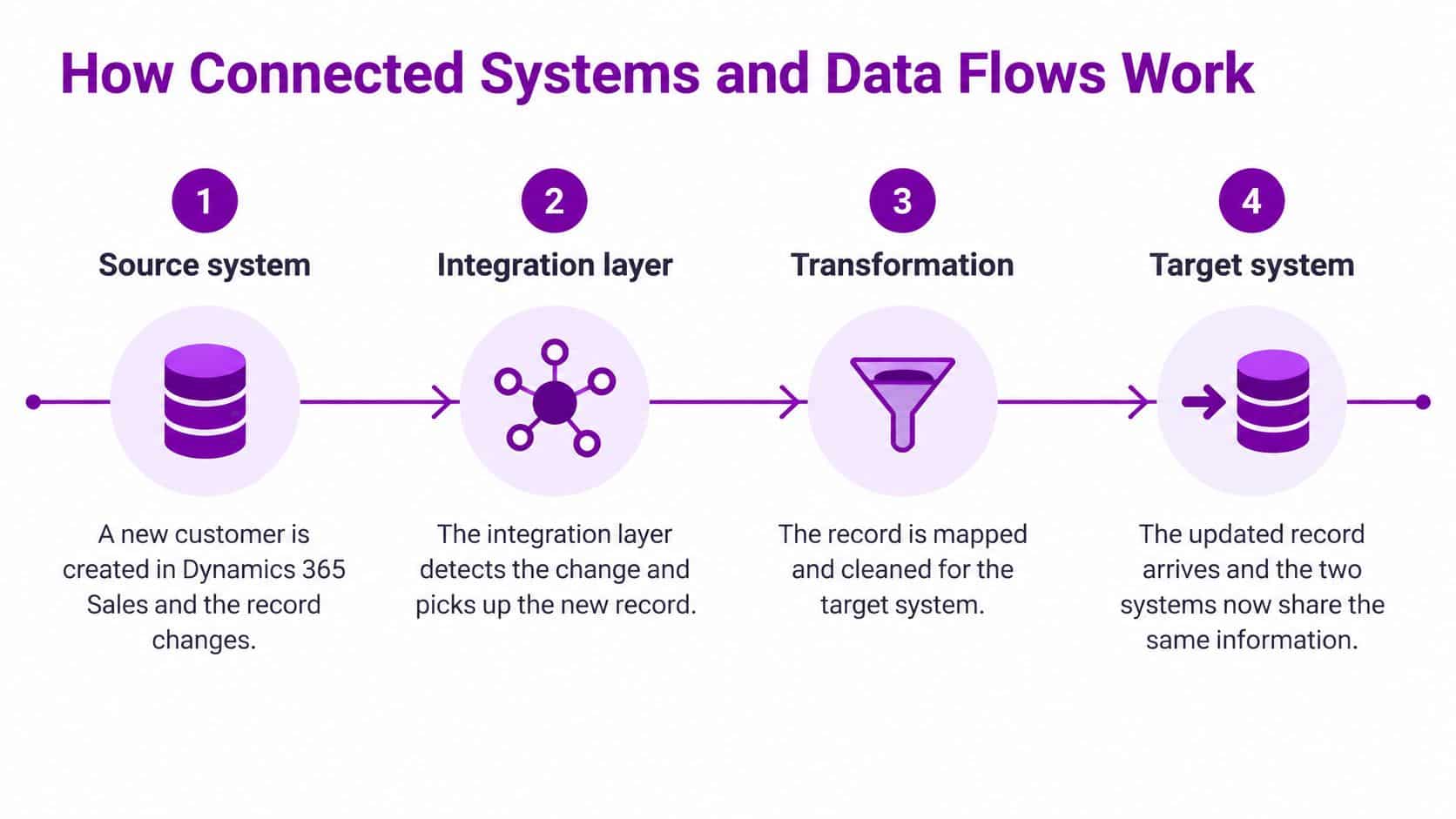
How Connected Systems and Data Flows Work
Say a salesperson creates a customer in Dynamics 365 Sales and the finance team needs an account for that customer. A reliable integration follows a controlled sequence, rather than copying everything it finds.
- Create or change the source record. The salesperson saves the customer's details, including a stable customer identifier.
- Detect the change. An integration layer picks it up through a scheduled synchronisation, an event trigger or an API call.
- Map and transform the fields. It matches fields between applications and converts formats, such as dates, into the destination's expected structure.
- Validate the transfer. Required fields and permissions are checked. Incomplete or restricted records are held for review.
- Write and log the result. The destination accepts the record, while logs record what happened and identify failures.
The diagram groups these activities into the main stages of the journey.
Common data flows between business systems
| Data flow | Typical source | Typical destination | Values that must match |
|---|---|---|---|
| Customer records | CRM (Dynamics 365 Sales) | Accounting system | Customer ID and VAT number |
| Orders and invoices | Sales system | Finance system | Currency, tax code and invoice date |
| Staff starters and leavers | HR system | Microsoft 365 accounts | Employee ID, role and licence |
| Support tickets | Service desk | CRM | Case ID and status values |
| Management reporting | Several operational systems | Power BI | Shared definitions of revenue and dates |
A successful transfer isn't necessarily a correct transfer. A finance application might accept an amount that the sales application treats as excluding VAT, while interpreting it as including VAT. Nothing has crashed, but the resulting invoice is wrong.
The Government Digital Functional Standard's technical guidance supports shared data meaning and governed exchanges. Test with realistic records, including missing values, duplicate submissions and destination outages. A retry mustn't create another customer or invoice.
For a sales-specific application of these ideas, The Social Search pipeline automation guide offers useful context on connecting pipeline activities.
Before approving any flow, name its source, the owner of each important field and the identifier that links the records.
Common Integration Approaches Compared
Choose an approach by looking at transaction volume, the number of systems, available skills and governance needs. Also consider what happens when an application changes. A connection that's easy to demonstrate can still be awkward to support.
Integration approaches compared
| Approach | Best suited to | Main strength | Main limit |
|---|---|---|---|
| Point-to-point link | Two systems with low volume | Quick to build | Becomes fragile as links multiply |
| Native connector | Standard Microsoft pairings | Little setup and vendor supported | Moves only the fields the vendor provides |
| Low-code workflow (Power Automate) | Moderate volume with business-owned logic | Visible audit trail and quick changes | Licensing and throughput limits |
| Middleware or integration platform | Many systems sharing common rules | Central monitoring and reuse | Ongoing platform fees |
| Bespoke API integration | High volume or custom rules | Full control with documented contracts | Highest build and upkeep effort |
A point-to-point link connects applications directly. It's reasonable for a contained requirement, but maintaining separate rules across an expanding web of links becomes difficult. A native connector reduces setup work where the vendor already supports the required pairing, although you still need to check its supported fields and actions.
Power Automate suits workflows where staff need to understand and adjust business logic, such as routing approvals before updating a record. Low-code doesn't mean maintenance-free: someone must manage connection credentials, failed runs and changes. Our Power Automate and Zapier comparison explores that workflow-tool choice.
When more control is justified
A middleware platform provides a central place to route exchanges, reuse transformations and monitor failures. A bespoke API integration is appropriate when standard connectors can't meet the required rules or workload, but it needs maintained documentation and development expertise.
UK Government API guidance recommends documented interfaces, open-standard formats, common authentication protocols such as OAuth and OpenAPI 3 for REST API documentation. OAuth governs access; OpenAPI describes the interface's requests and responses.
Start with the simplest approach that meets the operational and security requirements. Add complexity only when a clear limitation justifies it.
These approaches can overlap. A low-code workflow can call a bespoke API, while middleware can use native connectors. Choose responsibilities and support boundaries, not just a product label.
Integration Examples from Health and Business
The NHS demonstrates integration at national scale. Its interoperability standard requires services to share patient records and move data quickly between systems, using agreed FHIR-based APIs where appropriate and the NHS number to identify patients through APIs when appropriate.
The healthcare illustration shows why hospitals and clinics need agreed routes for exchanging records.

An illustrative manufacturing workflow
Consider an East Midlands manufacturer, rather than a particular client. When a salesperson creates an approved order in Dynamics 365 Sales, an integration reserves stock in the warehouse application and creates the corresponding invoice in accounting, following the company's agreed invoicing policy.
The customer ID must identify the correct account, the product code must identify the correct item, and the order date must retain its intended meaning. If the warehouse rejects the reservation, staff need an exception to review, not an invoice that suggests everything succeeded.
The video provides another way to approach the topic.
An illustrative charity workflow
A charity might connect donor records in its CRM with Gift Aid processing in finance and volunteer details in HR. A shared supporter identifier prevents someone who donates and volunteers from appearing as unrelated people across applications.
That doesn't justify copying every detail everywhere. Finance may need donation and declaration information, while volunteer coordinators need availability and role details. Access should follow those tasks, not merely the existence of a connection.
The shared lesson: Systems must agree which person, product or transaction a record represents before they can exchange it usefully.
Whether the setting is healthcare, manufacturing or charitable work, shared meaning comes before connectivity. Otherwise, faster transfers spread misunderstandings more efficiently.
Why Integration Decides Whether AI Tools Work
The AI tool isn't always the main obstacle. In September 2024, 15% of UK businesses reported using artificial intelligence, up 5 percentage points from September 2023, according to the Office for National Statistics.
Moving from adoption to dependable business use brings a different challenge. In a 2025 survey of 250 UK business leaders, 40% identified integration with legacy systems as the main challenge to scaling AI programmes, ahead of budget constraints at 33% and internal expertise at 29%, reported by Expleo.

Integration as a control layer
For East Midlands organisations adopting Microsoft 365, Dynamics 365, Azure and Power Platform, AI readiness requires more than switching on a feature. Customer, finance, HR and operational information need consistent meanings, duplicates need resolving, and the origin of an answer must be traceable.
Build these controls into the workflow:
- Permission enforcement limits the information available to the tool and its user.
- Data lineage records where figures and statements originated.
- Human approval keeps high-impact actions, such as releasing payments or changing employment records, under accountable supervision.
Questions to settle before deployment
Can Copilot safely use information from several systems? Potentially, but only through supported, correctly configured access paths. Test the actual connector and user context rather than assuming connected means safe.
What happens when records conflict? Define the authoritative source for each field and send unresolved conflicts for review. An AI-generated guess isn't a reconciliation policy.
How are permissions inherited? Don't assume they are. Check whether the integration runs as the individual user or through a service identity, and test restricted records explicitly.
Who is accountable for a wrong action? Assign a business process owner, record automated actions and provide a way to stop or reverse them where possible. For sales teams, our Dynamics 365 Sales Insights guide provides a related product-specific starting point, but these operational decisions still need an owner.
What Integration Costs and Who Maintains It
What will integration cost, and what must you maintain afterwards? A UK Government review of business systems integration identifies implementation, training and ongoing subscription fees as major barriers, alongside inconsistent interfaces, authentication methods and data formats. It also highlights the difficulty smaller organisations face when they lack combined business and technical expertise.
The main expense headings are straightforward, even when a reliable quotation requires investigation.

Budget for the working life of the connection
Compare shortlisted options over five years, rather than treating the initial build as the whole cost. Ask for an itemised budget in GBP, with recurring charges and assumptions clearly separated.
- Discovery and cleansing cover understanding existing flows and correcting records before transfer.
- Platform access includes API, middleware, connector and subscription charges.
- Testing and training cover failure scenarios, user checks and staff time.
- Monitoring and support cover alerts, investigation and restoring failed exchanges.
- Future changes cover adapting the integration when suppliers alter interfaces or your business changes its rules.
A native connector generally needs less development than a bespoke API, but neither removes operational responsibilities. Our Power Automate cost guide can help frame the licensing questions for that option.
Sometimes integration isn't necessary
An occasional, low-risk transfer may be better handled with a manual check. Native functionality may already solve the problem without another workflow to support.
Ownership is the deciding issue. Our support contracts can cover all a client's systems, including third-party applications, giving the team a single point of contact. We focus on the most cost-effective way to resolve problems and support them long term, regardless of who supplied the equipment; for schools, that includes being frank about whether existing IT is terrible, salvageable or brilliant.
Before approving the work, check:
- Named owner: Who is responsible for the complete business flow?
- Monitoring plan: Who receives alerts and reconciles missing records?
- Change budget: Who funds adjustments after launch?
Decide Whether Integration Fits Your Business
Start with the work your staff do, not a shopping list of connectors. Ask:
- Frequency: How many times a week does someone move the same information manually between systems?
- Consequences: What would an incorrect customer, payment or access record cost the organisation?
- Ownership: Is someone already responsible for the systems and the process between them?
Frequent re-keying or expensive errors make integration worth evaluating. Occasional, low-risk transfers may need only a native feature or a documented manual check. If nobody owns the process, appoint an owner before automating it.
Make the next step a review
List your current applications and the data flows that matter most. Choose a manageable starting flow, define what a correct result looks like and compare suitable approaches over a five-year planning period, including maintenance.
F1Group is a full-suite IT solutions company established in 1995 and based in Lincoln, Nottingham, Leicester, Scunthorpe, Grimsby and Newark. A useful discussion should distinguish what needs connecting from what needs cleaning up, replacing or leaving alone.
F1Group offers systems integration and ongoing IT support, helping you assess how your applications should work together and who will maintain them. Lincoln businesses can also arrange a complimentary IT services review to identify potential vulnerabilities and opportunities. Phone 0845 855 0000 today, or send us a message to arrange a conversation about your systems.