
Managed IT services turn unpredictable technology risk into dependable expertise, stronger security and more predictable uptime, particularly when 44% of UK businesses have a basic cyber-security skills gap. Buying that capability as a service usually makes more sense than building an equivalent specialist team in-house, but compare the full scope and total cost before signing.
You're probably juggling Microsoft 365, an ageing server, business applications and people who need everything working now. Your internal IT contact is capable, but they can't simultaneously handle support tickets, investigate suspicious sign-ins and plan an Azure migration. The decision isn't whether outsourcing sounds attractive. It's whether your current arrangements can keep the organisation operating when something goes wrong.
The Friday Afternoon Problem Most East Midlands Businesses Face
Consider a manufacturer in Lincoln approaching the end of its working week. The dispatch team can't access the application that produces delivery paperwork, the office can't reach shared files, and the person who normally fixes IT problems has already left. This is an illustrative situation, not a customer case study, but it's a useful test of your support arrangements.
A charity in Leicester could face the same operational problem through a compromised email account. A professional services firm in Nottingham might lose access to documents needed for a client deadline. Different organisations, same uncomfortable question: who takes responsibility now?
The UK Government's Cyber Security Breaches Survey 2025 found that 43% of businesses, approximately 612,000 organisations, experienced a cyber breach or attack in the previous twelve months, rising to 67% of medium-sized businesses and 74% of large businesses. Those are reported security incidents, not a measure of IT outages, but they underline why a purely reactive arrangement leaves important work uncovered.
The failure starts before the outage
The immediate fault might be technical. The deeper failure is often organisational: nobody owns the recovery plan, supplier contacts are scattered, and management doesn't know which systems must return first.
Ask what would happen at your organisation:
- Initial response: Who receives the alert and decides whether it's an outage or a security incident?
- Operational priorities: Who knows which application restores dispatch, casework or customer service?
- Recovery authority: Who can authorise action and contact the relevant software supplier?
- Staff communication: Who tells employees what they can safely use?
Practical rule: If your recovery plan depends on finding one particular person, you haven't bought resilience. You've bought availability when that person happens to be free.
For owners, IT managers and IT directors at SMEs, mid-sized businesses, small PLCs and large charities, this is why managed IT services deserve serious consideration. IT isn't a back-office convenience when staff need it to fulfil orders, support beneficiaries or serve clients.
Choose support around those dependencies. A printer fault and a halted warehouse shouldn't enter the same undifferentiated queue.
What Managed IT Services Actually Mean
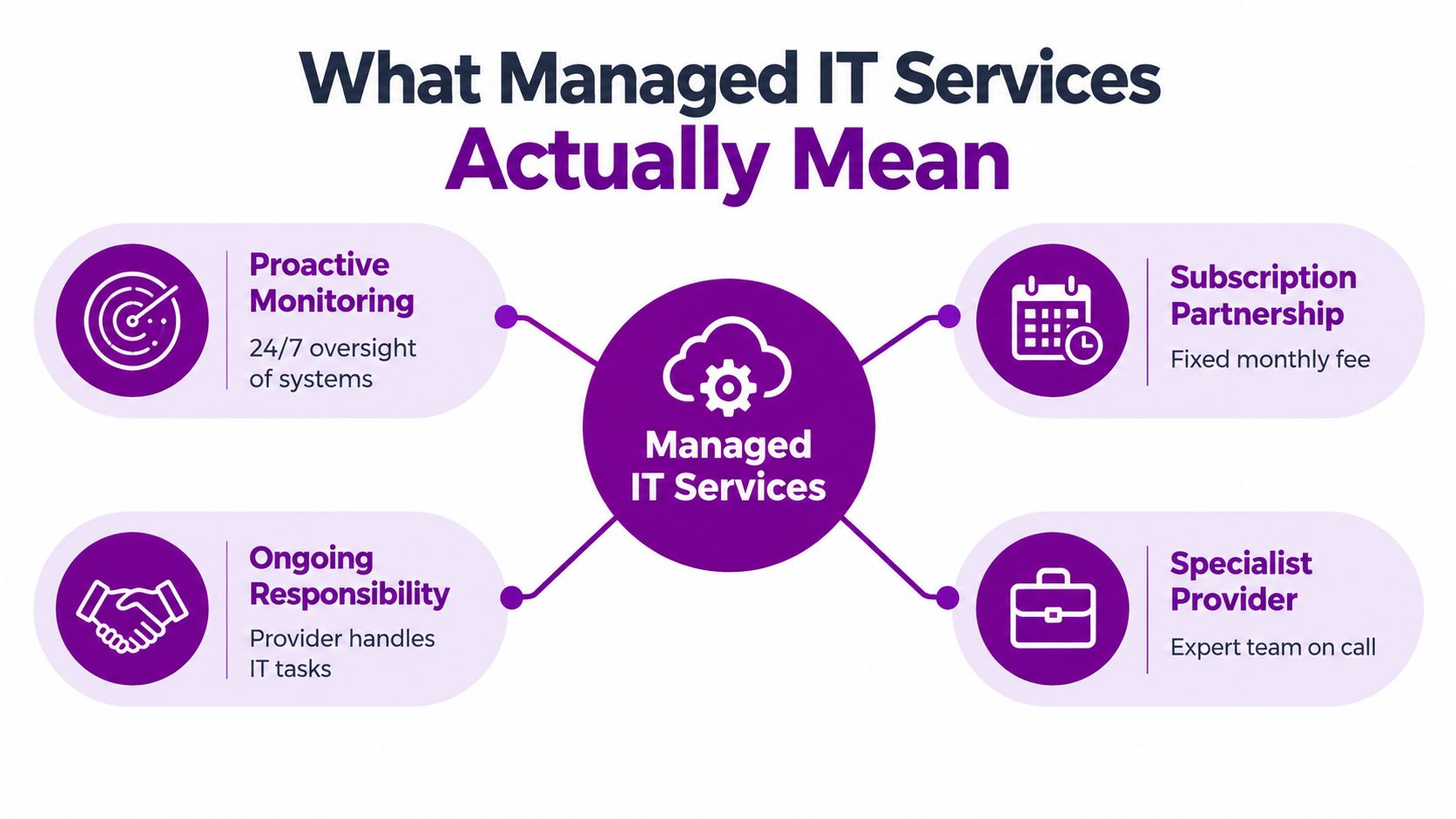
Managed IT services are an ongoing partnership in which a specialist provider takes agreed responsibility for monitoring, maintaining, securing and supporting your technology. The arrangement is typically subscription-based, with a monthly fee covering a defined service rather than a promise to handle absolutely everything.
The distinction is responsibility before something breaks. Break-fix support starts with a fault and an invoice for the work required; a managed partner should also maintain the estate, review risks and address recurring causes.
Think of a serviced vehicle contract versus calling a mechanic whenever the warning light appears. Maintenance doesn't guarantee that the vehicle will never fail, but it gives someone an ongoing duty to check its condition.
Choose the right division of work
The service model should follow your organisation's capabilities, not the provider's preferred package.
- Fully managed: Suitable when you need an external team to run the agreed IT environment and provide everyday user support.
- Co-managed: Your employees retain defined responsibilities while a partner supplies specialist skills, operational cover or additional capacity.
- Project-based: Useful for a migration, integration or deployment. It isn't ongoing managed support unless someone explicitly accepts responsibility after handover.
- Cloud-focused: Concentrates on platforms such as Microsoft 365 and Azure. Check whether laptops, connectivity and legacy applications remain outside the contract.
A fully in-house team is different again. You directly employ and develop the people, own their priorities and arrange their cover. That can be the right model, particularly where business-specific knowledge matters, but it requires deliberate investment in skills and capacity.
A helpdesk isn't the whole service
Ticket handling is necessary, but it isn't enough. Ask whether the provider maintains an asset register, owns outstanding maintenance actions and reviews repeat incidents with you.
If you're trying to find reliable IT support for business, Steel City IT's guide provides another resource to consider alongside your own service requirements. Use it to inform questions, not to replace a written scope.
Monitoring isn't the same as intervention. A system may raise alerts outside office hours while human investigation remains limited to contracted hours. Establish who acts, when they act and what they're authorised to do.
The Seven Benefits That Actually Matter
Don't buy a list of software tools. Buy a service that changes how your organisation handles everyday work and operational risk.
The UK Government's cyber-security skills research estimates that around 637,000 businesses have a basic cyber-security skills gap; among businesses that don't outsource incident management, 48% weren't confident they could deal with a breach or attack. Access to capable people and established procedures is therefore a serious buying criterion.
The operational benefits
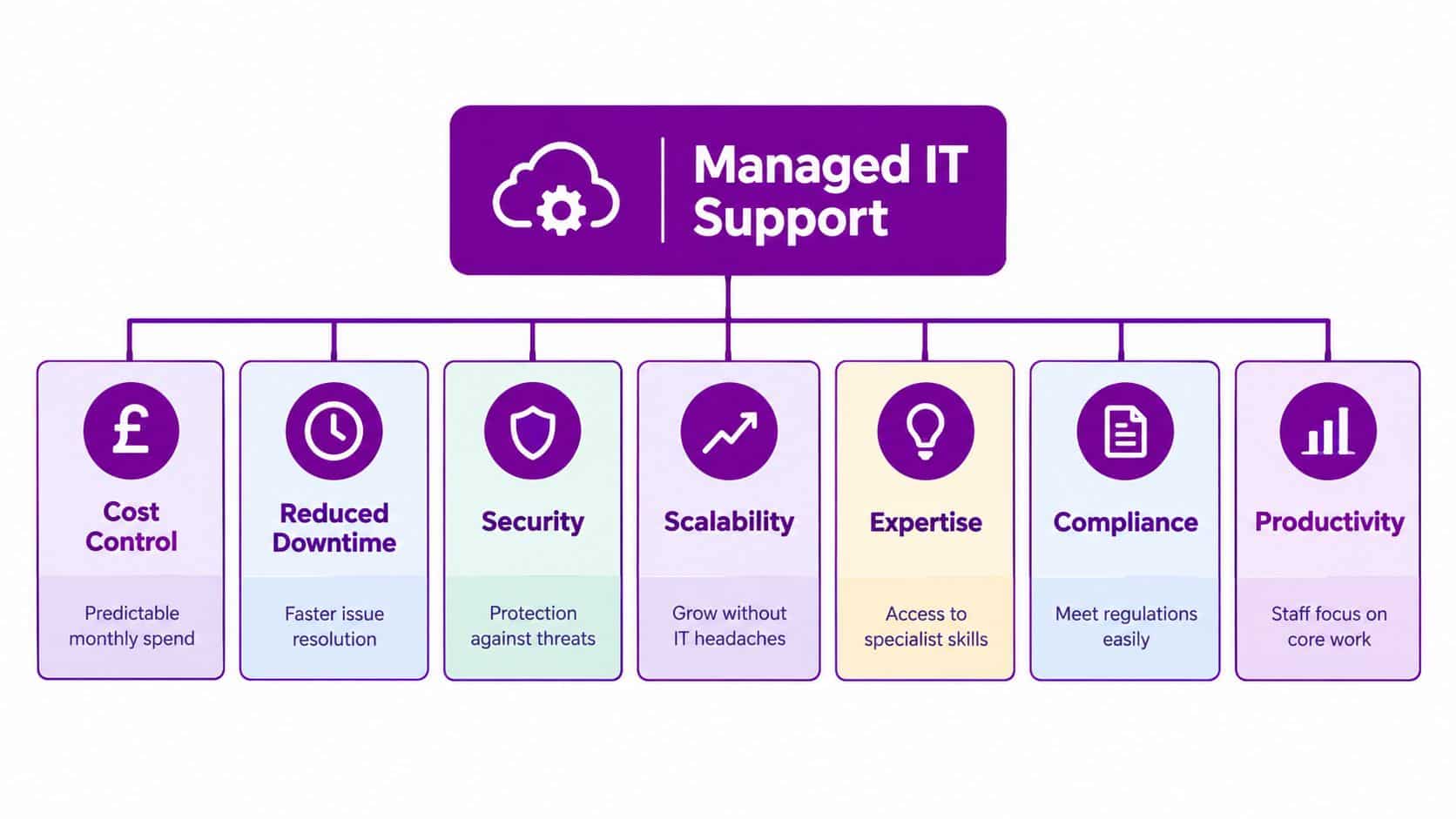
Cost predictability means knowing what routine support costs and which work falls outside it. For example, a finance director should be able to distinguish an included laptop rebuild from a separately priced office relocation. A monthly contract doesn't eliminate hardware replacement or project spending.
Stronger security comes from agreed controls and someone checking they're operating. Consider an endpoint with an overdue security update: the useful service is identifying it, deploying the update and investigating failures, not merely displaying a warning. Patching reduces exposure; it doesn't guarantee that ransomware will be blocked.
Higher uptime depends on practical maintenance. A provider that investigates repeated storage alerts before a server becomes unavailable gives your organisation a better chance of avoiding disruption. Demand evidence of actions taken, rather than assuming a monitoring dashboard proves prevention.
Broader expertise helps when one task crosses several disciplines. A Dynamics 365 deployment may require licensing decisions, Microsoft 365 identity configuration, application permissions and integration work. Access to those skills can stop your internal generalist becoming the bottleneck.
The management benefits
The remaining benefits are less visible on a technical dashboard, but they matter just as much:
- Scalability: When you open a branch or recruit another team, an agreed onboarding process can cover devices, accounts and application access. Confirm capacity and commercial notice periods before expansion, rather than assuming support scales instantly.
- Compliance support: Documented access reviews, patch records and recovery tests can support Cyber Essentials preparation, GDPR responsibilities and sector-specific scrutiny. For an audit, a completed restore-test record is more useful than a verbal assurance that backups work. Your organisation still owns its legal obligations.
- Leadership focus: A named service owner can coordinate a connectivity supplier and an application vendor while managers run the business. The benefit is fewer unresolved hand-offs, not removing directors from technology decisions altogether.
Ask for evidence of work completed, risks still open and decisions requiring your approval. A reassuring report without those details isn't useful management information.
These examples describe what a well-scoped service should deliver, not guaranteed customer outcomes. Insist on mechanisms you can inspect: maintenance records, escalation procedures, recovery evidence and an accountable person.
Managed IT Versus In-House Versus Break-Fix
Compare equivalent capability, not a salary against a subscription. An internal employee may understand your processes exceptionally well; an external service may supply broader cover. Neither advantage settles the decision on its own.
Break-fix can be sensible for a simple, non-critical environment. It becomes a weak primary model when staff depend on interconnected systems and you need someone to own maintenance between incidents.
Comparing IT Support Models
| Criterion | In-House IT Team | Break-Fix Support | Managed IT Services |
|---|---|---|---|
| Total cost | Employment, tools, training and cover | Labour charges plus separately arranged preventative work | Recurring service fee, exclusions and additional projects |
| Skills coverage | Determined by the people you employ | Depends on available technicians | Agreed access to the provider's team |
| Response time | Depends on staffing and availability | Depends on booking and supplier capacity | Defined by the contract and incident priority |
| Security coverage | Must be staffed and maintained internally | Usually separately commissioned | Included only where explicitly scoped |
| Predictability | Strong where staffing and processes are mature | Limited without a standing agreement | Stronger where scope and escalation are clear |
| Business knowledge | Direct access to daily operations | Can require investigation at each callout | Must be developed through discovery and documentation |
The hidden costs deserve attention. With in-house IT, include recruitment, training, management time, holiday cover and the risk of concentrating knowledge in one employee. With break-fix, include emergency charges, staff inactivity and diagnosis time when the technician doesn't know your systems.
Buying principle: The cheapest support quote isn't the cheapest operating model if it leaves critical responsibilities with nobody.
Calculate value without invented savings
Use your own records. Estimate interruption costs from affected staff time, delayed work, recovery expenditure and demonstrable lost contribution, rather than borrowing a dramatic breach-cost figure from another business.
A finance director can assess:
- Current operating cost: Include internal labour, external support, tools and recurring disruption.
- Proposed operating cost: Include the service, retained internal work, onboarding, exclusions and planned projects.
- Risk-adjusted benefit: Estimate the value of reducing interruptions using realistic assumptions, not a promise that every incident disappears.
Keep prevented-incident estimates separate from realised savings. You can measure fewer repeated faults; you can't confidently claim that every security alert represented a disaster avoided.
Where your internal staff are effective but stretched, co-managed IT services deserve consideration before replacing the whole function. For project capacity, Wonderment Apps' resource helps buyers compare staff augmentation and managed services; distinguish acquiring people from assigning ongoing responsibility.
Where Managed IT Services Make the Biggest Difference
The strongest trigger isn't a particular headcount. It's a mismatch between the systems your organisation depends on and the people available to run them.
Hands-on device support remains part of that requirement, even where most applications are hosted elsewhere.

Office for National Statistics analysis reported that 69% of UK firms had adopted cloud-based computing systems and applications in 2023, and adopters of advanced digital technologies such as cloud computing and AI achieved approximately 19% higher turnover per worker, after accounting for management practices and business characteristics. That finding isn't proof that buying managed support causes a productivity increase.
When growth outpaces informal support
For an SME with ten to seventy-five staff, the trigger might be an IT contact who can no longer keep pace with recruitment, application changes and support requests. Treat that range as an example of organisational size, not a threshold for outsourcing.
A growing Newark business should ask for a repeatable joiner-and-leaver process, documented system ownership and a plan for the next premises change. The objective is to stop relying on personal memory as the organisation expands.
Mid-sized organisations preparing for Microsoft 365, Azure, Dynamics 365 or Copilot AI need a different emphasis. Before deployment, assign ownership of permissions, data governance, integrations, user training and ongoing administration. Don't approve a project whose support handover remains undecided.
When data responsibilities become harder to manage
A large charity may need to protect donor and beneficiary information while supporting staff and volunteers with limited internal resource. A useful engagement starts by identifying sensitive information and access requirements, not by replacing every application.
For regulated businesses or organisations seeking Cyber Essentials or ISO 27001 evidence, ask the provider to connect technical work to the documentation your assessment requires. Certification and compliance need organisational decisions as well as technical controls.
This video provides an additional viewing point when considering support requirements.
A prospective partner should address:
- Business applications: Who supports Dynamics 365 Sales, Customer Service or HR after deployment?
- Automation and integration: Who maintains Power BI reports, Power Apps, Power Automate flows and custom applications?
- Supplier coordination: Who owns an incident when the application vendor blames the network?
Choose one accountable service owner without pretending one supplier can perform every specialist task.
How to Choose the Right Managed IT Partner
Start procurement with discovery, not a price list. A provider should understand your applications, sites, working hours, internal capabilities and recovery priorities before proposing a service.
The UK Business Data Survey 2024 reported that 19% of businesses handling digitised data used a public cloud provider, 13% used a private cloud provider and 35% stored and processed data on their own premises. Those categories shouldn't be treated as a simple partition, but they demonstrate why buyers must assess infrastructure beyond a single cloud platform.
Ask for proof rather than assurances
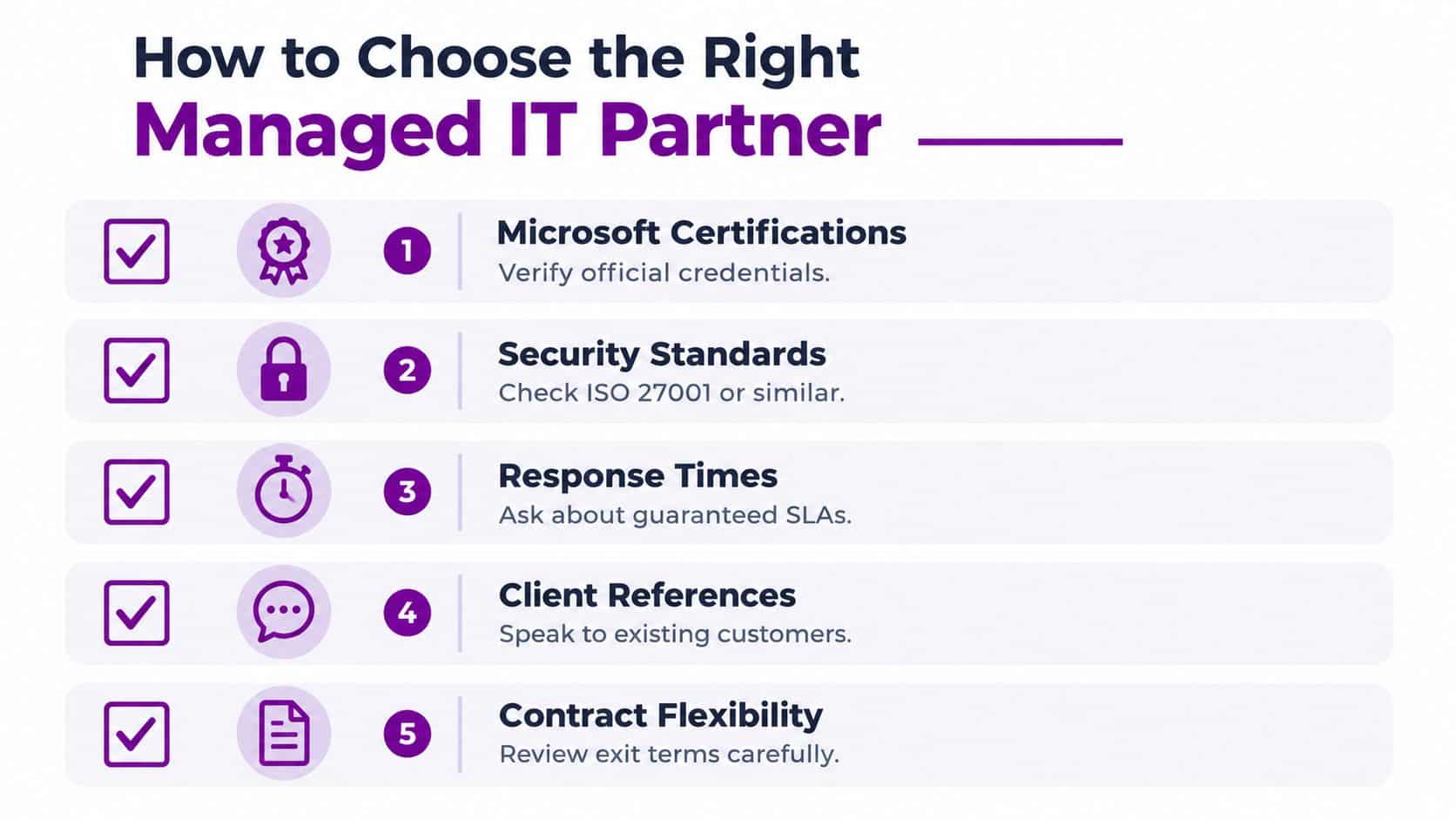
Verify Microsoft and relevant security vendor credentials, including which employees hold them and whether they relate to your requirements. A badge doesn't demonstrate experience with your legacy application or a complicated Azure integration.
Ask to speak with customers whose environments resemble yours. A charity reference may illuminate volunteer access and sensitive data handling; a manufacturer can explain whether the provider understands production constraints.
Take these questions into every meeting:
- Scope: Which users, devices, servers, applications and sites are included, and what is explicitly excluded?
- Service targets: What separates acknowledgement, technical response, restoration and final resolution?
- Recovery: Where is data stored, who can access backups and what evidence demonstrates successful restore testing?
- Accountability: Who is the named engineer or service lead, and who covers their absence?
- Provider security: How are privileged accounts protected, access reviewed and supplier incidents communicated?
- Exit arrangements: Who owns the documentation, administrator access and configuration records when the contract ends?
Read the documents before signing
Request the service schedule, SLA, security responsibilities, data-processing terms, onboarding plan and exit provisions. Review how the provider measures service performance and what happens when a target is missed.
Reject vague language around urgent incidents. A response target isn't a guarantee of restoration, and an external software dependency may limit what the provider can promise.
A provider should be able to explain its own security arrangements as clearly as it explains yours.
Treat missing security evidence, unsupported low pricing and contracts issued without discovery as warning signs. Named engineers matter, but so does a documented escalation route that works when those engineers are unavailable.
Finally, keep authority on your side. You should retain appropriate oversight of your Microsoft tenant, business data and critical accounts rather than becoming dependent on information only the provider holds.
Why East Midlands Location Changes the Calculation
Remote support is effective for account problems, configuration changes and many application faults. It can't replace a failed switch, inspect damaged cabling or prepare equipment at a client site.
For organisations operating across Lincoln, Nottingham, Leicester, Scunthorpe, Grimsby and Newark, ask about actual on-site arrangements. An office address doesn't tell you where engineers start their day, which locations they cover or whether travel is included.
Match site support to the work
Set expectations around the practical demands of each location:
- Manufacturing: Engineers may need to work around production windows and equipment that can't be casually restarted.
- Logistics: Dispatch and warehouse operations need priorities based on operational impact, not office convenience.
- Professional services: Client deadlines, confidential documents and remote access shape support requirements.
- Education and charities: Site access, safeguarding procedures and sensitive information need explicit preparation.
Where DBS checks are required, establish that appropriate checks and site permissions are in place before an urgent visit. A DBS-checked engineer still needs to follow your organisation's access procedures.
Regional knowledge is useful when it's demonstrable
A regional partner should understand your locations, coordinate local attendance and provide evidence of relevant sector experience. Ask how it recruits, retains and covers engineers; claims about local knowledge are weak without practical arrangements behind them.
Microsoft expertise also needs to extend beyond cloud administration. Your partner must understand how Microsoft 365 and Azure interact with local networks, devices and applications that haven't migrated.
For buyers reviewing East Midlands IT support services, compare remote capability and physical coverage together. A remote-only national provider may suit a distributed, cloud-based organisation with local hardware arrangements already covered.
My recommendation is straightforward: where operations depend on physical sites, give proven regional attendance real weight. Geography doesn't guarantee competence, but leaving it out of procurement ignores a dependency that becomes obvious during a hardware failure.
Deciding Whether Managed IT Is the Right Move for You
Choose managed IT when business-critical platforms need more expertise or cover than your team can provide. A single-workstation business or a fully staffed internal function may need targeted assistance instead.
Review managed IT service costs against your required scope. Keep website care distinct from infrastructure support; checking SiteSelf's maintenance breakdown can inform a separate supplier conversation.
Book a discovery meeting this week. Ask the provider to describe your environment back to you, identify ownership gaps and submit a written proposal with named contacts.
F1Group offers managed IT support, Microsoft-focused expertise and remote or on-site assistance for East Midlands organisations, drawing on a regional track record since 1995. Bring your current support arrangements and upcoming projects so we can discuss where ongoing management or specialist assistance fits. Phone 0845 855 0000 today or Send us a message to start the conversation.