
A manager arrives to find that a key account is locked, the latest backup hasn't completed and an unfamiliar cloud subscription is overdue. Staff can't get on with client work, and there's no internal IT team to diagnose the problem quickly. For a small business, that's not just a technical snag. It's lost time, uncertain recovery and a decision about who owns the fix.

Why the Right IT Support Changes Everything
SME IT services shouldn't be measured by how quickly someone replaces a laptop or resets a password. The useful measure is whether people can keep working, information stays protected and the business can recover when something goes wrong. That takes a mix of responsive support, security, cloud administration and sensible technology planning.
The scale of the challenge is easy to underestimate. The UK National Cyber Security Centre (NCSC) estimates that there are approximately 5.5 million small organisations with between 0 and 49 employees, and reports that around one in two small businesses suffers a cyber incident each year (NCSC guidance for small organisations). Many of these firms don't have dedicated IT, security, compliance or cloud specialists. An external provider may therefore be responsible for essentials such as Microsoft 365 administration, patching, backups, identity protection and incident response.
Outsourcing doesn't mean handing every decision to a supplier. It gives a small team access to support and specialist skills it may not be able to maintain in-house, while leaving business priorities and risk decisions with the owner or manager. A professional-services firm may mainly need dependable email, protected devices and a clear route to help. A growing business may need someone to coordinate a cloud migration as well.
The right support model fits your people, risk and workload. Don't buy an enterprise-sized service just because the provider can sell one.
Start with the work that must not stop, the systems it depends on and the support your staff can realistically manage themselves. That's a better basis for choosing a service than a long catalogue of technical products.
Understanding Managed IT and Helpdesk Support
Think of reactive support as calling a mechanic when a warning light appears. It can be a sensible option if the problem is occasional and you can tolerate some disruption. Managed IT is closer to arranging regular servicing: a team handles reported problems, checks systems, applies updates and helps reduce the chance of avoidable breakdowns.
A helpdesk is the front door for staff who need assistance. It receives and prioritises requests, solves common problems and routes more complex work to the right person. A managed IT service may include that helpdesk, but it also takes responsibility for ongoing tasks such as monitoring, patching, managing suppliers and reviewing service performance. Project work is different again. A migration, office move or major system change needs defined planning and delivery, not just a place in the support queue.
Use three questions to decide what you need:
- Internal capability: Can someone in the business reliably manage devices, accounts, backups and supplier calls, or does that work fall to whoever has time?
- Business criticality: How much disruption would a failed email account, server or business application cause?
- Risk and control: Do you need someone to monitor systems and coordinate security tasks, or is help only required when a fault appears?
| Support model | Best suited to | Primary focus | Main trade-off |
|---|---|---|---|
| Break-fix | Businesses with capable internal contacts and occasional faults | Repairing specific problems when they arise | Costs and response times can be harder to predict |
| Helpdesk support | Teams that need a clear route for staff issues | Logging, prioritising and resolving user requests | May not include proactive maintenance or security ownership |
| Managed IT | Businesses that want ongoing operational oversight | Support, maintenance and agreed management responsibilities | A recurring fee, with scope that must be checked carefully |
| Hybrid support | Organisations with some in-house IT or specialist systems | Sharing day-to-day support and defined responsibilities | Gaps can emerge if ownership isn't written down |
Break-fix can suit a low-dependency environment with someone competent to manage risks internally. Fully managed support is often a better fit when staff rely on technology throughout the day and no one has clear responsibility for keeping it secure and available. Hybrid arrangements can work well, but only when the contract says who handles each system and what happens when an issue crosses those boundaries.
Core Services That Keep Business Running
A provider's service list matters less than whether the services work together. Helpdesk triage, endpoint management and monitoring address ongoing operational needs. A cloud migration or Dynamics 365 rollout, by contrast, should be treated as a planned project with discovery, sequencing and validation. Paying for tools without assigning anyone to manage their combined effect leaves obvious gaps.
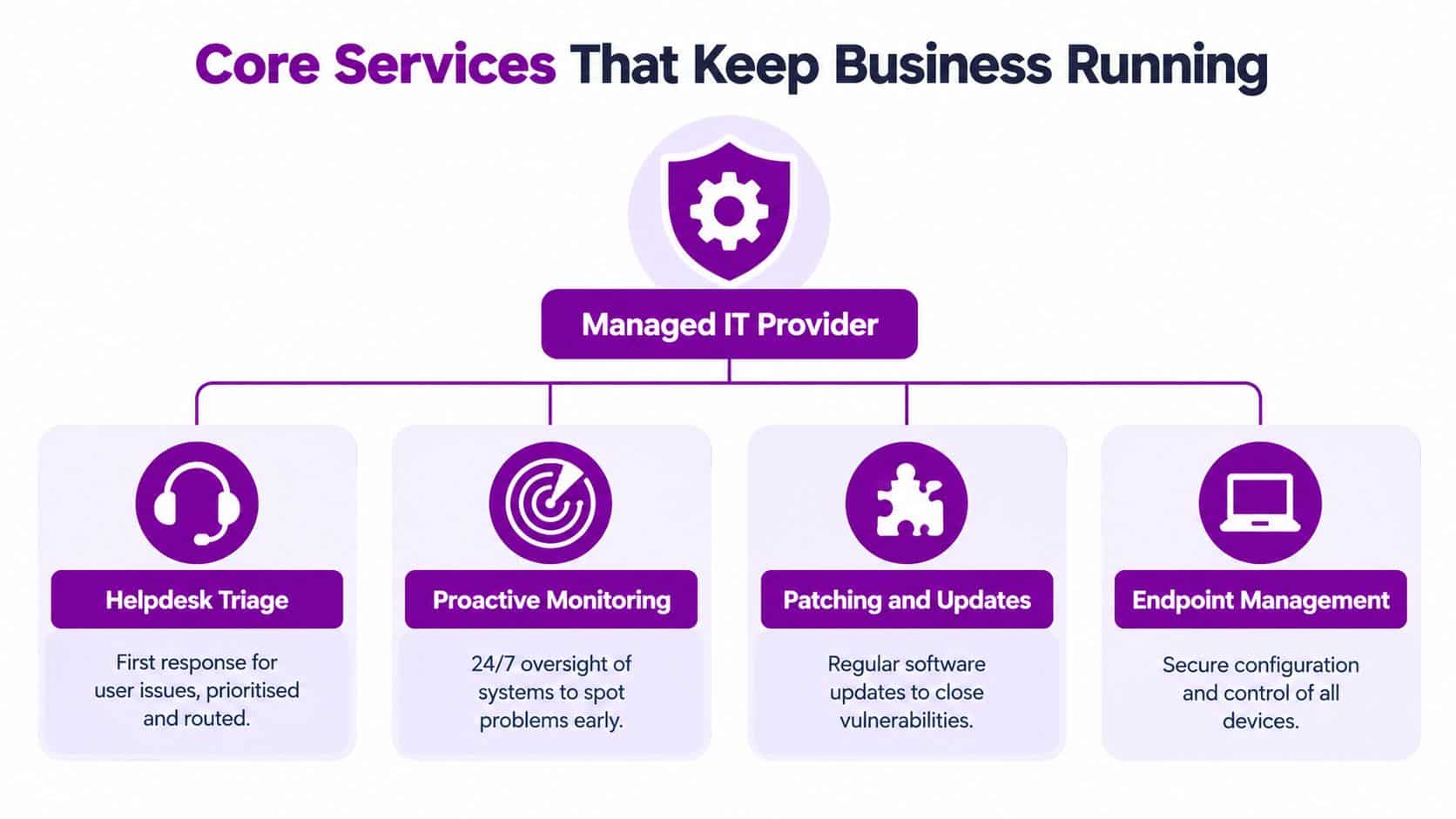
Start with staff and devices. Helpdesk triage gives employees a defined place to report issues and helps route urgent problems. Remote support can resolve many user and software faults without a visit. On-site assistance matters when equipment needs physical attention or staff need hands-on help. Endpoint management keeps business devices under agreed security and configuration controls, while patching helps keep software maintained.
Monitoring and maintenance are most useful when someone acts on alerts, rather than collecting them. Ask which systems are covered, who reviews alerts and how the provider reports recurring faults. If staff keep losing access or the same device keeps failing, the service should identify the pattern instead of treating every ticket as unrelated.
Then check the information that keeps work moving. Microsoft 365 and Azure administration can cover accounts, cloud services and configuration. Backup and recovery arrangements should be clear about what is protected, who checks that backups are running and how recovery is tested. Identity controls help manage who can access systems and information. Incident response should define who coordinates action when there's a security problem, while staff awareness helps people recognise common threats.
Treat substantial change as a project. Moving files or applications to the cloud isn't a transfer. A provider should first understand users, dependencies and access requirements, then plan the sequence and verify that the new setup works. Dynamics 365 and Power Platform implementations need similar care, particularly where business processes or data must connect across systems.
Use this checklist to identify gaps before comparing packages:
- Support: Do staff know where to raise an issue, and can they get remote or on-site help when needed?
- Ownership: Who manages Microsoft 365, devices, backups, suppliers and security alerts?
- Recovery: Can the business restore important information and confirm that the process works?
- Change: Are migrations and system roll-outs planned and validated separately from routine support?
This video gives a visual introduction to managed IT support:
Security and Cloud Adoption Without Unnecessary Risk
Cloud use and cyber security belong in the same conversation. A cloud service can make work easier to access, but it still needs secure configuration, controlled permissions, reliable backup and clear ownership. A business that adopts Microsoft 365 or Azure without those basics may have moved its systems online without making them easier to manage or recover.
The UK Government's Cyber Security Breaches Survey 2025 found that 43% of businesses had experienced a cyber security breach or attack during the previous 12 months, equivalent to approximately 612,000 businesses. It also reported that 19% had experienced at least one cyber crime, or about 267,000 businesses (Cyber Security Breaches Survey 2025). Earlier research focused on micro and small businesses found that 38% had identified a cyber attack in the previous year. Among those affected, phishing accounted for 82% of attacks, while only 18% had a written incident-management plan, according to the same government survey series. That's a practical warning: having security tools isn't the same as being ready to respond.
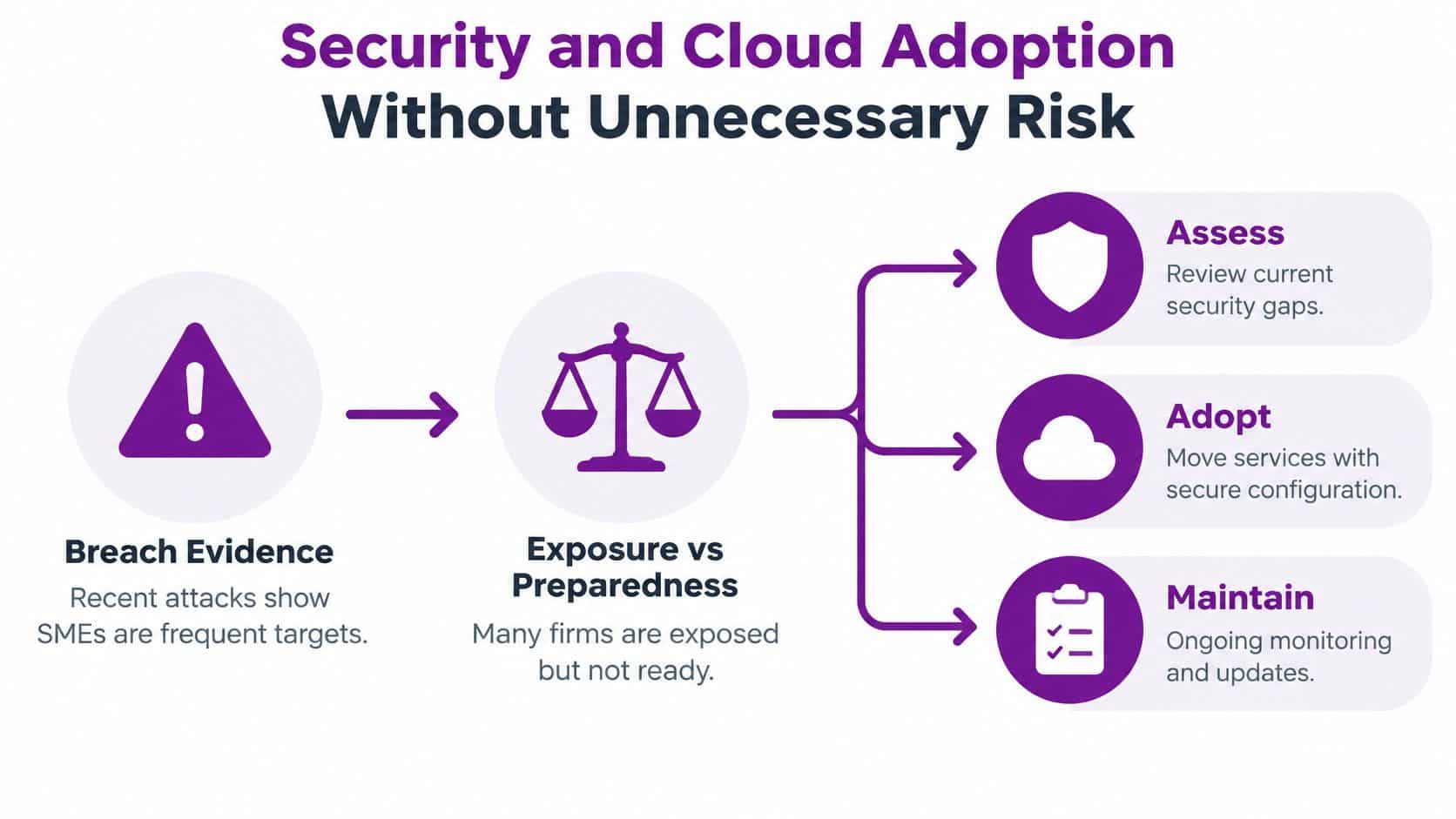
A service should join up identity protection, secure configuration, monitoring, backup, staff awareness and tested response procedures. These controls complement one another. Strong identity checks won't restore lost data, and a backup won't stop an attacker using a compromised account. For a practical starting point on email protection options, compare this email security tools list with the risks and systems your organisation has.
Cloud adoption is now a normal business decision, not a project reserved for large organisations. The Office for National Statistics found that 69% of firms used cloud-based computing systems and applications in 2023. Cloud adopters had approximately 12% higher turnover per worker than non-adopters, after accounting for management practices and firm characteristics. That's an association, not proof that cloud adoption alone causes higher productivity (ONS analysis of technology and AI adoption).
Measure a cloud programme by business results: application availability, time spent on manual administration, recovery objectives and reporting-cycle duration. Poorly governed integrations, duplicated data, excessive permissions and unmanaged automation can erode the value of Microsoft 365, Azure, Dynamics 365, Power Platform or AI tools. A cloud transformation service should therefore include clear ownership, access controls, recovery planning and a way to review whether the change is improving the work it was meant to support.
Pricing Models and Service Level Agreements
A monthly price only tells you what a service costs if you know what it includes. UK managed IT support is commonly priced per user each month. Published benchmarks put basic support at approximately £40–£55 per user monthly, standard support at £65–£95, and premium services at £100–£150, particularly where enhanced security and strategic planning are included (UK managed IT services pricing benchmarks).
For a worked example, 25 users at £80 per user each month would cost approximately £24,000 annually. At the same monthly rate, an organisation with 50 users would spend approximately £48,000 annually. These are examples based on a benchmark price, not a quote for your business. The actual fee depends on the agreed scope, systems and service commitments.
Compare the complete scope
Per-user plans make it easier to estimate recurring support, but a lower tier may leave out security monitoring, on-site visits or strategic advice. Project fees can be a better fit for migrations, office moves and implementations because they define a specific piece of work. A hybrid model may combine an internal IT contact with external helpdesk or specialist support, but shared responsibility needs to be explicit.
A service level agreement (SLA) should answer practical questions:
- Coverage: Which days and hours are included, and is any out-of-hours response available?
- Priorities: How does the provider classify business-critical issues compared with routine requests?
- Response: What response is committed for each priority, and how is it measured?
- Exclusions: Are projects, on-site work, third-party software and after-hours support charged separately?
- Escalation: Who takes ownership when a problem isn't resolved at the first point of contact?
Ask whether the price includes backup management, recovery testing, security monitoring, account administration and supplier coordination. Check for setup fees, minimum contract terms and charges when user numbers change. If your organisation runs significant cloud services, it's also sensible to understand who reviews usage and avoidable spend. These FinOps optimization strategies offer a useful way to think about cloud cost control alongside support costs.
Request the service schedule and SLA before signing, then compare the managed IT support pricing details against the scope in each quotation. Compare like with like, not just the headline monthly figure.
Matching IT Services to Real Business Needs
The same service catalogue can produce very different support arrangements. Start with the work people do and the systems they rely on, then buy only the capabilities needed to keep that work moving.
A professional-services firm
A small office where staff depend on email, shared files and everyday business applications may need a clear helpdesk, managed devices, endpoint protection and dependable backup. Bundle routine support and ongoing maintenance if there's no internal IT owner. Keep a major office move or software replacement as a separately scoped project, so it doesn't disappear into a general monthly fee. Ask how the provider handles account access, backup checks and recurring device problems.
A business adopting Microsoft cloud services
A growing organisation moving to Microsoft 365 and Azure needs more than account setup. It may require migration planning, identity governance, integration design and support for staff adopting new processes. Give one person responsibility for the project's scope and decisions, then agree what moves into ongoing support after launch. Review the migration plan, access model, recovery arrangements and measures that show whether staff can complete their work more effectively.
A charity or organisation with specialist requirements
A charity, small PLC or other organisation using specialist systems should identify which supplier supports each application and how those responsibilities interact. Keep specialist system support separate if the software vendor must lead, but make sure the IT provider knows how to escalate issues and protect connected devices and accounts. Where staff require it, ask for evidence of DBS checks and confirm how local visits are arranged.
For each situation, ask for a written service schedule, named responsibilities and examples of comparable work. Don't pay for a broad transformation package when the immediate problem is unclear ownership of everyday support. Conversely, don't treat a complex cloud migration as routine helpdesk work.
Choosing a Trusted Local IT Partner
Local coverage can make on-site support more practical, but proximity doesn't prove technical depth. Vet a provider by asking for evidence of the capabilities your systems require, a clear route for escalation and written commitments about who owns a problem from first report to resolution.
F1Group provides vendor-certified and DBS-checked support across the East Midlands, including Lincoln, Nottingham, Leicester, Scunthorpe, Grimsby and Newark, and has supported organisations since 1995. These details can help you assess regional coverage and experience, but you should still confirm which people would support your account and what their responsibilities include.

Use a structured supplier check:
- Relevant expertise: Ask for vendor certifications that match the Microsoft products, security work or specialist systems you use. Request examples of comparable Microsoft-focused work.
- People and access: Confirm who is assigned to your account and whether personnel who may need access to sensitive environments have the required DBS checks.
- Service ownership: Ask who receives requests, who handles escalations and how the provider reports on unresolved or recurring issues.
- Security practice: Ask how the provider manages its own access, monitors supported systems and coordinates incident response.
- Commercial clarity: Get the contract, service schedule, SLA, exit process and all recurring or additional charges in writing.
For a separate sense-check of your security priorities, a small business cyber resilience checklist can help prompt questions before a supplier meeting. Use it as a discussion aid, not a substitute for checking that your provider will take responsibility for the controls your business needs.
Before agreeing a contract, make sure you understand how to leave, retrieve your data and transfer responsibilities to another provider. A guide to choosing an IT service provider can help you prepare the questions, but the contract itself must describe your actual service.
Make Your Next IT Decision with Confidence
Begin with the business problem, not the product list. Identify the work that stops when technology fails, then decide which responsibilities need ongoing support and which are one-off projects. Set practical measures, such as application availability, time spent on manual tasks or whether backup recovery has been tested.
Next, compare quotations on equivalent scope. Check support hours, response commitments, security coverage, backup responsibilities, project fees and exclusions. Then verify the provider's relevant experience, staff arrangements and escalation process. If urgent gaps exist, prioritise helpdesk cover, identity protection, backup and recovery before committing to a broad transformation programme.
Effective SME IT support should make your organisation more resilient, not more dependent on technology jargon.
F1Group offers managed IT support, helpdesk and on-site assistance, alongside Microsoft-focused services for organisations across the East Midlands. Phone 0845 855 0000 today to discuss your support needs, or send us a message.
F1Group can help you assess day-to-day support, security and Microsoft cloud requirements, then scope the work around your organisation's priorities. Visit F1Group to discuss a practical service arrangement that fits your people and workload.