
72% of UK senior IT decision-makers reported significant disruption or downtime caused by IT-resilience problems during the previous 12 months, according to research commissioned by Asanti and conducted by Vanson Bourne. That figure should change how you think about your IT disaster recovery process. It's not a backup report. It's whether your firm can restore identity, configuration and business services, in the right order, while Microsoft 365, files and admin access may all be unavailable.
A backup is not a recoverable service. Restoring files won't help if staff can't sign in, permissions are missing, or a finance integration points at a server that hasn't returned yet. I would build the process around that reality from the first workshop.
Recovery Targets Your Business Must Agree First
Start with exposure, not products. The UK Government's Cyber Security Breaches Survey 2024 found that 50% of UK businesses, approximately 718,000 businesses, reported experiencing at least one cyber security breach or attack during the previous 12 months, rising to 70% of medium-sized businesses and 74% of large businesses. Among affected businesses, 92% said they restored operations from their most disruptive breach or attack within 24 hours. Around one-third of affected organisations still experienced a negative outcome, such as staff time being diverted or wider disruption.
That contrast matters. A business can resume trading and still not be recovered, secure or able to prove what data it lost. Directors therefore need to agree two numbers for each service before anyone buys replication, storage or extra licences.
The Two Targets That Drive Every Decision
Your recovery time objective (RTO) is the longest outage the business will accept. Your recovery point objective (RPO) is the oldest data you can afford to return to, measured backwards from the incident. If finance sets a 15-minute RPO, a nightly backup fails by design, however reliable the backup job looks.
Use a structured business impact analysis to force those choices service by service. Ask what stops after four hours, what becomes a regulatory or payroll problem after a day, and which customers must be told first. For technical context on setting the time side of the target, IT Cloud Global's guide to reducing downtime after server failures is a useful companion to the workshop discussion.
Practical rule: If a director won't sign the RTO and RPO, you don't have a recovery target. You have an IT assumption.
Starter Table to Mark Up in One Workshop
These are planning defaults for a mid-sized firm, not a regulation. Replace every figure with your own values and record who agreed them.
Starter RTO, RPO and restore order for a UK SMB
| Service | RTO | RPO | Restore order |
|---|---|---|---|
| Identity, Entra ID and recovery credentials | 1 hour | 15 minutes | 1 |
| Microsoft 365 mail, Teams and SharePoint | 4 hours | 1 hour | 2 |
| Finance, payroll and invoicing | 4 hours | 15 minutes | 3 |
| Dynamics 365 and line-of-business applications | 8 hours | 1 hour | 4 |
| File shares and user data | 8 hours | 4 hours | 5 |
| Public website and marketing systems | 24 hours | 24 hours | 6 |
Identity returns first because you can't administer Exchange Online, SharePoint, Dynamics 365 or Azure properly without trusted accounts and recovery credentials. Finance may justify a 15-minute RPO because rekeying invoices and payroll changes is slow and error-prone. The public website can often wait a day if phones, email and order processing are working.
Don't average these numbers across the estate. A single, generous target hides the one service that stops cash coming in. Keep the table to one page, date it, and make operations, finance and IT sign the same version.
How to Create and Implement the Recovery Process
Build this as six outputs your team can finish in sequence. The NCSC technical recovery guidance warns that backups may not cover the full environment and recommends prioritising business-critical restoration while balancing recovery speed against assurance that systems are clean. That balance must be written into the steps, not improvised mid-incident.
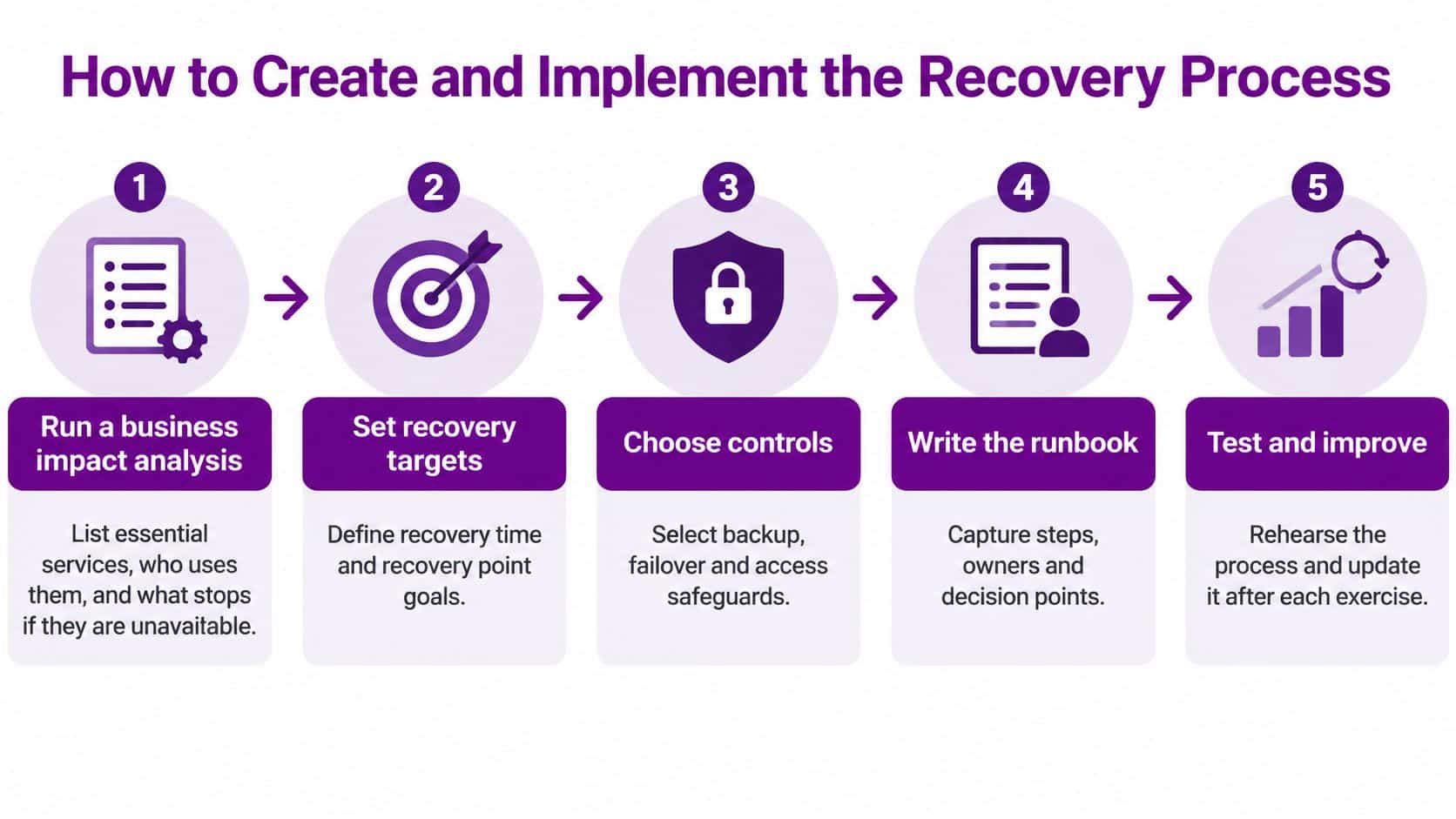
Steps One to Three
- Run the business impact analysis: List essential services, who uses them, and what stops if each is down for four hours or four days. File the signed service list.
- Agree RTO and RPO values: Apply the targets to Microsoft 365, Azure, Dynamics 365, identity, network services and line-of-business systems. File the one-page table directors approved.
- Map dependencies and restore order: Put Entra ID before Exchange Online, core network services before line-of-business apps, and database servers before Dynamics 365 integrations. File a dependency map a deputy can read without prior knowledge.
Dependency mapping is where hopeful plans fail. An app server can boot perfectly and still be useless if its database, licence service, file share or identity provider is missing. Walk each priority service forwards from sign-in to the user's first successful transaction.
Steps Four to Six
- Back up the whole service: Include applications, identity systems, security and trust configuration, gold builds and recovery credentials alongside business data. Use a 3-2-1 design, with at least three logically separate copies on two types of storage, one off-site, and at least one copy offline or immutable.
- Write the runbook: Name who declares a disaster, who isolates systems, who verifies backups are complete and uncompromised, and who validates data and user access after restore. Print it and hold copies off the network.
- Book the first restore test: Test against representative services, document failed tests and track corrective actions to closure. Don't call the plan finished before this date exists.
Stage the actual recovery in that order. Isolate the incident first, verify the backup, restore shared infrastructure and identity, recover the highest-priority services, then check data integrity and access. Restoring everything at once feels faster but makes it harder to spot reinfection or a broken dependency.
A failed disk with no usable backup is a different problem from a planned restore. Specialist help to recover lost data belongs in the runbook as a last-resort contact, not as your strategy.
Finish with a one-page board summary showing services, targets, restore order, known gaps and the next test date. If a service can't meet its signed target with current tooling, say so on that page. Directors can then fund the gap or formally accept a longer outage, but they shouldn't discover the gap during ransomware.
Backup Strategies Failover and Azure DR Options
Treat products as ways to hit targets you've already signed. The NCSC guidance on preparing technical recovery recommends protecting backups from unauthorised modification or deletion, using immutable backups where possible, and ensuring cloud administration remains accessible if corporate networks are offline. It also stresses logical separation, because multiple copies in one cloud service are not sufficient.

For most workloads, the first question is how often a clean copy is taken. RDE Technologies' guidance on how to find the right backup frequency helps translate an RPO into a schedule, while our overview of backup solutions for business systems sets out the service options in plain terms. Frequency alone doesn't create separation, immutability or a tested restore path.
Backup and failover options against SMB recovery needs
| Option | Typical RTO | Best for | Relative GBP cost |
|---|---|---|---|
| Immutable backup and restore | Hours to a few days | Most SMBs and ransomware | Lowest |
| Azure Backup | Hours | Azure virtual machines and files | Low monthly GBP cost |
| Azure Site Recovery | Under 4 hours | Virtual machines with an RTO under four hours | Higher monthly replication bill |
| Warm secondary region | Under 1 hour | Workloads needing fast Azure failover | Highest ongoing GBP cost |
| Microsoft 365 native retention | Minutes to hours within the tenant | Mailbox and file recovery within the tenant | Included in licence |
What Each Option Cannot Do
Microsoft 365 retention helps with deleted mail and files inside a working tenant. It doesn't rebuild a compromised tenant, restore lost admin control, recreate conditional access policy or repair a line-of-business integration. Calling it disaster recovery leaves the hardest part unplanned.
Azure Backup gives managed protection for Azure workloads, but restore time still depends on data volume, chosen tier and whether identity and networking are available. Azure Site Recovery suits virtual machines that need an RTO under four hours, yet replication will faithfully copy corruption or encrypted data if the incident isn't isolated. A warm secondary region is faster still, but you'll pay in GBP every month for capacity you may rarely use.
I recommend immutable backups for everything, replication only where the signed RTO demands it, and a named owner for each Microsoft 365 recovery path.
Moving to cloud doesn't remove disaster recovery. It changes the failure to privileged accounts, tenant configuration, SaaS suppliers and administrative access. Drop any option that can't meet the RTO and RPO on your signed table, even if it's already licensed or cheap in GBP terms.
Roles Runbooks and Decisions When Systems Are Down
Only 25% of businesses had a formal incident-response plan, according to the UK Government Cyber Security Breaches Survey 2025/26. Across all surveyed businesses, only a quarter had a formal incident-response plan, so many firms would be starting from scratch when an incident hits.
The immediate gap is often decision-making authority. Nobody should spend the first hour asking who may disconnect a server, contact the insurer or tell customers that orders are paused.

Name the Roles and Deputies
- Incident lead: Declares a disaster, sets priorities and owns the decision log.
- Technical restore lead: Controls isolation, backup verification and the restore sequence. Restore identity and configuration before dependent services, and make sure the process can be followed without Microsoft 365.
- Communications owner: Sends approved updates to staff, customers, suppliers and insurers.
- Finance and payroll lead: Keeps payments, invoicing and statutory duties moving manually.
Give every role a named deputy with authority to act. Set out who can stop systems, approve emergency spend in GBP and speak externally. Link these responsibilities to your wider incident response planning so escalation, evidence handling and regulatory notification are covered in the same process.
Build an Offline Pack That Works Without Sign-In
Two directors should hold a labelled printed pack with mobile numbers, supplier contacts, the declare-disaster rule, restore order, customer wording and sealed recovery credentials. Include a short holding statement that explains what happened, what customers should do and when the next update will arrive. Do not promise a restore time the team has not evidenced.
The short video below gives non-technical executives a prompt for discussing who makes each decision. Pause it during a tabletop and apply the choices to your own roles and authority limits.
Define manual workarounds before an outage. Payroll may need the last approved run repeated, sales may need paper order capture, and safeguarding or care records may require a controlled paper process followed by reconciliation. Run the tabletop without laptops signed into the tenant. The test should show that leaders can make decisions within the agreed RTO and that staff can follow the runbook without relying on unavailable Microsoft 365 services.
Testing Cadence That Proves Recovery Actually Works
Organisations often report that operations resumed without measuring the elapsed time against a predefined RTO. A service coming back is not proof that it met its target, restored clean data or can run securely. Test the full recovery path against a clock.
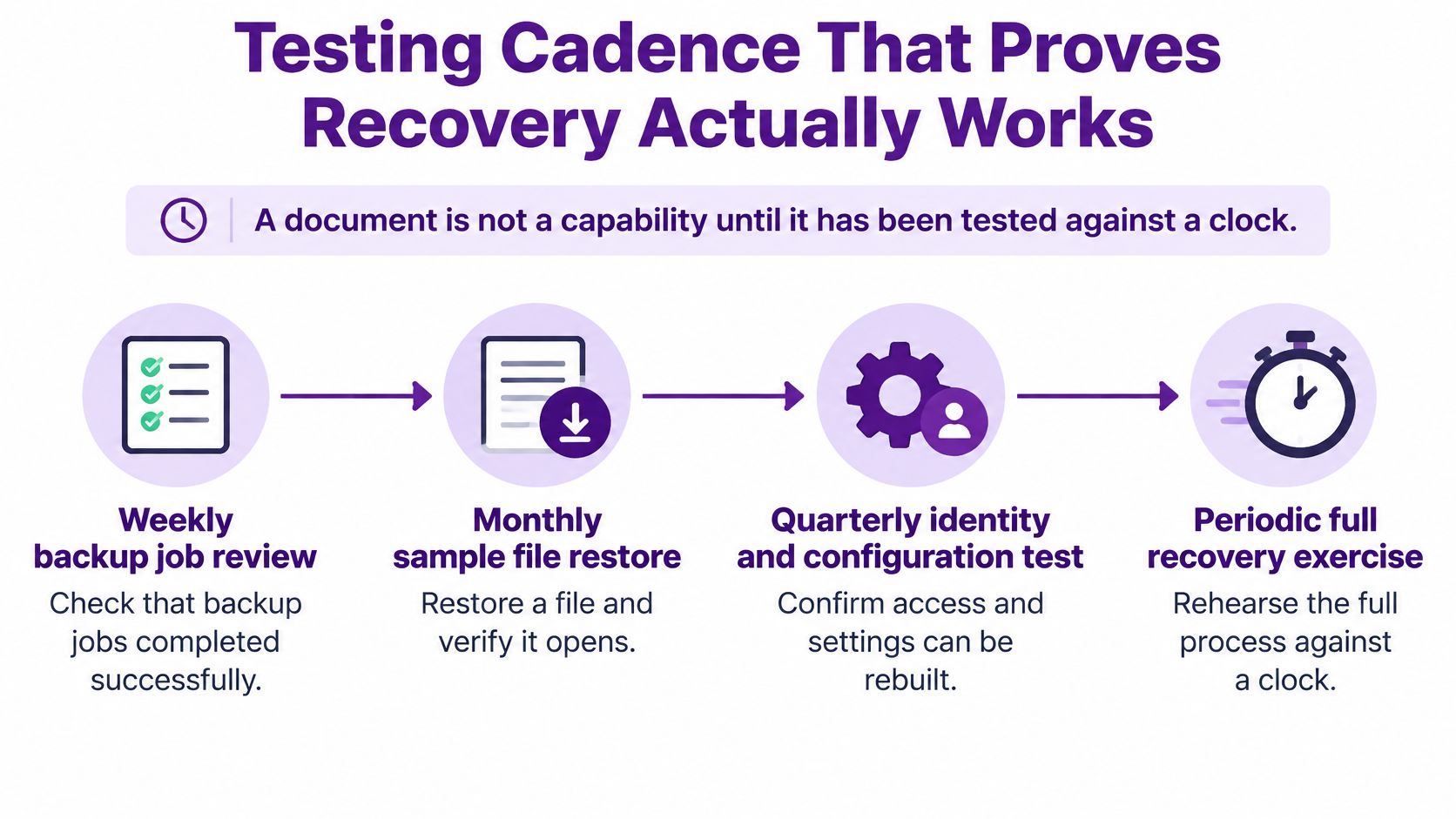
Recovery test calendar and what each test proves
| Test | Cadence | Pass evidence |
|---|---|---|
| Backup job review | Weekly | Jobs completed and copies reachable |
| Sample file restore | Monthly | Files open and match the RPO age |
| Identity and configuration restore | Quarterly | Privileged access works from the offline pack |
| Executive tabletop | Twice a year | Decisions made without Microsoft 365 |
| Representative restore or failover | Yearly and after major change | Elapsed time meets the RTO |
Measure the Result, Not the Attendance
Record backup age against the RPO, elapsed restoration time against the RTO, the percentage of systems restored successfully, data-integrity exceptions, dependency failures and time to re-establish privileged access. A test fails if users can log in but finance totals are wrong, or if recovery depends on one engineer who knows the undocumented steps.
Include awkward conditions deliberately. Make an administrator unavailable, remove access to the usual recovery console, or assume an attacker may still be present. These conditions expose gaps in credentials, supplier support and decision-making while the test is underway. Record whether the runbook can still be executed when Microsoft 365 is unavailable.
False Passes to Watch For
- File-only testing: Proves a document opens, not that identity, applications and integrations recover.
- Single-location copies: Leaves every copy exposed to the same deletion or tenant compromise.
- No retest after change: Makes the result unreliable after cloud, firewall or application changes.
- Fast resumption: Can hide corrupted data, persistence or an RPO breach that nobody measured.
Log every failure with an owner and fix-by date, then review open actions at board level until they are cleared. Put the cadence in shared calendars for the next 12 months and name deputies for holiday periods. If the yearly exercise slips twice, record the risk decision and who has accepted it.
Start the Recovery Programme This Quarter
Turn the work into a 90-day programme, not another policy folder. Keep each month to outputs directors can see and sign.
The Next 90 Days
- Month one: Agree the RTO and RPO table with finance and operations, and name the incident lead and deputy.
- Month two: Confirm backups cover identity, configuration and at least one offline or immutable copy, then print the offline pack for two directors.
- Month three: Run a tabletop without Microsoft 365 and one timed restore of a priority service, then brief the board on the gap between actual time and target.
Store the plan in two places, the systems you use daily and paper that works when those systems don't. Book the next restore test before the next major change window, because an untested IT disaster recovery process is only a hope with better formatting.
East Midlands organisations that want a partner to build the Azure and Microsoft 365 recovery side, facilitate the exercise and own the follow-up actions can contact F1Group. Phone 0845 855 0000 today, or Send us a message to arrange a recovery review for your firm.
If your current plan wouldn't work with Microsoft 365 unavailable, visit F1Group to discuss Microsoft 365, Azure and Dynamics 365 recovery, immutable backup and timed restore testing for your organisation. We'll help you agree realistic targets, build an identity-first runbook and prove the recovery works before an incident tests it for real.