
You're probably already handling more personal data than you think. Website enquiries go into Microsoft 365. Sales notes sit in Dynamics 365 or a CRM spreadsheet. Staff records live in SharePoint, OneDrive, payroll software, and email attachments. Then someone asks, “Are we GDPR compliant?” and the room goes quiet.
That's usually when business owners start searching for what is GDPR compliance and get pages full of legal definitions that don't help them decide what to do on Monday morning.
In practice, GDPR compliance means your business can explain what personal data it uses, why it uses it, where it sits, who can access it, how long it keeps it, and how it protects it. In the UK, that sits within the post-Brexit framework of UK GDPR alongside the Data Protection Act 2018. It isn't a one-off policy exercise. It's an operating discipline that touches IT, security, HR, sales, finance, and any supplier that handles data for you.
Why GDPR Compliance Still Matters for UK Businesses
Most SMEs don't struggle because they've never heard of GDPR. They struggle because the day-to-day reality is messy. Customer details arrive through your website, your inbox, Teams chats, marketing tools, and finance systems. Over time, the same person's data ends up copied across multiple places, often with no clear owner and no agreed retention rule.
That's why GDPR still matters. It forces a business to get control of its information estate, not just publish a privacy notice and hope for the best.
Since Brexit, UK businesses still work within a GDPR-style framework. The original benchmark remains serious. Non-compliance can lead to fines of up to €20 million or 4% of annual worldwide turnover, whichever is higher, as noted in MIT Sloan's review of GDPR's business impact. For many firms, the burden is operational as well as legal. The same MIT Sloan piece cites research showing a 20% increase in average data-storage costs after GDPR, and describes the impact as particularly heavy for smaller firms.
The pressure hasn't gone away. The ICO reported 39,737 data protection complaints in 2023/24, up 15% year on year in its annual reporting. That tells you something useful. Customers, staff, and the public are still asking questions, raising concerns, and expecting organisations to get this right.
For a plain-English reminder that personal data compliance is still very much alive for UK businesses, that's a sensible companion read.
GDPR matters because data protection problems usually show up as business problems first. Lost trust, slow responses, messy systems, and avoidable risk.
What this means in real life
A compliant business usually has these basics under control:
- Clear ownership so someone is responsible for data protection decisions.
- Known data flows so the business understands what's collected and where it goes.
- Working controls so access, retention, encryption, and breach handling aren't left to chance.
- Evidence so if the ICO asks questions, the business can prove what it does.
If you can't answer those points confidently, that's the fundamental starting point.
The Seven Core Principles of UK GDPR
The seven principles are the foundation. If you want the shortest useful answer to what is GDPR compliance, it's this: applying these principles consistently and being able to prove you've done it.
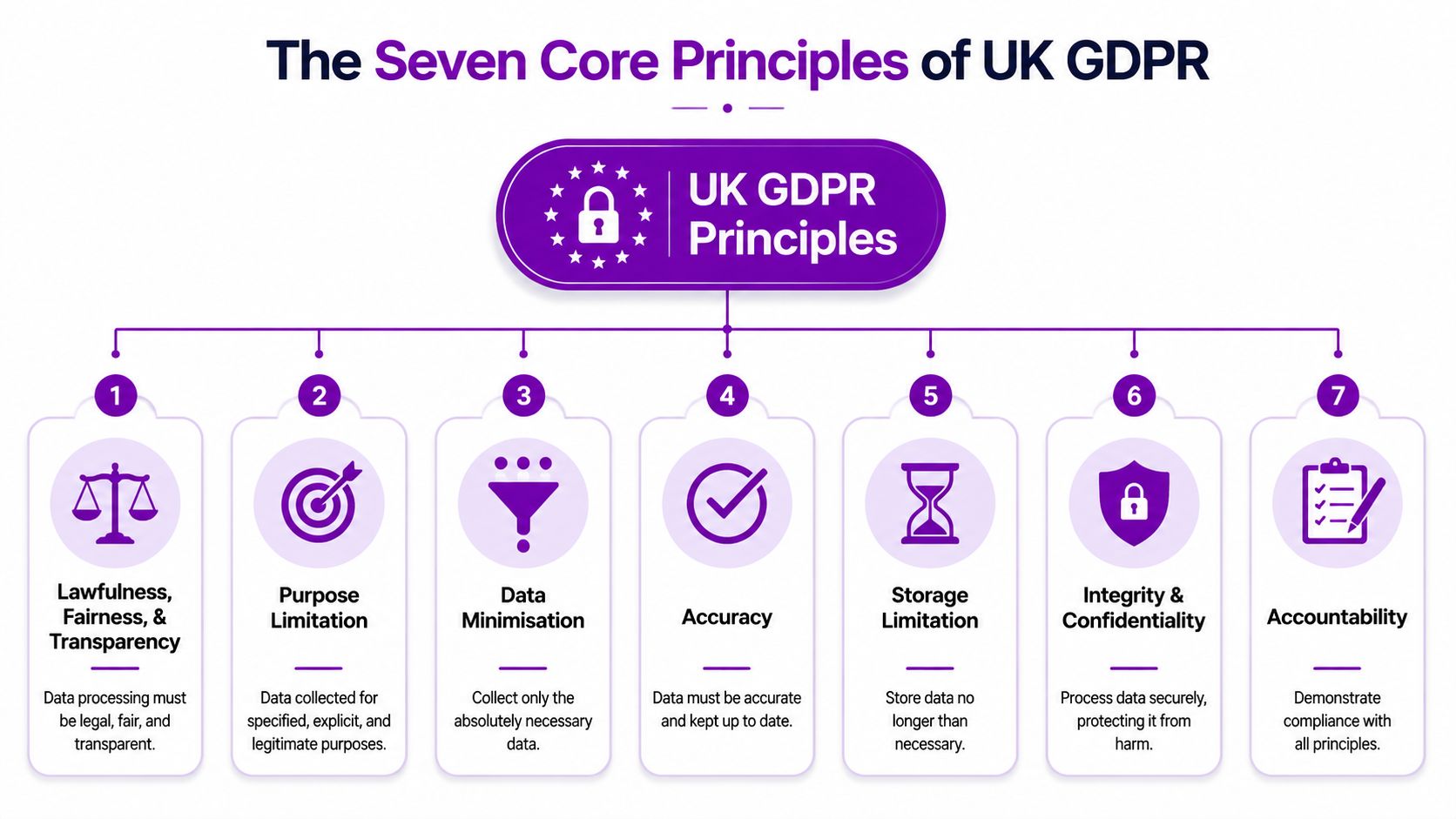
Lawfulness fairness and transparency
You need a valid reason to process personal data, and people should understand what you're doing with it. Under UK GDPR, organisations must document a valid Article 6 legal basis for each processing activity. If you rely on consent, it must be “freely given, specific, informed and unambiguous”, and withdrawing it must be as easy as giving it, according to Secureframe's summary of compliance requirements.
What this means for you: don't collect data first and work out the justification later.
Purpose limitation
Collect data for a specific purpose, then use it for that purpose. If someone fills in a support request, that doesn't automatically mean you can add them to every marketing list you own.
What this means for you: define the purpose before the form, workflow, or integration goes live.
Data minimisation
Ask for the minimum you need. A contact form usually doesn't need a date of birth. A newsletter sign-up rarely needs a phone number.
What this means for you: remove optional fields that serve curiosity rather than business need.
Accuracy
Personal data should be correct and kept up to date. Old addresses, outdated emergency contacts, and duplicate customer records all create risk.
What this means for you: put review and correction processes into normal business workflows.
Storage limitation
Don't keep data forever just because cloud storage makes it easy. Retention should follow business need, legal requirement, and a documented rule.
What this means for you: archive and delete on purpose, not by accident.
Integrity and confidentiality
Data must be protected against unauthorised access, loss, or damage. Consequently, security controls become part of compliance.
What this means for you: access control, encryption, MFA, and monitoring aren't optional extras.
Accountability
This principle catches many businesses out. It isn't enough to claim you take privacy seriously. You need records, decisions, policies, logs, and evidence.
Practical rule: If your process only exists in someone's head, it doesn't count as a reliable control.
A simple business view
| Principle | Plain-English test |
|---|---|
| Lawfulness, fairness and transparency | Can you explain why you use the data? |
| Purpose limitation | Are you only using it for the stated reason? |
| Data minimisation | Are you collecting only what you need? |
| Accuracy | Can you correct bad data quickly? |
| Storage limitation | Do you know when it should be deleted? |
| Integrity and confidentiality | Is it properly secured? |
| Accountability | Can you prove all of the above? |
Understanding Your Customers Data Subject Rights
The rights under UK GDPR are often presented as a legal list. A more useful way to see them is as service requests your business must be ready to handle. If someone exercises a right, can your team identify the data, verify the person, respond safely, and keep a record of what happened?
The rights your business needs to operationalise
These are the core rights most SMEs need to plan for:
- Right to be informed. People should know what you collect and why.
- Right of access. They can ask for a copy of their personal data.
- Right to rectification. They can ask you to fix inaccurate data.
- Right to erasure. In some cases, they can ask you to delete it.
- Right to restrict processing. They can ask you to limit how you use it.
- Right to data portability. They can ask for data in a usable format.
- Right to object. They can object to certain kinds of processing.
- Rights related to automated decision-making and profiling. They can challenge decisions made solely by automated means in relevant cases.
The hard part isn’t knowing the names. It’s building the process.
What each request demands from your systems
A subject access request sounds simple until you try to fulfil it across Exchange Online, SharePoint, Teams, archived mailboxes, CRM records, HR folders, and third-party apps. That’s why rights handling is an operational issue, not just a legal one.
A workable rights process usually needs:
- Identity verification so you don’t disclose data to the wrong person.
- Search capability across email, files, systems, and backups where relevant.
- Review and redaction where other people’s data appears in the same material.
- Secure delivery of the response.
- Audit trail showing what you received, what you searched, and what you sent back.
If you can’t locate a person’s data without asking three departments and searching five inboxes manually, your rights process isn’t mature enough.
For small businesses, rights handling often fails because data sits in too many places with inconsistent naming. One team uses full names, another uses email addresses, another stores PDFs in a private folder structure nobody else understands. Good GDPR practice reduces that sprawl.
A useful test is this. If a customer asked today, “Show me all the personal data you hold about me and stop using it for marketing,” would your team know exactly who handles that request and how they’d do it?
A Practical GDPR Compliance Checklist for SMEs
If your business is still trying to define what good looks like, start with a manageable checklist. Don’t begin with edge cases. Start with the controls that make the rest of compliance possible.

Start with visibility
The first task is a data mapping exercise. You need to know what personal data you hold, where it came from, why you use it, who you share it with, and where it is stored. Without that, every other GDPR discussion turns into guesswork.
That map should include systems like Microsoft 365, Azure-hosted workloads, Dynamics 365, payroll tools, marketing platforms, finance software, and any spreadsheets people still keep locally.
For a broader governance baseline, F1Group has published guidance on data governance best practices that fits well with this stage.
Then build the operating basics
Use this as a practical SME checklist:
- Review your privacy notice so it reflects what you do, not what an old template says you do.
- Record your lawful basis for each processing activity. If the basis changes, update the record.
- Check consent mechanisms where consent is your basis. Keep logs that show when and how consent was captured.
- Review third-party processors such as payroll, CRM, outsourced IT, cloud backup, and email marketing providers.
- Assign responsibility so one person or a small governance group owns data protection actions.
- Set retention rules for common categories such as enquiries, customer records, CVs, employee files, and leaver accounts.
A short explainer can help non-technical stakeholders see the basics before implementation starts:
Don’t skip the people side
Many GDPR failures are process failures. Someone exports data to a spreadsheet. A mailbox gets shared too widely. An employee keeps records far longer than policy allows. Technology helps, but staff behaviour still matters.
Make sure your team knows:
- What personal data looks like in your business context
- Where it should be stored
- Who should have access
- How to raise a potential breach
- What not to send or save casually
That’s a much better use of effort than producing a long policy nobody reads.
Using Microsoft 365 and Azure for Compliance
Many UK businesses already own tools that can support GDPR work, but they aren’t configured with compliance in mind. Microsoft 365 and Azure won’t make you compliant by themselves. They do give you practical controls for classification, retention, access management, investigation, and audit evidence.

Microsoft 365 for data control
For most SMEs, Microsoft Purview is where compliance work starts becoming operational.
Purview can help you:
- Classify data using sensitivity labels for items such as HR records, customer contracts, and financial information.
- Apply retention policies so content in Exchange Online, SharePoint, OneDrive, and Teams follows a defined lifecycle.
- Use eDiscovery and content search to locate relevant data when handling access requests, investigations, or internal reviews.
- Use Data Loss Prevention to reduce accidental sharing of sensitive information by email or collaboration tools.
This is one of the clearest examples of what GDPR compliance looks like in practice. Instead of telling staff to “be careful”, you apply labels, policies, and automated guardrails.
If you’re reviewing your tenant posture, F1Group also has a useful article on Microsoft 365 security best practices.
Azure and identity controls
A large part of GDPR is proving that only the right people can access the right data. That’s where Microsoft Entra ID and Azure security controls matter.
Use them to support:
| Requirement | Microsoft control |
|---|---|
| Restrict access to personal data | Entra ID groups, conditional access, role-based access |
| Reduce account compromise risk | Multi-factor authentication |
| Protect hosted workloads | Azure security configuration and monitoring |
| Limit exposure by design | Segmented access and least-privilege administration |
The point isn't to turn every SME into an enterprise security operation. It's to remove obvious weaknesses, especially around shared accounts, broad admin rights, and unmanaged access.
Dynamics 365 and consent handling
If you use Dynamics 365 Sales or Dynamics 365 Customer Service, your CRM design affects GDPR directly. That includes how you record marketing preferences, how long records are kept, and whether staff can see more personal data than they need.
Good Dynamics practice includes:
- Structured consent fields rather than free-text notes
- Defined ownership of customer records
- Role-based permissions to limit access by department
- Retention-aligned processes for stale leads and inactive contacts
Poor CRM hygiene creates compliance failures. Duplicate contacts, unclear source data, and inconsistent unsubscribe handling all make lawful processing harder to prove.
The post-Brexit reality for UK firms
The underserved issue for many SMEs is not “what is GDPR compliance” in theory. It's how to maintain evidence across Microsoft 365, Azure, Dynamics 365, and third-party processors in a UK-specific framework after Brexit. That means joining legal basis records, retention settings, access controls, processor agreements, and system logs into one working model.
Good compliance in Microsoft isn't about turning every feature on. It's about selecting the controls that match your actual data flows and then documenting why they exist.
That's also where an implementation partner can help, including firms such as F1Group, by configuring Microsoft controls and aligning them with your operating processes rather than leaving them as unused licence features.
Incident Response and Proving Accountability
Most organisations think about GDPR during a policy review. Regulators often see the operational reality when something goes wrong. A mis-sent spreadsheet, compromised mailbox, exposed SharePoint link, or ransomware event will test whether your controls are effective.
A documented incident response plan matters because the first hours after discovery are usually chaotic. Staff need to know who to contact, how to contain the issue, what evidence to preserve, and who decides whether the incident is notifiable.
Why preparation matters
Across Europe, regulators had imposed about €2.7 billion across 1,560 fines since May 2018, and the most common breach category was insufficient legal basis for processing personal data, responsible for 510 fines and about €431 million in penalties, according to Varonis's review of GDPR's effect.
Those figures matter because they show enforcement isn't limited to dramatic hacks. Basic governance failures are still costly.
A useful incident plan should cover:
- Containment so access is removed or exposure is limited quickly
- Assessment of what data was involved and which individuals may be affected
- Decision-making on whether notification is required
- Communication with internal stakeholders, suppliers, and affected individuals where needed
- Documentation of every action and decision
DPIAs are part of engineering
The GDPR requires a Data Protection Impact Assessment where processing is likely to result in a high risk to individuals' rights and freedoms. In practice, that turns compliance into a security discipline requiring records of processing, data minimisation, and technical safeguards such as encryption and MFA to demonstrate accountability, as summarised in this GDPR compliance checklist overview.
That's why DPIAs shouldn't be treated as paperwork at the end of a project. They belong near the start, when you're designing a new portal, deploying monitoring, introducing AI features, or changing how customer data moves between systems.
For businesses reviewing operational resilience alongside breach handling, this guide to a disaster recovery plan for IT is also relevant.
The businesses that cope best with incidents are the ones that already know where the data is, who owns the system, and which controls should have stopped the issue.
How an Expert IT Partner Simplifies Your GDPR Journey
There's a big gap between understanding GDPR and implementing it properly. Most SMEs don't need a mountain of theory. They need someone to translate the rules into controls, workflows, and evidence that fit the systems they already use.
That usually means practical work such as tightening Microsoft 365 permissions, configuring retention and sensitivity labels, setting up MFA, reviewing SharePoint access, improving Dynamics 365 data handling, and checking how third-party tools fit into the wider data map. It also means helping your team decide what's proportionate. Not every business needs the same level of formality, but every business does need clear ownership and documented choices.
An experienced IT partner can also reduce the friction between departments. Legal wants lawful basis and notices. Operations wants workable processes. IT wants secure systems that people will use. Compliance succeeds when those three line up.
For East Midlands businesses, that kind of support is often more valuable than another generic GDPR template. It turns abstract obligations into day-to-day controls that can be maintained, reviewed, and evidenced as the business changes.
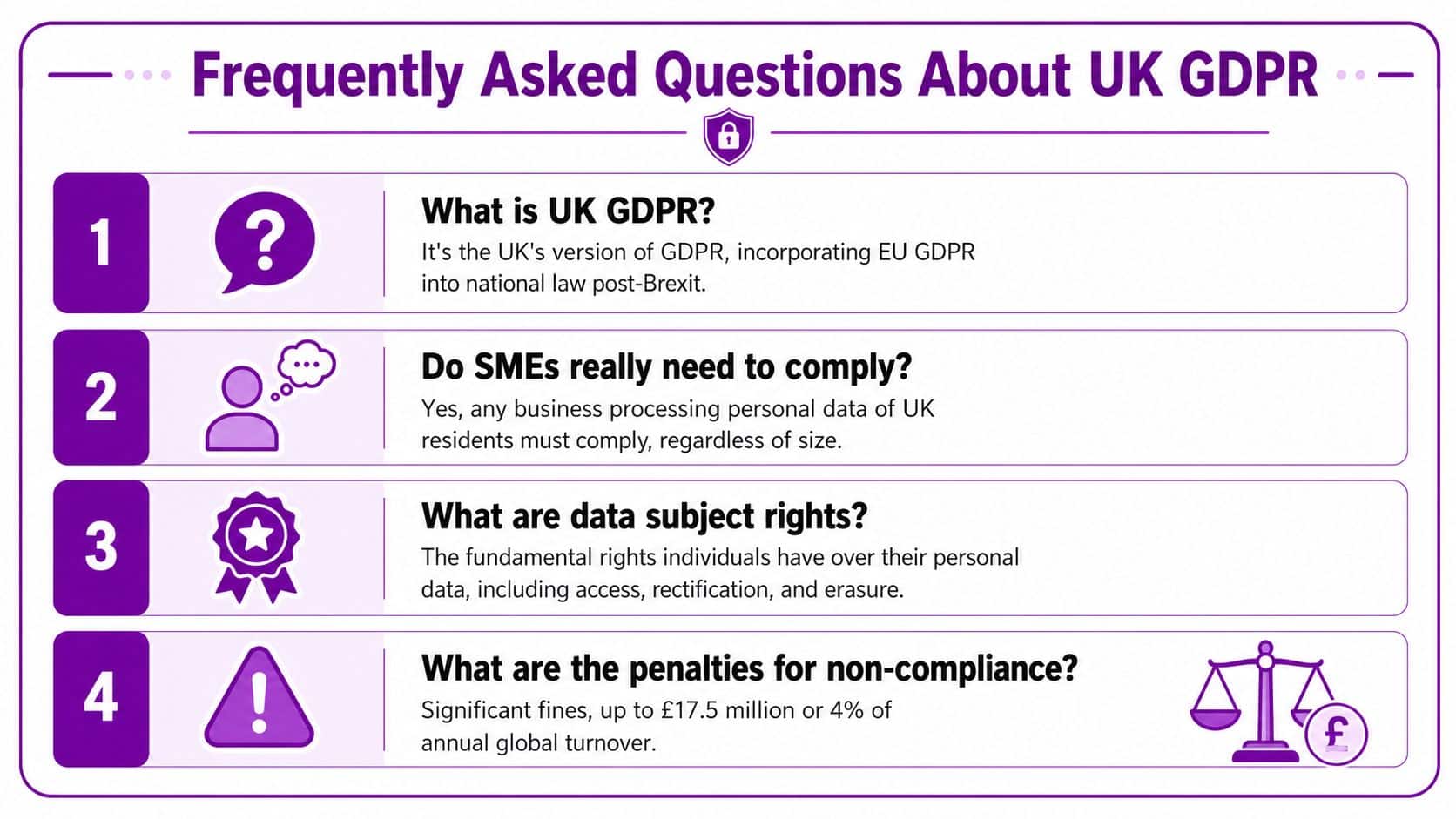
Frequently Asked Questions About UK GDPR
Did Brexit remove GDPR for UK businesses
No. The UK retained a GDPR-based framework through the Data Protection Act 2018 and UK GDPR after Brexit. For most UK businesses, the practical obligations still look very similar. The difference is that you need to think clearly about whether you're dealing only with UK personal data, or whether EU GDPR obligations may also apply because of customers, staff, or operations in the EU.
Do small businesses really need to comply
Yes. Size doesn't remove the obligation if you process personal data. A ten-person company with poor access control and no retention process can create just as many problems as a larger organisation. The scale of your programme may be smaller, but the core duties still apply.
Does using Copilot or other AI tools affect GDPR compliance
Yes. Using AI and automated decision-making tools like Copilot directly affects GDPR compliance. The ICO has been actively issuing guidance because AI raises questions about lawful basis, transparency, and human review obligations, making it a live governance issue for UK firms, as set out in the ICO's guidance on AI and data protection.
In practical terms, if staff paste personal data into AI tools, or if automated outputs influence decisions about people, you need to review your lawful basis, transparency wording, retention approach, and review controls.
What about sending personal data outside the UK
International transfers need proper consideration. The safe answer isn't “the supplier is in the cloud”. You need to know where data is processed, what transfer mechanism applies, and what your contracts say. For many businesses, this becomes part of supplier due diligence rather than a separate legal project, but it still needs documenting.
What is the simplest definition of GDPR compliance
The simplest useful definition is this. GDPR compliance means handling personal data lawfully, securely, and transparently, then being able to prove you do.
If you want practical help turning GDPR requirements into working controls across Microsoft 365, Azure, Dynamics 365, and your wider IT estate, contact F1Group. Phone 0845 855 0000 today or send us a message.