
Your Microsoft 365 rollout went well. Teams is embedded, SharePoint has replaced some file shares, and someone in the business is pushing for Azure, Power Platform, or Copilot next. Then the cracks start to show.
A department buys a SaaS tool without telling IT. Sensitive documents sit in three different places. Access rights drift as staff change roles. Finance wants to know why cloud spend jumps some months. The board asks who is accountable for AI use, cyber risk, and data handling. IT ends up reacting issue by issue.
That’s the point where an IT governance framework stops sounding like corporate jargon and starts looking useful. For an East Midlands business, it’s the working model that decides how technology choices get approved, how risk gets controlled, and how Microsoft tools are used properly rather than just switched on.
Your Guide to Strategic IT Control
In practice, most growing businesses don’t lack technology. They lack agreed rules for using it well.
A typical mid-sized firm in Nottingham or Lincoln might have Microsoft 365 in place, a few Azure workloads under discussion, and at least one team experimenting with Power Apps or Copilot. None of that is a problem on its own. The problem starts when nobody has defined who can approve new tools, what data can be stored where, or what evidence is needed before a change goes live.
That’s where an IT governance framework earns its keep. It isn’t a stack of documents written for auditors. It’s the operating model behind your IT decisions. It sets roles, approval routes, control points, reporting lines, and review routines so technology supports the business instead of creating avoidable risk.
For most SMEs, good governance answers a small set of practical questions:
- Who decides: Which decisions sit with the board, leadership team, IT, or department managers.
- What gets approved: New apps, integrations, security exceptions, AI tools, and cloud spending.
- How risk is assessed: What happens before a system change, supplier purchase, or data-sharing arrangement.
- How success is measured: Whether technology is reducing friction, supporting growth, and staying within acceptable risk.
Governance works when it makes decisions faster and clearer. It fails when it becomes paperwork with no operational effect.
The businesses that get this right usually treat governance as part of business planning, not as a separate IT exercise. That’s why it helps to tie governance decisions back to a broader IT strategy for business growth. If your strategy says improve customer response times, reduce manual admin, or support hybrid working, governance decides which Microsoft capabilities help and which controls must sit around them.
Without that structure, every tool looks useful. With it, technology becomes easier to justify, safer to run, and much less chaotic to manage.
Why IT Governance Matters for UK Businesses
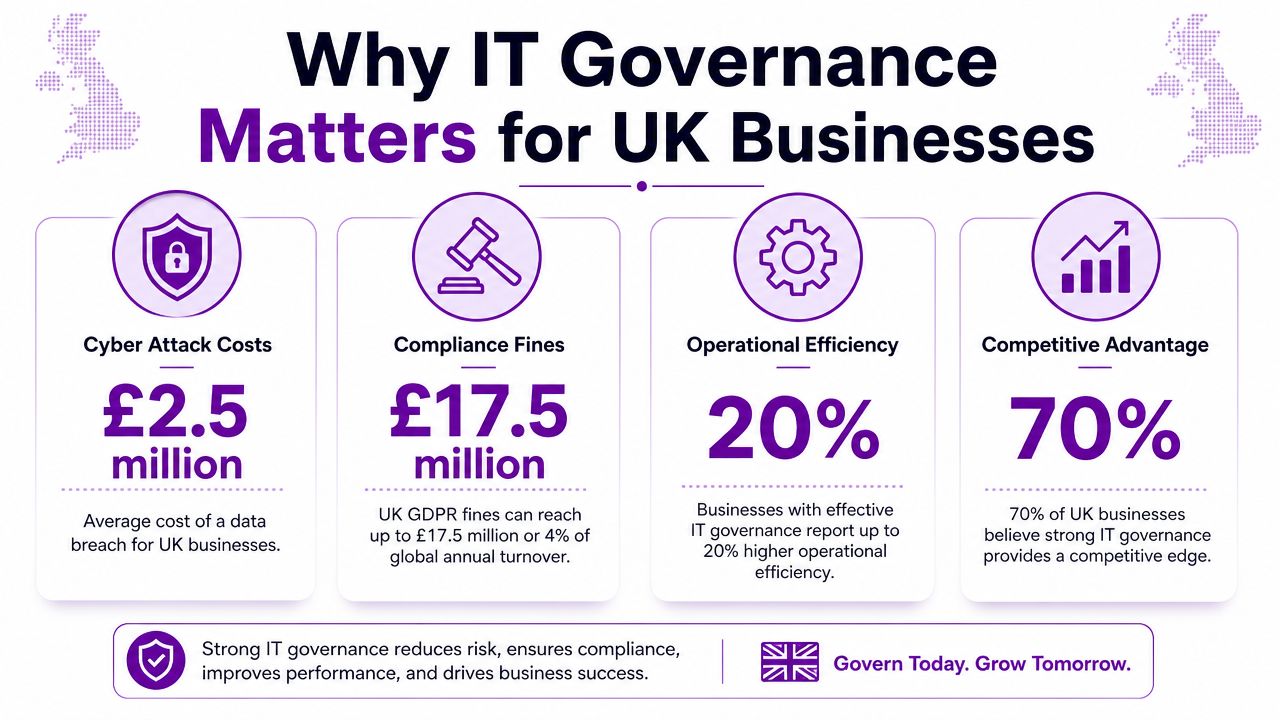
For many leadership teams, governance only becomes urgent after something goes wrong. A failed audit. A ransomware event. A cloud service that nobody owns properly. An AI tool that accesses information it shouldn’t.
The UK risk picture is already clear. The UK Government’s Cyber Security Breaches Survey 2024 found that 50% of UK businesses and 32% of charities reported some form of cyber security breach or attack in the previous 12 months, and the cost of cyber incidents is estimated at billions of pounds annually across the economy, as noted in this summary of UK cyber breach findings and governance implications.
Risk is now a board issue
If you’re running a business in Leicester, Newark, or Scunthorpe, that cyber exposure isn’t abstract. It affects uptime, customer confidence, insurance conversations, supplier due diligence, and management time. A governance framework gives you a way to assign ownership before incidents happen.
That usually means:
- Defining accountability: Someone owns identity, someone owns data protection, someone approves exceptions.
- Setting minimum controls: Multifactor authentication, joiner-mover-leaver processes, device standards, and change approvals.
- Creating reporting routes: Leadership sees meaningful risk and service information, not just technical noise.
For boards that need a wider view of responsibilities, Lighthouse Consultants has a useful practical guide to corporate risk and reporting. It helps frame IT governance where it belongs, inside overall corporate governance rather than off to one side.
Compliance is only part of the story
A lot of businesses approach governance as a defensive exercise. They want enough policy to satisfy an insurer, customer, or auditor. That’s understandable, but it’s too limited.
Well-run governance also improves decision quality. It stops duplicate systems creeping in. It makes Azure spend easier to challenge. It creates a proper route for approving Power Platform development. It reduces the chance that Copilot gets introduced before anyone has thought about permissions, data exposure, or review of generated output.
The real benefit isn’t more control for its own sake. It’s fewer surprises.
An SME doesn’t need the same structure as a listed enterprise. It does need a model that can stand up to scrutiny, support daily operations, and give directors confidence that technology risk is being actively managed rather than passively hoped away.
The Core Components of an IT Governance Framework
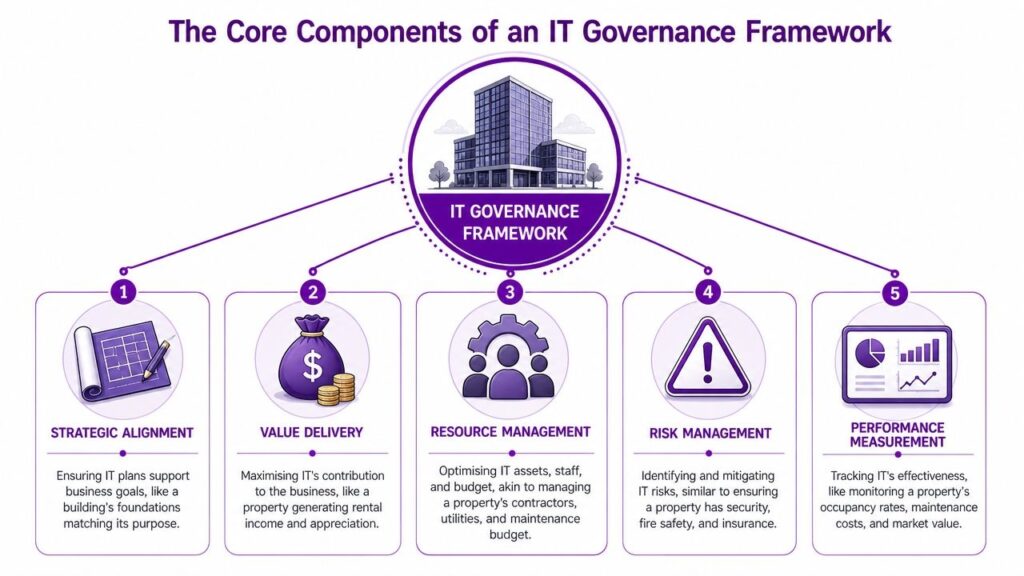
The easiest way to explain governance is to compare it with running a commercial building. If the building is poorly planned, badly maintained, insecure, and never inspected, problems pile up quickly. Technology works the same way.
A useful UK reference point sits outside pure IT. A foundational milestone was the UK Corporate Governance Code, first introduced by the Cadbury Report in 1992, showing how oversight has moved from management practice into board accountability, particularly for regulated and listed organisations, as outlined in this overview of major IT governance frameworks.
Strategic alignment
This is your blueprint. It asks whether IT plans support the business.
If you want to improve customer service, your governance model should prioritise Dynamics 365 design, Teams calling standards, or workflow automation that helps service teams respond faster. If the business goal is tighter control over information, then SharePoint structure, retention decisions, and Purview configuration matter more than buying another point solution.
Without alignment, businesses collect tools. With alignment, they build capability.
Value delivery
A building has to earn its keep. So does technology.
Value delivery means checking whether Microsoft licences, Azure services, reporting tools, and automation are producing a useful business outcome. For an SME, that may be better stock visibility, less manual data entry, more reliable reporting, or fewer handoffs between departments.
A simple test helps. If a system costs money, who owns the outcome it is meant to improve?
Resource management
This is the facilities and budget side of governance. It covers people, licences, devices, suppliers, and cloud services.
In Microsoft environments, resource management usually means being disciplined about:
- Licensing: Who needs which Microsoft 365 plan and who doesn’t.
- Admin roles: Limiting privileged access and reviewing it regularly.
- Cloud spend: Assigning ownership for Azure subscriptions and cost visibility.
- Development capacity: Deciding who can build Power Apps, flows, and integrations.
For organisations trying to tighten control over information handling, data governance consulting for Microsoft environments can sit alongside wider governance work as one practical layer.
Risk management
This is the fire safety plan, alarm system, and physical security combined.
Risk management covers cyber security, supplier risk, data handling, resilience, and change control. In Microsoft 365 terms, it includes access control, conditional access, data classification, backup decisions, monitoring, and incident response responsibilities.
What doesn’t work is writing a risk register and leaving it untouched. What does work is connecting identified risks to named controls, owners, and review dates.
Practical rule: If a risk has no owner and no control, it isn’t being governed.
A short explainer video can help if you’re aligning leadership around the basics before formalising controls.
Performance measurement
This is the regular inspection. You need evidence that controls are working and services are performing.
That means defining KPIs your leadership team can understand, then reviewing them consistently. Not every measure needs to be technical. Good examples include unresolved high-risk issues, time to approve access changes, Azure cost variance, policy exceptions, or recurring support problems caused by weak standards.
| Component | Practical Microsoft example |
|---|---|
| Strategic alignment | Approving M365 and Azure changes against business priorities |
| Value delivery | Reviewing whether Power Platform automation removes manual work |
| Resource management | Controlling admin roles, licences, and Azure ownership |
| Risk management | Setting conditional access, DLP, and change approval standards |
| Performance measurement | Tracking incidents, exceptions, and service reliability trends |
Choosing Your Governance Starting Point
Most business leaders don't need a lecture on framework theory. They need to know which model helps solve the problem in front of them.
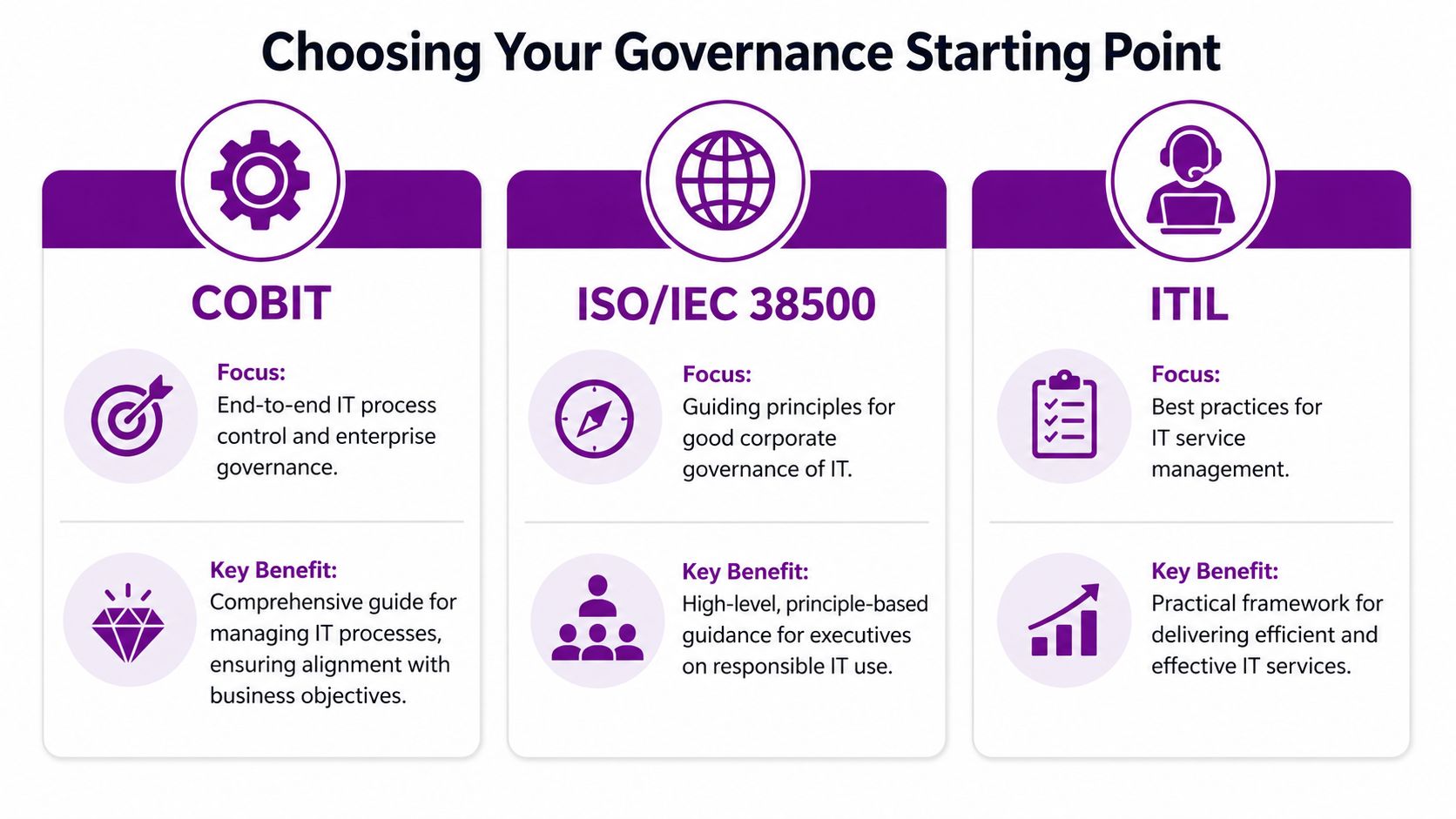
If you're hearing terms like COBIT, ISO/IEC 38500, and ITIL, don't assume you must adopt one in full. Most SMEs are better served by borrowing the parts that fit their scale, sector, and internal maturity.
When COBIT fits
COBIT is useful when you need a stronger control environment across the whole technology function. It suits organisations dealing with audit pressure, customer scrutiny, or complex process ownership.
Choose COBIT thinking if your main issues are:
- Control gaps: Different teams changing systems with inconsistent approval.
- Weak reporting: Leadership can't see risk, compliance, and service performance clearly.
- Accountability confusion: Governance decisions sit between finance, operations, and IT with no clear owner.
It can feel heavy if you apply it word for word. For smaller firms, that's usually the wrong move.
When ISO IEC 38500 fits
ISO/IEC 38500 is more useful in the boardroom than on the service desk. It gives directors and senior leaders a principle-led model for evaluating, directing, and monitoring how IT is used.
This works well when the business needs a cleaner governance layer above existing operations. It's especially helpful if leadership is asking sensible questions but hasn't yet defined how IT decisions should be governed.
A good fit looks like this:
| Need | Better fit |
|---|---|
| Board-level direction and oversight | ISO/IEC 38500 |
| Detailed process control across IT | COBIT |
| Day-to-day service consistency | ITIL |
When ITIL fits
ITIL is strongest when your problem is service management. If users complain about inconsistent support, poor change handling, or unclear incident ownership, ITIL gives structure to daily operations.
That matters in Microsoft estates where changes happen often. A new Intune policy, SharePoint permission update, Dynamics workflow change, or Azure deployment can all affect users quickly if change discipline is weak.
Good governance often starts with a service problem. Businesses fix incidents, requests, and changes first, then layer wider governance on top.
The hybrid approach most SMEs actually need
In real environments, a blended model works best.
Use ISO/IEC 38500 principles to shape board oversight. Use selected COBIT controls for accountability, risk, and reporting. Use ITIL routines for incidents, changes, and service standards. That gives you an IT governance framework that is structured but still usable by a lean internal team.
What usually fails is copying a large-enterprise framework wholesale. It creates policy overhead, drains time, and leaves staff bypassing the process. Governance should be proportionate. If your approvals take longer than the business can tolerate, people will route around them.
A Practical Roadmap for Microsoft Cloud Users
Microsoft gives you plenty of capability. Governance decides how that capability is used safely and consistently.
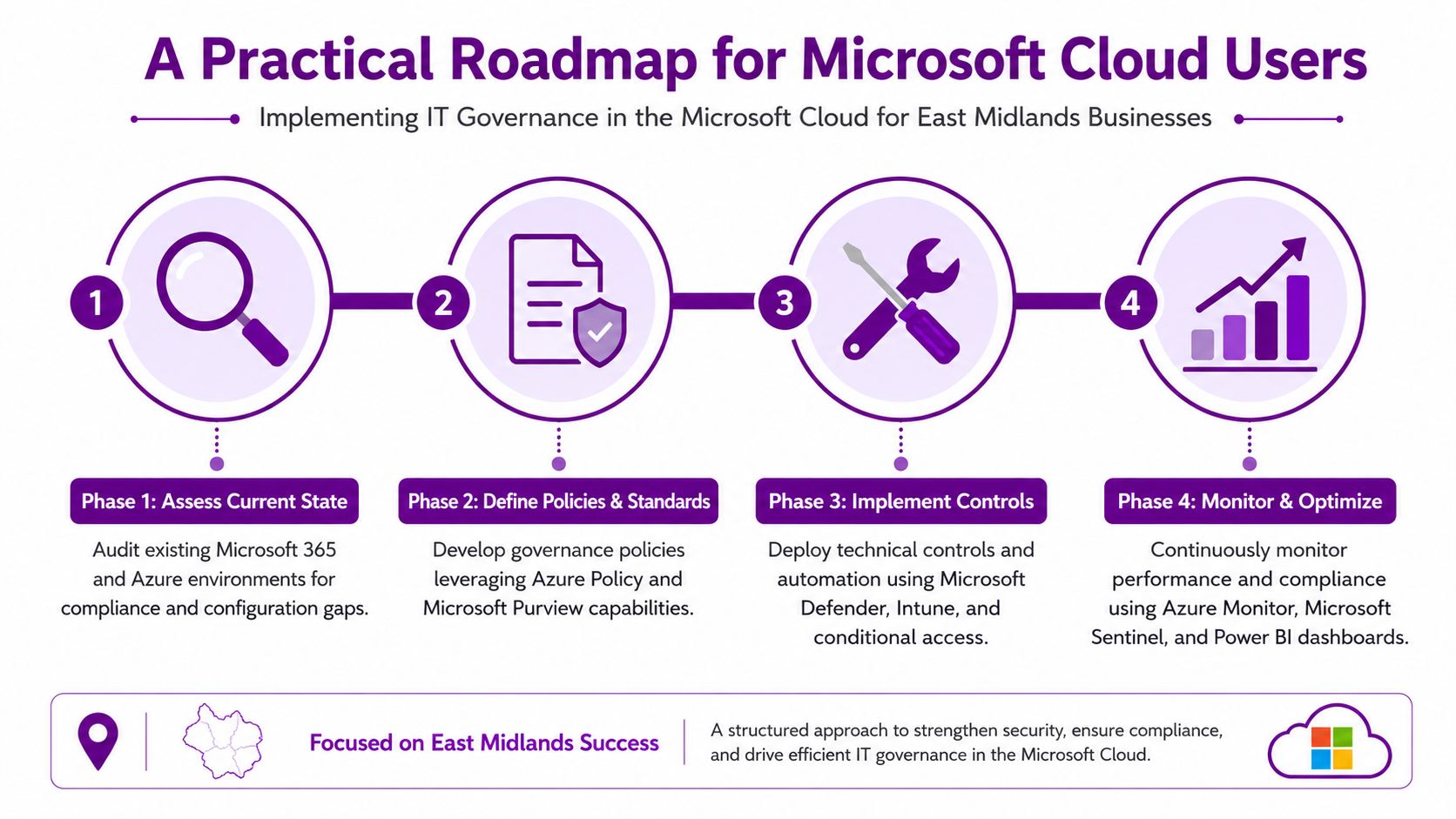
For East Midlands organisations already on Microsoft 365 and moving further into Azure, Power Platform, Dynamics 365, or Copilot, the most effective approach is phased. Don't try to document everything first. Start by making the environment visible, then add control, then refine.
Phase 1 assess current state
Begin with what you already have, not what you think you have.
Review your Microsoft 365 tenant, Azure subscriptions, privileged roles, external sharing, device posture, and Power Platform usage. The aim is to surface reality. Which teams are creating sites freely? Where are guest accounts sitting? Which Azure resources have no obvious owner? Who has admin rights they no longer need?
In this phase, useful actions include:
- Map identity and access: Review Entra ID roles, group structure, and conditional access coverage.
- Check data locations: Identify where sensitive content lives across SharePoint, OneDrive, Teams, and email.
- Audit cloud ownership: Tie Azure subscriptions, resource groups, and budgets to named business owners.
- Review app sprawl: List third-party apps connected into Microsoft 365 and who approved them.
If you're formalising cloud adoption at the same time, a structured Azure cloud adoption framework approach helps connect landing zones, policy, and operating ownership rather than treating governance as an afterthought.
Phase 2 define policies and standards
Once you can see the environment, define the rules that matter most. Keep them short and enforceable.
Most SMEs need a core policy set rather than a policy library. Focus on access, data handling, change approval, device compliance, and low-code development. For Microsoft estates, that often means standards around Teams creation, SharePoint permissions, external sharing, retention, and Power Platform approval.
A practical baseline often includes:
- Acceptable use for AI: What staff may enter into Copilot and what they must not.
- Data handling rules: Which information can be shared externally and under what conditions.
- Change control standards: Which changes need testing, approval, or rollback planning.
- Low-code governance: Who can build Power Apps and flows, and when central review is required.
Phase 3 implement technical controls
Policies only matter when the platform supports them.
Microsoft tools earn their place. Microsoft Purview can help with data classification, retention, and policy enforcement. Conditional Access can restrict risky sign-ins. Intune can enforce device compliance. Azure Policy can apply control standards at cloud scale. Defender and Sentinel can strengthen visibility and response.
The key is linking each control to a clear business decision. Don't enable settings just because they exist.
Here's a workable pattern:
| Governance need | Microsoft control |
|---|---|
| Limit access to approved users | Entra ID roles and Conditional Access |
| Reduce data leakage risk | Purview labels and DLP policies |
| Control unmanaged devices | Intune compliance and app protection |
| Keep Azure configuration consistent | Azure Policy and role-based access |
| Improve monitoring and review | Sentinel, Azure Monitor, and Power BI |
One practical option for businesses that need outside implementation support is working with a Microsoft-focused partner such as F1Group for control design, policy rollout, and operational handover.
Phase 4 govern AI and continuous monitoring
Many frameworks fall behind in this area. They cover traditional IT controls but say too little about daily AI use.
UK governance guidance increasingly stresses that governance should be dynamic and customized. For organisations using generative AI such as Microsoft 365 Copilot, governance needs to cover data access, human review, and acceptable-use rules, not just classic service controls, as discussed in this ISACA article on why IT governance should not be overlooked.
That matters because Copilot doesn't create a new data problem from nowhere. It exposes the permissions and information hygiene you already have. If users can access too much in SharePoint, Copilot may surface too much. If prompts include sensitive material, that has to be governed. If staff act on generated output without checking it, governance has failed.
Build AI governance around a few essential principles:
- Access before adoption: Fix permissions before broad Copilot rollout.
- Human review: Staff must verify outputs before sending, publishing, or acting on them.
- Prompt standards: Set rules for what data can be entered into AI-assisted tools.
- Use-case approval: Higher-risk uses, especially customer, HR, or financial workflows, should go through formal review.
If Copilot is in scope, governance can't stay static. Your review cycle needs to move at the pace of the tool.
Continuous monitoring is what keeps the whole framework alive. Use dashboards, exceptions reporting, and regular reviews so leadership can see drift early. In Microsoft environments, telemetry is already available. The missed step is usually turning it into a review rhythm that someone owns.
Measuring Success and Finding Expert Support
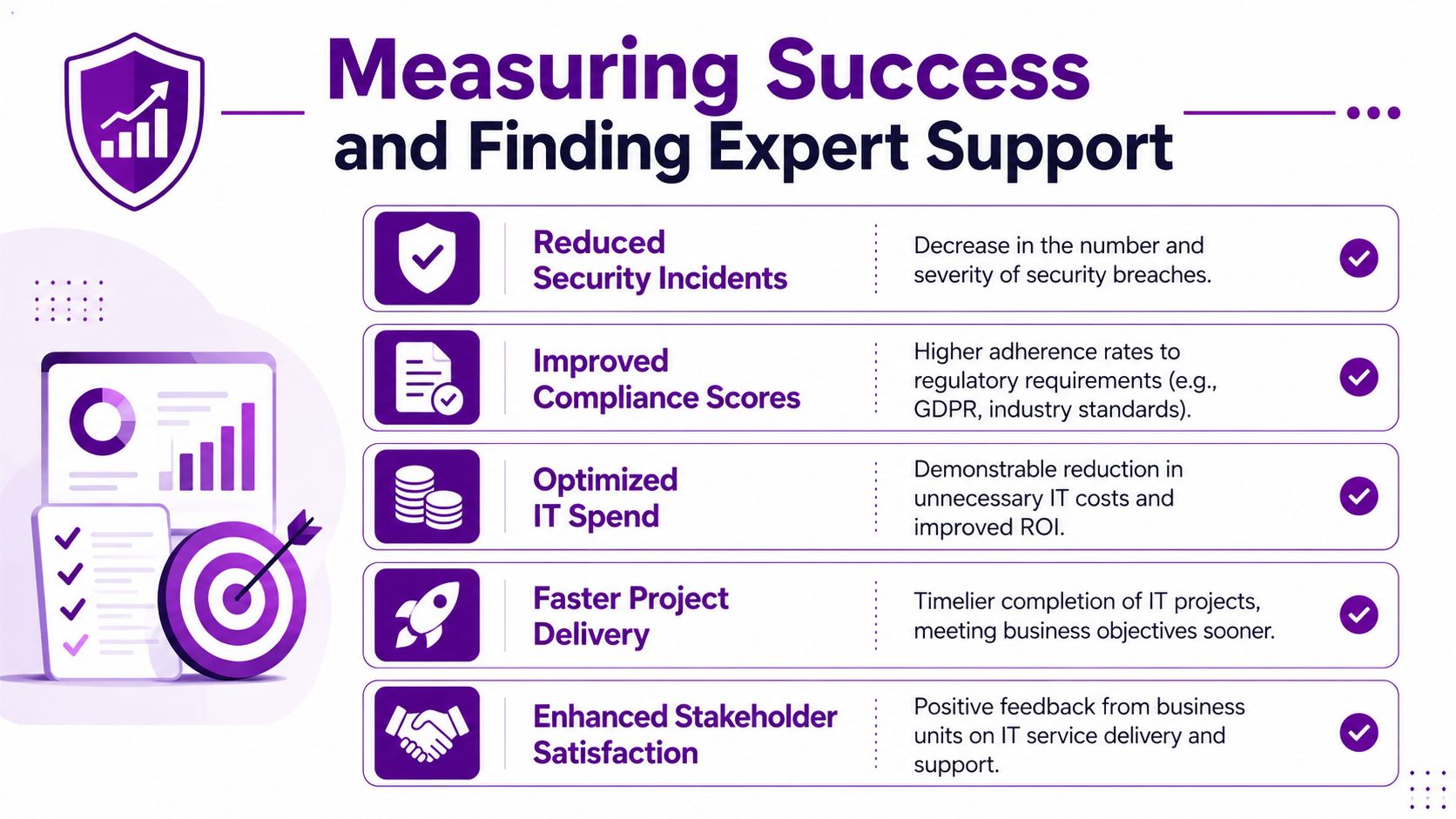
A governance framework only counts if the business can see the effect. If leaders can't tell what has improved, governance gets dismissed as overhead.
Independent guidance describes IT governance frameworks as roadmaps that support strategic alignment, risk management, and performance measurement, with a practical UK implication that governance should run as a continuous monitoring model rather than a one-off project, as summarised in this overview of IT governance frameworks and ongoing review practice.
What to measure in practice
Useful governance KPIs are usually operational, not theoretical.
- Reduced access friction: Fewer support tickets caused by unclear permissions or poor joiner-mover-leaver handling.
- Lower shadow IT exposure: Fewer unapproved apps and fewer duplicate tools doing the same job.
- Tighter audit readiness: Policies, approvals, and control evidence are easier to gather when requested.
- Better cloud cost discipline: Azure spend has named owners, review points, and fewer surprises.
- Improved service stability: Repeat incidents linked to change failure or weak standards begin to fall.
You should also track the softer signals. Do department heads know who approves a new app? Can managers explain the rules around Copilot use? Are exceptions documented, or just agreed informally in meetings? Those answers tell you whether governance is embedded.
Where outside support helps
Many SMEs know what good looks like but struggle to implement it while keeping daily operations moving. That's normal. Governance crosses infrastructure, security, data, cloud, compliance, and user behaviour. It rarely sits neatly with one person.
There are also adjacent specialist needs. If a business is dealing with data loss or recovery issues during wider resilience planning, external data recovery experts can be relevant as part of the broader continuity picture.
The key is choosing support that can translate governance into Microsoft configuration, reporting, and operational ownership rather than just handing over a policy pack.
If you want an IT governance framework that works in practice, not just on paper, F1Group can help you turn strategy, risk control, and Microsoft cloud governance into a practical operating model for your business. Phone 0845 855 0000 today or send us a message.