
You know the pattern. Sales keeps customer details in one system. Accounts rekeys the same information into another. Operations relies on spreadsheets because the warehouse package doesn't talk properly to finance. By Friday afternoon, nobody is quite sure which report is right.
That's where many East Midlands firms get stuck. A manufacturer in Lincoln, a professional services business in Nottingham, or a growing charity in Leicester can all have the same problem. The software itself isn't necessarily poor. The core issue is that each system was bought to solve one department's problem, not to run the whole organisation as one joined-up operation.
I've seen owners describe this as an IT issue when it's really a business visibility issue. If a quote accepted in CRM doesn't update stock, invoicing, project delivery, and management reporting without manual intervention, growth starts creating friction instead of momentum. Businesses then hire around the problem, add more admin, and accept delays that should never have become normal.
From Data Chaos to Business Clarity
Take a fictional East Midlands wholesaler. The sales team logs opportunities in a CRM. Accounts uses a separate finance package. The warehouse runs on a stock system that was fitted years ago and still does one job reasonably well. HR is elsewhere again. Nothing is fully broken, yet everything takes longer than it should.
A customer rings to ask whether an order can be expedited. Sales can see the order was raised, but not whether the goods have been picked. Operations can check stock, but not whether the account is on hold. Finance knows the payment history, but not the promised delivery date. Staff spend their time chasing updates instead of serving the customer.
That's what data silos look like in practice. They don't always show up as dramatic outages. More often, they appear as duplication, workarounds, conflicting reports, and people keeping their own “master spreadsheet” because they don't trust the systems to agree.
What the problem looks like day to day
- Manual rekeying: Staff copy customer, order, or invoice data from one screen to another.
- Conflicting reports: Sales and finance produce different figures for what should be the same period.
- Slow customer response: Teams can't answer simple status questions without checking three systems.
- Brittle processes: One small change in workflow forces people back to email and spreadsheets.
A similar operational pattern appears in sectors where timing and hand-offs matter. This piece on streamlining container operator workflow shows how disconnected processes create avoidable friction when information doesn't move cleanly between teams and systems.
Systems rarely fail because a business lacks software. They fail because the software doesn't share context.
Systems integration services solve that problem by connecting the tools you already depend on, or by shaping a better architecture when the current stack has become too fragmented. The aim isn't technical elegance for its own sake. It's to give staff one reliable flow of information, reduce avoidable admin, and make decisions based on current data rather than guesswork.
When integration is done properly, a quote accepted by sales can trigger downstream actions automatically. Customer records stay aligned. Stock, finance, service, and reporting all reflect the same reality. That's when growth becomes manageable again.
What Are Systems Integration Services
Think of your software estate as a set of islands. CRM sits on one island. ERP or finance sits on another. HR, warehouse systems, field service tools, e-commerce platforms, and reporting tools sit elsewhere. Systems integration services build the bridges that let data move between them in a controlled, useful way.
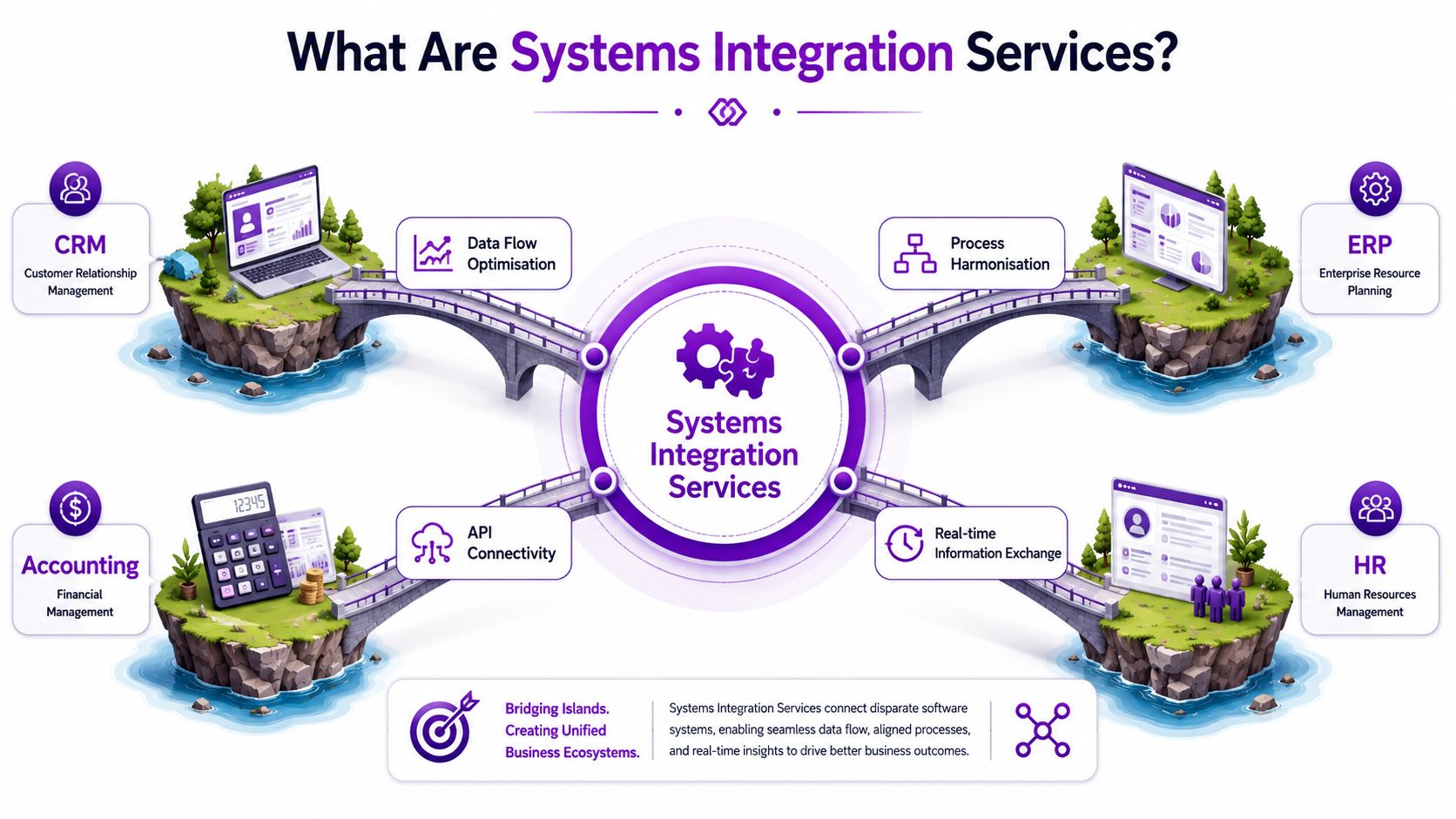
In practical terms, this means more than plugging one app into another. It usually starts with process analysis. Someone has to decide which system owns the customer record, when an order should create an invoice, what should happen if data is incomplete, and who needs alerts when something fails. Good integration work is part business design and part technical delivery.
The three main categories
The UK market view is straightforward. InsightAce Analytic's system integration services market overview states that system integration services in the UK facilitate integrated and synchronized functioning across diverse software, hardware, and network elements, optimising corporate operations and elevating operational efficiency by enabling smooth communication and data interchange. It also notes the market is segmented into infrastructure integration services, enterprise application integration services, and consulting services.
Those three categories matter because they answer different business needs:
- Infrastructure integration services: These deal with the underlying environment. Networks, platforms, identity, device connectivity, and the mechanics that allow systems to work together reliably.
- Enterprise application integration services: These connect the business applications themselves, such as CRM, ERP, HR, service management, and stock control.
- Consulting services: These shape the roadmap, define governance, uncover process issues, and stop firms from automating a mess.
What good integration actually does
A sensible integration design should deliver a few clear outcomes:
-
Data moves without rekeying
Customer, product, and transaction data should flow automatically where it's needed. -
Processes follow business rules
Approval paths, exceptions, notifications, and hand-offs should reflect how the business runs. -
Failures are visible
If one system can't accept a record, somebody needs to know quickly and know what to do next. -
The setup can evolve
New systems, acquisitions, reporting demands, or service changes shouldn't force a complete rebuild.
If you want a sector-specific example of this thinking, integrating commercial transport data is a useful read because it shows how information from separate operational sources becomes more valuable once it's connected.
For a Microsoft-focused view of connected applications, integrating software systems is a relevant reference point.
The Business Benefits of a Unified System
The case for integration isn't that it sounds modern. The case is that disconnected systems drain margin, time, and management attention. Once your business reaches a certain level of complexity, patching around those gaps becomes more expensive than fixing them.
The commercial backdrop is clear. The Fortune Business Insights system integration market report says the UK market for system integration services is projected to reach USD 22.16 billion by 2026. Using a simple rounded conversion for UK readers, that's about £17.5 billion. The same source says this surge underscores demand as organisations adopt AI, IoT, and cloud-based platforms to unify complex IT environments.
Better operational efficiency
Admin work often expands to fill the gaps between systems. Staff export data, tidy it, import it again, and chase exceptions by email. Integration removes much of that repetitive effort.
That matters in growing firms because the same people often carry multiple responsibilities. If your operations manager is also acting as data reconciler, the business is paying senior time for low-value work.
Cleaner reporting and sharper decisions
When systems disagree, meetings drift into arguments about whose numbers are correct. A unified setup gives you a more dependable operating picture. Revenue, pipeline, stock, service tickets, cash collection, and project delivery become easier to review without waiting for someone to stitch data together first.
Practical rule: If your month-end reporting depends on heroic spreadsheet work, you don't have a reporting problem. You have an integration problem.
A connected environment also helps managers spot issues earlier. Delays, exceptions, and customer risks become visible while there's still time to act.
Here's a useful explainer on workflow-led automation through Power Automate workflows if you're looking at how integrated data can trigger practical day-to-day actions.
A short overview of the business case sits well in video form too:
A better customer experience and room to scale
Customers don't care which department owns the data. They expect one coherent answer. Integration helps sales, finance, service, and logistics work from the same record rather than from partial snapshots.
It also gives SMEs a stronger base for expansion. New sites, additional services, e-commerce channels, outsourced fulfilment, or acquisitions are far easier to absorb when the underlying architecture already expects systems to exchange data cleanly.
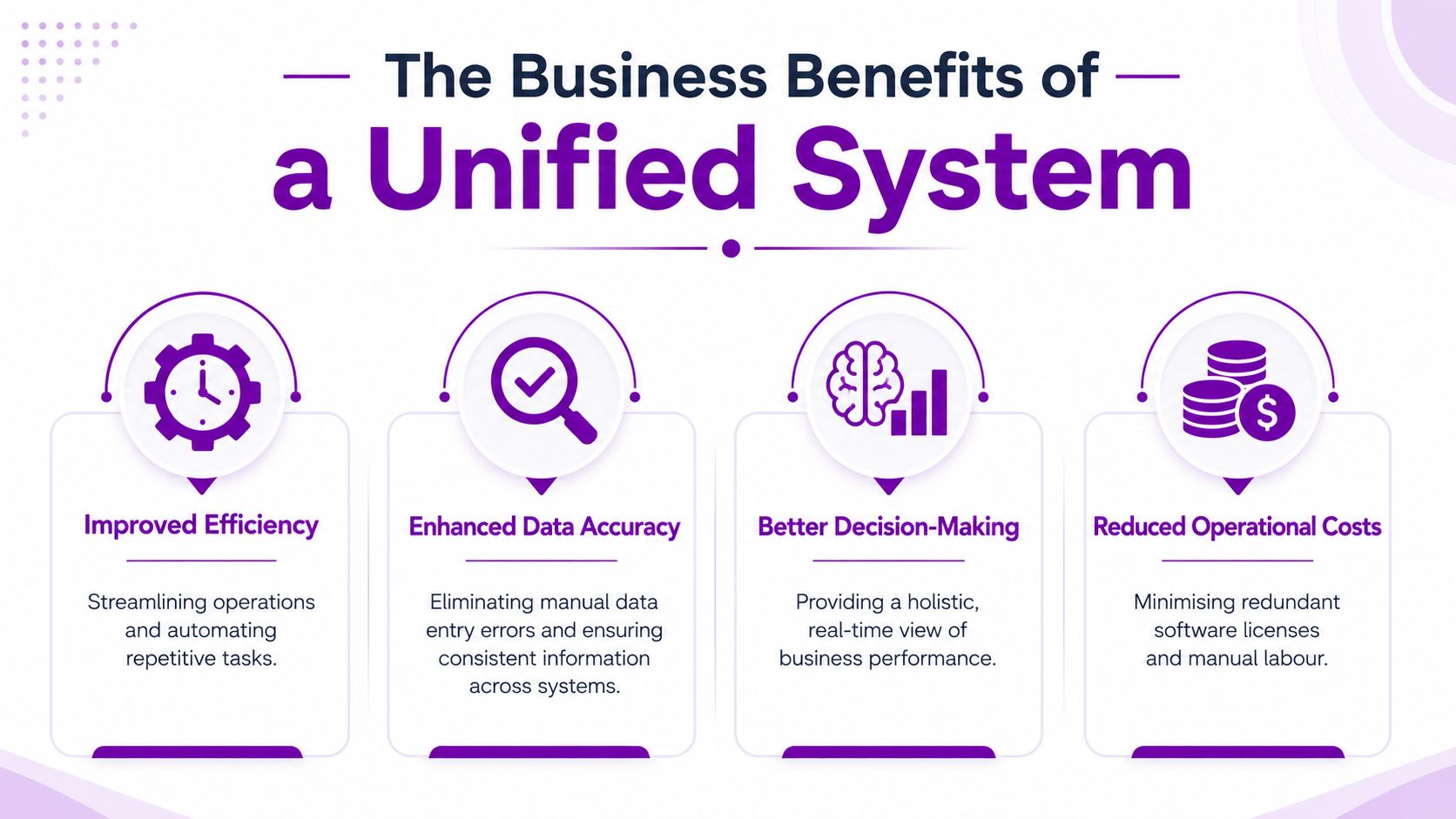
- Improved efficiency: Routine tasks can run automatically rather than by email or spreadsheet.
- Enhanced data accuracy: Staff stop typing the same details into multiple systems.
- Better decision-making: Managers work from a broader, more current view.
- Reduced operational costs: Duplicate effort and avoidable software overlap become easier to remove.
Microsoft Tools for Modern Integration
For many SMEs in the East Midlands, Microsoft is already the estate they know best. Microsoft 365 handles collaboration. Azure underpins infrastructure or cloud workloads. Dynamics 365 may already support sales, finance, customer service, or HR. The smartest integration projects usually build on that familiarity rather than introducing a completely separate stack unless there's a strong reason to do so.
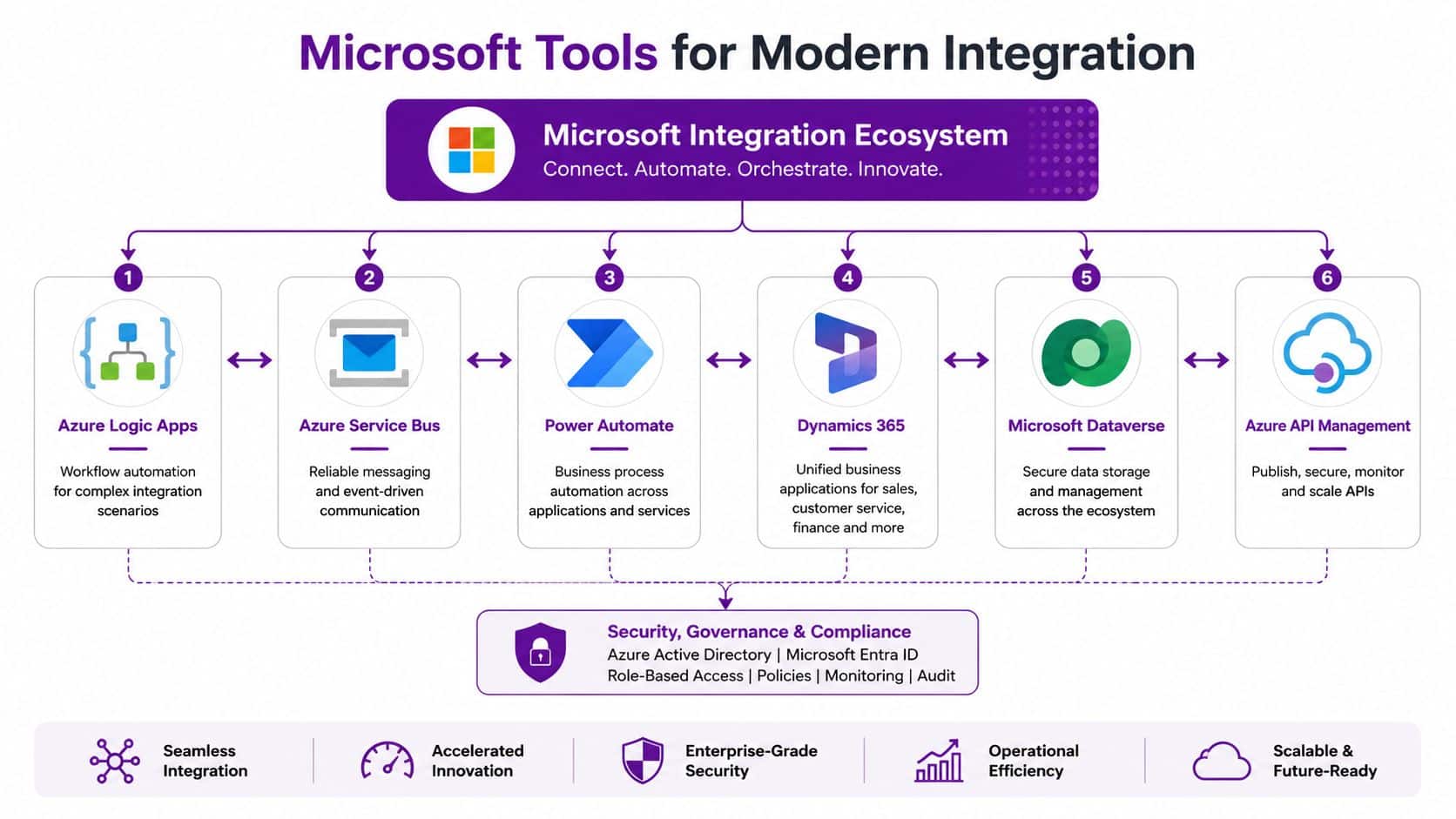
What makes the Microsoft ecosystem useful is that it supports both structure and flexibility. You can create strong integrations for core systems, but you can also automate department-level processes without rebuilding your whole architecture every time a new need appears.
Azure as the integration backbone
Azure provides the heavier-duty plumbing. In practice, that often means tools such as Azure Logic Apps, Azure Service Bus, and Azure API Management.
Each has a different role:
- Azure Logic Apps: Best when you need workflow orchestration across systems, approvals, notifications, or conditional actions.
- Azure Service Bus: Useful when messages need to be handled reliably, especially where timing and order matter.
- Azure API Management: Helps govern, secure, and expose APIs in a controlled way so integrations don't become a free-for-all.
Good architecture is critical. Point-to-point links can work for a small number of systems, but they become awkward fast. A more structured Azure-led approach gives you clearer monitoring, cleaner security boundaries, and less pain when one application changes.
Dynamics 365 as the business layer
Dynamics 365 often becomes the operational heart of a Microsoft-centric business. Sales teams may work in Dynamics 365 Sales, service teams in Customer Service, finance users in Business Central or related finance systems, and HR teams in specialist platforms.
Significant gain comes when Dynamics doesn't sit on its own. Orders, cases, approvals, invoices, stock movements, contract updates, and reporting data can all move in a more coherent pattern when Dynamics is integrated properly with the rest of the estate.
For a deeper look at connecting business applications in this environment, Dynamics 365 integration services is the relevant internal resource.
Power Platform for the last mile
This is the part many organisations find most immediately useful. Power Automate, Power Apps, Power BI, and Microsoft Dataverse can turn integration from an architectural concept into visible day-to-day improvement.
Power Automate can route approvals, create records, send alerts, and coordinate tasks across systems. Power BI can surface integrated data in dashboards that management can readily use. Power Apps can fill process gaps where no single packaged application fits neatly. Dataverse can provide a structured data layer for apps and automation.
The market evidence supports the need for this kind of work. The IoT Analytics integration services release notes that nearly 50% of all IoT projects involved custom-built solutions in 2023, with a majority executed by professional system integrators. It also says mid-market companies allocate 3% to 5% of their annual revenue to integration and ERP systems.
That tracks with what experienced teams already know. Off-the-shelf capability gets you part of the way. The value comes from shaping the tools around how the business runs.
A strong Microsoft setup isn't one where every tool is switched on. It's one where the right tools exchange the right data at the right moment.
Your Step-by-Step Integration Project Plan
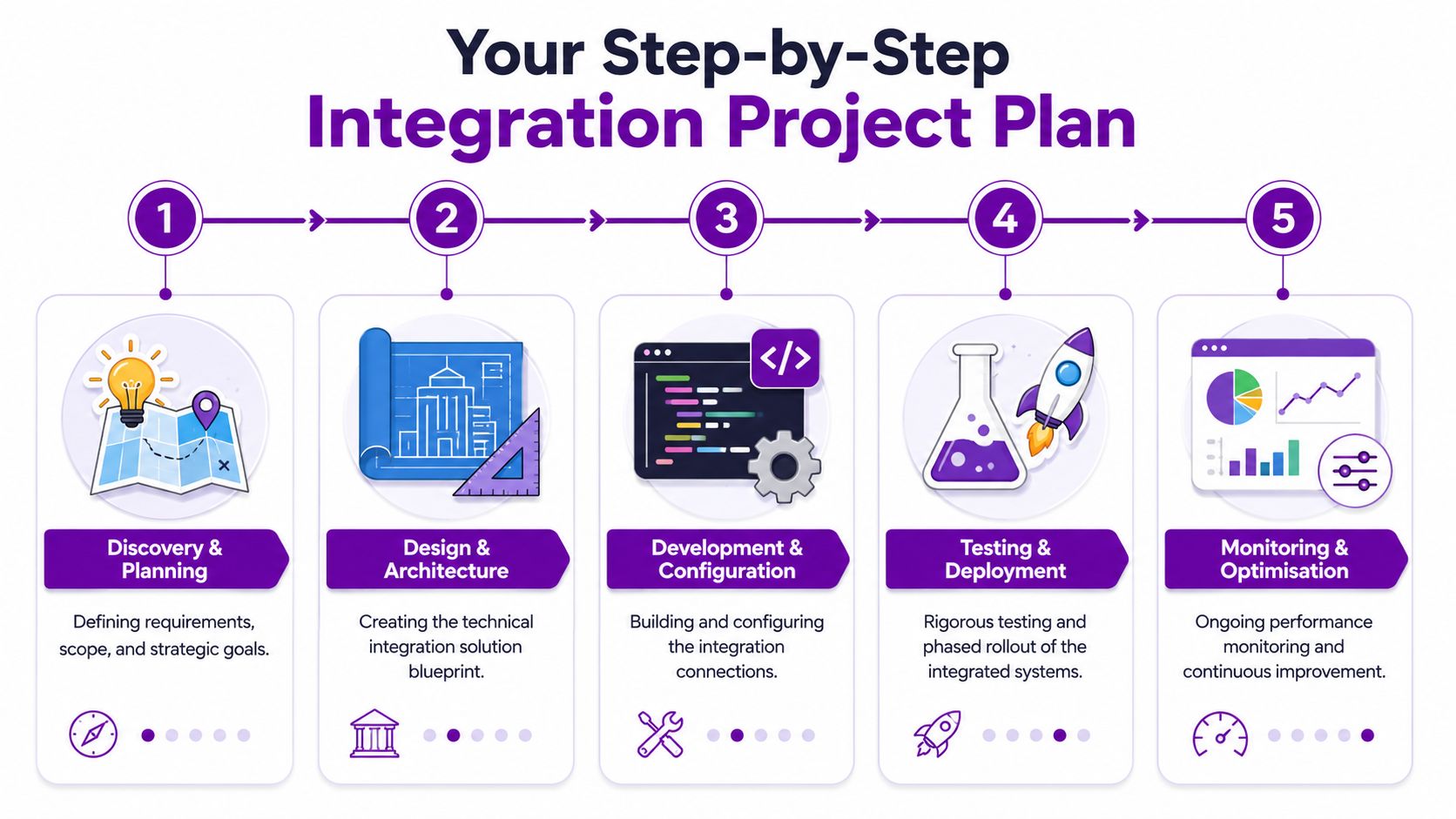
Integration projects go wrong when firms jump straight into connectors and workflows before they've agreed process ownership, data rules, or business priorities. A calmer approach works better. Break the work into stages, keep the scope honest, and test properly before anyone calls it done.
UK integration demand is being driven by projects that need more than a single connector. The Grand View Research system integration market analysis says large-scale transformation projects in the UK typically require multi-vendor interoperability, middleware deployment, API orchestration, and custom application integration, which directly fuels system integrators' demand by 6.8% annually through 2034.
Five phases that keep projects under control
-
Discovery and planning
Start with business priorities, not software features. Which processes hurt most? Which records are duplicated? Which reporting gaps create risk? This stage should also identify data owners, compliance considerations, and where manual work is currently masking process flaws. -
Design and architecture
Here, the team maps system ownership, data flows, error handling, and security controls. During this phase, decisions are made about APIs, middleware, workflow tools, and whether any legacy system needs to stay, be wrapped, or be replaced. -
Development and configuration
Connectors are built. Workflows are configured. Validation rules are added. Logging and alerting are set up. Good delivery teams also document what they've built so your business isn't dependent on tribal knowledge later.
What sensible testing looks like
Testing is where rushed projects reveal themselves. It's not enough to confirm that record A reaches system B. You need to test failures, duplicate entries, missing fields, role-based access, approvals, and exception handling.
A practical test checklist usually includes:
- Data validation: Confirm that values map correctly between systems.
- Process testing: Run real-world scenarios, including awkward edge cases.
- Permission checks: Make sure users only see and do what they should.
- Rollback planning: Know how to recover if deployment exposes a serious issue.
If you only test the happy path, you're not testing the integration. You're testing a demo.
Deployment and optimisation
Go-live should be phased where possible. Start with a controlled release, monitor closely, and give users a clear route to report issues. Post-launch support matters because operational use always reveals things that design workshops miss.
Integration also isn't a one-off exercise. New systems arrive. Teams change workflows. Vendors alter APIs. Reporting needs evolve. The best projects leave behind a manageable operating model rather than a brittle one-time build.
Choosing Your Integration Partner in the East Midlands
The technology matters, but partner selection often decides whether the project feels manageable or painful. For a small or mid-sized organisation in Leicester, Lincoln, Nottingham, Newark, Grimsby, or Scunthorpe, you need a provider that understands local operating realities as well as Microsoft platforms.
A polished sales presentation isn't enough. Ask how they handle change control, failed syncs, documentation, user training, and support after go-live. Ask who does the work. Ask whether they've delivered for organisations your size, not just for national enterprises with dedicated internal project teams.
Why transparent pricing matters
This point has become more important as firms experiment with AI and low-code tools. The MarketsandMarkets system integration services insight says 54% of UK non-profits abandon AI integration initiatives within 12 months due to unanticipated data governance costs and undefined pricing models for custom Power Automate flows.
That should make any SME cautious. If a provider can't explain what affects cost, what sits inside scope, and what will trigger additional charges, you're likely to discover the truth mid-project.
Use ROI logic, but keep it grounded. If integration removes repetitive admin work, reduces reporting delays, or shortens order handling, those time savings have value. You don't need inflated promises. You need a provider willing to tie the project to actual business processes and actual ownership.
East Midlands systems integration partner checklist
| Criteria | Question to Ask | Why It Matters |
|---|---|---|
| Local presence | Who can be on-site in the East Midlands if the project needs workshops or hands-on support? | Local access helps with discovery, user adoption, and issue resolution. |
| Microsoft capability | Which Microsoft technologies do you actively deliver with, such as Azure, Dynamics 365, Power Automate, and Power BI? | A Microsoft-centric organisation needs delivery depth, not just reseller status. |
| Experience with SMEs | What kinds of organisations do you usually support in terms of size and internal IT maturity? | SME projects need pragmatism and sensible governance, not enterprise overhead. |
| Security standards | Are your engineers vetted, and how do you control access during development and support? | Integration touches live business data. Security and trust can’t be afterthoughts. |
| Delivery method | Do you offer fixed-price, time-and-materials, or phased engagements, and when is each appropriate? | Pricing structure affects risk, scope control, and budget confidence. |
| Support model | What happens after go-live if a connector fails or a workflow needs adjustment? | Integrations need monitoring and ongoing care. |
| Documentation | What documentation will we receive for flows, dependencies, ownership, and support procedures? | Without documentation, future changes become slow and risky. |
| Data governance | How do you handle data ownership, retention, permissions, and exception logging? | Governance problems often surface after launch, when they’re costlier to fix. |
| Vendor independence | Can you work across third-party platforms as well as Microsoft tools? | Most businesses don’t run a pure single-vendor estate. |
| Commercial clarity | Can you explain likely change requests, exclusions, and the assumptions behind your estimate? | Hidden assumptions are where many projects drift off course. |
A good partner won't claim every process should be automated. They'll tell you which integrations are worth doing first, which should wait, and which process problems need fixing before any technology is introduced.
Unify Your Business for Future Growth
Disconnected systems aren't a sign that your business has failed. They're usually a sign that the business has grown faster than its processes and platforms. The trouble starts when those gaps become accepted as normal.
Systems integration services give SMEs a practical route out of that trap. They reduce manual work, improve data quality, support better decisions, and make customer-facing teams more effective. For East Midlands organisations using Microsoft technologies such as Azure, Dynamics 365, Microsoft 365, and Power Platform, the opportunity is often to connect what already exists rather than start again from scratch.
The firms that handle integration well usually do three things. They focus on business processes first. They choose tools that fit their operating reality. They work with a partner that can explain trade-offs plainly, not bury them in jargon.
Growth puts pressure on every weak hand-off in the business. Orders, approvals, invoicing, reporting, customer service, stock movement, and management visibility all depend on clean information flow. If your systems still force people to act as the bridge, the business is carrying unnecessary cost and risk.
A unified setup won't solve every operational issue overnight. It will give your team a stronger foundation to solve them properly and to keep scaling without adding chaos.
Ready to connect your systems and maximize your business potential? Speak to F1Group, East Midlands-based Microsoft specialists supporting organisations across Lincoln, Nottingham, Leicester, Scunthorpe, Grimsby, and Newark. Phone 0845 855 0000 today or Send us a message.