
Your replacement laptops are arriving, the old kit is piling up in a spare room, and someone in the business is already asking whether a local clearance firm can “just take it away”. That's usually the moment risk enters the process.
For many East Midlands businesses, hardware refreshes are planned down to the last Microsoft 365 licence, docking station, and delivery slot. The retirement of the old equipment often isn't. Yet the disposal stage is where data protection, environmental compliance, and operational discipline all meet. If you get it wrong, the problem isn't just clutter. It's loss of control over devices that may still contain staff records, customer data, finance files, cached credentials, and email archives.
That matters at national scale as well as site level. The United Kingdom generates approximately 1.65 million tonnes of electronic and electrical waste annually, part of the world's fastest-growing solid waste stream, according to UK e-waste statistics compiled by Business Waste. For any business replacing laptops, desktops, servers, phones, or storage, that figure is a reminder that secure retirement isn't an edge case. It's routine work that needs proper controls.
Your Business Is Upgrading Now What
A typical scenario looks harmless enough. You replace ageing Lenovo laptops, retire a few Dell desktops, swap out some old switches, and move a file server workload into Azure. The old devices don't leave site straight away, so they end up boxed in a comms room or stacked in a meeting room cupboard. Everyone assumes they'll deal with it later.
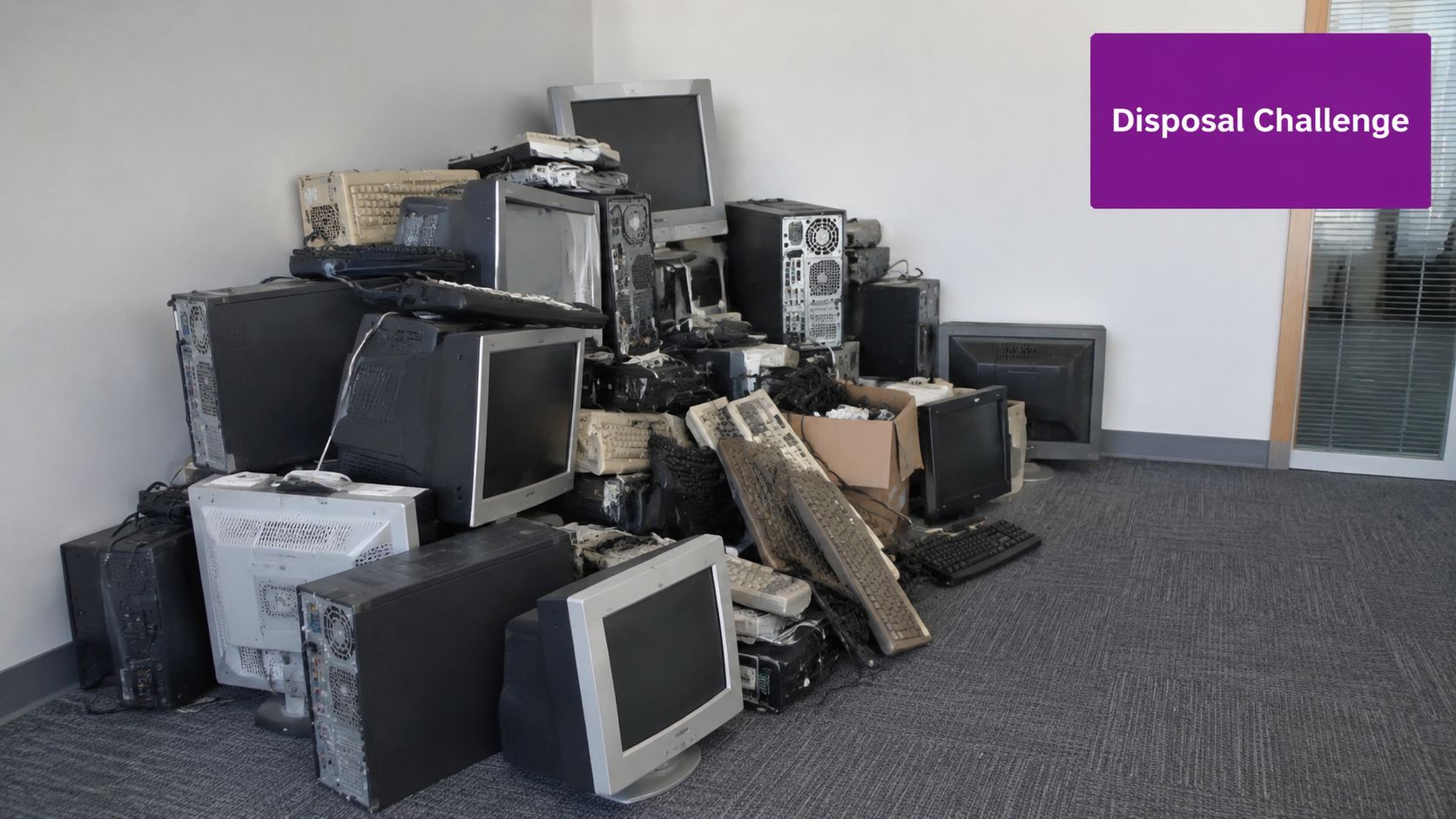
That “later” is where trouble starts. Devices sit untracked. Labels fall off. Someone borrows a machine for testing. A laptop with an SSD disappears during an office move. An old NAS is sent out with general electrical waste because it “was probably wiped”. None of those failures look dramatic on the day. They become serious when you can't prove what happened to the data-bearing assets in your care.
Why old hardware becomes a live risk
National IT disposal isn't just about removing junk. It's about controlling three things at once:
- Data exposure: Old endpoints and storage media often hold far more than users realise, including cached files, browser data, synced folders, and saved credentials.
- Compliance liability: The legal duty doesn't disappear because a device is obsolete or no longer on your asset register.
- Environmental handling: Electronic equipment has to move through the right reuse, recycling, or destruction route.
A good discipline is to treat retirement as part of the asset lifecycle, not as a clean-up exercise. If your business already tracks deployments, users, serial numbers, and support status, disposal should follow the same logic. That's one reason a strong IT asset management approach makes disposal safer and far easier to evidence.
Practical rule: If a device ever held company data, assume it still presents a security risk until a compliant process proves otherwise.
The hidden mistake businesses make
The biggest operational mistake isn't usually malice or negligence. It's choosing disposal on convenience. A cheap collection service can remove the physical burden from your office while leaving the legal burden with you. Business owners often think the handover itself transfers responsibility. It doesn't.
When I see disposal handled well, the business has already decided three things before collection day: what can be reused, what must be sanitised, and what must be physically destroyed. That creates order. Without it, national IT disposal becomes a pile of assumptions, and assumptions are a poor security control.
Understanding Your Legal Obligations in the UK
The rules that matter most are straightforward once you translate them into operational terms. In the UK, organisations disposing of IT assets must comply with three core legal frameworks: the Waste Electrical and Electronic Equipment Regulations 2013, the UK GDPR, and the Data Protection Act 2018, which collectively require certified data destruction rather than simple file deletion, as outlined in Restore's guide to IT asset disposal best practices.
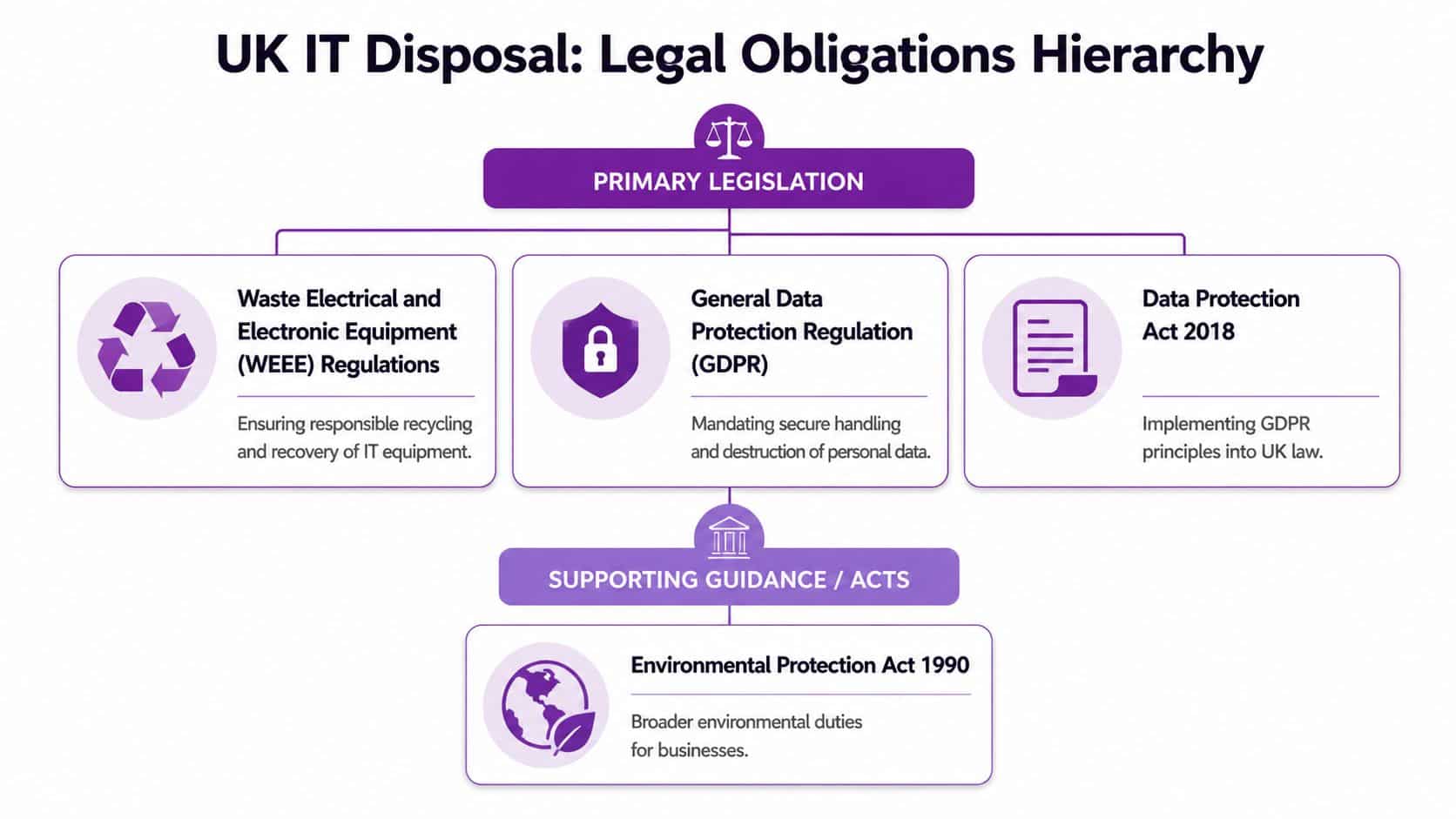
For a business owner in Leicester, Lincoln, Nottingham, or Newark, that means one practical thing above all. Deleting files, reformatting a drive, or asking an engineer to “factory reset it” isn't enough on its own unless the method used is appropriate, documented, and defensible.
What each legal framework means in practice
WEEE Regulations 2013
WEEE is the environmental side of the job. It governs how electrical and electronic equipment is handled at end of life, with proper recovery, recycling, and disposal routes rather than informal dumping or general waste removal.
If your business places more than 5 tonnes of electrical and electronic equipment on the UK market in a compliance year, it must join a Producer Compliance Scheme. If it places less than 5 tonnes, it may register directly as a small producer with its environmental regulator, according to the UK government's WEEE regulations guidance.
UK GDPR
UK GDPR is the data protection side. If a retired laptop still contains personal data, your organisation remains responsible for protecting that data until it is properly destroyed or irreversibly sanitised.
That matters for staff devices, finance systems, HR laptops, customer service machines, and mobiles. It also matters for less obvious storage such as printer hard drives, virtualisation hosts, backup appliances, and failed SSDs pulled from servers.
Data Protection Act 2018
The Data Protection Act 2018 puts the UK GDPR regime into domestic law and gives the compliance issue practical force. It's the framework you'll be judged against if a disposal process fails and you can't show proper controls, oversight, and evidence.
What compliant disposal looks like day to day
A compliant process usually includes:
- Asset identification before anything leaves site.
- Assessment of data-bearing risk by device type.
- Approved sanitisation or destruction using a suitable method.
- Documented evidence including serial numbers and outcomes.
- Governance checks through internal policies and supplier due diligence.
If your current process can't answer who handled the device, where it went, what happened to its storage, and what evidence you hold, it isn't robust enough.
For many organisations, the missing piece isn't technology. It's governance. Clear disposal standards should sit alongside your broader information governance framework, because retired hardware is still an information risk until the chain is closed.
The legal test is not whether you meant to handle disposal responsibly. It's whether you can prove that you did.
Secure Data Destruction Methods Compared
The right destruction method depends on the media in front of you. That sounds obvious, but on this point many disposal projects fail. Businesses often apply old hard drive logic to modern storage.
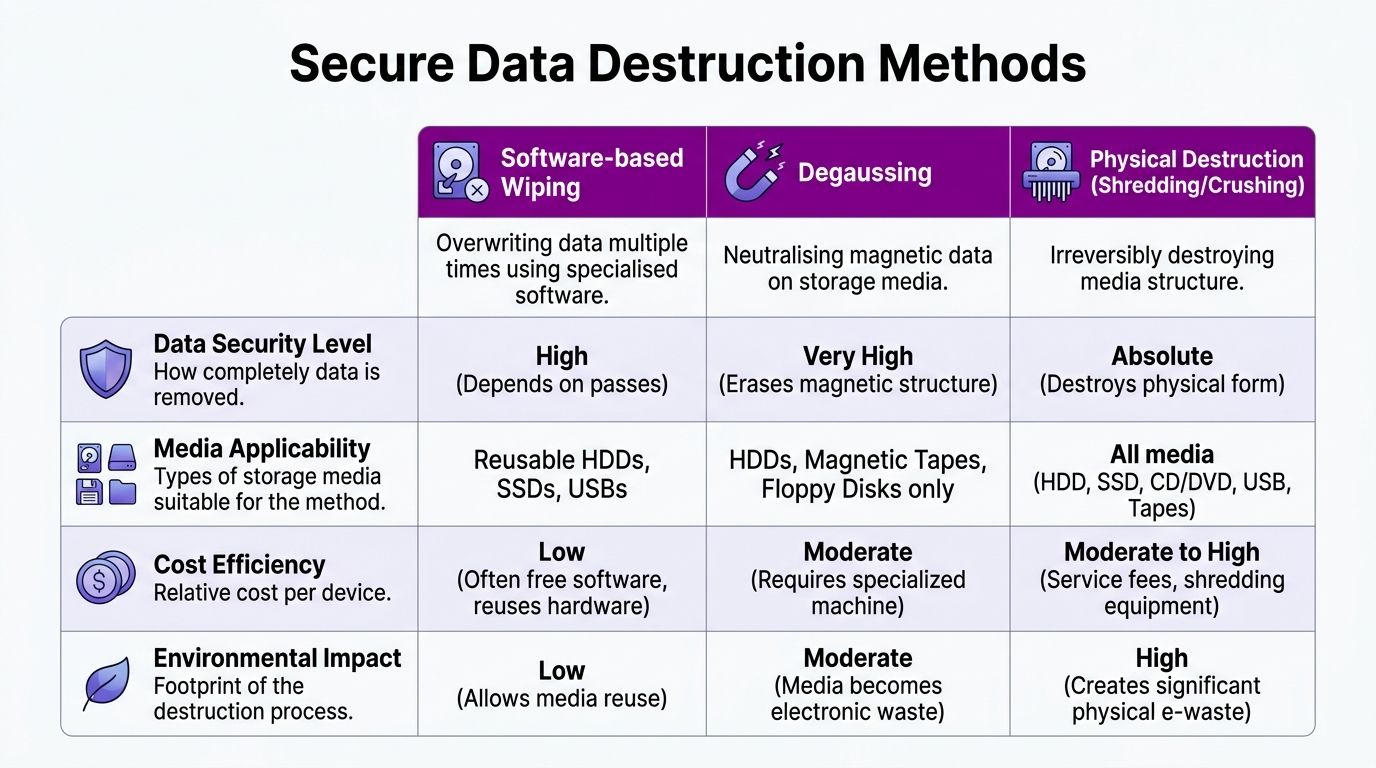
If you're clearing older desktop PCs with spinning hard drives, one set of options applies. If you're retiring Microsoft Surface devices, modern business laptops, or compact server storage using SSD or NVMe media, the answer changes sharply.
The methods side by side
| Method | Best suited to | Main strength | Main limitation |
|---|---|---|---|
| Software-based wiping | Some reusable storage where certified erasure is appropriate | Can support reuse if done correctly | Not dependable for all modern solid-state media |
| Degaussing | Magnetic media such as some legacy hard drives and tapes | Effective on the right media type | Useless for SSDs and NVMe |
| Physical destruction | High-risk media and modern solid-state storage | Irreversible when done to the correct standard | Prevents reuse of that media |
Software wiping works, but only in the right place
Software erasure has a role. If you're planning redeployment or resale of suitable devices, certified software-based or cryptographic erasure can be the right first step. For example, where a device uses encryption, removing the encryption keys can render data unreadable if the process is controlled and verified.
The problem is overconfidence. Too many businesses hear “wiped” and assume every storage device is now safe. That assumption is especially dangerous with SSDs and NVMe drives.
Field note: On modern laptops, the storage is often the weakest point in a weak disposal process, not because it is harder to find, but because people trust the wrong method.
To see why chain-of-custody thinking matters alongside destruction itself, Sentry Private Investigators' security playbook is a useful read. It treats company data as something that needs protection through process, not just through intention.
A practical demonstration helps here:
Why SSDs and NVMe drives change the decision
A critical gap in UK IT disposal guidance is that software wiping is ineffective for SSDs. Industry guidance cited by Innovent Recycling's IT asset disposal best practices states that physical shredding is the only method that guarantees complete data elimination from solid-state storage, and failure to do so under UK GDPR can risk ICO fines of up to £17.5 million.
That's the issue many businesses miss. SSDs don't behave like traditional hard drives. Their internal controller decides where data is physically written, moved, and retained. As a result, a software command may not touch every cell in the way an operator expects. NVMe adds speed and density, not simplicity.
What works and what doesn't
Here's the plain verdict.
- For older magnetic hard drives: software erasure or degaussing may be valid, depending on the intended outcome and controls.
- For SSDs and NVMe drives: physical destruction is the dependable answer when the objective is guaranteed non-recovery.
- For mixed estates: don't apply one blanket method across all devices. Segment by media type.
This matters even more now because so much business hardware has moved to solid-state storage. A process designed years ago for desktop HDDs can be non-compliant today without anyone noticing.
If a device contains particularly sensitive information, the safest question isn't “can we wipe it?” It's “why are we trying to avoid destruction?”
Key Certifications for Your Disposal Partner
Most disposal suppliers look credible on a web page. The difference appears when you ask for evidence. The provider handling your retired laptops, servers, phones, and storage media should be able to show that security, quality, and environmental controls are built into the service, not added afterwards.
The UK's Information Commissioner's Office recognises standards such as the ADISA Asset Recovery Standard as meeting suitable data protection requirements. Providers should also hold a current waste carrier licence and ISO 27001 certification, as set out in the Education Data Hub disposal and destruction guidance.
What the core certifications actually prove
ISO 27001
This is the security baseline. It shows the provider works within a formal information security management system. In practice, that should cover access control, incident handling, documented procedures, risk treatment, and supplier oversight.
If a disposal firm claims to be secure but can't evidence ISO 27001, ask harder questions.
ISO 9001
This is about repeatable quality. For disposal, that means the process should be consistent from booking to collection, audit, destruction, and reporting. You don't want a one-off “careful team”. You want a system that works predictably every time.
ISO 14001
This is the environmental control layer. It indicates that the provider manages environmental obligations in a structured way, which matters when equipment is being sorted for reuse, recycling, parts recovery, or waste handling.
ADISA Asset Recovery Standard
ADISA matters because it is specifically recognised by the ICO as suitable in the data protection context. It gives you stronger reassurance that asset recovery and sanitisation have been assessed against relevant security expectations.
What to ask for before you sign anything
Don't settle for badges on a proposal. Ask for:
- Current certificates: Check dates, scope, and legal entity names.
- Waste carrier licence details: A valid licence is mandatory.
- Method statements: Especially for SSD, NVMe, failed drives, and high-risk media.
- Sample reporting: You need to see the level of audit evidence you'll receive.
A disposal partner should make compliance easier to prove. If their paperwork creates ambiguity, the service is too weak.
One more point. Some firms mention broad alignment to standards without naming what standards they meet. That's a warning sign. In disposal, specifics matter.
Logistics of National Disposal from the East Midlands
If your head office sits in Nottingham, Lincoln, Scunthorpe, Grimsby, or Leicester, but your devices are spread across several UK sites, disposal becomes a logistics exercise as much as a security one. The risk isn't confined to destruction day. It starts when the first device leaves a desk.
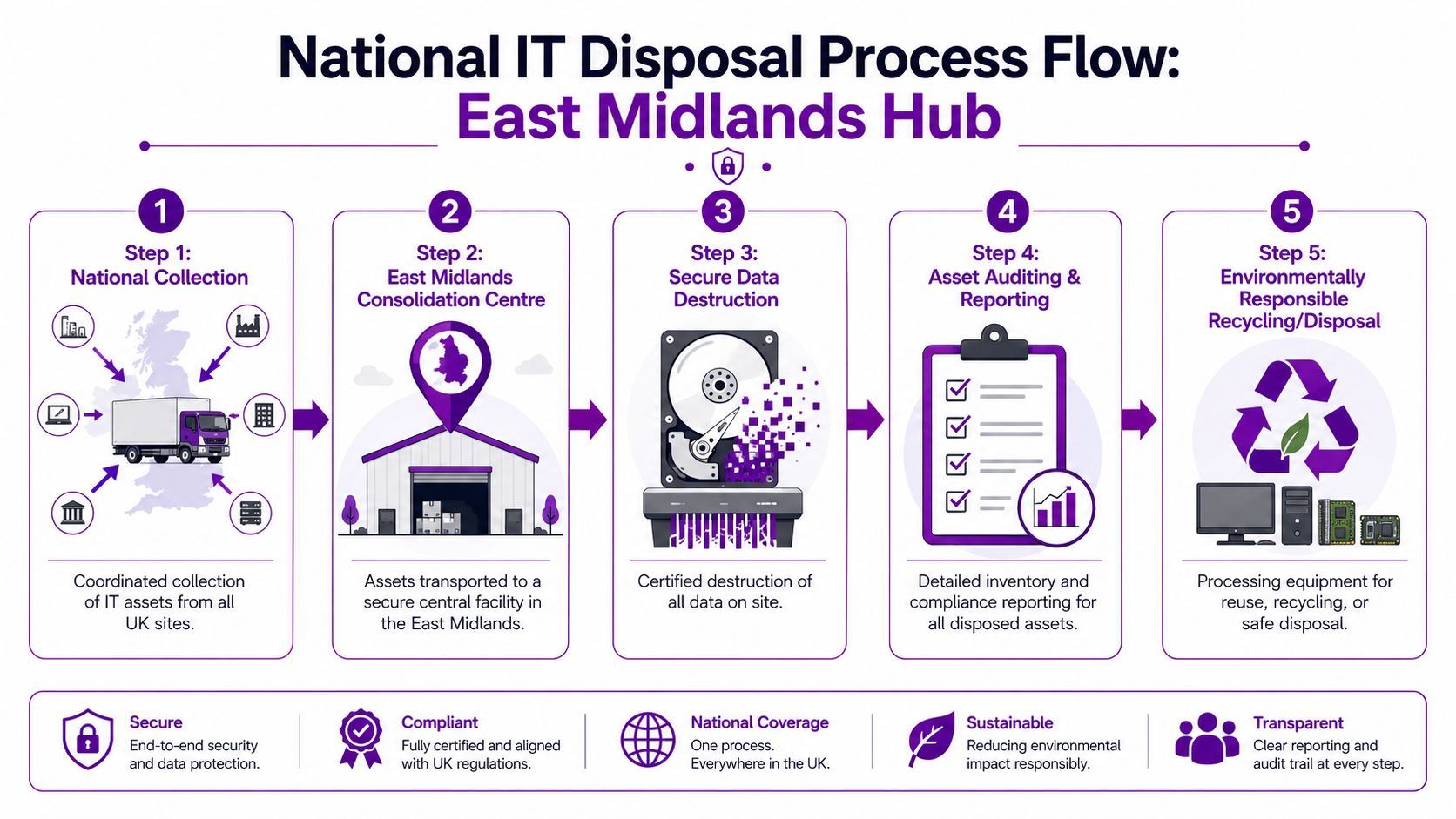
National IT disposal works best when one provider controls collection, transport, intake, processing, and reporting under a single auditable chain. Splitting those stages across multiple parties usually creates handover gaps, and handover gaps are exactly where proof gets lost.
The chain of custody has to stay intact
Compliant UK national IT disposal requires physical destruction of high-risk media into particles no larger than 6mm in any direction, with a full chain-of-custody audit trail, item-level serial numbers, and a Certificate of Destruction, according to the NCSC guidance on secure sanitisation of storage media.
That single requirement changes how collection should be run. The process cannot be vague. It needs item-level accountability from pickup to final outcome.
What a controlled national process usually includes
Collection planning
Before collection, assets should be listed by location, type, and risk category. Laptops, desktops, servers, mobile devices, loose hard drives, tapes, and networking equipment shouldn't all be lumped together as “old IT”.
Secure removal from site
Collected assets should move in sealed containers or controlled loads, with documented handover points. Staff on site need a clear record of what was collected and by whom.
Intake and reconciliation
When assets arrive at the processing facility, the load should be checked against the collection record. Missing serials, damaged packaging, or unlisted media need immediate exception handling.
Destruction or reuse decision
Effective policy is essential. Devices approved for reuse need appropriate sanitisation and verification. High-risk media, failed drives, and solid-state storage selected for destruction need to go through the required physical process.
Why businesses need item-level reporting
A generic note saying “collected for recycling” is not useful evidence. You need reporting that ties each relevant asset to an outcome. For data-bearing items, that should mean serial numbers, destruction dates, and the destruction method used.
If an auditor or insurer asks what happened to one specific drive from one specific office, you should be able to answer without guesswork.
That's the value of a national service run properly from an East Midlands hub. It standardises the process across all sites. Your Newcastle branch, Birmingham office, and Nottingham head office should all enter the same workflow and produce the same evidence set. That consistency is often more valuable than speed.
How to Evaluate Providers A Practical Checklist
Choosing a disposal provider is not a procurement exercise you should run on price alone. The cheapest quote often strips out the controls that protect you when a question is raised later. If you want a reliable national IT disposal partner, use a checklist and insist on direct answers.
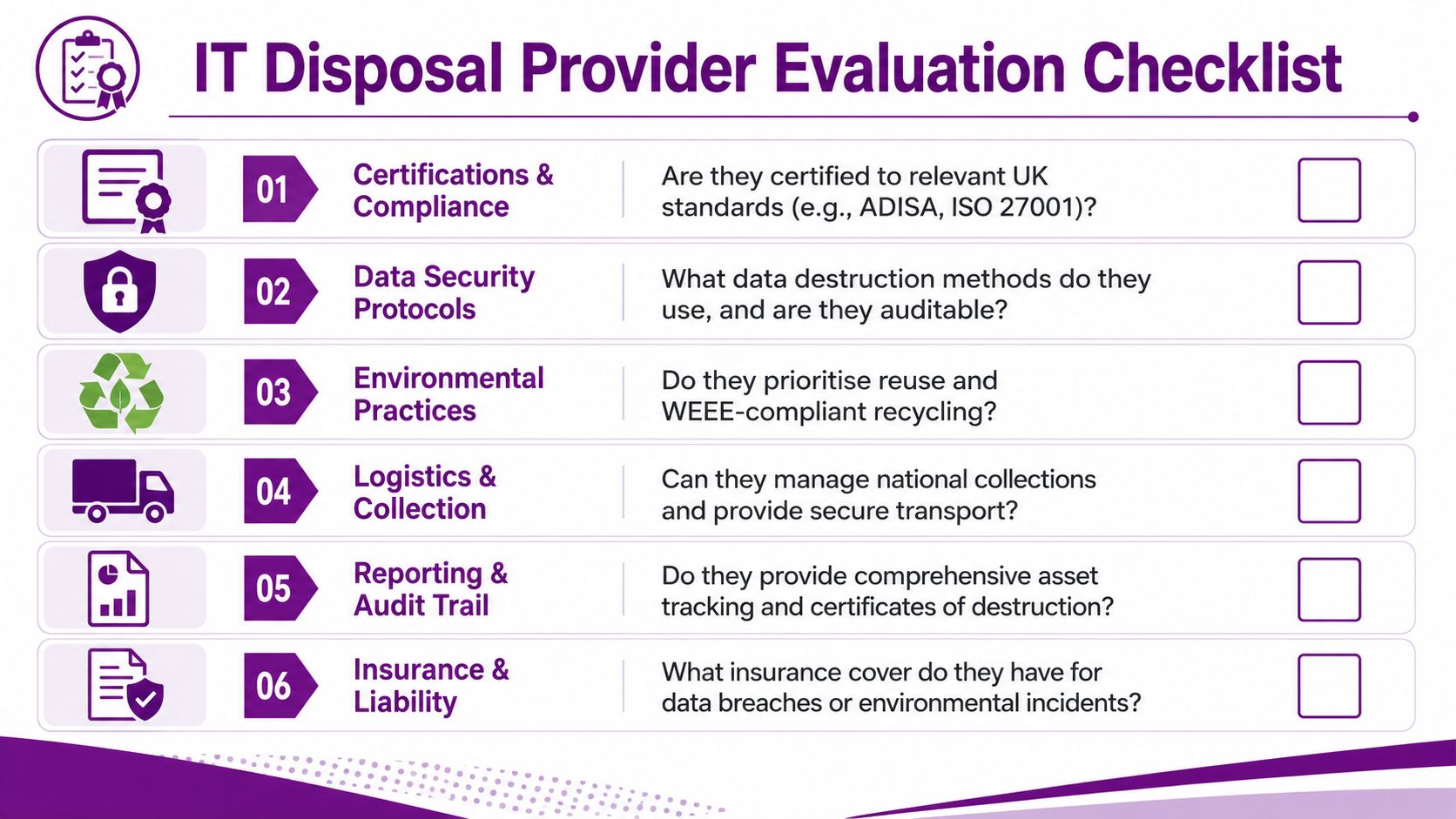
Questions worth asking before any collection is booked
- What do you do with SSDs and NVMe drives? If the answer drifts straight to wiping software without discussing physical destruction, keep digging.
- Can you prove your chain of custody? Ask what documentation is created at collection, at intake, and at destruction.
- Which certifications do you currently hold? Ask for copies, not logos.
- Do you hold a current waste carrier licence and suitable insurance? Both matter when something goes wrong.
- What does your final report include? You want asset-level detail, not a summary line.
- How do you handle multi-site collections? National disposal needs process consistency, not ad hoc couriering.
Compare the commercial model, not just the headline figure
Providers charge in different ways. Some price per item. Some price by collection. Some blend transport, labour, reporting, and destruction into one schedule.
That isn't a problem in itself. The risk appears when the pricing model encourages shortcuts. If loose drives, failed SSDs, or ad hoc site visits create extra charges, the provider may be tempted to route difficult items through a weaker process. Ask what is included and what triggers variation.
A helpful governance step is to check whether the supplier's operating standards align with your own supplier code of conduct expectations. Disposal vendors should meet the same seriousness you'd expect from any party handling sensitive business risk.
A quick red-flag test
Use this if you need to make a fast judgement.
| If the provider says this | Treat it as |
|---|---|
| “We delete everything before recycling” | Insufficient detail |
| “We can collect tomorrow, no paperwork needed” | A process failure |
| “We don’t usually provide serial-level reports” | High audit risk |
| “All media types are wiped the same way” | Technical misunderstanding |
Cheap disposal can become very expensive once you need to defend it.
The best suppliers answer clearly, document consistently, and don't become evasive when you ask about failed drives, modern storage, or exceptions.
Your Next Steps for Compliant IT Disposal
Secure disposal isn't an administrative tidy-up at the end of an upgrade. It's part of your security posture. If your business is replacing user devices, server hardware, mobile phones, or storage media, the retirement plan needs the same discipline you apply to deployment and support.
The essential requirements are clear. You need a disposal process that matches UK legal duties, uses the correct destruction method for the media involved, and maintains a documented chain of custody throughout. For modern SSD and NVMe storage, that usually means being far more cautious than many organisations have been historically.
A well-run national IT disposal service removes uncertainty. You know what left each site, what happened to it, what was destroyed, what was reused, and what evidence you hold if anyone asks. That's what good looks like.
If you need practical advice on secure hardware retirement across the East Midlands or multiple UK sites, speak with F1Group. Phone 0845 855 0000 today or send us a message for a no-obligation discussion about your IT disposal requirements.