
Your sales team has customer notes in Outlook. Marketing has a spreadsheet. Service enquiries live in shared mailboxes. Quotes sit in folders that made sense six months ago and don't now. Everyone knows the business has good relationships, but no one can see the full picture without asking three people and opening five systems.
That's usually the moment a director starts looking seriously at CRM implementation. Not because CRM is fashionable, but because scattered information slows follow-up, weakens reporting, and makes growth harder than it should be. For UK businesses already using Microsoft 365, the good news is that you don't need to bolt on a disconnected platform. A well-planned Dynamics 365 rollout can turn Outlook, Teams, Power Platform, and Azure into one practical operating model.
Why a CRM Is No Longer Optional for UK Businesses
A CRM stops being “another system” once your team has outgrown memory, inbox searches, and informal handovers. It becomes the place where sales activity, customer history, service issues, and reporting come together in a way management can trust.

For UK firms, this is already the norm. CRM adoption among UK small and medium-sized enterprises is expanding at a year-over-year rate of 12.6%, and 91% of UK companies with 10 or more employees now utilise CRM software according to UK CRM adoption and market trend data. That changes the conversation. The question isn't whether your business needs CRM. It's whether your implementation will be disciplined enough to deliver value.
What directors usually see first
Most East Midlands SMB directors don't begin with a technology problem. They begin with symptoms:
- Missed follow-up: a prospect speaks to one person, then hears nothing because the next action sat in someone's inbox.
- Weak visibility: pipeline meetings rely on opinion rather than shared, current records.
- Service friction: the customer has to repeat information because sales and support can't see the same history.
- Reporting delays: month-end takes too long because data has to be collected and corrected manually.
A CRM should reduce admin and ambiguity. If it creates more of either, the implementation has gone off course.
If your business already depends on Microsoft tools, it helps to understand what customer relationship management means in practical terms before choosing modules and workflows. The strongest projects start with operational reality, not software menus.
That same operational discipline applies outside traditional sales teams too. For example, professional services firms tightening their digital client acquisition often need cleaner lead handling and attribution alongside specialist marketing work such as website marketing for lawyers 2026. The pattern is the same. Better growth needs cleaner systems.
Laying the Groundwork Your Discovery and Planning Phase
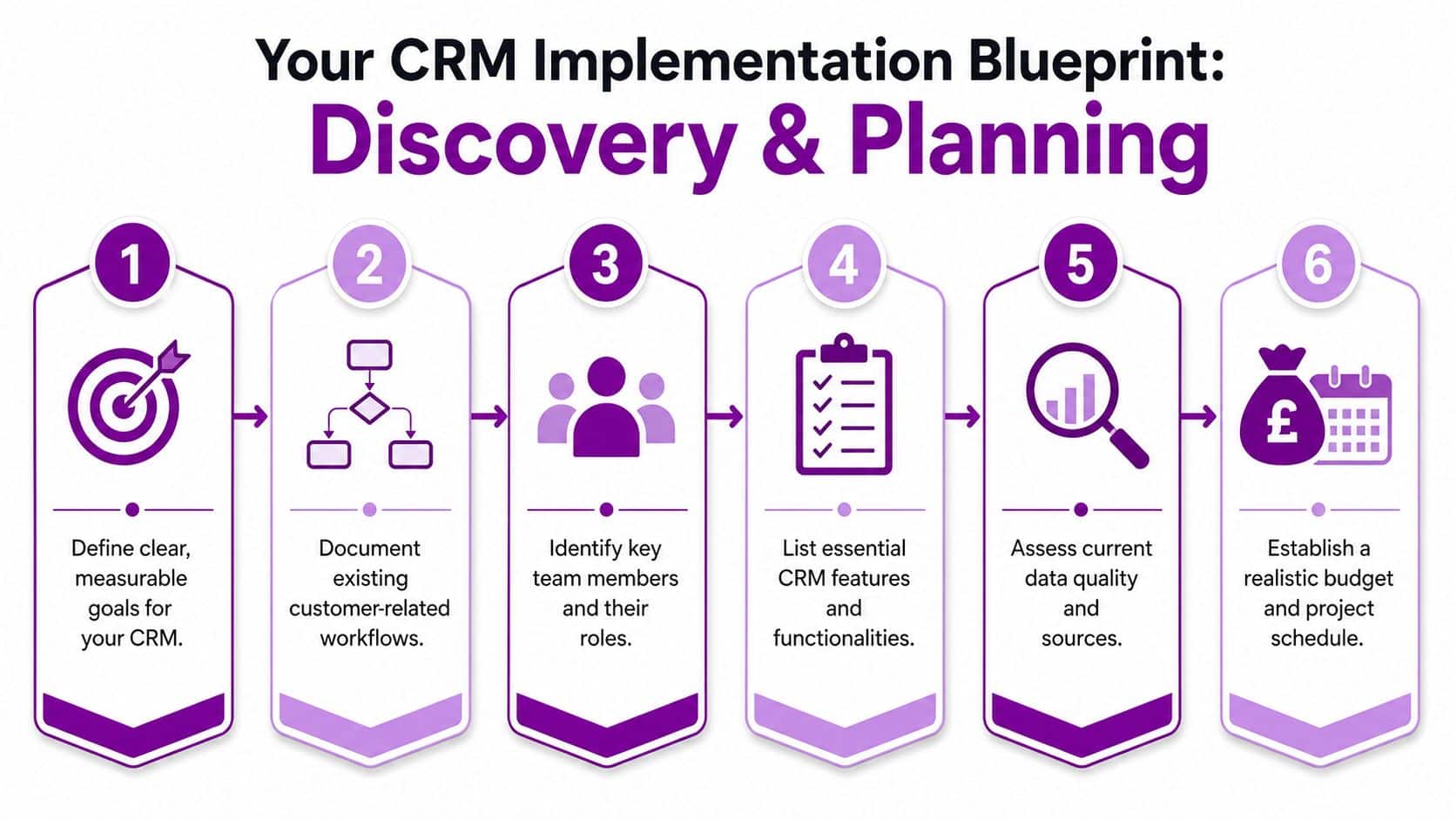
Most CRM problems are created before the first user logs in. Teams buy licences too early, migrate untidy data, and assume people will “pick it up” once the system is live. That's backwards. Good CRM implementation starts with discovery.
Start with business reality
Before anyone compares Dynamics 365 modules, write down how work moves through the business today. Not how the process diagram says it works. How it really works.
Look at the hand-off points that tend to break:
- Lead to first meeting: who owns it, how quickly, and where it gets recorded
- Quote to close: what approval steps slow the team down
- Customer handover: what sales promises need to reach service or account management
- Renewal or repeat business: whether anyone has a structured follow-up process
A planning workshop usually goes better when you include one decision-maker, one daily CRM user from each function, and one person who understands your Microsoft estate. That mix stops the project becoming either too technical or too theoretical.
Use the four-step logic
For small businesses, a simple rule works well. A functional CRM setup for UK micro-businesses typically requires a budget of £50 to £150 per month, and implementation should follow a four-step logic of Audit, Clean, Integrate, and Train according to UK small business CRM setup guidance.
That sequence matters.
-
Audit
Identify where customer data lives now. Excel files, Outlook contacts, finance systems, website forms, and personal notebooks all count. -
Clean
Remove duplicates, dead records, old pipelines, and inconsistent formats before import. Don't migrate confusion into a new platform. -
Integrate
Connect the tools people already use first. For most SMBs, Outlook or Gmail sits at the top of that list. -
Train
Every user needs enough context to understand why the system exists, not just where to click.
Practical rule: if a field, process, or report doesn't support a real business decision, leave it out of phase one.
Decide what success looks like
A good discovery phase produces a short list of measurable outcomes, but not an endless wish list. In practice, that might include better pipeline visibility, cleaner handover into service, improved reporting, or less time spent chasing incomplete records.
A useful planning document should answer these questions:
| Question | Why it matters |
|---|---|
| Which team uses the CRM first | Prevents an over-wide rollout |
| Which records must migrate | Keeps data scope under control |
| Which Microsoft tools must connect on day one | Avoids isolated working |
| Which process needs the fastest improvement | Gives the project a clear priority |
| Who signs off changes | Stops endless redesign |
For a five-person business in Newark, this phase can be light and quick. For a larger firm with several departments, it needs more structure. Either way, planning is where you avoid expensive rework later.
Choosing Your Solution Within the Microsoft Ecosystem
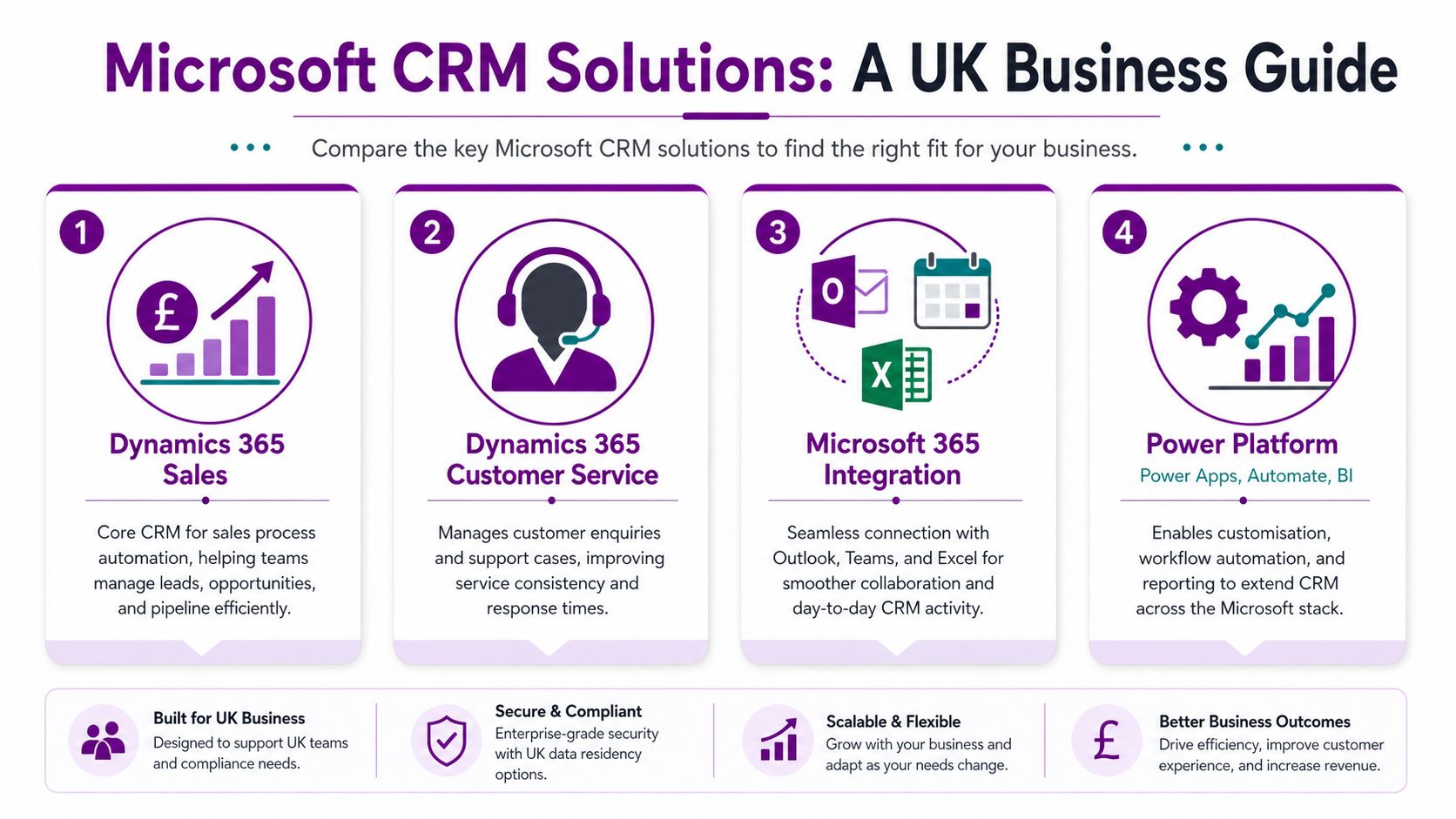
A lot of SMBs assume choosing a CRM means choosing one product. Inside the Microsoft ecosystem, it's more accurate to think in terms of a connected stack. Dynamics 365 handles the customer process. Microsoft 365 supports the daily work around it. Power Platform extends and automates what sits between the two.
Which part of Dynamics 365 fits your business
For most SMBs, the choice starts with two core options.
| Product | Best fit | What it does well |
|---|---|---|
| Dynamics 365 Sales | Businesses focused on lead management, opportunities, quotes, and forecasting | Brings structure to pipeline management and sales activity |
| Dynamics 365 Customer Service | Teams handling enquiries, cases, and ongoing support | Gives service staff one place to manage customer issues and history |
A manufacturer, consultant, distributor, or B2B services firm usually begins with Sales. A business with a busy support desk or service operation may need Customer Service at the same time, or soon after.
If you're still weighing the platform itself, this guide to Microsoft Dynamics 365 is a sensible starting point.
Why integration matters more than the licence
The buying decision is only part of the work. In the UK market for 2025, CRM implementation and integration services hold a 34.96% share, which reflects that the heavy lifting sits in rollout and connection work rather than the licence alone, according to UK CRM implementation and integration market analysis.
That matches what happens in real projects. A CRM that doesn't connect to Outlook, Teams, Excel, or your wider reporting estate won't get adopted properly.
Keep the stack connected
Within Microsoft, the strongest combinations are usually straightforward:
- Outlook and Exchange: track customer communication without forcing staff to retype it
- Teams: support collaboration around accounts, opportunities, and service cases
- Power Automate: remove repetitive handoffs and notifications
- Power BI: turn CRM records into usable management reporting
- Azure services: support governance, integration, and security where needed
Some firms also use a partner to configure Dynamics 365, migrate data, and align the platform to existing Microsoft investments. F1Group provides that type of implementation support for Dynamics 365, Power Platform, Microsoft 365, and Azure-based environments.
The safest CRM choice for an SMB is usually the one your team can use inside the tools they already trust.
Complexity is still the enemy. If Dynamics 365 can solve the business problem with standard entities, light custom fields, and targeted automation, that's usually better than building a miniature software house inside your CRM.
Your Data Migration and Integration Checklist
Data migration worries most directors for good reason. This stage reveals old habits, duplicate records, and GDPR risks. It is also during this process that many CRM projects either gain credibility fast or lose it before go-live.
The right approach is methodical. Move less data than you think. Clean more than you think. Automate earlier than you think.
What to migrate and what to leave behind
Start by classifying your current information into three groups:
- Active records: current customers, open opportunities, live enquiries, and recent interactions
- Reference records: account histories or closed opportunities you still need for reporting or context
- Dead weight: obsolete contacts, duplicate companies, stale leads, and records with no clear owner
If nobody trusts a spreadsheet now, don't import it solely because it exists. CRM implementation improves operations when the migrated data is relevant, current, and structured.
A useful reference point is this guide to data migration best practices, particularly if you're moving from several sources into one Dynamics 365 environment.
Build GDPR and data hygiene in from day one
One question gets missed too often in UK CRM projects: how do you set up privacy, consent, and data quality without slowing the team down? The practical answer is to avoid manual dependence wherever possible. As noted in this UK CRM data hygiene and GDPR article, manual data entry “fails every time”, so automated workflows are needed to maintain quality and support UK data protection obligations.
That means your setup should include:
- Mandatory ownership fields: every important record should have a responsible user or team
- Clear consent handling: marketing preferences and lawful processing status must be captured consistently
- Duplicate prevention rules: especially on accounts, contacts, and leads
- Automated updates: use Power Automate where possible instead of relying on memory
- Auditability: changes to key customer records should be traceable
Clean data is a sales issue, a service issue, and a compliance issue at the same time.
Data Migration Sanity Checklist
| Phase | Task | Done |
|---|---|---|
| Prepare | Export all current customer data sources | ☐ |
| Prepare | Identify duplicates, incomplete records, and obsolete data | ☐ |
| Prepare | Define the field mapping into Dynamics 365 | ☐ |
| Clean | Standardise company names, contact names, and basic formats | ☐ |
| Clean | Remove records with no business value or valid purpose | ☐ |
| Clean | Confirm consent and communication preference handling | ☐ |
| Test | Run a sample import into a non-live environment | ☐ |
| Test | Check record ownership, relationships, and views | ☐ |
| Integrate | Connect Outlook and shared mailboxes where relevant | ☐ |
| Integrate | Set up initial dashboards or reports for management | ☐ |
| Validate | Ask users to review real migrated records | ☐ |
| Launch | Freeze old lists and agree the new source of truth | ☐ |
First integrations that matter
On most Microsoft projects, day-one value comes from a small number of integrations done properly. Outlook connection matters because it sits in the flow of work. Basic Power BI reporting matters because leadership needs confidence quickly. Teams matters when sales, support, and management need shared visibility without sending screenshots around.
The mistake is trying to connect everything at once. Start with the systems that remove duplicate effort and improve record quality immediately. Add the rest once users trust the CRM.
Driving Success Through Customisation and User Adoption
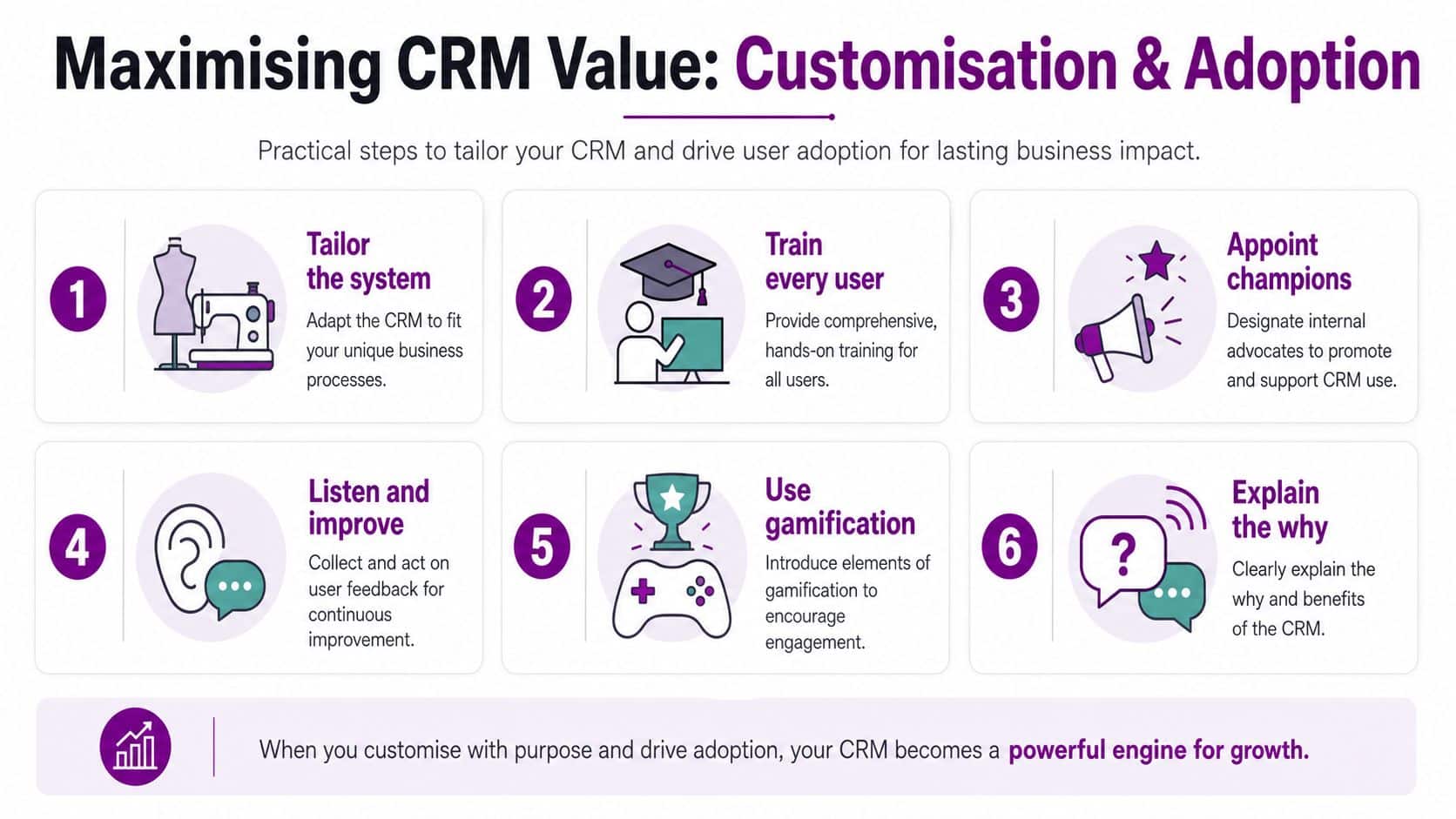
The system can be technically correct and still fail. That's what catches many businesses out. CRM implementation succeeds when users see it as the easiest place to do their work, not the place they're told to update after their main work is finished.
The risk is not small. Between 20% and 70% of UK CRM projects fail, with poor user adoption identified as the leading cause. For a 10-person UK team, a failed project can represent over £10,000 in direct financial loss, including licence waste and implementation costs, based on analysis of UK CRM project failure rates and costs.
Customise lightly, not endlessly
Many first-time CRM projects make the same mistake. They try to model every exception, every special process, and every historical preference before users have formed basic habits.
A better approach is to make the system feel familiar without making it fragile:
- Rename fields where needed: use the language your team already uses
- Simplify forms: show only the fields a role needs
- Use business rules carefully: enough structure to guide behaviour, not enough to frustrate it
- Automate repetitive steps: follow-up reminders, record creation, notifications, and approvals are good candidates for Power Automate
The aim is fit, not excess.
Training has to answer why
People don't resist CRM because they dislike databases. They resist extra admin, vague purpose, and poor timing. Training needs to address all three.
The most effective sessions are practical and role-based. Sales users should work through a real lead, a live opportunity, and a next action. Service users should log and update a realistic customer issue. Managers should learn how to review pipeline quality, not just how to run a report.
Give users enough context to answer these questions:
- Why does the business need this information?
- What's the minimum I must update every time?
- What will the system do for me in return?
If staff leave training thinking “this helps me do the job”, adoption usually follows. If they leave thinking “this is for management”, adoption usually drifts.
A short explainer video can help reinforce the message after workshop sessions:
Create internal champions
Directors often assume project ownership should stay with management or IT. In practice, adoption improves when respected operational users become local champions.
Those champions should:
- Answer simple user questions before frustration builds
- Flag poor form design or awkward workflows while they're still easy to change
- Model good behaviour by keeping their own records current
- Translate project language into team language
You don't need a formal “change programme” to do this well. You need a few credible people, a short feedback loop, and the discipline to keep the first version simple.
Go-Live Runbook and Measuring What Matters
Go-live is not the finish line. It's the point where theory meets Monday morning. The first few weeks decide whether the CRM becomes normal working practice or another underused platform with decent intentions behind it.
Your go-live runbook
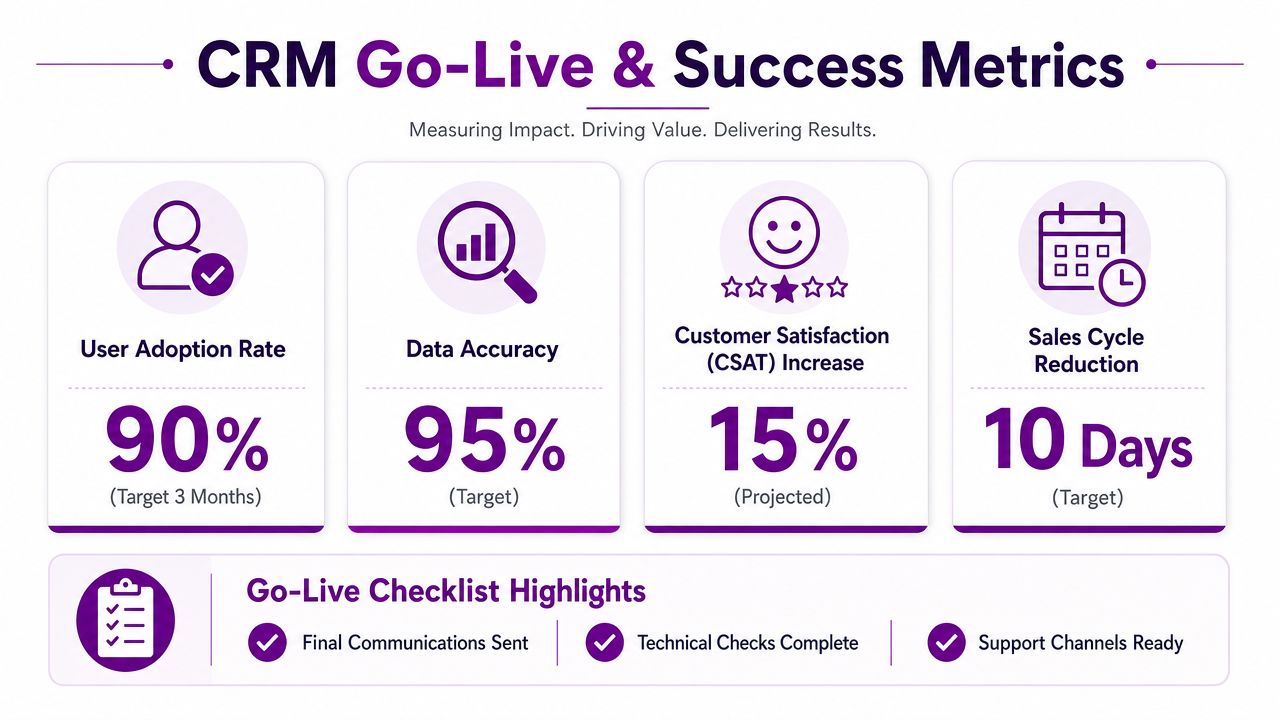
Keep launch day controlled. Don't combine it with major process changes, unrelated software updates, or staff uncertainty about where to work.
Use a short operational checklist:
- Confirm access: every user can log in, reach the right app, and see the right records
- Check integrations: Outlook connection, queues, flows, and key reports work as expected
- Send final communication: tell users what changes today, where support sits, and what the minimum data standard is
- Nominate support contacts: users should know exactly who to ask first
- Freeze legacy working: stop parallel updates in old spreadsheets and side systems where possible
Measure behaviour first, then outcomes
In the first month, focus on usage quality. Are opportunities being updated? Are customer records complete enough to support decisions? Are teams using the agreed process rather than creating workarounds?
After that, measure business outcomes. For UK businesses, a successful CRM implementation yields an average ROI of £7.15 for every £1 spent, with a 34% boost in sales productivity, a 42% improvement in sales forecast accuracy, and an 8 to 14% reduction in sales cycle time, according to CRM implementation ROI and performance benchmarks.
Those figures are useful because they point to what leadership should track.
KPIs that matter for an SMB
| KPI | What to look for |
|---|---|
| Sales productivity | Less admin friction and more time spent progressing live deals |
| Forecast accuracy | Better confidence in expected revenue and pipeline reviews |
| Sales cycle time | Shorter time between first engagement and close where the process is consistent |
| Record quality | Fewer duplicates, clearer ownership, and complete core fields |
| User consistency | Teams updating the CRM as part of daily work, not as an afterthought |
Good CRM reporting doesn't just show activity. It shows whether the process is becoming easier to run and easier to trust.
If results are weaker than expected, don't respond by adding more fields. Look first at user friction, training gaps, and unclear ownership. Most post-launch issues are behavioural or process-related before they are technical.
Review rhythm matters
A steady review cadence helps more than a dramatic quarterly reset. For a typical SMB, that means checking user feedback early, refining forms and views sparingly, and tightening any process that still depends on side notes or personal spreadsheets.
The businesses that get value from Dynamics 365 usually treat go-live as the beginning of operational discipline, not the end of implementation effort.
Your Partner in CRM Success
A good CRM implementation brings order to customer data, clarity to pipeline management, and consistency to service delivery. Within the Microsoft ecosystem, Dynamics 365 works best when it's connected properly to Microsoft 365, Power Platform, and the way your team already operates day to day.
For East Midlands businesses, the difference usually comes down to practical planning, clean migration, sensible customisation, and hands-on support after launch. That's the work that turns a licence into a system people effectively use.
If you're planning a Dynamics 365 rollout or need help rescuing a stalled CRM project, speak to F1Group. Phone 0845 855 0000 today or send us a message.