
Preventive maintenance can reduce equipment downtime by up to 30% and cut total maintenance costs by about 12%, while reactive maintenance can cost 3 to 5 times more over an asset's lifecycle. For UK organisations, that makes scheduled upkeep a business decision, not an optional technical habit.
That matters even more in IT, where a missed patch, failing endpoint, or neglected cloud dependency can block payroll, sales, and customer service in a single morning. The UK's maintenance culture has deep legal roots in the Health and Safety at Work etc. Act 1974, which pushed employers towards planned inspection, servicing, and upkeep because they became legally responsible for protecting employees and others affected by work activities (UK preventive maintenance history and the 1974 Act).
Why Preventive Maintenance Is Your Most Underused IT Strategy
Preventive maintenance gets treated like background admin, and that is exactly why it is missed so often. In a distributed IT estate, routine checks protect revenue, compliance, and continuity at the same time. A laptop failure usually affects one user. A fault in Microsoft 365, Azure identity controls, or a firewall can spread disruption across finance, operations, and customer service.
The UK context gives this discipline real weight. The Health and Safety at Work etc. Act 1974 pushed organisations toward planned inspection and upkeep because they carried a duty of care for employees and others affected by their work. That same logic still applies to IT estates, even if the assets now look different. A failure is less about a broken machine and more about missed access, interrupted workflows, or a control that was never checked properly.
For IT teams, preventive maintenance covers patching, backup verification, account hygiene, device health, and monitoring. As the environment becomes more distributed, these tasks start to look like operational governance. They shape how well the business handles risk, supports users, and keeps systems available.
Practical rule: if a system supports finance, identity, or customer-facing work, it belongs in a preventive maintenance programme, not in a break-fix queue.
The best programmes do not try to chase every alert. They focus on the assets that carry the most business impact, then keep a steady cadence around checks that occur regularly. That approach is easier to manage than ad hoc repair, and it fits better with a modern support model built around proactive IT support.
The Business Case for Preventive Maintenance in IT
The business case starts with downtime. Industry maintenance data reports that preventive maintenance can reduce equipment downtime by up to 30%, cut total maintenance costs by about 12%, and reduce total lifecycle costs by up to 25%. That matters in IT because the cost of an interruption usually lands across several teams at once, not just in the service desk.
The financial gap between planned work and reactive work is harder to ignore. Reactive maintenance can cost 3 to 5 times more than preventive maintenance over the equipment lifecycle. For SMEs, that gap bites hard because emergency work usually lands when teams are already stretched, and the cost shows up as overtime, disrupted schedules, and avoidable replacement decisions.
In IT, the savings do not stay inside the IT department. If a finance team can't reach Dynamics 365, invoicing slows. If remote endpoints drift out of date, helpdesk tickets rise. If cloud access controls aren't checked, the organisation inherits avoidable risk.
The same pattern shows up in service delivery and control. A planned programme for IT asset management gives teams a clearer view of what they own, what needs checking, and where maintenance effort has the most value.
| Metric | Reactive Maintenance | Preventive Maintenance |
|---|---|---|
| Cost profile | Emergency-driven, usually higher over time | Planned and easier to budget |
| Downtime impact | Unplanned disruption is common | Downtime is reduced through scheduling |
| Asset life | Wear and failures accumulate faster | Asset life is protected through upkeep |
| Compliance risk | Higher, because checks happen after failure | Lower, because checks are part of the routine |
Predictability is the advantage. Preventive maintenance gives managers a schedule they can resource, audit, and improve. Reactive work gives them surprises, and those surprises usually arrive at the worst possible time.
Risk-Based Prioritisation for IT Assets
Maintenance works best when it follows business risk, because different assets carry different consequences if they fail. A uniform schedule may look orderly, but it can pull time toward low-risk equipment and leave the systems that support day-to-day work under-protected. The practical basis for preventive maintenance is a planned strategy of cost-effective treatments that preserves function and slows deterioration, a definition used in infrastructure guidance and directly transferable to IT estates (FHWA preventive maintenance definition).
The right question is not which device feels most technical, it is which asset has the highest business impact. Start with four checks. How much work depends on it? What happens if it fails? Does failure raise regulatory or security exposure? How expensive is replacement or recovery?
A simple three-tier model for IT teams
Tier 1, Critical Systems. Core servers, firewalls, key databases, Microsoft 365 tenants, and identity platforms belong here. These need the tightest monitoring, the clearest escalation path, and the most disciplined maintenance cadence.
Tier 2, Important Systems. File servers, switches, branch systems, and medium-load applications sit in the middle. They matter, but they can usually tolerate slightly broader maintenance windows.
Tier 3, Routine Systems. Workstations, printers, and rarely used peripherals can follow lighter schedules or condition-triggered work if the risk is low.
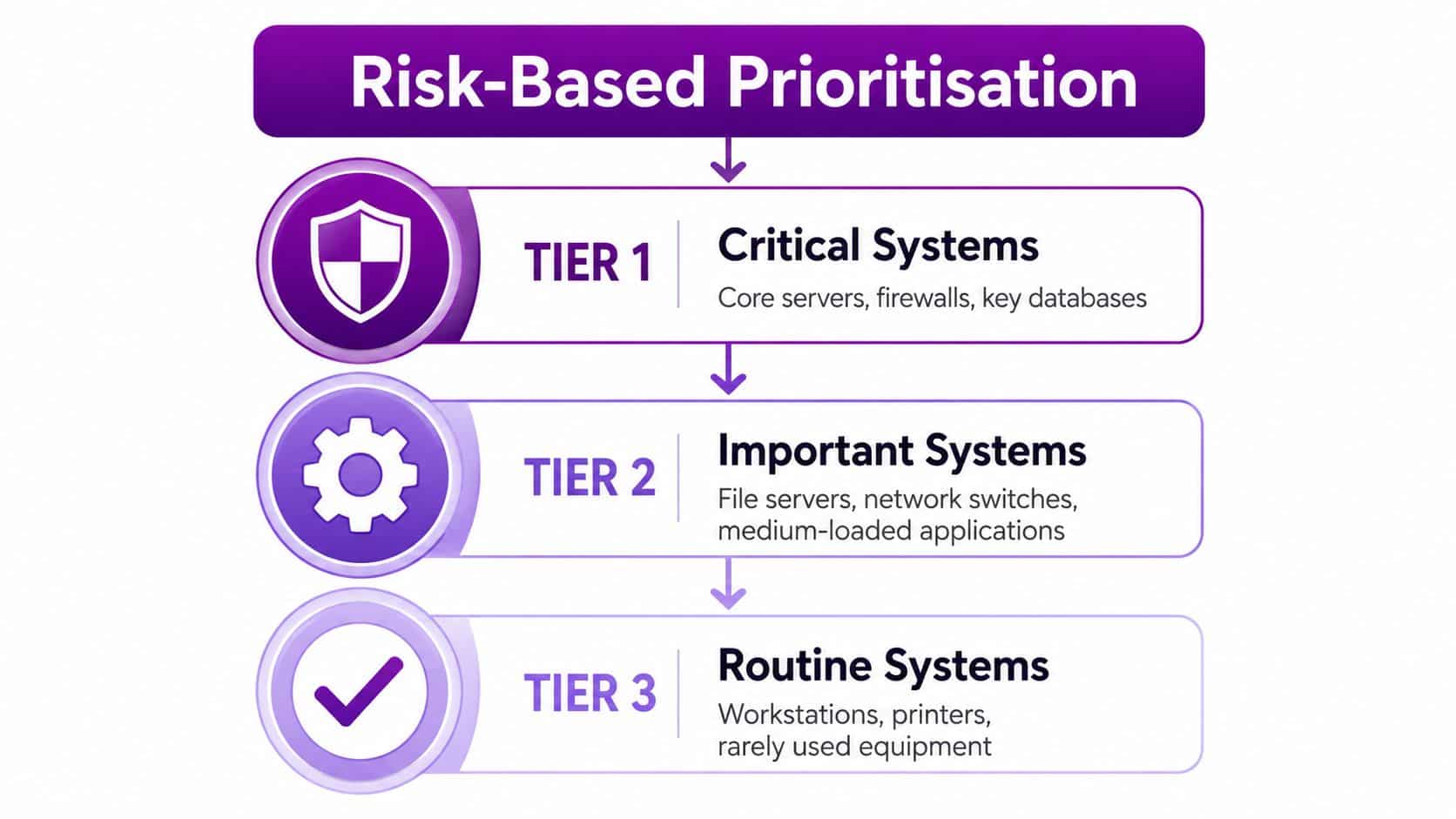
Maintenance expenditure is still a material cost for UK businesses, so over-maintaining low-value assets can waste budget while under-maintaining critical ones creates avoidable disruption (UK-facing guidance on prioritisation).
A good prioritisation model also needs visibility across the estate. A guide to IT asset management helps teams keep track of what they own, where each asset sits, and which items deserve the most attention. That matters even more in distributed environments, where maintenance windows have to be aligned across people, systems, and locations, and the timing often depends on a guide to shared business calendars.
Practical Preventive Maintenance Checklist for IT Environments
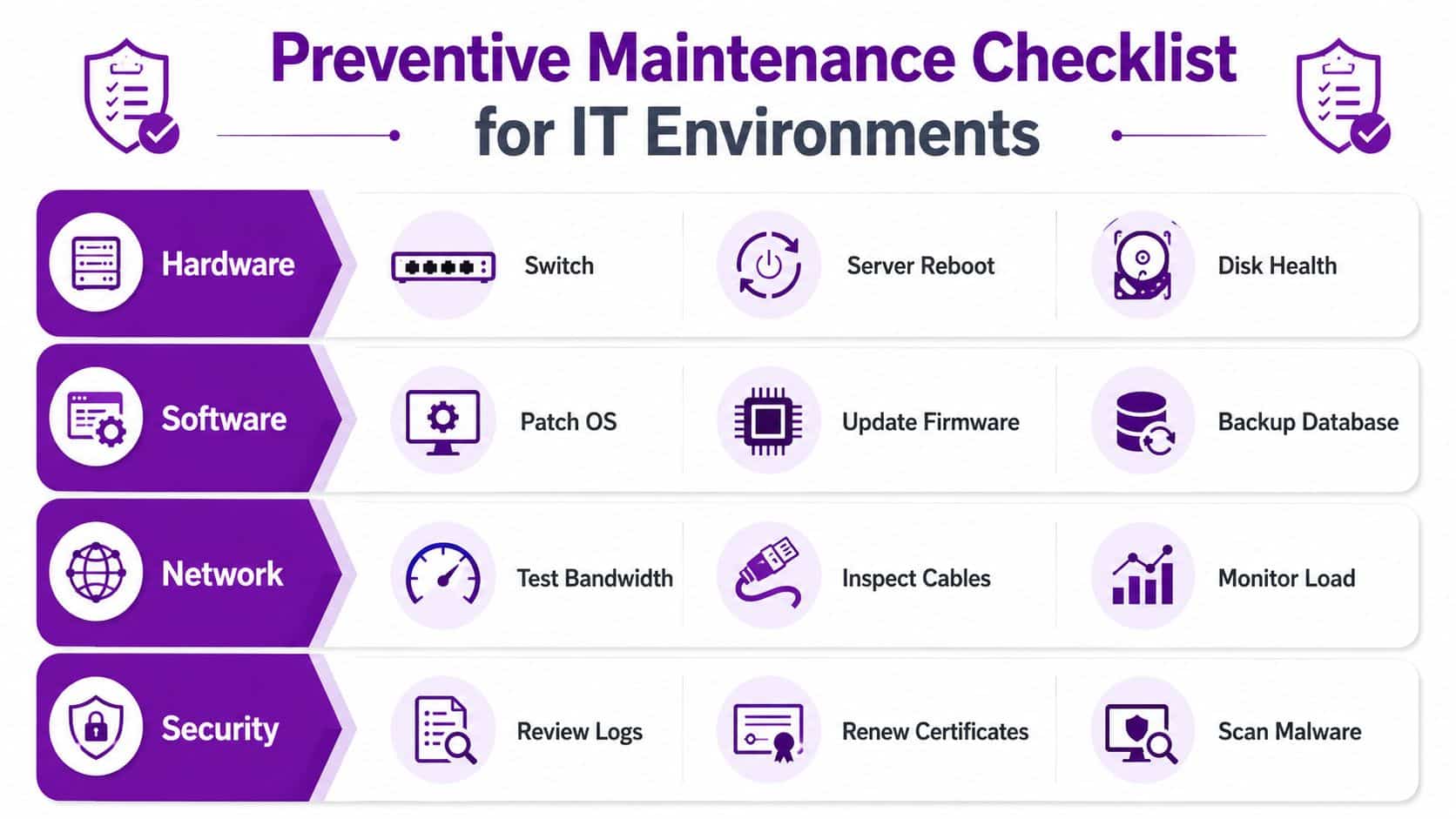
A useful checklist follows the shape of the estate, not the layout of a spreadsheet. In a distributed environment, maintenance has to cover infrastructure, cloud services, endpoints, and security together. If one layer is left behind, the others carry the impact.
The UK cyber picture makes that harder to dismiss. The UK Government's Cyber Security Breaches Survey found that 50% of UK businesses reported a cyber breach or attack in the previous 12 months, and smaller firms were less likely to have formal risk processes and incident response planning than larger ones (UK cyber breaches survey data). In practice, maintenance discipline now sits inside cyber resilience, because weak patching, stale accounts, and missed checks create openings that security teams then have to close.
Infrastructure and endpoint routine
Daily. Review critical alerts, backup failures, and device health exceptions. Triage anything that affects Tier 1 systems first, because delays there usually spread to users fastest.
Weekly. Check server hardware status, cooling warnings, switch and router logs, and endpoint update compliance. Confirm that patch jobs have completed, rather than sitting in a scheduled state without execution.
Monthly. Inspect disk health, firmware versions, wireless access point status, certificate expiry dates, and anti-malware definitions. Reconcile what the system reports with what users are experiencing, since dashboard health and day-to-day performance do not always match.
Cloud and security discipline
Quarterly. Review Microsoft 365 tenant health, Azure resource configuration, Dynamics 365 environment status, identity and access permissions, and backup integrity. Use the same review to check configuration drift and compare live settings with the approved baseline.
Annually. Run a deeper review of licences, device inventory, privileged access, recovery procedures, and the maintenance calendar itself. If a task has not been completed in months, it is an incomplete process that has not been executed.
For teams managing hybrid estates, a guide to network monitoring tools is a practical companion, because maintenance and visibility need to support each other.
A good checklist is specific enough for a technician to complete and a manager to audit. If it cannot be checked, it cannot be trusted.
Tooling and KPIs to Measure Preventive Maintenance Success
A preventive maintenance programme without measurement is just a hope dressed up as process. The right tools let teams capture readings, compare trends, and spot degradation before a fault becomes visible. In practice, that means using a CMMS to record vibration, amperage, temperature, lubrication condition, and other readings over time, then acting on trend-based thresholds rather than relying only on the calendar (maintenance checklist guidance).
The technical value is simple. Time-only servicing can miss assets with variable duty cycles, while trend-based monitoring shows what's changing. That's a better fit for mixed IT estates where some systems are heavily loaded and others sit idle most of the week.
KPIs that actually tell you something
PM compliance. Calculate it as completed PM tasks divided by scheduled PM tasks, multiplied by 100 (UK KPI guidance). This is the core control metric, because it tells you whether the programme is being executed, not just planned.
Backlog age. Old work orders reveal where the team keeps postponing the same jobs.
Mean time between failures. If this is improving, the programme is probably helping. If it isn't, the schedule may be too generic or the asset may need a different maintenance strategy.
Mean time to repair. This shows whether the team can recover quickly when something still does go wrong.
Useful rule of thumb: if compliance is high but failures keep recurring, the issue is probably not effort, it's targeting.
Choosing the right tool for the estate
A small SME might start with a disciplined spreadsheet and a shared calendar. A larger multi-site business usually needs a CMMS or EAM platform because manual tracking breaks down as soon as the asset list expands. The test isn't software sophistication, it's whether the team can consistently log work, review trends, and adjust the schedule.
How F1Group Implements Preventive Maintenance Programmes
F1Group treats preventive maintenance as part of the managed service, not a separate add-on. That approach suits organisations running Microsoft 365, Azure, Dynamics 365, remote endpoints, and branch-office systems, because the maintenance plan has to reflect the actual shape of the estate rather than a one-size-fits-all template.
The starting point is an asset and dependency review. Every device, tenant, application, and access path needs to be mapped, because maintenance priorities only make sense once the business dependency is clear. From there, the team sets baseline performance readings and assigns cadence by criticality, using the same logic that underpins high-reliability maintenance models.
What structured delivery looks like
Industrial asset-management software is a useful reference point for teams that need a repeatable workflow and a single source of maintenance truth. The Evright Industrial software guide shows how software can support structured planning without turning maintenance into paperwork.
For distributed IT estates, the same discipline applies to patch compliance, backup checks, identity reviews, and endpoint visibility. The maintenance process and the cyber process overlap, because both are aimed at spotting degradation before it turns into interruption or a security issue.
Ownership is the practical difference. A strong managed service model takes responsibility for scheduling, monitoring, escalation, and follow-through, rather than leaving those tasks to whoever has time that week. That matters most for organisations with remote workers or multiple sites, where consistency is usually the first thing to slip.
Maintenance works when someone owns the calendar, checks the readings, and closes the loop.
The client benefit is straightforward. Internal teams can stay focused on the business while the maintenance programme keeps moving in the background, with remote and on-site support available where needed. In the UK context, that also helps organisations show that day-to-day upkeep is being handled with discipline, which matters when cyber resilience and operational control are being looked at together.
Next Steps Building Your Preventive Maintenance Programme
The decision point is simple. Preventive maintenance protects revenue, improves compliance, extends asset life, and strengthens cyber resilience. It also avoids the cost spiral that comes with reactive work, where delays, rush fixes, and repeated failure become normal.
Start with an asset audit. Classify what's critical, what's important, and what can tolerate lighter treatment. Then set maintenance cadences, define the tasks, and choose the KPIs you'll review every month.
Once that's in place, track completion diligently. If the programme is slipping, the problem is usually either poor scheduling or missing ownership. If the schedule is running well but failures continue, reclassify the asset and change the maintenance method.
A managed IT partner can help if your internal team is already stretched, especially when the estate spans Microsoft 365, Azure, Dynamics 365, and remote endpoints. The right partner should be able to design the programme, run it consistently, and adapt it as the business grows.
Phone 0845 855 0000 today or send a message through the contact form if you want a preventive maintenance programme built around your actual estate, not a generic checklist.
F1Group helps East Midlands organisations bring order to IT maintenance, from Microsoft 365 and Azure through to endpoint health, security hygiene, and managed support. If you want a preventive maintenance programme that's practical, measurable, and built to fit your business, visit F1Group and start the conversation today.