
Continuous integration looks simple until the team is staring at a Friday afternoon release that broke a live Microsoft 365 integration, the hotfix is waiting on one developer's branch, and manual test results are still sitting in three separate spreadsheets. That's the point where CI stops being theory and starts being operational discipline. The organisations that handle those moments best are the ones that integrate early, automate checks, and treat each change as something to validate continuously rather than something to bundle up and hope for the best.

CI has been around long enough to stop feeling trendy. Martin Fowler's 2006 essay framed it around frequent integration, automated builds, and rapid feedback, and that framing still matters because it explains why CI is now a default engineering discipline, not an optional tooling choice. In the UK, that historical line runs straight into modern delivery practice, from public-sector standards to enterprise governance, where CI is no longer just a developer habit but part of how teams ship safely.
For teams still living through merge conflict drama and release-day chaos, the question is blunt. If your work keeps stalling because changes arrive too late, tests are manual, and nobody trusts the branch, CI is probably the fix you need. If you want a wider view of where CI sits in the delivery lifecycle, this application lifecycle management guide gives useful context without getting lost in jargon.
Why Your Team Needs Continuous Integration
The pattern is familiar. A developer finishes work on Wednesday, another person keeps building on an older branch, and by Friday the merge is painful enough that everyone postpones it until after the weekend. Then a manual test catches something, a release gets delayed, and the business loses confidence in the team's ability to ship small changes safely.
Continuous integration breaks that cycle by making integration routine instead of dramatic. Code lands frequently, builds run automatically, and failures show up while the change is still small enough to fix quickly. That's a key value of CI, not just faster delivery, but less ambiguity about what's broken and who needs to look at it.
From occasional merges to a working habit
Martin Fowler's article is important because it captures the shift from an idea to a working engineering practice. The core message is still relevant, especially for UK teams that have inherited older release habits, because CI pushes everyone towards short integration cycles and early error detection rather than long-lived branch isolation. That matters in Microsoft-heavy environments where the same team may be changing Azure services, Power Apps, Dynamics 365 customisations, and automated workflows at once.
Practical rule: If integration happens late, every problem becomes expensive. If it happens continuously, most problems stay small.
That's why CI fits East Midlands organisations modernising mixed estates. It gives project teams a predictable way to test each change before it spreads across a wider platform, and that predictability is what reduces release stress. It also aligns with the way UK digital operations are now governed, because build stability and quick feedback are no longer “nice to have” behaviours, they're part of standard delivery discipline.
Why the old way keeps failing
Manual testing alone can't keep pace with frequent change. Even when the test plan is good, it still depends on people remembering what to run, when to run it, and how to record it. CI replaces that fragile memory chain with a repeatable pipeline, which is why teams stop asking whether the latest build was checked and start asking why a specific step failed.
The change in mindset is bigger than the tooling. Once a team trusts that every commit gets built and tested, they can work in smaller increments, resolve defects earlier, and stop using release day as the first real integration point. That's the practical reason CI has become foundational in UK organisations, not just for software firms but for internal IT teams delivering business systems.
Building Your First CI Pipeline in Azure DevOps
Azure DevOps is usually the cleanest starting point for Microsoft-focused teams, especially where the organisation already lives in the Microsoft ecosystem and wants source control, build automation, and release visibility in one place. The trick is to keep the first pipeline boring. A CI pipeline should prove that the code builds, the tests pass, the package is usable, and the team can trust the output.
For a Power App or Dynamics 365 customisation, that usually means a commit triggers validation, the pipeline compiles or packages the solution, runs the relevant automated tests, scans for obvious security issues, and publishes a deployable artefact. The aim isn't to build every possible control on day one. It's to create a pipeline shape the team can repeat across projects without hand-crafted exceptions.
The basic Azure DevOps structure
Start with triggers, because they decide when CI happens. The right default is every commit to the main branch or pull request branch, so integration is continuous rather than periodic. That's the core mechanical rule that keeps the pipeline honest.
Then define stages. A stage is the logical flow of work, such as validation, packaging, and reporting. Inside each stage, create jobs that can run in parallel where possible, or sequentially where one step depends on another. The final output should be a clear artifact, such as a packaged solution or build bundle that can be promoted downstream without rebuilding.
A simple Microsoft-centric sequence looks like this.
- Commit received. The repository change starts the pipeline automatically.
- Build and validate. The code is compiled, solution files are checked, and the basic quality gates run.
- Run tests. Unit tests and integration checks execute before anything is deployed.
- Scan and package. Security checks run, then the validated output is packaged as an artefact.
- Publish results. The build status and test output are made visible to the team.
That structure maps well to Azure Cloud Adoption Framework guidance because it keeps governance, repeatability, and delivery discipline aligned.
Keep the first pipeline narrow. One low-risk project, one repeatable path, one obvious place to improve it later.
What makes Azure DevOps practical
Azure DevOps works best when you treat templates as a standard, not an afterthought. If multiple projects need the same build logic, put that logic in shared templates instead of rebuilding the YAML from scratch each time. That cuts drift and makes support easier when someone inherits the pipeline six months later.
Caching dependencies also matters. Package restoration, build tools, and repetitive analysis steps can slow feedback enough that developers start avoiding commits, which defeats the point of CI. If your pipeline is sluggish, the answer is usually to remove repeated work, not to ask developers for more patience.
For Microsoft estates, the platform earns its place. A pipeline that handles a Power Platform solution or a Dynamics 365 change set properly gives the business a consistent way to validate work before it reaches users, and that consistency is what turns CI from a technical exercise into an operational habit.
Measuring What Matters with CI Metrics
Teams often focus on build success rate and assume they're managing CI well. That metric matters, but it only tells you whether the last run passed. It doesn't tell you whether the pipeline is too slow, whether testing is thin, or whether delivery risk is rising in production.
A better model links pipeline health to production reliability. GitLab's CI metrics guidance groups the most useful measures into build success rate, pipeline duration, test coverage, deployment frequency, change failure rate, and mean time to restore service. AWS also calls out mean time to build as a diagnostic measure, because a slow build creates a hidden tax on every commit.
The six metrics that actually tell the story
Build success rate shows whether the pipeline is passing often enough to be trusted. If it starts failing randomly, the team usually has flaky tests, unstable dependencies, or inconsistent environments.
Pipeline duration tells you how long feedback takes. If it drags on, developers wait, context switches increase, and fewer commits land during the day.
Test coverage shows how much of the codebase is protected by automation. Low coverage doesn't always mean immediate failure, but it does mean the team is relying on luck more than evidence.
Deployment frequency reveals whether CI is supporting delivery or just producing green builds that never go anywhere.
Change failure rate highlights how often deployments break something. That's the practical check on whether the pipeline is validating the right things.
Mean time to restore service shows how quickly the team can recover when something slips through. In mature CI, recovery is part of the design, not an afterthought.
Benchmarking without pretending the numbers are magic
The table below is a working reference point for mid-sized organisations. It's not a promise, and it won't fit every estate, but it does help teams decide where to focus first.
| Metric | Good Performance | Warning Sign | Improvement Lever |
|---|---|---|---|
| Build success rate | Stable, predictable passes | Random failures, flaky runs | Fix unstable tests, pin dependencies |
| Pipeline duration | Fast enough for frequent commits | Developers wait and batch changes | Cache dependencies, parallelise jobs |
| Test coverage | Enough automated checks to trust the build | Manual testing carries too much weight | Add unit and integration tests first |
| Deployment frequency | Changes move through consistently | Builds sit unused after approval | Reduce approval friction, automate promotion |
| Change failure rate | Few production regressions | Frequent rollback or hotfixes | Strengthen tests and pre-merge checks |
| Mean time to restore service | Fast, rehearsed recovery | Prolonged incident recovery | Improve rollback, alerting, runbooks |
The three metrics to track first are pipeline duration, build success rate, and change failure rate. They tell you whether the pipeline is usable, whether it's trusted, and whether it's helping or harming production. In Azure DevOps, dashboards make this practical, because the team can see baselines, spot drift, and decide whether the issue is speed, quality, or recovery.
If the build is slow, the team will avoid it. If the build is unreliable, the team will work around it. CI only helps when people trust it enough to use it every day.
Securing Your Pipeline Without Slowing Delivery
Security is the part most CI guides underplay. Once the build system can reach source code, secrets, packages, and deployment targets, the pipeline becomes part of the attack surface. That's why CISA's 2023 guidance treats CI/CD environments as something that needs dedicated controls, not just general IT hygiene.
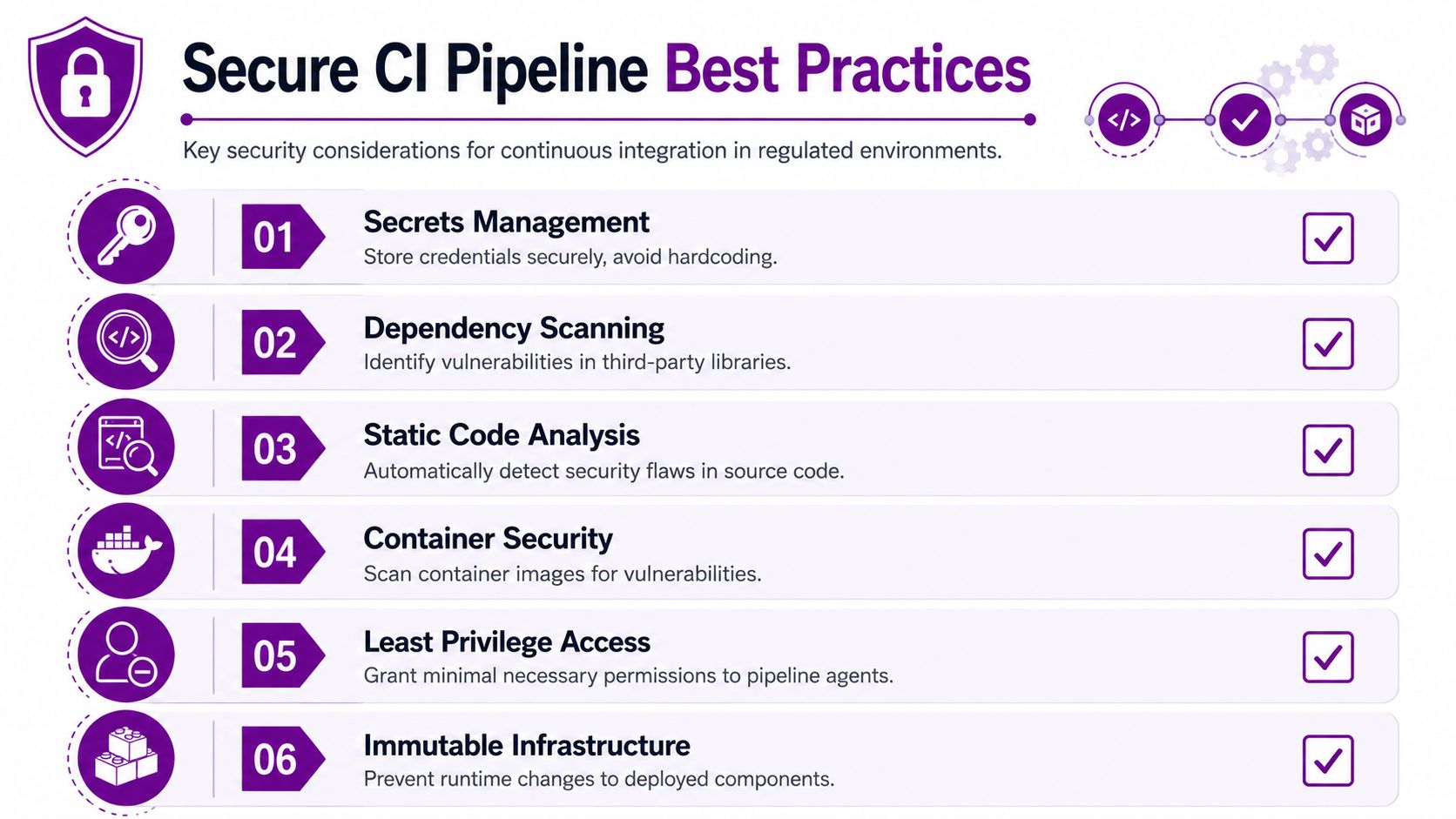
The controls are straightforward in principle. You need security scanning inside the pipeline, audit logs for pipeline activity, signed pipeline configuration so changes can't be tampered with, SBOM and SCA checks for dependency visibility, segmentation for build environments, and disaster recovery testing for the pipeline itself. Those aren't ornamental extras. They're what make a fast pipeline trustworthy in a regulated environment.
How to add controls without adding friction
The cleanest approach is to run security work in parallel with functional validation wherever possible. If a scan waits for a test suite to finish before starting, the team sees security as a delay. If it runs alongside the tests, it feels like part of the normal flow.
Policy-as-code helps here because it lets Azure DevOps enforce standards automatically instead of asking people to remember them. That's a better fit for Microsoft environments with multiple delivery teams, because it keeps the same controls consistent across projects.
For teams looking for a practical comparison of delivery and deployment controls, the practical 2026 continuous deployment guide from Appjet is useful background, especially where CI needs to support later delivery automation without creating a governance mess.
The controls that matter in regulated Microsoft estates
Secrets management should keep credentials out of the repository and out of casual access paths. Pipeline agents need only the access they require, which is why role-based access control guidance is relevant when you start hardening build and release permissions.
Dependency scanning catches risky third-party packages before they move further down the pipeline. Static code analysis helps expose obvious flaws early, while container security matters if your build produces images for Azure-hosted workloads.
Least privilege access reduces the damage a compromised agent can do, and immutable infrastructure limits the temptation to patch production by hand. The more those controls are built into the pipeline, the less security looks like an obstacle and the more it looks like a repeatable delivery standard.
Structuring Teams and Branches for CI Success
CI fails more often because of team design than because of tooling. You can build a clean Azure DevOps pipeline and still end up with long merge queues, overdue branches, and developers waiting on each other's work. The mechanical constraints matter, especially in larger Microsoft estates where several people are changing related systems at once.
AWS's guidance is clear that integrated teams should be no more than 12 members and should commit frequently to the main branch without long-running feature branches. That keeps coordination overhead from swallowing the benefit of CI. Once a team gets too large, people start isolating work, integration slows down, and the pipeline becomes a ceremonial checkpoint rather than a live feedback system.
Small teams integrate better
Small teams make it easier to own a change end to end. In Azure DevOps, that means using work items to keep changes independent, well-scoped, and traceable. It also means breaking big requests into smaller pieces that can be merged, tested, and reviewed without dragging half the department into every decision.
Branch policies help, but they only work if they support the team's behaviour rather than trying to rescue bad habits. Require review, require automated tests, and require a clean merge path, but don't let policy become a substitute for sensible scoping. The best CI teams commit daily because they've built the work that way, not because a manager nags them into it.
The 10-minute rule keeps feedback useful
Tutorialspoint's best-practice guidance says CI builds should preferably never go beyond 10 minutes, and that advice still makes sense because feedback loses value when it arrives too late. A build that drags on encourages batching, and batching pushes the team back towards the same integration pain CI was meant to remove.
Branch duration matters as much as branch policy. Long-running feature branches feel safe while the work is hidden, but they usually produce ugly merges and hard-to-reproduce defects later. Frequent commits to the main branch keep the system honest, and honest systems are easier to support.
The branch strategy is not a style preference. It decides whether CI is continuous or merely occasional.
Your 90-Day CI Adoption Roadmap
The smoothest CI roll-outs follow the people, process, technology sequence. If you start with tooling alone, the pipeline exists before the team is ready to use it. If you start with culture and operating rules, the technology lands more cleanly because people already understand why it matters.
Month 1 people first
Pick one pilot team with a real delivery need and a manageable workload. Train them on Azure DevOps, basic CI concepts, and the expectations around frequent commits, then make it safe for them to fail a build without treating that failure like a personal problem.
By the end of the month, the team should know what CI is for, what the branch rules are, and who owns the pipeline if it breaks. If people are avoiding commits, the issue is usually trust, not capability.
Month 2 process second
Build the first pipeline on a low-risk project and define branch policies that match how the team works. Add the six-metric dashboard so everyone can see whether the pipeline is improving or just producing more noise.
The warning sign here is overengineering. If the team spends weeks debating the perfect workflow without shipping a live pipeline, the adoption is drifting into theory. Keep the first version narrow, visible, and usable.
Month 3 technology last
Expand CI to another project only after the first one is stable. Add security scanning, automate more of the test suite, and tune the pipeline with caching and parallelisation so feedback stays quick.
The milestone is not just that the pipeline exists. It's that developers trust it enough to commit regularly and managers trust it enough to use it as the default delivery path. That's where a managed IT partner becomes valuable, because adoption usually needs hands-on guidance, not just a slide deck.
Common Pitfalls and How F1Group Helps You Avoid Them
The most common mistake is treating CI like a one-off setup. Teams install the pipeline, celebrate the first green build, and then let the process drift until the same branch problems come back in a new form. The fix is ongoing ownership, not a one-time project.
Another failure mode is ignoring metrics until delivery slows down or incidents start piling up. By then, the team is usually guessing, because there's no baseline for pipeline duration, build reliability, or recovery performance. Skipping security controls creates a third problem, since CI/CD environments need protection just like production systems do.
The final issue is cultural. If leadership doesn't back the team's branch discipline, frequent commits, and smaller change sizes, CI becomes a local preference instead of an operating model. That's where a practical partner matters, especially for East Midlands organisations that want Microsoft-focused support, full ownership of issues, and scalable help that doesn't disappear after the first deployment.
Phone 0845 855 0000 today or send a message through the contact form if you want help turning CI from a brittle build script into a reliable operating practice.
If your team is wrestling with slow releases, fragile branches, or CI security concerns, F1Group can help you put a proper Azure DevOps foundation in place and keep it working. Visit F1Group to discuss a pipeline review, a pilot implementation, or a wider Microsoft delivery roadmap built around continuous integration.