
43% of UK businesses experienced a cyber breach or attack in the previous 12 months, equivalent to about 612,000 businesses, according to the UK Government's Cyber Security Breaches Survey 2025. For an East Midlands organisation built around Microsoft 365, Azure, cloud applications, remote access and email, threat detection is no longer an advanced capability reserved for large enterprises. It's part of keeping ordinary operations running.
The practical challenge is choosing what to monitor first, which alerts deserve action, and how to build response capability without buying a complex platform that nobody has time to operate. A proportionate Microsoft-centric stack can give mid-sized organisations useful visibility, provided the technology, processes and people are designed together.
Why Threat Detection Matters More Than Ever for UK Businesses
A prevention strategy can block known threats, but no boundary control catches every malicious email, stolen credential or compromised device. Threat detection gives a mid-sized organisation a way to spot suspicious activity after an attacker gets through, then contain it before the incident disrupts operations.
The UK figures support that approach. In the Cyber Security Breaches Survey 2025, 43% of businesses reported a breach or attack in the previous 12 months. The previous survey recorded 50% of businesses reporting some form of breach or attack, according to the Cyber Security Breaches Survey 2024. Annual results vary, but the decision for an East Midlands IT director is consistent. Prevention controls can fail, so the organisation needs visibility into what happens next.
Threat severity matters as much as incident volume
The National Cyber Security Centre's incident management figures show why early warning and triage belong in day-to-day operations. Between 1 September 2024 and 31 August 2025, the NCSC received 1,727 incident tips, triaged 429 incidents requiring support, and classified 204 as nationally significant, including 18 highly significant incidents. The NCSC incident management review reports that highly significant incidents rose by 50% year on year.
The NCSC also issued 542 bespoke notifications to UK organisations in 2024, compared with 258 the year before. 317 notifications related to pre-ransomware activity. Detection therefore needs to identify preparation and intrusion signals, not just respond after encryption, extortion or prolonged downtime has begun.
| UK Cyber Threat Statistics at a Glance | Statistic |
|---|---|
| Businesses reporting a breach or attack in the previous 12 months | 43% |
| UK businesses represented by that survey estimate | About 612,000 |
| NCSC incident tips received between 1 September 2024 and 31 August 2025 | 1,727 |
| NCSC incidents requiring support | 429 |
| Nationally significant NCSC incidents | 204 |
| Highly significant NCSC incidents | 18 |
| Bespoke NCSC notifications issued in 2024 | 542 |
| Notifications linked to pre-ransomware activity | 317 |
A proportionate capability beats an oversized platform
A mid-sized company does not need to recreate a bank's security operations centre. It needs useful signals from identity, endpoints, email and cloud services, with clear ownership for investigating and containing high-confidence incidents.
Practical rule: If an alert doesn't lead to a defined decision or action, it's probably not useful detection.
Teams assessing implementing threat detection systems should judge tools by visibility, alert quality, response authority and the time required for ongoing tuning. Microsoft Defender and Sentinel can provide a strong foundation for Microsoft 365 and Azure environments, provided someone owns the configuration, integrations and workflow. That ownership matters more than buying every available security module.
Understanding the Core Detection Methods
Threat detection works through several viewpoints. Each method exposes different evidence, and gaps appear when one layer is expected to cover every risk.
Four views of the same environment
Security Information and Event Management, or SIEM, collects logs from identity services, endpoints, firewalls, applications and cloud platforms. It correlates events that seem routine individually but suspicious together. A successful sign-in, a new mailbox rule and unusual file access can form a meaningful sequence when analysts view them in one incident.
Endpoint Detection and Response, or EDR, monitors laptops, desktops and servers. It records process behaviour, file changes, script execution, memory activity and device health. EDR can identify the process that began an attack and support containment actions such as device isolation or file quarantine.
Network Detection and Response, or NDR, examines traffic between systems and external destinations. It can reveal lateral movement, command-and-control communication and unusual data transfers. NDR provides useful evidence when endpoint telemetry is incomplete, although encrypted traffic and limited network coverage can reduce what it explains.
User and Entity Behaviour Analytics, or UEBA, searches for deviations from established activity patterns. It may flag an unusual sign-in location, access to data a user does not normally handle, or an account activity sequence that differs from normal use. Its accuracy depends on reliable identity and activity data, plus sensible baselines.
These methods overlap without replacing one another. EDR may detect a malicious process but lack context about cloud access. SIEM can correlate account and application events yet still need device-level evidence for containment. NDR may identify suspicious traffic without showing which process generated it. The right design uses each signal for the question it can answer.
Microsoft's two main pillars
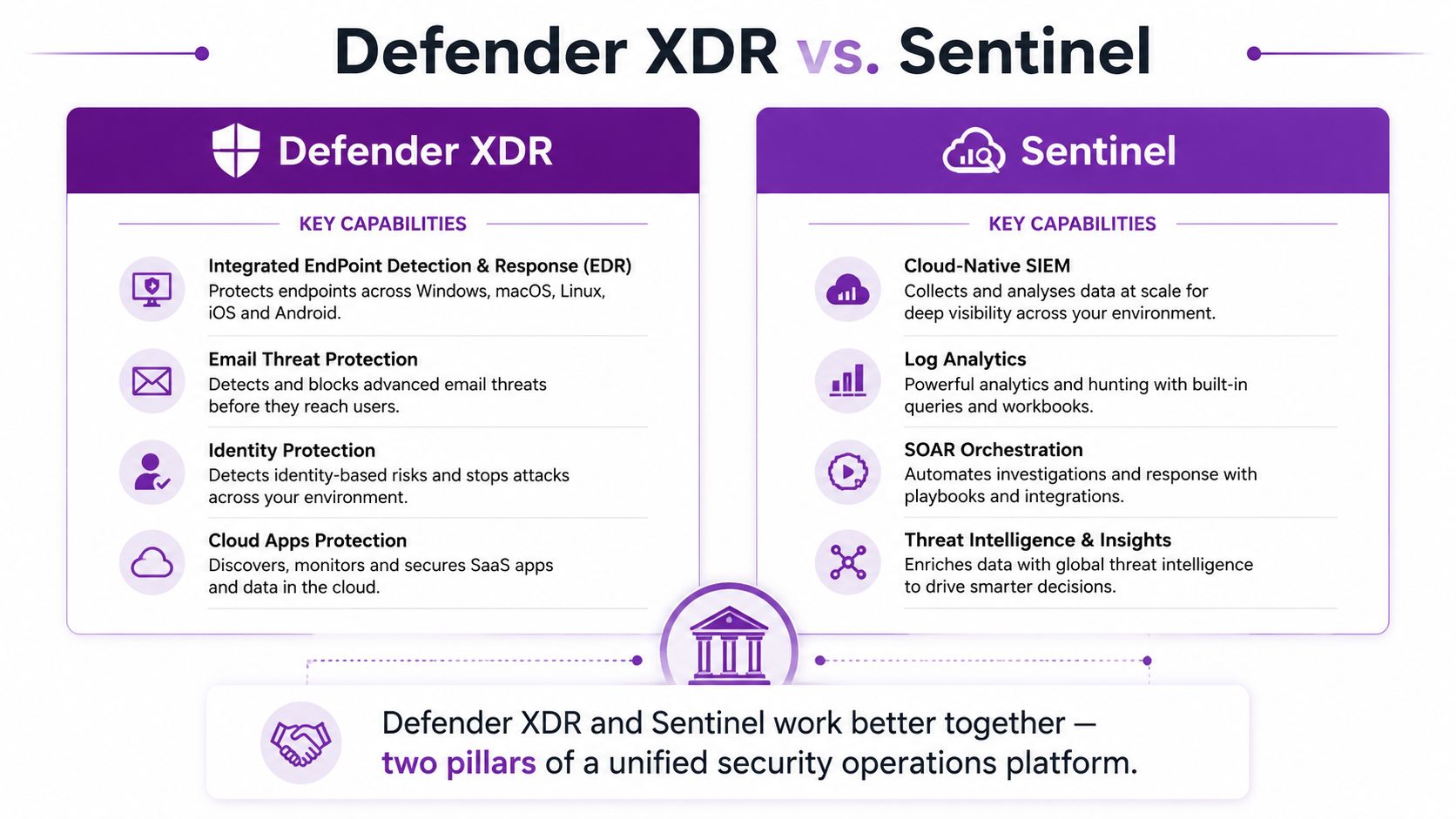
For Microsoft-heavy organisations, Defender XDR usually supplies integrated endpoint, email, identity and cloud application signals. Sentinel provides the broader SIEM and orchestration layer, particularly where logs from non-Microsoft systems also matter.
The same principle applies to adjacent controls. A badge-audit system or physical access control can show who entered a room, but it cannot explain a suspicious PowerShell process or an impossible-travel sign-in. Specialist services such as bug sweeping London address a different risk. Mid-sized organisations should match each sensor to the threat it can observe instead of buying overlapping controls without an investigation plan.
The NCSC's threat-hunting guidance reinforces that detection includes proactive searches for activity that standard controls miss. Hunting needs visibility across networks, hosts, devices and cloud services, with searches that correlate attacker tactics, techniques and procedures rather than relying only on known indicators of compromise.
Microsoft Defender and Sentinel as Your Detection Foundation
Microsoft Defender XDR and Microsoft Sentinel solve different operational problems. Defender is the integrated detection and response fabric across Microsoft security workloads. Sentinel is the cloud-native SIEM that extends visibility beyond those workloads and helps your team manage incidents across the wider estate.
Defender XDR handles the close-up evidence
Defender for Endpoint is strongest where the question is, “What happened on this device?” It can identify suspicious process execution, malware behaviour, exploit activity and risky device changes. Defender for Office 365 focuses on phishing, malicious attachments, unsafe links and email remediation. Defender for Identity and Entra signals add context around credential misuse and account activity, while Defender for Cloud Apps extends monitoring into cloud application use.
That integration reduces investigation friction. An analyst can move from a suspicious email to the user who clicked it, the device involved, the sign-in activity that followed and the files accessed afterwards. Where the evidence is strong, Defender can support native actions such as isolating a device, quarantining a file or remediating email.
Sentinel connects the wider story
Sentinel becomes valuable when an incident crosses Microsoft boundaries. It can ingest Defender alerts alongside relevant firewall, server, application, backup, SaaS and third-party telemetry. Analytics rules identify patterns, while Logic Apps can orchestrate response steps and route incidents to the people responsible for action.
| Detection question | Usually strongest starting point |
|---|---|
| Did a user click a malicious link? | Defender for Office 365 |
| Did malware execute on a laptop? | Defender for Endpoint |
| Was an identity used in an unusual way? | Defender and Entra signals |
| Do events across identity, endpoint and cloud form one attack chain? | Microsoft Sentinel |
| Does activity involve non-Microsoft infrastructure? | Microsoft Sentinel with additional connectors |
| Should a response step run automatically? | Sentinel orchestration with Defender actions |
Licensing must be checked rather than assumed. Some organisations already hold Microsoft security capabilities through Microsoft 365 Business Premium or Microsoft 365 E5, but entitlement, configuration and data retention vary. The cost-effective approach is to understand what's already available, activate the controls that match the risk, and only then consider additional platforms.
A wider security risk management approach helps prevent technology decisions from becoming detached from business priorities.
Building a Proportionate Detection Stack
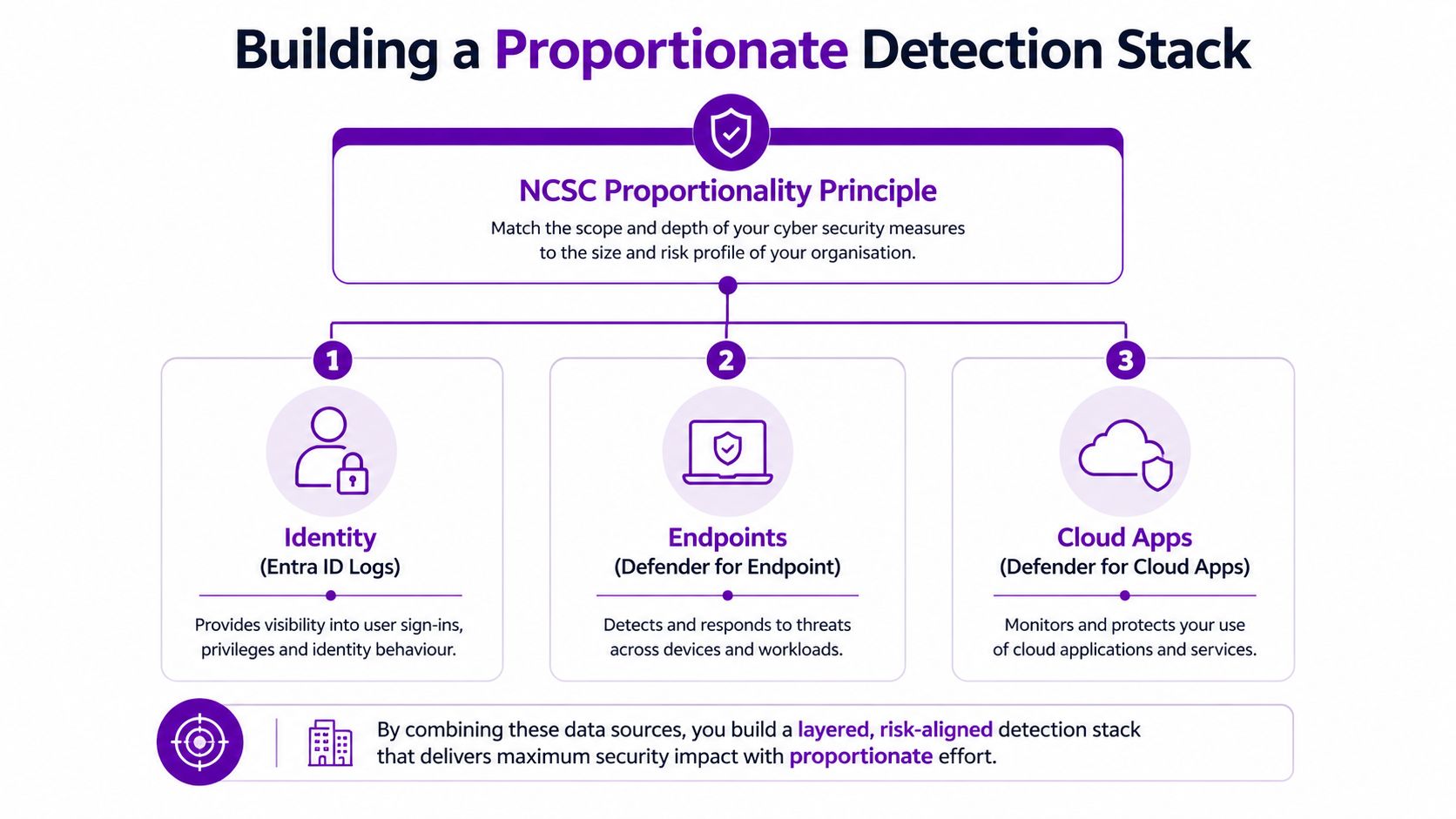
The NCSC's security monitoring guidance says capability should be proportionate to the threats faced and the resources available. That principle is particularly useful for an East Midlands IT director who needs to present a defensible plan without committing the organisation to tooling it can't operate.
Start with the telemetry that addresses the most important attack paths.
Build from the signals you already own
Identity comes first. Entra ID sign-in logs, authentication failures, conditional access outcomes, privilege changes and session activity tell you whether an attacker is trying to use legitimate credentials. Identity often connects otherwise separate events, so it deserves consistent collection and review.
Endpoints provide the technical detail. Defender for Endpoint alerts, device exposure information, process activity and device health help establish what happened after a user or service account was compromised.
Email remains a practical entry point. Defender for Office 365 signals around phishing, malware and suspicious links give the team a way to connect initial delivery with later identity and endpoint activity.
Add these sources to native Microsoft alerting first. Then connect relevant events to Sentinel for central correlation, incident grouping and response orchestration. Add behavioural analytics where normal alerting leaves a meaningful gap, rather than because the product catalogue offers another feature.
Match investment to consequence
A business holding sensitive customer, financial or operational information may need broader logging and tighter investigation processes than a business with limited data exposure. Regulatory duties, contractual requirements, dependence on cloud services and the effect of downtime should influence the design.
Avoid buying NDR or a third-party SIEM before checking whether Microsoft-native telemetry is configured, retained and reviewed properly. A platform with incomplete identity logs still produces an incomplete picture.
A proportionate stack isn't the smallest stack. It's the stack your organisation can operate consistently and improve after every incident.
Every alert needs a route to a decision. Define severity, asset criticality, escalation ownership and response authority before expanding data collection. The practical objective is not to collect everything. It's to make important activity visible and actionable.
A workable operating model is also part of managing security operations, especially where the same IT team supports users, infrastructure and security.
Alert Triage and Response Workflows That Deliver Results
Threat detection fails when every event becomes an urgent incident. It also fails when analysts suppress so much noise that genuine compromise disappears. A workable triage process reduces volume while preserving evidence and a clear route to action.
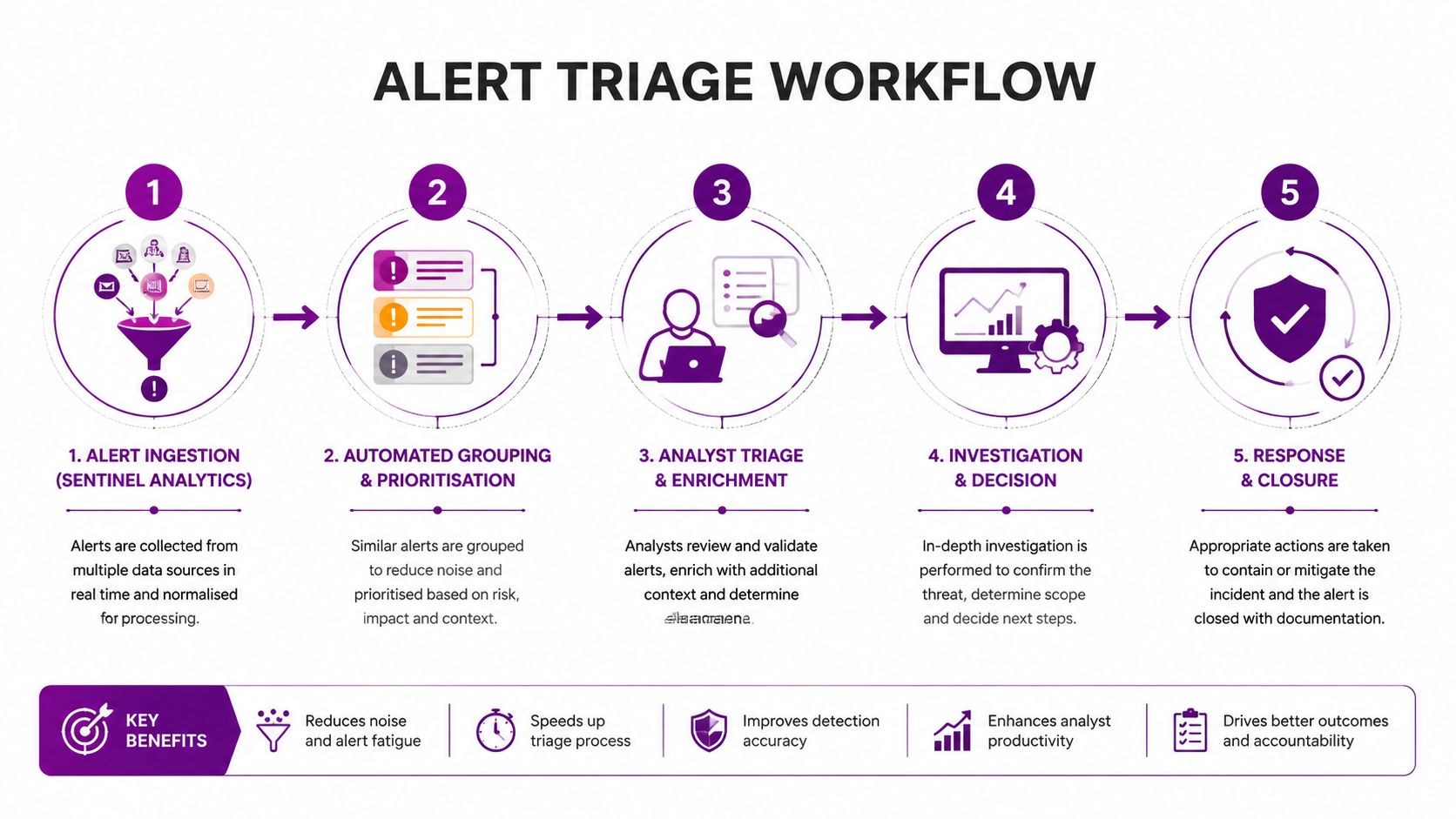
Sentinel analytics rules should group related signals into incidents instead of creating separate tickets for each event. A suspicious sign-in, impossible travel alert and unusual mailbox action may form one identity incident. Grouping gives the investigator a usable narrative and limits duplicated work.
A practical triage decision tree
Classify the alert. Begin with severity and confidence. A confirmed malicious file on a privileged administrator's device needs a different response from an unusual, unexplained sign-in.
Enrich the evidence. Check available threat intelligence, the user's role, device ownership, recent changes and related alerts. An event carries more weight when it matches a known malicious indicator or forms part of a wider sequence.
Assess business impact. An event on a domain controller, finance account or production server may require faster attention than a higher-volume event on a low-risk test device.
Choose automation carefully. High-confidence actions, such as quarantining a confirmed malicious file or isolating a clearly compromised device, can be automated. Disabling a heavily used service account or blocking a business-critical application may require human approval.
Contain and document. Defender for Endpoint supports device isolation and file quarantine. Entra ID supports account disablement and session revocation. Record what happened, which actions were taken and the evidence supporting them.
False-positive tuning needs ownership. Legitimate administrator activity, scheduled tasks and approved software deployments may trigger rules. Narrow the exclusion rather than disabling detection globally, document its reason, assign an owner and review it when the system or business process changes.
A mature workflow checks whether alerts lead to timely containment and whether investigations improve future rules. Post-incident review should identify missing telemetry, noisy rules, effective response actions and gaps in escalation. Guidance on incident response planning can help convert those findings into repeatable procedures.
When Managed Detection Makes Sense for Mid-Sized Organisations
Many mid-sized organisations have capable IT professionals but no spare team for continuous alert review. The same people may be responsible for service desk support, Microsoft 365 administration, projects, supplier management, backups and infrastructure. Asking them to maintain detection rules and investigate alerts outside normal working hours creates a capacity problem, not a commitment problem.
Alert fatigue makes that gap worse. If rules produce too much noise, analysts spend time explaining normal activity instead of investigating suspicious behaviour. If the team can't review alerts promptly, a technically sound platform still leaves a response delay.
Managed detection and response, or MDR, can act as a force multiplier. It doesn't remove the need for internal ownership. Your organisation still decides risk appetite, approves sensitive response actions and manages business recovery. An MDR provider can supply the operational layer around Defender and Sentinel, including monitoring, rule tuning, investigation, escalation and reporting.
Compare the operating models honestly
| Factor | In-House SOC | Managed Detection (MDR) |
|---|---|---|
| Alert monitoring | Internal staff must provide coverage | Provider supplies an analyst function |
| Platform tuning | Owned and maintained internally | Shared or provider-led, depending on agreement |
| Incident escalation | Internal routes and availability | Defined escalation contacts and procedures |
| Microsoft integration | Requires internal specialist capacity | Provider brings operational experience |
| Control | Direct internal control | Control retained through agreed authority and playbooks |
| Cost model | Staffing, tooling and skills investment | Contracted service aligned to agreed scope |
| Data sovereignty | Managed directly by the organisation | Requires supplier due diligence and contractual review |
| Strategic ownership | Internal | Remains internal, with operational support |
The NCSC advises organisations to assess suppliers and manage supply chain risk carefully. Before appointing an MDR partner, review data handling, access permissions, staff screening, service boundaries, incident communications, retention, subcontracting and exit arrangements. Ask how the provider tunes rules for your environment rather than applying generic thresholds.
F1Group is one possible operational partner for organisations using Microsoft technologies, offering managed IT and cyber security services that can support monitoring and Microsoft security tooling. The right choice depends on scope, assurance, response authority and the provider's ability to work within your governance model.
Managed detection makes sense when the business needs continuous attention but doesn't want to build an in-house SOC. It's less suitable when the organisation expects a supplier to own every security decision without internal accountability.
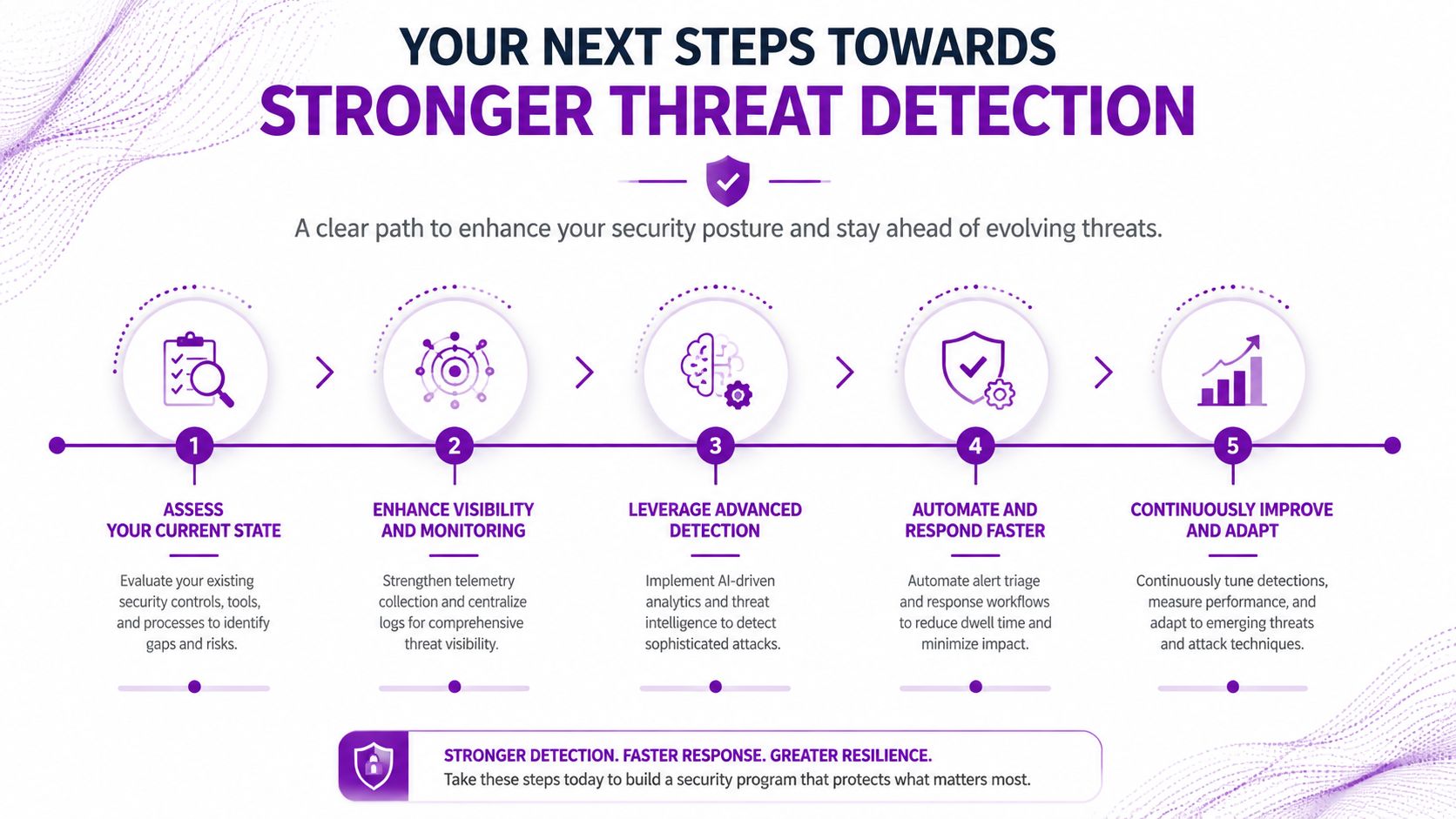
Your Next Steps Towards Stronger Threat Detection
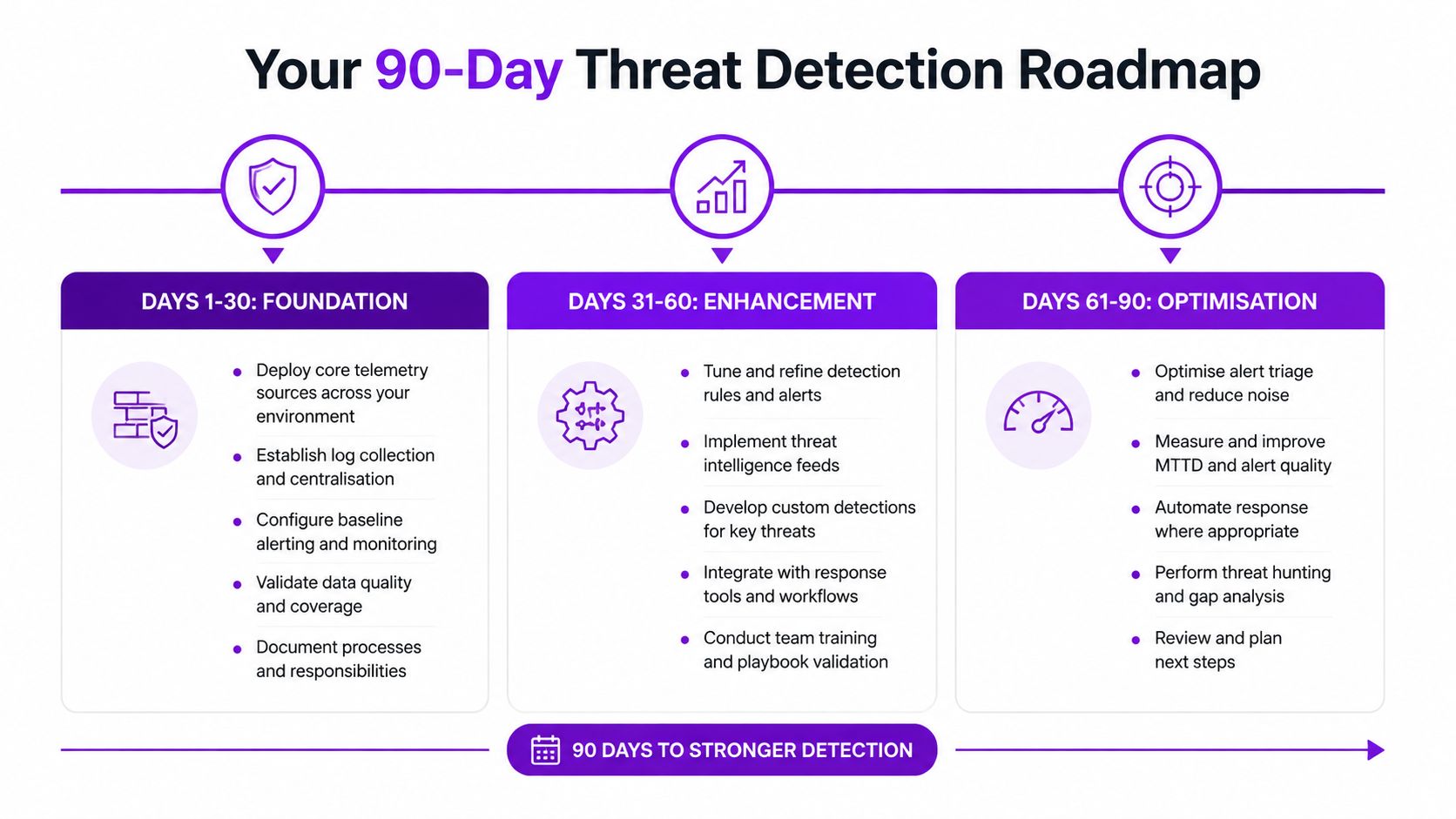
A realistic 90-day plan starts with usable visibility, not a large procurement exercise.
Days 1 to 30, secure the foundation
Confirm which Microsoft 365 security capabilities are licensed and enabled. Deploy or validate Defender for Endpoint, review Entra ID sign-in and privilege activity, and check that Defender for Office 365 produces actionable phishing and malware signals. Define who receives high-severity incidents and who can approve containment.
Days 31 to 60, consolidate the evidence
Connect priority identity, endpoint and email telemetry to Sentinel. Group related alerts, remove duplicate routes, tune noisy analytics rules and document approved administrative activity. Test the response path for a compromised account and affected device, including escalation when the usual IT contact is unavailable.
Days 61 to 90, improve maturity
Add playbooks where the response is predictable and low risk. Consider NDR only where network complexity, third-party infrastructure or visibility gaps justify another tool. Establish board-level reporting covering alert volumes, high-confidence incidents, investigation status, containment activity and unresolved coverage gaps.
The NCSC's Active Cyber Defence programme shows how shared telemetry can support detection at national scale. In the 2025 Annual Review, Early Warning alerts covered 316,343 IP addresses in a single year, with 131,000 reported as likely compromised by malware or hacking to 1,350 organisations. Vulnerability reports covered 187,000 IP addresses sent to 4,030 organisations. The programme received over 10.9 million reports in the last year and more than 45 million reports since April 2020.
Smaller organisations can apply the same principle at a proportionate scale. Collect Microsoft signals consistently, route them to the right people and connect them to a tested response process. Managed detection can bridge limited internal capacity without requiring an enterprise SOC.
F1Group can assess Microsoft 365, Azure, identity, endpoint and email detection readiness, then recommend a proportionate route using Defender, Sentinel and managed operational support where appropriate. Call 0845 855 0000 today or send us a message for a no-obligation conversation about strengthening threat detection across your organisation.