
A 20-person professional services firm in Nottingham starts Monday with three problems at once. Email is unavailable, the Finance Director's laptop has frozen during payroll, and nobody in the office owns the incident. There's no IT manager, the relative who used to fix the printers left last year, and the previous freelancer won't reply until later in the week.
That isn't a technology problem alone. It's a business ownership problem. Good IT consulting for small business turns unpredictable disruption into a planned, budgeted risk, with someone accountable for the environment before the next crisis arrives.
When a Small Business Actually Needs an IT Consultant
Most firms don't need a consultant because they want more technology. They need one because technology has become too important to manage informally.
The warning signs usually appear gradually. Staff lose time waiting for systems to recover. Backups run without anyone checking whether they can restore data. New starters receive inconsistent access. Employees store business files in personal accounts because nobody has designed a sensible document structure. Each issue looks manageable until they collide on the same morning.
The trigger points worth taking seriously
A small business should start looking for external expertise when one or more of these conditions applies:
- Recurring downtime: outages are disrupting client work, payroll, production or cash collection.
- Unverified backups: the business assumes files are protected but has no tested recovery process.
- Compliance pressure: GDPR, Cyber Essentials or FCA expectations now affect purchasing and operational decisions.
- Business growth: additional staff, sites, devices or acquisitions have outgrown the original setup.
- A major Microsoft project: email, file storage, identity or applications need moving into Microsoft 365 or Azure.
- No accountable owner: several people can make changes, but nobody is responsible for the overall design or risk.
The UK SME Digital Adoption Taskforce describes a large but uneven market. The UK has around 5.5 million SMEs, representing 99% of all businesses, yet smaller firms continue to face greater barriers to adopting digital tools and AI, according to the UK SME Digital Adoption Taskforce interim report.
That's why an adviser should start with business exposure, not a product catalogue. The right conversation is about how the firm works, what would stop it operating, who needs access to what, and how quickly it must recover.
Practical rule: If a serious IT failure would leave the directors guessing who to call, the business already needs an IT ownership model.
Recognising your own version of that Monday morning is the first step. The next question is what a capable consultant should deliver.
The Core Services an IT Consultant Delivers
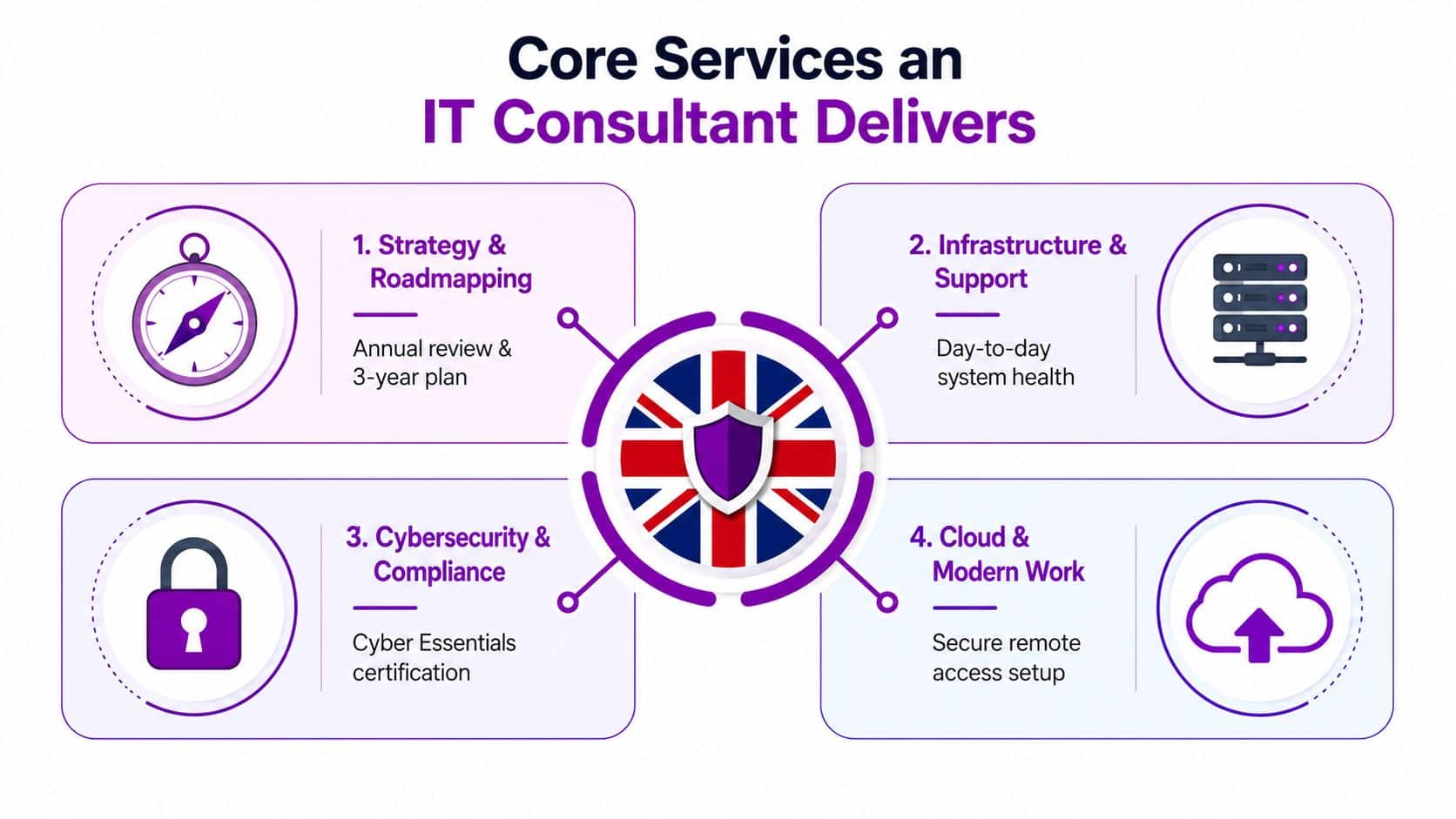
A competent UK small-business IT consultant should provide four connected service families. You might buy them through one managed agreement or separate projects, but they should form one coherent plan.
Strategy and roadmapping
A roadmap translates business plans into technology decisions. It should cover Microsoft 365, devices, connectivity, identity, security, applications, lifecycle planning and likely changes in staffing or location.
For example, a Leicester accountancy firm planning future recruitment shouldn't wait until every new starter needs a laptop. Its adviser should identify licensing, device standards, access controls, onboarding, backup and support requirements in advance.
A useful roadmap is specific enough to assign owners, costs and priorities. It shouldn't be a glossy document that sits untouched after the meeting.
Infrastructure and managed support
Managed services handle the daily work that prevents avoidable incidents. That includes monitoring, patching, helpdesk support, device health, user administration and escalation.
The usual commercial model is a per-user agreement, although some providers price by device, site or service bundle. If you're unfamiliar with the terminology, managed network services explained provides useful context on how external monitoring and support can sit around a business network.
Cloud migration
Cloud work involves more than moving files. A proper project considers identity, permissions, data structure, retention, backup, licensing, user training and the applications that depend on the existing environment.
A Derby manufacturer might move shared drives into SharePoint, but the consultant must first decide which folders should move, who should access them, how documents will be organised and how staff will work with them afterwards. Microsoft 365, Azure and hosted desktops can all be appropriate, but only when they solve a defined operational problem.
Cybersecurity and compliance
Security should include firewalls, endpoint protection, multi-factor authentication, phishing awareness, email controls, patching and Cyber Essentials preparation. The UK government's cyber security guidance for businesses identifies Cyber Essentials as the recognised UK minimum standard and points smaller organisations towards practical support resources.
These services shouldn't be sold as unrelated add-ons. A new Microsoft 365 rollout changes identity and access risk. A device refresh affects security and support. A growth plan affects licensing, onboarding and resilience. A consultant who separates everything into isolated products probably hasn't understood small-business reality.
The Pain Points That Push Small Firms to Get Help
A finance manager cannot access email on a Monday morning. A director discovers that a former employee still has access to shared files. A phishing message reaches a customer-facing mailbox before anyone notices. These incidents expose the point at which informal IT support stops being sufficient.
Cyber security is usually the clearest buying signal. The Cyber Security Breaches Survey 2025 to 2026 reports that 43% of UK businesses experienced a breach or attack in the previous 12 months, equivalent to about 612,000 organisations. Phishing affected 38% of businesses and was the most disruptive attack type in 69% of breached cases. For a small firm, MFA, endpoint hardening, email authentication and user awareness should therefore be operating controls, not optional extras.
The practical warning signs tend to arrive in sequence:
First, access becomes difficult to control. New starters need accounts, leavers need prompt removal, and staff accumulate permissions across Microsoft 365, line-of-business applications and shared storage. Growth exposes gaps that were easy to ignore when one person handled every change.
Next, digital adoption outpaces internal capability. Cloud tools may be widely available, but selecting applications, setting permissions and supporting staff still require a plan. The SME Digital Adoption Taskforce notes that cloud adoption reaches up to 80% across sectors and regions, while smaller firms continue to face greater adoption barriers. Buying another application will not fix unclear ownership or poor configuration.
Then, reactive support starts affecting cash flow. Break-fix work appears after disruption, when urgency limits supplier choice and staff time is already lost. A growing firm with more users, devices, sites and applications needs repeatable standards, clear ownership and predictable access to technical help.
Finally, resilience and compliance gaps become visible. Only 59% of small businesses had a formal cyber security policy and 53% had a cyber security continuity plan in the 2025 survey. Those gaps matter when a customer asks how data is protected, when an insurer requests evidence, or when an incident requires a documented response.
Earlier findings show the same planning weakness among smaller firms. 38% identified a cyber attack in the previous 12 months, 82% of those incidents involved phishing attempts, and only 18% had a written incident management plan, according to the Cyber Security Breaches Survey 2022 micro and small business infographic.
Use these symptoms to assess a consultant. Ask which risk they will reduce first, what evidence they will provide, and how their recommendation fits the firm's actual systems and people. A useful engagement should turn security exposure, growth pressure and unpredictable support into defined priorities, documented controls and an accountable operating model.
Engagement Models and How to Choose
The right IT arrangement depends on risk, internal capability and how much budget certainty the directors need. It isn't a choice between the cheapest quote and the most expensive package.
Comparing IT Engagement Models for Small Businesses
| Engagement Model | Best Fit | Typical Cost Profile | Key Drawback |
|---|---|---|---|
| Break-fix | Very low-risk estates or a temporary stopgap | Pay per ticket or incident | Reactive, unpredictable and slower during busy periods |
| Fully managed | Firms without a dedicated IT manager | Flat monthly fee within an agreed scope | Requires clear boundaries and a dependable supplier |
| Co-managed | Businesses with an internal IT lead | Shared responsibility and targeted external capacity | Handover gaps can create uncertainty |
| Project-based | Defined migrations, rollouts or remediation work | Fixed scope, milestones and project fee | Doesn’t provide ongoing ownership after completion |
Break-fix feels flexible because there's no standing commitment. In practice, it encourages firms to defer maintenance and call only when something breaks. That approach can work briefly while a business selects a longer-term partner, but it's a poor permanent model for an estate holding important client and operational data.
Fully managed support usually suits firms with 10 to 75 people and no dedicated IT manager. A single provider can manage the service desk, maintenance, security controls and supplier coordination under agreed terms. The benefit is predictability and faster ownership, provided the contract explains what's included.
Co-managed support works when an internal IT lead already understands the estate but needs specialist capacity, out-of-hours cover, project support or security expertise. The contract must define who makes decisions and who responds first.
Project-based consulting is the correct tool for a defined change, such as a Microsoft 365 rollout or cloud migration. It shouldn't be mistaken for ongoing support.
Choose the model that controls your most expensive risk, not the one with the lowest headline fee.
Evaluating and Selecting the Right Consultant
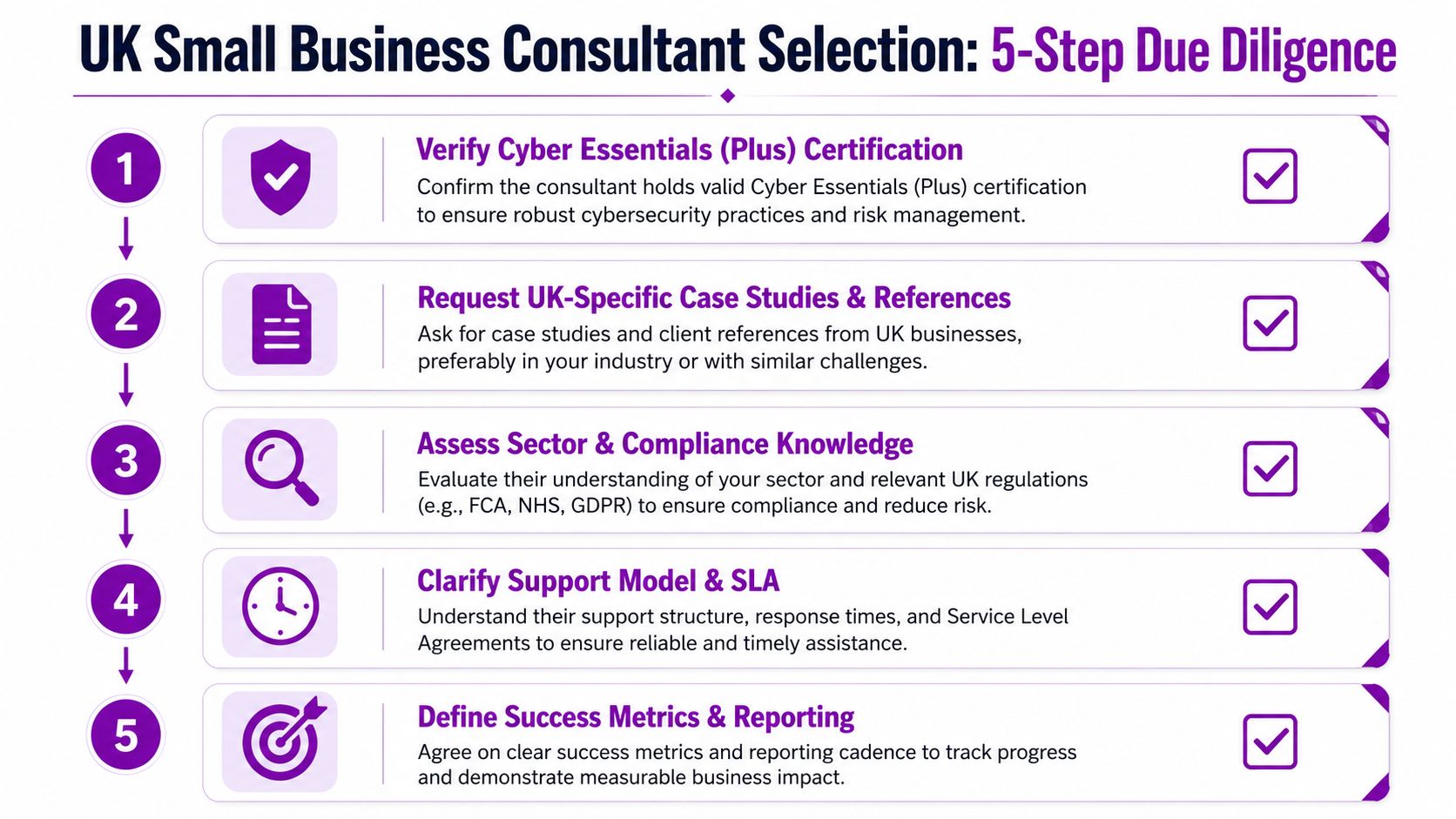
A polished proposal doesn't prove that a consultant can protect or support your business. Use a short due diligence process that tests credentials, operating discipline and practical fit.
Five checks before you sign
-
Verify Cyber Essentials status. Ideally, the provider should hold Cyber Essentials or Cyber Essentials Plus certification. A consultant that can't demonstrate its own approach may struggle to guide you through your accreditation journey. The government states that organisations with Cyber Essentials are 92% less likely to make a claim on cyber insurance, as set out in its cyber security guidance for business.
-
Check Microsoft capability. Ask about Microsoft partner status, relevant solution designations and experience with Microsoft 365, Azure, SharePoint, Intune, Defender and Entra ID. Don't accept a generic claim that the team is “Microsoft friendly”. Ask who will design and deliver the work.
-
Review people and access controls. Request engineer accreditations and confirm whether staff are DBS checked, particularly where consultants will visit premises or handle sensitive information. Ask how privileged access is granted, reviewed and removed.
-
Read the SLA line by line. Check response times, support hours, included work, escalation routes and the definition of out-of-scope activity. “Fast support” means little without a measurable commitment.
-
Speak to similar clients. Ask for two or three references from organisations of a comparable size and sector. Ask those clients how the provider handles incidents, explains technical decisions and deals with work outside the original scope.
A discovery call should expose more than a presentation deck. Bring a recent incident, a problem user journey or an upcoming project and ask the consultant to explain how they'd investigate it. You can also review practical guidance on procurement of consultancy services before comparing proposals.
The cheapest quote often hides a narrow reactive contract. Compare ownership, documentation, security depth and communication quality, not just the monthly figure.
UK Pricing Models and What to Budget
Pricing varies with support hours, user risk, device numbers, security tooling, applications and the standard of documentation. The following are realistic 2026 UK planning bands, not universal tariffs.
UK Small-Business IT Consulting Pricing Bands (2026)
| Engagement Model | Typical 2026 Band | Currency | Usually Included | Common Extras |
|---|---|---|---|---|
| Break-fix | £40 to £90 per ticket | GBP | Fault diagnosis and repair activity | Urgent response, travel, project work |
| Fully managed | £45 to £110 per user per month | GBP | Helpdesk, patching, monitoring and basic cyber security tooling | Advanced threat protection, hardware procurement, out-of-hours cover |
| Co-managed | £25 to £60 per user per month added to an internal function | GBP | Specialist support, escalation and agreed operational tasks | Projects, on-site work and extended hours |
| Project-based | £2,500 to £15,000 for a 10 to 75-person deployment | GBP | Defined Microsoft 365 or Azure migration scope | Complex integrations, data remediation and extended training |
Break-fix has the lowest visible commitment but the least budget control. Fully managed support costs more consistently because it pays for prevention, availability and defined ownership. Co-managed arrangements are harder to compare because the internal team retains part of the workload.
Before accepting a quote, ask whether the price includes user onboarding, leaver processing, device configuration, Microsoft licensing administration, security alerts and supplier management. Hardware, advanced threat protection, major application changes and out-of-hours cover commonly sit outside the base package.
For internal planning, I'd treat 4% to 7% of operational spend on IT as a healthy budgeting rule for a small UK firm. That isn't a promise of what a supplier will charge. It's a way to prevent the business from treating technology as an occasional emergency purchase.
A useful comparison is to place the proposal beside the provider's explanation of managed IT support pricing. Look for assumptions, exclusions and the work required from your own staff.
AI Copilots, Cloud Migrations, and What to Prioritise
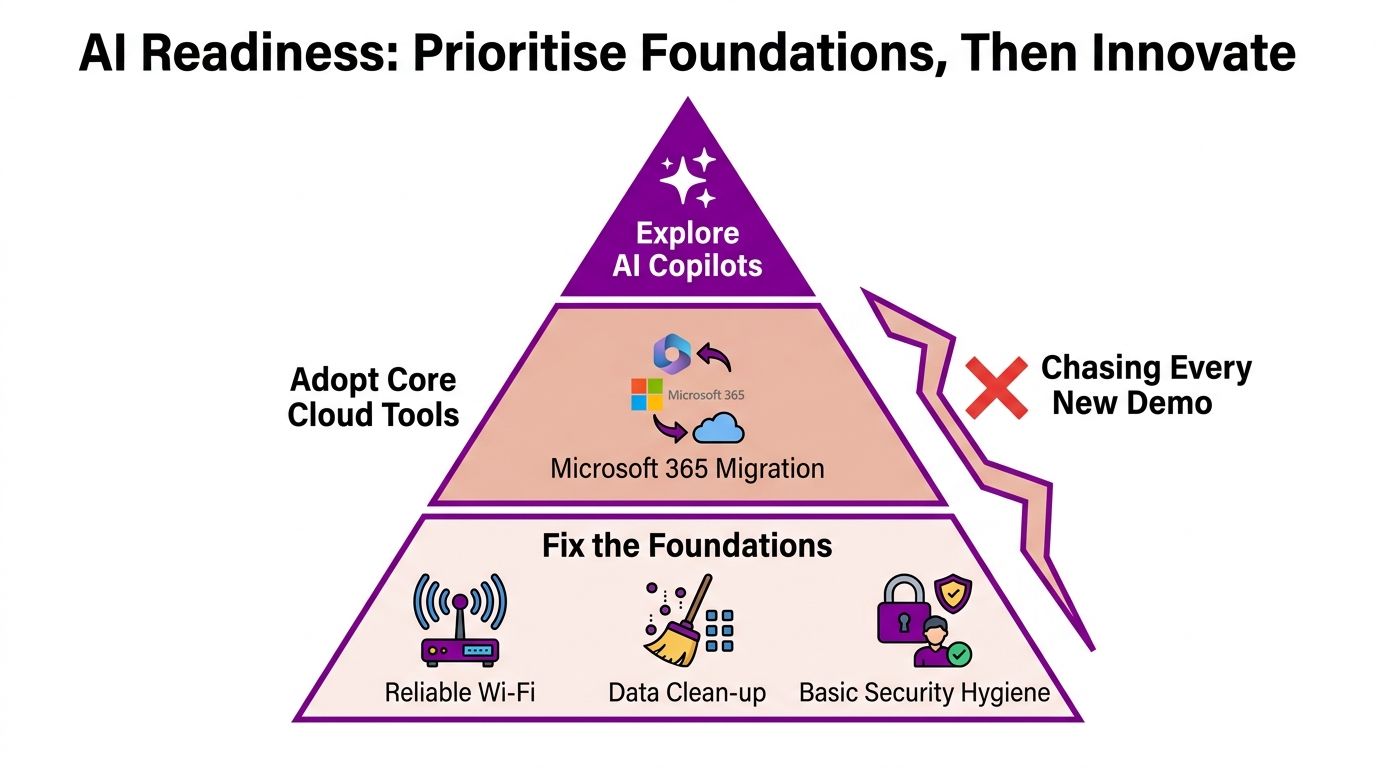
Most small firms don't need another Copilot demonstration. They need cleaner data, controlled identities, reliable recovery and a clear answer to who can access company information.
The UK government's AI adoption research found that around 16% of UK businesses were using at least one AI technology. ONS reporting cited in the same official context found usage among businesses with 10 or more employees reached just under 35% by July 2026, compared with around 12% in late 2023, according to the AI Adoption Research Report. Adoption is rising, but most businesses still aren't using AI.
Build the stack in the right order
Start with the environment that an AI assistant will read and act upon:
- Stabilise infrastructure. Fix unreliable Wi-Fi, ageing devices, patching gaps and inconsistent user accounts.
- Complete the cloud migration. Decide where documents belong, remove unnecessary duplication and establish sensible SharePoint or OneDrive ownership.
- Secure identities. Enforce MFA, use conditional access where appropriate and remove dormant accounts and excessive permissions.
- Formalise backup and recovery. Document what is protected, how restoration works and who makes the recovery decision.
- Pilot a contained use case. Test Copilot with a defined marketing, finance or internal knowledge workflow, with clear data boundaries and human review.
The Microsoft AI Copilot guidance is most useful when treated as part of a wider adoption decision, not as a reason to buy licences before the estate is ready.
AI investment is premature when staff rely on personal accounts for company data, nobody has agreed data classifications, access permissions are unclear, documents are duplicated across uncontrolled locations or the business can't explain how an incorrect output will be checked. Fix those foundations first. AI can then support a known process instead of magnifying an unknown risk.
How F1Group Supports East Midlands Businesses
For an East Midlands firm, geography still matters. A partner that understands the working patterns of businesses in Nottingham, Leicester, Derby and the surrounding counties can combine remote support with practical on-site assistance when the situation demands it.
F1Group supports small and mid-sized organisations with Microsoft-focused services across the region, including Microsoft 365, Azure, Dynamics 365, Copilot AI, Power Platform, custom applications and cyber security. The sensible way to assess that type of partner is to ask for a discovery process, not a product list.
What a sensible engagement looks like
A useful first stage should include:
- Discovery workshop: document users, devices, applications, risks, suppliers and business priorities.
- Written roadmap: separate urgent remediation from planned improvements across infrastructure, security and Microsoft 365.
- Clear operating model: decide whether the next stage is fully managed, co-managed or project-based.
- Evidence of control: review Cyber Essentials status, Microsoft Solutions Partner designations, DBS-checked engineers and ISO-aligned processes.
- Review rhythm: agree how progress, incidents, risks and upcoming decisions will be reported.
Consider a 25-user professional services firm moving away from break-fix support. The onboarding should begin with access and asset discovery, backup verification, endpoint and Microsoft 365 review, documentation and a prioritised risk register. During the first 90 days, the firm should expect agreed remediation, support procedures, user onboarding standards, security improvements and a roadmap for the next phase. Exact timescales depend on the estate's condition, but the supplier should explain dependencies before work begins.
F1Group is one regional option for firms seeking a Microsoft-focused adviser that can move from assessment into managed or co-managed support. Before signing, request a sample vCIO review, ask how the first 90 days would be measured and check whether the proposed service matches your actual risk profile.
F1Group can assess your current systems, Microsoft 365 environment, cyber security controls and support model, then recommend a practical route forward. Visit F1Group, phone 0845 855 0000 today, or send us a message to arrange a discovery conversation.