
A sole IT manager in a 55-user manufacturer near Loughborough can start Monday with a manageable queue and finish the week buried under it. Intune policies drift, a phishing incident consumes three days, and the board still expects a Copilot rollout by Q3. The problem isn't commitment or competence. It's that one person can't provide strategic leadership, specialist engineering, user support and dependable out-of-hours cover at the same time.
Co-managed IT services solve that capacity problem without stripping control from the business. An external partner takes an agreed share of support, monitoring, security and specialist delivery, while the internal lead keeps ownership of business priorities, suppliers and user relationships. The model is particularly practical for East Midlands SMEs that have outgrown one-person IT but don't need, or can't justify, a fully staffed department.
The important question isn't whether co-managed IT sounds collaborative. It's whether the division of work is precise, secure and financially sensible. The buyer maths matters, especially when you're comparing a partner's monthly fee with the actual cost of another internal hire.
Why Co-Managed IT Is the Answer When Your Internal Team Is Stretched
The Loughborough manufacturer is a familiar example. Its IT manager knows every production system, understands which users need immediate help and can explain why the Microsoft 365 tenant is configured as it is. Yet the same manager is also expected to monitor alerts, maintain endpoints, respond to incidents, manage suppliers and deliver new technology projects.
That workload creates a damaging trade-off. Every hour spent clearing routine tickets is an hour not spent preparing the Copilot deployment. Every delayed patch cycle increases exposure. Every evening interruption makes the next day's project work slower. Hiring another generalist may add capacity, but it doesn't automatically provide 24/7 monitoring, Azure expertise, incident-response depth or cover during leave.

Add capability without surrendering ownership
A well-designed partner absorbs the work that benefits from scale:
- Service desk pressure: Routine requests, password issues, Microsoft 365 administration and first-line troubleshooting can move away from the internal lead.
- Continuous operations: Monitoring, alert triage, patch orchestration and backup oversight can run through an external operational layer.
- Specialist delivery: Azure changes, security hardening, Power Platform builds and Copilot preparation can be assigned to engineers who work on those systems regularly.
- Resilience: Holiday cover and out-of-hours escalation stop depending on one person's availability.
The internal lead should still decide how technology supports production, sales, finance and customer service. They should own the roadmap, vendor strategy, data governance and high-context user escalations. The partner supplies additional hands, tools and specialist judgement, not a replacement chain of command.
That distinction is supported by the shape of the UK market. In Whitelane Research's UK and Ireland 2025 survey, 30% of respondents said they planned to increase IT spending on external providers over the following two years, while 22% expected to spend less and 31% expected no change. The same survey says 22% expected to reduce the share of IT budget going to service providers, which points to selective sourcing rather than unconditional outsourcing.
Practical rule: Keep business context inside the company. Buy external depth where one internal person can't maintain it safely.
Co-managed IT works when the internal team is stretched but still valuable. If nobody inside owns priorities, fully managed support may be cleaner. If a capable lead is being consumed by tickets and operational gaps, co-managed IT is usually the more sensible escape hatch. The cost comparison becomes clearer when you put a second hire beside a defined monthly service, rather than comparing vague ideas about “support”.
Co-Managed IT vs In-House and Fully Managed Models
Co-managed IT sits between two simpler choices. Fully in-house means the business owns every operational task, tool and skills gap. Fully managed means the provider owns nearly everything. Co-managed IT divides responsibility deliberately, which makes the model more flexible but also places a higher burden on governance.
| Dimension | Fully In-House | Co-Managed IT | Fully Managed |
|---|---|---|---|
| Day-to-day ownership | Internal team owns support, systems and projects | Internal lead owns business direction, partner owns agreed operational layers | Provider owns most IT operations |
| Cost profile | Mainly salaries, benefits, tools and training | Predictable service spend alongside existing internal cost | Predominantly outsourced operating expenditure |
| Out-of-hours coverage | Limited unless the team accepts on-call work | Partner provides defined monitoring and escalation cover | Provider supplies the complete service model |
| Microsoft expertise | Depends on the people employed | Internal context combined with partner specialisms | Provider supplies the expertise, with less internal influence |
| Cyber Essentials readiness | Internal team must maintain evidence and controls | Responsibilities and evidence are split in a written RACI | Provider generally drives the operational baseline |
| Best fit | Organisations with enough staff and broad skills | Typically businesses with 30 to 150 users and a competent internal lead | Businesses without internal IT ownership or wanting maximum outsourcing |
The cost profile is about more than salaries
An in-house model can look controllable because the business sees the employee on its payroll. The hidden cost is breadth. A second person may improve weekday capacity, but the organisation still needs monitoring platforms, security tooling, cover for absence and access to specialist skills.
Co-managed IT converts some of that burden into operating expenditure. The company pays for a defined service, while retaining its internal salary base and decision-making authority. Fully managed support can reduce internal headcount further, but it may also remove the day-to-day business knowledge that an internal lead provides.
The wider UK outsourcing market shows why access to external capability remains commercially relevant. Chambers' UK Technology and Outsourcing 2025 guide reports Statista projections that UK IT outsourcing revenue will reach £34.60 billion in 2025 and £48.04 billion by 2030, implying a 7.18% annual growth rate over that period. Those are outsourcing figures, not co-managed pricing, but they show the provider ecosystem is expanding around cloud operations, cybersecurity, service desk and specialist delivery.
The decision rule
Choose fully in-house when you have enough people to provide reliable cover and maintain the required technical depth. Choose fully managed when there isn't a capable internal owner for priorities, access and business context.
Choose co-managed IT when you already have a competent internal lead who is being pulled into work that an external team can perform more efficiently. In that situation, co-managed IT generally offers better value than a second hire for specialist cover, while preserving more strategic influence than a fully managed arrangement.
Roles, Responsibilities, and Microsoft 365 Capabilities
The relationship fails when “shared responsibility” means nobody knows who acts. Use a RACI matrix, then make every important task accountable to one named role. “Both teams” isn't an owner.
Start with the Microsoft 365 estate. The internal IT lead should retain strategic planning, supplier management, user-facing escalations and data governance. The partner can run the operational mechanics, including tier one and tier two support, monitoring, patch cycles and alert triage.
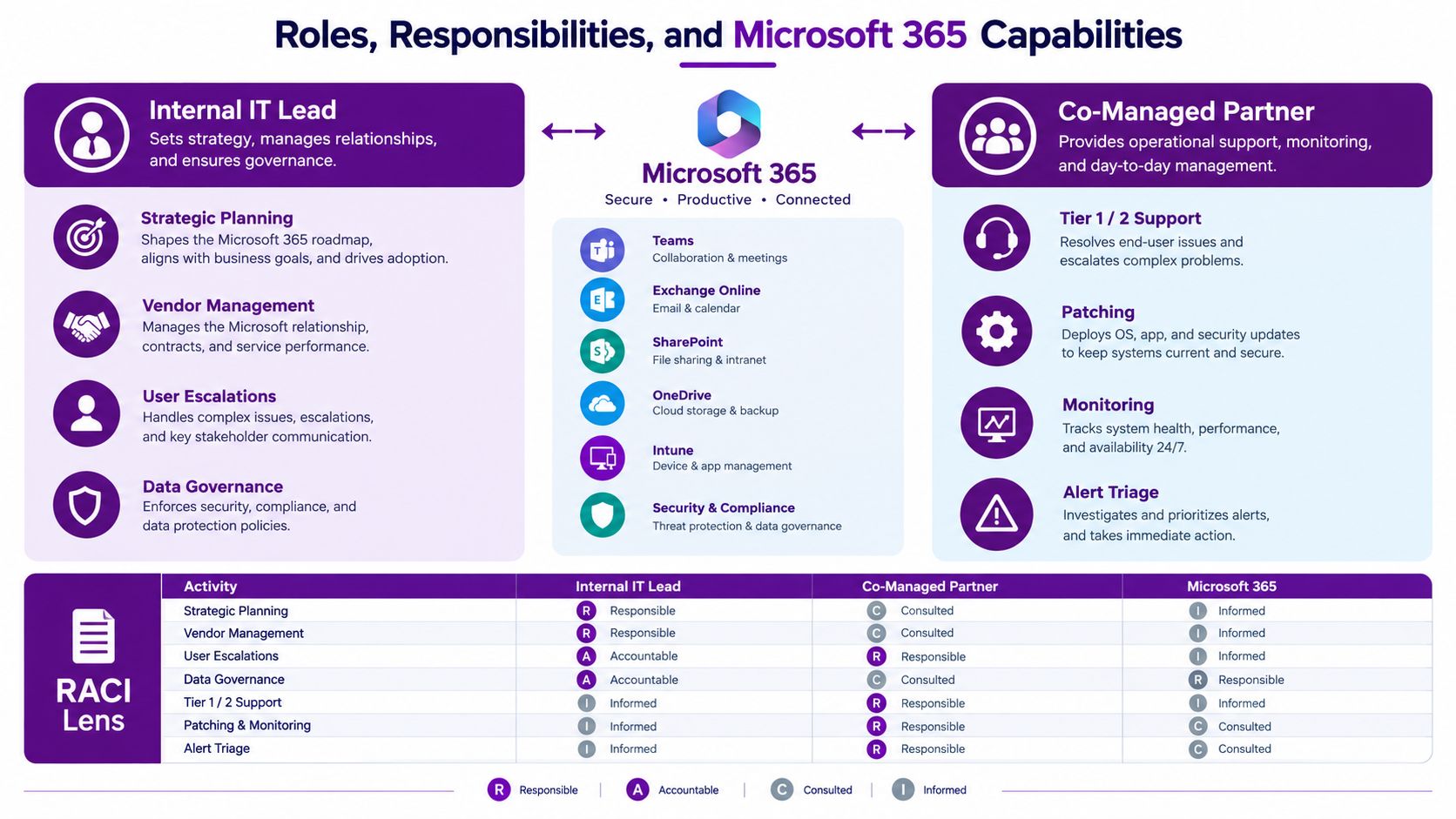
A practical Microsoft 365 split
| Workstream | Internal IT lead | Co-managed partner |
|---|---|---|
| Strategy | Roadmap, priorities and supplier decisions | Technical options and effort estimates |
| Service desk | High-context escalations and sensitive users | Tier one and tier two requests |
| Endpoint management | Business policy and exception approval | Intune, Autopilot enrolment, compliance and patching |
| Identity | Access policy and governance | Entra ID conditional access changes and operational support |
| Security | Risk acceptance and incident decisions | Defender for Business tuning, alert triage and hardening |
| Collaboration | Data ownership and retention decisions | Exchange Online, Teams, SharePoint and OneDrive administration |
| Projects | Business outcomes and stakeholder management | Specialist design, build, testing and documentation |
For a fuller operational view of Microsoft administration, Microsoft 365 support and managed services guidance can be useful when comparing licence administration, health monitoring, Secure Score, Intune and recurring reviews.
Make project hand-offs explicit
Take Copilot for Microsoft 365 as an example. The internal lead decides which departments should benefit, what data must remain restricted and which business processes matter. The partner assesses SharePoint readiness, reviews permissions, supports prompt governance, prepares the technical configuration and assists with change management.
The same split works for a tenant-to-tenant migration. The internal side confirms business-critical applications, user priorities, retention requirements and acceptable disruption. The partner maps identities, plans mailbox and SharePoint moves, configures migration tooling, tests dependencies and handles technical remediation.
Friction usually appears at the seams:
- Approval: Who can authorise a Conditional Access exception?
- Escalation: Which alerts trigger a phone call rather than a ticket?
- Change ownership: Who approves a patch that could affect a production application?
- Documentation: Who records the final configuration and reviews it?
- User communication: Who explains a new Teams policy to staff?
Write those answers before the first live change. Microsoft 365 gives both teams significant administrative power, so unclear authority creates operational risk faster than a lack of technical ability.
UK Pricing Models and the Cost Compared to a Second IT Hire
UK MSPs commonly shape co-managed pricing in four ways. Per-user pricing suits service desk and Microsoft 365 administration. Per-device pricing works better for endpoint monitoring, patching and security controls. Block hours provide flexibility for ad hoc support, but unused capacity and emergency rates need careful definition. A co-managed retainer with shared break/fix combines a recurring operational scope with separately priced projects or exceptional work.
The package may include helpdesk, patching, Microsoft 365 administration and backup monitoring. Advanced security, project delivery, out-of-hours response and major remediation often sit outside the base fee. Get those boundaries in writing.
The market needs better buyer maths. UK guidance often cites broad co-managed ranges, but the right comparison is not a headline rate. It's the cost of a defined outcome, including cover, tools, specialist access and management time.
A 50-user comparison
For the following model, the internal hire figure is a planning assumption, not a verified market statistic. A competent second IT hire is budgeted at £42,000 to £55,000 fully loaded, before additional tools and training. The co-managed package is modelled at £45 to £90 per user per month, a planning range that must be validated against the actual scope.
| Cost line | Second IT hire, in-house | Co-managed IT, external partner |
|---|---|---|
| Core monthly cost | £3,500 to £4,583 | £2,250 to £4,500 |
| Tools and training | Additional, depending on the role | Often included or specified in the service scope |
| Out-of-hours cover | Usually requires separate arrangements | Can be contracted as part of the service |
| Specialist Azure, security or Power Platform work | Additional recruitment or consultancy | Available through agreed project capacity |
| Management requirement | Internal line management and development | Supplier governance and service reviews |
| Indicative monthly difference | Co-managed model can be £0 to £2,333 lower before extras | Depends on scope, exclusions and actual usage |
At 50 users, the modelled co-managed monthly cost is calculated as 50 users multiplied by the stated per-user range. The comparison indicates a potential saving of up to £2,333 per month, or up to £27,996 annually, before tools, training, project charges and other assumptions are considered. Those figures are calculations from the planning inputs above, not a quoted saving or guaranteed outcome.
For a more detailed look at service components and commercial questions, review managed IT support pricing. The model becomes less convincing below 30 users, or when there is no clear internal owner to make decisions, approve changes and provide business context.
Don't compare a partner's fee with salary alone. Compare the complete coverage you actually need.
Co-managed IT beats a second hire when the business needs specialist cover, monitoring and resilience rather than another person working the same weekday queue. It may not win when the organisation needs a permanent internal engineering team or has no one available to manage the relationship.
Implementation Roadmap and Realistic Timeline
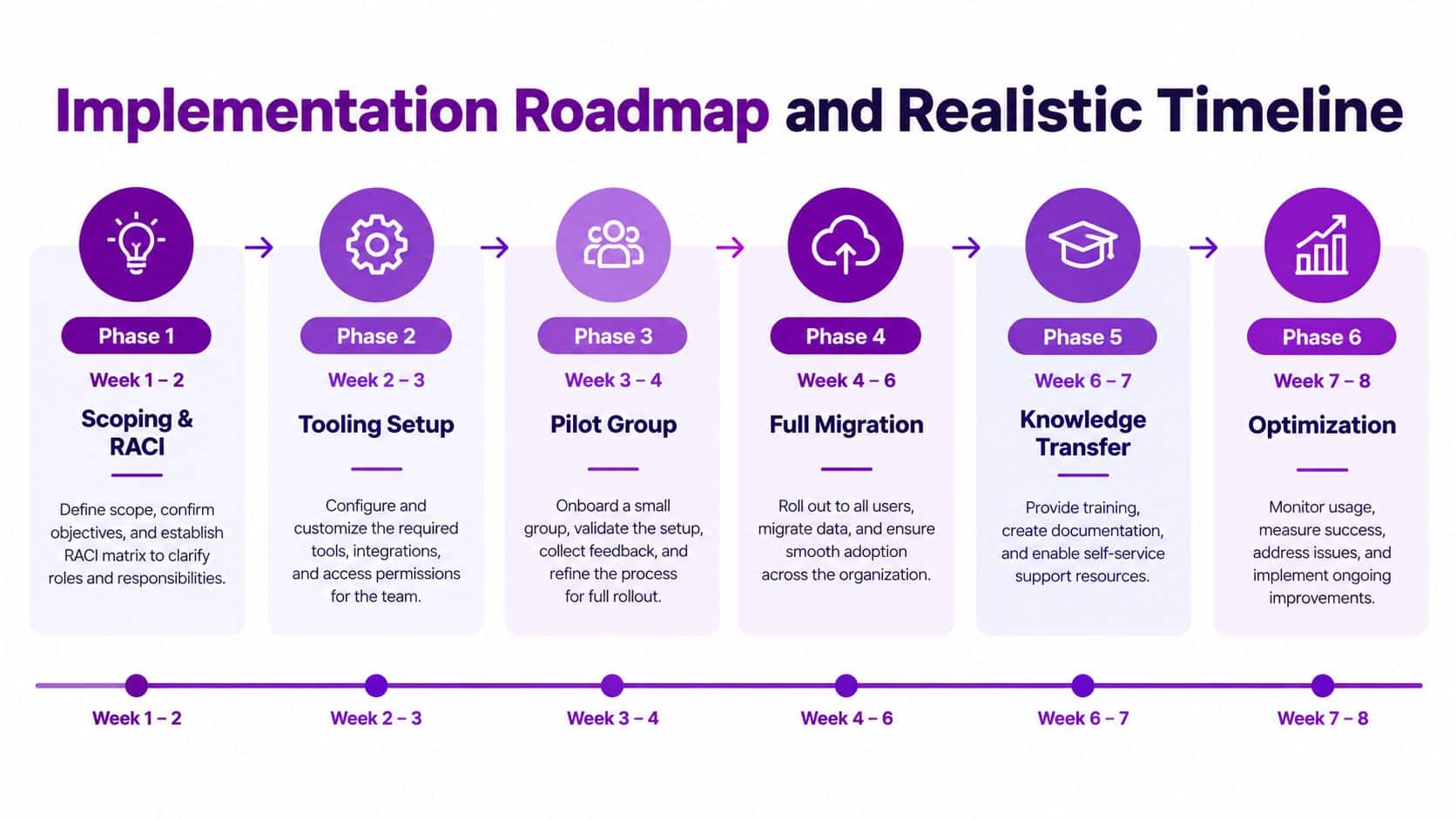
A co-managed engagement should be introduced as an operating change, not a rushed supplier switch. The following rollout gives an internal IT lead a workable sequence, with enough time to find missing documentation and test the hand-offs.
Six phases for a controlled transition
-
Weeks 1 to 2, scoping and RACI: Hold a workshop covering users, sites, devices, applications, security duties, suppliers and escalation paths. Produce the first responsibility matrix and identify every task without a current owner.
-
Weeks 2 to 3, tooling and tenant review: Audit monitoring, endpoint management, backup, Microsoft 365, privileged access and contracts. Confirm what the partner will use, what remains owned by the business and how evidence will be reported.
-
Weeks 3 to 5, pilot: Start with one site or department. Run monitoring in parallel, test ticket routing and measure whether alerts reach the right people. Don't move the full environment until the internal lead has seen the workflow operate.
-
Weeks 5 to 7, knowledge transfer: Share passwords through an approved process, asset records, architecture notes, vendor contacts, application dependencies and escalation rules. Ask the partner to repeat the environment back to the internal lead, because misunderstanding discovered early is cheap to fix.
-
Weeks 7 to 9, operational handover: Transfer agreed service desk queues, patching, alert triage and backup monitoring. Keep the internal lead involved in exceptions and sensitive incidents rather than disappearing from the process.
-
Weeks 9 to 12, steady state: Baseline service levels, review ticket categories, confirm reporting and set the quarterly steering cadence. Adjust the RACI where the pilot exposed duplicated work or an unowned task.
Prevent avoidable delays
Incomplete asset lists, undocumented shadow IT and slow administrator credential handover regularly extend transition work. Ask the internal team to prepare a minimum inventory before the workshop, including line-of-business systems and supplier-managed services. Use named administrator accounts, retain business control of the Microsoft 365 tenant and document every exception.
Go live means more than installing an agent. It means the partner can identify covered assets, receive and classify alerts, follow the escalation route, access the approved systems, document actions and report against agreed responsibilities.
Risks, Security Baseline, and Common Mistakes to Avoid
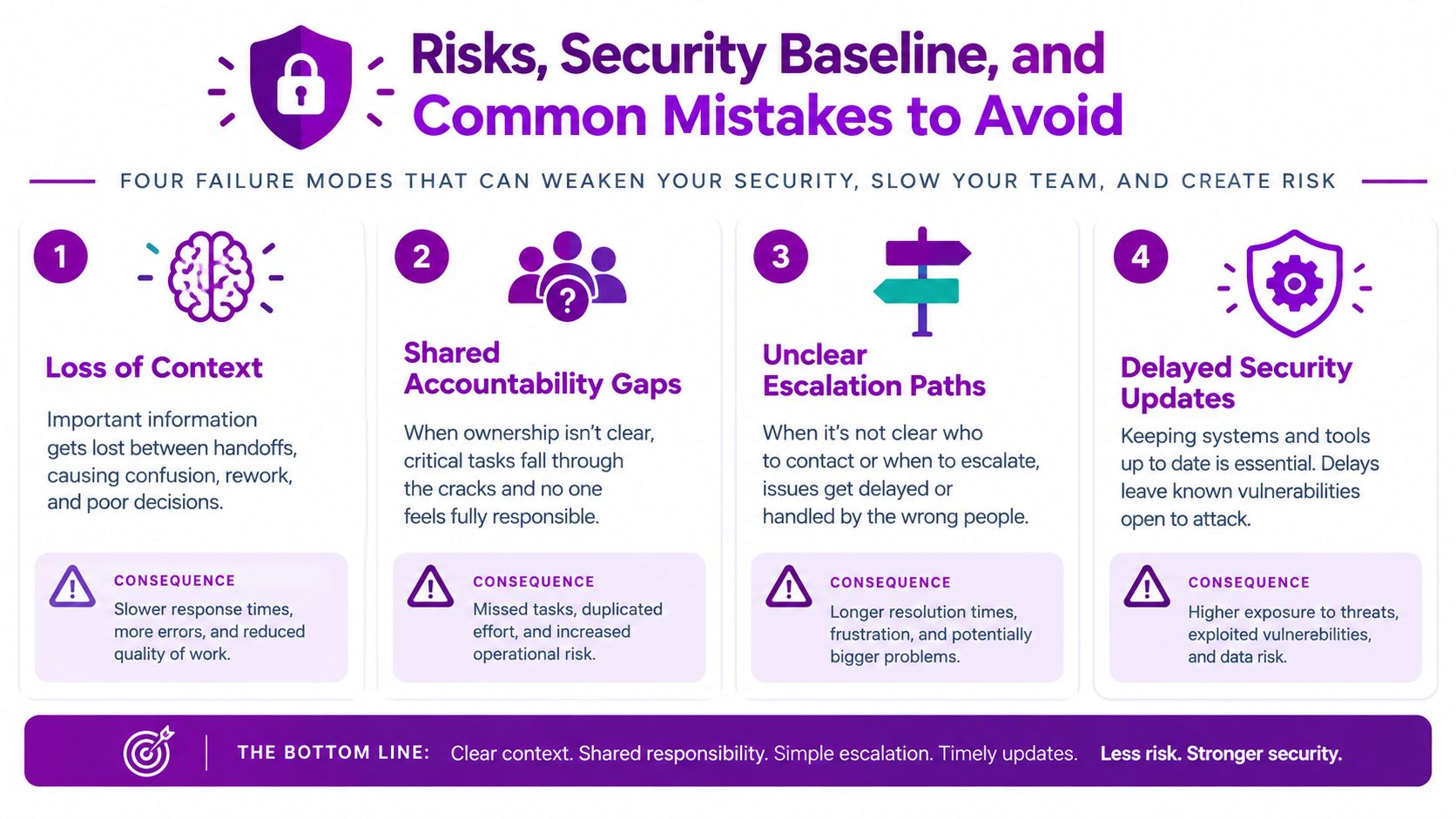
Co-managed IT isn't risk-free. It moves risk to the boundaries between teams, where assumptions can survive until an incident exposes them.
The first failure mode is loss of context. A partner that sees only ticket data may miss a production dependency or an informal process that matters to users. The mitigation is a named internal owner, a shared configuration and asset record, and regular knowledge-transfer sessions.
The second is a shared accountability gap. Both sides may assume the other is patching servers, checking backups or responding to alerts. Give every task one accountable owner, a frequency and an escalation route. A monthly report should show what happened, what failed and who acted.
Treat security as a baseline, not an optional add-on
The National Cyber Security Centre's guidance for small and medium-sized organisations describes Cyber Essentials as a government-backed scheme that helps organisations of any size protect against common cyber attacks. The NCSC also supports a self-led route or a supported route through a licensed Certification Body, while Cyber Advisors can provide practical help with the five controls. Certification starts at £320 plus VAT, with the price set by organisation size, according to the Cyber Essentials overview.
Use that baseline to structure the co-managed scope. Conditional Access, Intune policies, Defender tuning, patching and evidence collection should have joint review points. Smaller firms also benefit from separating website exposure from internal IT controls, and this guide to affordable web security for startups offers useful context for protecting public-facing services.
The remaining traps are commercial and procedural:
- Contract traps: Require clear exit clauses, data ownership and documentation rights.
- Unclear escalation: Name the account manager, technical escalation and emergency route.
- Security drift: Review Conditional Access and Intune policy ownership at quarterly steering meetings.
- Weak supplier evidence: Reject boilerplate SLAs that don't identify response, resolution and reporting responsibilities.
Red flags include no UK-based out-of-hours cover, no credible Microsoft Solutions Partner capability, refusal to sign an exit plan and an SLA that doesn't say who acts on a critical alert.
Vendor Selection Checklist and Next Steps for East Midlands Businesses
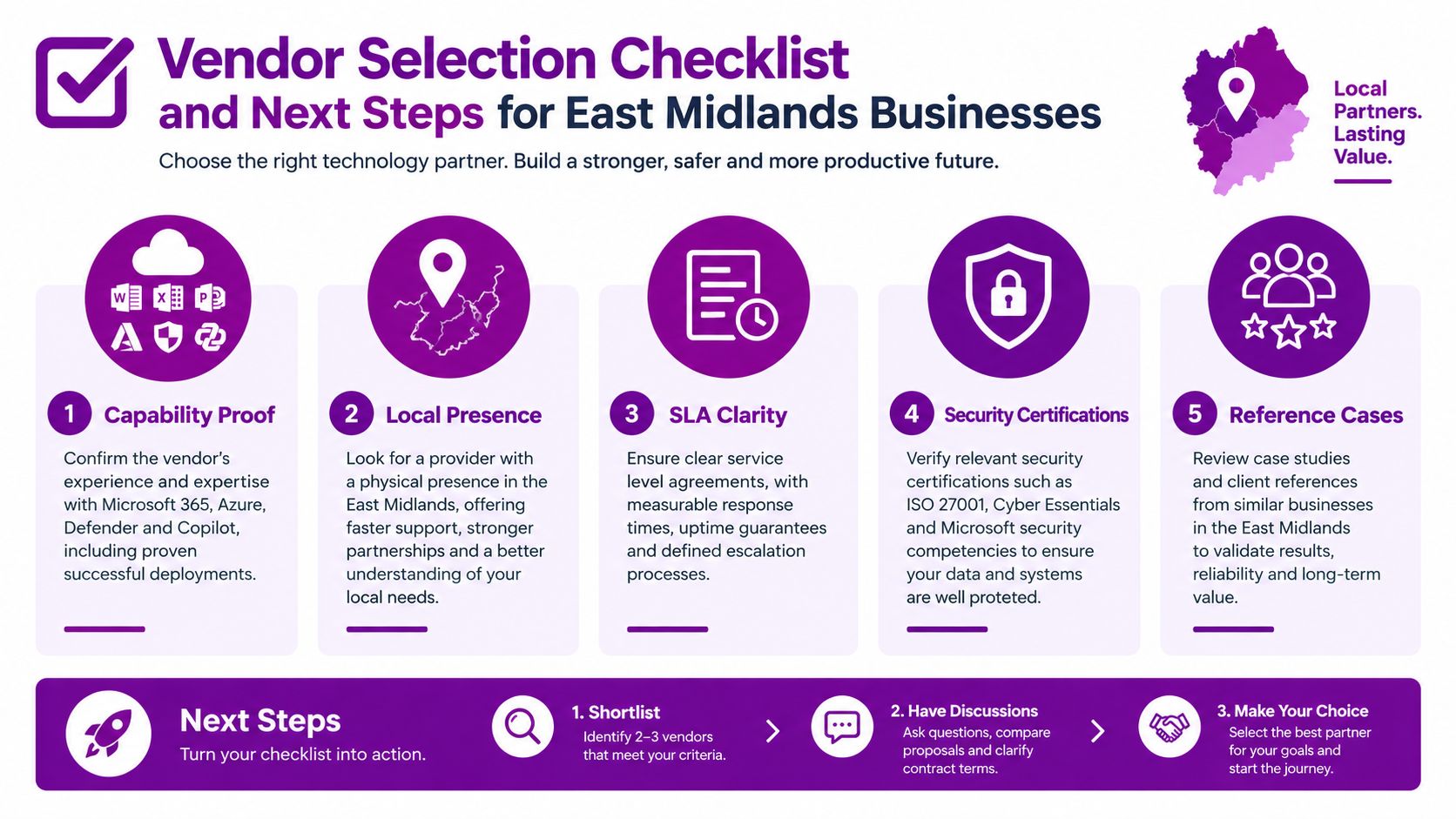
Shortlist partners against four tests, not sales presentation quality.
- Capability proof: Ask for evidence of Microsoft 365, Azure, Defender, Copilot and Power Platform delivery.
- Operational fit: Confirm local response options, a named account manager and UK-based security operations coverage.
- Commercial clarity: Require per-user and per-device pricing, explicit project fees and a workable exit clause.
- Security posture: Check Cyber Essentials Plus alignment, ISO 27001 capability and FCA-ready reporting where relevant.
- Local understanding: Look for experience supporting organisations across Lincoln, Nottingham, Leicester, Scunthorpe, Grimsby and Newark, with references that match your environment.
Ask every shortlisted provider three questions:
- Can you show me a sample RACI for a Microsoft 365 estate like ours?
- Can you provide a live monthly ticket report from a comparable client?
- Will you give us a fixed-price statement of work for a defined Microsoft 365 project?
Those questions expose vague scope quickly. A provider should be able to explain who owns the tenant, how escalation works, what reporting looks like and what happens when the contract ends.
Managed IT services for East Midlands businesses can be a useful starting point when assessing a partner's service coverage and Microsoft-focused capability. F1Group supports managed IT, Microsoft 365, Azure, Dynamics 365, Copilot, Power Platform and cybersecurity requirements for organisations that need either external delivery or an extension to an existing IT team.
F1Group can map your current responsibilities, identify the operational gaps and design co-managed IT services around the systems your team already owns. Book a 30-minute scoping conversation by calling 0845 855 0000 today, or send us a message and visit F1Group to discuss a practical next step.