
Only 31% of UK small businesses in education, financial, and IT sectors had CRM software, while 69% had no CRM system, according to a UK SME survey published by Capterra. That figure reframes Dynamics 365 Sales Insights completely. For many firms the question isn't whether predictive scoring sounds impressive, it's whether the underlying sales records exist in a form any insight tool can use.
That's the test applied throughout this guide. Every capability is paired with the licence it needs and the data it depends on, so you can judge readiness before you spend anything.
What Dynamics 365 Sales Insights Adds to Your Sales Process
Dynamics 365 Sales Insights is an intelligence layer on top of Dynamics 365 Sales. It doesn't replace your CRM. It reads the activity, relationship and opportunity data already held there and turns it into guidance, such as which leads deserve attention first, who already knows a buyer, and what a seller should do next.
The product isn't new to the UK. Microsoft's announcement of the European, Middle Eastern and African rollout confirms Sales Insights reached the UK on 4 April 2019, after beginning as AI for Sales in November 2018 in North America only. Relationship analytics and seller experience features formed part of that launch, while functions such as "Who knows whom" and relationship analytics using Exchange were subject to staged regional availability.
That staged history still matters because availability has never been uniform. Licence, tenant and region can each change what you get.
Sales Insights capabilities, the question each answers and the licence needed
| Capability | Sales question it answers | Licence needed |
|---|---|---|
| Predictive lead scoring | Which leads are most likely to convert? | Sales Premium, or Enterprise with monthly capacity limit |
| Relationship analytics (Who knows whom) | Who on our team already knows this buyer? | Confirm for your licence and tenant |
| Sales accelerator | What should each seller do next today? | Enterprise (premium capability, limited monthly capacity) |
| Conversation intelligence | What was said on calls and meetings? | Enterprise (premium capability, limited monthly capacity) |
| Email engagement tracking | Are prospects opening and replying to outreach? | Enterprise or Premium |
| Auto-capture | Which emails and meetings reach the CRM without manual entry? | Enterprise or Premium |
| Forecasting | Will this quarter close on target? | Confirm current Microsoft licence terms |
Read the table from right to left, not left to right. Most buying mistakes start with a capability a team likes, then discover the licence doesn't include it or includes it only within a monthly capacity limit that a busy team exhausts quickly.
An insight is only as good as the records behind it. Buy the data discipline first and the feature second.
There's also a process point hiding in the first row. Scoring tells you where to look, but it doesn't do the outreach. Teams that pair scoring with disciplined follow up, including structured B2B outreach for sales enablement firms, get more from the ranking than teams that treat a high score as a result in itself.
For a mid-sized firm, the practical conclusion is narrow. Start with one question from the table, confirm the licence covers it without a capacity ceiling you'll hit, and check the records feeding it. Everything else is expansion.
Licence Tiers and What Each Costs in Pounds
The rule that gates everything is simple. Standard assistant, auto-capture and email engagement features are included with Dynamics 365 Sales Enterprise and Sales Premium, but are not available with the Sales Professional app, and full premium Sales Insights functionality requires a Sales Premium, Sales Insights or qualifying Sales Enterprise licence, according to Microsoft's Sales Insights admin guide. A team on Professional therefore gets none of the Sales Insights experience, however it's configured.
UK prices in pounds
Microsoft's UK Dynamics 365 Sales pricing page lists three editions, each per user per month, paid yearly and excluding VAT. Sales Professional costs £50.00 and provides core sales-force automation, Microsoft 365 integration, reporting and dashboards. Sales Enterprise costs £80.70 and adds contextual insights, AI capabilities and advanced customisation. Sales Premium costs £115.30 and includes Sales Insights, AI-powered recommended actions and AI-powered data enrichment.
For ten users, that arithmetic becomes concrete very quickly:
- Professional: £6,000 a year excluding VAT, or £7,200 with VAT at 20 per cent
- Enterprise: £9,684 a year excluding VAT, or £11,620.80 including VAT
- Premium: £13,836 a year excluding VAT, or £16,603.20 including VAT
The gap between Enterprise and Premium for that same ten-person team is £4,152 a year before VAT. You aren't paying that for a nicer dashboard. You're paying to remove the monthly capacity limits on premium capabilities and to gain the full Sales Insights set.
Where Enterprise catches people out
Enterprise looks like the economical route into Sales Insights, and for a pilot it often is. Enterprise customers can configure sales accelerator, conversation intelligence and predictive scoring, but each comes with limited monthly capacity. A small pilot group may never notice. A full team logging calls daily can reach the ceiling and then lose the very signals managers have started relying on.
That creates a specific buying sequence. Pilot on Enterprise if you already hold those licences, measure actual monthly usage, then decide whether Premium is justified by volume rather than by a feature checklist.
Mixed licensing by role is the other lever. Sellers working sequences every day need Enterprise or Premium. A manager who only reviews dashboards, or an administrator maintaining records, may not need the same tier. Audit roles before you buy, because assigning Premium to every seat by default is the fastest way to inflate a budget without adding insight.
Prices change, and Microsoft revises edition contents. Confirm current UK rates and capacity limits in writing before you commit a budget to a board paper.
How Lead Scoring, Relationship Analytics and Sales Accelerator Work
The three mechanisms below look similar in a demo because they all produce a recommendation. They work from different signals, fail in different ways, and need different data to stay honest.
The diagram summarises the three panels before the detail.

Predictive lead scoring
Predictive lead scoring ranks open leads by likelihood to convert. It learns from your past wins and losses, comparing characteristics of leads that became opportunities with those that went nowhere, then applies that pattern to what's currently open.
The limit is historical volume. A team with only a few dozen closed deals doesn't have enough outcomes for the model to separate signal from coincidence, so treat the output as a ranking for attention, not a probability you can forecast revenue against. Scoring also assumes your qualification standard is consistent. If sellers qualify to different thresholds, you should first build a lead qualification process that defines what a qualified lead means, otherwise the model learns five different standards at once.
Say a seller holds forty open leads. Scoring puts six at the top because they resemble previous conversions. That's useful for ordering a morning. It isn't evidence those six will close.
Relationship analytics
Relationship analytics draws on email and calendar signals to show who in your organisation already has contact with a prospect, how recent and frequent that contact is, and where a relationship is cooling. Who knows whom surfaces the colleague best placed to make a warm introduction, which usually outperforms a cold approach from an unknown seller.
Its weakness is coverage. If senior staff conduct relationships from personal inboxes, or meetings happen outside Outlook, the map shows gaps that look like absent relationships. Read a blank result as "no captured signal", not as "nobody knows them".
Sales accelerator
Microsoft's sales accelerator configuration guidance describes a tool that gathers information from multiple sources, ranks pipeline activity and presents automated recommendations throughout a sales sequence, working through sequences, segments and a prioritised daily work list. The work list can include activities linked to contact, opportunity, lead and account records, and managers define the activity steps in the sequence designer.
In practice, that seller with forty leads opens one list showing eight tasks for the day, each with the reason it was ranked, rather than scanning forty records and guessing. The sequence enforces cadence, so a lead doesn't sit untouched because a seller forgot it.
This short video shows the work list behaviour in context.
Two constraints change how you plan. The full capability requires configuration, so it isn't a switch you flip on a Friday afternoon. It's also not supported on mobile devices such as tablets and smartphones, so field sellers who work mainly from a phone won't get the prioritised list where they work.
All three mechanisms share one failure mode. If sellers don't log outcomes, scores drift, relationship signals age, and the work list recommends actions against deals that closed last week. The tool keeps working. It just stops describing reality.
Data Readiness Checks Before You Switch Anything On
Switching on AI features isn't the first step, and treating it as one is the most common reason these projects disappoint. A 2025 analysis of a CRM data-management study reported that 76% of respondents admitted their data was flawed, 45% believed their CRM data was not ready for AI, and employees spent approximately 13 hours per week searching for information needed to respond to requests.
Read those three figures together and the priority flips. The problem isn't a missing algorithm. It's sellers losing time hunting for information that should already be in one place, in records they don't fully trust.
The order of work
Do these in sequence, because each stage protects the next:
- Define ownership: Name who owns accounts, contacts, leads and opportunities, so nobody assumes someone else maintains a record
- Standardise fields and stages: Agree mandatory fields and one definition per sales stage across the whole team
- Set duplicate rules: Configure duplicate detection and merge rules, then validate account and contact relationships
- Enforce opportunity logic: Require realistic close dates and probability values tied to stage, not optimism
- Connect activity sources last: Link Outlook, Teams and calendar only once the record structure can receive that data cleanly
Reversing that order imports years of inconsistent activity into structures that can't organise it. Predictive scoring and next action advice built on incomplete records produce poorly calibrated output, and Copilot style summaries repeat the underlying errors faster and with more confidence.
Building that discipline is a governance task as much as a CRM task, which is why structured data governance support belongs in the plan before configuration starts.
Data readiness measures to capture before and after go-live
| Measure | How to capture it | Why it matters |
|---|---|---|
| Duplicate account and contact rate | Duplicate detection report run on account and contact tables | Duplicates split activity history and distort relationship analytics |
| Inactive or stale records | Leads and opportunities with no logged activity in the last 30 days, from a Power BI or Dataverse report | Stale records inflate pipeline and lower scoring accuracy |
| Missing industry and territory fields | Completeness count on mandatory fields in a Power BI report | Segments and routing rules fail without them |
| Opportunity age distribution | Days open by stage, reviewed monthly | Ageing deals signal where forecasts drift |
| Stage-to-stage conversion | Count of opportunities moving between stages each quarter | Shows whether stage definitions are used consistently |
| Opportunities without a next step | Count of open opportunities with an empty next-step field | Feeds sales accelerator recommendations with usable actions |
| CRM search time per seller | Short survey of time spent finding customer information each week | Gives the baseline the pilot must beat |
Baseline rule: Capture every measure in this table before go-live. Without a starting number, a pilot can only prove that people logged in.
Repeat the same measures after the pilot. If search time falls and opportunities without a next step shrink, decisions improved. If only usage rose, you've bought activity, not insight.
Integration Points with Microsoft 365, Azure and Power Platform
Sales Insights doesn't generate its own raw material. It depends on connections across your Microsoft estate, and each connection carries a permissions decision alongside the convenience. Work through them as a checklist before a pilot, not during one.
Outlook and Exchange supply the email and calendar data behind engagement tracking, auto-capture and relationship analytics. This is the highest value connection and the most sensitive, because it reads communication patterns across staff. Confirm which Exchange based analytics are available in your tenant, agree what's in scope, and tell staff plainly what's captured. Surprises here damage adoption more than any technical fault.
Teams contributes meeting and chat signals that help show where a deal conversation happened. Confirm which of those signals your licence captures before you promise managers a complete activity picture, because partial capture presented as complete coverage produces confident but wrong conclusions.
Dataverse holds the data behind Dynamics 365 and feeds Power BI dashboards covering pipeline health, forecast variance and data quality. Set ownership and duplicate rules before you connect any further source into it, otherwise every new feed multiplies existing record problems and your dashboards report the mess with great precision.
Power Automate handles the flows around opportunity stage changes, approvals and reminders. Each flow needs a named owner and a test run. Unowned flows are the ones that stop working without notice, or worse, keep sending reminders for a process you changed months ago. Planned properly, this layer is where Dynamics 365 integration work earns its place, because the connections have to survive staff changes and process revisions.
Microsoft Entra ID provides single sign-on and role-based access. Map your sales roles to security roles before the pilot starts, so sellers see their own pipeline, managers see their team's, and nobody gains broad access because it was quicker during setup.
Azure underpins the wider tenant, region and data handling settings. Confirm data location and retention expectations early, particularly if you're a charity or regulated firm with specific handling obligations.
Every integration saves manual entry and adds a governance owner. If you can't name the owner, don't connect it yet.
Copilot summaries draw on these same CRM records, so their quality is capped by record quality. Integration increases the volume of data available to summarise. It doesn't improve the truth of what's being summarised.
Phased Rollout Steps for a Mid-Sized Team
A phased rollout works because each step earns the next one. Skip ahead and you're testing five variables at once, which means you'll never know what caused the result.
The sequence below is summarised in the rollout graphic.
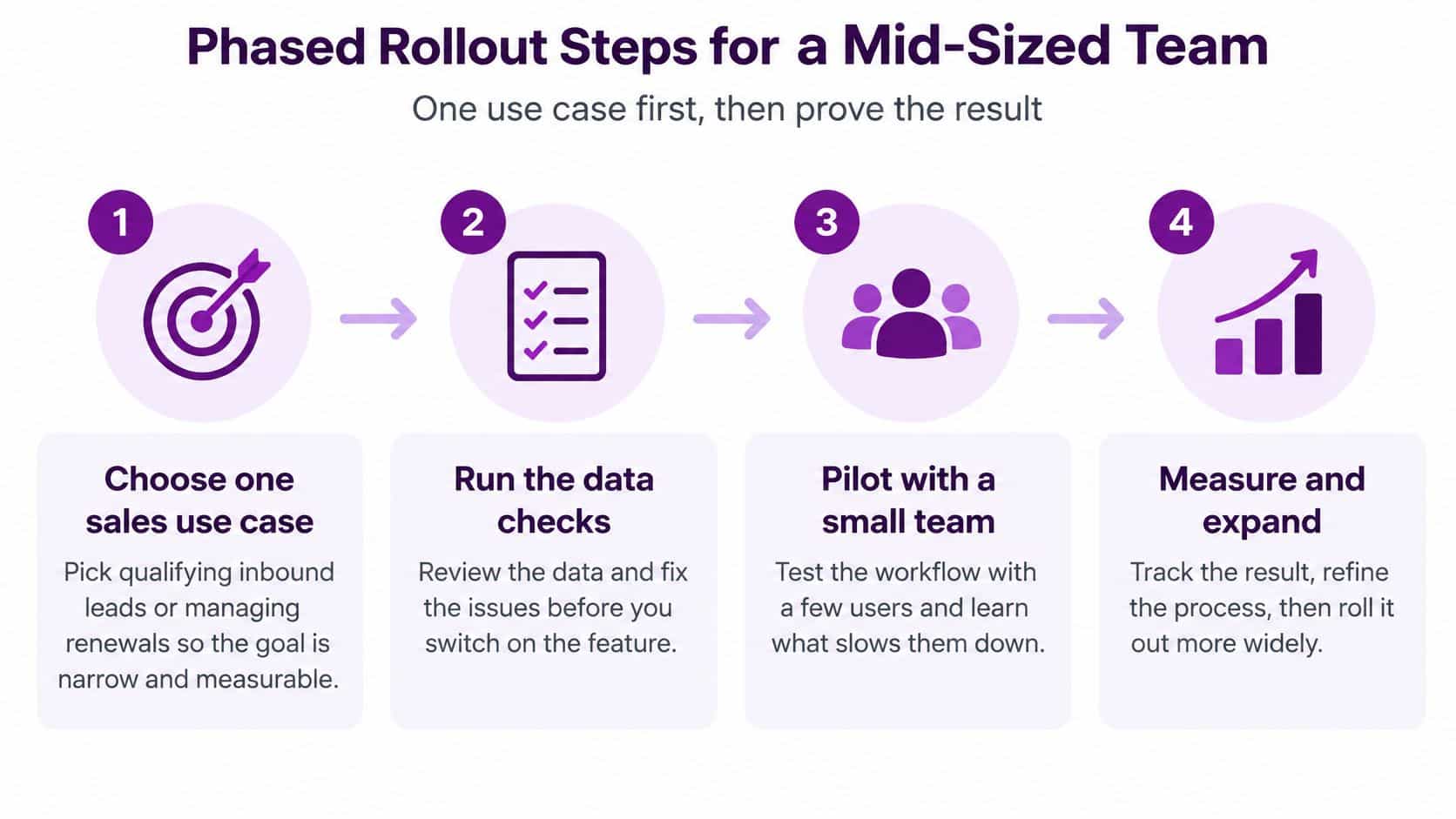
- Choose one sales use case. Pick qualifying inbound leads or managing renewals, not both. A narrow goal produces a measurable result, while a broad ambition to "improve sales" can't be proved or disproved.
- Run the data checks and fix the top three issues. Sellers dismiss insights built on records they know are wrong, and they'll be right to. Fix duplicates, missing fields and stale opportunities for the chosen use case first.
- Assign licences by role. Place sellers who need sales accelerator on Enterprise or Premium and reserve full Sales Insights for roles that need it. This step controls cost before it controls anything else, and it's best handled as part of a deliberate CRM implementation plan rather than as a purchasing afterthought.
- Configure the connections. Set up Outlook, Teams, Entra ID role mapping and any Power Automate flows, each with a named owner. Test with real records from the pilot group, not dummy data.
- Build the first sequence with a manager. Keep it to three or four steps. A long sequence designed in theory gets abandoned in practice, whereas a short one that sellers follow can be extended once the habit forms.
- Pilot with eight to twelve sellers for eight to twelve weeks. Choose a representative group, not just enthusiasts. Enthusiasts make anything look successful and tell you nothing about the wider team.
- Train in short sessions and check adoption weekly. Monthly reviews discover problems four weeks after sellers gave up. Weekly checks let you fix a confusing step while the pilot still has goodwill.
- Extend only when the pilot measure improves. Compare against the baseline you captured earlier. If the measure moved, expand. If it didn't, find out why before spending on more licences.
Two edge cases need attention before step one. Firms operating across several regions should check staged feature availability per tenant, because a capability working in the UK may not be present elsewhere. Charities and public sector bodies should review consent aware customer data handling before the pilot begins, since auto-capture and engagement tracking touch personal communication data directly.
Working Out Payback and Your Next Step
Payback for Sales Insights is mostly a time question, so make the assumptions visible and test them rather than quoting a vendor return figure. The table below uses a firm with 25 sellers, a loaded cost of £25 an hour and 46 working weeks. On those assumptions, one hour saved per seller each week is worth £28,750 a year.
Illustrative payback for 25 sellers at different time savings
| Scenario | Sellers | Annual licence (excl. VAT) | Annual value of time saved | Net annual value |
|---|---|---|---|---|
| Enterprise, 1 hour saved a week | 25 | £24,210 | £28,750 | £4,540 |
| Premium, 1 hour saved a week | 25 | £34,590 | £28,750 | £5,840 negative |
| Premium, 2 hours saved a week | 25 | £34,590 | £57,500 | £22,910 |
Break-even per seller works out at roughly 0.84 hours saved a week on Enterprise and about 1.2 hours on Premium. That framing earns its place in a board conversation because it turns an abstract software cost into a question a sales manager can answer: can this return about 50 minutes a week to each seller, and can they spend that time selling? Premium carries the heavier burden of proof. At £34,590 it needs around 1.2 hours a week per seller, which asks more of the pilot than Enterprise's 50 minutes does, so the case for the higher tier has to rest on better data and follow-through, not time alone.
Those time savings are assumptions, not Microsoft benchmarks. Nobody can promise an hour a week; only your pilot measures it.
The number that matters is where the saved time goes. Time counts only if it is redeployed into selling, and the baseline survey of search time and activity capture is what shows whether that happened. A team that saves an hour and fills it with internal meetings has gained nothing commercially.
Note also what the table excludes. Implementation, data cleansing, training and your own staff time all sit on top of licence cost, so treat the net figures as a ceiling for year one rather than a forecast.
Three next steps follow logically:
- Run a readiness review: capture the baseline measures and confirm licence coverage for your chosen use case
- Fix the top three data issues: do this before any premium capability is configured
- Pilot narrowly and measure time: compare real hours against the break-even thresholds above
F1Group provides managed Dynamics 365 support across Lincoln, Nottingham, Leicester and the wider East Midlands, and a readiness review is the most useful first conversation because it tells you whether to buy yet. Send us a message to book one.
If you're weighing up Dynamics 365 Sales Insights and want an honest view on whether your data, licences and sales process are ready for it, talk to F1Group before you commit to Premium seats. We'll assess your current CRM records, map the right licence tier to each role, and set out a phased pilot with measures you can check.