
Monday starts with a routine change. Someone tightens a Conditional Access policy, an admin handset dies, or a sign-in method stops behaving the way it did on Friday. Then the calls begin. No one with the right level of access can get into Microsoft 365. Azure changes are blocked. Mail flow, security settings, or user recovery all depend on admin access that suddenly isn’t there.
That’s the point where many small and mid-sized businesses discover an uncomfortable truth. They assumed there was a fallback, but what they had was a rough idea, an old password in a drawer, or one senior person who “usually knows how to get in”. None of that is a recovery plan. It’s a gamble.
A break glass account is the controlled answer to that problem. In a Microsoft 365 and Azure estate, it gives you a way back into the tenant when normal administration fails. Used properly, it supports continuity. Used badly, it creates one of the most dangerous identities in the whole environment.
Your Last Line of Defence in an IT Emergency
A break glass account matters most on the day you hope never arrives.
A common UK SMB scenario looks like this. Your team has modern security in place, which is good. Admin accounts are protected with MFA, Conditional Access, device requirements, and stricter sign-in controls than standard users. Then a policy change goes wrong, or an identity dependency fails, and every normal admin route is blocked at once. The problem isn’t just inconvenience. It’s loss of control over the systems you rely on.
If your business runs on Microsoft 365, that loss spreads quickly. You may need to unblock users, reverse a policy, investigate suspicious sign-ins, or restore a service setting. Without an emergency route in, the technical problem becomes a business continuity problem.
That’s where a break glass account sits. It is the emergency key for when normal doors won’t open.
Practical rule: If your only recovery plan is “one of the admins will sort it out”, you don’t yet have recovery. You have dependency on luck and availability.
The important point is that this isn’t just a spare login. A genuine break glass arrangement includes controlled storage of credentials, named people who can approve use, logging, alerting, and a clear sequence for what happens before, during, and after access. The account is only one part of the control.
For most organisations, this belongs alongside wider resilience planning such as an IT disaster recovery plan. If you already document outages, recovery priorities, and operational dependencies, emergency admin access should sit inside that same discipline.
The businesses that handle this well don’t treat break glass access as an afterthought. They treat it as their final administrative safety net, and they make sure it works before they need it.
What Is a Break Glass Account?
A break glass account is a highly privileged account reserved for genuine emergencies, when ordinary administrative access isn’t available.
The easiest way to understand it is the physical analogy. Think of a key in a sealed glass box on the wall. You don’t use it to open the office every morning. You use it when the normal route has failed and you need immediate access to prevent a larger problem.
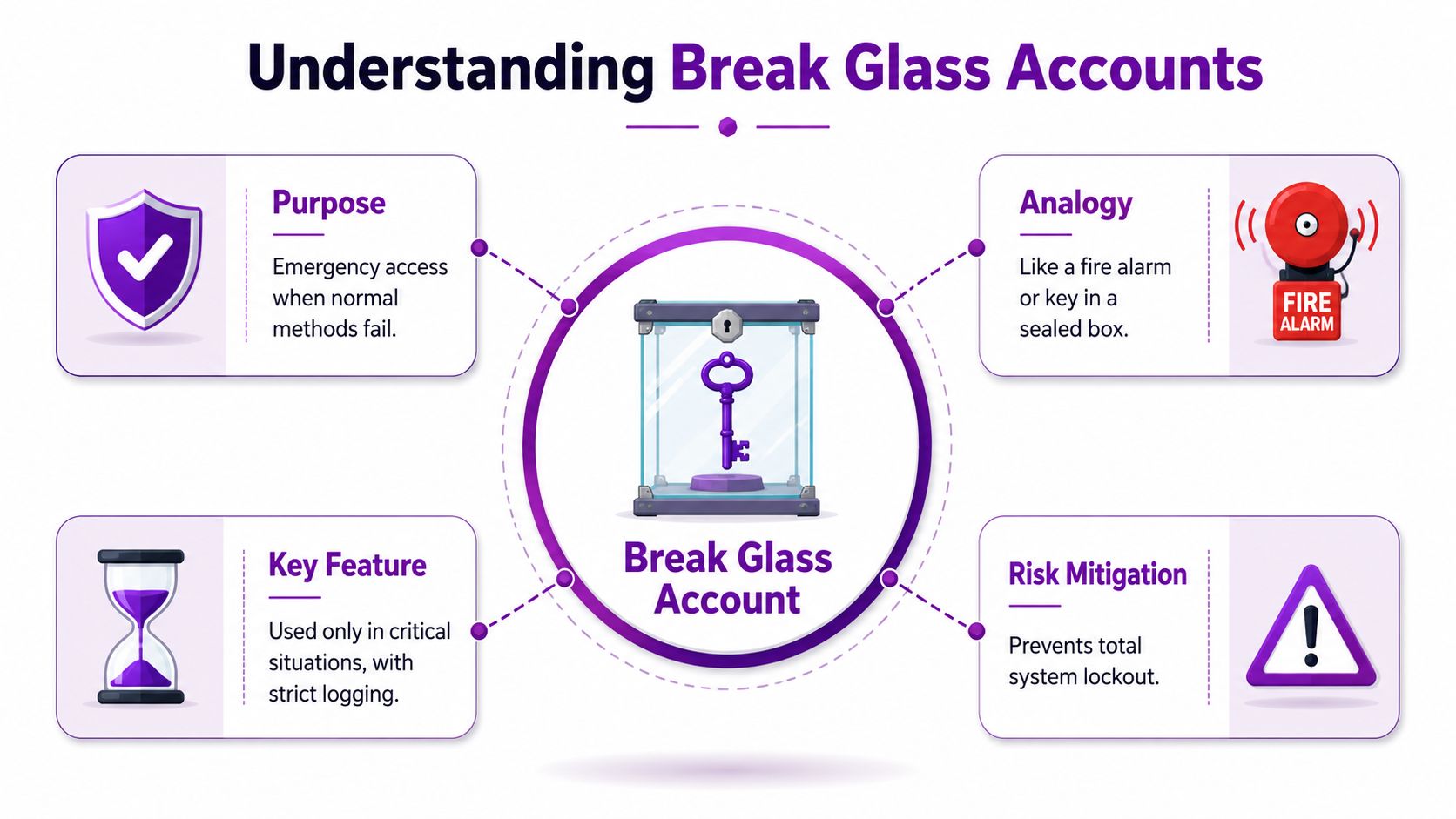
In cloud terms, that means an account with enough privilege to recover control of Microsoft 365 or Azure when standard admin accounts are locked out, unavailable, or unsafe to use. It should be obvious in your records what the account is for, who can authorise its use, and how its activity will be checked afterwards.
How it differs from a normal admin account
A normal admin account supports day-to-day administration. It should be tightly controlled and used only when required for operational work. A break glass account serves a different purpose entirely.
Key differences usually include:
- Emergency-only use. It isn’t there for convenience, speed, or “just this once” administration.
- Separate handling. Its credentials are stored and protected differently from routine support accounts.
- Policy exceptions where needed. If the point is recovery during identity failure, it can’t depend on the same controls that may be causing the lockout.
- Immediate scrutiny. Any sign-in should trigger attention because use should be rare and explainable.
A lot of organisations get this wrong by creating a powerful account and then discreetly using it when someone wants to bypass friction. Once that happens, it stops being emergency access and starts becoming a hidden operational shortcut.
What a break glass account is not
It isn’t:
- A shared admin login for busy days
- A workaround for poor privilege design
- A substitute for proper identity governance
- A forgotten password envelope that nobody tests
That distinction matters because emergency access only works if everyone treats it as exceptional.
A short explainer is useful if you want to see the idea in a Microsoft context:
The trade-off you have to accept
A break glass account is deliberately powerful. That is why it can save you during an outage, and also why it can become a serious risk if you manage it casually.
The security challenge isn’t deciding whether emergency access is useful. It’s making sure the control is exceptional, visible, and governed every time it exists.
That’s the balance. You create a route around failure, but you surround that route with process so it doesn’t become an unguarded back door.
Essential Governance and Risk Management
The hard truth is simple. An unmanaged break glass account is a liability.
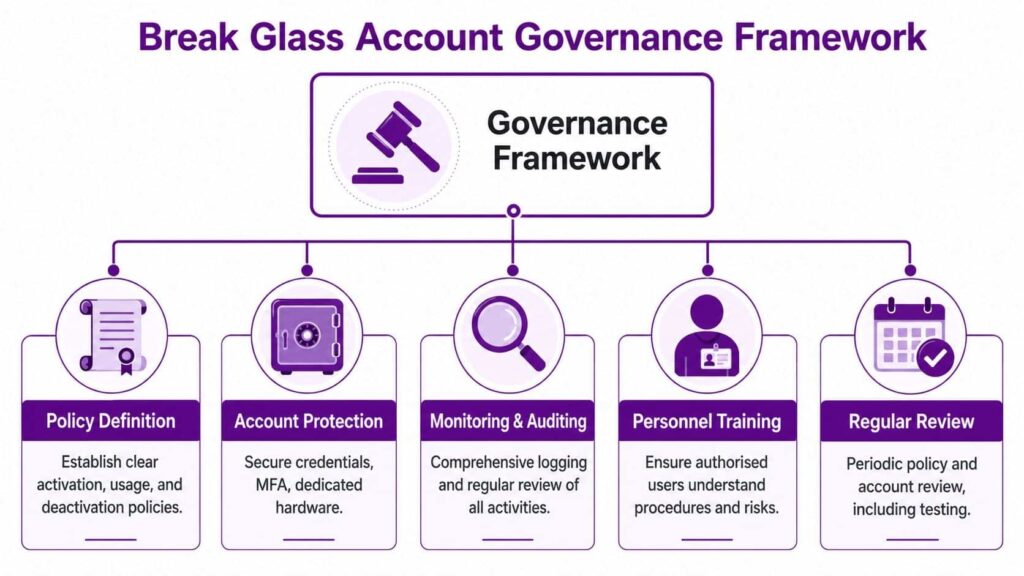
If a business creates an emergency admin account but doesn’t define ownership, approval, storage, monitoring, and post-use review, it has not improved resilience. It has created a highly privileged exception that people will eventually misunderstand, misuse, or forget.
Ownership must be explicit
Someone must own the control. Not “IT” in the abstract. Not “the service desk”. A named role, and ideally a named individual, must be accountable for making sure the account exists, stays protected, is reviewed, and is reset after use.
For a smaller business, that may be the IT Manager with sign-off from a director. In a larger SMB, ownership often sits with the head of infrastructure or security, while custody of credentials is separated from technical ownership.
Good identity and access management practice demonstrates its value. Emergency access should fit into your wider model for privileged identities rather than living outside it.
Approval has to be workable under pressure
A policy that demands half the board approve emergency use sounds impressive until there is an actual lockout on a Friday afternoon.
Your approval model needs to be proportionate and usable. That usually means deciding in advance:
| Governance area | What should be defined |
|---|---|
| Use criteria | What counts as a genuine break glass event |
| Authorisation | Who can approve access when time matters |
| Escalation | What happens if the approver is unavailable |
| Evidence | What must be recorded during and after use |
If you can’t activate the process quickly, the control fails operationally. If anyone can activate it casually, the control fails from a security perspective.
Documentation is part of the control
The strongest break glass arrangements are boring on paper. That’s a good sign.
You want a straightforward written procedure that covers:
- Activation conditions. State the events that justify use, such as admin lockout or suspected compromise of normal privileged accounts.
- Handling steps. Record where credentials are held, how they are retrieved, and who witnesses access if your process requires it.
- Session expectations. Make clear that users must perform only the recovery tasks needed to restore safe normal administration.
- Closure tasks. Reset credentials, review logs, confirm the incident record, and return the account to standby.
Governance check: If two people in your organisation would describe the break glass process differently, the process is not mature enough.
Review is non-negotiable
Emergency access often fails for ordinary reasons. Passwords are changed and not updated in storage. People leave. Alert rules break. Ownership drifts.
That is why governance has to include routine review, not just setup. The primary value of review is catching administrative decay before an emergency exposes it.
A break glass account should feel slightly inconvenient. That friction is healthy. It reminds everyone that the account exists for resilience, not convenience.
Operational Best Practices for Secure Management
Once governance is in place, day-to-day handling becomes much more practical. At this point, many SMBs either make the control dependable or accidentally undermine it.

Make the accounts unmistakable
The account name should clearly identify its purpose. If it appears in logs, alert emails, or sign-in records, nobody should need to guess what they’re looking at.
Avoid bland names that blend into service accounts or ordinary admin identities. A clear naming standard reduces confusion during an incident and makes later review easier.
A practical naming rule is to include a recognisable emergency identifier and platform reference, then record the convention in your privileged account standard.
Store credentials away from the systems they may need to rescue
Many designs collapse in this scenario. If the credentials for the break glass account are stored in the same environment that has just locked everyone out, they’re not emergency credentials. They’re inaccessible credentials.
You need separation.
That might mean:
- Physical storage in a secure location with controlled access
- Dedicated password vault storage with an access process separate from the affected tenant
- Split knowledge or dual custody where appropriate, so one person can’t access the account without scrutiny
The right model depends on your size and maturity, but independence matters more than elegance.
Choose resilient authentication
Strong authentication still matters, but it has to survive the type of failure you’re planning for.
If your regular administrators depend on one sign-in path, one device, or one app, don’t make the emergency route dependent on exactly the same chain. Otherwise a failure in that chain affects both normal access and emergency recovery.
That doesn’t mean making the account loose or weak. It means designing authentication around availability as well as security.
The test is simple. If the same outage breaks both your normal admin login and your break glass login, the emergency design hasn’t solved the real problem.
Build alerting around any activity
A break glass account should be one of the noisiest identities in your environment from a monitoring point of view. Any sign-in attempt, successful or not, should trigger review.
Operationally, that means deciding who gets notified, how quickly, and what they must check. Even in smaller teams, there should be a clear expectation that break glass activity is treated as high priority until explained.
Useful monitoring points include:
- Sign-in activity
- Privilege use
- Changes made during the session
- Follow-up review of audit records
Rotate and reset after use
Once a break glass account has been used, its credentials and any supporting secrets should be treated as exposed operationally. Even if the use was completely legitimate, the state of standby has been broken.
A sensible post-use process usually includes:
- Confirm what was done and why.
- Review logs and admin actions.
- Reset credentials and re-secure them.
- Update the incident record.
- Confirm the account is back in emergency-only status.
Test the process, not just the password
A login test on its own doesn’t prove much. You need to know whether the whole procedure works when people are under pressure.
That includes retrieval, authorisation, sign-in, alerting, and hand-back. The test should be controlled and documented, but it should still feel like an operational exercise rather than a box-ticking task.
What works in practice is a short, repeatable drill. What does not work is assuming that because the account was created once, it will still save you months later.
Implementing in Microsoft 365 and Azure
For UK organisations using Microsoft 365 and Azure, the best practical reference point is Microsoft’s emergency access guidance for Entra ID. Microsoft recommends keeping at least two emergency access accounts for a tenant and reviewing the emergency-access process at least every 90 days. Microsoft also states these accounts should be used only for true break glass scenarios, with regular drills to confirm the accounts work and that monitoring and alerting trigger correctly if they are later misused, as set out in Microsoft’s Entra ID emergency access guidance.

That guidance is especially relevant for SMBs because it is practical, not theoretical. In real environments, one emergency account can become unavailable due to bad password handling, lost access to a credential, or another failure in the identity path. Two accounts reduce that single-point dependency. The review cadence also gives you a clear governance checkpoint that auditors, managers, and technical staff can all understand.
Build the accounts as true emergency identities
In Microsoft 365 and Azure, emergency access accounts should be created as dedicated cloud-only identities for the tenant. They should not be mixed with personal admin accounts or repurposed from existing support identities.
In practice, that means:
- Separate account creation for emergency use only
- Clear records of ownership, purpose, and storage location
- High privilege only where justified, typically sufficient to recover administrative control
- No day-to-day use for troubleshooting or convenience
The mistake to avoid is turning an emergency account into a “special admin account” that people use when standard controls feel awkward.
Treat Conditional Access carefully
Design judgment is critical. If Conditional Access rules are part of what can lock out normal administrators, emergency accounts can’t be trapped by those same controls.
That does not mean leaving them invisible. It means handling them differently. Many organisations exclude break glass accounts from the restrictive policies most likely to cause an unrecoverable lockout, then compensate with strong monitoring, alerting, and disciplined storage.
This is also where the wider conversation about privileged identity management becomes relevant. Good privileged design reduces the chance that emergency accounts are needed in the first place, but it doesn’t remove the need for a true recovery route.
In Microsoft environments, the strongest break glass design is usually not the one with the most controls attached. It is the one that still works when the usual controls are the source of the problem.
Wire up visibility before the emergency
If someone signs into an emergency account, the right people should know quickly. In a Microsoft stack, that typically means using the tenant’s available audit, alerting, and monitoring capabilities so break glass activity is surfaced immediately and investigated.
For an SMB, the tooling may be simpler than in a large enterprise, but the principle is the same. The event must not disappear into a log nobody checks.
A practical implementation approach looks like this:
| Microsoft area | What to configure |
|---|---|
| Entra ID sign-ins | Make emergency accounts easy to identify in sign-in logs |
| Audit records | Ensure administrative actions can be reviewed afterwards |
| Alerting workflow | Send immediate notifications to the responsible team |
| Review process | Tie drills and checks to the defined review cycle |
Keep the process achievable
Small businesses sometimes overcomplicate this because enterprise guidance can sound heavier than their actual operating model. The answer is not to ignore best practice. It is to scale it sensibly.
If you have a lean IT team, keep the design simple, documented, and tested. Two emergency accounts, controlled access to credentials, clear approval, clear alerting, and a repeatable review routine will achieve far more than an elaborate design that nobody can maintain.
Incident Scenarios Tailored for SMBs
Most businesses only really understand a break glass account when they picture the moment it has to be used.

The admin lockout
An IT manager rolls out a Conditional Access change intended to tighten administrator sign-ins. The logic is sound, but one condition catches more accounts than expected. Within minutes, the team realises that normal admin access is blocked.
The response should be disciplined, not improvised.
First, the incident is declared internally and the authorised approver confirms that this meets the break glass criteria. The emergency credentials are retrieved through the agreed process. The designated admin signs in with the break glass account, verifies that alerting has fired, and limits actions strictly to reversing the faulty policy and restoring safe admin access.
Afterwards, the team doesn’t merely close the ticket and move on. They review the sign-in logs, document what was changed, reset the emergency credentials, return them to secure storage, and record why the policy failure happened in the first place.
The suspected compromise
A senior administrator’s account starts showing suspicious behaviour. The sign-in pattern doesn’t fit normal working activity, and the team can’t rely on that account while they assess the risk.
In that situation, a break glass account gives the business a trusted route to act without depending on the identity that may be compromised.
A sensible sequence is:
- Approve emergency use because normal privileged access is no longer trusted
- Sign in with the break glass account under the monitored process
- Disable or restrict the suspected account
- Review recent admin activity and sign-in evidence
- Restore normal secure administration once the risk is contained
Use the break glass account to regain control, not to do everything. The objective is to stabilise the environment, restore trusted admin access, and then step back out of the emergency identity.
What these scenarios show
In both examples, the value is not just the account itself. It is the combination of preparation, authority, auditability, and restraint.
What works is a team following a known process under pressure.
What does not work is someone hunting for an old password, using a powerful hidden account with no approval, and trying to remember later what they changed.
Secure Your Business Before You Need To
At 08:15 on a Monday, a director cannot sign in, MFA prompts are failing, and nobody is certain whether the problem is a policy error or an active compromise. That is a bad time to discover your emergency access account has never been tested.
For a UK SMB running Microsoft 365, break glass access is part of business continuity as much as security. It gives the business a controlled way back into Entra ID, Microsoft 365, and Azure when normal admin access is unavailable. The account matters, but the operating discipline around it matters more.
Good emergency access is achievable without enterprise-scale overhead. Set clear ownership. Store credentials in a controlled way. Define who can approve use, who monitors the sign-in, and who signs off the post-incident review. If the process depends on one person remembering what to do, it will fail at the worst moment.
This work also needs to fit the way SMBs operate. Smaller teams rarely have a dedicated identity function or a 24-hour security operation. That means the procedure must be simple enough to run under pressure, documented well enough for senior staff to follow, and tested often enough that nobody is guessing.
Start before you are under stress. Review your break glass design, test it against realistic scenarios such as a Conditional Access lockout or suspected admin compromise, and check that your policy documents reflect how your team would respond in practice.
If you want help designing or reviewing a break glass account strategy for Microsoft 365 or Azure, speak to F1Group. We can help you put a practical, well-governed emergency access process in place before you need it. Phone 0845 855 0000 today or send us a message.