
You can usually tell when a business has outgrown basic IT support. The tickets still get closed. New laptops still arrive. Microsoft 365 still works, mostly. But the harder questions sit unanswered for too long.
Who owns the Azure tenant design? Who reviews licence sprawl before renewal? Who decides whether Copilot is worth introducing now or later? Who handles a security incident at 7am when your internal team is already flat out keeping people operational?
That’s where many East Midlands SMEs are now. They don’t need to replace the people they have. They need to reinforce them with sharper oversight, project leadership, and someone senior enough to make sound decisions across infrastructure, security, Microsoft platforms, and suppliers.
When Your IT Needs More Than Just a Helpdesk
A familiar example is a growing manufacturer in Leicester, a professional services firm in Nottingham, or a charity in Lincoln. They often have a dependable internal technician, perhaps a small team, and a stack of platforms that has grown faster than the governance around it. Microsoft 365 was rolled out in phases. Azure was adopted for a specific project and then expanded. Dynamics 365 or Power Platform arrived because one department needed results quickly.
The day-to-day support still matters, but it stops being enough. Somebody has to take responsibility for standards, priorities, budgets, supplier control, and security decisions that affect the whole business.

The risk side is part of the story. For UK organisations, the NCSC’s survey reports that 43% of businesses and 30% of charities experienced a cyber breach or attack in the prior 12 months, which is why IT support now sits on the front line of security operations, not just break-fix work, according to the UK Government’s Cyber Security Breaches Survey summary.
What that looks like in practice
A good internal technician can resolve user issues, manage devices, and keep services moving. What they often can’t do, because there aren’t enough hours, is all of this at once:
- Run the service desk well: Keep incidents moving and users productive.
- Lead strategic decisions: Set direction for Microsoft 365, Azure, and business systems.
- Own supplier relationships: Challenge renewals, scope projects, and control third parties.
- Strengthen resilience: Improve patching, access control, backup oversight, and incident handling.
The gap usually isn’t effort. It’s senior capacity.
For many SMEs, the answer isn’t a full outsourcing step. It’s to add leadership and structure around the existing team. That might mean using an outsourced service desk for operational cover while bringing in manager-level support to set standards, govern change, and keep Microsoft technology aligned with the business.
What Is Supplementary IT Manager Support
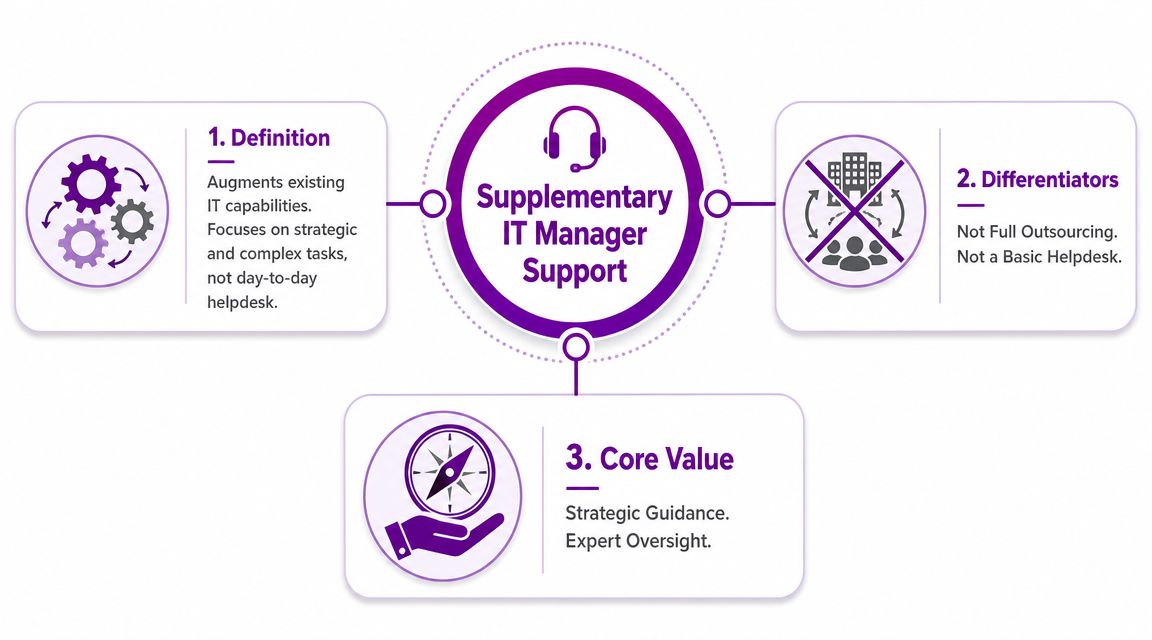
Supplementary IT manager support sits between a basic helpdesk contract and a fully outsourced IT department. It doesn’t remove your team. It gives your team someone senior to lean on.
A simple analogy helps. Plenty of growing businesses have a bookkeeper, but they still bring in a Finance Director or fractional FD for planning, forecasting, and commercial control. IT works the same way. Your technician or support team keeps the engine running. Supplementary IT manager support makes sure the engine is going in the right direction.
What it includes
This model usually covers the work that falls between technical support and board-level decision making:
- Technology roadmap ownership: Deciding what gets replaced, consolidated, upgraded, or retired.
- Microsoft platform oversight: Reviewing Microsoft 365 structure, Azure governance, identity, security settings, and licence fit.
- Project leadership: Taking charge of migrations, tenant clean-up, new business applications, or office moves.
- Operational governance: Setting standards for change control, escalation, documentation, and supplier accountability.
- Team support: Mentoring internal staff and helping them escalate cleanly rather than firefighting in isolation.
What it is not
It helps to be clear about the boundaries.
| Model | What it does | Where it falls short |
|---|---|---|
| Basic helpdesk | Resolves user issues and routine incidents | Rarely owns strategy, budgeting, or major change |
| Full outsourcing | Takes over most or all of IT operations | Can be too broad if you want to keep internal control |
| Supplementary IT manager support | Adds senior direction while your team stays involved | Needs clear scope and decision rights to work well |
That distinction matters. If you already have capable people internally, replacing them often creates disruption you don’t need. Augmenting them is usually the cleaner move.
Practical rule: If your team can keep systems running but struggles to plan, prioritise, or govern change, you need management support rather than more ticket handling.
A useful benchmark is whether your current setup can answer basic leadership questions without delay. Which Microsoft licences are underused? Who signs off Azure changes? Which systems are due for replacement? If those answers depend on one overworked person “getting round to it”, the support model is too thin.
Businesses that need this kind of reinforcement often look for IT support consulting so they can add direction, not just hands.
Key Services and SLAs You Should Expect
The quickest way to judge an IT manager support arrangement is to look past ticket response promises and ask what’s being managed. If the offer is only “we’ll be there when something breaks”, it’s not management support. It’s reactive cover.
Core services that matter
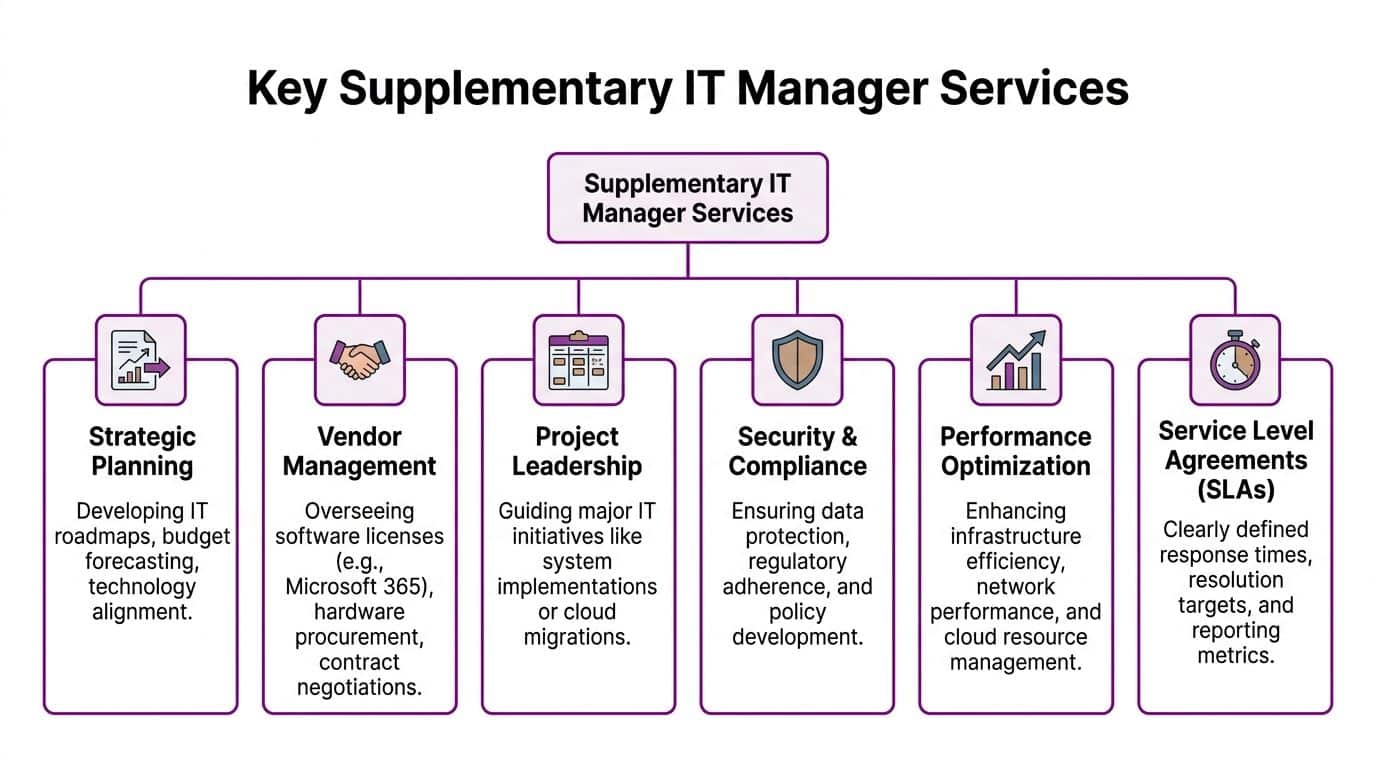
A credible provider should be able to take ownership of the areas that usually create drift inside SMEs.
- Strategic planning: A roadmap for infrastructure, Microsoft 365, Azure, devices, security controls, and business systems.
- Budget and commercial control: Renewal planning, supplier review, and challenge around unnecessary licensing or duplicated tools.
- Security governance: Policies, escalation routes, access reviews, patching oversight, and incident coordination.
- Project leadership: Migrations, onboarding of new sites, tenant changes, CRM rollout, Dynamics 365 workstreams, or Power Platform governance.
- Vendor management: Handling Microsoft partners, telecoms suppliers, line-of-business software providers, and infrastructure vendors.
- Documentation and standards: Keeping handover notes, system ownership, escalation paths, and operating procedures usable.
Many teams also need operational structure. In UK support models, Tier 0 self-service is the most impactful way to reduce incident load, with escalation then moving through Tiers 1 to 4 as issues become more complex, as outlined in this guide to the levels of IT support. A good IT manager oversees that whole structure rather than letting every issue land on the same person.
The SLAs worth asking for
Traditional SLAs focus on how quickly somebody answers the phone. That still matters, but it’s not enough if you’re paying for manager-level support.
Ask for service commitments such as:
- Regular governance reviews: Scheduled meetings with actions, ownership, and business risks tracked.
- Security reporting: Clear updates on access, patching, incidents, and unresolved risks.
- Project milestone accountability: Named owners, planned dates, dependencies, and decisions required from your side.
- Escalation clarity: A documented path for major incidents, supplier failures, and security events.
- Documentation upkeep: Reviews that keep key records current rather than forgotten in a shared folder.
This short explainer is useful if you want a visual sense of how IT services should support the business, not just the helpdesk queue.
What works and what doesn’t
What works is a provider that brings structure to decision making. What doesn’t is a vague promise to be “proactive” with no rhythm, no reporting, and no ownership map.
A strong arrangement usually includes a simple incident handbook too. Atlassian recommends clear workflow definitions, continuous training, and formal escalation procedures so support staff know when to hand off and when to stay with an issue, as described in its support level guidance.
If an issue can’t be routed cleanly, it can’t be managed cleanly.
The Business Case for East Midlands Organisations
East Midlands businesses often face a very specific problem. They’re large enough to depend on Microsoft 365, Azure, and connected business systems, but not large enough to hire a specialist for every layer of the stack.
That gap becomes obvious when a project starts. You may need someone who understands Azure governance, someone else who can shape Dynamics 365 properly, and somebody senior enough to decide how Copilot should be introduced without creating security or data handling problems. Hiring all of that capability directly is rarely practical for an SME.
Why the hybrid model fits the region
The UK’s digital skills shortage makes specialist hiring difficult, and many IT leaders are asking whether they should hire, outsource, or use a hybrid model as cloud and AI tooling become more complex, according to the techUK Digital Economy Monitor. For East Midlands organisations, that often makes supplementary support the most realistic path to Microsoft 365, Azure, and Dynamics 365 skills that aren’t easy to recruit locally at speed.
The strongest model is usually hybrid. Keep the internal knowledge that matters. Add external specialist capability where depth or time is missing.
That gives you practical advantages:
| Need | Internal team strength | External partner strength |
|---|---|---|
| Business context | Knows users, workflows, politics, and operational priorities | Needs onboarding but can challenge assumptions |
| Specialist Microsoft depth | Often broad rather than deep | Can bring focused Azure, Dynamics 365, Power Platform, and Copilot expertise |
| Capacity during change | Limited by BAU demands | Can flex around projects, incidents, and audits |
| On-site presence | Available if local and resourced | Valuable when the partner is regionally based |
Remote is useful. Local still matters.
Remote support is efficient for a lot of work. Password resets, endpoint support, licensing tasks, and routine triage don’t need a car journey. But some situations still benefit from being on site.
A workshop on a CRM rollout goes better when stakeholders are in the room. A major incident often gets resolved faster when someone senior is physically present with the business. A strategy session on Microsoft tenant consolidation, governance, or data handling is usually clearer face to face.
That’s the point many national remote-only providers miss. East Midlands SMEs often want a partner who can do both. Remote when speed and efficiency matter. On site when change is sensitive, urgent, or political.
One option in that space is F1Group, which provides East Midlands support across Microsoft 365, Azure, Dynamics 365, Copilot, Power Platform, cyber security, and on-site or remote service delivery. The reason to consider a local partner isn’t branding. It’s response quality, workshop quality, and accountability.
A Checklist for Choosing Your IT Support Partner
A poor support partner creates more management work, not less. You end up chasing updates, translating business needs into technical language for them, and discovering too late that they’re fine at desktop support but weak on Microsoft strategy or security process.
A better way to buy is to test for capability, operating style, and fit before you sign anything.
Questions that expose real capability
Start with Microsoft depth. Lots of providers can support Windows endpoints and basic Microsoft 365 administration. Far fewer can lead Azure governance, advise on Dynamics 365 design decisions, or help you introduce Copilot without creating unnecessary data exposure.
Ask questions like these:
- Microsoft expertise: Which parts of Microsoft 365, Azure, Dynamics 365, Power Platform, and Copilot do they actively support?
- Delivery model: Which services are remote-only, and which include on-site work across the East Midlands?
- Named leadership: Who provides the manager-level support? A senior consultant, a service manager, or whoever is free that week?
- Documentation discipline: How do they maintain system records, ownership lists, escalation paths, and service reviews?
- Commercial control: Will they review licensing, challenge suppliers, and help reduce waste, or only process renewals?
Test their security maturity with one scenario
Phishing was the most common attack type in the last year, affecting 85% of businesses that identified any breach or attack, according to this help desk statistics summary. That makes one interview question especially useful.
Ask the provider to walk you through exactly what happens when a user reports a suspicious email and an account may already be compromised.
A mature answer should cover triage, containment, user communication, account action, audit trail, review of related access, and post-incident follow-up. A weak answer usually stays at “we’ll reset the password and investigate”.
Don’t ask whether they take security seriously. Ask what they do in a real phishing incident.
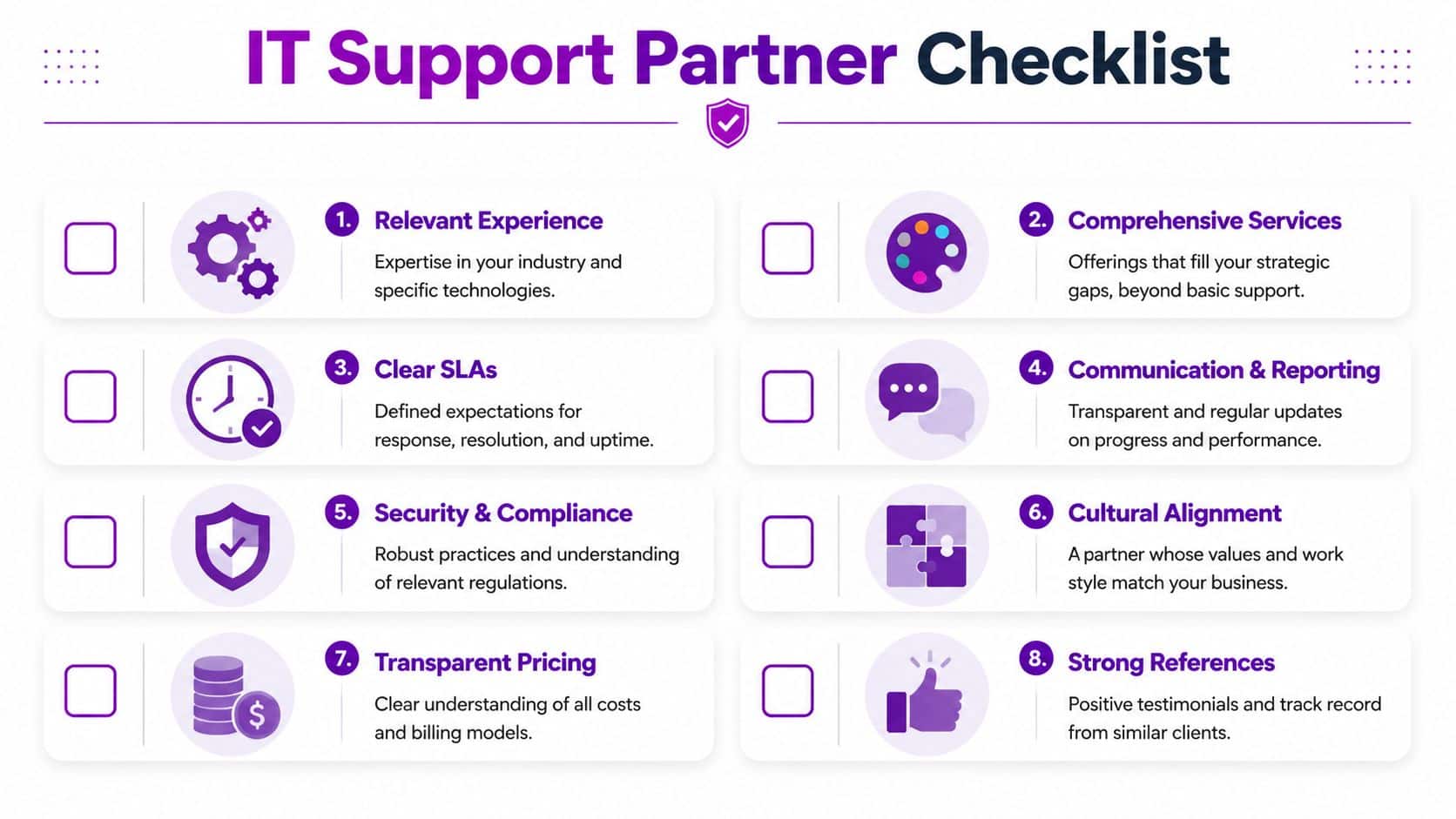
Use this shortlist before you choose
- Relevant Microsoft capability: They should be comfortable discussing Azure structure, Microsoft 365 governance, Dynamics 365 dependencies, and Power Platform control, not just endpoint support.
- Local delivery option: If your business values in-person workshops or incident presence, get that commitment written down.
- Clear service boundaries: Know what sits with your team, what sits with theirs, and what gets escalated to third parties.
- Reporting rhythm: Monthly and quarterly reviews should be standard if manager support is part of the service.
- Flexible scale: You want the option to dial support up during projects and down once the change settles.
- Security process: Look for practical incident handling, not generic reassurance.
- Commercial transparency: Understand the charging model, what’s included, and what triggers extra cost.
- Client references: Ask for organisations with similar Microsoft estates or similar internal team sizes.
If you’re comparing providers that combine strategic oversight with operational delivery, review their managed IT services approach against your own gaps rather than buying on response times alone.
Understanding Pricing Models and Real Costs
The awkward truth about pricing is that many businesses compare the wrong things. They look at the monthly support figure and ignore the cost of indecision, delayed projects, poor licence control, or weak ownership over suppliers and security tasks.
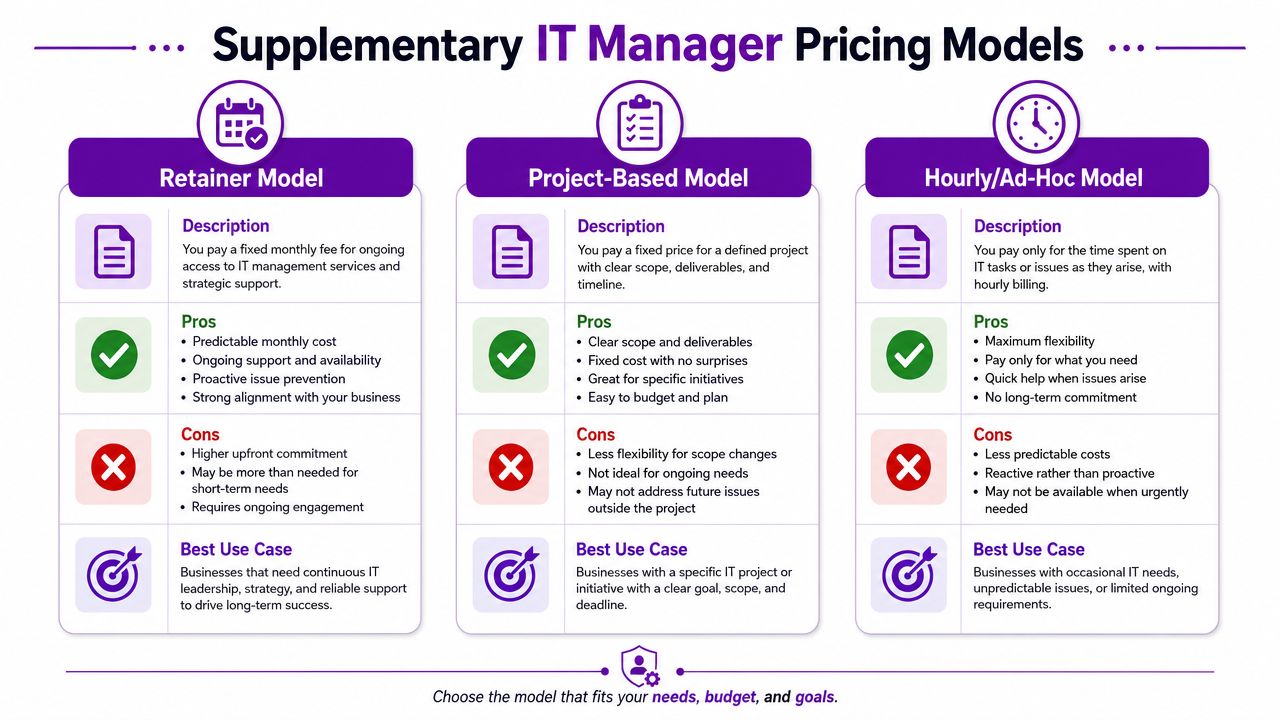
There are three common ways supplementary IT manager support is priced.
Retainer, project, or ad hoc
| Model | Best when | Watch out for |
|---|---|---|
| Monthly retainer | You need ongoing oversight, regular reviews, and a consistent senior contact | Scope can drift if responsibilities aren’t written clearly |
| Project-based | You have a defined piece of work such as a migration, review, or rollout | Good for delivery, weaker for ongoing governance afterwards |
| Hourly or ad hoc | You need occasional senior input without a standing commitment | Easy to underuse until problems become urgent |
The retainer model usually works best when the business already has an internal team but needs leadership around it. It creates rhythm. Decisions happen. Reviews get booked. Documentation gets updated. Suppliers get challenged.
Project pricing makes sense when the outcome is specific. That might be a Microsoft 365 tenant review, Azure landing zone planning, Dynamics 365 implementation oversight, or security remediation plan. It's tidy, but once the project ends the leadership gap often returns.
What cost really means
The cost isn't just the invoice. It's also the trade-off between flexibility and continuity.
- Retainers give continuity and accountability.
- Projects give focus and a defined endpoint.
- Ad hoc support gives flexibility but can become reactive very quickly.
An East Midlands SME with a stable internal technician and a growing Microsoft estate often does best with co-managed support. That means routine support remains operationally efficient while manager-level guidance is available for governance, supplier decisions, and projects.
Cheap support becomes expensive when nobody owns the important decisions.
Before you agree any model, ask for a written description of what “IT manager support” includes. If roadmap ownership, review cadence, escalation responsibility, and project leadership aren't explicit, you're paying for a title rather than a service.
Building a More Resilient Business Today
Supplementary IT manager support works because it matches how many East Midlands SMEs operate. They already have people in place. They already use Microsoft platforms extensively enough to need better oversight. What they lack is the spare senior capacity to govern it properly.
That support can take several forms. It might be a strategic layer above an internal team. It might be co-managed support around Microsoft 365 and Azure. It might be project leadership for Dynamics 365, Power Platform, or Copilot adoption. The right model depends on where your bottleneck sits.
The important point is this. IT manager support is no longer just about keeping systems available. It's about helping the business make better technology decisions, reduce risk, and move faster without losing control.
If your team is capable but stretched, don't assume the next step is replacing them. In many cases, the better move is to give them stronger leadership, clearer escalation, and access to specialist Microsoft skills when they need them.
If you want to discuss practical IT manager support for your organisation, including Microsoft 365, Azure, Dynamics 365, Copilot, co-managed support, and on-site coverage across the East Midlands, speak to F1Group. Phone 0845 855 0000 today or send us a message.