
Monday starts with three people unable to sign into Microsoft 365. By 10am, someone in finance can’t open a shared spreadsheet. By lunch, a senior manager is asking why Teams calls keep dropping. Your internal IT person hasn’t touched the Azure tidy-up they were supposed to finish last week, because they’re still resetting passwords and chasing laptop issues.
That’s the point where many East Midlands businesses realise they don’t have an IT strategy problem. They have a capacity problem.
An outsourced service desk is often the cleanest fix. Not because it sounds modern, but because it gives your business a consistent support function without forcing you to keep hiring, firefighting, and hoping one or two internal people can cover everything.
Is Your Business Drowning in IT Problems
For a lot of mid-sized firms, the pattern is predictable. Growth comes first. Systems get added. Microsoft 365 expands. Azure starts hosting more workloads. Remote staff need access from more locations and more devices. Then the support burden creeps up until every small issue becomes a business interruption.
Your internal team ends up trapped in reactive work. They’re busy, but not productive in the way the business needs. They’re clearing queues, not improving systems.

What this looks like in the real world
A typical East Midlands business owner doesn’t complain about “ticket volumes”. They complain that staff can’t work properly.
One sales team loses half a morning because email access breaks on mobiles. A charity’s finance lead gets stuck waiting for permissions on a shared folder. A manufacturer’s office team starts building workarounds because getting IT help feels too slow. None of these sound dramatic on their own. Together, they drain time, frustrate staff, and stall proper improvement work.
That’s why I’m blunt about this. If your IT staff spend most of their day reacting, your business is paying for support but not getting progress.
Why outsourcing is now mainstream
This isn’t a fringe decision any more. In the UK, around 60 to 65% of mid-sized enterprises now use some form of outsourced IT support, and organisations report annual cost savings in the region of 12 to 17% compared with maintaining a fully in-house team, according to UK outsourcing statistics cited here.
That matters because it changes the question. You’re no longer asking whether outsourcing is risky or unusual. You’re asking whether your current model is still sensible.
Practical rule: If senior IT staff are doing basic user support every day, you don’t have the right support structure.
For many SMEs, the answer isn’t replacing internal IT. It’s giving internal IT room to do the work only they should be doing. Governance. Planning. Supplier management. Cyber security oversight. Microsoft roadmap decisions. Business systems improvement.
An outsourced service desk handles the constant flow of routine incidents so your in-house people can stop being a human shield between users and every minor technical problem.
What Is an Outsourced Service Desk Really
A lot of firms say “help desk” when they really mean “someone to answer the phone when things break”. That’s too narrow.
A proper outsourced service desk is an operational layer for your business. It handles user issues, yes, but it should also control how incidents are logged, prioritised, escalated, resolved, and learned from. If all you’re buying is a ticket queue with a voice at the end of it, you’re buying too little.
Help desk versus service desk
Think of a help desk as your local GP appointment for immediate symptoms. Useful, necessary, often reactive.
A service desk is closer to a clinic. It still deals with immediate problems, but it also looks at repeat issues, referral paths, prevention, records, and the wider health of the environment. That difference matters if you’re running Microsoft 365, Azure, SharePoint, Teams, line-of-business apps, and a mix of office and remote staff.
If you want a plain-language overview of how businesses optimize business IT with managed helpdesk, that resource is worth a look. Just make sure your own buying decision goes beyond generic support promises.
What a real service desk should include
A decent provider should cover several disciplines, not just basic troubleshooting:
- Incident management means restoring service when something breaks, such as login failures, device issues, or access problems.
- Problem management means finding the root cause of recurring faults, not endlessly fixing the same Teams issue every Friday.
- Change management means handling standard changes in a controlled way, such as onboarding users, adjusting permissions, or supporting Microsoft 365 configuration updates.
- Knowledge management means documenting fixes, standard processes, and known errors so support becomes faster and more consistent over time.
A service desk should reduce repeat pain, not simply process it more politely.
What it should not be
It shouldn’t be a black box. It shouldn’t hide behind vague SLAs. It shouldn’t route every serious issue back to your own team because “that’s out of scope”.
And it definitely shouldn’t be disconnected from your business priorities. If you’re rolling out conditional access in Microsoft Entra ID, tightening SharePoint permissions, or moving workloads into Azure, the service desk has to support those changes in a structured way.
That is the ultimate test. A proper outsourced service desk doesn’t just keep users quiet. It supports the way your business operates and grows.
In-House vs Outsourced A Clear Comparison for SMEs
The in-house versus outsourced debate usually gets framed badly. People talk as if one model is modern and the other is outdated. That’s lazy thinking. The core issue is fit.
For most East Midlands SMEs, the question is simple. Can your current internal setup provide reliable support, enough technical breadth, and enough cover without dragging skilled people away from work that moves the business forward?
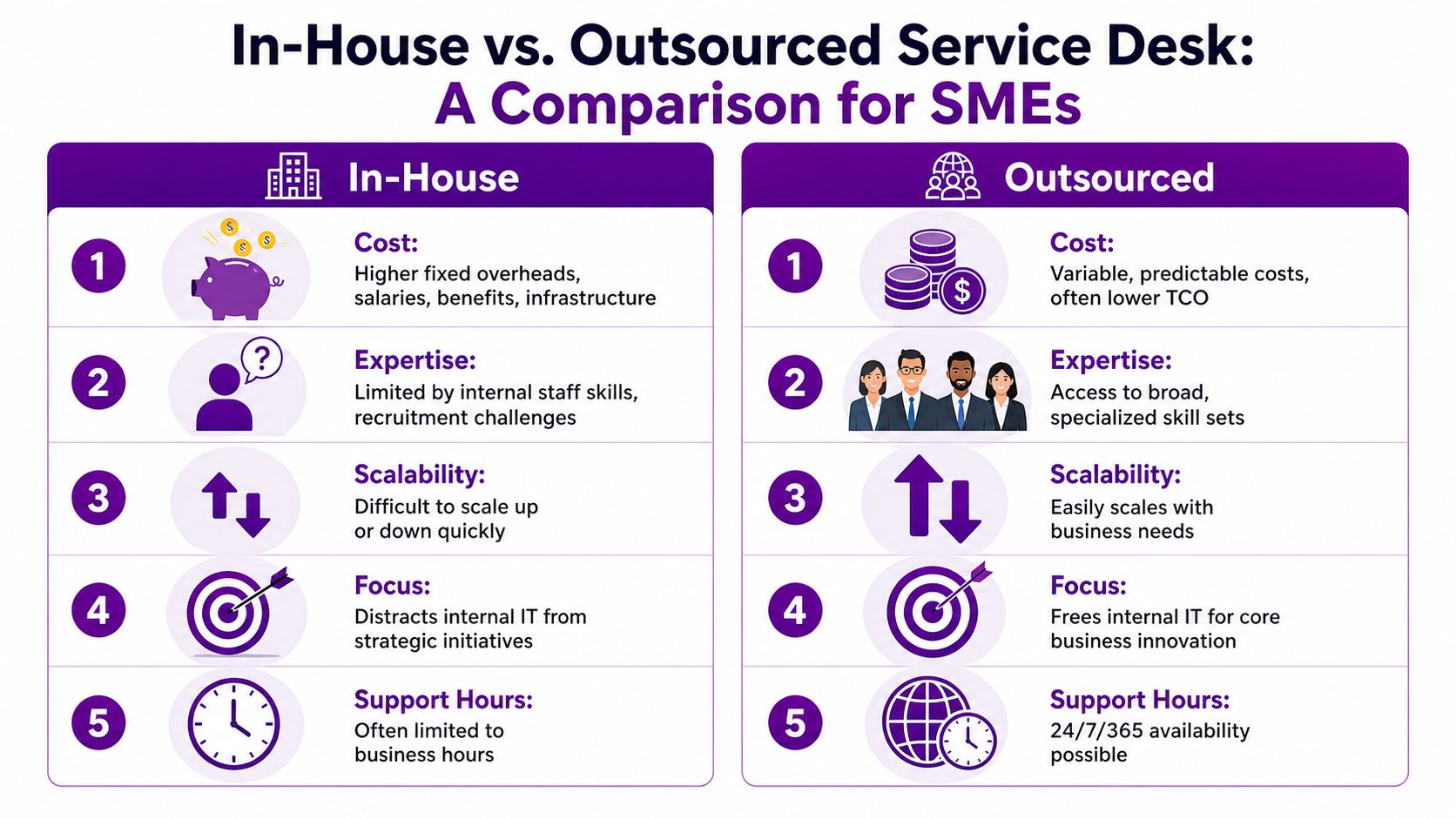
Side by side on the issues that matter
| Area | In-house | Outsourced |
|---|---|---|
| Cost structure | Fixed overheads, recruitment, training, tooling, absence cover | Usually more predictable contract-based spend |
| Skills access | Limited by your current team and hiring success | Broader bench across Microsoft 365, Azure, security, devices, and business apps |
| Availability | Often restricted by office hours and holidays | Easier to secure extended coverage and overflow support |
| Scalability | Slow to scale when the business grows or projects land | Easier to flex with demand |
| Strategic focus | Senior people get pulled into day-to-day support | Internal staff can stay focused on projects and governance |
Where in-house still makes sense
If you’ve got a large internal IT department, mature processes, specialist cloud and security capability, and enough depth to cover absence and growth, keeping the desk in-house can work well.
It also makes sense if your environment is highly specialised and tightly bound to internal operational knowledge that an external team would struggle to absorb quickly.
But most SMEs aren’t in that position.
Why outsourced often wins for mid-sized firms
Mid-sized businesses usually have one of two problems. Either they have too few IT staff, or they have competent people doing the wrong level of work. Both are expensive.
An outsourced model gives you access to a broader support structure without turning every staffing issue into a recruitment project. It also helps protect your internal team from the grind of repetitive support demand.
If you’re weighing that shift, Our overview of IT outsourcing options for business support is a useful reference point for what a co-managed or fully outsourced model can look like in practice.
If your best technical person spends their week unlocking accounts and chasing printer faults, your IT function is underused.
A strong outsourced service desk doesn’t remove control. It changes where control sits. Your business keeps ownership of policy, priorities, risk, and architecture. The provider delivers the operational engine.
That’s usually a better use of scarce IT leadership time.
Navigating Costs and Service Level Agreements
Most outsourced service desk contracts look straightforward at first. Monthly fee. Defined scope. Agreed response targets. Job done.
That’s exactly where firms get caught out.
Pricing models you’ll actually see
Providers usually package support in one of these ways:
- Per user works well if your workforce is stable and each employee needs a similar level of support.
- Per device can suit operational environments where staff share equipment or use multiple endpoints.
- Tiered support packages bundle hours, service windows, escalation paths, and add-ons such as on-site work or project assistance.
- Hybrid pricing combines a core monthly fee with extras for out-of-scope work, projects, or major changes.
The right model depends on your environment. A Microsoft 365-heavy office with remote users has different support patterns from a mixed estate with warehouse devices, thin clients, and legacy applications.
The trap most SMEs miss
Some providers run on tight margin models. When profit comes under pressure, service quality can slip into being “just good enough”, even while they still appear to hit headline targets, as discussed in this article on why outsourcing help desk can be risky.
That’s the hidden issue. A provider can technically meet an SLA while users still have a poor experience.
You need an agreement that rewards good service and exposes decline early.
What to insist on in the SLA
Don’t settle for generic language. Your SLA should spell out the operating reality.
- Response and resolution definitions should be clear. “Responded” must not mean a ticket was merely acknowledged.
- Escalation rules must show when level 1 stops and specialist support starts.
- Major incident handling should define who contacts whom, how updates are issued, and who owns communications.
- Security-related tickets need their own urgency and process, especially in Microsoft 365 and Azure environments.
- Reporting cadence should be regular and readable by both IT and leadership.
A useful companion topic is boost business continuity for MSPs, because service desk support and recovery expectations need to line up. If your provider can answer tickets quickly but can’t support the wider continuity model, you’ve got a gap.
Ask for evidence, not promises
Review meetings matter more than glossy proposals. Ask to see real monthly reporting examples. Ask how they flag repeat incidents. Ask what happens if ticket quality drops over time.
For contract structure, it also helps to understand what belongs in the legal framework behind the service. This guide to a managed services agreement for IT support gives a practical view of the commercial side.
Here’s a useful explainer before you sign anything:
The strongest contracts aren’t the cheapest. They’re the ones that make poor service visible before it becomes normal.
Security and Compliance A Non-Negotiable Priority
Many outsourced service desk conversations fail because, although everyone talks about responsiveness, coverage, and cost, few properly address security.
That’s reckless.
Cyber criminals increasingly exploit help desk functions as backdoors for identity-based attacks, and outsourcing guidance rarely explains how to assess a provider’s security posture, vetting standards, or resistance to social engineering, as noted in this analysis of outsourced service desk security blind spots.
Why Microsoft 365 and Azure raise the stakes
If your business runs on Microsoft 365 and Azure, your service desk isn’t just handling minor support issues. It may be touching user identities, password resets, conditional access problems, mailbox permissions, SharePoint access, Intune-enrolled devices, and cloud administration workflows.
That means a weak support process can become a security weakness very quickly.
An attacker doesn’t need to break your firewall if they can manipulate a poorly trained support agent into resetting access or bypassing controls.
Security at the service desk starts with identity handling. If a provider treats verification as a formality, walk away.
Questions you should ask every provider
Don’t ask vague questions like “Are you secure?” Ask operational questions:
- Staff vetting. Are engineers and service desk analysts DBS-checked where appropriate?
- Access control. How is privileged access granted, approved, reviewed, and removed?
- Identity verification. What’s the process before a password reset, MFA change, or permissions update?
- Microsoft expertise. Who handles escalations involving Entra ID, Exchange Online, SharePoint, Teams, Intune, and Azure?
- Incident response. What happens if the provider suspects account compromise or suspicious help desk activity?
- Logging and audit. Can they show who did what, when, and under whose approval?
Compliance needs to be written into service
A secure outsourced service desk should support your compliance position, not weaken it. If you’re in a charity, regulated business, or an organisation handling sensitive staff and client data, you need evidence of process discipline.
That includes onboarding and leaver workflows, approval chains, access records, and clear boundaries around who can authorise what.
If you want a broader view of operational discipline, ensuring service level agreement adherence is a useful reference. Compliance isn’t only about speed. It’s about whether the provider consistently follows the controls you agreed.
One practical example in the East Midlands market is F1Group, which states that its team is vendor-certified and DBS-checked for managed IT support across Microsoft-focused environments. That’s the kind of concrete operational detail you should look for from any provider, not just polished claims about “security-first service”.
Choosing Your East Midlands Partner A Checklist
Choosing a provider isn’t about who gives the slickest presentation. It’s about who can support your business properly once the honeymoon period ends.
Local knowledge matters here. An East Midlands business often needs a partner who understands regional operations, can work with on-site realities, and doesn’t treat every issue like a remote-only commodity support task.
What good selection looks like
A shortlist should be built around evidence, not branding. You want a provider that can support your current environment and still be useful when your business changes.
If you’re comparing options, it’s worth looking at what a managed IT services firm with regional coverage should offer in practical terms. Then use a checklist and score providers objectively.
Vendor Selection Checklist
| Evaluation Criteria | What to Look For |
|---|---|
| Microsoft 365 and Azure capability | Clear experience supporting Entra ID, Exchange Online, Teams, SharePoint, Intune, Azure administration, and cloud migrations |
| Security controls | DBS checking where appropriate, documented verification processes, access control discipline, incident escalation paths |
| SLA transparency | Plain-English targets, meaningful reporting, clear exclusions, realistic escalation routes |
| Local and regional fit | Ability to support East Midlands sites, understand local business needs, and provide on-site help when required |
| Service model | Flexibility for co-managed or fully outsourced support, not a one-size-fits-all package |
| Documentation standards | Strong knowledge base, onboarding process, asset and user process documentation |
| Commercial clarity | Transparent charging, scope boundaries, review points, and change control |
| Cultural fit | Staff who communicate clearly, take ownership, and work well with internal teams |
| Client proof | Relevant testimonials, references, or examples from similar organisations and sectors |
| Improvement mindset | Regular service reviews, repeat-issue analysis, and a willingness to refine the support model |
Choose the provider you can challenge openly. If honest conversations feel awkward during sales, they’ll be worse after contract signature.
The shortcut I’d avoid
Don’t pick purely on lowest monthly price. That usually buys one of two things. Thin coverage or rigid scope.
Neither helps when your users need dependable support and your IT manager needs a partner that can handle real work, not just log tickets politely.
Your Implementation Roadmap From Decision to Go-Live
The transition to an outsourced service desk doesn’t need to be disruptive. It does need structure.
The biggest mistake is trying to switch everything at once with weak documentation and vague ownership. That’s how tickets bounce around, users lose confidence, and internal teams end up doing double work.
The phases that keep the move under control
Start with discovery. Audit users, devices, applications, support demand, common incidents, admin roles, and current pain points. If you don’t understand your own environment, no provider can support it properly.
Then move into onboarding and knowledge transfer. The external team needs documented processes, system access boundaries, escalation routes, key contacts, and known problem areas. This stage is where many projects succeed or fail.
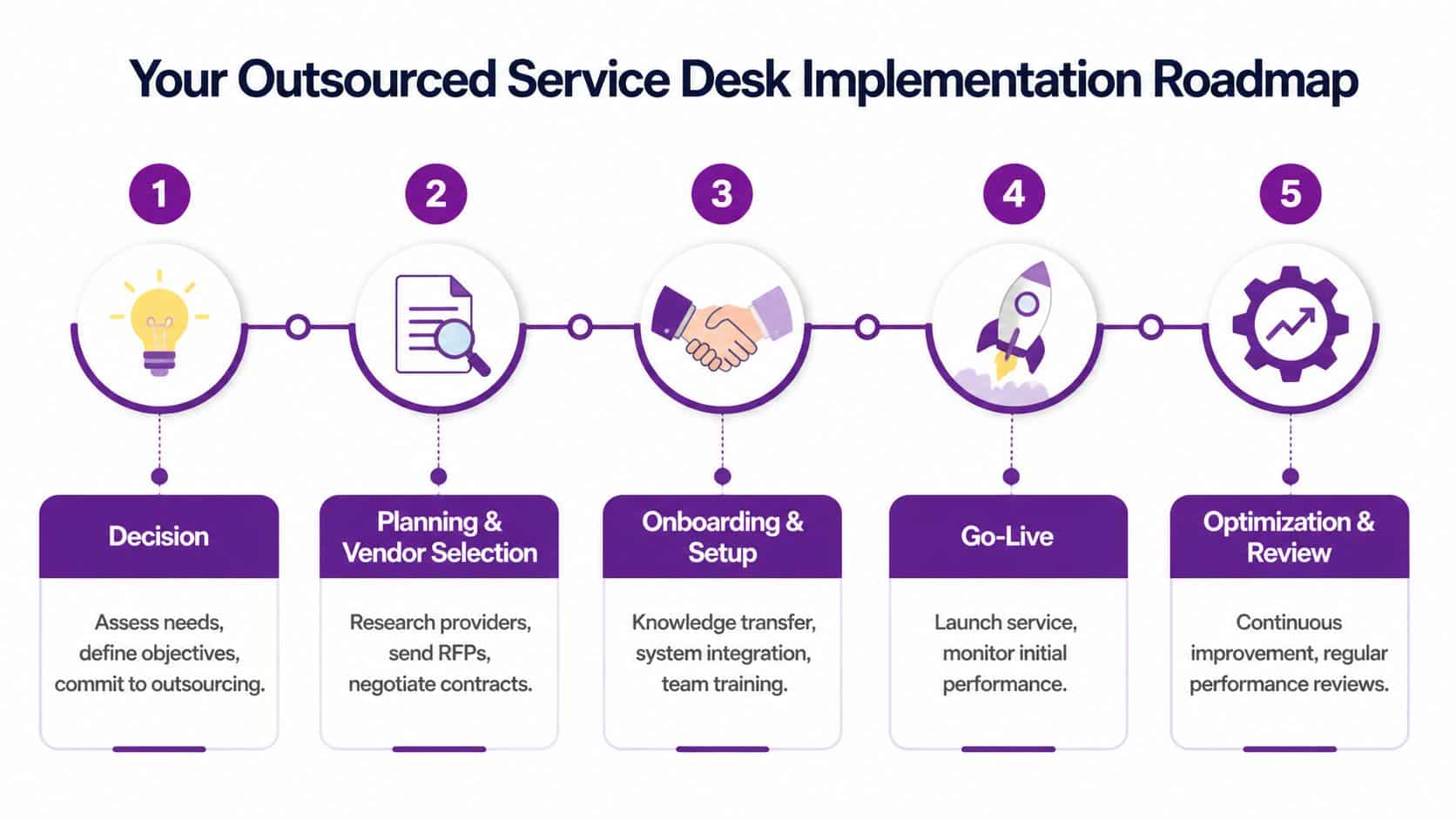
A sensible rollout sequence
A phased rollout works better than a dramatic cutover:
- Pilot first with a manageable user group, department, or support category.
- Review early issues and tighten documentation, triage rules, and communications.
- Expand in stages until the provider handles the agreed operational scope.
- Keep internal oversight so someone in your business still owns standards and direction.
- Run service reviews to refine the model once real usage data starts to show patterns.
What good go-live support looks like
Users should know where to go, what channels to use, and what kinds of issues the desk handles. Internal IT should know what still stays in-house. Leadership should know how service performance will be reported.
That clarity matters more than fancy launch messaging.
An outsourced service desk works well when the provider understands your environment, your people understand the process, and your internal team stays focused on control rather than queue management.
Take Control of Your IT Today
An outsourced service desk isn’t just a way to answer more tickets. It’s a way to stop routine IT demand from dragging your business backwards. Done properly, it gives you steadier support, clearer accountability, stronger security discipline, and more room for your internal team to focus on work that improves the business.
If you’re a mid-sized organisation in the East Midlands, don’t buy on price alone. Choose a partner with Microsoft 365 and Azure depth, solid operational processes, and security standards you can verify.
If you’re ready to discuss an outsourced service desk that fits your business, contact F1Group. Phone 0845 855 0000 today or Send us a message.