
You’re probably dealing with a familiar tension. The board wants faster delivery, better resilience, tighter security, and a clearer plan for AI. Finance wants fewer surprises. Your operations team wants stability. Your users just want Microsoft 365, Dynamics 365, Power BI, and Azure-hosted services to work properly every day.
That’s where the private cloud vs public cloud decision gets difficult. On paper, public cloud looks simple. In practice, most mid-sized organisations in the East Midlands don’t have paper workloads. They have legacy systems, compliance obligations, steady workloads, occasional spikes, remote users, supplier integrations, and growing pressure to make sensible use of Microsoft’s platform without losing control of cost.
The Cloud Conundrum for Mid-Sized Businesses
An IT Director in Nottingham or Leicester often starts in the same place. Azure is already in use for something. Microsoft 365 is standard. A Dynamics 365 project is underway, or Copilot is being discussed. Then the awkward questions arrive. Which systems belong in Azure? Which ones shouldn’t? And why does “move it all to the cloud” stop sounding simple once finance, compliance, and performance come into the conversation?

A quick definition helps. Public cloud means shared infrastructure delivered by providers such as Microsoft Azure. Private cloud means infrastructure dedicated to your organisation, either in your own environment or hosted for you. Hybrid cloud combines the two, which is often the most realistic answer rather than the most fashionable one.
The shift towards private cloud is no longer a niche position. According to Broadcom’s Private Cloud Outlook 2025 Report, 53% of UK and global IT leaders now prioritise private cloud for deploying new workloads, driven by cost predictability and control, particularly for sensitive applications and GenAI.
Why the decision feels harder now
The cloud conversation used to be about replacing servers. Now it’s about placement.
- Microsoft 365 stays public by design because that service is already delivered from Microsoft’s cloud.
- Dynamics 365 integrations often touch sensitive operational or customer data.
- Power BI and automation workloads can create steady, always-on demand that behaves very differently from short-lived development environments.
- Compliance reviews force teams to look beyond vendor brochures and into how data is stored, moved, audited, and retained.
If your team is reviewing security posture at the same time, a practical checklist like these 7 essential cloud computing security tips is useful because the cloud model only works if governance, access control, and monitoring are handled properly.
The right cloud model isn’t the one with the longest feature list. It’s the one that fits how your systems actually behave.
Public Cloud The Power of Microsoft Azure
A typical pattern shows up in mid-sized firms across Nottingham, Derby, and Leicester. Microsoft 365 is already in place, identity sits in Entra ID, and the next project lands on the IT Director’s desk. A new customer portal, a Dynamics 365 integration, better reporting, or a short-lived dev environment. Azure is usually the fastest route from approval to delivery.
That speed is the main advantage. Public cloud removes the delay of hardware procurement, rack space, warranty planning, and capacity decisions made six months too early. For organisations that need to move quickly, Azure can turn an infrastructure request into a live service in days rather than weeks.
What Azure does well
Azure is strongest where demand changes, teams need flexibility, or the business does not want to build and maintain every underlying component itself.
Common examples include:
- Development and test environments that need to be created quickly and removed just as quickly
- Customer-facing applications where traffic varies by campaign, season, or time of day
- Project-based workloads that only need infrastructure for a defined period
- Azure-native services such as app hosting, data platforms, automation, virtual desktops, and integration tools that would be expensive or awkward to run privately
For Microsoft-centric organisations, that matters. Azure fits naturally around Microsoft 365, supports identity and conditional access policies through Entra ID, and gives IT teams a practical platform for workloads that sit adjacent to the productivity stack rather than inside it.
Microsoft’s own Azure architecture guidance for SMB workloads is useful here because it reflects a real operational truth. Public cloud works well when systems need to scale, change, and integrate quickly.
Where the public model starts to bite
The problems usually start after the first successful deployment.
A workload that looked sensible in Azure as a pilot can become a permanent service with steady daily usage, attached storage, backup policies, outbound traffic, security tooling, and licensing layers that were barely noticeable in month one. That is where many mid-sized businesses hit the cost-performance tipping point. The platform is still technically the right fit, but no longer the most economical one.
Shared infrastructure is not the issue on its own. The issue is that stable, always-on workloads often lose the commercial advantage that made public cloud attractive in the first place. In practice, I see this with long-running application servers, integration platforms that never sleep, and reporting systems with predictable demand every business day.
Compliance adds another layer. UK organisations in regulated sectors still use Azure successfully, but they need to be much clearer on data residency, retention, logging, privileged access, and how services interact with Microsoft 365 data. For an East Midlands business facing customer audits or sector-specific controls, the question is rarely "Is Azure compliant?" The question is whether the chosen Azure design gives auditors enough evidence and your internal team enough control.
The Azure question IT Directors should ask
The useful question is simple. Which workloads are elastic, and which are just permanently rented?
If the answer points to variable demand, Azure is often the right home. If the workload is steady, resource-hungry, and tied to tighter compliance controls, the economics need checking before public cloud becomes the default answer.
Teams reviewing operations, governance, and cost control should also understand what a capable Azure managed service provider should deliver. In real projects, the difference between a well-run Azure estate and an expensive one usually comes down to workload placement, policy discipline, and ongoing review.
Azure is excellent for speed, integration, and variable demand. It deserves a closer cost and compliance review once a workload becomes permanent.
Private Cloud Your Dedicated Infrastructure
Private cloud changes the conversation from convenience to control. Instead of consuming capacity from a shared hyperscale platform, you run workloads on infrastructure dedicated to your organisation. That can sit in your own environment, or it can be hosted and managed on your behalf.
What dedicated infrastructure changes
The biggest advantage is simple. No shared tenancy. Your compute, storage, and networking are provisioned for you, not shared across unrelated tenants.
That matters when you’re hosting systems that don’t like surprises:
- Line-of-business applications with consistent daily demand
- Dynamics 365 supporting services or integrations that need predictable response times
- Database-heavy reporting and internal analytics
- Sensitive data workloads where auditors care about control, access boundaries, and residency
Private cloud also gives you more influence over patching windows, infrastructure design, segmentation, backup policies, and operational change control.
Two common private cloud approaches
There are two broad models.
| Model | How it works | Best fit |
|---|---|---|
| On-premises private cloud | Your organisation owns and runs the infrastructure | Teams with internal capability and strong control requirements |
| Hosted managed private cloud | A partner provides dedicated infrastructure and operational support | Mid-sized organisations that want private cloud benefits without building everything in-house |
Hosted options are often more realistic for mid-sized businesses. You still get dedicated infrastructure, but you don’t have to create a full internal platform team just to maintain it.
For organisations reviewing location, resilience, and managed hosting options, a credible UK data centre partner matters because private cloud is only as strong as the operational standards behind it.
Why private cloud keeps gaining ground
Private cloud isn’t a throwback. It’s becoming a practical answer to modern problems. According to Broadcom’s earlier-cited report, private cloud is being prioritised for new workloads because teams want clearer cost visibility and better control for sensitive and AI-related workloads.
That aligns with what many IT Directors discover after the first wave of cloud adoption. Public cloud is brilliant for access and speed. Private cloud is often better for steady-state, compliance-heavy, or performance-sensitive services.
Operational reality: If a workload runs all day, every day, and rarely changes shape, dedicated infrastructure usually deserves a serious look.
Private vs Public A Head-to-Head Comparison
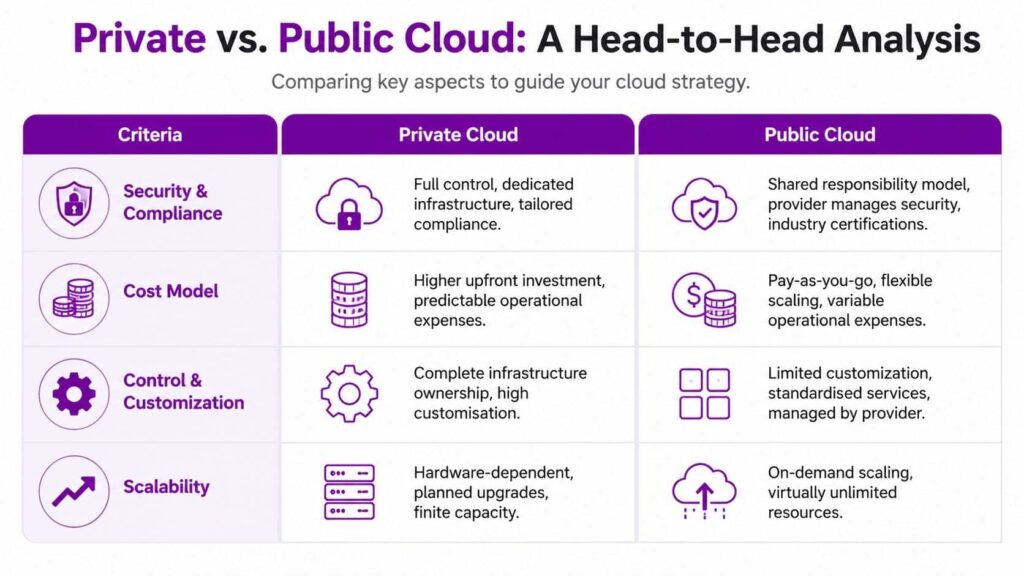
The decision gets clearer when you compare the models against the things that matter in a mid-sized organisation: security, cost, performance, and management.
| Criterion | Public Cloud (e.g. Azure) | Private Cloud (Managed or On-Premises) |
|---|---|---|
| Security and compliance | Strong provider controls, shared responsibility, broad certifications | More direct control over data location, segmentation, and operational policies |
| Cost model | Pay-as-you-go, easy to start, can become variable | Higher commitment, often more predictable for stable workloads |
| Performance | Fast to deploy, can vary under shared conditions | Dedicated resources, more consistent behaviour |
| Scalability | Rapid and elastic | Planned scaling, finite but controllable |
| Customisation | Standardised platform services | Deeper infrastructure and policy control |
| Operational overhead | Provider manages the underlying platform | More responsibility unless outsourced to a managed partner |
Security and compliance
Public cloud security is strong, but it’s a shared responsibility model. Microsoft secures the underlying platform. You still own identity, data handling, configuration, retention, integration security, and user access. That’s workable, but it needs discipline.
Private cloud changes the emphasis. You gain more direct control over where data sits, how networks are segmented, and how supporting systems are configured. For regulated organisations, that often makes audit conversations easier because the boundary is simpler to explain.
This is one reason private cloud remains relevant for businesses handling customer records, sensitive reporting, internal operational data, or workloads tied closely to GDPR expectations.
Cost and total cost of ownership
Public cloud is usually cheaper to start. It avoids upfront hardware spend and lets you move quickly. That’s valuable. But “cheap to start” isn’t the same as “cheap to run forever”.
The tipping point becomes obvious at scale. According to Hykell’s comparison of public vs private cloud performance and cost, for a medium deployment of 500 VMs, public cloud on Azure can average £28,925 per month, whereas a managed private cloud for the same workload could be around £11,294 per month. That represents a potential saving of over £211,000 annually.
For a mid-sized organisation, that isn’t a technical footnote. That can fund cyber security improvements, application modernisation, support capability, or analytics work the business has been deferring.
Performance and reliability
Performance is where the theory of private cloud becomes very practical. Shared infrastructure can produce uneven behaviour under load. Anyone who has operated busy virtual estates knows the pattern. Things look fine until contention appears, and then a previously acceptable service feels sluggish at the worst possible moment.
The same Hykell source reports that private cloud offers 22-31% less performance variation for steady-state workloads, reducing the noisy neighbour effect common in public environments.
Board-level translation: if users complain that a system is “intermittently slow”, the issue may be architectural placement rather than application code.
This matters for workloads such as:
- Dynamics 365 integrations that need steady response times
- Power BI datasets and reporting layers serving internal users throughout the day
- Background automations that can’t afford inconsistent execution windows
- Persistent application servers that aren’t scaling up and down in meaningful ways
To add context on scaling behaviour, this cloud computing scalability guide is a useful companion read because not every workload benefits equally from elasticity.
A practical explanation helps here:
Management and expertise
Public cloud removes a lot of infrastructure management, but not all operational complexity. It shifts the work. Teams spend less time replacing hardware and more time on governance, access control, architecture, cost management, backup design, and service sprawl.
Private cloud demands more direct infrastructure thinking, unless it’s delivered as a managed service. That’s why the real comparison isn’t just public versus private. It’s often public self-managed versus private managed, or hybrid with a clear operational split.
What works and what doesn’t
What usually works:
- Public cloud for bursty, short-lived, or innovation-led workloads
- Private cloud for stable, critical, or compliance-sensitive services
- Hybrid for organisations that need both speed and control
What usually doesn’t work:
- Treating every workload as cloud-native when it isn’t
- Leaving long-running estate in Azure without cost reviews
- Using private cloud for systems that need rapid elastic scaling
- Assuming security improves automatically just because a provider is large
Hybrid Cloud Strategy Using Azure Arc
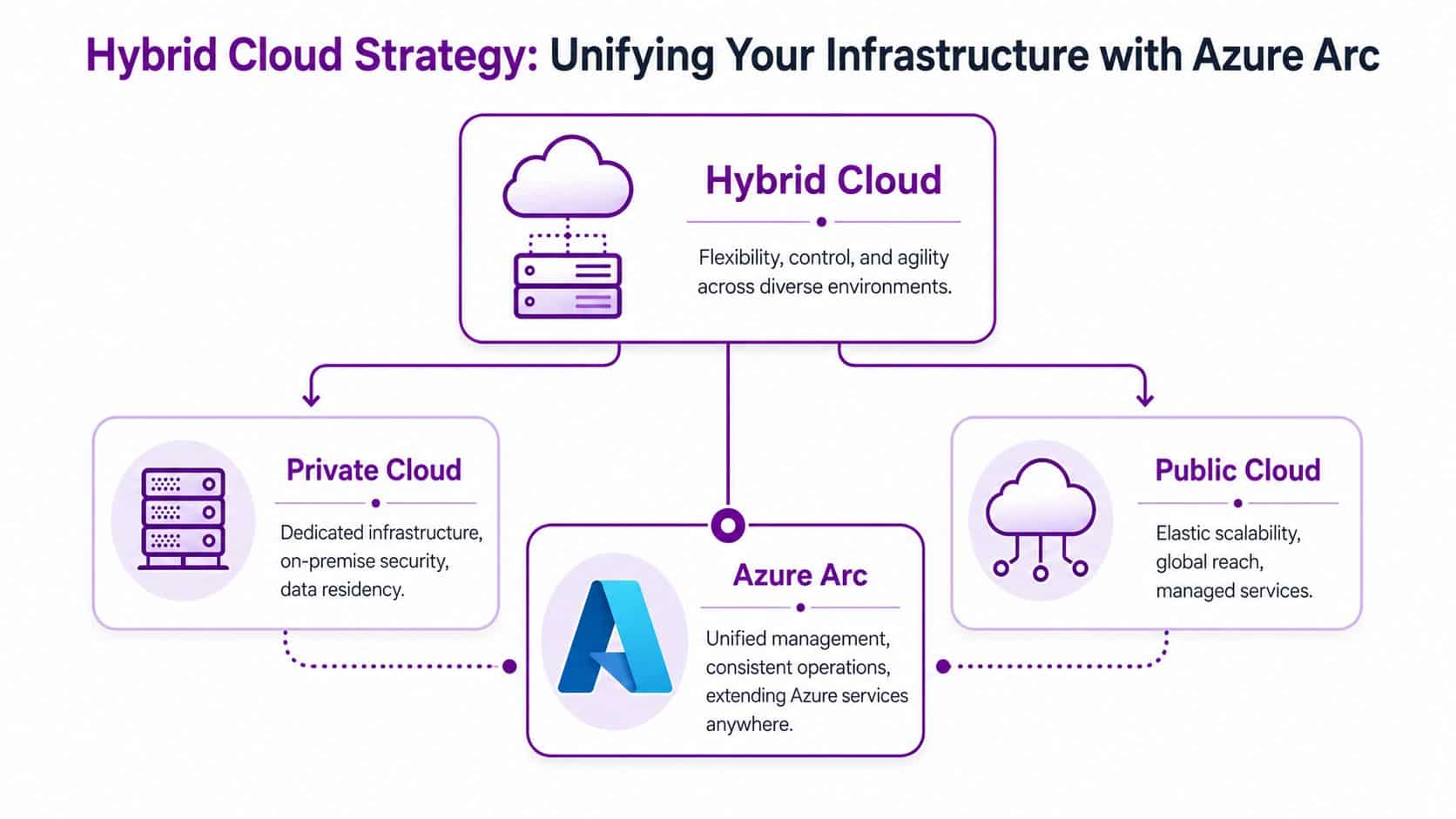
For many mid-sized businesses, the best answer isn’t private cloud or public cloud. It’s hybrid, with clear rules about what runs where. That’s especially true in Microsoft estates, where Microsoft 365 is already public by nature, but supporting business systems may need tighter control.
Why hybrid makes sense in the East Midlands
A Leicester manufacturer might keep production-related systems or sensitive operational data in a private environment, while using Azure for external apps, collaboration tooling, identity services, and selected analytics workloads. A charity may want donor-sensitive data handled conservatively, while still taking advantage of Microsoft 365 and cloud-based productivity tools.
According to Rubrik’s private cloud vs public cloud analysis, 57% of private cloud deployments are now within SMEs in the UK, largely driven by GDPR and NIS2 compliance requirements. The same source notes that adopting a hybrid model has helped East Midlands firms save 18-25% on Azure data egress fees compared to a pure public cloud strategy.
That’s one of the less discussed reasons hybrid works. It doesn’t just improve placement. It can reduce avoidable movement of data between systems.
Where Azure Arc fits
Azure Arc gives Microsoft-centric organisations a practical way to manage resources across environments without pretending everything must live in Azure itself. It extends Azure management principles into private and on-premises estates, which is useful when you want a consistent approach to governance, policy, visibility, and operations.
Hybrid starts making operational sense when you use it deliberately:
- Keep stable internal workloads private where cost and predictability matter
- Use Azure for elastic or externally facing services
- Apply consistent governance across both environments
- Reduce unnecessary data movement between platforms
Hybrid is only sensible if the split is intentional. If workloads drift between environments without rules, costs and complexity climb fast.
If you’re planning that kind of split, an Azure cloud adoption framework is useful because hybrid architecture depends on policy, workload assessment, and operating model design, not just connectivity.
A Decision Framework for Your Business
A finance director signs off Azure because the monthly entry cost looks manageable. Six months later, the same environment is carrying always-on servers, rising backup charges, and data transfer costs nobody modelled properly. The question at that point is not whether cloud was the right decision. It is whether the workload was placed in the right environment from the start.

For mid-sized businesses across the East Midlands, that is usually the actual decision. Azure is often the right platform. It is not always the cheapest long-term home for every steady workload, and it does not remove UK compliance responsibilities just because the infrastructure sits in Microsoft’s cloud.
Ask how the workload behaves
Start with workload pattern, not vendor preference.
- Spiky and unpredictable workloads usually suit Azure well because you can scale up and down without carrying fixed capacity all year.
- Stable, always-on workloads should be costed against private cloud because predictable usage often changes the economics.
- Mixed estates need a deliberate split, especially where some services are elastic and others are fixed.
I see more disappointment caused by poor workload placement than by any failure in Azure or private infrastructure. A three-year-old line-of-business application that runs 24/7, barely changes, and pushes large volumes of data can become expensive in public cloud faster than many teams expect.
Ask who needs control
Control is not just a technical preference. It affects audit, support boundaries, and the amount of policy work your team must maintain.
A few Microsoft-specific examples make the point:
- Microsoft 365 should generally stay in Microsoft’s cloud. Important considerations include conditional access, data retention, identity protection, and user governance.
- Dynamics 365 connected systems often need closer review because customer, service, and finance data may cross into other applications that are not designed with the same controls.
- Power Platform, reporting, and integration services can sit on either side depending on data residency needs, connector use, and how tightly they depend on internal systems.
For regulated businesses, the practical test is simple. Can the team show where the data sits, who can access it, how it is retained, and how it is recovered? If that answer is hard to produce, the architecture needs work before the next audit does it for you.
Ask what finance will tolerate
Cloud plans break down when the technical design and the charging model point in different directions.
Industry research from the Flexera 2024 State of the Cloud Report found broad public cloud adoption, frequent budget overruns, and continued workload repatriation. That matches what many IT directors already know from experience. Public cloud is easy to start. It is harder to keep cost-efficient once environments become permanent, layered, and poorly governed.
Boards should treat repatriation as a commercial correction, not a failed strategy. If a workload is running constantly, has known performance needs, and gains little from elasticity, moving it to private cloud can be the financially sensible choice.
A practical decision pattern
A useful starting point looks like this:
- Keep commodity collaboration in Microsoft’s cloud. Microsoft 365 belongs there.
- Use Azure for elastic or short-lived services. Development, testing, project environments, and internet-facing applications often justify the model.
- Put steady, sensitive, or performance-critical services in private cloud when the usage profile is consistent and the cost model works better over time.
- Use hybrid where business process drives the design. That often applies when Azure, Microsoft 365, on-premises data, and legacy applications all need to work together without creating compliance gaps.
Practical rule: if a workload is permanent, predictable, and getting more expensive every quarter in public cloud, review it before renewal locks the cost in again.
Navigate Your Cloud Journey with F1Group
Private cloud vs public cloud isn’t a branding exercise. It’s a placement decision with real consequences for cost, resilience, compliance, user experience, and how confidently you can expand your Microsoft estate.
For mid-sized businesses across the East Midlands, the best answer is often a carefully chosen mix. Azure remains the right home for many services. Private cloud remains the right home for others. Hybrid is often the model that reflects how businesses operate, especially when Microsoft 365, Dynamics 365, Power Platform, and security requirements all need to coexist.
The hard part isn’t getting access to cloud technology. It’s designing an approach that fits your workloads, your compliance obligations, and your budget without creating unnecessary complexity later.
That’s where experienced guidance matters. F1Group helps organisations across Lincoln, Nottingham, Leicester, Scunthorpe, Grimsby, and Newark design, implement, and support Microsoft-focused cloud strategies that prove effective in practice.
If you’re reviewing private cloud, public cloud, or a hybrid Azure strategy, speak to F1Group about what fits your environment. Phone 0845 855 0000 today or Send us a message.