
If you're looking at SharePoint because your shared drive is chaotic, your Teams files are scattered, and staff keep asking where the latest version lives, you're in the right place. Most mid-sized businesses don't start a SharePoint implementation because they want new technology. They start because document control is weak, approval processes are manual, and nobody trusts the filing structure anymore.
That matters, because SharePoint implementation succeeds or fails on business design, not on whether the platform has been switched on correctly. A technically tidy rollout can still disappoint if it doesn't match how people work day to day. The businesses that get value from SharePoint treat it as an operational project first and a Microsoft 365 project second.
Laying the Groundwork for a Successful Implementation
A strong SharePoint implementation starts before anyone creates a site or migrates a single folder. The first job is deciding what business problem you're solving. If that sounds obvious, it should be. Yet a realistic 90-day zero-to-hero timeline is achievable, while 40% of UK organisations report their implementations as unsuccessful due to rushing the analysis phase and failing to match business processes with platform functionality according to ScienceSoft's SharePoint implementation guide.
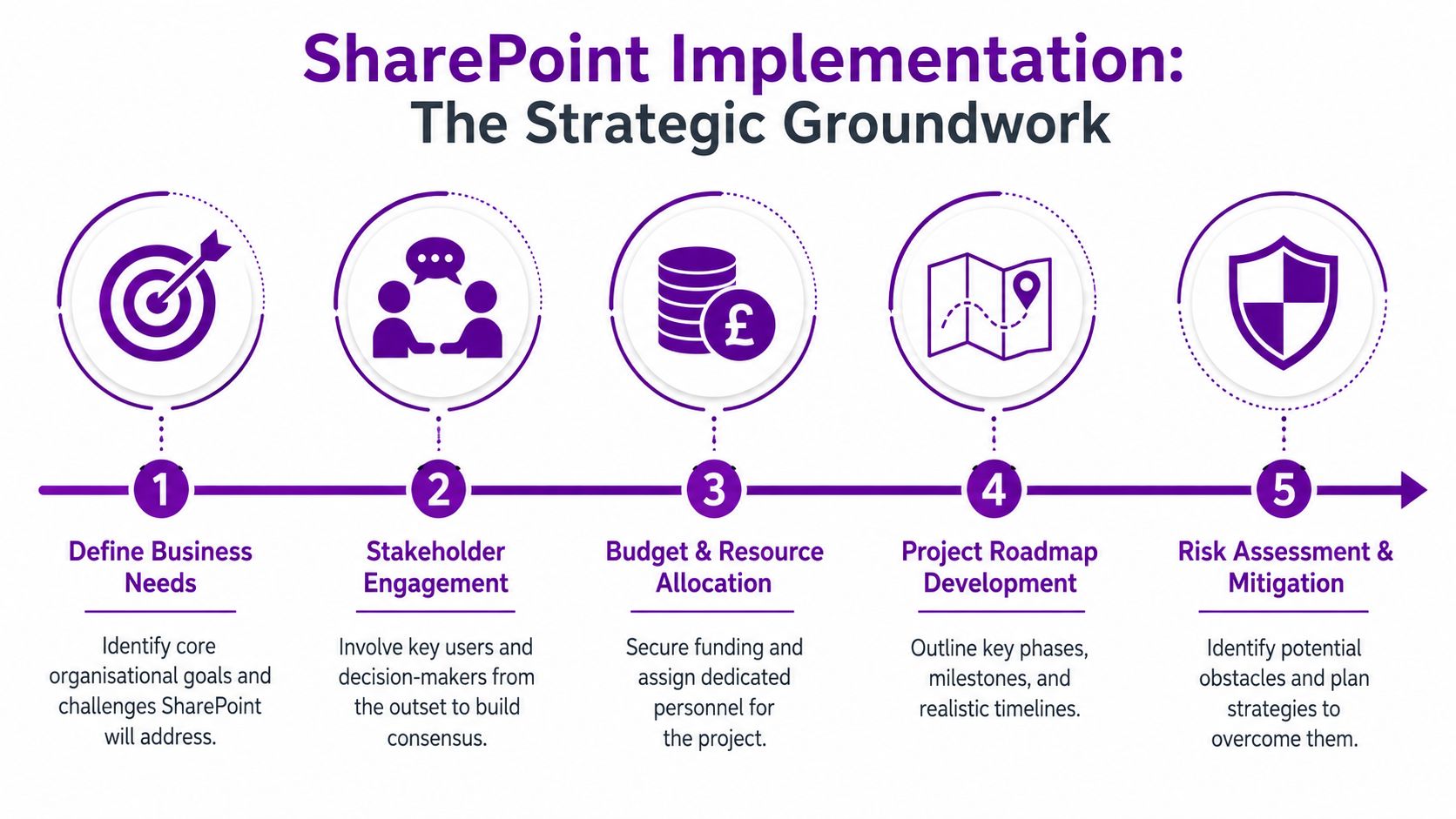
Start with business friction, not features
When a business says it needs SharePoint, the underlying need is usually something more specific:
- Document control is unreliable. Staff can't tell which file is current.
- Approvals are happening in email. Nobody can see status without chasing.
- Knowledge sits with individuals. When someone is off, work slows down.
- Departments have built their own workarounds. Files, lists and messages are spread across too many places.
If you skip this stage, you end up deploying a nice-looking intranet that doesn't fix any of the above. SharePoint then gets judged unfairly for problems caused by poor scoping.
Build a project team with real authority
A practical implementation team usually includes operational owners, not just IT. Finance should define how policies and records need to be handled. HR should explain the employee processes that need a front door. Department leads should identify the documents, approvals and pain points their teams deal with every week.
Use a short discovery process to pin down:
- Core use cases such as controlled document libraries, internal communications, onboarding, or policy management
- User groups including office staff, mobile workers, managers and administrators
- Content types such as contracts, policies, project files, forms and templates
- Constraints around permissions, retention, compliance and ownership
Practical rule: If a business process matters enough to move into SharePoint, the person who owns that process must help design it.
Map the current state before designing the future state
This is the point where many projects lose discipline. Teams jump into site creation because it feels like progress. It isn't. You need to understand how work currently moves through the business.
A useful discovery workshop asks questions like these:
| Area | Questions to ask |
|---|---|
| Documents | Where are files stored now, and who controls them? |
| Decisions | Which approvals rely on email or verbal sign-off? |
| Access | Who needs access, and who shouldn’t have it? |
| Search | What do staff struggle to find repeatedly? |
| Ownership | Who is responsible for keeping content current? |
Those answers shape everything later, from libraries and metadata to permissions and training.
Set a realistic roadmap
A working SharePoint implementation usually follows a structured sequence: education, analysis and requirements, information architecture, data mapping, then configuration, migration and training. That order matters. It stops the project becoming a technical exercise detached from business reality.
A sensible roadmap also protects the project from two common mistakes:
- Trying to migrate everything
- Trying to please every department in phase one
A better approach is to launch with a controlled scope, prove adoption, then expand. SharePoint is flexible enough to grow with the business. Your first release doesn't need to solve every problem.
Designing Your Information Architecture and Governance
Once the groundwork is done, the next challenge is structure. Its implementation determines if SharePoint projects become intuitive and scalable, or drift into the same mess the old shared drive created. Information architecture is the blueprint. Governance is the rulebook that keeps it usable.
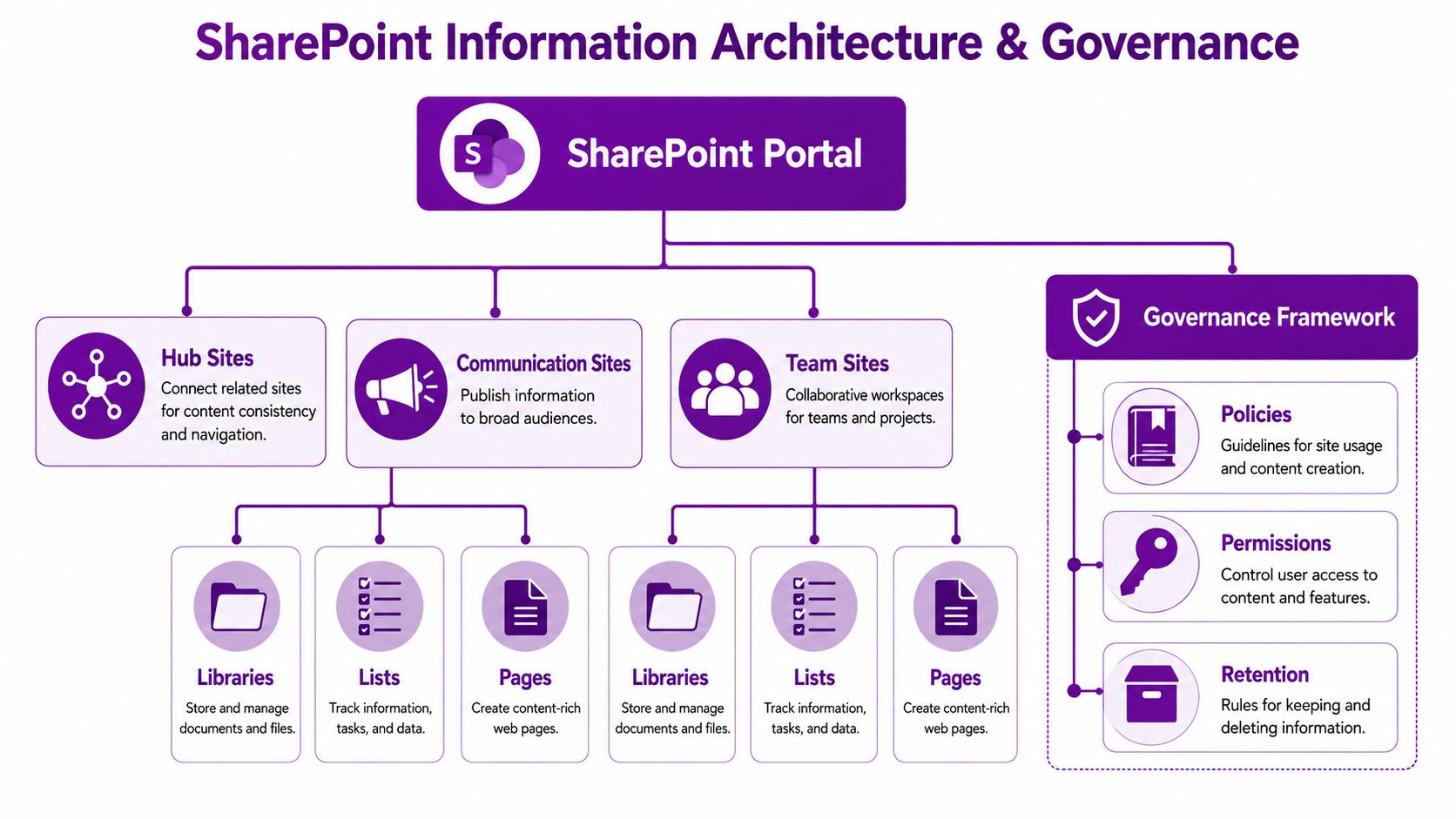
Think of SharePoint like a building
If you were fitting out a new office, you wouldn't label every room "General". You'd create spaces for specific purposes, control who can enter, and decide how records are stored. SharePoint needs the same thinking.
The core building blocks usually look like this:
- Hub sites connect related sites and give users a consistent navigation experience
- Communication sites publish information to a wider audience
- Team sites support active collaboration for departments, projects and working groups
Underneath those sit the things users interact with daily: libraries, lists and pages. The mistake isn't choosing the wrong feature. It's using all of them without a clear reason.
Good architecture reduces search time and bad habits
A poor setup pushes users back to email attachments and desktop folders. A well-planned setup makes the correct behaviour easier than the wrong one.
That means agreeing:
- Naming conventions for sites, libraries and files
- Metadata that helps users filter and search properly
- Ownership rules so content doesn't become stale
- Permission boundaries to stop access spreading too widely
For many businesses, this is also the stage where a broader governance framework needs to be documented properly. If you're tightening control over business data, these data governance policies are a useful reference point for deciding how ownership, standards and lifecycle rules should work in practice.
Governance isn't bureaucracy. It's what stops a new platform becoming another unmanaged filing system.
Decide what should be standard and what should vary
Not every department needs a bespoke design. In fact, too much variation usually creates support problems later. Standardise the parts that benefit from consistency, then allow local flexibility only where there is a clear operational reason.
A practical split looks like this:
| Standard across the business | Flexible by department |
|---|---|
| Site naming | Local page content |
| Permission model principles | Department-specific lists |
| Document retention approach | Team working areas |
| Template structure | Process-specific workflows |
Businesses often underestimate the value of formal information governance. If your environment includes regulated records, sensitive HR content or controlled documentation, a structured approach to information governance support helps keep SharePoint aligned with policy rather than working against it.
Write the rules down
Governance that lives in someone's head won't survive the first year. Put it into a short, usable document. It doesn't need to be legalistic. It does need to answer practical questions.
Include items such as:
- Who can request a new site
- Who approves permissions
- How long content should be retained
- What content belongs in SharePoint and what doesn't
- Who reviews inactive sites and outdated pages
That document becomes far more valuable than another diagram once the platform is live and people start making requests.
Executing a Seamless and Strategic Data Migration
Data migration is where many SharePoint projects become stressful. It shouldn't. Done well, migration is less like moving house and more like a controlled archive review. You don't carry every broken chair into the new place.
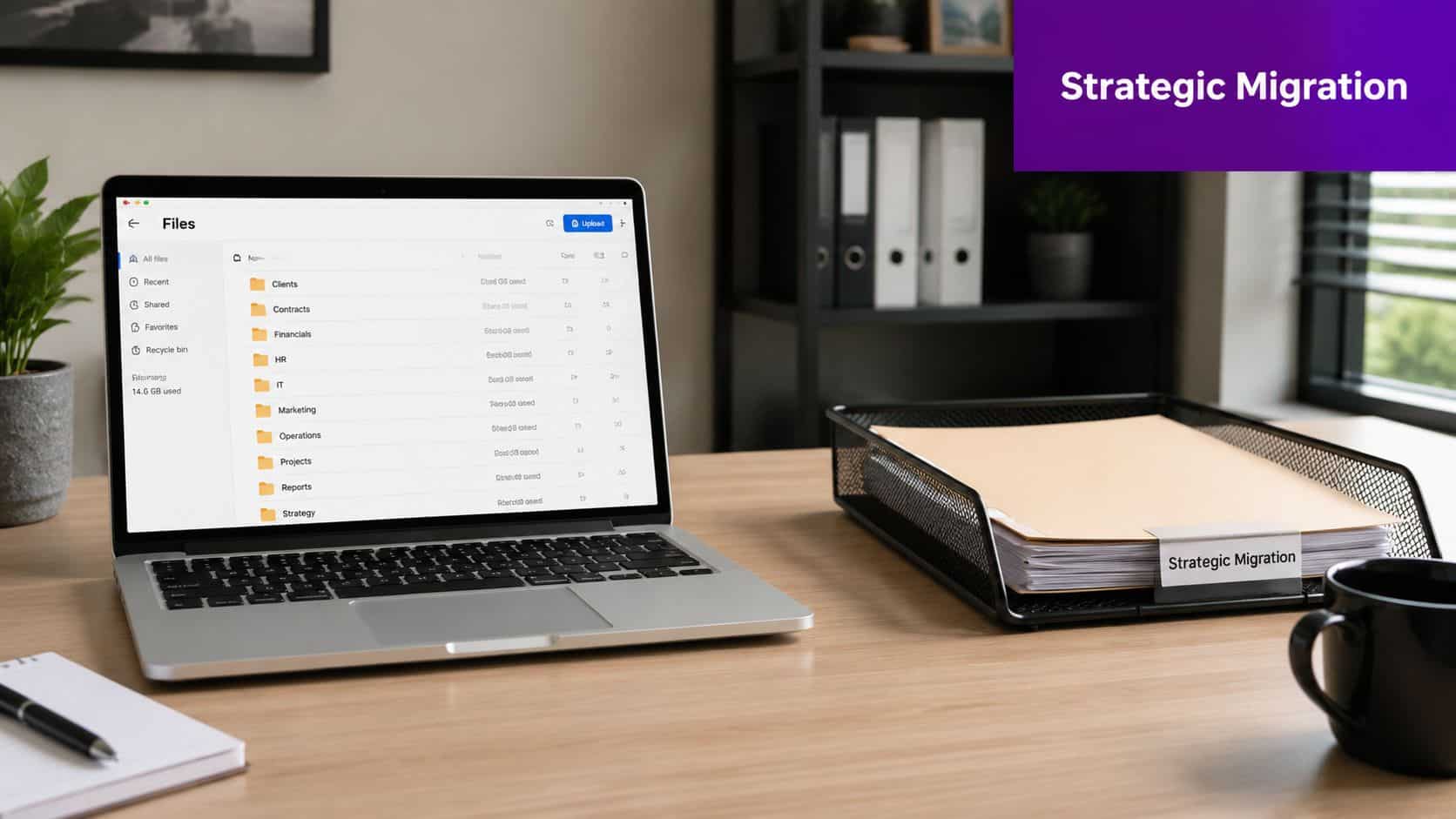
A typical mid-sized business starts with a shared drive that has grown for years. Top-level folders make sense. Subfolders don't. Duplicates exist everywhere. Nobody knows whether "Final", "Final v2", or "Final Use This One" is the correct document. If that entire structure is copied into SharePoint as-is, the platform inherits the same confusion.
Treat migration as a clean-up exercise
The best migrations begin with reduction. Archive what no longer has value. Remove redundant, obsolete and trivial content. Agree what should move, what should stay in archive, and what should be deleted according to your policies.
That discipline matters whether you're moving from:
- Legacy file shares, where the challenge is usually poor structure and duplication
- An older SharePoint environment, where the challenge is often site sprawl and outdated permissions
For teams planning the detail, these enterprise data migration best practices are a helpful reference for sequencing, validation and risk control.
Folder structures rarely survive unchanged
SharePoint offers capabilities beyond a file server. Instead of burying documents in nested folders, you can map content into libraries with metadata that makes it searchable and filterable.
A simple example:
| Old approach | Better SharePoint approach |
|---|---|
| Folder by year, client, document type | Library with client, year and document type as metadata |
| Access controlled at many folder levels | Access managed at site or library level where possible |
| Users browse manually | Users search, filter and create saved views |
That doesn't mean folders disappear completely. It means they stop doing all the work.
Use tools, but don't let tools define the project
Microsoft's SharePoint Migration Tool is often suitable for straightforward moves. Other tools may be more appropriate where there are complicated mappings, larger estates or staged migrations. The tool matters less than the design.
A migration tool can move files. It can't decide what the business should keep, how content should be classified, or whether users will understand the new structure.
For businesses trying to reduce disruption, it's worth reviewing a practical migration plan such as this guidance on data migration planning and delivery. The point isn't to move everything quickly. It's to move the right content cleanly, with ownership and validation built in.
Unlocking Potential with Customisation and Integration
A SharePoint site can be technically sound and still disappoint the business. That usually happens when it stores documents well enough, but never becomes part of the day-to-day work people need to complete.
SharePoint starts to deliver stronger returns when it supports the flow of work across Microsoft 365, rather than sitting alongside it as another place to visit. Microsoft 365 SharePoint supports real-time collaboration and business process automation, and it connects with tools many UK organisations already use, including Teams, OneDrive and Outlook, as outlined in Inflection Point's overview of Microsoft 365 SharePoint.
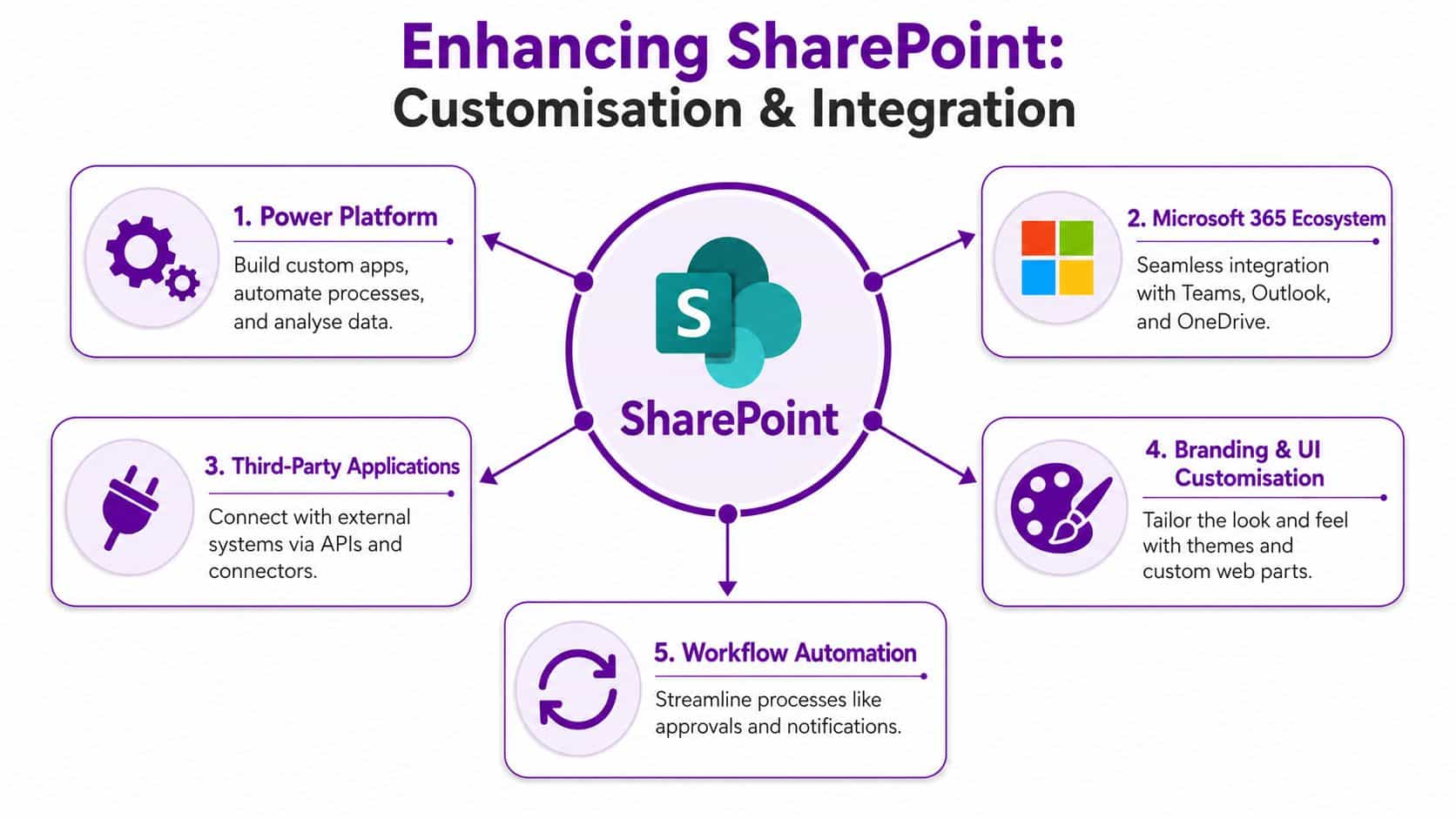
SharePoint should support work, not just store content
In a well-planned implementation, SharePoint holds the content, status and context behind routine business activity. A document library can trigger approval steps. A list can feed a Power App used by operations staff. A team site can surface live information inside Teams, where people are already working.
For most mid-sized organisations, the strongest integration opportunities fall into five areas:
- Power Automate for approvals, reminders and notifications
- Power Apps for simple forms and task-based applications
- Teams integration so staff can reach content without changing habits
- Outlook and OneDrive alignment for smoother document handling
- CRM and line-of-business integration where records need to move between systems
The best choice depends on the process. Automating everything is a mistake. High-volume, repeatable tasks usually benefit first. Exception-heavy processes often need tighter design work before automation helps.
Customisation should reduce effort
Poor SharePoint customisation often starts with visuals. Teams ask for branded homepages, custom layouts and polished landing pages before they have fixed search, permissions or content ownership. That approach looks good in a demo and causes friction in live use.
Useful customisation usually does one of three jobs:
- Cuts steps for common tasks
- Improves consistency by standardising data entry
- Removes manual chasing through workflow and status updates
A policy review process is a good example. Without automation, documents sit in inboxes, version control slips, and nobody is sure who is holding things up. With a properly designed approval flow built through Power Automate workflows for business processes, the reviewer is prompted, the status is visible, and the record stays with the document.
That is the difference between customisation that helps and customisation that creates support calls.
Integration decisions need business ownership
Many SharePoint projects drift off course. IT can connect systems. Business teams must decide what should happen when information moves between them.
If a sales team wants SharePoint and CRM linked, someone needs to define the purpose. Is the goal to reduce duplicate data entry, control proposal templates, improve handover to delivery, or all three? Each option affects permissions, data structure and support requirements. Without that clarity, integration adds complexity and staff work around it.
The projects that hold up best are usually the ones with a short list of high-value use cases, a named process owner, and clear rules for what stays standard.
AI readiness starts with process discipline
Many businesses now ask about Copilot before they have consistent content, sensible permissions or repeatable workflows. That order causes problems.
57% of leaders in UK organisations report a widening productivity gap between workers using AI and those who are not, according to Microsoft's research on the AI divide in the UK. In practice, AI performs better when SharePoint already reflects how the business works, who owns the content, and which records can be trusted.
For leadership teams, that is the strategic point. SharePoint customisation is not mainly a design exercise. It is a way to standardise decisions, reduce avoidable admin, and make adoption easier because the platform supports real work. That is often what separates a platform people tolerate from one they use.
Driving User Adoption Beyond the Launch Day
A SharePoint launch often looks healthy in week one. Staff attend the demo, managers share the link, and the homepage gets a spike in traffic. By week six, people are back in email attachments, old network folders and Teams chats because the new system has not become part of the job.

That is the point many businesses miss. SharePoint success is decided less by the go-live checklist and more by whether staff can see a clear reason to change their habits. Poor planning and weak user fit are what sink a large share of projects. Training helps, but it does not fix a platform that adds steps, hides useful content, or ignores how teams work.
Adoption depends on daily usefulness
Staff use systems that save time, reduce friction and make routine work easier to complete. If SharePoint feels like an extra destination rather than the place where work happens, usage falls quickly.
Frontline and operational teams are usually the first to expose that gap. They may be on shared devices, working across sites, or relying on mobile access between tasks. An intranet built for desk-based staff with long page journeys and document-heavy navigation rarely holds their attention.
Microsoft's guidance on driving adoption of Microsoft 365 reflects the same pattern. Adoption improves when change is tied to specific business scenarios, visible sponsorship and support within each team, not just a platform announcement from IT.
A stronger approach is to make SharePoint the obvious route to things people already need. That often includes:
- Leave and absence requests
- Policies and HR documents
- Operational notices
- Forms, checklists and handover records
- Department news surfaced inside Teams
Teams usually matters more than the homepage
In many mid-sized businesses, Teams is the actual starting point of the working day. Staff open it for chat, meetings, files and quick decisions. Expecting them to build a separate intranet habit from scratch creates unnecessary resistance.
SharePoint content works better when it appears inside the flow of work. A policy library linked in the right channel, an onboarding checklist pinned to a team, or a request form available where managers already collaborate will usually outperform a polished homepage that people forget to visit.
Workflow design also has a direct effect on adoption. Staff return to systems that help them get approvals, submit requests and track progress without chasing colleagues. Businesses that want SharePoint to support these repeatable tasks often get better results from Power Automate workflow support than from spending more time on visual design alone.
Training explains the system. Relevance gets people to use it.
Local champions reduce friction faster than central IT alone
A central project team cannot spot every issue after launch. Department champions can. They see where users get stuck, which shortcuts people create, and which pages are ignored because the labels make no sense outside IT.
The NHS England adoption guidance for Microsoft 365 points to the value of a champions network for change and adoption. In practice, this model works because support becomes local, visible and tied to real business tasks. It also gives IT better feedback before minor frustrations turn into workarounds.
For a mid-sized business, that does not need to mean a formal programme with heavy admin. A practical version is enough:
- Pick one contact in each department who understands the team's daily work
- Give them early visibility of changes and short guidance they can reuse
- Ask them which documents, forms or processes still send staff elsewhere
- Retire duplicate storage locations where there is a clear replacement
- Fix the high-friction issues quickly so confidence builds after launch
Managers matter here as well. If line managers still email attachments, keep local copies of forms, or bypass the agreed site structure, staff will follow that example. Adoption is as much a management discipline as a technical one.
A short practical explainer can help users understand what's possible once the basics are in place:
Ensuring Long-Term Value with Ongoing Support
Go-live isn't the finish line. It's the point where the environment starts proving whether it can support the business reliably over time. SharePoint needs ownership after launch because processes change, teams change, and content quality declines unless someone keeps watch.
When SharePoint is implemented with defined structure, governance and adoption strategies, the operational improvements can be measurable and lasting, as described in Brewster Consulting's analysis of real-world SharePoint use cases. The key point is simple. Value lasts when the environment is maintained, reviewed and improved, not left untouched.
Track usage and act on it
SharePoint gives administrators and hub site members the ability to view aggregated site usage data, including homepage visits and file access frequency, through the SharePoint site usage reporting tools from Microsoft Support. That's useful because it replaces guesswork with evidence.
If a policy site has low traffic, the issue may be discoverability. If a team area is heavily used but has weak metadata, search refinement may be the next priority. If pages are never opened, they may not deserve to stay on the homepage.
Ongoing support is part governance, part operations
A stable SharePoint environment needs regular attention in several areas:
- Permissions review so access stays appropriate as roles change
- Content ownership checks to remove stale or abandoned material
- Security and compliance review so the environment stays aligned with policy
- Workflow maintenance where automated processes need updates
- Change control for new site requests, new lists and new integrations
That work is often underestimated by businesses that treat SharePoint as a one-off project. In reality, the platform becomes part of operational infrastructure. If it's important, it needs managed attention.
Why external support often makes sense
Mid-sized organisations don't always want to carry SharePoint governance, support, enhancement and troubleshooting entirely in-house. That's reasonable. Internal IT teams are usually balancing helpdesk demand, cyber security, device management and wider Microsoft 365 administration.
External support isn't just a fallback for when something breaks. It can provide:
| Support need | Why it matters |
|---|---|
| Proactive review | Prevents drift in structure and governance |
| Specialist troubleshooting | Resolves configuration or integration issues faster |
| Enhancement planning | Keeps the platform aligned with business change |
| Adoption advice | Improves value after the initial rollout |
The businesses that get the strongest long-term return from SharePoint usually treat support as a continuation of implementation discipline. They review what users are doing, tidy what no longer works, and keep improving the environment in line with the business.
Conclusion and Your Next Steps
A successful SharePoint implementation isn't about creating more places to store documents. It's about building a working digital environment that reflects how your organisation communicates, collaborates and controls information. Get the planning right, design a sensible structure, migrate with discipline, connect SharePoint to the wider Microsoft stack, and focus hard on user adoption. That's what turns SharePoint into a useful business platform instead of another underused system.
If you're ready to improve your SharePoint environment or start from a stronger foundation, take the next step and get expert advice adapted to your organisation.
F1Group helps organisations across the East Midlands deliver practical Microsoft solutions that improve security, collaboration and day-to-day efficiency. If you need support with SharePoint implementation, Microsoft 365, data migration, workflow automation or ongoing managed IT services, F1Group can help. Phone 0845 855 0000 today or send us a message.