
A vulnerability doesn't become dangerous when a scanner finds it. It becomes dangerous when it sits in your environment long enough for someone else to find it first.
That risk is getting harder to ignore. The number of Common Vulnerabilities and Exposures has increased by 560% since 2016, and only 54% of critical vulnerabilities detected in 2024 were resolved within the same year according to this vulnerability management statistics summary. For a business in Nottingham, Lincoln, Leicester or Newark, that means the problem isn't a lack of alerts. It's deciding what matters, fixing it properly, and proving it stays fixed.
For organisations running Microsoft 365, Azure and Windows endpoints, vulnerability management should be part of daily operational discipline. It isn't just a security team concern. It affects uptime, cyber insurance conversations, tender responses, client trust, and whether your internal IT team spends its week patching the right systems or chasing noise.
Why Vulnerability Management Matters More Than Ever

The volume of known weaknesses is no longer the main story. The issue is that most businesses already know they have gaps, but many still don't close them fast enough.
A practical definition helps. Vulnerability management is the ongoing process of finding security weaknesses across your systems, deciding which ones matter to your business, fixing them, and checking that the fix worked. It covers laptops, servers, cloud workloads, user accounts, Microsoft 365 configurations, Azure services, third-party applications, and the places those systems connect.
Why directors and IT managers should care
If you run a growing business in the East Midlands, this lands in three places quickly:
- Operational risk. An unpatched endpoint, exposed service, or weak Azure setting can interrupt business systems and force staff into manual workarounds.
- Commercial risk. Clients increasingly ask how you manage vulnerabilities, patching, and cloud security before they sign contracts.
- Reputational risk. A breach caused by a known weakness is much harder to explain than an advanced attack nobody could have predicted.
The common mistake is treating vulnerability management as a monthly scan and a spreadsheet. That doesn't hold up in a Microsoft environment where devices move on and off site, staff adopt new SaaS tools, Azure resources appear quickly, and changes in configuration can introduce risk without anyone installing a single new application.
Practical rule: If your team can't see every business-critical asset and its current exposure, you don't have vulnerability management. You have partial visibility.
There's also a data handling angle that often gets overlooked. Vulnerability management reduces the chance of exposure, but it should sit alongside a wider plan to secure your sensitive online data, especially where Microsoft 365 holds client files, mailbox content, contracts, and personal information.
What works and what doesn't
What works is routine, ownership, and follow-through. Security teams that do this well usually have a defined patching process, named system owners, and clear rules for what gets fixed first.
What doesn't work is relying on severity labels alone, scanning without remediation, or assuming that Microsoft licensing on its own means the environment is safe. The tools are strong. The programme around them is what makes them useful.
The Six Stages of an Effective Vulnerability Management Cycle
Vulnerability management works best when you treat it like a building security routine. You don't inspect a property once, fit one lock, and assume the job is done forever. You check every entrance, test alarms, fix weak points, and repeat that cycle as the building changes.
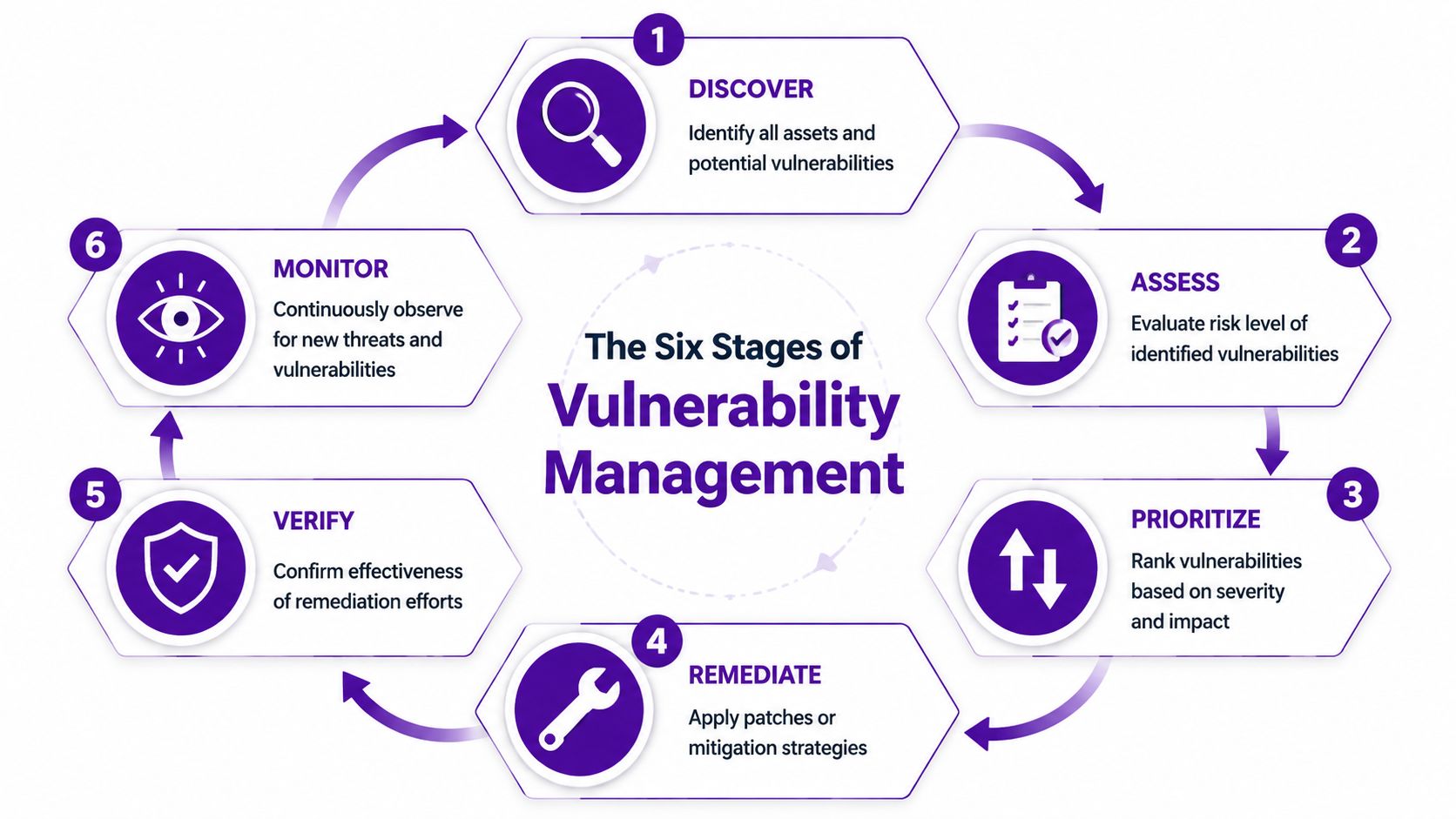
Discover
Start with visibility. You need an inventory of endpoints, servers, cloud workloads, applications, identities and internet-facing services. In Microsoft environments, that usually means combining data from Intune, Microsoft Defender, Entra ID, Azure, and your CMDB or asset register if you have one.
This stage often fails because businesses only track what IT bought centrally. They miss old servers, test subscriptions, unmanaged devices, and software installed outside procurement.
Assess
Once you've found the assets, assess the weaknesses tied to them. That includes missing patches, unsupported software, insecure configurations, weak exposure controls, and risky account permissions.
A good assessment asks more than “How severe is this?” It asks:
- Is the asset business-critical
- Is it internet-facing
- Does it store sensitive data
- Is there an available mitigation if patching can't happen immediately
Prioritise
Not every vulnerability deserves the same response. A medium-severity issue on an externally exposed system supporting finance or operations may need quicker action than a higher-scoring issue on an isolated test machine.
Many teams lose time. They try to clear the list in order instead of tackling the items that create the highest real-world risk.
Focus first on vulnerabilities attached to important assets, exposed services, privileged accounts, and known weak configurations in cloud platforms.
Remediate
Remediation means fixing the issue in a controlled way. That might involve patching software, changing Azure policy settings, disabling insecure legacy protocols, removing unused local admin rights, or applying compensating controls while a permanent fix is planned.
For Microsoft estates, remediation often spans multiple teams. Desktop support may patch endpoints. Infrastructure may handle servers. A cloud engineer may correct Azure posture. Application owners may need to test updates before release.
A strong remediation workflow needs tickets, owners, deadlines, and escalation. Without that, findings become background noise. For organisations that want an independent view of how exploitable their estate really is, penetration testing in the UK is often a useful complement to scanning because it shows how separate weaknesses can chain together in practice.
Verify
Never assume the patch or change solved the problem. Rescan. Recheck the configuration. Confirm the vulnerable version has gone. Validate that the mitigation didn't break something or create a new gap elsewhere.
Verification matters because failed patches, incomplete deployments, and policy drift are common. Consequently, a lot of “closed” tickets turn out not to be closed at all.
Report
Leadership doesn't need raw scanner output. They need a clear picture of exposure, risk trend, blocked issues, and what's overdue.
Useful reporting usually covers:
- What was found
- What has been fixed
- What remains open
- Where the blockers sit
- Which business services carry the most risk
The best reports help managers make decisions. They don't just dump technical detail.
Measuring What Matters Vulnerability Management KPIs
A vulnerability programme can look busy and still perform badly. Long lists of findings, lots of tickets, and weekly scans don't mean risk is reducing. You need a handful of metrics that tell you whether the programme is actually working.
The gap in UK small business coverage is a good example. The 2024 UK Cyber Security Breaches Survey reports that only 32% of small businesses conduct regular vulnerability scans, compared to 58% of larger firms, and 39% of UK breaches involved unpatched vulnerabilities according to this summary of vulnerability management metrics. That points to a basic truth. If you aren't scanning consistently, you won't know what needs fixing. If you know but don't remediate, the scan has limited value.
The KPIs worth tracking
Most SMBs don't need a complicated dashboard. They need a short set of measures that can be reviewed monthly and acted on quickly.
| KPI | What It Measures | Good Target for an SMB |
|---|---|---|
| Scan Coverage | How much of your known estate is being scanned regularly | As close to full coverage as operationally possible across endpoints, servers, and cloud assets |
| Time to Remediate | How long it takes to fix a vulnerability after detection | Critical issues fixed within a defined internal SLA, with faster action for internet-facing assets |
| Remediation Rate | The proportion of identified vulnerabilities that are closed over a reporting period | A consistent downward trend in open critical and high-risk items |
| Repeat Findings | Whether the same issues keep returning after closure | Very low recurrence, with root cause review where issues reappear |
| Asset Ownership Coverage | Whether each asset or service has a named owner responsible for remediation | Named ownership for all business-critical systems |
What good measurement looks like
The best KPI sets are tied to action, not vanity reporting. If your time to remediate is slipping, you should be able to explain why. Change freeze. Testing backlog. Vendor dependency. Poor asset ownership. Unsupported software. Each blocker needs a response.
A common mistake is over-measuring severity categories and under-measuring process quality. In practice, these questions are often more useful:
- Are scans reaching all intended systems
- Are critical findings assigned on the same day
- Do teams have patching SLAs they can meet
- Are cloud configuration issues being tracked alongside software flaws
A dashboard should help you decide what to do next. If it only proves you have a lot of vulnerabilities, it isn't doing enough.
What SMBs should avoid
Avoid setting targets that look neat in a board pack but ignore operational reality. For example, aiming to patch every system immediately sounds sensible, but some servers need maintenance windows, testing, or supplier sign-off. The better approach is risk-based SLAs with documented exceptions.
Also avoid mixing everything into one number. Endpoints, servers, Azure resources and Microsoft 365 configuration issues move at different speeds. If you lump them together, the slowest area stays hidden.
Using Microsoft Tools for Vulnerability Management
For businesses already invested in Microsoft 365 and Azure, the most practical approach is usually to build around the Microsoft security stack you already own or can extend. That gives you tighter integration, clearer identity context, and fewer blind spots between endpoint, email, cloud and user risk.
The need is obvious. The 2025 UK Cyber Security Breaches Survey reveals that 42% of SMEs experienced breaches linked to cloud misconfigurations, with Microsoft 365 cited in 28% of cases, yet only 15% of affected firms had proactive vulnerability scanning integrated with their M365 stack. For UK organisations adopting cloud services quickly, that's a direct warning that generic scanning alone won't cover the problem.

Defender for Endpoint and Defender Vulnerability Management
Microsoft Defender for Endpoint gives you visibility into device posture, software exposure, security recommendations, and risky behaviours across managed endpoints. Defender Vulnerability Management adds the layer that helps security and IT teams understand which software weaknesses and configuration issues matter most across those devices.
That matters because a Windows estate rarely fails in one dramatic place. More often, risk builds gradually through outdated applications, missing browser updates, unsupported tools, weak local admin control, and inconsistent device hardening.
Useful use cases include:
- Software exposure tracking across desktops and laptops
- Security recommendations linked to missing fixes or insecure settings
- Prioritisation that combines endpoint context with broader security signals
- Workflow handoff into IT operations for patching and configuration work
Defender for Cloud and Azure posture
For Azure, Microsoft Defender for Cloud is where vulnerability management becomes more than patching. It helps surface insecure configurations, workload issues, missing protections, and policy gaps across subscriptions and resources.
That's especially important for businesses with hybrid estates, where a problem may sit in an Azure virtual machine, a storage configuration, an over-permissive identity role, or a service that nobody meant to expose publicly.
The practical benefit is that you can see cloud risk in the same operating rhythm as endpoint risk, instead of treating Azure as a separate world.
If your Microsoft 365 environment is monitored but your Azure tenant is not governed with the same discipline, your vulnerability management programme has a blind spot.
How the stack works in the real world
A sensible Microsoft-led setup usually looks like this:
- Intune and Entra ID maintain device and identity control.
- Defender for Endpoint surfaces software and endpoint weaknesses.
- Defender for Cloud flags Azure posture and workload issues.
- Security operations or IT operations assign remediation through service management workflows.
- Validation scans and review meetings confirm closure and track recurring problems.
This is also where one specialist partner can help. Alongside Microsoft-native tooling, organisations sometimes use a provider such as F1Group's security risk management services to align scanning, remediation planning, cloud governance and reporting into one operational model.
What doesn't work in Microsoft estates
The weak approach is bolting on a scanner and assuming it understands tenant configuration, identity risk, Azure policy, endpoint exposure and administrative drift. In Microsoft environments, those issues interact. Your tools and your process need to reflect that.
When to Partner with a Managed Security Provider
Some organisations should run vulnerability management internally. If you've got a mature security function, clear ownership across infrastructure and cloud, disciplined change control, and people who can triage findings properly, in-house can work well.
Many East Midlands businesses aren't in that position. Their IT team may be strong, but it's generalist. The same people looking after Microsoft 365, Azure, laptops, networking, support tickets, procurement and supplier issues are also expected to stay on top of vulnerability triage, threat context, remediation tracking and reporting. That's a big ask.

The point where internal teams start to struggle
The pressure is increasing. NCSC's Q4 2025 Threat Intelligence Report notes a 55% rise in AI-enhanced attacks targeting East Midlands firms. Over-reliance on manual prioritisation wastes 40% of IT time, while AI-powered workflows can significantly cut risk and costs. That doesn't mean every business needs an AI-heavy security stack tomorrow. It does mean manual spreadsheets, email chasing and ad hoc patch reviews won't scale well.
A managed security partner can help when:
- Your team scans but doesn't remediate fast enough
- Azure and Microsoft 365 security is split across several owners
- Critical findings sit open because nobody owns the business decision
- Leadership wants reporting that links technical risk to operational impact
- You need external expertise without building a larger internal security function
What a good partner actually changes
The value isn't just tool access. It's operating discipline.
A strong managed partner will usually bring:
- Consistent review cadence so findings don't drift
- Triage experience to separate urgent exposure from low-value noise
- Microsoft-specific knowledge across Defender, Azure, identity and endpoint controls
- Escalation structure when remediation is blocked by business dependency or lack of ownership
Good outsourced vulnerability management doesn't replace your IT team. It gives them cleaner priorities, better context, and fewer wasted cycles.
If you're weighing that route, look for a provider that can support vulnerability operations as part of broader managed security services, not just run scans and email a report. The difference matters. Reporting without remediation support tends to create backlog, not resilience.
Your Vulnerability Management Checklist for 2026
A quick self-check usually tells you whether your programme is solid or mostly aspirational. If several answers below are “no”, the issue probably isn't your toolset. It's process, ownership, or consistency.
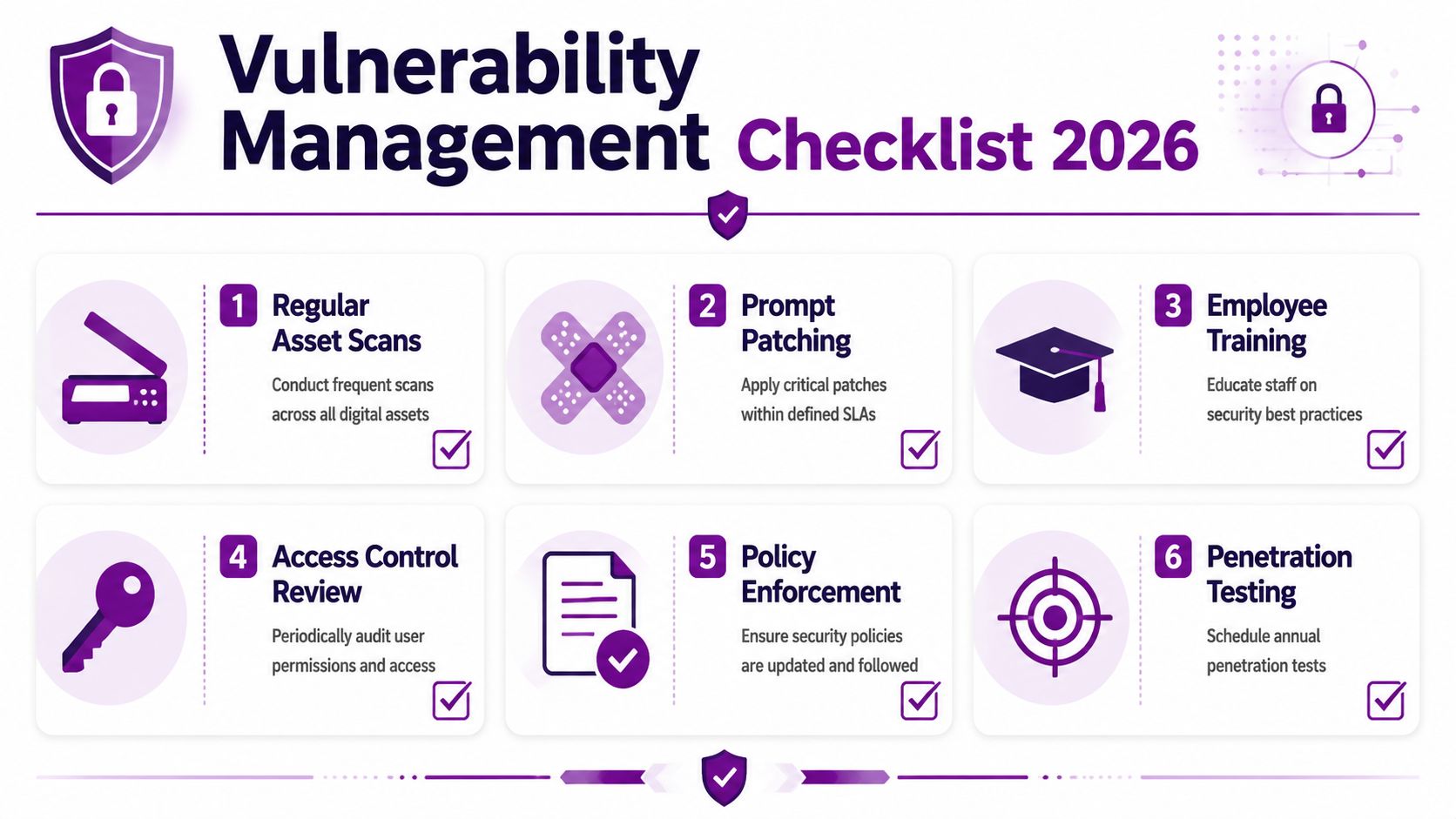
Questions worth asking now
- Do you have a current inventory of endpoints, servers, business applications, Azure resources and Microsoft 365-connected services?
- Do you scan regularly across both on-premises and cloud assets, not just user devices?
- Do you have defined patching SLAs for critical and high-risk issues?
- Does every business-critical system have a named owner who can approve or drive remediation?
- Do you track configuration risk in Azure and Microsoft 365, not just missing software patches?
- Do you verify fixes with rescans or technical review before closing tickets?
- Do you report exposure trends in a way that senior management can understand?
- Do you have a plan for exceptions where patching isn't immediately possible?
- Do you test your assumptions through periodic security review or penetration testing?
- Do your IT and security teams use the same workflow for prioritisation, action and follow-up?
What a healthy answer pattern looks like
You don't need every control to be perfect. You do need a working rhythm. The businesses that manage vulnerability well usually know what they own, know what matters most, and know who is responsible when a serious issue appears.
If that isn't true today, the right next step is usually to simplify, not complicate. Fewer tools. Clearer ownership. Tighter SLAs. Better Microsoft integration.
Take Control of Your Cyber Security Posture
Vulnerability management is one of those areas where maturity shows up in everyday habits. Asset visibility. Clear ownership. Sensible prioritisation. Fast remediation. Verification. Reporting that helps decisions get made.
For Microsoft-led organisations, the practical route is usually clear. Use the Microsoft stack properly, align endpoint and cloud visibility, and build a repeatable process that your IT team can maintain. If you need extra perspective on securing Microsoft 365 alongside that work, this guide to actionable M365 security guidance is a useful companion read.
The important point is that vulnerability management isn't a one-off project. It's an operating discipline. Businesses that treat it that way tend to make better security decisions, reduce avoidable exposure, and waste less time reacting to issues that should have been handled earlier.
If your organisation is already on Microsoft 365, Azure, Defender or a hybrid estate, the opportunity is to turn those tools into a working security programme rather than a collection of dashboards.
If you want help reviewing your vulnerability management approach across Microsoft 365, Azure and Defender, speak to F1Group. Phone 0845 855 0000 today or Send us a message.