
If you’re running a business in Nottingham, there’s a good chance your IT feels slightly patched together. A bit of on-site kit in the office. Microsoft 365 for email and files. Maybe Azure for a newer system. Perhaps an older accounts package or line-of-business server that nobody wants to touch because it still does an important job.
On paper, everything works.
In reality, staff lose time to slow logins, printers drop off the network, remote access behaves oddly, backups are assumed to be fine rather than checked, and every cyber security headline raises the same uncomfortable question. If something serious happened tomorrow, would the business keep moving?
That gap between “it mostly works” and “it’s properly managed” is where many small and mid-sized firms get stuck. They’re not careless. They’re busy. Technology grows in layers over time, and eventually nobody has a clear view of the full picture.
That’s where IT infrastructure management comes in. In plain English, it means organising, monitoring, securing and improving the systems your business depends on every day, so they support growth instead of getting in the way.
Is Your IT Holding Your Business Back
A typical East Midlands business owner rarely wakes up thinking about infrastructure. They think about customers, margins, staffing, delivery dates and cash flow. IT only gets attention when it causes friction.
A finance manager can’t access a shared folder before month-end. A sales team loses time because the CRM is slow over VPN. A director approves Microsoft licences, cloud services and support costs, but still isn’t sure whether the business is secure. None of these issues look dramatic on their own. Together, they create drag.
That drag matters because it affects how people work. When staff don’t trust systems, they invent workarounds. Files get copied locally. Password habits get worse. Updates are postponed. A new cloud tool is bought to solve one problem and creates three more because it doesn’t fit the rest of the environment.
Poor IT rarely fails all at once. More often, it chips away at time, confidence and control.
For many firms, the turning point comes when growth exposes the cracks. Opening another location, hiring more remote staff, adopting Copilot, moving data into Azure, or integrating a legacy application with Microsoft 365 all add complexity. If no one is managing that complexity properly, the business becomes slower at the exact moment it needs to become more capable.
So when people ask what is it infrastructure management, the practical answer is this. It’s the difference between constantly reacting to IT issues and running technology as a stable business asset.
What business owners usually notice first
- Operational friction: Staff spend too long waiting, retrying, calling support or double-checking whether a system is available.
- Security anxiety: You know cyber risk is real, but you’re unsure whether patching, access controls and backups are under control.
- Growth limits: New software, new locations and new users become harder to add because older systems weren’t built with change in mind.
Those problems don’t always mean you need to replace everything. Often, you need better management of what you already have.
The Blueprint of Your Digital Business Core Components
The easiest way to understand IT infrastructure is to compare it with a commercial building.
Your business premises need foundations, wiring, heating, locks, rooms, equipment and utility services. If any one of those is neglected, the building becomes difficult, unsafe or expensive to use. Your IT estate works the same way.
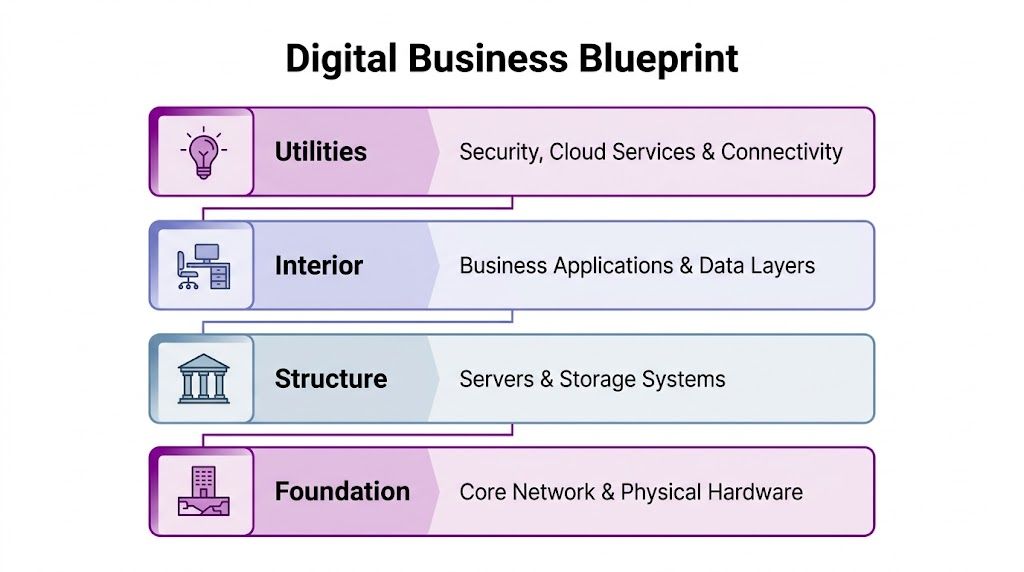
Foundation means network and physical hardware
The network is your building’s wiring and plumbing. It connects everything. That includes switches, Wi-Fi, routers, internet connectivity and the cabling or wireless links that let people reach systems and data.
Physical hardware sits here too. Laptops, desktops, firewalls, meeting room devices and office networking kit all form the base layer. If the foundation is weak, nothing above it feels reliable.
For a Nottingham firm with a mix of office and remote staff, this often shows up as uneven Wi-Fi, poor connectivity to cloud apps, or devices that were bought at different times with no consistent standards. A well-designed estate doesn’t just “connect”. It gives people predictable access wherever they’re working.
Structure means servers and storage
If the network is the wiring, servers and storage are the plant room. They do the heavy lifting behind the scenes.
Some businesses still rely on an on-site server for a legacy application, file shares or print services. Others use Azure-hosted servers or a hybrid model with some services in the cloud and some kept locally for practical reasons. Storage includes where your business data lives and how it’s organised, protected and recovered.
This is where confusion often starts. Many business owners hear “move to the cloud” and assume local servers disappear overnight. In reality, plenty of firms need a staged approach. A useful explanation of a tailored IT infrastructure solution can help show how different environments are shaped around real operational needs rather than a one-size-fits-all model.
Interior means applications and data
Inside the building, you’ve got desks, meeting rooms, stock areas and working spaces. In IT terms, that’s your business applications and data.
This layer includes Microsoft 365, Dynamics 365, finance systems, specialist industry software, reporting tools and the data that moves between them. People usually interact with this layer first, so they often assume it is the infrastructure. It isn’t. It sits on top of the lower layers.
That matters because when an application runs badly, the cause may be somewhere else. It could be identity settings, storage performance, network bottlenecks or device issues. Good infrastructure management helps you trace the actual cause instead of treating every symptom as a separate fault.
For firms trying to track software, hardware and licences more clearly, proper asset visibility is part of the picture too. F1Group’s overview of IT asset management is a useful companion topic because infrastructure management and asset management overlap in day-to-day operations.
Utilities mean cloud, security and identity
Every building depends on utilities and access controls. In modern IT, that means cloud services, identity and security.
Cloud services such as Microsoft 365 and Azure are a bit like external utility feeds. You consume what you need, but they still have to be configured properly and governed well. Identity is how users prove who they are and what they’re allowed to access. Security covers the locks, alarms, cameras and rules of the digital estate.
A simple way to think about this layer is to ask three questions:
| Layer | Business question | Example |
|---|---|---|
| Cloud | Where does the service run? | Microsoft 365 email, Azure virtual servers |
| Identity | Who can access it? | Staff sign-in, permissions, conditional access |
| Security | How is it protected? | Patching, endpoint protection, backups, monitoring |
Practical rule: If you can’t quickly answer what you have, where it is, who can access it and how it’s protected, your infrastructure probably isn’t being managed tightly enough.
Key Processes That Keep Your Business Running Smoothly
Infrastructure isn’t just a collection of parts. It’s a set of ongoing disciplines. You don’t manage IT by buying hardware once and hoping for the best. You manage it through repeatable processes that keep the environment healthy.
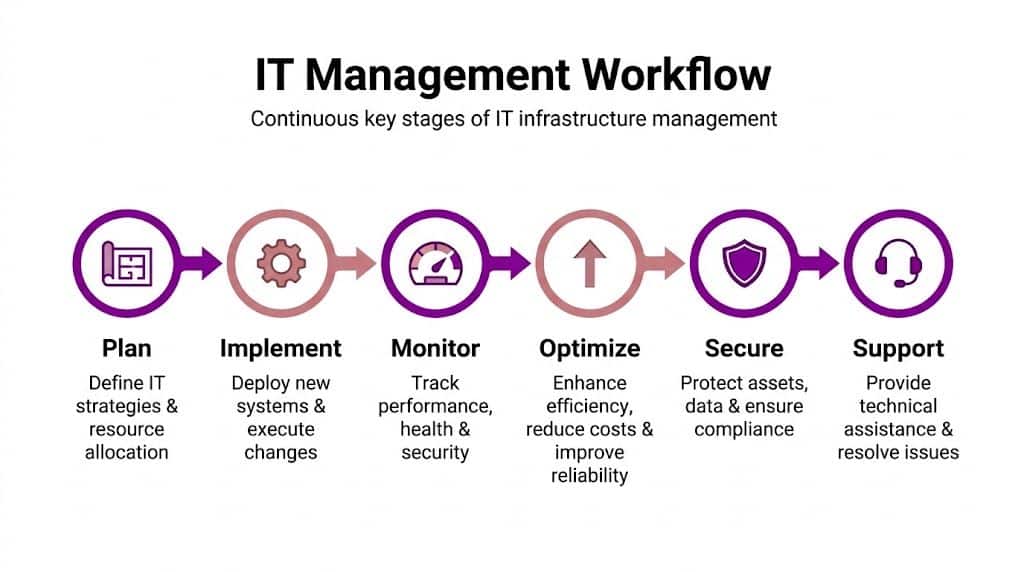
Monitoring catches small issues before they become outages
Monitoring is the equivalent of a dashboard in a vehicle. It tells you what’s running normally, what’s under strain and what needs attention now.
That includes server health, storage use, failed backups, unusual login activity, internet performance and device issues. Without monitoring, teams usually discover problems when staff complain. By then, the issue has already affected productivity.
A good example is a file server or Azure workload gradually running out of capacity. Left unnoticed, it can slow critical applications at exactly the wrong time. According to TechTarget’s explanation of DCIM, Data Center Infrastructure Management tools enable proactive capacity planning by centralising data from power, cooling, and server systems. That helps IT managers anticipate growth and avoid overload in hybrid Azure environments.
Patching and maintenance close obvious gaps
Most cyber incidents don’t happen because a company ignored IT completely. They happen because basic maintenance wasn’t consistent.
Patching means applying updates to operating systems, applications, firmware and security tools. It sounds routine because it is. That’s the point. Routine tasks prevent avoidable exposure.
For a smaller business, this can be harder than it sounds. You may have remote laptops, legacy software with compatibility concerns and different update habits across departments. A proper process balances risk and practicality. It tests, schedules and verifies updates rather than relying on ad hoc effort.
Incident management creates order during disruption
When systems fail, the biggest risk is often confusion. Who owns the problem? What changed? Is it isolated or widespread? Should staff stop using the system?
Incident management gives the business a calm structure for responding. The issue is logged, prioritised, investigated, communicated and resolved in a consistent way. That’s very different from someone rushing around trying random fixes.
A related discipline is resilience planning. If your internet goes down, your server fails, or encrypted files have to be restored, recovery should follow a plan rather than guesswork. A practical reference point is this guide to a disaster recovery plan for IT, which helps frame what a recoverable environment looks like.
Change management protects the business from well-meant mistakes
Many outages come from change, not neglect. A firewall rule is adjusted. A licence is removed. A legacy system is connected to Microsoft 365 in a hurry. Something breaks.
That’s why change management matters. Not every change needs a committee meeting, but every meaningful change should be assessed, documented and implemented safely.
A simple workflow often includes:
- Review the reason: What business need is driving the change?
- Check dependencies: Which users, systems or integrations could be affected?
- Test first where possible: This matters especially with hybrid systems and older applications.
- Schedule carefully: Avoid making risky changes during payroll runs, quarter-end or major customer activity.
- Record the outcome: If the change causes trouble later, someone needs a trail to follow.
Smooth IT isn’t accidental. It comes from doing ordinary tasks consistently well, especially when nobody notices them.
Essential Tools for Modern IT Management
The processes above need tools behind them. Otherwise, you’re relying on memory, spreadsheets and inbox threads. That might work for a very small setup, but it quickly breaks down once you’ve got multiple sites, hybrid cloud services and a mix of old and new systems.
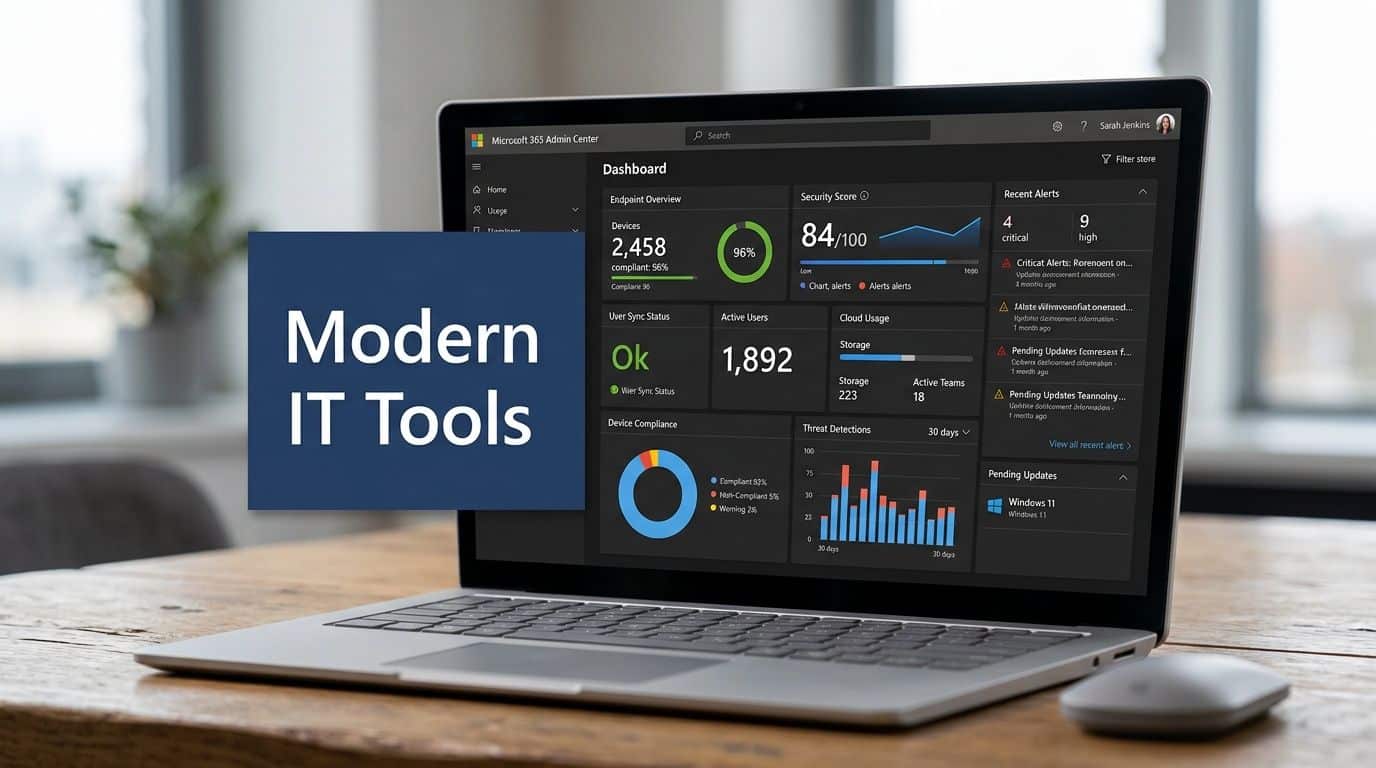
Microsoft tools often form the core
For many UK SMBs, the management stack already starts with Microsoft. They just don’t always think of it that way.
Microsoft 365 provides more than email and documents. Its admin tools help manage users, devices, access policies and collaboration settings. Azure extends that into cloud infrastructure, identity, backup options, virtual machines, networking and broader governance. If you’re using Dynamics 365, Power Platform or Copilot, those services depend on the same underlying discipline around identity, permissions, security and data handling.
That’s why configuration matters so much. Atlassian notes that robust configuration management through automated monitoring and patch management tools is critical for security. For organisations using Microsoft 365 and Azure, this helps prevent security gaps, supports compliance and reduces mean time to recovery when incidents happen.
Specialist platforms add visibility and control
Microsoft’s ecosystem is powerful, but many businesses also need dedicated tools for deeper operational control.
A mature setup often includes:
- Monitoring platforms: These watch devices, servers, applications and alerts in real time.
- Patch management tools: These automate updates and highlight exceptions that need attention.
- Backup and recovery systems: These confirm data is recoverable, not just copied somewhere.
- IT service management tools: These log incidents, service requests and changes so support becomes trackable.
- Security tooling: This can include endpoint protection, identity controls, vulnerability review and alerting.
The key point is integration. A disconnected toolset creates blind spots. A joined-up one gives your team a clearer operational picture.
Tools should match the business, not the other way round
A manufacturer in Leicester with shop-floor systems won’t need exactly the same setup as a charity in Lincoln or a professional services firm in Nottingham. The right toolset depends on risk, regulation, internal capability and the shape of your existing systems.
One option some organisations use is a managed support partner that works across Microsoft technologies and daily operations. F1Group, for example, provides support across Microsoft 365, Azure, Dynamics 365, Power Platform and cyber security for East Midlands organisations. In practice, that kind of model can help when internal teams need help joining together cloud services, support workflows and legacy platforms.
The best tool isn’t the one with the most features. It’s the one your team can operate consistently and use to make better decisions.
The Business Case for Proactive Infrastructure Management
Technology conversations often stall because they sound technical when the decision is commercial. The question isn’t whether infrastructure management is interesting. It’s whether poor management costs the business more than proper management.

Security failures are expensive and public
The UK has already seen the consequences of weak IT management at scale. The Turing Institute’s critical infrastructure report notes that the 2017 WannaCry attack cost the NHS £92 million and disrupted over 200,000 appointments. That’s an extreme example, but it’s useful because it shows how an IT issue quickly becomes an operational and financial issue.
For a smaller business, the same principle applies. If systems are poorly maintained, access is loosely controlled and recovery arrangements are vague, one incident can interrupt sales, service delivery and customer confidence at the same time.
Reliability improves efficiency
Well-managed infrastructure doesn’t just prevent disasters. It makes ordinary working life smoother.
Staff can access systems consistently. New starters are onboarded faster because accounts and devices follow a standard. Remote users connect without awkward workarounds. Business leaders spend less time chasing support and more time making decisions.
That operational benefit shows up in the data. UK businesses with effective IT infrastructure management report 45% fewer outages, according to the same Turing Institute report.
Here’s a short explanation of why that matters in boardroom terms:
| IT outcome | Business effect |
|---|---|
| Fewer outages | Less lost staff time and less disruption to customers |
| Better control of access | Lower risk around sensitive business data |
| Cleaner systems and standards | Easier growth, simpler support, fewer surprises |
A short video can help make that connection clearer in practical terms.
Scalability becomes realistic
Growth is where weak infrastructure often gets exposed. Adding more users, cloud tools, reporting needs or automation sounds straightforward until older systems, inconsistent permissions and unclear ownership get in the way.
Proactive management changes that. It gives the business a stable base to adopt Azure services, modernise around Microsoft 365, integrate Copilot sensibly and support expansion without reinventing core systems every time something changes.
A Practical Roadmap for East Midlands SMBs
Most businesses don’t need a grand transformation plan on day one. They need a sensible sequence. If you’re trying to answer what is it infrastructure management in a practical way, the answer is this. It starts with understanding your current estate and making better decisions from there.
Start with what you’ve actually got
Many firms underestimate how fragmented their environment has become. Devices were purchased at different times. Old servers still support niche processes. Microsoft 365 is live, but nobody has reviewed permissions properly. Azure may be in use, yet costs, resilience and identity design haven’t been looked at together.
So the first step is a simple audit.
- List your systems: On-site servers, cloud services, endpoints, line-of-business applications and network equipment.
- Map dependencies: Which systems rely on which others?
- Check ownership: Who looks after each service, and who approves change?
- Review access: Who has admin rights, and who probably shouldn’t?
This exercise often reveals that the biggest issue isn’t one faulty product. It’s lack of visibility.
Tie IT decisions to business goals
Once the current picture is clearer, the next question is business-led. What does the company need IT to do over the next few years?
That might mean supporting hybrid work properly, integrating a legacy system with Azure, enabling better reporting from Dynamics 365, reducing cyber risk, or preparing for expansion into another site. Without that business context, IT improvements become random upgrades.
A useful test is simple. If you can’t explain an IT change in terms of security, efficiency, compliance or growth, it probably isn’t the right priority yet.
Focus early on the awkward hybrid gaps
Many East Midlands firms hit trouble. A cloud strategy sounds simple until it meets a legacy application, an ageing file server or an old authentication method.
That challenge is well documented. A 2025 TechUK survey referenced here found that 45% of East Midlands firms using Microsoft 365 and Azure struggle with on-premise to cloud migrations, leading to 20-30% higher downtime costs compared to national averages. That’s a regional reminder that hybrid environments need proper planning.
A sensible cloud plan usually includes three decisions:
- What should stay local for now because of compatibility, performance or operational dependency.
- What can move first with low disruption, such as collaboration, identity improvements or backup modernisation.
- What needs integration work so cloud and legacy systems function as one environment rather than two disconnected ones.
Build routines, not one-off fixes
Infrastructure management only works when it becomes habitual. That means regular reviews of patching, backups, access, capacity, incidents and changes.
For a business owner, that doesn’t mean becoming technical. It means making sure someone is accountable for those routines, someone reports clearly on risk, and someone can support the environment as it evolves. Once those habits are in place, improvement becomes much more achievable.
Partnering for Success How F1Group Elevates Your IT
At a certain point, most growing businesses have to decide whether they want to coordinate all of this internally or bring in specialist support. That isn’t a question of ambition. It’s a question of capacity, risk and pace.

Why managed support is becoming more relevant
The market is moving in that direction anyway. In the UK, the IT infrastructure management market is projected to reach £15.3 billion by 2030, and East Midlands businesses face 18% higher cyber threats, according to Grand View Research’s market analysis. In practical terms, that means more organisations are treating infrastructure management as an ongoing service requirement rather than an occasional internal project.
For business owners, the appeal is straightforward. A managed partner can help with migration planning, daily operational support, cyber hygiene, Microsoft administration and legacy integration without requiring you to build every capability in-house.
What local support changes
A local partner doesn’t just provide tools. They provide context. They understand the typical estate of an East Midlands manufacturer, charity, school-linked organisation or professional services firm. They know that “move it to the cloud” often collides with older applications, compliance questions and operational habits that can’t be wished away.
That matters with Microsoft-heavy estates in particular. Microsoft 365, Azure, Dynamics 365, Power Platform and Copilot can work together very effectively, but only if identity, governance, support and configuration are managed as one joined-up environment.
If you’re comparing service models, this essential guide to managed IT support for UK SMEs offers a useful outside perspective on what businesses should look for in a support relationship. It’s worth reading alongside F1Group’s own explanation of what a managed service provider is, especially if you’re deciding how much responsibility to keep in-house.
The value is in ownership and continuity
A good support relationship should reduce ambiguity. You shouldn’t have to work out whether an issue belongs to your cloud provider, your device supplier, your internal admin team or a software vendor. Somebody needs to take ownership, coordinate the response and keep the business moving.
That becomes even more important when you’re modernising in stages. A lot of East Midlands firms won’t replace everything at once. They’ll run hybrid systems for years. The primary value of a capable partner is helping you manage that in-between state safely, while still improving resilience, security and usability.
The goal isn’t to create more technology. It’s to create a business environment where technology stops getting in the way.
Take Control of Your IT Infrastructure Today
If your systems feel reactive, unclear or difficult to scale, it’s time to get a firmer grip on them. Better infrastructure management means fewer surprises, stronger security and more confidence in every future IT decision.
Talk to F1Group about building a more secure, reliable and manageable IT environment. Phone 0845 855 0000 today or send us a message.