
If you run a business in Lincoln, Nottingham, Leicester or nearby, you’ve probably had the same uneasy thought more than once. Your team is working in Microsoft 365, files are in the cloud, people connect from the office, home and mobile, and you know cyber risk is real. What’s less obvious is where your network begins, where it ends, and what needs protecting.
That’s where many business owners get stuck. They hear terms like firewall, Zero Trust, endpoint protection and Azure policies, but the practical question is simpler. What is network security, and what does it mean for a real business trying to keep staff productive and data safe?
In plain English, network security is the set of rules, tools and habits that protect your business systems from unwanted access, misuse and disruption. Think of it as the locks, alarms, visitor checks and internal doors for your digital premises. It covers your Wi-Fi, internet connection, cloud services, laptops, phones, servers and the paths data takes between them.
Understanding Network Security in 2026
A good starting point is to stop thinking about network security as a purely technical subject. It’s really a business protection issue.
If someone walked into your office unchallenged, plugged into your network cabinet and copied customer records, you’d immediately see the problem. The same logic applies online. Your network is the route into your email, files, finance systems, Microsoft Teams, Dynamics 365 and cloud data.

Your network is your digital premises
When people ask what is network security, I usually compare it to securing a building.
You’ve got an outer boundary, such as doors and gates. You’ve got internal controls, such as key cards and locked rooms. You’ve got valuable assets inside, such as client files, payroll details and operational systems. Network security does the same job in digital form.
That matters because attackers usually don’t start with a dramatic Hollywood-style hack. They look for easy entry. Phishing accounted for 45% of all reported cyber incidents across UK businesses, with over 1.2 million phishing-related complaints logged, according to the NCSC figures referenced here.
Practical rule: Most breaches don’t begin with an attacker smashing through a wall. They begin with someone opening the door for them.
If you’re trying to place network security in the wider business picture, it helps to understand cybersecurity risk management. It connects technical controls to real decisions such as who can access what, which systems would hurt most if they failed, and where you need stronger oversight.
Why the stakes are so high
UK organisations have already seen what weak network protection can do in practice. The WannaCry attack disrupted NHS services on a huge scale after exploiting unpatched systems and network weaknesses. That wasn’t just an IT inconvenience. It affected operations, appointments, costs and public trust.
For a smaller East Midlands business, the scale may be different, but the pattern is the same. If your network goes down, staff can’t work, customers can’t be served, and leadership is suddenly making decisions under pressure.
That’s why modern businesses are redesigning networks around resilience, not just connectivity. If you want to see how that thinking applies to modern infrastructure, this guide to the network of the future is a useful next read.
The Foundations of a Secure Network
Before you get into products and platforms, it helps to understand the basic rules that make a network secure. These don’t change whether you’re in one office, several sites, or running mostly in Microsoft Azure.
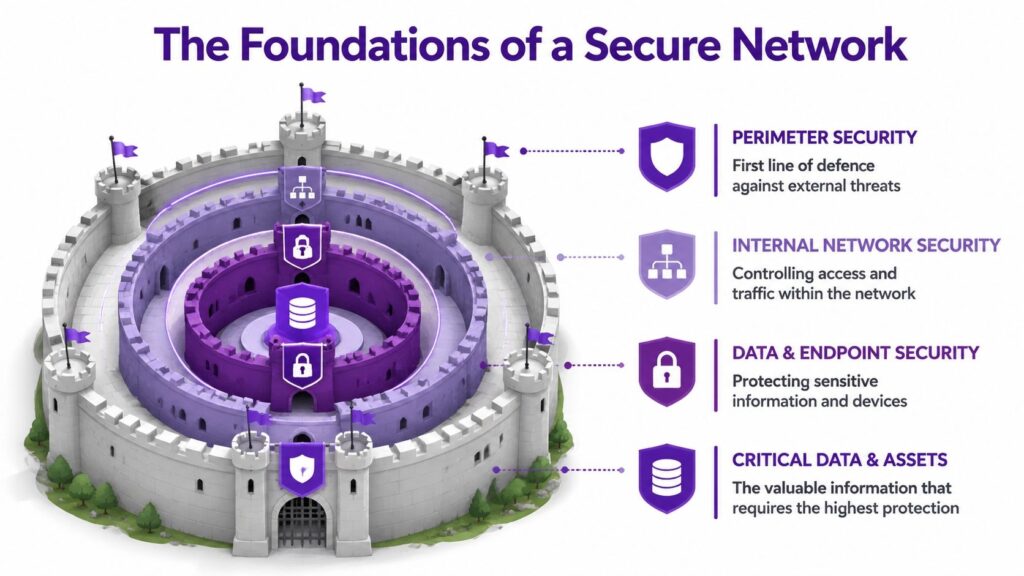
Think castle, not cable
A secure network works a bit like a castle.
The outer wall is your perimeter protection. That includes the way internet traffic enters and leaves, and how wireless access is controlled. The gatekeepers are your access controls. They decide who gets in and what they’re allowed to reach. The sealed message carried between towers is your encryption, which keeps information unreadable to anyone who intercepts it.
That may sound old-fashioned, but the logic is still right.
Four basics every business needs
Here are the foundations most businesses need to get right first.
- Strong authentication means staff don’t use weak or recycled passwords, and accounts aren’t protected by guessable defaults.
- Secure Wi-Fi means your wireless network uses modern protection such as WPA3 where possible, rather than acting like an open side entrance.
- Least privilege means people only get access to the systems and folders they need for their role.
- Segmentation means one compromised device shouldn’t give an attacker free movement across everything else.
The cost of ignoring these basics is very real. In 2024, 32% of UK SMEs experienced a network breach due to weak or default passwords, with average recovery costs hitting £25,000 per incident, according to the DSIT figure cited here.
A password problem isn’t just an account problem. It can become a network problem very quickly once an attacker gets a foothold.
Where business owners often get confused
Many people assume network security is only about blocking outsiders. It isn’t.
A lot of damage happens after access has already been gained. That’s why internal controls matter so much. If one user account is compromised, can that account reach payroll, finance, HR files and shared mailboxes? If a laptop is infected, can it talk freely to everything else?
A simple way to think about it is this:
| Area | Simple meaning | Business risk if weak |
|---|---|---|
| Access | Who can get in | Unauthorised logins |
| Permissions | What they can reach | Excess exposure of data |
| Encryption | Whether data is readable in transit | Interception of sensitive information |
| Separation | Whether systems are isolated | Problems spreading across the business |
The technical terms matter less than the outcome. You want fewer ways in, fewer ways across, and fewer chances for one mistake to become a major incident.
Your Essential Toolkit of Security Controls
Once the foundations are clear, the next question is usually practical. What tools do the work?
The easiest way to understand them is by job role rather than product category.

The receptionist, the fire doors and the patrol team
A firewall is your digital receptionist. It checks traffic trying to enter or leave and applies rules about what's allowed. In a business setting, that can mean controlling access to services, blocking suspicious connections and limiting unnecessary exposure.
A segmented network is the equivalent of internal fire doors. If something goes wrong in one area, it doesn't automatically spread everywhere else. That matters in firms where office devices, guest Wi-Fi, cloud workloads and specialist systems all sit side by side.
A VPN is like an armoured courier for data travelling across the public internet. If staff work remotely, a secure connection matters because public networks aren't under your control.
Detection matters as much as blocking
Some tools are there to spot trouble, not just stop it.
An IDS (Intrusion Detection System) works like CCTV with alerting. It watches for suspicious behaviour. An IPS (Intrusion Prevention System) goes a step further and can actively block certain activity. Modern businesses also use EDR on devices, which watches how laptops and servers behave, looking for signs of malware, abuse or unusual commands.
That layered approach is often more realistic than relying on one product to do everything.
If you'd like a short visual explainer before going further, this video gives a useful overview of how network security fits together in practice.
What these controls look like in everyday business life
Here's how these controls often show up in a typical SME.
- Email account protection keeps a stolen password from becoming access to shared data.
- Firewall rules reduce exposure of systems that never needed to be visible from outside in the first place.
- Device controls stop unmanaged laptops from connecting freely.
- Monitoring gives someone a chance to respond before a small issue becomes downtime.
One option businesses consider when they need stronger perimeter control is a managed firewall service. The key point isn't the label. It's whether the firewall is configured sensibly, reviewed regularly and tied into wider monitoring.
Tools only work if they're tuned properly
Buying controls is the easy part. Making them work together is the hard part.
A firewall with overly broad rules can give false confidence. A VPN without proper access limits can create a secure tunnel into an insecure internal setup. EDR without response planning may generate alerts that no one acts on.
Good network security is less like buying a safe and more like running a security operation. The controls need maintenance, review and clear ownership.
That's especially true when your network now stretches across office broadband, business Wi-Fi, Microsoft 365, Azure services and remote devices.
Common Threats Targeting UK Businesses
Attackers rarely care who you are in a personal sense. They care whether your business looks easy to exploit, slow to detect problems, or likely to pay to restore operations.
That's why understanding their playbook helps.
Phishing is still the easiest route in
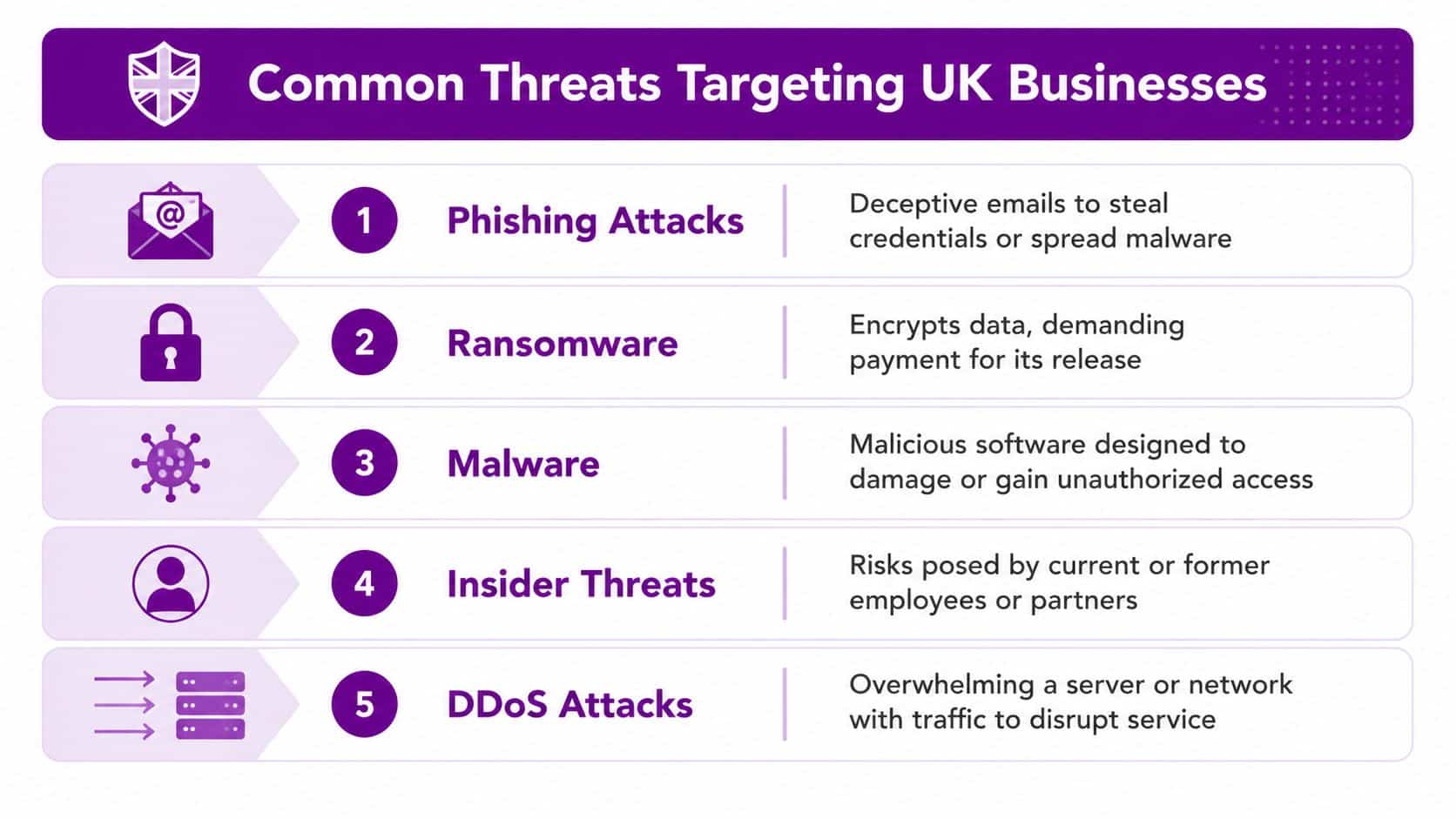
The most common attack often starts with a believable message. It may look like a Microsoft sign-in prompt, a file share notification, a supplier request or a parcel update. The goal is simple. Get someone to click, sign in, download or approve something they shouldn't.
From the attacker's point of view, this is efficient. They don't need to break a hardened system if they can persuade a busy employee to hand over the keys.
Ransomware aims to stop the business
Ransomware is different because the attacker's objective is disruption. They want your files, systems or services locked up badly enough that leadership feels cornered.
That's a local issue, not a distant headline. Ransomware hit more than 1,200 East Midlands SMEs in 2025, causing £4.2bn in regional losses, according to the figure cited here.
A common pattern looks like this:
- Initial access through a phishing email, stolen password or exposed remote service.
- Quiet movement across accounts, devices or shared systems.
- Payload deployment to encrypt files or interrupt key services.
- Pressure through ransom demands, downtime and operational confusion.
Other threats businesses shouldn't ignore
Not every incident is ransomware. Plenty of problems start smaller and still cause real damage.
- Malware can spy on activity, steal credentials or create a hidden route back into your systems.
- Insider misuse can be deliberate or accidental. Both are dangerous if permissions are too broad.
- DDoS attacks aim to overwhelm online services so genuine users can't get through.
Attackers usually choose the path of least resistance. They're looking for rushed decisions, weak controls and gaps between systems.
The common thread is that threats don't stay neatly in one box. A phishing email can lead to stolen credentials. Stolen credentials can lead to mailbox access. Mailbox access can lead to internal fraud, data loss or wider compromise.
That's why network security has to cover people, devices, traffic and permissions together, not as separate problems.
Network Security with Microsoft 365 and Azure
For many East Midlands businesses, the network no longer sits neatly inside one office. Part of it lives in Microsoft 365. Part of it lives in Azure. Part of it exists on laptops, mobile devices and site connections. That changes how security needs to be applied.

The principles stay the same, the implementation changes
The same basic ideas still apply. You still need controlled access, separation, monitoring and secure connections. What changes is where those controls sit.
In Microsoft environments, you might use Azure Network Security Groups to control traffic paths, Azure Firewall to manage and inspect traffic, and Microsoft Defender for Endpoint to watch device behaviour. Identity also becomes central, because so much access now depends on user accounts rather than being tied to a single office location.
That's where many firms run into trouble. In the UK, 68% of mid-sized businesses using Microsoft 365 reported configuration errors in Azure network security groups leading to exposure, based on the verified NCSC cloud misconfiguration figure provided in the brief.
Where cloud security often goes wrong
The problem usually isn't that Microsoft lacks security features. It's that businesses assume the defaults match their exact setup.
A few common examples include:
- Overly broad access rules that allow more traffic than intended.
- Poor separation between production systems, test environments and user services.
- Unclear ownership of who reviews changes when new apps or integrations are introduced.
- Identity gaps where access remains in place after role changes.
For a business using Microsoft 365, Teams, SharePoint, Azure-hosted apps and perhaps Dynamics 365, the challenge is coordination. Security settings in one area can affect risk in another.
Why managed support becomes practical, not optional
This is the point where business owners often realise that network security isn't just a one-off setup. It's ongoing design, review and correction.
A Microsoft-focused partner can help translate broad principles into specific controls. That may include reviewing Azure rules, tightening permissions, checking device compliance and making sure monitoring is connected across the environment. F1Group provides support in those Microsoft-focused areas for organisations across the East Midlands.
Cloud security is often less about buying more tools and more about removing unsafe assumptions from the setup you already have.
If you're already invested in Microsoft 365 and Azure, getting the configuration right usually delivers more value than adding disconnected products on top.
Practical Security Steps and UK Compliance
Business owners often ask what to do first. That's the right question, because strong network security usually comes from disciplined basics rather than dramatic overhauls.
Start with habits that reduce exposure
If I were advising a typical SME, I'd focus on a short list of actions that are hard to argue with.
- Turn on multi-factor authentication for business accounts, especially email, admin access and remote services.
- Review account permissions so staff only have access that matches their current role.
- Patch regularly across laptops, servers, networking kit and cloud-connected systems.
- Separate critical systems so one issue doesn't travel freely across the business.
- Back up properly and make sure recovery is tested, not assumed.
- Train staff to question unusual login prompts, payment changes and file-sharing requests.
Compliance and security overlap more than people think
This isn't just about stopping criminals. It's also about meeting obligations under frameworks and regulations such as UK GDPR and Cyber Essentials.
If your network is poorly controlled, you don't only face operational risk. You may also struggle to show that access was restricted, systems were maintained, and sensitive information was handled appropriately. In practice, good compliance usually rests on the same behaviours as good security.
A useful practical reference when tightening web access and filtering rules is AI Video Detector's blocking patterns. It's not a complete security strategy, but it can help teams think more concretely about how filtering policies are shaped.
AI-related threats are adding pressure
Security is also getting harder because attacks are becoming more convincing and more automated. That's one reason many firms are reassessing how they monitor traffic and identity behaviour.
The challenge is clear in the region. East Midlands IT managers reported integration difficulties with AI tools for security, with 62% lacking integration know-how, and AI-orchestrated DDoS attacks disrupted 19% of Leicester and Nottingham firms, based on the verified British Chambers of Commerce Cyber Survey figure provided in the brief.
That doesn't mean every business needs a complex AI programme tomorrow. It does mean modern monitoring, sensible tooling and proper integration work can't be put off indefinitely.
Compliance paperwork won't secure a network on its own. Regulators and insurers both expect real controls behind the policy documents.
How a Managed IT Partner Secures Your Network
By this point, the pattern should be clear. Network security isn't one product and it isn't one project. It's a continuous process of deciding who gets access, limiting movement, monitoring activity, fixing weaknesses and responding quickly when something looks wrong.
For a busy business, that's difficult to sustain internally unless you've got the right mix of time, technical depth and operational discipline. Most SMEs don't struggle because they don't care. They struggle because Microsoft 365, Azure, endpoints, Wi-Fi, access control and compliance all need attention at the same time.
What managed support changes
A managed IT partner brings structure to that complexity.
That usually includes routine review of security settings, patching oversight, monitoring, help with Microsoft configuration, guidance on access control, and support if an incident occurs. It also gives the business a clearer owner for the day-to-day health of the environment.
If you want a plain-English overview of that service model, this explanation of what a managed service provider is is a helpful place to start.
Why this matters for East Midlands firms
For organisations in Lincoln, Nottingham and across the region, managed support often fills a practical gap. You may have internal IT people who know the business well, but need specialist support on cloud security, network design or Microsoft tooling. Or you may need a partner to take operational ownership altogether.
Either way, the value is the same. Problems are spotted earlier, configurations are reviewed properly, and security becomes a managed discipline rather than a background worry.
A secure network doesn't guarantee nothing will ever go wrong. What it does is make your business far harder to exploit, far easier to recover, and far better prepared when something unexpected happens.
If you'd like to talk through your network security, Microsoft 365 setup or Azure risks with F1Group, Phone 0845 855 0000 today or Send us a message.