
If you're running Pegasus Opera 3 today, you're probably in a familiar position. The system still does the core job. Orders go through, payroll gets processed, ledgers balance, and your team knows where the buttons are. But every year it becomes harder to ignore the cracks around it.
Remote access feels awkward. Reporting usually depends on someone exporting data into spreadsheets. Security responsibility sits on your own servers, your own patching routine, and your own backup discipline. When the finance manager wants better visibility, or the operations director wants live dashboards, Opera 3 often becomes the bottleneck rather than the enabler.
That doesn't mean Pegasus Opera 3 was a bad choice. For many UK businesses, it was a sensible one. It still can be, if it's properly managed. But East Midlands firms trying to modernise around Microsoft 365, Azure, Power BI, and Dynamics 365 need a clear view of reality. Keep it, host it better, integrate it properly, or move on. Those are the fundamental options.
Is Your Business Outgrowing Pegasus Opera 3
A lot of East Midlands businesses didn't choose Pegasus Opera 3 because it was fashionable. They chose it because it worked. It gave finance, payroll, stock, and customer data a home in one system, and it did that reliably for years.
The problem is that the rest of the business has changed faster than the ERP. Staff now expect secure remote access. Managers expect live reporting. Directors want systems that connect cleanly to Microsoft 365 and cloud services. If Opera 3 still sits on an ageing server in a comms room, you're not really managing software anymore. You're managing workarounds.
The signs are usually obvious
You don't need a formal audit to spot the pressure points. They show up in day-to-day frustration:
- Reporting takes too long: Finance exports data manually because the default outputs don't give leadership what they need.
- Remote working is clunky: Staff rely on VPNs, remote desktop sessions, or office-only access.
- Changes feel risky: Every update, server change, or integration request feels like it could break something important.
- Data lives in too many places: Teams still use spreadsheets, email trails, and side systems because Opera 3 doesn't cover everything cleanly anymore.
- Security ownership is unclear: Nobody is fully confident that patching, backups, and access controls are where they need to be.
Businesses rarely replace Pegasus Opera 3 because it stops working. They replace or modernise it because the business around it has moved on.
If that sounds familiar, you don't need hype. You need a practical decision. Either stabilise Opera 3 properly and connect it to modern tools, or start planning a structured move away from it. Sitting in the middle is where cost and risk pile up.
For a broader view of how ERP decisions affect growing firms, this guide to ERP in SMEs is worth reading.
Understanding Pegasus Opera 3s Role in UK Business
Pegasus Opera 3 isn't just accounting software. It's an ERP system built for UK organisations. That's why it stayed relevant for so long. It pulls together business functions that many firms used to run separately, and that integration solved real operational problems.
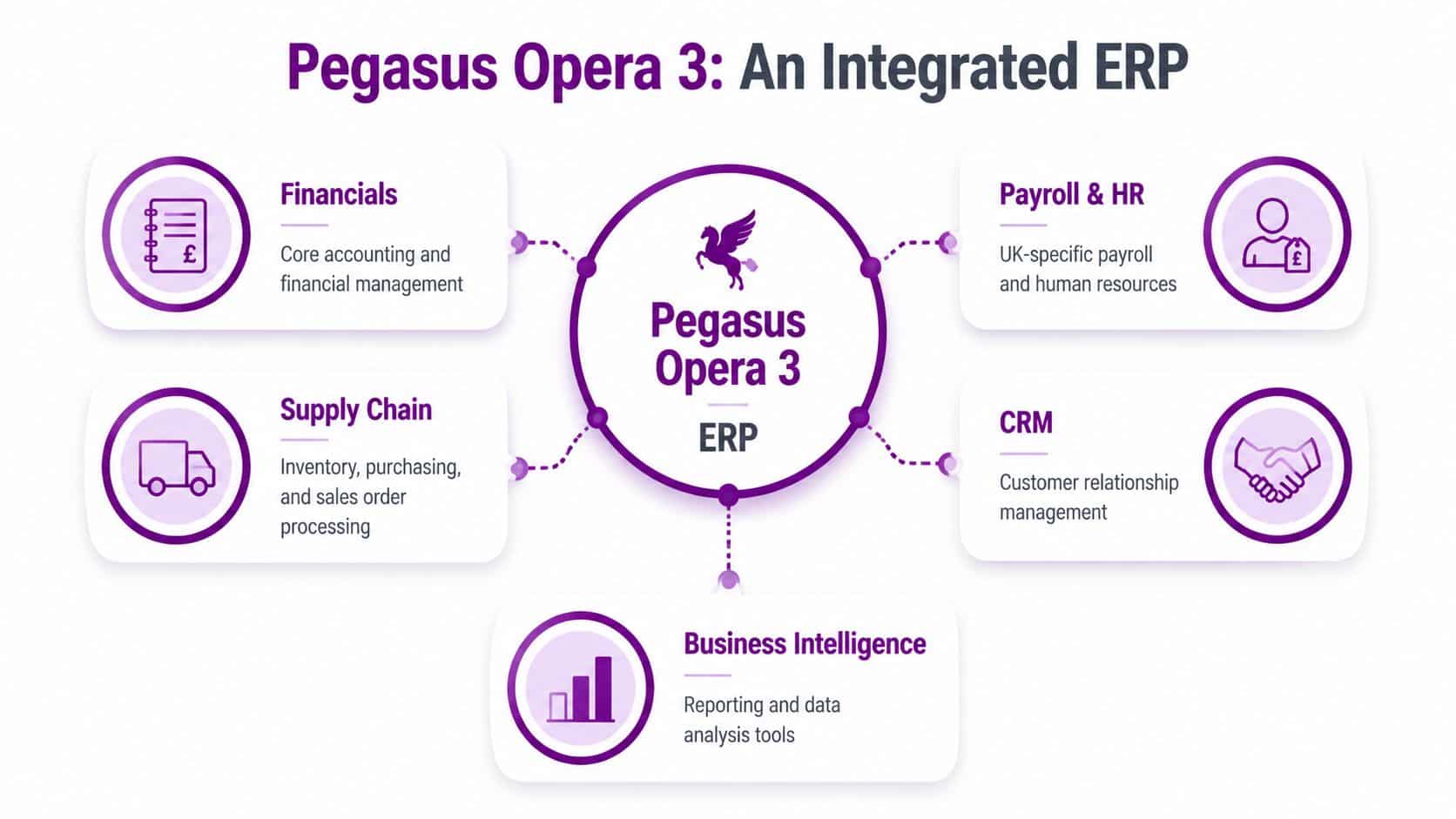
According to this overview of Pegasus Opera 3 in the UK market, Pegasus Opera 3 is a fully integrated ERP system specifically designed for the UK market, consolidating finance, supply chain, payroll, CRM, and service platforms into a single solution. That matters because separate systems create duplicated data, inconsistent reporting, and wasted admin effort.
Why it became a staple
Opera 3 succeeded because it matched how established British businesses operate. Finance needs one truth. Payroll needs to reflect UK rules. Sales and purchasing need to connect to stock and customer records. Directors need reports that don't depend on someone stitching exports together by hand.
Think of it as the central nervous system of the business. If finance, payroll, stock control, and CRM all sit inside one ERP, people stop retyping the same information into multiple tools. Errors drop. Audit trails improve. Departments stop arguing about which spreadsheet is correct.
What UK specific design really means
Opera 3 wasn't built as a generic global platform with light localisation. It was designed around UK business needs, including compliance expectations and financial reporting conventions. That gave it an edge with firms that wanted a system that felt familiar to British finance teams rather than one that needed constant translation into local practice.
Here's the practical value of that UK focus:
| Area | What it means in practice |
|---|---|
| Finance | Reporting aligned with UK accounting expectations |
| Payroll | Better fit for UK payroll processing and administration |
| Operations | Shared data across departments instead of isolated records |
| Management control | Cleaner oversight of multi-department workflows |
Editorial view: Pegasus Opera 3 earned its place because it solved integration inside the business long before "digital transformation" became a buzzword.
That said, historical value isn't the same as future fit. A system can be strong at its core and still become restrictive when the business wants cloud access, modern automation, and better analytics.
A Breakdown of Core Opera 3 Modules
The value of Pegasus Opera 3 depends on which modules your business uses. Some firms only rely on the financial core. Others run payroll, supply chain, and CRM through it as well. That distinction matters because the more operationally embedded Opera 3 is, the more carefully any upgrade or migration needs to be handled.
Financials and payroll
For many businesses, Financials is the anchor. It contains the nominal ledger, purchase ledger, sales ledger, and cash management. If you're a manufacturing firm near Leicester or a service business in Lincoln, this module often acts as the final point of truth for what the business has sold, bought, owes, and expects to collect.
The strength is control. Finance teams like established posting routines, familiar audit trails, and a system they trust at month end. The weakness is that reporting can feel dated if leadership wants more visual, interactive, or self-service access to data.
Payroll and HR is where Opera 3 often becomes indispensable. Once a payroll process is settled and trusted, businesses become understandably cautious about changing it. That's sensible. Payroll errors damage confidence quickly, and teams don't forgive disruption there.
Supply chain and stock control
If your business buys, stores, assembles, or distributes products, the Supply Chain side of Opera 3 probably matters just as much as finance. This includes purchasing, stock handling, sales order processing, and the movement of goods through the business.
In practical terms, it solves problems like:
- Purchase control: Buyers can track what has been ordered, received, and invoiced.
- Stock visibility: Operations teams can see what's available, what's committed, and what's becoming a problem.
- Order processing: Sales and warehouse staff work from the same operational record.
- Cost discipline: Managers get a better handle on purchasing patterns and stock-related inefficiency.
A business in Nottingham with stock on the shelf and margin pressure in every order can't afford disconnected systems. That's where Opera 3 still has real operational value.
CRM and management visibility
The CRM module matters less to some firms and far more to others. If your sales team mainly lives in Outlook and spreadsheets, Opera 3 CRM may be underused. If customer history, quotes, and service interactions are managed there, it becomes part of the operational backbone.
The bigger issue is management visibility. Opera 3 can hold useful business data, but many firms struggle to turn that data into modern decision-making tools. That's often the trigger for Microsoft integration or migration. The ERP has the information. The business wants it surfaced better.
If your team says "Opera has the data, but we can't easily use it", that's not a minor complaint. That's a strategic signal.
On-Premises vs Cloud Hosting Options for Opera 3
Keeping Pegasus Opera 3 on an office server is no longer the default sensible choice. It may still be the right one for some firms, but it needs to be justified. Habit isn't a strategy.
What on premises still gives you
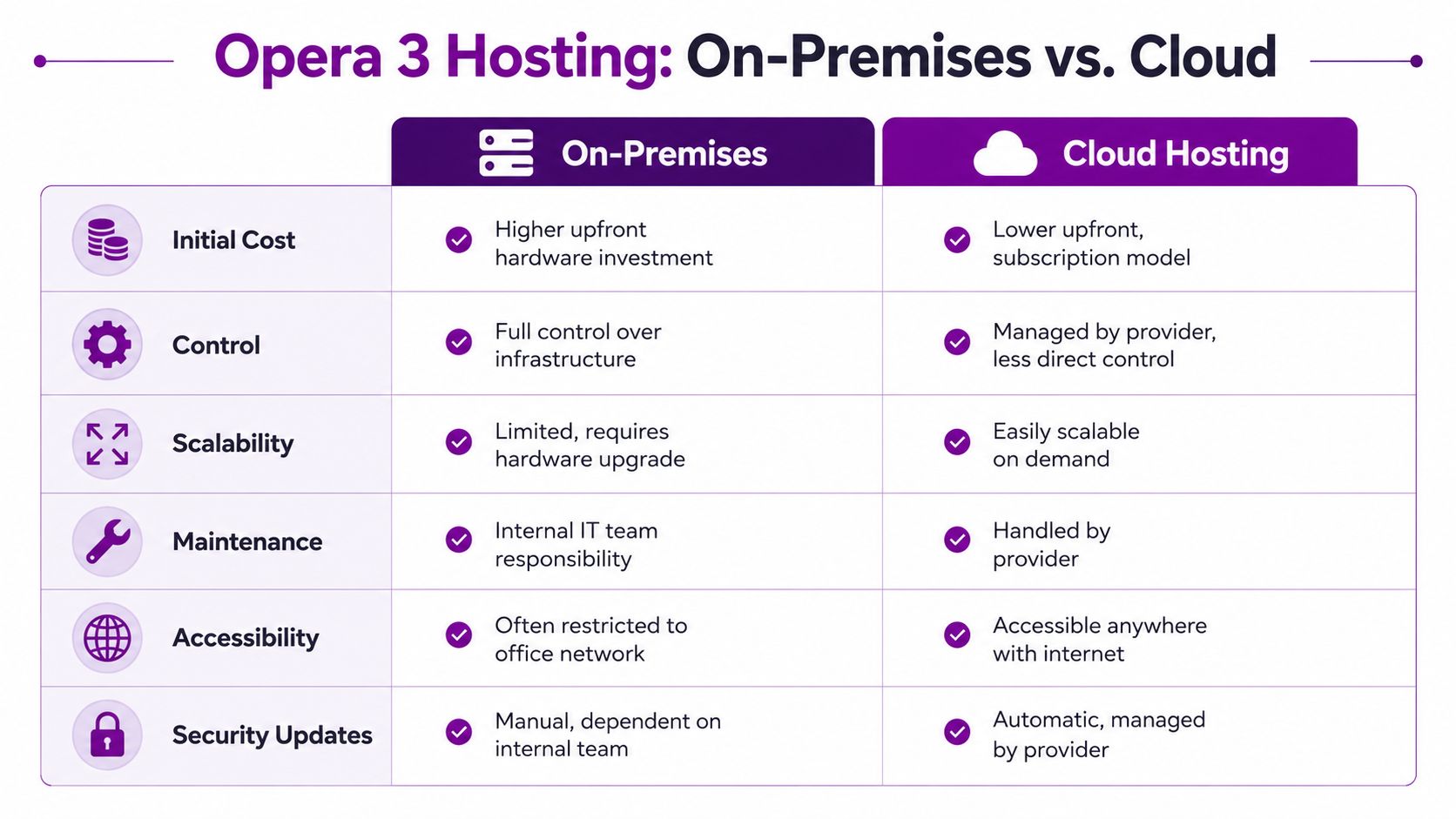
On-premises hosting gives you direct control over infrastructure. Your server, your storage, your access rules, your maintenance windows. Some businesses like that because they know exactly where the system sits and who touches it.
That control comes with responsibility. Hardware ages. Backup routines need checking. Remote access needs securing. Disaster recovery needs planning, not assuming. If your internal IT resource is thin, on-premises Opera 3 can become one more thing everyone hopes keeps running.
Here's a simple comparison:
| Criteria | On-premises | Cloud hosting |
|---|---|---|
| Upfront spend | Higher hardware commitment | Lower upfront, service-based approach |
| Access | Often tied to office network methods | Easier remote access |
| Maintenance | Internal responsibility | Shared or provider-managed |
| Scalability | Limited by existing kit | Easier to expand |
| Recovery | Depends on your own planning | Usually stronger if properly architected |
Where Azure hosting changes the conversation
Hosting Opera 3 in Azure doesn't magically modernise the application itself. It does modernise the environment around it. That's an important distinction. You can improve resilience, accessibility, and operational management without replacing the ERP on day one.
For East Midlands SMEs, that can be the smart middle route. Keep the known ERP for now, but move it off ageing local infrastructure and into a better-managed platform. This is especially useful if the business wants to buy time before a larger migration decision.
For a direct look at the broader trade-offs, see this guide on on-premises vs cloud.
A short walkthrough helps illustrate the hosting question in practical terms:
My recommendation
If your server estate is old, remote access is awkward, and recovery planning is weak, move the hosting question to the top of the list. Don't wait until a hardware failure forces the decision.
Use this rule of thumb:
- Keep on premises if your infrastructure is current, your internal IT team is capable, and your business has a clear reason for retaining local control.
- Move hosting to Azure if the ERP still fits operationally but your infrastructure doesn't.
- Plan full replacement if both the application and the infrastructure are now limiting growth.
Navigating Security and Compliance Challenges
A legacy on-premises ERP creates a security burden that many SMEs underestimate. The risk isn't just the software itself. It's the full stack around it. Server patching, user access, backups, endpoint hygiene, remote connectivity, and audit discipline all sit on your side of the fence unless you've deliberately outsourced them.
Compliance has a real price tag
If you're handling payroll, financial records, and customer information through an on-premises Opera 3 setup, compliance isn't optional paperwork. It's operating discipline. For UK SMEs, a basic Cyber Essentials project often costs between £1,500 and £5,000, while preparing for ISO 27001 starts from £10,000 for preparation alone, based on UK cyber security compliance guidance.
Those figures matter because they expose a common mistake. Some directors assume keeping legacy systems is cheaper because the software is already there. It often isn't. The compliance and security workload around a legacy platform can gradually become a serious operational cost.
The hidden problem is ownership
The hardest security issue isn't usually one dramatic flaw. It's fragmented ownership. One person looks after backups. Another handles Microsoft 365. Someone external checks the firewall occasionally. Opera 3 sits in the middle, carrying sensitive business data, while no one owns the whole risk picture.
That creates familiar weak points:
- Patch gaps: Server updates get delayed because no one wants to disturb production.
- Access drift: Old accounts, broad permissions, and shared credentials linger too long.
- Recovery uncertainty: Backups may exist, but restore confidence is weak.
- GDPR exposure: Sensitive data sits in systems and exports that aren't tightly governed.
Practical rule: If you can't clearly explain who owns security for the server, the application, the backups, and user access, you don't have a secure setup.
A cloud-hosted or modernised Microsoft environment won't remove your obligations, but it usually gives you better tooling, tighter policy control, and less dependence on ageing local infrastructure. That's why security is often the strongest business case for change, even before usability or reporting.
Integrating Opera 3 with Modern Microsoft Tools
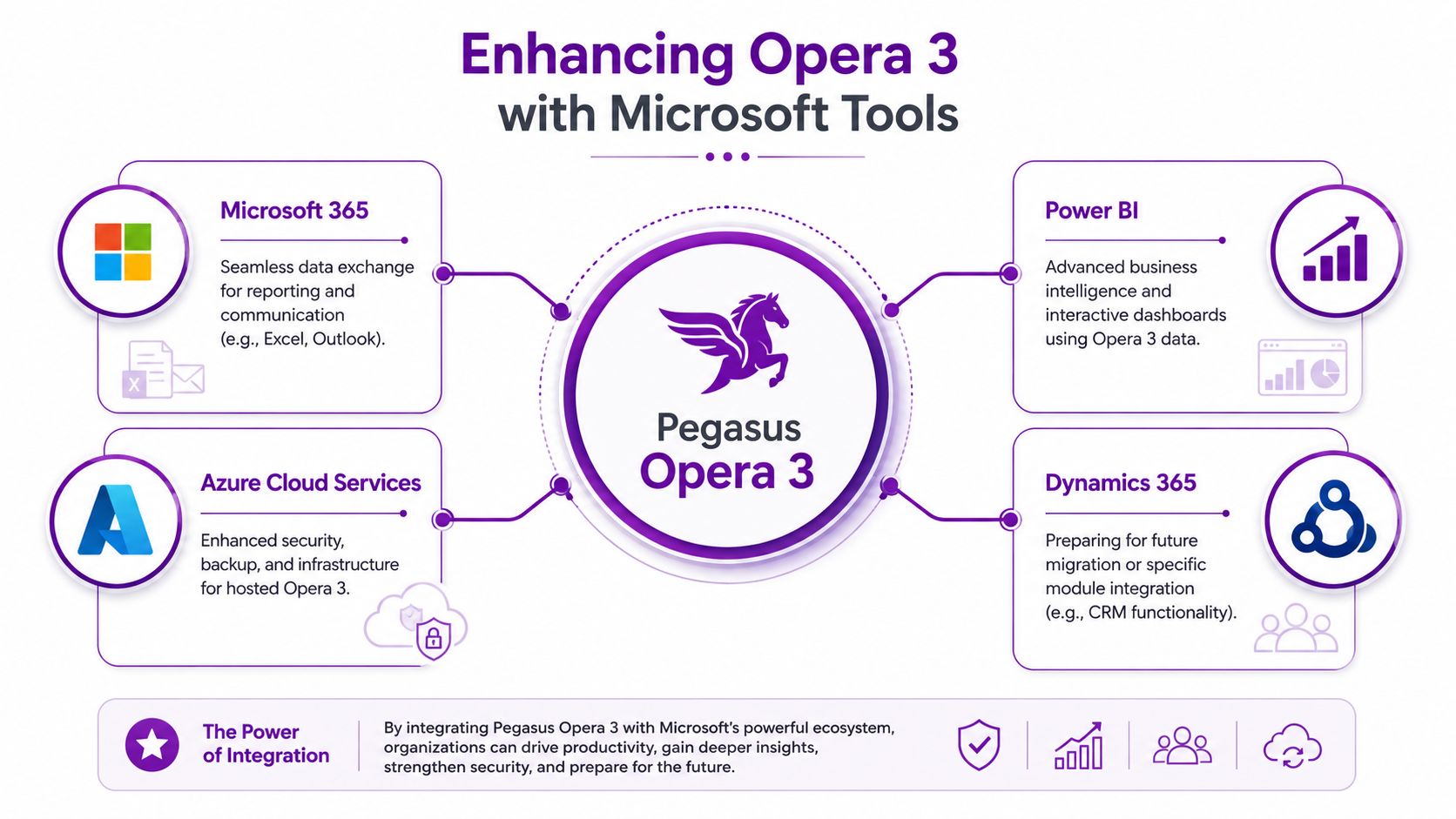
You don't always need to replace Pegasus Opera 3 to get more value from it. Many businesses can improve reporting, automate admin, and extend access by integrating Opera 3 with Microsoft tools they already use. That's often the fastest route to visible improvement.
Start with reporting
The most common frustration with Opera 3 isn't that data is missing. It's that the data is trapped in formats that don't help leadership make decisions quickly. That's where Power BI becomes useful.
Instead of sending static exports around by email, businesses can build dashboards that show sales, stock, cash position, purchasing trends, or debtor exposure in a format directors can readily use. Finance still controls the numbers. Management gets better visibility.
If your teams still rely heavily on spreadsheet-based reporting, it's worth reviewing Trupeer's Excel features for ideas on how Excel-driven workflows can be documented and shared more effectively before or during wider reporting improvements.
Then automate the repetitive work
Microsoft Power Automate is a practical bridge between a legacy ERP and a modern working day. It won't turn Opera 3 into a cloud-native app, but it can remove some of the friction around it.
Examples that usually make sense:
- Approval workflows: Trigger notifications and approval steps in Microsoft 365 when certain ERP-related actions happen outside the system.
- Email handling: Move routine updates into structured flows tied to Outlook and Teams.
- Document movement: Standardise how exported reports, customer files, or operational outputs are stored and shared.
- Task reminders: Push follow-up actions to the people who need to act on them.
Use Azure as the platform layer
Azure can support hosted Opera 3 while also giving you a cleaner landing zone for broader Microsoft services. That matters because integration gets easier when the surrounding environment is standardised.
Legacy doesn't have to mean isolated. A business can keep Opera 3 for core processing while improving reporting, collaboration, and automation around it.
Think of Dynamics 365 as a direction, not just a destination
Some firms use Microsoft integration as a holding pattern. That's fine. Others use it as a deliberate first stage towards Dynamics 365, especially where CRM, service, or workflow gaps are already obvious.
The best approach is usually selective. Keep Opera 3 where it still performs. Add Microsoft tools where they solve a current business problem. Don't bolt on technology for the sake of it.
Planning Your Migration to Dynamics 365
At some point, many firms reach the same conclusion. Hosting improvements and integrations help, but the business has outgrown Pegasus Opera 3 itself. That's when migration becomes the sensible conversation.
The problem is that many SMEs struggle to find a practical roadmap specific to UK businesses moving from Opera 3 into Microsoft cloud platforms. A known gap in the market is the lack of UK-specific guidance covering data residency, GDPR, and cost implications for East Midlands businesses moving from Pegasus Opera 3 to cloud-native Microsoft environments, as noted in this discussion of the migration gap.
Know when migration is justified
Migration shouldn't start because the interface looks old. It should start because the business case is clear.
Common triggers include:
- Operational limitation: The ERP no longer supports how teams need to work.
- Integration fatigue: Too many manual bridges exist between Opera 3 and other systems.
- Reporting weakness: Leadership can't get timely, trustworthy visibility.
- Infrastructure drag: The effort required to maintain the platform no longer makes sense.
- Strategic alignment: The business is standardising around Microsoft 365, Azure, and Dynamics.
Use a phased roadmap
A good migration is boring in the best possible way. It is planned, staged, tested, and controlled. Not dramatic.
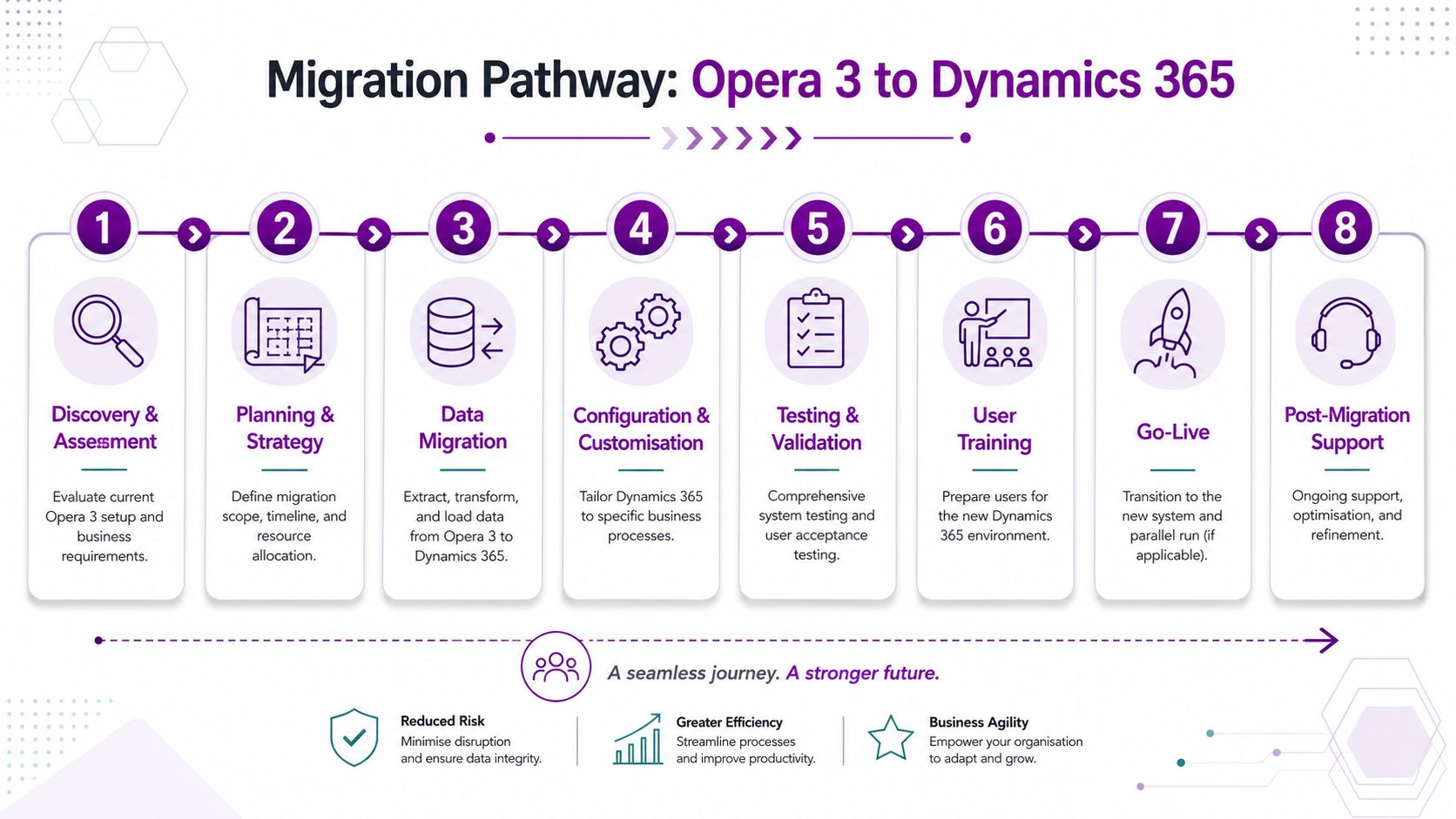
A practical pathway looks like this:
-
Discovery and assessment
Identify which Opera 3 modules matter, which data sets are active, and which processes are critical. -
Process review
Challenge old habits. Don't rebuild unnecessary complexity in a new platform. -
Data preparation
Clean customer, supplier, stock, finance, and historical records before moving anything. -
Platform design
Decide what belongs in Dynamics 365, what belongs in Microsoft 365, and what should be retired. -
Configuration and testing
Build around real business scenarios, not just generic templates. -
Training and change management
Users don't resist new systems for no reason. They resist confusion. -
Go-live planning
Sequence the cutover carefully. If you're looking for ways to minimize data migration downtime, this practical guide is a useful companion to internal planning. -
Support after launch
The first weeks matter. Issues need fast ownership and refinement.
Don't migrate every module in one jump
Many businesses make better decisions with phased change. Finance may move at one pace. CRM and service may move faster. Reporting improvements may arrive before full ERP replacement. That's often safer than trying to replace everything in one sweep.
For businesses reviewing customer and sales processes as part of the move, this article on CRM implementation is a useful parallel read.
A migration from Opera 3 to Dynamics 365 isn't an IT upgrade. It's a business process redesign with technology attached.
That mindset prevents expensive mistakes. If you treat migration as software replacement only, you carry old inefficiencies into a new system.
Choosing Managed Support for Pegasus Opera 3
If you're keeping Pegasus Opera 3 for now, expert support isn't a nice-to-have. It's basic operational protection. Legacy ERP systems fail in boring, technical, expensive ways. Dependencies get missed, upgrades stall, and nobody wants to take responsibility when payroll or finance is affected.
A good example is the platform requirement in Pegasus Opera 3 version 2.96.00. Server-side installation depends on Microsoft .NET Framework 4.7.2 or later, and without it the Menu.exe installer won't execute the upgrade properly to the SQL-based SE architecture, which can cause installation failure and hanging data structure updates, according to the Opera 3 payroll upgrade checklist. That's exactly the kind of detail that catches out generalists.
Why ad hoc support usually costs more
Break-fix support feels cheaper until you need it regularly. Then it becomes unpredictable and disruptive. For the UK market in 2026, ad-hoc IT support averages £90 to £120 per hour, while subscription-based managed services typically range from £30 to £125 per user per month. That same pricing analysis states that subscription models are 40 to 60 per cent more cost-effective for businesses with regular IT needs, based on UK IT support pricing guidance for 2026.
That doesn't mean every company needs the same support model. It does mean most firms running Opera 3 need a predictable one.
What to expect from a serious support partner
Look for a provider that can do more than answer tickets. They should understand Microsoft infrastructure, cloud hosting, ERP dependencies, cyber security, and the practicalities of staged migration.
A useful external checklist on how to find a reliable IT provider can help you assess the basics, but for Opera 3 you also need product-specific operational knowledge.
Use these criteria:
- Technical depth: They must understand Windows servers, SQL environments, Microsoft 365, Azure, and ERP support dependencies.
- Security discipline: They should be able to support hardening, backup confidence, and compliance work.
- Migration awareness: Even if you aren't moving yet, they should know how to prepare for it.
- Clear ownership: You need one accountable team, not finger-pointing between vendors.
If Pegasus Opera 3 still runs a critical part of your business, manage it properly. If it no longer fits, don't drift. Plan the move.
If your business in Lincoln, Nottingham, Leicester, Scunthorpe, Grimsby, or Newark is managing, modernising, or migrating from Pegasus Opera 3, F1Group can help you make the right call and execute it properly. Phone 0845 855 0000 today or Send us a message.