
A compromised Microsoft 365 account, an over-permissioned SharePoint folder or an untested Azure backup can disrupt an otherwise well-run business. Cloud platforms remove much of the work involved in maintaining physical infrastructure, but they don't remove the need to decide who can access data, which settings are secure, how activity is monitored and whether recovery works.
Cloud security is a shared responsibility. Microsoft secures the underlying services, while your organisation remains responsible for identities, permissions, information, devices, configurations and many operational decisions. The UK National Cyber Security Centre cloud guidance recommends secure-by-default services, provider assurance, granular access controls, good-practice architectures and automation rather than relying on ad hoc configuration.
The following ten cloud security best practices form a practical operating model for UK SMBs using Microsoft 365, Azure and Dynamics 365. Start with identity, control access and data, continuously detect weaknesses, standardise recovery and finish with managed protection. Along the way, you'll find decision points, implementation actions, trade-offs and Microsoft-focused examples.
The language and terminology follow British English and UK operating realities, including data protection, audit evidence, resilience and sovereignty considerations. At the end, you'll have an action checklist for assigning ownership and validating controls, plus a clear route to hands-on support from F1Group. For a related platform perspective, see these articles on Sitecore cloud security.
1. Implement Multi-Factor Authentication Across All Cloud Services
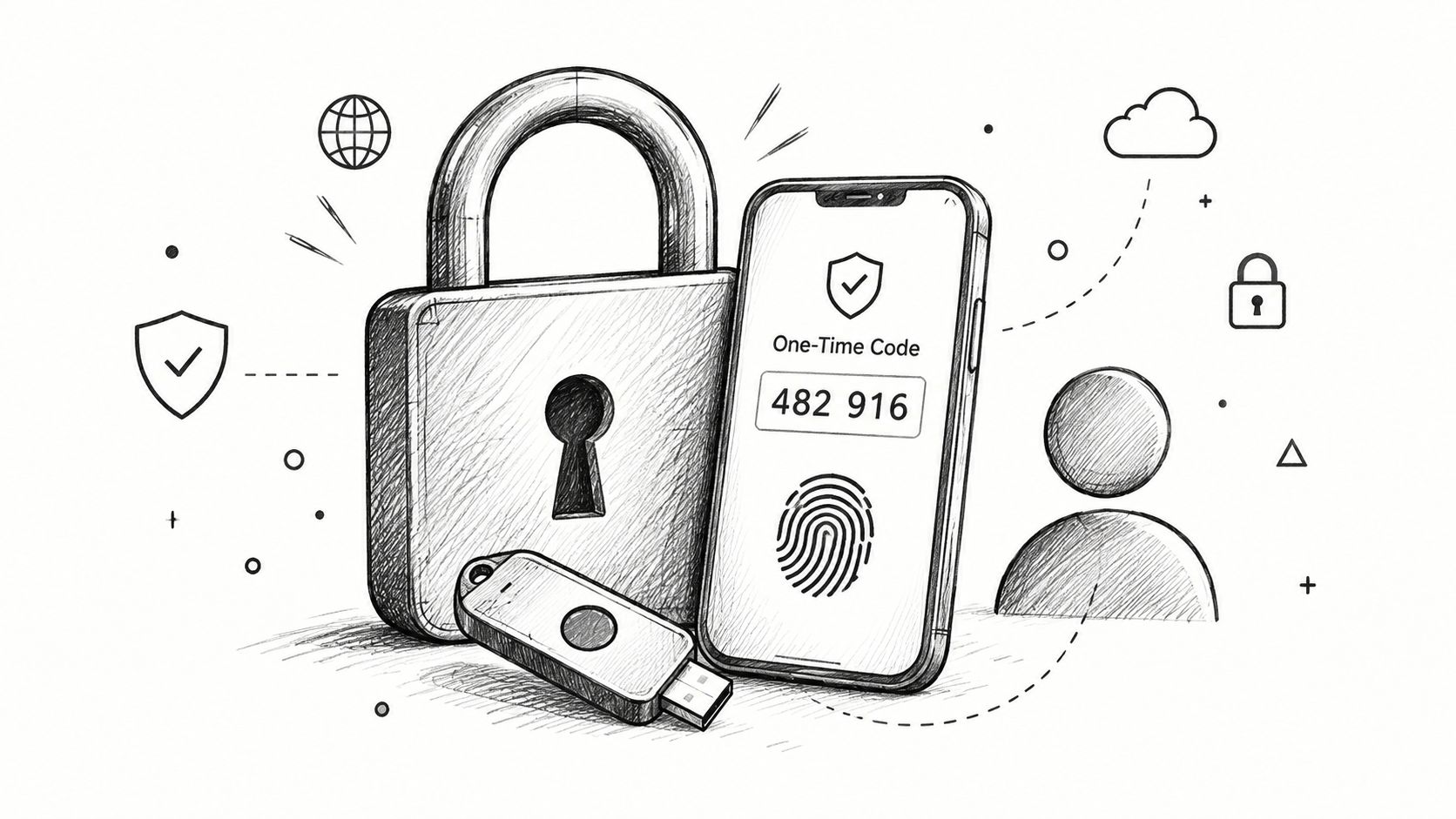
A compromised password can give an attacker a route into your tenant. Multi-factor authentication, or MFA, adds a second verification step, such as an authenticator app, security key or biometric check. That extra control helps protect accounts when passwords are phished, reused or exposed by an infected device.
Start with global administrators, privileged users and accounts handling sensitive information. Extend enforcement to employees, contractors and supported service accounts across Microsoft 365 and Azure. Microsoft Entra ID and Microsoft 365 Conditional Access can require stronger verification according to the user, device, application or sign-in risk.
Make the rollout secure and usable
The key decisions are which methods to permit, how users recover access after losing a device and how emergency access is governed. Microsoft Authenticator is usually easier to administer than SMS. FIDO2 security keys offer a stronger, phishing-resistant option for privileged roles, although they require purchasing, registering and replacing physical devices.
Use a staged rollout, with administrators included at the start rather than the end. Create emergency access accounts with tightly controlled credentials, alert on their use and document the recovery process. Test Conditional Access policies with a pilot group before broad enforcement. A rule with the wrong scope can block legitimate users and create avoidable support pressure.
- Start with privileged accounts: Require MFA for administrators and other high-value roles before extending enforcement across the tenant.
- Control authentication methods: Prefer managed authenticator apps or security keys, and restrict weaker methods where the business can support that choice.
- Prepare support procedures: Document how staff replace a lost phone, regain access and report suspicious authentication prompts.
- Review exceptions: Give every exclusion an owner, a written reason and a review date.
Practical rule: Treat every MFA exception as temporary. If a legacy application cannot use modern authentication, isolate it, document the exposure and assign an owner to remove or reduce the risk.
MFA forms one part of a wider secure remote access approach. The trade-off is added user friction, especially during the initial rollout. Clear instructions, carefully scoped Conditional Access policies and responsive support make adoption easier without weakening protection.
2. Employ Role-Based Access Control and Least Privilege
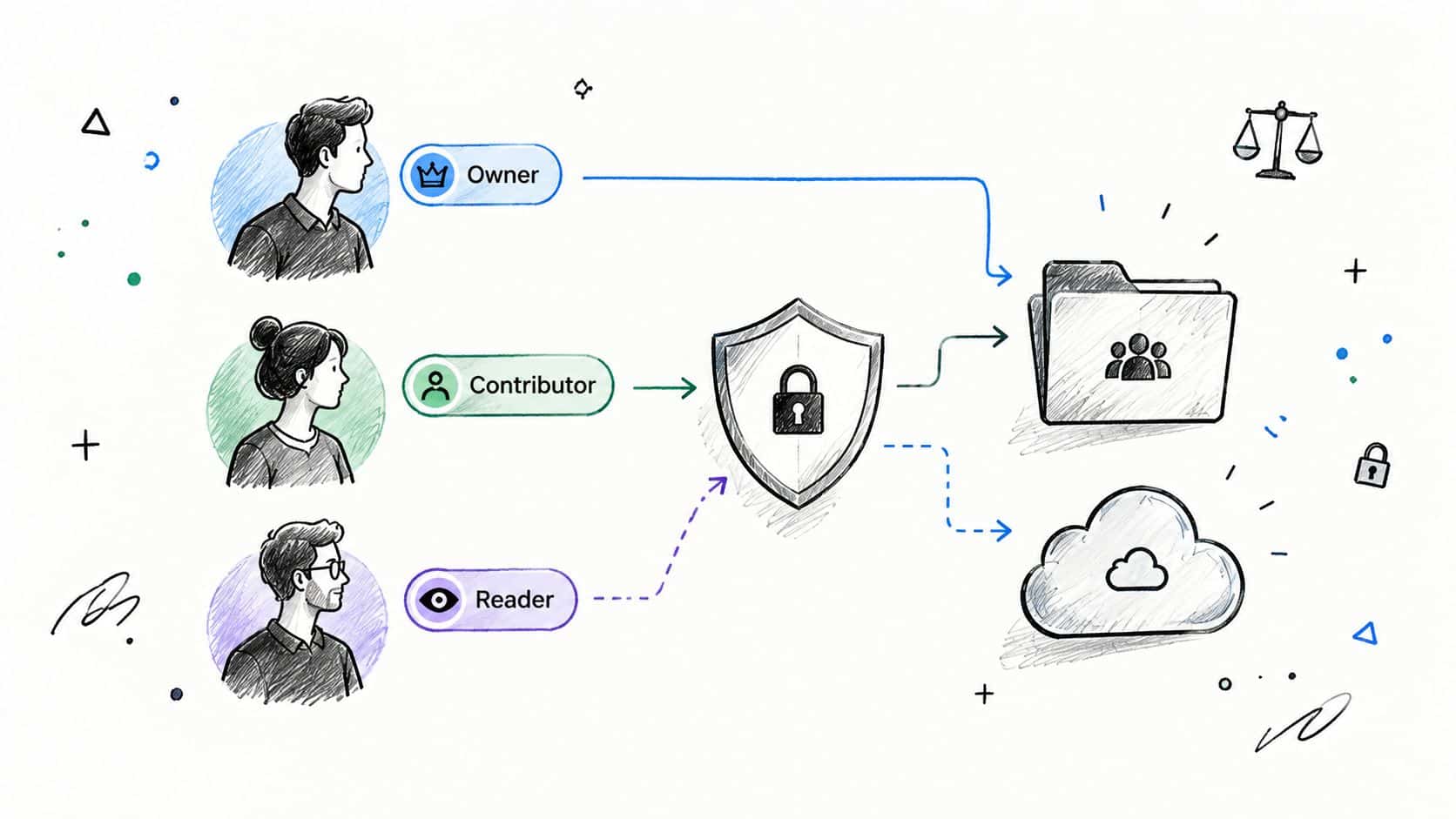
A finance employee needs different permissions from a sales manager. Neither role should automatically access Azure subscriptions or every SharePoint library. Role-Based Access Control, or RBAC, assigns permissions according to job responsibilities, while least privilege limits them to the work required.
Begin with an access map. List business roles, Microsoft 365 services, Azure resources and the information each role must use. In Dynamics 365, finance, HR, operations and customer service may need separate permissions. In Azure, distinguish subscription, resource-group and workload access instead of giving every technical user the Contributor role. In Power BI, combine workspace roles with row-level security so reports show appropriate information.
Make privileged access deliberate
Standing administrator access saves time during routine work, but a compromised account or mistaken change can affect an entire tenant. Microsoft Entra Privileged Identity Management supports just-in-time elevation, approval workflows and access reviews for sensitive roles. The decision is whether the operational convenience of permanent access justifies its wider impact. For most privileged duties, temporary elevation is the safer default.
Set up the operating rules:
- Assign role ownership: Give each role a named business owner, alongside technical administration.
- Record permissions: State what the role can read, create, change and delete.
- Use security groups: Apply access through clearly named groups with accountable owners, rather than scattered individual assignments.
- Separate administration: Keep privileged accounts apart from everyday email and web browsing.
- Review actual use: Compare assigned permissions with activity and remove access that is no longer needed.
- Remove stale access: Recheck permissions after job changes, project completion and supplier offboarding.
Review frequency should match staff turnover, information sensitivity and regulatory expectations. A periodic review has little value if unnecessary permissions remain in place. Removing access too aggressively can interrupt work and push staff towards shared accounts or unapproved file transfers, so pair reductions with a clear request and approval route.
A professional services firm could give each department access to its own client workspace while limiting other departments to approved matter folders. A manufacturer might allow developers to deploy to a test resource group, while production changes require an approved operations role. Group membership, documented approvals and separate environments make these decisions easier to audit than individual exceptions.
3. Enable Cloud Audit Logging and Monitoring
A security incident becomes difficult to investigate when sign-in records, administrative changes or data activity were never collected. Audit logging captures those events, while monitoring turns them into alerts, dashboards and investigation workflows.
For Microsoft 365, review unified audit logging, Entra sign-in and audit logs, SharePoint activity and Defender alerts. In Azure, configure suitable diagnostic settings for subscriptions, resources, storage, databases and security services. Send priority records to a controlled Log Analytics workspace or Microsoft Sentinel environment, then restrict who can change or delete them.
The decision is coverage versus cost and noise. SMBs rarely need every available event. Start with activity that could change access, expose data or indicate compromise:
- Prioritise critical events: Monitor privilege changes, authentication anomalies, new forwarding rules, unusual sign-ins and data-sharing changes.
- Set retention requirements: Balance investigation needs, contractual duties, regulatory expectations and storage costs.
- Assign ownership: Give each high-priority alert a named person or service for triage.
- Test detection paths: Generate controlled events to confirm alerts arrive with useful context and lead to an agreed response.
- Protect monitoring controls: Limit administrative access and log changes to the monitoring configuration.
Microsoft Defender alerts and a focused Sentinel workspace can provide a practical starting point for a small organisation. Collecting less data reduces cost and alert fatigue, but it can leave gaps during an investigation. Expand coverage as systems, information sensitivity and incident experience change.
The Information Commissioner's Office guidance on cloud computing and data protection highlights appropriate cloud controls, including encryption and authentication. Audit evidence supports those controls in practice. A policy stating that administrators are reviewed is weaker than a retained record showing who completed the review, what changed and when.
4. Encrypt Data in Transit and at Rest
A stolen session, exposed storage account or misconfigured integration can reveal business information unless encryption limits what an attacker can read. Encryption covers data moving between users, applications and services, as well as data held in storage. It reduces exposure, but does not correct excessive permissions or unsafe sharing.
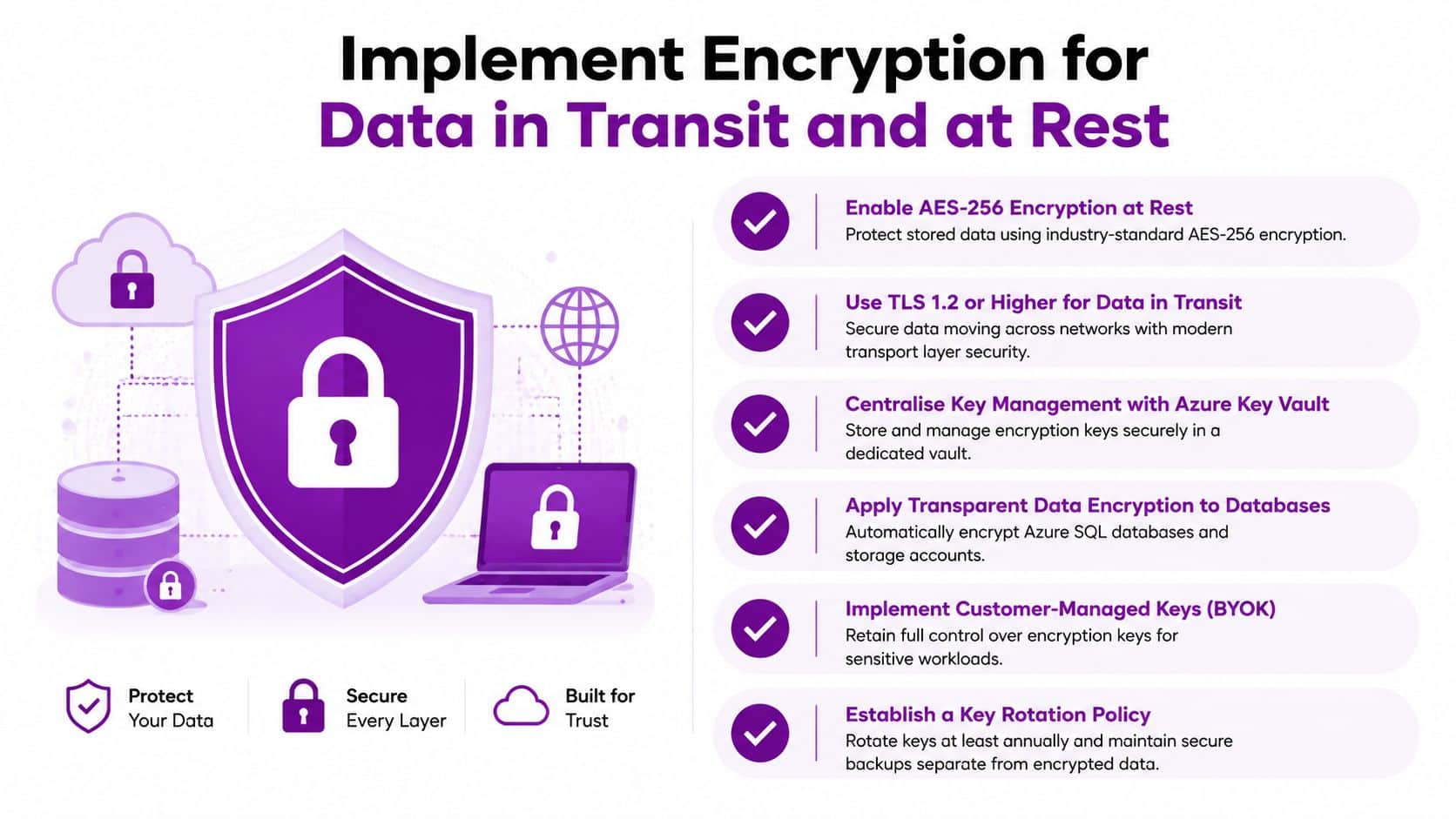
The Information Commissioner's Office guidance on cloud computing and data protection says cloud customers should consider encryption in transit and at rest. Use HTTPS and current TLS configurations for web applications, APIs and integrations, then check that older protocols are disabled. Review remote administration and service-to-service connections as well as public-facing endpoints.
Choose controls according to information sensitivity
Microsoft 365 and Azure encrypt platform-managed data, yet administrators must confirm what each service covers, which keys are involved and whether the business needs additional control. Azure Key Vault can store secrets and manage keys centrally. Customer-managed keys may suit highly sensitive workloads or contractual requirements, while creating responsibility for availability, access, rotation and recovery.
Start with a short inventory:
- Map storage: Record Azure Storage, SQL databases, managed disks, file shares, SharePoint and OneDrive.
- Check transfers: Review web endpoints, integrations, remote administration and service-to-service traffic.
- Separate key access: Keep application operators from holding broad permissions over encryption keys.
- Protect recovery material: Store keys and recovery information through a controlled, tested process.
- Verify settings: Use Azure Policy and security reviews to find resources without expected encryption.
The decision is whether added control justifies added operational risk. Customer-managed keys support governance and separation of duties, but an unavailable or poorly recovered key can prevent legitimate access. For an SMB, platform-managed encryption is often the simpler option unless a contract, regulator or risk assessment requires customer control. Specialist support can validate the design without leaving key ownership and recovery to an overstretched administrator.
A legal team storing confidential documents in SharePoint should pair encryption with sensitivity labels, restricted sharing and audit logging. The practical test is whether the organisation can explain who may download a document, create an external link or administer its keys. Encryption protects the content, while access and governance controls determine how it can be used.
5. Maintain Regular Backups and Disaster Recovery Planning
A ransomware incident, deleted SharePoint site or failed Azure workload can turn a minor administration error into prolonged disruption. Recovery depends on more than having backup jobs enabled. The copies must be complete, protected from the same attack and usable by staff who know the recovery process.
Microsoft 365 retention features, recycle bins and version history support selected recovery scenarios, but they do not automatically satisfy every business's backup requirement. The NCSC advises organisations to recover critical data from backups and recreate cloud environments from backed-up infrastructure-as-code documents, with periodic tests to confirm that recovery works. The UK government's draft security code document also recommends regular cloud and offline backups, including tests of data and network recovery.
Start by deciding what must return first. Record recovery priorities for Exchange Online, SharePoint, OneDrive, Teams-related data, Azure workloads and Dynamics 365 integrations. Define acceptable recovery time and data loss in practical terms, even if precise targets have not been agreed. Then run a scenario such as a deleted site, compromised administrator or unavailable Azure workload.
Use this checklist to turn that decision into an operating routine:
- Separate backup access: Keep backup administration apart from normal user administration, with strong authentication and limited permissions.
- Protect recovery copies: Consider geographically separate and immutable storage where the business impact justifies its cost and administration.
- Check failed jobs: Review alerts, retention periods and restore-point accessibility. A completed job can still leave an unusable copy.
- Test representative recovery: Restore files, applications and configurations, rather than checking a single document.
- Record ownership: Document each procedure, assign unresolved gaps and update instructions after every exercise.
The UK Business Data Survey 2026 found that 20% of firms storing data off-premises experienced downtime in the previous 12 months. It also reported that 31% of businesses used a public cloud provider and 19% used private cloud, showing why resilience needs to accompany cloud adoption. The survey data is available from the UK Government.
The trade-off is cost and staff time. A complex recovery design that nobody tests can create false confidence, while a smaller procedure that employees can execute may provide more practical protection. F1Group's backup and disaster recovery support can help an SMB validate recovery without placing the workload entirely on an overstretched administrator.
6. Deploy Identity and Access Management Solutions
A compromised administrator can expose Microsoft 365, Azure and connected services in minutes. Identity and Access Management, or IAM, reduces that risk by controlling how accounts are created, authenticated, assigned permissions, monitored and removed.
For Microsoft environments, Microsoft Entra ID provides the central identity layer for Microsoft 365, Azure and many Dynamics 365 services. Hybrid organisations can connect on-premises identities through Entra Connect, although weaknesses in the source directory can then affect cloud access. Keep privileged identities separate, protect synchronisation infrastructure and include leavers in a documented joiner, mover and leaver process.
Start with the access decisions that carry the greatest consequence. Which users need administration rights? Which applications contain sensitive information? Can the business support managed devices for those applications? The answers should determine policy scope rather than applying identical controls everywhere.
Conditional Access can assess device compliance, application, location and sign-in risk. A user accessing a sensitive application from a managed device may face a different requirement from someone using an unmanaged device or unfamiliar location. Test policies against legitimate business journeys before enforcement.
- Require managed devices: Use Intune compliance for sensitive applications where the business can support device management.
- Reduce password dependence: Consider Windows Hello for Business or FIDO2 keys for suitable users.
- Monitor identity risk: Use Entra ID Protection signals and investigate risky users or sign-ins.
- Control locations carefully: Location policies can help, but travel and VPNs create exceptions, so do not rely on geography alone.
- Document policy logic: Administrators and users should understand why access is blocked or challenged.
The trade-off is security against availability. A blanket block can stop a travelling director, supplier or emergency responder from working. A staged policy, tested exceptions and a documented break-glass route provide stronger protection without requiring manual changes during an incident.
A hybrid business might synchronise employee identities while keeping privileged cloud administration in cloud-only accounts. This separation can reduce dependence on one identity path, provided both environments are protected and tested. Small teams may also use specialist support to review Entra roles, Conditional Access and leaver controls without making one administrator responsible for every check.
7. Establish Cloud Security Posture Management and Vulnerability Scanning
Cloud controls drift as people troubleshoot, deploy temporary resources and change services. A storage account may become publicly reachable, a firewall rule may remain wider than intended, or a test workload may outlive its project. Cloud Security Posture Management, or CSPM, identifies policy deviations and misconfigurations. Vulnerability scanning examines weaknesses in workloads, operating systems and supported applications.
Use Microsoft Defender for Cloud for posture recommendations and workload protection across Azure and connected environments. It will not decide what your team should fix first. Define ownership, remediation evidence and an escalation route before enabling more alerts.
Turn findings into owned work
The practical decision is whether your team can triage findings internally or needs vulnerability management services for prioritisation and escalation. Begin with internet-facing resources, privileged paths, sensitive data stores and weaknesses relevant to the workloads you run. Use the NCSC cloud security principles to shape the baseline, then adjust it for business risk.
A workable operating model includes:
- Rank exposure: Consider data sensitivity, internet access, privilege and exploitability together, rather than sorting only by scanner severity.
- Name an owner: Send each finding to an infrastructure, application or supplier owner, not a shared security queue.
- Set treatment times: Address high-risk issues urgently and schedule lower-risk configuration work in a controlled backlog.
- Automate carefully: Use Azure Policy or approved automation for repeatable changes, with testing for changes that could interrupt services.
- Prove closure: Re-scan after remediation, record the result and retain evidence for review.
The trade-off is coverage against capacity. Buying a scanner can expose more issues than an SMB can process, creating alert fatigue and leaving genuine weaknesses unattended. A narrower scope, clear risk order and scheduled review usually produce better results than collecting every available recommendation.
For Azure, combine Defender for Cloud recommendations with Azure Policy, ticketing and change control. The team can then connect detection to a named action, approval and verification. Where internal capacity is limited, a managed security partner can triage findings and escalate only the issues requiring business decisions.
8. Establish Data Loss Prevention Policies and Content Governance
A customer file can leave the business through an ordinary email, a Teams share or an unsanctioned application. Data Loss Prevention, or DLP, limits that exposure by recognising sensitive content and applying rules to communication, storage and collaboration.
Start with information that would cause the greatest harm if disclosed: personal data, financial records, confidential client material and intellectual property. Microsoft Purview brings together sensitivity labels, sensitive information types, DLP policies and audit capabilities across Microsoft 365. The first decision is the control level each category needs. Some data may require a warning and justification, while high-confidence matches may justify blocking.
Set controls people can follow
Begin in audit-only mode. Review matches, false positives and the business processes affected before enforcing restrictions. Move from audit to user warnings, then apply targeted blocking where the pattern is reliable. Each warning should explain the matched rule and offer an approved alternative. Exceptions require a named approver and a recorded reason.
Build the operating model around these checks:
- Define categories: Use labels employees can apply, such as public, internal, confidential and highly restricted.
- Tune detection: Create or adjust sensitive information types for the organisation's documents, identifiers and terminology.
- Set user guidance: Explain why an email, file share or upload is restricted and what action is permitted.
- Review incidents: Examine alerts for repeated process weaknesses, such as an approved supplier lacking a safe transfer method.
- Connect governance: Align labels with retention, access reviews, supplier requirements and audit evidence.
The trade-off is protection against friction. Blocking useful work can push staff towards unapproved channels, while audit-only policies may record a disclosure without stopping it. Business owners should test policies with real documents and collaboration patterns before enforcement.
A law firm could label case material as confidential, restrict external sharing and require justification for approved collaboration. A manufacturer might protect design documents while allowing controlled access to named suppliers. Keep the label catalogue small enough for employees to use consistently. Specialist support can help map information types, tune Purview policies and manage exceptions when internal teams lack time for repeated review.
9. Implement Secure Configuration Management and Infrastructure as Code
A single Azure environment can drift quickly. One administrator enables diagnostic logging, another changes a network rule manually, and the next deployment overwrites an undocumented fix. Infrastructure as Code, or IaC, puts these settings into version-controlled templates that teams can review, test and redeploy.
Azure Resource Manager templates, Bicep and Terraform can define networks, identities, storage, monitoring and security controls. Choose the tool that fits the team's skills and existing pipeline. The operating requirement stays the same: store templates in a controlled repository, review production changes and keep secrets out of source control.
Set the decision point before deployment
Decide which configurations Azure Policy should audit and which it should deny. A small business may audit first while teams learn the baseline, then block high-risk deviations such as unapproved regions, disabled secure transfer or missing diagnostic settings. Record exceptions as risk decisions with an owner, expiry and reason.
Use this implementation sequence:
- Choose repeatable assets: Start with virtual machines, databases, storage and network components deployed regularly.
- Review every change: Use pull requests, named reviewers and a readable history of modifications.
- Test safely: Check syntax, permissions, security settings, dependencies and deployment behaviour outside production.
- Separate environments: Keep development, test and production access, subscriptions and state appropriately separated.
- Protect state and secrets: Restrict Terraform state or equivalent artefacts, and retrieve credentials from managed secret stores.
IaC takes longer than an urgent manual edit at first. It reduces configuration drift, makes ownership visible and gives the team a repeatable recovery path. The practical trade-off is coverage: trying to codify every resource immediately can stall adoption, while leaving critical services unmanaged preserves avoidable risk.
Use an Azure landing zone and a small library of approved Bicep modules as a starting point. Expand them as deployments become familiar. Specialist support can help establish Azure Policy, pipelines and review controls without making the internal team responsible for every design decision.
10. Deploy Advanced Threat Protection and Endpoint Detection and Response
A compromised laptop can become the route into Microsoft 365 or Azure. An attacker may start with phishing, steal an active session, then reach SharePoint, Exchange or administrative resources. Endpoint Detection and Response, or EDR, records suspicious device activity and gives responders tools to investigate, isolate and contain it.
For Microsoft environments, Defender for Endpoint can connect with Defender for Office 365, Defender for Identity, Defender for Cloud and Microsoft Sentinel. The operational value is shared context. A risky sign-in, malicious email, unusual PowerShell command and access to sensitive files need one incident view, not four disconnected investigations.
Set the response boundary before an incident
Decide which detections justify automatic device isolation or remediation. Automatic action can limit spread, but isolating a production laptop, shared workstation or operational device may disrupt work. Set approval requirements, exceptions and a safe process for restoring access.
Start with this checklist:
- Cover the estate: Enrol laptops, desktops, servers and supported operational devices, including machines used outside the office.
- Connect the signals: Route relevant Defender alerts into a central incident workflow, such as Microsoft Sentinel, with clear ownership.
- Create playbooks: Record actions for phishing, ransomware indicators, suspicious administrator activity and lost devices.
- Tune carefully: Keep exclusions narrow, review false positives and remove rules that create avoidable noise.
- Practise response: Analysts should rehearse timelines, device isolation, evidence collection and user communications.
The UK Cyber Security Breaches Survey reported that 74% of UK businesses backed up data securely via a cloud service, compared with 47% using two-factor authentication and 36% using VPNs for remote staff. The comparison reinforces a practical point: backups support recovery, while identity controls and remote-access safeguards help prevent or contain compromise. The survey source is the UK government's Cyber Security Breaches Survey.
The decision for an SMB is operational. Can someone review alerts, investigate evidence and escalate incidents consistently, including outside normal working hours? If not, managed detection and response can provide monitoring, escalation and specialist support without requiring a full in-house security operation.
10-Point Cloud Security Best Practices Comparison
| Security control | Implementation complexity | Resource requirements | Expected outcomes | Ideal use cases | Key advantages |
|---|---|---|---|---|---|
| Implement Multi-Factor Authentication (MFA) Across All Cloud Services | Low–Medium (policy + rollout) | Low (auth apps, tokens, admin time) | Strong reduction in account compromise, fewer credential attacks | Protect admin accounts, remote access, sensitive services | Highly effective against phishing, cost-effective |
| Employ Role-Based Access Control (RBAC) & Principle of Least Privilege | Medium–High (role analysis, design) | Low–Medium (administration, possible PIM licensing) | Reduced insider risk, clearer audit trails | Organisations with many roles and privileged users | Enforces least privilege, improves accountability |
| Enable Comprehensive Cloud Audit Logging & Monitoring | Medium (collection + tuning) | Medium–High (storage, SIEM, analyst expertise) | Faster detection and investigation, compliance evidence | Regulated environments, incident response readiness | Forensic trails, real-time detection, compliance support |
| Implement Encryption for Data in Transit and at Rest | Low–Medium (configure keys & TLS) | Low–Medium (key management, Key Vault) | Protects data if storage/network compromised, regulatory compliance | Any sensitive data storage or transmission | Prevents data exposure, meets encryption standards |
| Maintain Regular Backups & Disaster Recovery Planning | Medium (policy + testing) | Medium–High (storage, replication, DR orchestration) | Rapid recovery, business continuity, ransomware resilience | Critical systems, legal/financial data, production services | Minimises downtime, enables reliable recovery |
| Deploy Robust Identity and Access Management (IAM) Solutions | Medium–High (policy design, integration) | Medium (directory sync, licensing, admin effort) | Centralised identity, better access control, SSO | Hybrid environments, enterprise apps, SSO needs | Unified identity, conditional access, improved UX |
| Establish Cloud Security Posture Management & Vulnerability Scanning | Low–Medium (enable + integrate) | Low–Medium (tooling, remediation effort) | Proactive identification of misconfigurations and vulnerabilities | Multi-cloud, compliance-driven organisations | Continuous posture visibility, prioritized remediation |
| Establish Data Loss Prevention (DLP) Policies & Content Governance | Medium (rule tuning, classification) | Medium (policy maintenance, user training) | Reduced accidental/malicious data leaks, regulatory compliance | Organisations handling PII, PCI, IP, regulated sectors | Prevents data exfiltration, enforces classification |
| Implement Secure Configuration Management & Infrastructure as Code (IaC) | High (template creation, testing) | Medium (DevOps skills, version control) | Consistent, auditable deployments, reduced config drift | DevOps pipelines, multi-environment deployments | Repeatable secure infra, faster recovery and scaling |
| Deploy Advanced Threat Protection & Endpoint Detection and Response (EDR) | Medium (deployment + tuning) | High (licenses, SOC staff, storage) | Detects sophisticated threats, faster incident response | Organisations facing targeted attacks, endpoint risk | Behavioural detection, automated response, forensic detail |
Turn Best Practices into a Security Routine
Ten controls don't create security if nobody owns them. An SMB needs a routine that connects configuration, people, evidence and recovery. Start with privileged identities because an administrator account can change access, disable controls and alter recovery paths. Enforce MFA, separate administrative accounts and remove standing privilege wherever practical.
Then review who can reach sensitive information. Map Microsoft 365 groups, SharePoint sites, Teams, OneDrive sharing, Dynamics 365 roles, Azure subscriptions and service accounts. Remove stale access, restrict external sharing and record exceptions. A permission that remains because nobody wants to investigate it is still a business risk.
The next stage is visibility. Enable relevant Microsoft 365 and Azure audit logs, connect Defender signals and define a small number of high-value alerts. Give every alert a response owner. Monitoring without triage creates noise, while triage without useful logs creates guesswork.
Secure the information and the deployment process together. Apply encryption in transit and at rest, classify sensitive content, introduce DLP gradually and use Azure Policy with IaC to keep new resources within the agreed baseline. The NCSC guidance recommends secure-by-default services, granular access controls, templates or landing zones and extensive automation. Those principles are particularly useful for SMBs because they reduce dependence on individual memory.
Recovery deserves its own test. The UK Business Data Survey 2026 found that 29% of businesses relied on specialist staff for data-protection requirements, while only 11% provided data-protection training to existing staff, indicating a skills gap that governance, role-based training and clearer responsibility can help address. The UK Government survey provides this data. Don't assume a backup dashboard proves recoverability. Restore representative data, recreate an Azure component from IaC and document what failed.
Use this compact operating checklist:
- Assign owners: Name business and technical owners for identities, permissions, data, monitoring, backups and incident response.
- Set review dates: Schedule access reviews, policy reviews, vulnerability remediation reviews and recovery exercises.
- Record exceptions: Capture the reason, risk, compensating control, approver and expiry date for every deviation.
- Validate controls: Test MFA enrolment, privileged access, alerts, DLP actions, encryption settings and restore procedures.
- Measure evidence: Keep reports, tickets, approvals, test results and remediation records where auditors and decision-makers can find them.
- Escalate capacity gaps: Bring in specialist support when internal staff can't monitor, investigate or test controls reliably.
SMBs don't need to build every capability alone. F1Group supports Microsoft 365, Azure, managed IT services and cyber security for organisations across Lincoln, Nottingham, Leicester, Scunthorpe, Grimsby and Newark. Its Microsoft-focused services can help organisations plan and manage identity, cloud configuration, data protection, monitoring, recovery and security operations.
Review the ten practices with your IT lead and business owners, choose the highest-risk gap, assign one person to fix it and set a date to validate the result. Then repeat the process. Cloud security improves when controls become part of normal operations rather than a one-off project.
F1Group provides practical support for Microsoft 365 and Azure security, including identity management, Conditional Access, MFA, cloud governance, monitoring, backup and cyber security. Phone 0845 855 0000 today or visit F1Group and send us a message at https://www.f1group.com/contact/.