
A junior accountant in a Nottingham firm copies a SharePoint folder into a personal OneDrive account two days before a client audit. Nobody sees a dramatic warning. The files move through an ordinary Microsoft 365 workflow, outside the firm's approved boundary and beyond the immediate view of the IT team.
That's the practical problem data loss prevention solutions need to solve. In the UK, 73% of organisations experienced at least one data loss incident in the previous 12 months, and 86% of affected organisations reported negative outcomes, including revenue loss or reputational damage, according to Proofpoint's UK data loss research. DLP isn't a box-ticking exercise or a product you switch on once. It's a governance programme that makes your Microsoft 365 policies enforceable.
What Data Loss Prevention Actually Does for Your Business
The Nottingham accountancy example is common because the user may not believe they're doing anything wrong. They may want to work from home, prepare for the audit, or create a personal backup. The action still moves client information somewhere the business hasn't authorised.
Data loss prevention is the combination of policies and tooling that identifies sensitive information, monitors how it's used, and intervenes when it moves in a way your organisation hasn't approved. It follows the data rather than relying only on a firewall, an antivirus product, or a written acceptable-use policy.
The three jobs a DLP programme must perform
-
Discover sensitive information. Find personal data, financial records, confidential contracts, intellectual property, and other material across SharePoint, OneDrive, Exchange, Teams, endpoints, and other sanctioned locations. You can't write a sensible rule for data nobody has mapped.
-
Classify the information. A DLP engine needs context. A public marketing brochure shouldn't trigger the same control as a payroll export or a client tax return. Microsoft Purview sensitivity labels, sensitive information types, trainable classifiers, and exact data matching can help distinguish routine documents from material that needs stronger handling.
-
Enforce the policy. Depending on the risk, the solution can warn the user, require business justification, alert an analyst, restrict sharing, encrypt content, or block the action. The response should reflect the data and destination, not punish every unusual action equally.
Practical rule: Blocking everything is not a DLP strategy. It's a shortcut to users finding workarounds.
For East Midlands SMEs, the important distinction is that DLP is governance expressed through technology. Your policy might say that client records can only be shared with named recipients through approved services. Microsoft 365 DLP turns that statement into detection, intervention, and an audit trail.
A broader view of data breach strategies for CTOs is useful when DLP forms part of a wider security programme. For a focused explanation of the Microsoft 365 concept, see what data loss prevention means in practice. The operational consequence is straightforward: start with data flows and business rules, then select and configure the controls that enforce them.
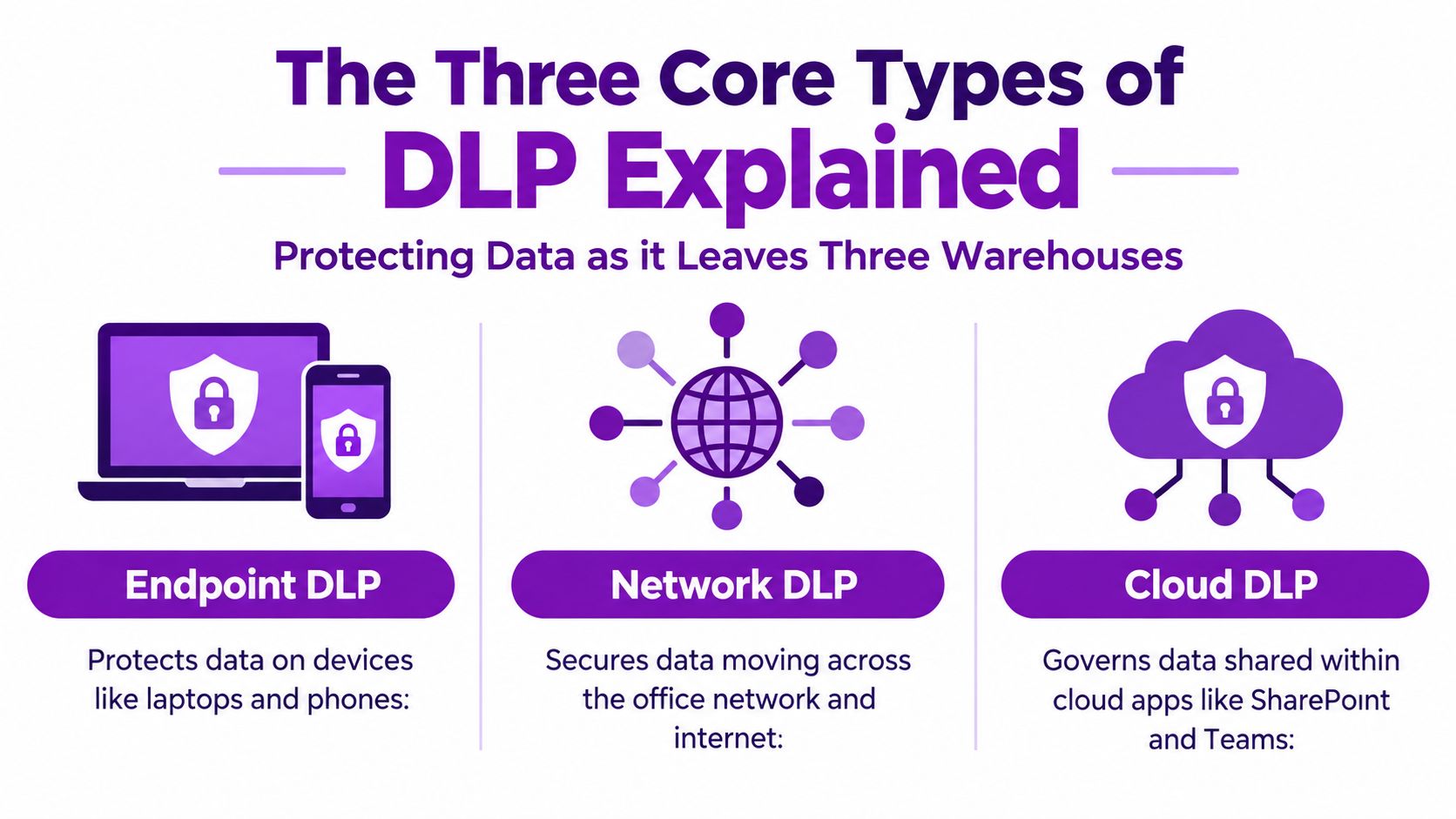
The Three Core Types of DLP Explained
Think of sensitive data as parcels leaving three different warehouses. One warehouse is the user's laptop, another is the office network, and the third is the Microsoft 365 cloud. Each type of DLP watches a different exit, so deploying only one leaves obvious gaps.
Endpoint DLP watches the laptop warehouse
Endpoint DLP controls what happens on Windows and macOS devices. It can monitor copying to USB, clipboard actions, screenshots, printing, browser uploads, and transfers to removable media. That matters because Microsoft 365 can record what happens in its services, but it can't by itself provide complete visibility into every local action on a laptop.
In a Microsoft estate, Windows DLP and macOS DLP policies can report into the Purview console. That gives administrators a more consistent policy view while recognising that operating systems and endpoint capabilities still need testing before enforcement.
Network DLP watches traffic crossing the building
Network DLP inspects traffic moving through office firewalls, mail gateways, and web proxies. It can identify sensitive content leaving the business even when the employee is physically in the office and using a company-managed connection.
Network controls still have value, but they're no longer sufficient. Encrypted SaaS traffic, remote working, personal devices, and direct-to-cloud applications mean important activity may never cross a traditional office inspection point.
Cloud DLP governs the Microsoft 365 warehouse
Cloud DLP is the main battleground for organisations built around Microsoft 365 and Azure. It examines data at rest in SharePoint, OneDrive, and Exchange Online, and data in motion through Teams, Outlook, and Copilot.
The three layers should share classifications, policy logic, ownership, and incident handling. A rule that blocks a sensitive SharePoint file from external sharing but ignores USB copying or personal webmail protects one door while leaving the loading bay open.
For a practical visual explanation of the three layers, watch the following overview.
Business Risks DLP Is Designed to Mitigate
The biggest DLP risk in a mid-market business usually isn't a cinematic attack. It's a normal user making a quick decision under pressure. UK research identified careless users as the main cause in 82% of responses, with an estimated average of 16 data-loss incidents per UK organisation per year, as reported by Proofpoint.
That changes the design priority. The solution must support users while stopping unsafe destinations, and it must give analysts enough context to decide whether an alert represents a reportable incident or a harmless business action.
| Risk Category | Typical Microsoft 365 Vector | Business Impact |
|---|---|---|
| Inadvertent insider risk | Incorrect recipient, external sharing, personal storage, sensitive text entered into an AI tool | Client complaints, regulatory assessment, remediation work, and possible contract loss |
| Malicious insider risk | Bulk download from SharePoint or OneDrive, copying source code, forwarding records to a personal account | Loss of intellectual property, customer data exposure, and difficult employee investigations |
| Contractor and supplier exposure | Guest access, shared sites, broad permissions, unmanaged devices | Unclear accountability, supply-chain concerns, and prolonged incident scoping |
| Shadow AI | Prompts or uploaded files containing personal, financial, or confidential information | Uncontrolled disclosure and weak evidence about where information was processed |
| Misconfigured collaboration | Anonymous links, external Teams sharing, over-permissioned libraries | Persistent exposure that may remain unnoticed until a third party discovers it |
Carelessness needs controls, not just training
Training matters, but it won't catch every misaddressed attachment or rushed upload. DLP can warn a user that a file contains client data, require justification for external sharing, or block a transfer to a personal account. The intervention should explain the policy in plain language, otherwise people will treat it as an obstacle rather than a safeguard.
Deliberate removal needs evidence
A departing employee downloading contact lists or source code creates a different investigation. User identity, device, destination, file classification, and timing all matter. DLP should connect those details so an IT manager can distinguish legitimate handover work from deliberate exfiltration.
The business cost isn't limited to a possible fine. A regulated client may question your controls, a supplier may demand evidence, and internal teams may spend days reconstructing events from incomplete logs. Good DLP reduces both the likelihood of leakage and the time needed to understand what happened.
UK Compliance Drivers and the 72-Hour Reporting Clock
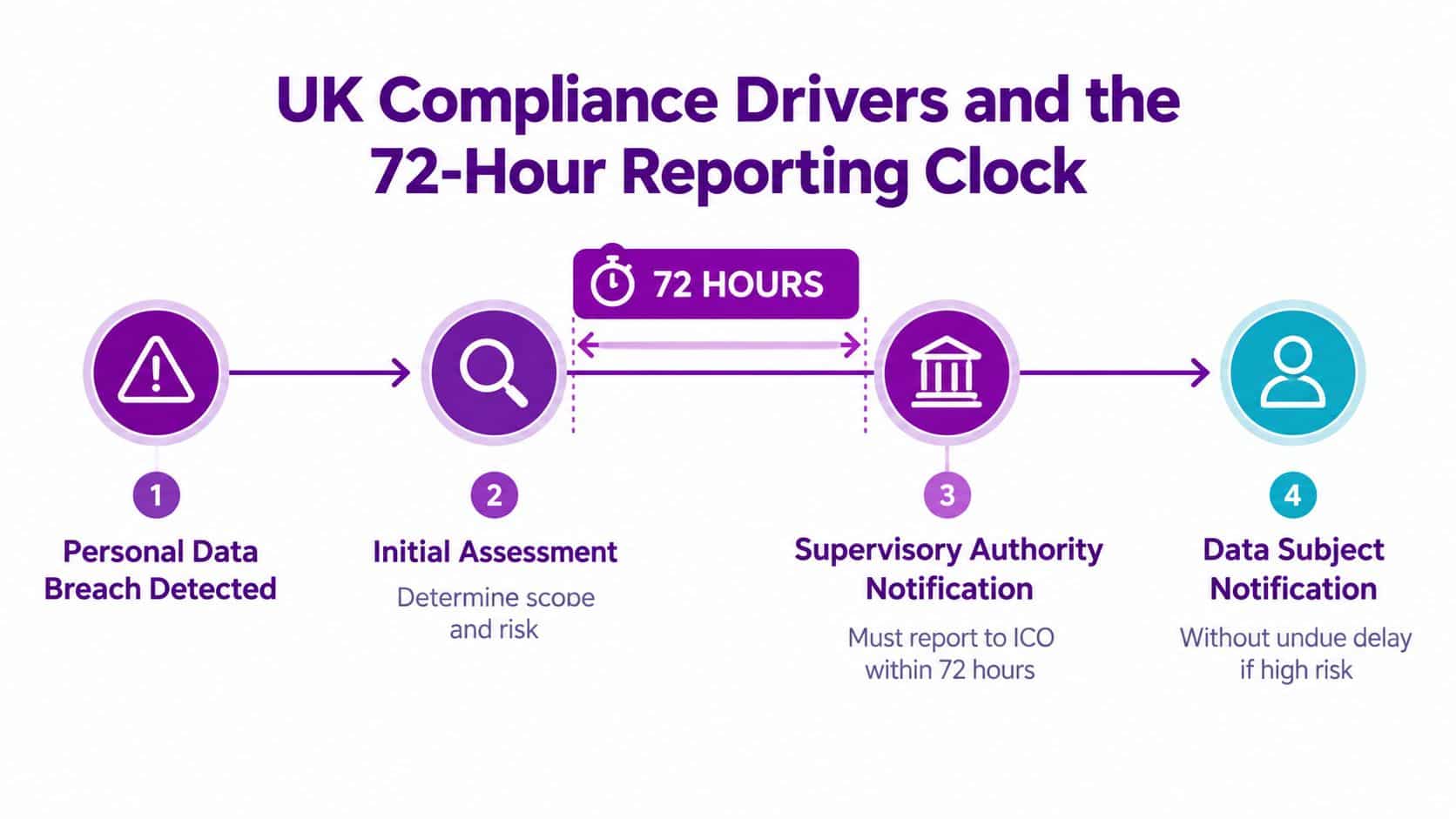
A stolen mailbox export on Friday afternoon can become a regulatory problem before your team has reconstructed what happened. UK GDPR requires an organisation to notify the ICO of a personal data breach without undue delay and, where feasible, within 72 hours of becoming aware of it, as set out in the ICO's breach guidance.
That clock does not apply to every incident. The ICO expects organisations to assess whether the breach is likely to create a risk to individuals' rights and freedoms, record the reasoning, and notify the regulator when that risk exists. DLP supports that decision by preserving the event details instead of leaving responders to search scattered Microsoft 365 logs.
What your DLP platform must record
A useful alert should give your response team enough evidence to establish:
- The data involved, including relevant personal or special category information.
- The people and records affected, where that can be established.
- The destination and access path, such as an external recipient, guest account, USB device, or AI service.
- The user and device context, including the policy that was triggered.
- The action taken, such as warning, encryption, restriction, or blocking.
- The remediation record, including decisions, communications, and follow-up tasks.
The ICO's guidance expects a breach report to describe its nature, affected individuals and records, likely consequences, and mitigation measures. Configure DLP to retain an exportable incident timeline. Without one, your team will assemble evidence manually while the reporting window is running.
The Data (Use and Access) Act 2025 reinforces the need for disciplined handling. UK government guidance covers limiting collection, maintaining processing records, securing personal data, deleting it when no longer needed, and reporting relevant breaches. It also notes that small organisations usually need to register and pay an ICO fee. The Act introduces a formal complaints process due by 19 June 2026, with faster complaint handling requirements, as explained in UK business data-protection guidance.
Use this GDPR compliance checklist beside your DLP configuration. DLP cannot correct excessive retention, weak access governance, or unclear ownership. Assign those controls to named people, then make Microsoft 365 policy evidence part of the same governance process.
Evaluating DLP Solutions Against Your Microsoft 365 Estate
Don't compare vendors by counting features. Score them against the way your Microsoft 365 estate works, including the places where your current controls are weakest.
Start with four questions:
- Are sensitivity labels in use? If labels are absent or inconsistent, your DLP rules may rely heavily on content inspection and produce noisy results.
- Which services carry sensitive information? Exchange, SharePoint, OneDrive, Teams, Power BI, Copilot, and Azure workloads each create different data paths.
- How does identity work? Hybrid identity, Entra ID groups, guest accounts, privileged roles, and unmanaged devices all affect policy context.
- Where does native coverage stop? Purview may cover your main cloud workflows, but endpoint egress, on-premises file shares, personal applications, and certain AI interactions may need additional controls.
| DLP Capability | Why It Matters for M365/Azure | Score 1-5 |
|---|---|---|
| Sensitive information detection | Identifies personal, financial, confidential, and business-critical content across services | |
| Sensitivity-label integration | Aligns enforcement with the classification model users and administrators already recognise | |
| Microsoft 365 coverage | Inspects Exchange, SharePoint, OneDrive, Teams, Power BI, and relevant Copilot activity | |
| Endpoint enforcement | Controls USB, printing, clipboard, screenshots, browser uploads, and local transfers | |
| Identity and context | Applies rules using user, group, device, application, destination, and risk context | |
| Incident evidence | Produces a clear timeline and exportable records for investigation and ICO assessment | |
| Operational usability | Supports audit-only policies, exceptions, justification, tuning, and ownership |
Build a costed control model
Purview DLP, Defender for Cloud Apps, Intune endpoint DLP, and third-party overlays each address different gaps. Don't assume the largest bundle is automatically the right answer. Check licensing, implementation effort, management overhead, and the cost of leaving a known channel uncovered.
A useful Steel City IT data security guide can provide wider context around the controls surrounding DLP. Your final decision should come from your own estate, not a generic maturity diagram.
Vendor test: Give every supplier your worst documented incident. Ask them to show the alert, the evidence trail, the user experience, the analyst workflow, and the report you'd provide to the ICO.
Phased DLP Implementation Checklist for Microsoft 365 and Azure
The common mistake is treating DLP as a licensing project. The control may be available in your Microsoft agreement, but that doesn't mean your data is classified, your policies are sensible, or anyone is ready to investigate alerts.

Phase one, discovery and data mapping
Use Microsoft Purview searches, Activity Explorer, Content Explorer, SharePoint reporting, OneDrive administration, Exchange investigation tools, and Teams governance data to map where sensitive content lives. Record owners, sharing patterns, retention expectations, and external access.
The East Midlands pitfall is starting with a template policy before understanding how the business operates. Discovery prevents you from blocking a legitimate payroll workflow or overlooking an unmanaged project site.
Phase two, policy design
Write rules around real exfiltration paths. Decide which data types need a warning, justification, restriction, encryption, or a block. Involve finance, HR, operations, legal, and client-facing teams before the policy reaches users.
The Microsoft 365 DLP policy guidance is useful when translating governance requirements into working rules.
Phase three, pilot in audit-only mode
Choose a defined user cohort and run policies without blocking. Review false positives, repeated destinations, unusual sharing, and exceptions. Purview alerts and Activity Explorer should show whether the detection logic matches genuine business risk.
Phase four, hardening and endpoint enforcement
Refine sensitive information types, trainable classifiers, labels, and exceptions. Use Defender for Cloud Apps session controls where appropriate, Intune endpoint DLP for local activity, and device-management policies for removable media.
Phase five, steady-state operations
Tune alerts, review exceptions, test response procedures, and report meaningful measures to the SIRO or equivalent risk owner. Put DLP into the risk register rather than leaving it with one administrator who may change roles.
F1Group can run discovery, configure Microsoft 365 and Azure policies, and support the ongoing tuning cycle for organisations that need practical implementation capacity.
Common Pitfalls and Metrics That Prove DLP Is Working
A quiet DLP dashboard proves very little. It may reflect accurate policies, or it may mean the controls are misconfigured, incomplete, or absent from the devices and services where staff share information.
The greatest danger is false confidence. The ICO fined 23andMe £2.31 million for failing to implement appropriate authentication and verification measures, including mandatory multi-factor authentication, as reported in the ICO enforcement announcement. The ICO also fined Advanced Computer Software Group £3.07 million after a ransomware attack put the personal information of 79,404 people at risk, as reported in the ICO enforcement announcement. These cases are not identical to a Microsoft 365 DLP failure, but they show why appropriate technical and organisational protection must be evidenced, tested, and reviewed.
| Pitfall | Metric That Exposes It | Remediation |
|---|---|---|
| Policy sprawl | Overlapping rules, duplicated alerts, and inconsistent actions | Consolidate policies around defined data types, destinations, and risk levels |
| Alert fatigue | High alert volume with weak investigation or closure quality | Tune thresholds, group related events, and assign clear ownership |
| Default labels only | Sensitive files remain unlabelled or inconsistently classified | Add business-specific labels, sensitive information types, and trainable classifiers |
| No endpoint coverage | Little visibility into USB, printing, clipboard, screenshots, or browser uploads | Deploy and test endpoint DLP through Intune and the relevant platform controls |
| One-off deployment | Stale exceptions, unmanaged sites, and policies nobody reviews | Schedule governance reviews and connect DLP to the SIRO risk register |
Metrics that matter
Track the reduction in unlabelled sensitive files, while checking discovery coverage and classification accuracy alongside it. A lower count can reflect incomplete scanning rather than safer user behaviour.
Measure mean time to detect exfiltration and the evidence attached to each incident. Fast detection still creates response delays if the record lacks user, content, destination, and action context.
Monitor the percentage of policy violations overridden with business justification. A high level can indicate a legitimate workflow that needs redesign, or a policy that is too broad. Review the stated reason, not only the percentage.
Track completed remediation tickets. An open alert has not reduced risk. Mature teams assign owners and deadlines, provide user coaching, change access where required, make retention decisions, and complete a formal breach assessment when appropriate.
Use an honest maturity position:
- Unmapped: Sensitive data locations and risky sharing are unknown.
- Observed: Discovery and audit signals exist, but enforcement is limited.
- Controlled: High-risk channels have tested, proportionate policies.
- Operational: Analysts tune rules, close tickets, review exceptions, and produce evidence.
- Governed: DLP informs board reporting, supplier assurance, retention, access reviews, and the SIRO risk register.
F1Group helps East Midlands businesses discover sensitive data, design Microsoft 365 DLP policies, configure proportionate enforcement, and manage tuning across Microsoft 365 and Azure. Visit F1Group or phone 0845 855 0000 today, and send us a message to discuss your data loss prevention requirements.