
A missed update rarely announces itself as a cyber incident. It may first appear as a failed login, an unavailable file share or a Microsoft 365 account that behaves strangely. By the time staff report the problem, an exposed system may already have affected customer service, finance or day-to-day operations.
For a small or mid-sized business in the East Midlands, patching can feel like a background IT task competing with urgent requests. It shouldn’t. Patch management is a measurable business control that helps reduce exposure, support compliance and keep essential services dependable. The UK National Cyber Security Centre recommends an “update by default” approach, with updates applied as soon as possible and ideally automatically. Its guidance also gives organisations practical rollout windows for different parts of the estate. NCSC vulnerability-management guidance provides the reference point.
Introduction Why Patching Cannot Wait for UK Businesses
A manufacturing firm near Nottingham starts Monday with several users unable to access a cloud-connected application. A customer portal is unavailable, and the IT manager finds that an approved security update never reached laptops used by remote staff. Restoring service becomes the immediate priority. The harder question is what else remains exposed.
A small business does not need a large security team to reduce this risk. It needs a repeatable control that identifies devices, assesses exposure, tests updates, deploys them in stages and confirms the result. Without that control, an update can exist in the console while the affected system remains vulnerable.
UK guidance treats patching as a governance responsibility, not only a technical task. The NCSC’s update-by-default policy gives leaders a basis for setting internal deadlines, assigning ownership and reviewing exceptions. The point is not to create paperwork. It is to make patch performance visible, much like tracking backup completion or recovery testing.
A useful policy should show which systems are covered, who accepts delayed updates and what evidence confirms completion. It should also define when a failed deployment becomes a business risk requiring escalation. This turns patching from an occasional IT activity into a control that can be measured and discussed at management level.
Practical rule: Speed and stability can work together. Testing, automation and phased deployment reduce exposure while limiting the chance that one faulty update interrupts the whole business.
The approach matters for Microsoft-centric estates. Microsoft 365 identities, Windows devices, Azure workloads and third-party applications may follow different update paths, so a gap in one area can undermine protection elsewhere. SMB leaders should set priorities around customer service, finance and operational continuity, then use the tools already available in their Microsoft environment where they fit.
Leaders reviewing wider cybersecurity trends for IT leaders can place patch governance alongside broader resilience planning. The aim is straightforward: fewer unknown exposures, clearer accountability and better evidence that technology controls support the business.
Understanding the Patch Management Lifecycle
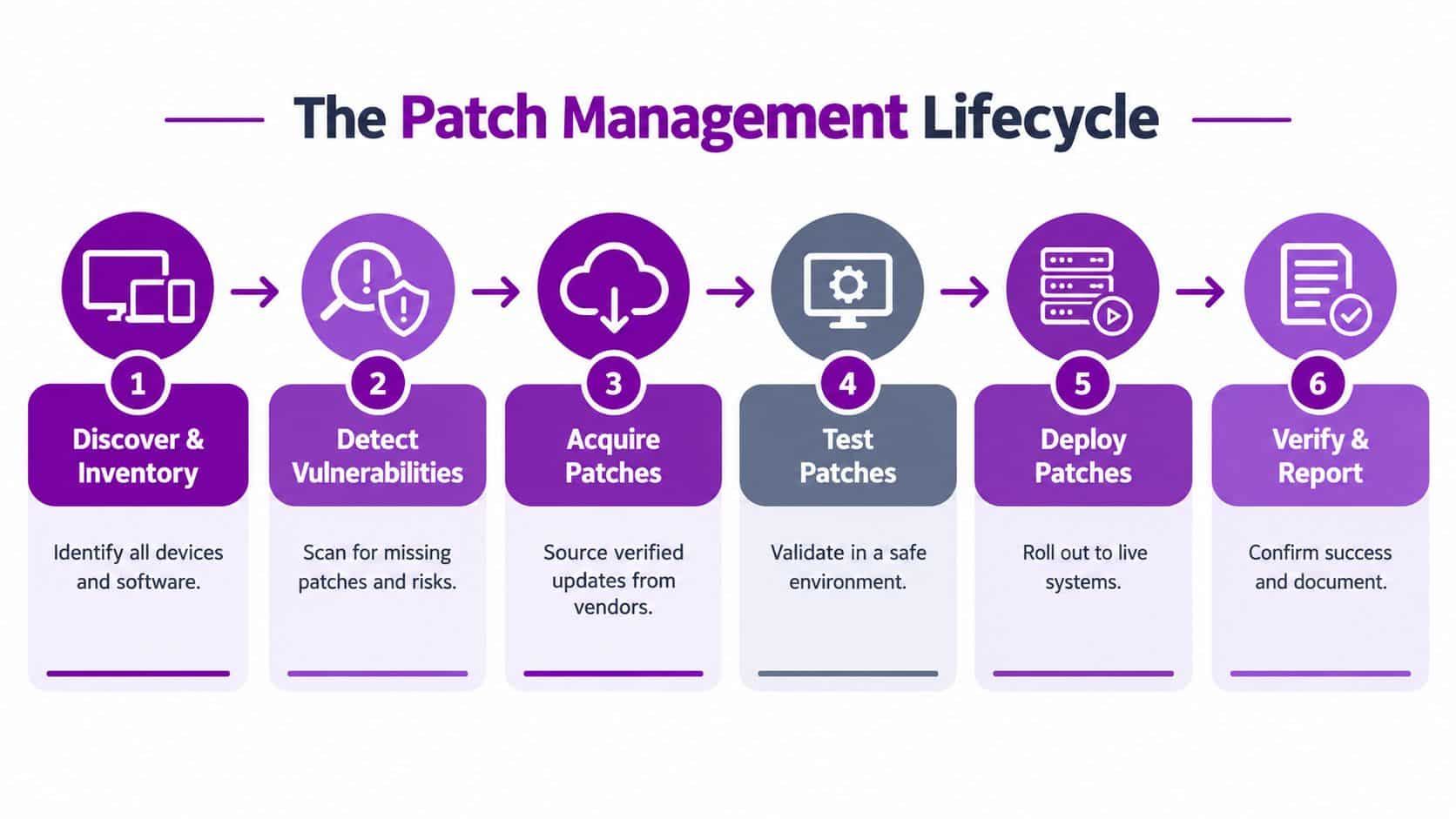
Think of patching like servicing a fleet of business vehicles. You need to know which vehicles exist, identify the ones with a safety issue, obtain the correct parts, test the repair, complete the work and record that each vehicle is safe to use. Applying one step while ignoring the others creates uncertainty.
Discover and identify the estate
Start with an accurate inventory of laptops, desktops, servers, virtual machines, network equipment, Microsoft 365-connected devices and Azure resources. Include third-party applications and systems that don’t follow the same update process as Windows. You can’t protect an asset that isn’t visible to the people responsible for it.
The register should show ownership, operating system, business purpose, location, internet exposure and critical dependencies. It should also identify devices that are temporarily offline, used remotely or excluded from standard management.
Detect and assess vulnerabilities
Use endpoint management, vulnerability scanning and vendor notifications to find missing updates. The output shouldn’t be a flat list. It should show which weaknesses affect externally exposed systems, business-critical services or assets with limited compensating controls.
Microsoft Intune can provide useful device-management information, while Azure Update Manager can help teams coordinate updates for supported Azure and server workloads. The exact toolset matters less than maintaining a current view of what needs attention.
Acquire and test verified updates
Obtain patches from trusted vendor channels and confirm that they apply to the correct products and versions. A deployment schedule should record the update, affected assets, owner, planned window and rollback approach. The Ministry of Defence guidance on effective system patching and update procedures highlights the importance of asset criticality, testing, response and recovery procedures, vendor download locations and patch notification channels.
Deploy, verify and report
Release the update in controlled stages, monitor devices and investigate failures. Verification should confirm that the patch installed, the relevant vulnerability is no longer present and the service still works. A deployment record that only says “sent” isn’t enough evidence that remediation succeeded.
Prioritising Patches and Assessing Risk Effectively
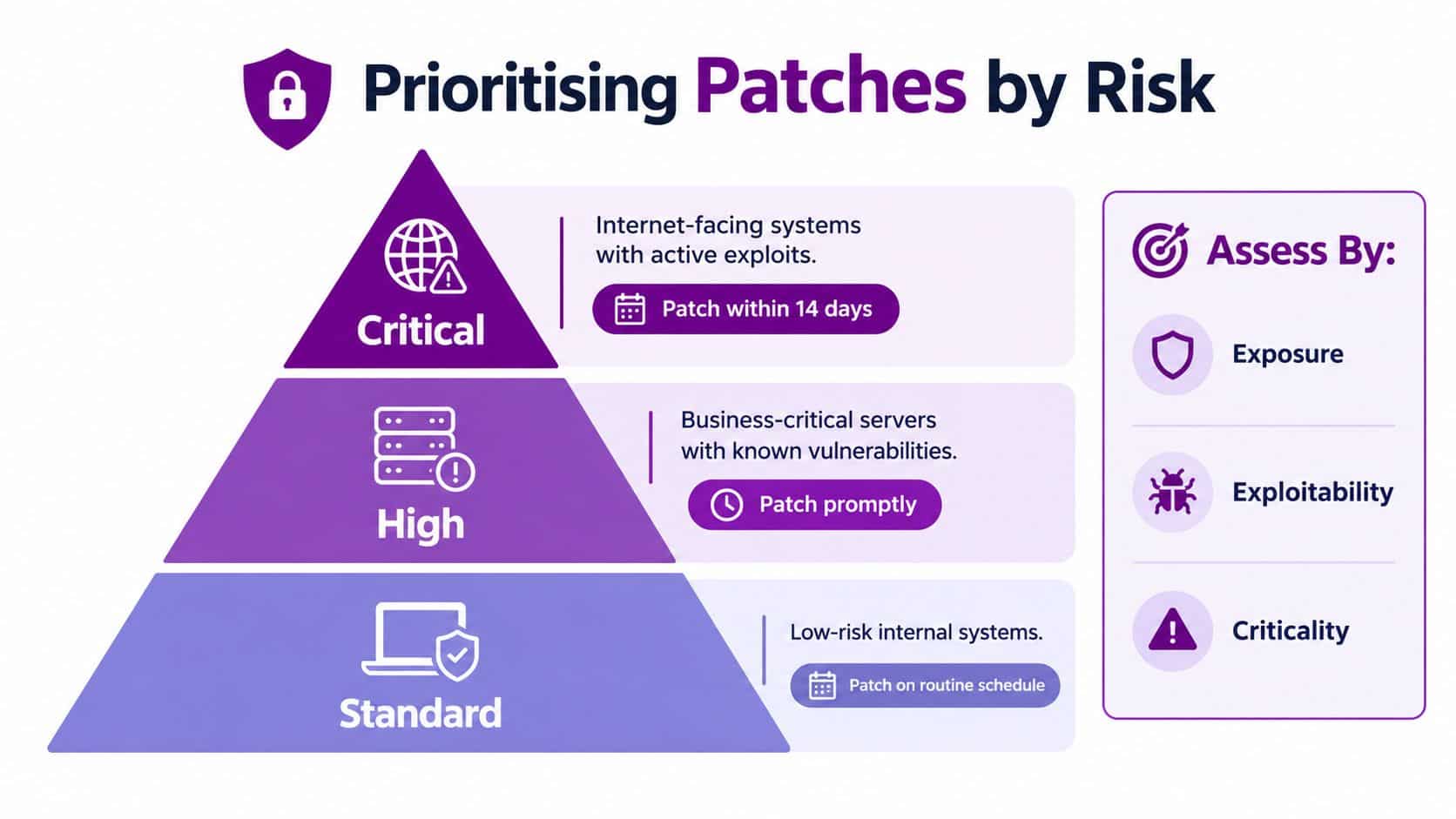
A patch for an internet-facing customer portal should not wait behind an update for an isolated office device. Both may show the same vulnerability, yet their routes to attack and potential business impact differ. Exposure, exploitability and business criticality provide a practical basis for deciding what happens first.
The NCSC’s recommended update-by-default timelines give that decision a measurable control. Internet-facing services and software should be tested and rolled out within 5 days. Operating systems and applications should be updated automatically within 7 days, while internal or air-gapped services and software should be tested and rolled out within 14 days. Its guidance also describes phased deployment, including an example of updating 10% of the estate per day for operating systems and applications. These targets help an East Midlands SMB turn “we are working through the backlog” into an owned deadline.
Use exposure as the first filter
Start with systems reachable from the internet, remote access infrastructure, identity services and externally available applications. Check whether an attacker can connect directly, whether the asset handles authentication and whether an outage would stop customer or staff work.
Then assess business importance. A server supporting payroll, production scheduling or customer records may require faster action than a low-risk internal workstation, even when both have the same patch available. Microsoft 365 identities and Azure workloads deserve the same review, because a compromised account or exposed cloud service can affect several business processes at once.
Add exploitability and operational context
A published vulnerability does not automatically receive the same priority in every environment. Assess whether exploitation is active or plausible, what protective controls already exist and whether the patch could affect a dependency or service window. Those questions help the team choose a safe response without treating operational concerns as permission for indefinite delay.
If installation cannot happen within the target window, record the reason, accountable owner, temporary controls and revised deadline. Risk acceptance must be a visible management decision, not an untracked note in an engineer’s task list.
Decision test: If an exception affects an internet-facing or business-critical system, senior governance should know about it, understand the temporary protection and agree when the exception ends.
Prioritisation becomes useful when it connects to scanning, configuration review and remediation tracking. Businesses assessing that wider control set can review this vulnerability management service overview to see how patch decisions fit alongside other security controls.
Automating Patch Management with Microsoft 365 and Azure Tools
Manual patching gives an engineer direct control, but it depends heavily on availability, accurate records and consistent follow-through. It also becomes difficult to manage across remote laptops, multiple offices, Azure workloads and third-party applications. Automation provides scale, provided the rules are designed before deployment.
Match the tool to the workload
Microsoft Intune is suited to managing enrolled Windows devices and applying update policies to a distributed workforce. It can help administrators define update rings, manage restart behaviour and report device status. A practical introduction to the platform is available in this guide to Microsoft Intune.
Windows Autopatch can reduce the amount of manual administration involved in keeping eligible Microsoft products updated. It still needs careful configuration, device readiness checks, reporting and exception management. Automation shouldn’t mean that nobody owns the result.
Azure Update Manager helps coordinate update assessment and deployment for Azure and supported server environments. It can support maintenance planning, compliance views and controlled deployment, particularly where a business has workloads across cloud and on-premises infrastructure.
Automatic update policies should be enabled wherever the risk and operational design support them. The NCSC recommends enabling automatic secure hot patching as a priority where it’s available, alongside phased deployment for operating systems and applications. Licensing and service costs vary by agreement and configuration, so confirm current GBP pricing with Microsoft or your licensing partner rather than relying on a generic USD example.
Build guardrails around automation
Automate routine workstation updates, but define approval requirements for production servers, specialist applications and changes that may affect availability. Separate normal security updates from drivers, firmware and feature changes, since each carries a different operational risk.
Useful guardrails include:
- Deployment rings: Start with representative test devices, then widen the release after monitoring results.
- Maintenance windows: Choose times that reduce disruption without allowing updates to drift beyond the required risk window.
- Restart controls: Communicate expected restarts and prevent users from postponing essential updates indefinitely.
- Exception ownership: Give every excluded device an owner, reason and review date.
- Failure handling: Route unsuccessful deployments into a queue that someone actively monitors.
A short visual explanation of cloud-based update management can help non-technical leaders understand where automation fits.
The best patch management best practices don’t remove human judgement. They reserve it for high-impact decisions while software handles repeatable work.
Testing and Rolling Out Patches Without Disruption
A safe rollout starts before the update reaches a production device. Build a representative test environment that includes the operating systems, business applications, security controls and integrations staff rely on. A test that covers only a clean Windows laptop won’t reveal a conflict with a line-of-business application or an older dependency.
Follow a controlled sequence
-
Reproduce the important configuration. Include a sample of device types, user roles and business applications. Test authentication, printing, file access, VPN connectivity and any workflow that would create an operational problem if it failed.
-
Validate the update. Check installation, performance, application compatibility and restart behaviour. The NCSC’s guidance for patching cross-domain solutions says patches should be tested, third-party libraries should be included and urgent patching should be possible outside normal cycles.
-
Verify authenticity. Use vendor-provided sources and confirm cryptographic signatures where the platform supports it. A patch should be trusted before it enters the estate.
-
Release in phases. Begin with test devices, continue with a small representative group and then expand across the organisation. Keep business-critical systems subject to the controls appropriate to their role.
-
Monitor and recover. Track installation failures, user reports, service health and security status. Prepare rollback steps before deployment, including how to restore service and who can approve the action.
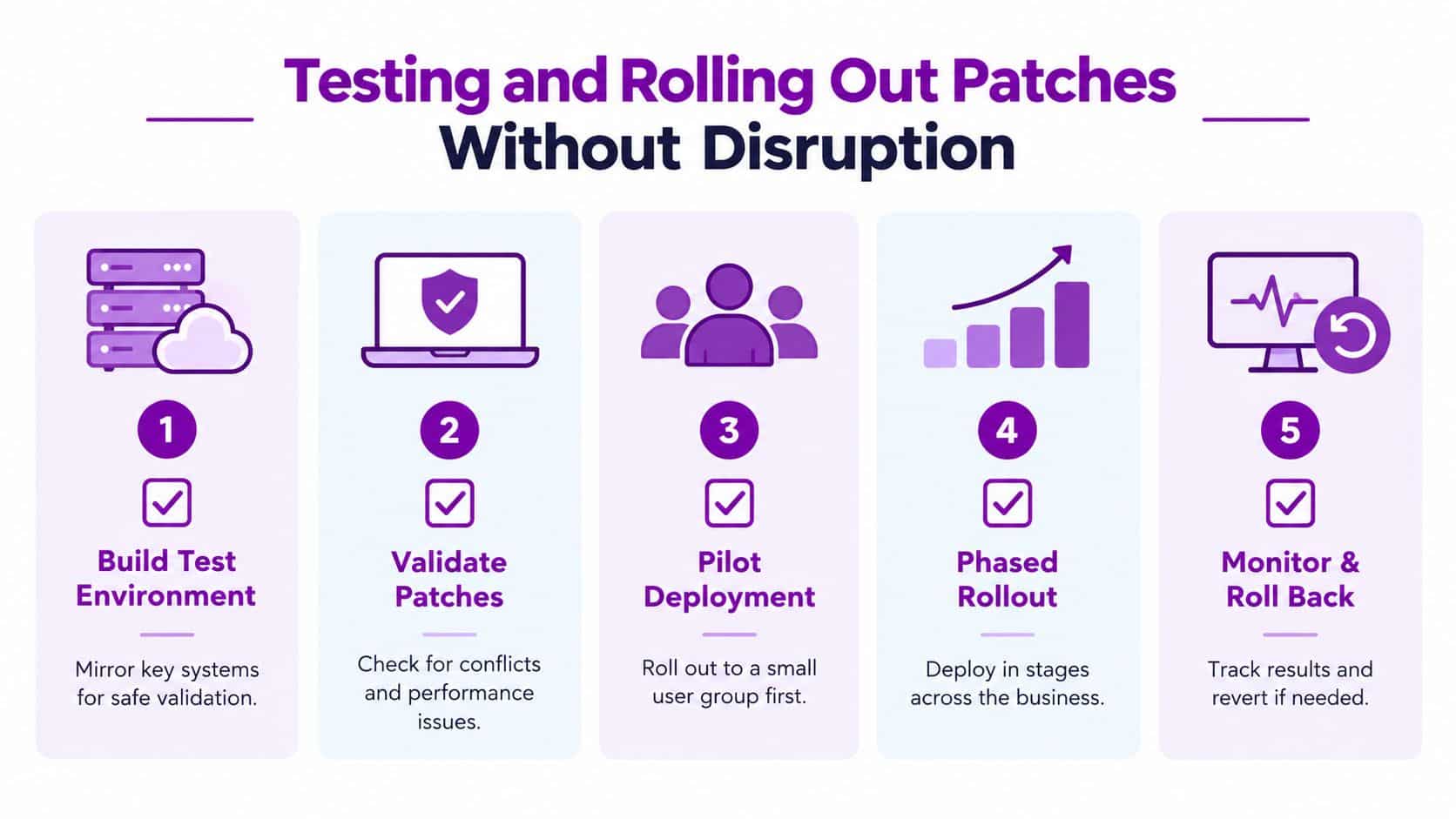
Phased deployment isn’t permission to postpone indefinitely. It is a way to reduce blast radius while meeting the relevant NCSC window. If a high-risk issue demands action before a normal maintenance slot, use an out-of-cycle process, apply compensating controls where necessary and communicate the business impact clearly.
Don’t assume that a rollback automatically makes the environment safe. The NCSC warns against applying a downgrade that returns a system to a more vulnerable state. If reverting is unavoidable, record the decision, isolate the affected service where possible and define the next remediation step.
Monitoring Performance and Measuring Patch Success
Deployment is only half the control. Leaders need evidence that updates reached the intended assets, that failed installations were addressed and that exceptions aren’t becoming permanent.
A useful dashboard should separate operational status from business risk. A device can report a successful installation while still missing another important update, while a failed deployment on an internet-facing server deserves more attention than several routine workstation failures.
Select measures that lead to action
| KPI | What It Measures | Target Benchmark |
|---|---|---|
| Patch compliance rate | The proportion of applicable assets meeting the organisation’s patch policy | Inside the relevant NCSC or approved internal window |
| Mean time to remediate | The time between identifying a vulnerability and completing remediation | Shorter for exposed and business-critical assets |
| Exception backlog | The number and age of approved deferrals | Every exception has an owner, reason and review date |
| Failed deployment rate | The proportion of patch attempts that don’t complete successfully | Investigate recurring failures and affected asset groups |
These are management indicators, not trophies. A high compliance figure can hide unmanaged devices, inaccurate inventory or systems excluded from measurement. Break reports down by asset group, operating system, application owner and exposure so the team can see where action is needed.
Connect dashboards to improvement
Microsoft Intune and Azure Update Manager can provide useful reporting for the workloads they manage. Where a business uses several tools, consolidate the results into a risk view that includes devices outside Microsoft management, third-party applications and exceptions.
Patching also sits within a wider maintenance discipline. A practical overview of preventive maintenance for IT environments can help leaders connect update work with lifecycle planning, capacity checks and service reliability.
The UK government's Cyber security breaches survey 2025/2026 shows why policy maturity matters. A policy to apply software security updates within 14 days was reported by 45% of primary schools, 62% of secondary schools and 84% of higher education institutions in the survey's education findings. The education institutions findings make clear that formal patch policies aren't universal, even in security-conscious environments.
Staying Compliant and Ready for Incidents
A patch policy turns update activity into a measurable business control. It should identify covered assets, explain how risk is ranked, name exception owners, set testing steps, define deployment checks and specify the evidence retained. For Microsoft 365 and Azure estates, assign ownership across endpoints, identities, cloud workloads and applications. That prevents an unpatched device or workload from becoming nobody's responsibility.
Cyber Essentials offers a practical UK benchmark. Its requirements state that vulnerabilities must be updated within 14 days of release. Organisations can use that timeframe to measure cyber hygiene, while still considering exposure, business impact and the systems that support day-to-day operations. The vulnerability-management guidance should sit alongside those local risk assessments, not replace them.
Manage deferrals as governed risk
UK legislation for public electronic communications networks and services requires patches or mitigations to be deployed within a period appropriate to the security risk. If a provider considers more than 14 days appropriate, an appropriate governance level must make the decision and record it in writing. Regulation 12 of the relevant UK legislation provides a clear model for documenting risk-based timing.
A deferral is an accepted risk that needs an owner, controls and an end date. If a patch cannot be applied promptly:
- Escalate the decision: Tell the service owner and appropriate governance level what is exposed and why.
- Apply compensating controls: Use isolation, access restrictions, monitoring or temporary service changes where suitable.
- Set a deadline: Record a time-bound remediation plan instead of leaving the review open.
- Retain evidence: Capture the vulnerability, affected assets, decision-maker, controls and final resolution.
During an incident, these records act like a map. Responders can identify systems that may be exposed and confirm which protections were already active. Leaders can also separate an approved operational decision from an unrecognised patching failure.
Effective patch management combines accurate asset visibility, risk-based prioritisation, automated updates, phased testing, verification and accountable governance. East Midlands businesses with limited internal capacity can ask F1Group to assess Microsoft 365 and Azure estates, improve update policies, monitor vulnerabilities and support controlled remediation. Phone 0845 855 0000 or send us a message to discuss your environment.
F1Group provides Microsoft-focused managed IT support, vulnerability management and patch governance for businesses across the East Midlands. Visit F1Group to discuss securing your Microsoft 365, Azure and wider technology estate, with a patching process your team can measure and trust.