
You’re probably looking at two IT support quotes right now and wondering why one looks lean and tidy while the other feels bloated. Or you’ve already had the worse experience. A printer stops working, Microsoft 365 access breaks, staff can’t log in, and an “urgent” engineer visit lands with a bill you never planned for.
That’s how most small and mid-sized firms end up thinking about IT support pricing. They don’t review it when things are calm. They review it when something has already gone wrong, cash is already leaving the business, and every provider seems to describe the same service in different words.
The problem isn’t just cost. It’s clarity. If you don’t understand what’s inside a quote, you can’t compare it properly. That’s where businesses across Nottingham, Leicester, Lincoln, Newark, Scunthorpe and Grimsby often get caught out. The cheaper quote can be the expensive one once security licences, on-site visits, Microsoft 365 admin, backup checks, or faster response times are added later.
Why Understanding IT Support Pricing is Critical for Your Business
A local business owner usually starts with a simple question. “How much should IT support cost?” A deeper inquiry often arises: What am I buying, and what risk am I leaving uncovered?

Take a familiar scenario. A growing firm has around a dozen staff, uses Microsoft 365, keeps files in the cloud, and assumes support will be straightforward. One provider quotes a low monthly fee. Another quotes more. On paper, both say “managed support”. Six months later, the cheaper contract turns out to exclude security tools, after-hours issues, and meaningful on-site help. The monthly saving disappears fast.
That’s why understanding IT support pricing matters. It protects your budget, but it also protects your operations. If your team relies on Outlook, Teams, SharePoint, Azure, Dynamics 365, or line-of-business applications, poor support doesn’t just create IT hassle. It disrupts quoting, invoicing, customer service, and internal delivery.
Bad comparisons create expensive decisions
The biggest pricing mistake isn’t overpaying. It’s comparing unlike-for-like proposals.
One quote may include:
- Helpdesk and monitoring with basic remote support
- Microsoft 365 administration for users, permissions, and routine changes
- Cyber security controls such as MFA, endpoint protection, and email security
- Backup oversight and recovery support
- On-site visits when remote fixes aren’t enough
Another may include only the first item and charge extra for the rest.
Practical rule: Never judge an IT support quote by the monthly total alone. Judge it by what would happen on your busiest day if systems failed.
Why East Midlands firms need a practical view
A lot of online advice is too vague to help. It talks in broad terms about support “packages” without telling you where the cost shifts happen. For East Midlands businesses, that matters because you need pricing you can budget for, not generic national advice that ignores local operating realities.
If you understand where providers build margin, where security licensing sits, and how support scope changes the price, you stop buying on guesswork. You start buying with control.
The Main IT Support Pricing Models Explained
There are four common ways providers price support. If you don’t know which model you’re being sold, you’ll struggle to manage costs properly.
Consider the example of car ownership. You can pay only when the car breaks down. You can pay for a limited service plan. Or you can pay for a proper maintenance contract that keeps the vehicle reliable. IT works the same way.
Pay-as-you-go or break-fix
This is the old model. Something breaks, you call someone, and you pay by the hour.
In the UK, ad-hoc or pay-as-you-go IT support averages £90 to £120 per hour, while managed services typically sit at £30 to £125 per user per month. The same market data says subscription models are often 40 to 60 per cent more cost-effective for businesses with regular IT needs. Fixed-rate contracts often sit at £25 to £35 per user per month, and some providers apply minimum monthly charges to keep the service viable.
This model suits very small firms with almost no reliance on technology. For everyone else, it’s usually false economy.
Per-device support
This charges by laptop, desktop, server, or other managed device. It can work well in stable environments where devices matter more than individual user activity.
The downside is obvious once staff use multiple devices. One person may have a laptop, mobile, home setup, and shared meeting room equipment. The bill can become awkward, and it often doesn’t reflect how people work.
Per-user support
This is the most common modern model. You pay a set monthly amount per person, and the provider supports that user’s day-to-day IT estate.
It’s easier to budget for because the invoice usually grows with headcount, not with random incidents. It also fits businesses using Microsoft 365, cloud applications, hybrid working, and standardised devices.
Fully managed support
This is the broadest model. It usually includes proactive monitoring, patching, routine admin, user support, and a wider operational relationship. Some providers also include strategic advice, cyber security layers, and scheduled on-site support.
This isn’t always the cheapest line item, but it’s often the cleanest business decision when downtime hurts.
IT support pricing models compared
| Model | Cost Structure | Best For | Key Drawback |
|---|---|---|---|
| Pay-as-you-go | Hourly billing when issues happen | Very small firms with minimal IT dependency | Unpredictable costs and reactive service |
| Per-device | Monthly charge per supported device | Static environments with simple estates | Doesn’t reflect cloud-heavy or multi-device users |
| Per-user | Monthly charge per employee | SMBs using Microsoft 365 and cloud tools | Scope can vary widely between providers |
| Fully managed | Fixed monthly service with broader coverage | Firms that need predictability and proactive support | Higher headline cost if you only compare the invoice |
Cheap support is usually reactive support. Reactive support is what you buy when you haven’t priced the cost of interruption.
Key Factors That Influence Your IT Support Cost
Two firms can have the same number of staff and still receive very different quotes. That isn’t necessarily a red flag. It usually comes down to scope, complexity, and risk.
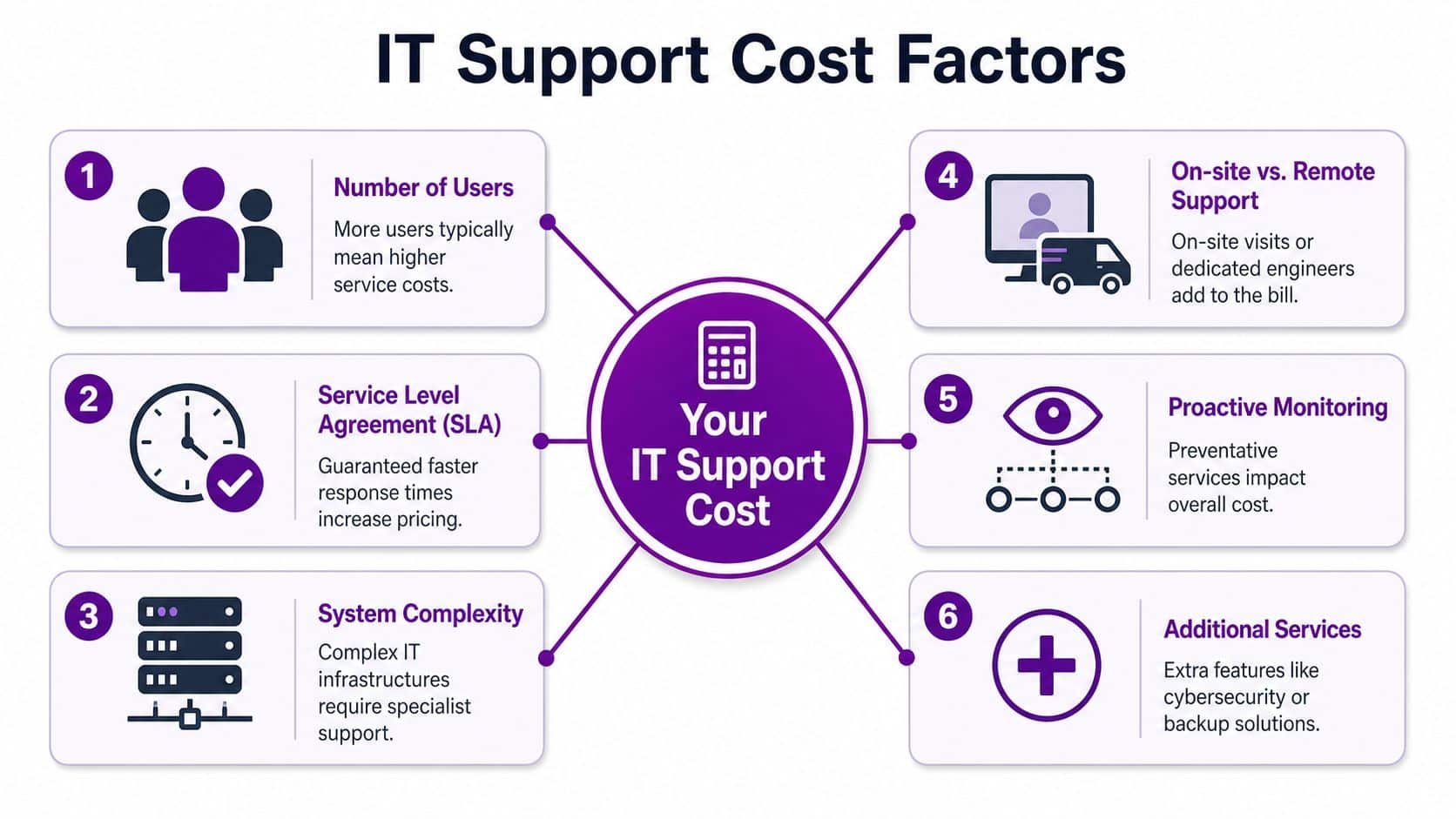
Security and on-site support shift the price fast
For the UK market in 2026, basic remote-only plans start at £40 to £55 per user per month, while standard plans with on-site support and cyber security rise to £65 to £95 per user per month.
That spread tells you something important. The jump in price usually isn’t arbitrary. It reflects the actual cost of putting engineers on the road, maintaining stronger security controls, and committing to tighter support delivery.
What providers actually price
Here’s what usually drives the quote upward or downward:
- User count. More users usually means more support demand, more administration, and more licence management.
- Technical setup. A neat Microsoft 365 estate is simpler to support than a mix of old servers, legacy apps, scattered file shares, and undocumented systems.
- Support hours and SLA. Faster response targets and broader cover windows cost more because the provider has to resource them properly.
- Remote versus on-site. If you want an engineer on-site for planned visits or physical faults, expect the price to move.
- Cyber security scope. Basic antivirus is one thing. Managed endpoint protection, MFA enforcement, email filtering, backup oversight, and compliance-focused controls are another.
- Project and consultancy expectations. Some contracts cover operational support only. Others include planning, roadmap advice, tenant reviews, and strategic input.
Same headcount, different quote
A 20-person accountancy firm in Leicester may need tighter security, stricter permissions, and more dependable document access. A 20-person creative agency in Lincoln may have heavier storage use, design workstations, and different application demands. Same staff count. Different support burden.
That’s why headline “per user” pricing only tells part of the story.
Ask these before you accept the number
- What security tools are included?
- Are Microsoft 365 admin tasks in scope?
- Is backup monitoring included or just backup software?
- How many on-site visits are covered?
- What counts as a project rather than support?
If a provider can’t answer those cleanly, the quote isn’t ready.
Typical IT Support Prices for East Midlands Businesses
Most business owners don’t need a theory lesson. They need a working budget range.
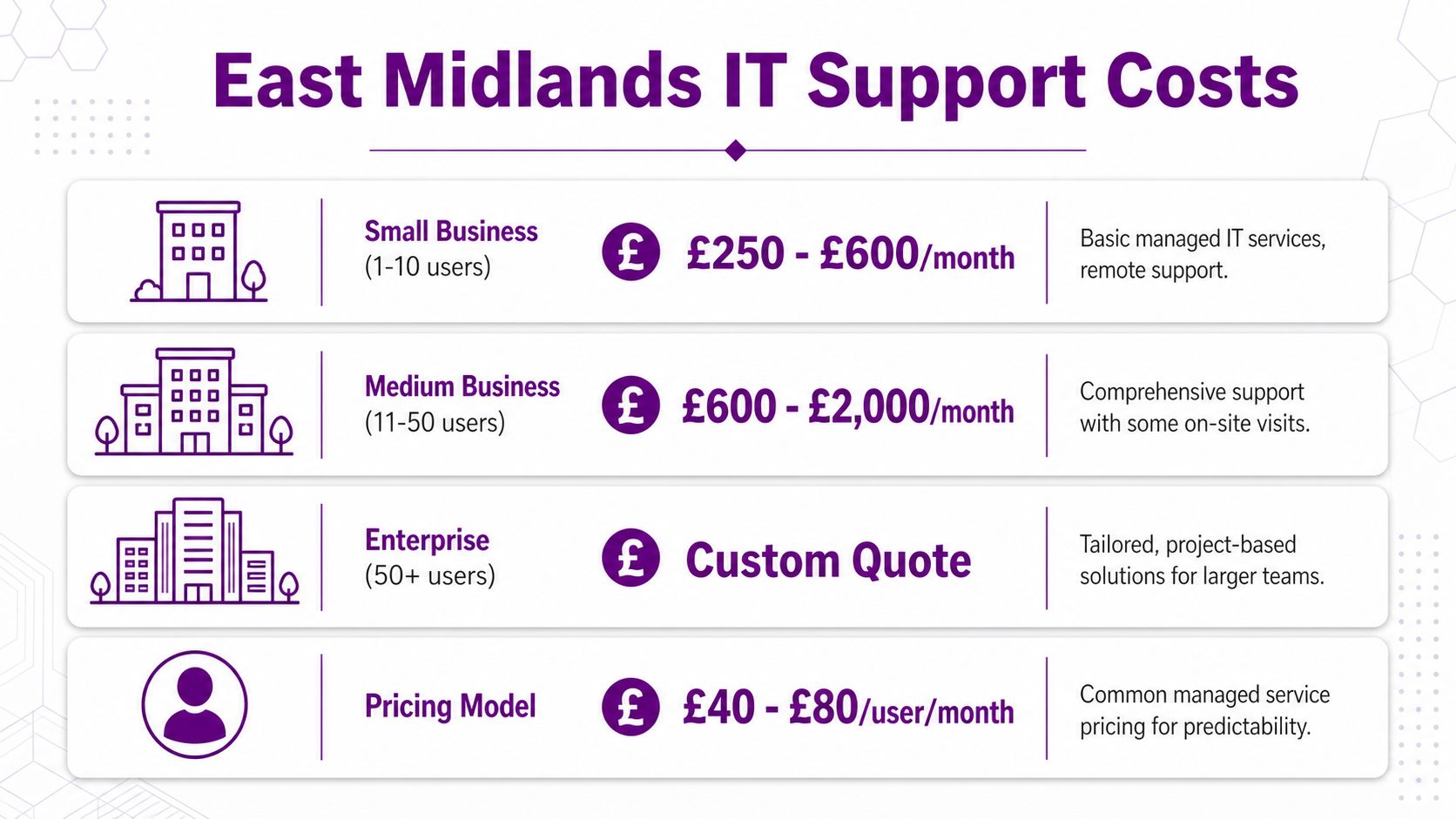
A sensible starting point is this. For a typical UK business with 20 employees, fully managed support costs about £1,100 in Year 1. A ten-person business on a standard cloud setup usually falls between £500 and £800 per month, and basic packages generally start at £30 to £70 per user per month, based on Morse Networks’ outsourced IT support pricing breakdown.
Those figures are useful because they give you a benchmark that feels close to what many East Midlands firms run: Microsoft 365, cloud-first systems, no appetite for random emergency invoices, and a clear need for dependable support.
What that looks like in practice
For a local business in Nottingham, Derby, Lincoln, or Newark, the quote usually lands in one of these practical bands:
| Package level | Typical fit | What you’d expect |
|---|---|---|
| Basic | Smaller teams with straightforward cloud use | Remote helpdesk, monitoring, patching, routine fixes |
| Standard | Established firms with compliance and security concerns | Helpdesk, Microsoft 365 admin, stronger security, some on-site presence |
| Premium | Operationally critical environments | Broader support, consultancy, faster service, more proactive oversight |
The exact monthly total depends on scope, but the market benchmark above gives you a useful reality check. If a 20-user business is quoted far below a properly managed baseline, something is probably missing.
Regional buying advice
London pricing often clouds the conversation. East Midlands businesses should focus on whether the proposal matches their operating model, not whether it looks cheaper than a figure pulled from a generic national article.
If you want a practical benchmark for service scope, review a managed support example such as these IT support services for business environments. Not to copy a package line by line, but to see how proper support is usually grouped around users, security, cloud platforms, and response expectations.
A believable quote explains the service. An unbelievable quote hides the service inside vague wording.
How to Compare Quotes and Read the Fine Print
Most buying decisions often go wrong when a business compares the monthly figure, assumes the lower one is better value, signs the contract, then discovers the cheap quote was built on exclusions.
Hidden security licence costs matter
One of the most overlooked parts of IT support pricing is the security layer. In the UK, many providers quote £50 to £150 per user per month without making clear that 10 to 15 per cent of that may be going to cloud security licences such as EDR, MFA, and email security. The same source notes that a £75 per-user quote with embedded EDR can offer better value than a £55 quote that requires separate security purchases.
That single point changes how you should compare proposals. A lower labour fee can hide a more expensive total cost once the licence stack is added separately.
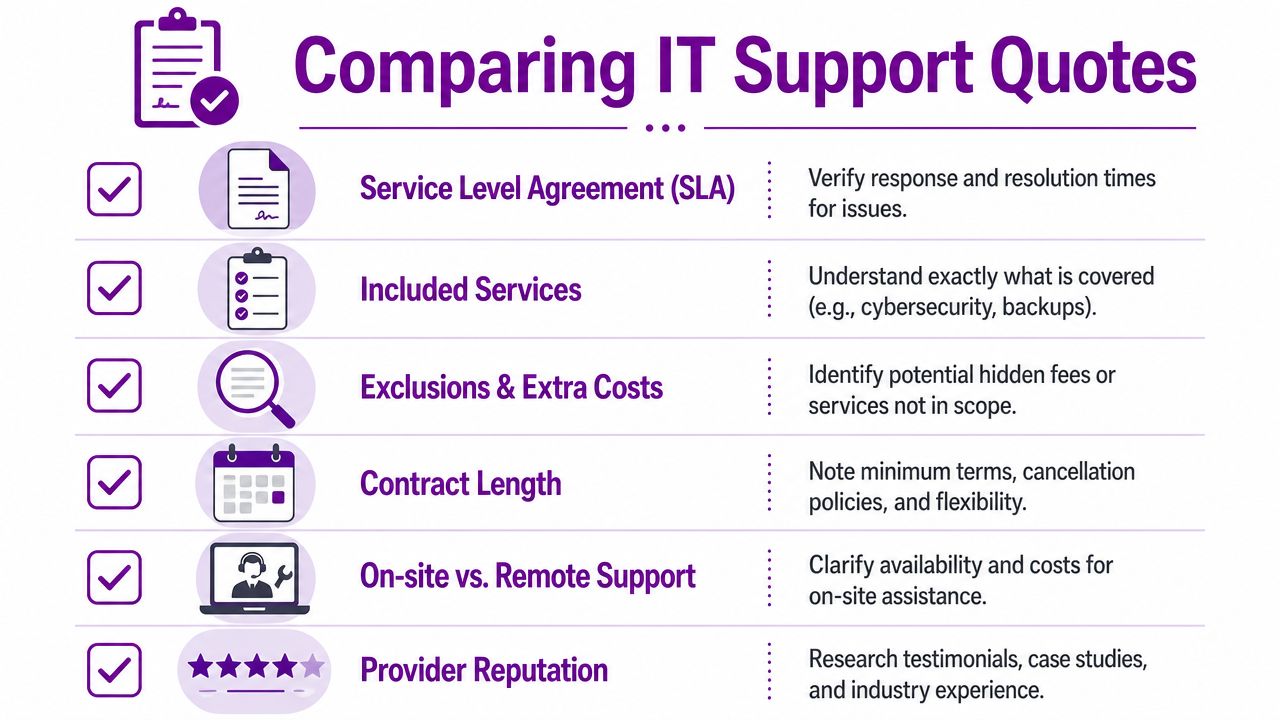
What to challenge in every proposal
Use this list when a quote lands in your inbox:
- Security inclusions. Ask whether endpoint protection, MFA management, email security, and backup oversight are included in the monthly figure or sold separately.
- SLA wording. Check whether the provider promises response time, resolution time, or just acknowledgement. Those aren’t the same thing.
- On-site support. Confirm whether site visits are included, limited, or charged as extra work.
- Contract terms. Look for minimum term, notice period, renewal wording, and exit conditions.
- Project boundaries. Ask what falls outside support. Tenant tidy-ups, migrations, device rollouts, and policy work are often excluded.
- User onboarding and leavers. Routine account changes should be clearly defined, especially if you rely on Microsoft 365 and role-based access.
Compare like for like
A proper comparison should put each provider into the same structure. Service desk, cyber security, Microsoft 365 admin, backups, on-site help, reporting, and strategic support. If one quote won’t break that down, treat that as a warning.
If you need a clean framework for gathering comparable proposals, use a structured IT support RFP template so each provider answers the same questions.
If a provider can’t explain where the security cost sits, they’re asking you to trust a number you can’t audit.
Budgeting for IT Support and Measuring ROI
Businesses often treat support as overhead. That’s a mistake. The better way to budget is to compare the monthly fee against the cost of interruption, delay, and recovery.

The key point is simple. The invoice isn’t the full cost. Lost time, paused work, delayed customer responses, and messy recovery all belong in the calculation.
A practical ROI lens
Research focused on the UK break-fix versus managed support gap found that the true cost can be measured through downtime, and that reactive models are often 40 to 60 per cent more expensive in total due to operational disruption, even when buyers initially focus only on hourly rates of £90 to £120. That comes from Micro Pro’s review of the true cost of IT support in the UK.
That’s the argument for managed support in one sentence. You’re not just paying to fix issues. You’re paying to avoid business interruption that costs more than the support plan.
Build your own simple business case
You don’t need a finance model with perfect precision. Use a basic framework:
-
List critical systems
Microsoft 365, line-of-business software, telephony, file access, internet, devices. -
Work out the effect of failure
Who stops working? Who can work partially? What customer-facing activity is delayed? -
Estimate the disruption cost
Consider lost staff time, missed deadlines, delayed invoicing, customer service backlog, and recovery effort. -
Compare that with predictable support spend
A steady monthly service cost is easier to plan for than repeated reactive bills and unplanned downtime.
Where ROI usually shows up
- Fewer interruptions because monitoring catches issues earlier
- Less internal admin because user changes and routine support are handled externally
- Better security posture because licence-backed protections are actively managed
- Cleaner budgeting because support spend becomes a planned operating cost
For a useful perspective on trimming waste while keeping support effective, read this guide on how to reduce IT costs without creating new problems.
Your IT Support Checklist and Next Steps
By this point, the decision should feel less fuzzy. You don’t need to memorise every support acronym. You need to ask sharper questions than the average buyer.
Your shortlist before you sign
Run through this checklist with every provider:
- Pricing model fit. Have you chosen the right structure for your business, whether that’s per-user or fully managed?
- Security licences included. Does the quote clearly state what’s included for endpoint protection, MFA, email security, and backup-related tools?
- SLA clarity. Do you understand both response and resolution commitments?
- On-site cover. Is site attendance included, and are there limits or extra charges?
- Operational scope. Are Microsoft 365 administration, user onboarding, patching, and routine support all covered?
- Project exclusions. Do you know what will trigger additional charges?
- Contract terms. Are renewal, notice, and exit terms commercially sensible?
- Downtime view. Have you compared the support cost against the likely business impact of disruption?
The standard you should expect
A good IT support proposal should be easy to read, easy to compare, and hard to misunderstand. If it hides behind vague wording, broad promises, or blurry exclusions, walk away.
You’re not buying a line item. You’re buying reliability, security, responsiveness, and fewer operational surprises. That means the right question isn’t “Who is cheapest?” It’s “Who has made the total cost easiest to understand?”
If you want a clear, transparent conversation with a local team that has supported East Midlands organisations since 1995, speak to a provider that’s used to Microsoft 365, Azure, Dynamics 365, cyber security, and hands-on support across the region.
F1Group helps organisations across the East Midlands work more efficiently and securely with dependable managed support and Microsoft-focused expertise. If you want a straightforward review of your current contract or a transparent quote, call 0845 855 0000 today or send us a message.