
Cloud incidents move faster than traditional RCA was designed to handle. For UK organisations running Azure and Microsoft 365, the cost of waiting is immediate. Gartner's estimate on the cost of IT downtime is often used as a benchmark because even a short outage can turn into lost sales, missed SLAs, and a support backlog that lasts for days.
We see the same pattern with our clients. An Azure outage starts as a service issue, then quickly becomes an operations issue, a communications issue, and a risk issue. A slow RCA process does not just delay answers. It also reduces the quality of those answers because logs roll over, temporary fixes hide the trigger, and teams remember events differently a few days later.
The point of the root cause analysis process in cloud operations is recurrence prevention. The document matters only if it leads to a verified change in configuration, monitoring, process, or ownership that stops the same incident happening again.
At F1Group, we treat RCA for Azure and M365 as a rapid operational discipline rather than a formal exercise completed long after the event. That means restoring service, preserving evidence, building a reliable timeline, and testing each assumption against what happened in the tenant. For businesses reviewing their wider cloud IT infrastructure strategy, that shift closes the gap between textbook RCA and the pace of a live Microsoft cloud estate.
Why Typical RCA Fails in Cloud Environments
Cloud incidents change by the minute. Traditional RCA was built for problems that stay still long enough for a tidy investigation. In Azure and Microsoft 365, the failure pattern is usually the opposite. The first symptom is often only the visible edge of a wider issue spreading through identity, networking, policy, automation, and dependent applications.

The timing problem
Typical RCA breaks down in cloud operations because it starts too late.
By the time a formal review begins, important evidence has already changed. Diagnostic logs may have aged out. Autoscaling may have moved workloads. A temporary firewall exception or policy rollback may have restored service while hiding the original trigger. People also reconstruct events in a way that fits the final outcome, which is useful for storytelling and poor for incident analysis.
We see this regularly with our clients across the UK. An Azure outage starts with a user complaint, then turns into a rushed mitigation, a service desk workaround, and three different explanations from three different teams. If nobody captures the timeline during the live incident, the later RCA becomes an argument about memory rather than a test of facts.
That is the gap between textbook RCA and cloud reality.
Why cloud incidents distort old RCA habits
Older RCA models assume clear system boundaries and a relatively linear chain of cause and effect. Azure outages rarely give you either.
A single incident can involve:
- Identity dependencies such as Entra ID sign-in issues, token failures, or Conditional Access conflicts
- Platform behaviour such as throttling, regional degradation, transient dependency failures, or control plane delays
- Change overlap where a deployment, runbook, permission update, DNS adjustment, or network rule changed close to the fault window
- Misleading symptoms such as Teams or Outlook failures that appear to be client problems but begin in identity, networking, or upstream service dependencies
This is why many teams stop at the first plausible answer. Service is restored, pressure drops, and the organisation records the workaround as the cause. That saves time in the moment, but it leaves the same failure path in place.
Practical rule: If the team cannot show the triggering event, the affected dependency, and the reason the controls failed to catch it, the RCA is still incomplete.
What works better in real cloud operations
The root cause analysis process for cloud estates needs two distinct tempos. First, stabilise service and preserve evidence during the incident. Second, run a tighter post-incident analysis that tests what failed across the tenant, the workload, and the operating process.
That approach matters for UK businesses running lean internal IT teams and expecting quick answers from managed partners. A long-form committee review has its place for major risk events, but most Azure and M365 incidents need a rapid RCA protocol that fits the pace of support operations. We use that model at F1Group because it closes the gap between formal RCA theory and what happens in a live Microsoft cloud estate.
In practice, that means capturing Azure Monitor data, Entra sign-in logs, Microsoft 365 audit activity, change records, and precise timestamps before they are overwritten or reinterpreted. It also means separating three questions that are often blurred together: what users experienced, what failed technically, and what allowed that failure to reach production.
Businesses reviewing their cloud IT infrastructure strategy usually improve RCA outcomes once they build that split into day-to-day operations. The same discipline sits behind manufacturing and engineering investigations, although the evidence and failure modes differ. Forge Reliability's RCA content is a useful comparison point for understanding how structured RCA principles translate across operational environments.
Typical RCA fails in cloud environments because it treats the investigation as paperwork after the event. Effective cloud RCA starts while the incident is still live, protects the evidence, and ends only when the preventive change is in place.
The Core Root Cause Analysis Process Adapted for IT
The most reliable root cause analysis process for IT incidents isn't complicated. It is disciplined. In UK practice, the process formally starts by defining the issue with specific, measurable data about what happened, when, where, and how, not with vague statements, as set out in BRCGS Industry Spotlight guidance on root cause analysis.
For an Azure outage, that means you don't begin with "users couldn't connect". You begin with a statement like: users in a defined tenant or location lost access to a named service, during a known time window, after a specific event or observed degradation.
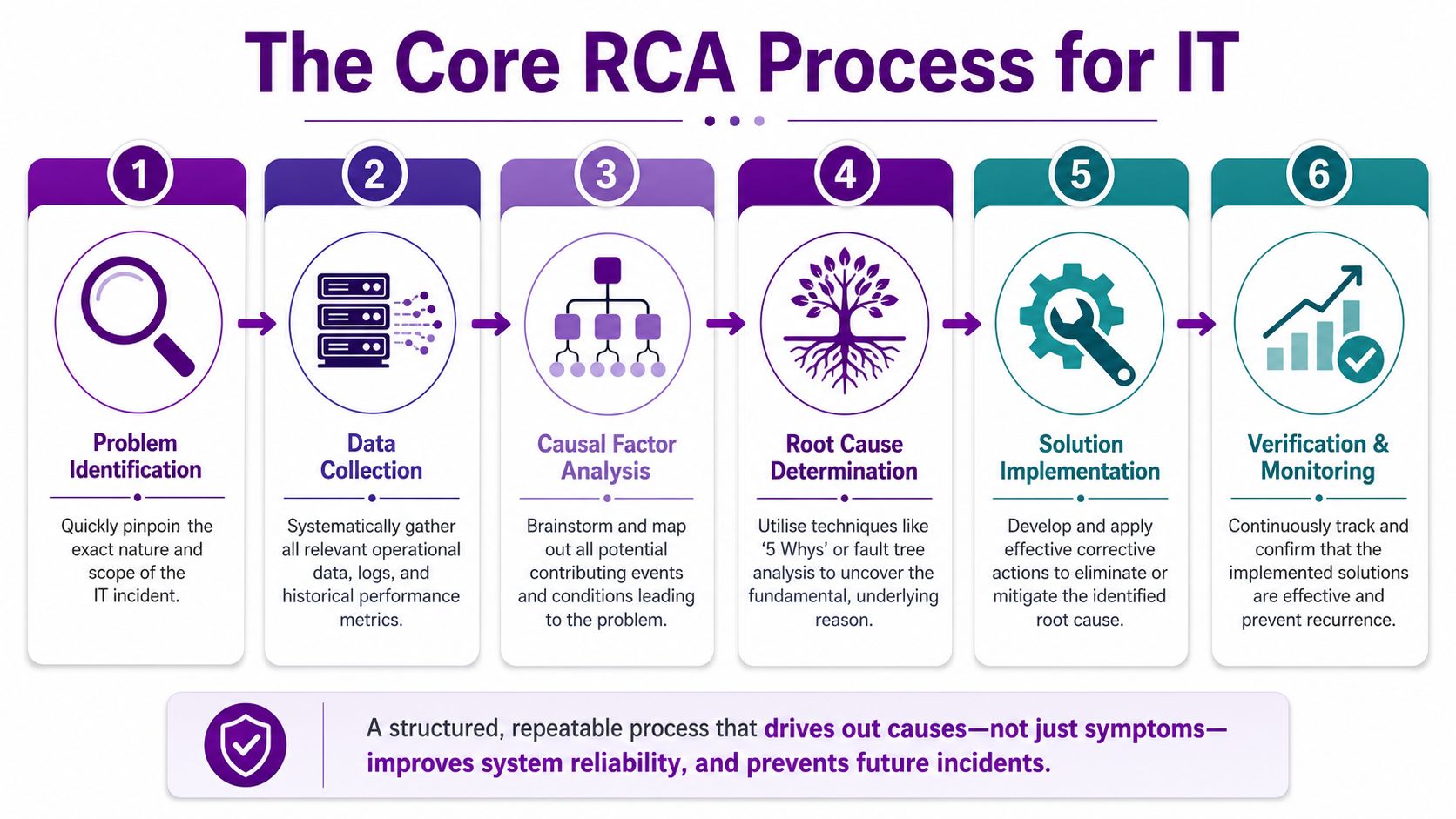
Step one and two
Define the incident properly
A poor problem statement wastes the rest of the investigation. Start with scope, timing, affected systems, business impact, and current status.
Use questions such as:
- What failed. Azure SQL connectivity, Entra ID sign-in, Exchange Online access, or a line-of-business app hosted in Azure
- When it started. First alert, first user report, first confirmed telemetry anomaly
- Where it appeared. One site, one tenant segment, one workload, or multiple services
- How it presented. Timeouts, denied access, sync lag, failed jobs, or degraded performance
If you can't state the problem in measurable terms, you aren't ready to analyse it.
Gather evidence before opinions
Once service is stabilised, collect evidence while it's still fresh. In Azure environments, that usually means Log Analytics, Azure Monitor, activity logs, change history, diagnostics, sign-in logs, service health notices, and application telemetry.
Don't ask the team what they think happened until you've anchored the timeline. Opinions arrive fast and often sound convincing. Evidence is slower, but it holds up.
A lot of reliability teams also borrow useful thinking from manufacturing and operations. For example, Forge Reliability's RCA content is worth reading because it reinforces a practical habit IT teams need as well: separate the visible failure from the condition that allowed it.
Step three and four
A short visual walkthrough helps when you're training teams or standardising your own incident review rhythm.
Identify causal factors
At this stage, many teams jump too quickly to a single answer. In real incidents, there is usually a chain.
For example, a database connection failure in Azure might involve:
- a recent configuration change
- an expired secret or broken dependency
- an alert that didn't trigger clearly
- an application retry behaviour that magnified impact
List those causal factors in time order. Don't call any of them "the root cause" yet.
The fastest way to get RCA wrong is to confuse the first broken thing with the first meaningful cause.
Isolate the root cause
The root cause is the factor that, if removed or corrected, would stop the same incident pattern recurring. In cloud systems, that may be a weak change control step, missing monitoring coverage, poor dependency mapping, or a configuration design flaw.
This phase should end with a cause statement that is plain, testable, and specific. Not "human error". Not "Azure issue". Not "misconfiguration" on its own. Say what failed in operational terms and why the environment allowed that failure to matter.
Step five and six
Implement corrective action
Corrective action must go beyond restoration. If the incident was caused by a change, add pre-deployment checks. If alerting missed the issue, create better detection and ownership. If access design was brittle, redesign it.
Short-term containment and long-term prevention are different actions. Both matter.
Verify the solution
This final stage is where strong RCA becomes operationally useful. You don't close the record because a task was assigned. You close it when monitoring, testing, and normal service behaviour show that the preventive change works.
A good RCA record for IT should leave you with an incident timeline, a verified root cause, corrective actions with owners, and an agreed check on whether the fix holds.
Selecting the Right RCA Method and Tools
Not every incident needs the same analysis method. If a single change triggered a straightforward failure, keep the method simple. If several systems, teams, and dependencies collided, use a broader structure.
The two methods many organizations employ are the 5 Whys and the Fishbone diagram. Both are useful. Neither works well when used lazily.
Where teams go wrong with the 5 Whys
UK RCA practice expects structured methods such as the 5 Whys or Fishbone diagrams. The problem is execution. 78% of UK teams stop the 5 Whys after only 3 to 4 questions, creating a 55% probability that the identified cause is only a symptom rather than the root, according to Baker Hughes on evaluating RCA quality.
That failure turns up constantly in IT. A team asks why a service went down, lands on "certificate expired" or "engineer changed a setting", and stops. That answer may be true, but it's often incomplete. Why was expiry not detected? Why did a single change pass without a safeguard? Why did monitoring not escalate the risk?
Choosing between depth and breadth
Use the 5 Whys when the event sequence is mostly linear. Use a Fishbone diagram when multiple factors may have contributed at the same time.
| Criterion | 5 Whys | Fishbone (Ishikawa) Diagram |
|---|---|---|
| Best fit | Single chain of failure | Multi-factor incidents |
| Speed | Fast in live review | Better for deeper workshops |
| Strength | Forces cause progression | Reveals interacting categories |
| Weakness | Easy to stop too early | Can become cluttered |
| Good Azure use case | Failed deployment, expired secret, broken automation | Tenant-wide disruption involving identity, network, policy, and process |
| Team requirement | Small focused group | Cross-functional review |
Practical tool choice in Microsoft environments
For Microsoft-focused estates, method and tooling should reinforce each other.
- Use Azure Monitor and Log Analytics when you need hard evidence from metrics, traces, and activity events.
- Use Microsoft 365 admin data to line up service-side events, user impact, and admin actions.
- Use Power BI when the incident has several contributing threads and the team needs a clean visual timeline or dependency view.
- Use a Fishbone framework with the 6 Ms mindset if you need to force broader thinking around people, method, measurement, and environment rather than staring only at the last failed component.
For operations teams reviewing recurring issues, good network monitoring tools also matter because they help distinguish a cloud service failure from latency, routing, local infrastructure, or edge-device conditions that only look like an Azure problem.
Decision rule: If one "why" leads naturally to the next, start with the 5 Whys. If the whiteboard fills with parallel causes, switch to Fishbone early.
Facilitating a Blameless Postmortem
A technically sound RCA still fails if the meeting culture is poor. People edit what they say when they think the session is about fault-finding. In cloud incidents, that's a serious problem because the missing detail is often the detail that explains the failure path.
UK-compliant RCA practice calls for a blameless discussion, and blame-oriented investigations reduce identification of underlying causal factors by 45% compared with blameless approaches, according to Splunk's root cause analysis guidance.
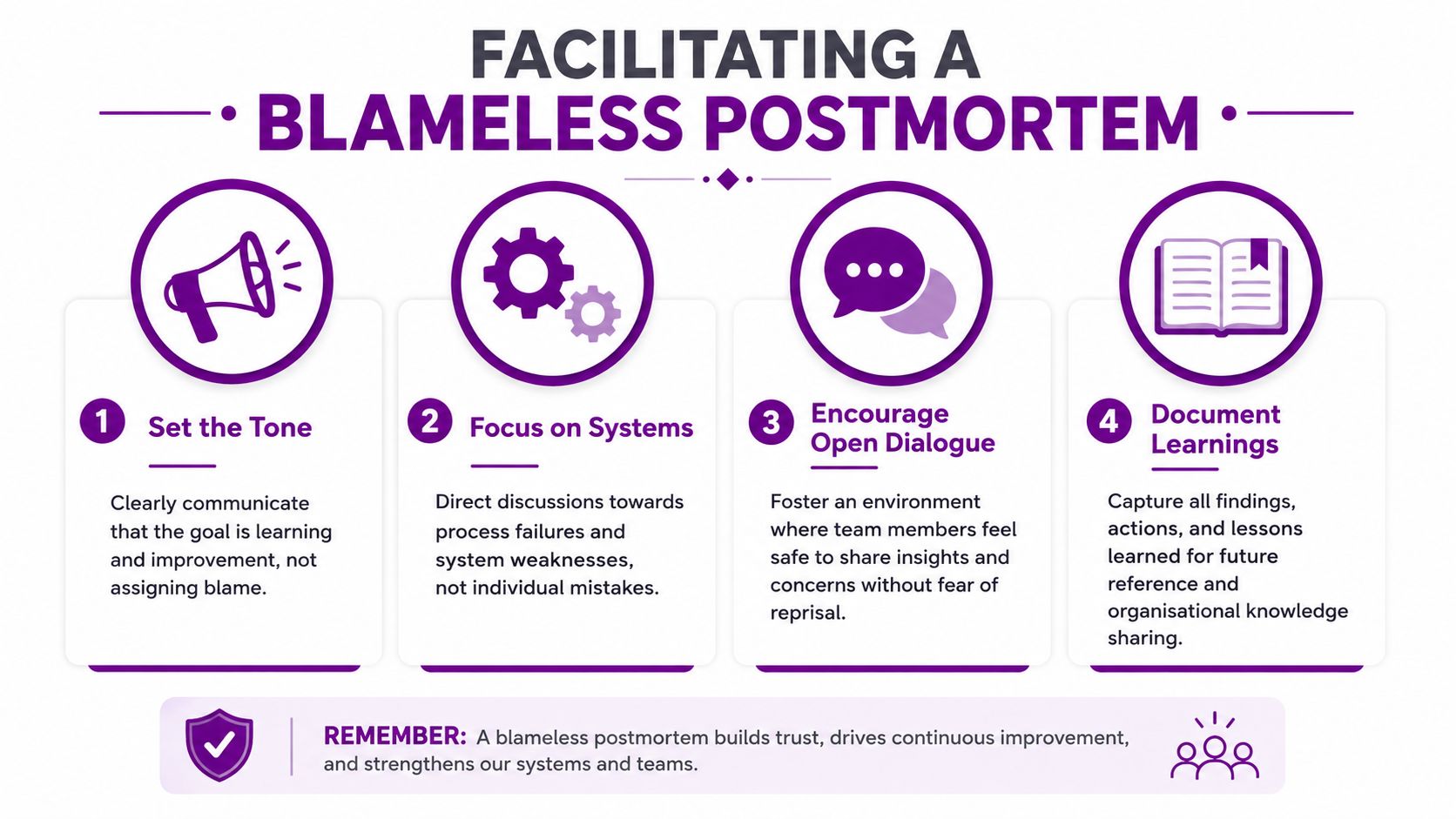
What blameless actually means
Blameless doesn't mean consequence-free. It means the discussion is aimed at understanding system behaviour, decision context, controls, and recovery, rather than turning one person into the explanation.
In a useful postmortem, the facilitator keeps bringing the group back to:
- System conditions that made the incident possible
- Decision context at the time, not hindsight judgement afterwards
- Control gaps in alerting, approval, testing, or fallback
- Operational learning that can be turned into concrete change
If someone says, "the engineer caused the outage", the meeting isn't finished. The next question is why one action could produce that level of impact.
How to run the meeting
Keep the attendee list focused. Include the people who saw the incident, touched the system, approved the change, or own the affected service. Open by stating that the purpose is prevention.
Then work through the timeline, not personalities. Ask what the system did, what the team observed, what evidence supports it, and what barriers failed. If there is disagreement, pin it to data and assign follow-up collection rather than arguing from memory.
A blameless postmortem is not a softer meeting. It's a stricter one. People must support claims with evidence, not with rank or confidence.
A useful parallel comes from continuous improvement work outside incident management. Teams that run powerful OKR retrospectives often get better learning because they review outcomes, assumptions, and process quality together. The same discipline strengthens IT postmortems.
Ground rules that improve the outcome
- State the aim early. The meeting exists to stop recurrence.
- Ban loaded language. Avoid careless phrases such as "obvious", "should have known", or "user error".
- Separate facts from interpretation. Put confirmed events on the timeline first, then discuss likely cause paths.
- Document live. Capture decisions, action owners, and open questions before the room disperses.
Integrating RCA into Your ITSM and Microsoft Cloud Stack
An RCA that sits in a document repository is mostly wasted effort. The value appears when findings move into the operational systems your team already uses. That is where the root cause analysis process becomes part of service improvement rather than a one-off report.
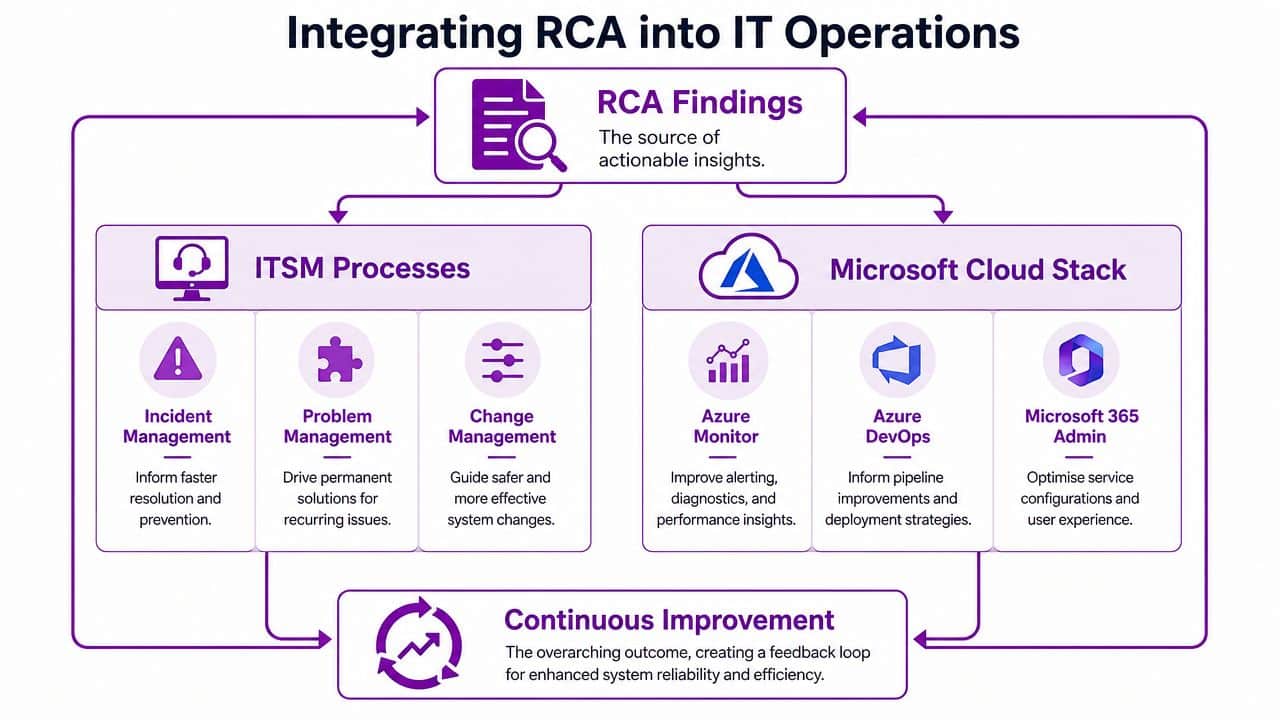
Turn findings into tracked work
Start by linking the incident to a formal problem record in your ITSM platform. Whether you use ServiceNow, Jira Service Management, or another service desk tool, the permanent fix needs a home that survives beyond the incident bridge call.
A good operational pattern is:
- Incident record for the service disruption itself
- Problem record for the underlying cause and known error
- Change record for the preventive fix
- Knowledge entry for support guidance and future diagnosis
That structure gives you traceability. It also stops the classic failure where everyone agrees on the lesson and nobody owns the implementation.
Use Microsoft tools to close the loop
In Microsoft-heavy environments, the follow-through can be built directly into the stack.
Create Azure DevOps work items for each corrective action. Link them back to the original incident or problem record. If the RCA identifies a weak deployment check, create a task for the pipeline owner. If monitoring missed the issue, assign a work item to update Azure Monitor queries, alerts, or dashboards.
Power Automate is useful here as well. It can push review reminders, notify action owners, and help enforce due dates so recommendations don't disappear once operational pressure eases.
For Microsoft 365 and Azure operations, keep the RCA outputs close to the systems they affect. If the issue involved service configuration, document the intended standard in the Microsoft admin context. If the failure involved reporting gaps, push the outcome into telemetry and dashboard design rather than leaving it in meeting notes.
Build a repeatable operating rhythm
The strongest teams don't reinvent the process every time. They use a standard incident template, a fixed evidence checklist, and a defined path from outage to improvement.
That rhythm works best when it includes:
- A trigger threshold for when an incident requires RCA
- A standard evidence pack from logs, alerts, change history, and user impact
- Action tracking inside ITSM and delivery tooling
- A review checkpoint after implementation to confirm the environment behaves as intended
This is what turns RCA into continuous improvement rather than a periodic exercise.
Measuring Success and Proving Value to the Business
A root cause analysis process only earns trust when it changes operational outcomes. Senior leaders don't need more post-incident paperwork. They need confidence that repeat failures will fall, service reliability will strengthen, and the team can prove which actions worked.
A major weakness in UK RCA practice is that about 40% of RCA reports omit the "evaluate actions" step, and missing that confirmation phase causes a 35% reduction in long-term incident prevention efficacy, as described in the BMC Health Services Research paper on RCA quality.
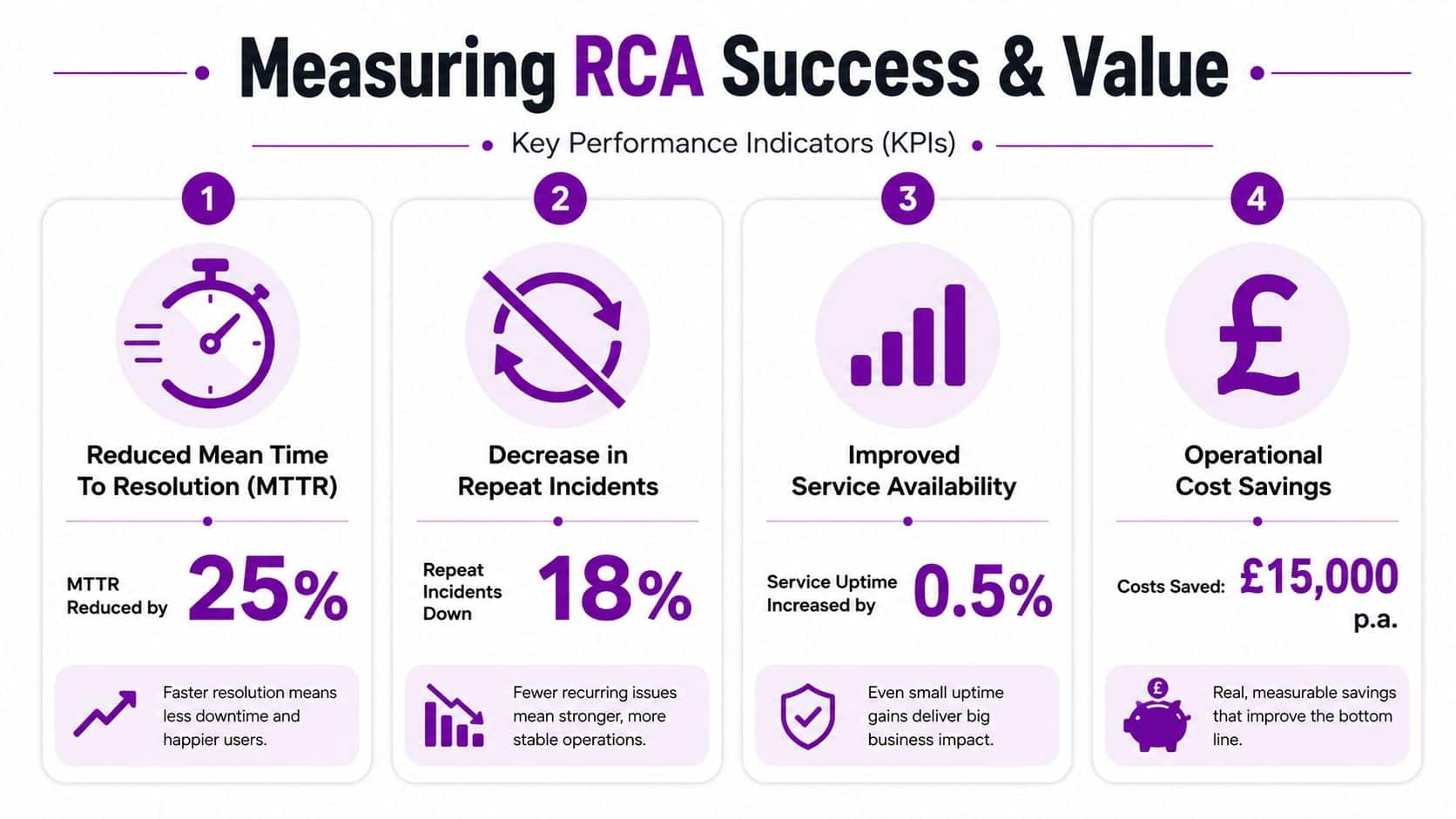
What to measure after the RCA
You don't need invented vanity metrics. You need operational proof tied to the incident pattern you were trying to eliminate.
Track measures such as:
- Repeat incident frequency for the same service or failure mode
- Mean time to resolution trends for similar incidents after preventive changes
- Change success quality where the RCA identified a release or configuration weakness
- Alert usefulness by checking whether monitoring now detects the issue earlier and more clearly
If the outage involved Azure identity, measure whether the same authentication failure pattern appears again. If the issue involved poor visibility, check whether the new dashboards or alert rules now surface the condition before users report it.
Make the review stage unavoidable
Most RCA programmes don't fail because the analysis was impossible. They fail because nobody comes back to verify whether the action changed the live environment.
Use a scheduled review point. Confirm the fix has been deployed, evidence exists, support teams understand the new state, and reporting can show whether recurrence has stopped. Teams that work heavily in reporting and dashboarding often already have the foundations for this. Good operational visibility principles from business intelligence basics help when you need to demonstrate service trends clearly to both technical and non-technical stakeholders.
Key takeaway: If you don't evaluate the action in production, you haven't finished the RCA. You've only written it down.
The organisations that get real value from RCA are the ones that treat it as an operating discipline. They define the problem precisely, preserve evidence quickly, choose the right method, run a blameless review, push outcomes into ITSM and Microsoft tooling, and verify that the fix holds under normal business conditions.
If you'd like help putting a practical, cloud-ready RCA approach into place, speak to F1Group. We support organisations across the East Midlands with Microsoft-focused IT services, from Azure and Microsoft 365 operations to security, monitoring, and service improvement. Phone 0845 855 0000 today or send us a message.