
A finance volunteer forwards an email that appears to come from a grant funder. The message says the organisation's bank details have changed, and a colleague follows the link without noticing the slightly altered sender address. By the time anyone questions the payment, the money has gone to the wrong account and the team is trying to work out whether the mailbox, donor records, or other systems have also been exposed.
That situation is uncomfortable because it's ordinary. Cyber security for charities isn't mainly about defending against cinematic attacks. It's about stopping convincing emails, protecting Microsoft 365 accounts, recovering quickly, and giving trustees evidence that sensible controls are operating. This practical playbook focuses on what a small UK charity can run without a dedicated security department.
Why Charities Are Now a Routine Cyber Target
A small charity can be targeted through an email that appears to come from a funder, supplier or trustee. Donor records, beneficiary details, volunteer information, grant correspondence and payment instructions give attackers information to exploit, while public websites and charity registers help them identify staff, trustees and likely email formats. Regular fundraising, supplier payments and grant administration provide believable reasons to contact finance and operations teams.
The UK government's Cyber Security Breaches Survey 2025/2026 estimated that 28% of charities experienced a breach or attack in the previous 12 months, while 14% reported being victims of at least one cybercrime. It estimated approximately 525,000 cybercrimes against charities during that period. A Civil Society summary of the findings identified phishing as the main source of those crimes and reported that 69% of charities that suffered a breach or attack described phishing as the most disruptive type.
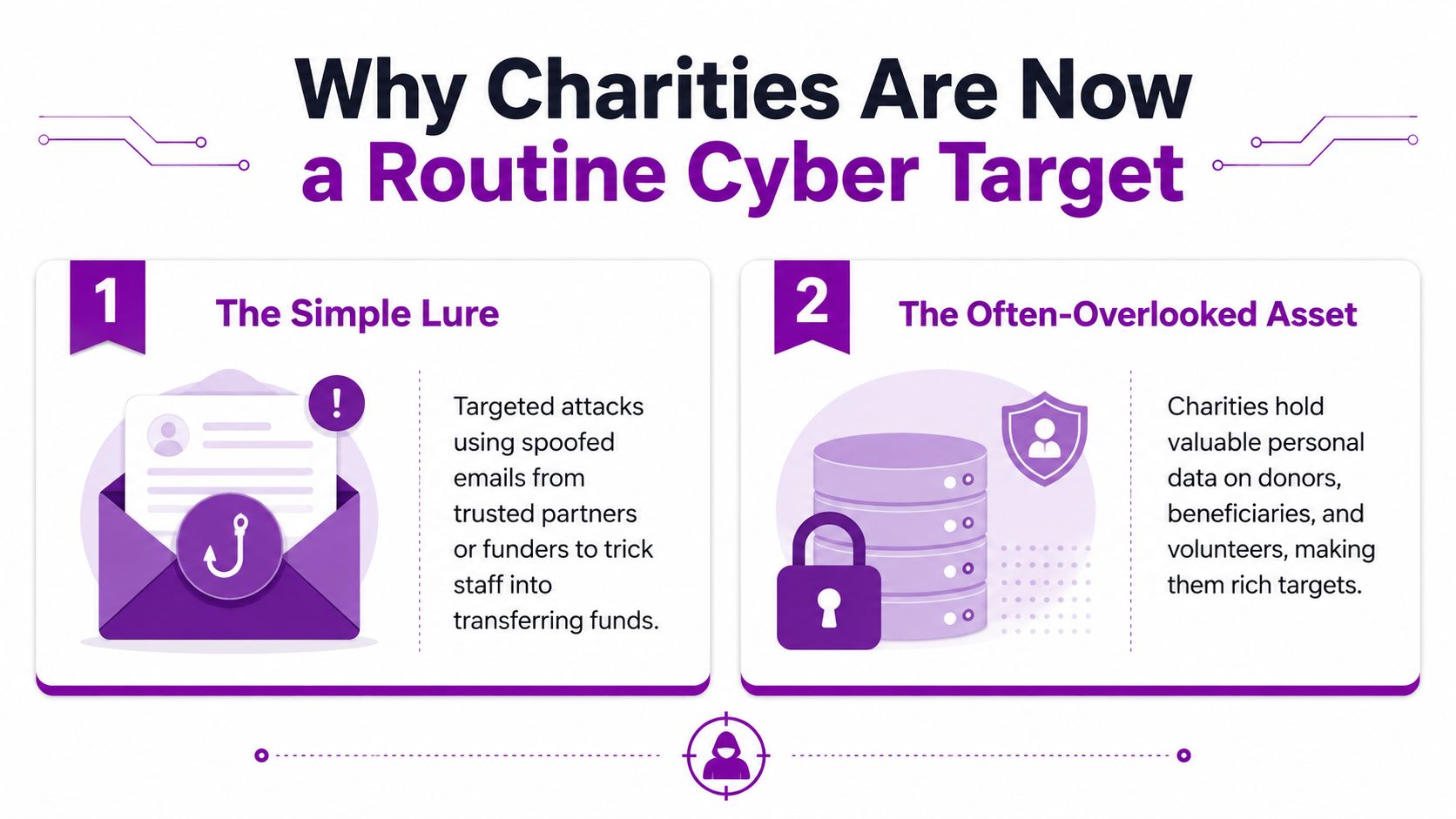
Why the inbox matters
Phishing remains the practical entry point to prioritise. A supplier-style message can persuade someone to change bank details, open an attachment, approve a sign-in or disclose a password. In a small Microsoft 365 team, one compromised mailbox can expose conversations, shared files and payment-related information before anyone recognises the pattern.
Ransomware creates a second risk. Encrypted files can interrupt services quickly, even where the charity has limited funds and no dedicated security department. The workable response is to make phishing harder to succeed through Microsoft 365 sign-in protection, sensible access controls, reporting routes and recoverable data.
Longer-term results show that exposure remains high. The Cyber Security Breaches Survey 2025 recorded breach-or-attack rates of 24% in 2023, 32% in 2024 and 30% in 2025, alongside estimated annual cybercrime volumes of approximately 785,000, 924,000 and 453,000 respectively. The same 2025 longitudinal survey found that 79% of charities reported some form of cyber security incident over the previous year.
Practical rule: Treat the first convincing phishing email as an expected operating condition, not an exceptional event.
The immediate question is whether the next credible message reaches an inbox, and whether its recipient can pause, verify the request and report it before an account or payment process is compromised.
Running a Lightweight Cyber Risk Assessment
A small charity doesn't need to start with a 40-page risk register. A shared spreadsheet, the right people and one focused meeting can produce a board-ready view of exposure in an afternoon.
Create one row for every important digital system. Include Microsoft 365 email, online banking, the donor CRM, shared files, payroll, fundraising platforms, website administration and any line-of-business application. For each row, record four things: what the system stores, who can access it, how access or data could be lost, and what would happen if it became unavailable.
Use four practical lenses
Begin with donor and beneficiary personal data. Identify where it lives, who exports it and whether old spreadsheets or downloaded reports remain in personal OneDrive folders or shared locations. Ask whether the charity still needs each dataset. Unnecessary copies increase the number of places a phishing-compromised account can expose information.
Next, trace payment flows. Follow a grant invoice from receipt to approval and payment, noting who can amend bank details and how a change is verified. The objective isn't to eliminate email from the process. It's to make an email alone insufficient for a high-risk financial change.
Then review operational systems. Consider email, calendars, SharePoint, Teams, shared files and the donor database. Record which accounts have administrator privileges and which systems depend on a single person's credentials.
Finally, list third parties. Payroll providers, fundraising tools, accountants and outsourced IT services may hold sensitive information or connect to Microsoft 365. Record the named contact, access method and what happens if that supplier is compromised.
Keep the scoring understandable
Mark impact as Low, Medium or High, rather than using complicated numerical scoring. Trustees can challenge a plain statement such as “loss of this mailbox would create High financial and safeguarding impact” more effectively than a formula whose assumptions nobody remembers.
Ask every participant to name the last three near-misses they remember. Include suspicious supplier emails, unexpected login prompts, misdirected attachments, reused passwords and former staff retaining access. Near-misses reveal the charity's actual habits faster than a generic questionnaire.
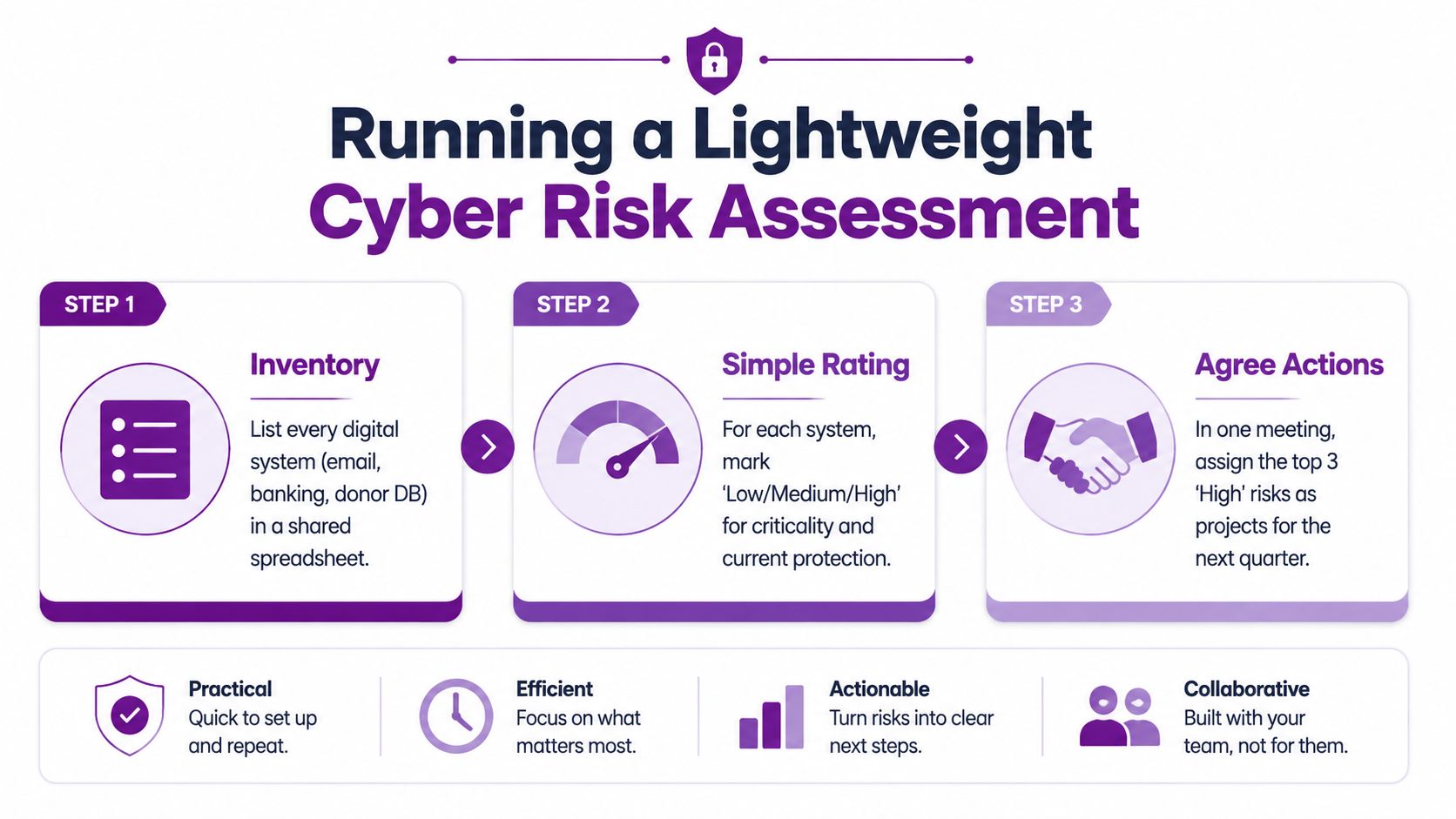
Finish with a prioritised list of the top five risks, each paired with an owner, a practical control and a target review date. That gives the trustee board something it can approve in one sitting, while keeping the assessment alive as a working management document.
Prioritised Technical Controls That Actually Reduce Risk
Start with the control that most directly limits phishing damage. Enforce multi-factor authentication for every Microsoft 365 mailbox, using Microsoft Authenticator number matching or hardware security keys where appropriate. Password theft remains dangerous, but a stolen password should not be enough to enter the account.
Apply Conditional Access carefully. Restrict risky sign-ins, require compliant devices for administrator accounts and review location-based policies before enforcing them across a mobile workforce. Keep a tightly controlled emergency access account, with its credentials protected and its use monitored. Test the recovery process before an incident, because an emergency account that nobody can access is not a recovery plan.
Build the control stack in the right order
Microsoft Defender for Office 365 should provide the email layer. Turn on Safe Links, Safe Attachments and preset security policies, then review quarantine and false positives with real users. Preset policies are usually more sustainable than a large collection of individually tuned rules that nobody owns.
Patch Windows devices, servers and line-of-business applications on a defined cadence. A patching process needs an owner, an exception record and a way to identify devices that haven't checked in. Backups need the same discipline. Use the 3-2-1 rule, with at least one offline or immutable copy kept away from the main Microsoft 365 tenant, and test restoration rather than relying on a successful job notification.
Defender for Business can strengthen endpoint protection, while mailbox auditing provides useful evidence about sign-ins, forwarding rules and suspicious activity. Add a joiners, movers and leavers process linked to HR, so access changes don't depend on someone remembering an informal conversation.
| Priority | Control | Phishing impact | Effort |
|---|---|---|---|
| First | Phishing-resistant MFA | Stops a stolen password from being sufficient on its own | Medium |
| Next | Defender for Office 365 | Filters malicious links and attachments before delivery | Medium |
| Then | Conditional Access | Limits risky sign-ins and unmanaged access | Medium |
| Alongside | Patching and endpoint protection | Reduces the damage after a user opens a harmful file | Medium |
| Always | Tested, offline or immutable backups | Supports recovery when accounts or files are compromised | High |
For a wider control checklist, the 15-step security guide for SMBs offers useful prompts that can be adapted for a charity. UK organisations should also consider whether Cyber Essentials certification fits their governance, procurement and assurance needs.
Know what to leave out
Small charities often skip the basics while pursuing advanced tooling. Don't begin with custom data loss prevention rules, a SIEM or an alerting platform that needs a full-time analyst to interpret. Those tools can have a place later, but they won't compensate for weak MFA, untested backups or a mailbox that automatically forwards messages outside the organisation.
Governance Policies and Staff Training That Stick
A phishing email should not force trustees to improvise. A small charity needs a short set of policies that assigns ownership, reflects its Microsoft 365 setup and gives staff a clear response when a suspicious message arrives.
Start with a one-page Acceptable Use Policy. Cover password managers, charity devices, personal accounts, removable media, sensitive data and the exact route for reporting suspicious messages. Keep a separate Data Protection Policy aligned with the charity's lawful basis, collection methods, storage locations and retention decisions. Remove references to systems the charity does not use. A copied corporate template creates confusion during a live incident.
The Incident Response Policy should identify who calls whom. Name the operational lead, trustee contact, IT provider, bank, insurer and relevant reporting routes. Store an offline copy as well. A compromised Microsoft 365 account may be inaccessible or untrustworthy when emergency instructions are needed.
Make reporting easier than silence
Staff awareness works when it becomes a repeated habit, not a single annual course. Hold monthly discussions lasting around 20 minutes, use examples from the charity's inbox and run controlled phishing simulations through Microsoft Defender for Office 365. Staff should use the Outlook Report Phishing add-in rather than forwarding suspicious messages to an already busy manager.
Keep each session focused on decisions staff can make quickly:
- Payment changes: Confirm new bank details using a known telephone number or an established second channel.
- Urgency: Pause when a message pressures someone to bypass normal approval.
- Unexpected prompts: Report unfamiliar Microsoft 365 sign-in requests, document shares and password resets.
- Near-misses: Thank the person who reports an error, record the event and adjust the process.
A quarterly trustee agenda should include three standing items: phishing patterns observed, near-misses reported and outstanding risks. Senior attention still varies. Only 60% of charities rated cyber security as a high priority for senior management, as reported in the survey summary earlier in the article. A brief recurring agenda item keeps phishing risk visible between annual policy reviews and makes ownership harder to overlook.
Training records also need to support follow-up without becoming a burdensome compliance exercise. Record attendance, simulation outcomes, reported near-misses and any team that needs a focused refresher. A charity comparing learning platforms may find this LMS for nonprofits guide useful when organising recurring awareness training for a small team.
Incident Response and UK Reporting Routes
The first response to a suspected phishing incident should be calm, recorded and decisive. Staff shouldn't delete the message, continue using a compromised account or start contacting every stakeholder before somebody establishes what happened.
The first hour
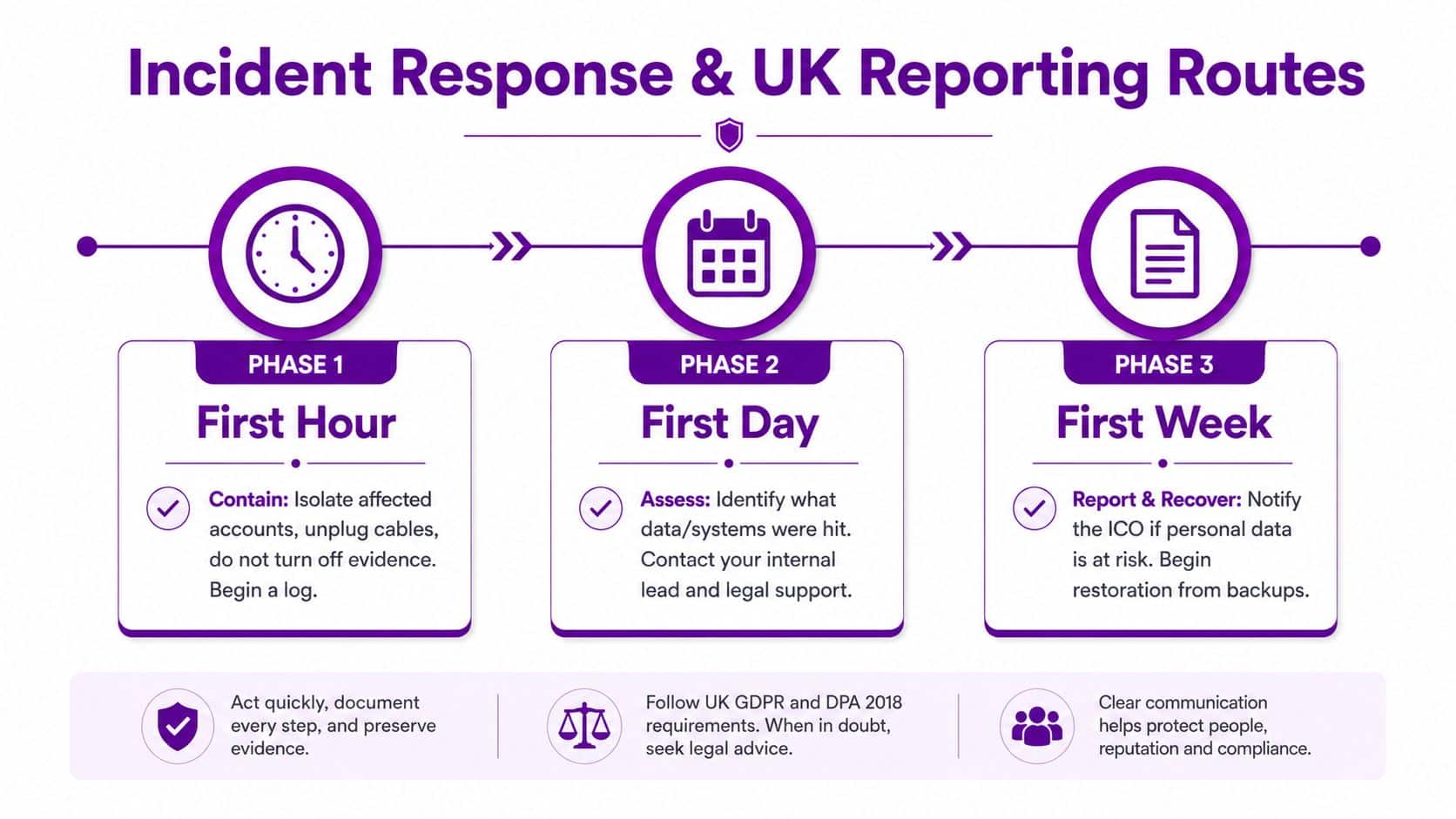
Isolate the affected account through the Microsoft 365 Admin Centre, revoke active sessions, force a password reset and confirm MFA. If a device may be compromised, disconnect it from networks without destroying evidence. Start a simple incident log containing times, people involved, messages, actions and decisions.
If money has moved or bank details may have been exposed, contact the bank using a trusted number. The UK Government charity cyber crime guidance says a live cyber attack should be reported immediately to Report Fraud on 0300 123 2040, and that charities should report cyber attacks even when no harm appears to have occurred.
The first day
Use Microsoft Defender logs to scope sign-ins, mailbox activity, forwarding rules, clicked links and affected endpoints. Use Sentinel only if it's already configured and somebody can interpret its records. Preserve relevant emails, audit records and screenshots, then assess whether personal data, payment information or safeguarding information could have been accessed.
A personal data breach may require notification to the ICO through its online portal within 72 hours. The responsible person should assess that route with appropriate legal or data protection support rather than waiting for perfect certainty.
This short video can support an internal discussion about incident handling:
The first week
Complete root cause analysis, restore from clean backups and tighten Conditional Access policies based on what the logs show. Review every mailbox rule and privileged account, not just the one initially reported.
Where data loss or financial harm is material, consider a serious incident report to the Charity Commission for England and Wales. Keep trustees informed through a factual timeline, agreed decisions and outstanding risks. A prepared incident response plan gives the team a place to start when pressure is highest.
Choosing Managed IT Support From a Microsoft-Focused Partner
A charity with one or two people handling IT can maintain sensible controls, but it may struggle to monitor them consistently while supporting users, suppliers and service delivery. The decision to use managed support should be based on ownership and coverage, not fear.
A Microsoft-focused partner can operate Conditional Access policies, review Defender alerts, coordinate monthly patch cycles, verify immutable backups and produce quarterly phishing simulation reports. That doesn't transfer governance responsibility. Trustees still decide risk appetite, approve policies and determine which services deserve protection first.
Ask questions that expose operational gaps
Before appointing a provider, ask which Microsoft security certifications its engineers hold and whether the provider itself holds Cyber Essentials Plus certification. Ask for the patching service level agreement, the process for after-hours incidents and the people responsible for alert triage.
Onboarding deserves equal attention. The provider should explain how it will document the existing Microsoft 365 tenant, review current policies, identify privileged accounts, remove unsafe forwarding rules and introduce changes without locking out legitimate users. A provider that promises a quick handover but can't describe discovery is asking you to accept avoidable risk.
| Responsibility | Small in-house team | Microsoft-focused managed IT support |
|---|---|---|
| Conditional Access | Often reviewed when a project arises | Tuned and reviewed as an operational control |
| Defender alert triage | Dependent on staff availability | Assigned to a defined monitoring process |
| Patching | Can be delayed by service priorities | Scheduled, tracked and reported |
| Backup verification | Frequently limited to job success notices | Test restores and exception follow-up |
| Phishing simulations | May happen irregularly | Planned, delivered and reported |
| Trustee risk decisions | Essential internal responsibility | Supported with evidence, not replaced |
The provider won't decide what risk the board accepts, and it can't sign policies on trustees' behalf. It can, however, remove repetitive technical work from a team that doesn't have enough hours to perform it reliably. For charities considering the model, IT support for charities explains the type of service scope to examine.
A 90-Day Cyber Security Roadmap for Charities
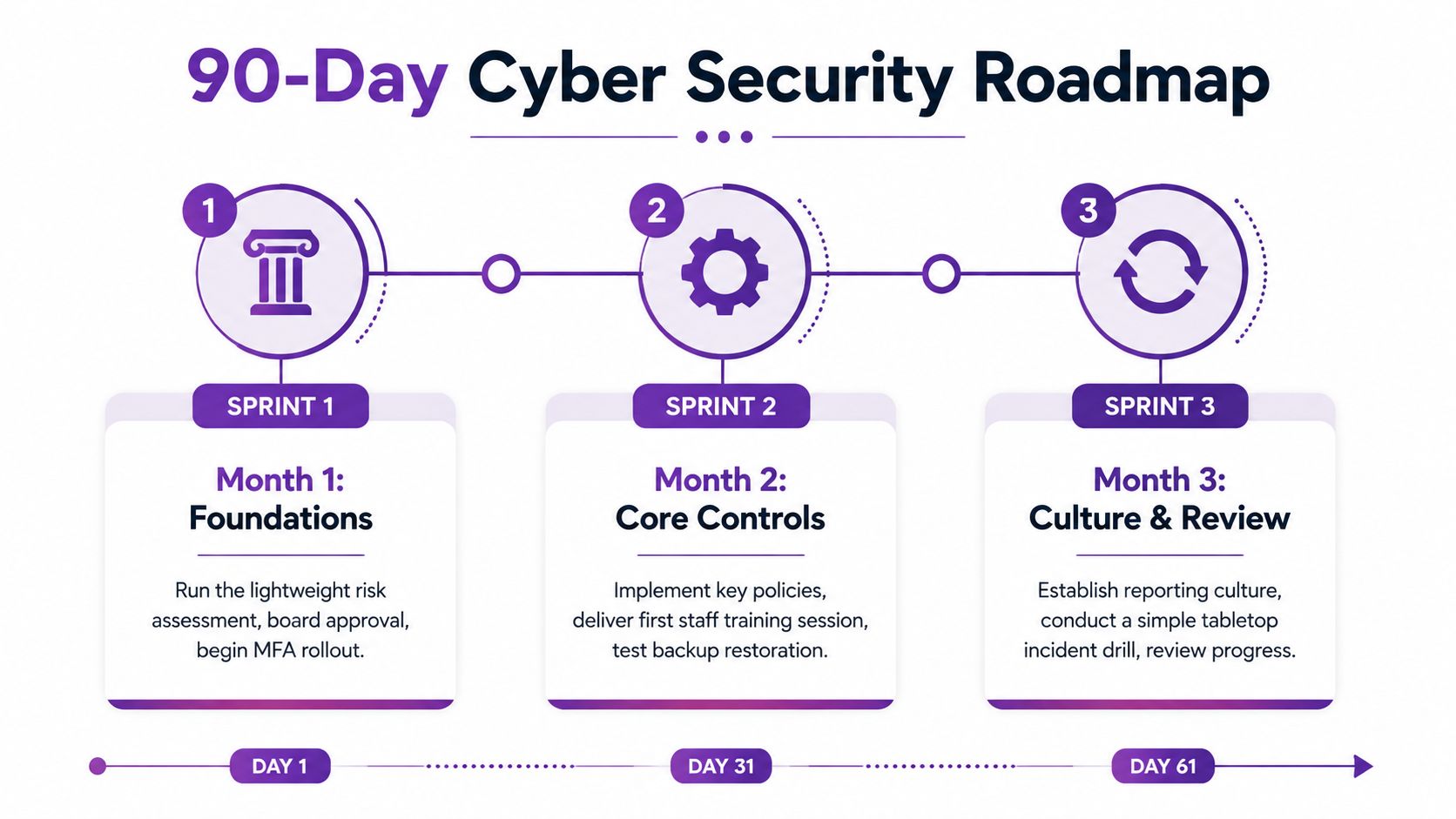
The plan becomes manageable when trustees approve three monthly sprints rather than an unbounded security project. Each sprint should end with evidence, an owner and a decision about the next action.
Month 1 builds the foundations
Run the lightweight assessment and agree the top five risks. Map where donor, beneficiary and grant information lives, including downloaded spreadsheets and shared mailboxes. Approve the MFA rollout, draft the Acceptable Use Policy and run one phishing simulation to establish a baseline for discussion.
The board doesn't need a technical dashboard at this point. It needs a short decision paper showing the systems that matter, the people accountable for them and the controls that will be implemented first.
Month 2 deploys the core controls
Enable MFA across Microsoft 365 accounts, pilot Conditional Access with a controlled group and turn on Microsoft Defender for Office 365. Add endpoint protection, formalise patching for laptops and servers, and verify that backups are running through a test restore.
Use the pilot to identify practical problems, such as older devices, shared accounts, unusual travel or third-party access. Fix those exceptions deliberately instead of weakening the whole policy.
Month 3 establishes response and culture
Deliver a 45-minute staff training session, publish the incident response runbook and make the Report Phishing workflow visible. Register the people who may need to use the Report Fraud and ICO routes, then run a simple tabletop exercise based on a compromised mailbox or changed supplier bank details.
Review one regional resilience resource, such as the NCSC's Cyber Aware materials or the Welsh Cyber Resilience Centre's free advisory hour. Check eligibility and availability directly before making it part of the delivery plan.
Put a budget around the decisions
Present the finance committee with four budget headings: Microsoft security licences, staff and trustee training time, external support and a contingency reserve for incident response. The exact allocation depends on the charity's tenant, devices, data and existing contracts, so avoid copying a generic percentage split. The useful discipline is to show every planned cost beside the risk it addresses and the person who will maintain it.
The NCSC Small Charity Guide remains underused. The Cyber Security Breaches Survey 2024 found that only 14% of charities had heard of it, which suggests that putting accessible guidance in front of trustees and staff can close an awareness gap.
F1Group can help charities review Microsoft 365 security, implement practical controls, support staff awareness and manage ongoing monitoring. Visit F1Group to discuss a 90-day cyber security plan built around your charity's systems, people and reporting responsibilities, then phone 0845 855 0000 today or send us a message.