
At 2pm on a Tuesday, a production dashboard stops loading. The factory is still running, but nobody can see the data that tells supervisors what's happening. The IT Manager opens an Azure ticket, checks the service health page, and discovers that the support plan promises a response on the next business day. Microsoft's platform may still be operating within its service commitment. The business is not.
That distinction is the reason Azure support services need designing before a workload goes live. Azure provides the infrastructure, resilience features and support channels. It doesn't automatically diagnose your application, patch your virtual machines, validate your backups or coordinate recovery with your team. For an East Midlands organisation, the practical question isn't whether Azure is reliable. It's who takes ownership when the system built on Azure misbehaves.
When Azure Goes Wrong on a Tuesday Afternoon
At 2:15pm, a logistics firm's dispatch dashboard starts returning errors. The virtual machine responds to health checks, Azure shows no platform incident, and the warehouse team still cannot see the information needed to release deliveries. The fault may sit in the application, database, identity permissions, network path or the latest deployment.
The IT Manager needs facts before making changes. Which component failed? What changed? Is production the only affected environment? Can the deployment be rolled back safely? Will the recovery plan restore a working application, or only the files beneath it?
Practical rule: Platform availability and application recoverability are separate responsibilities.
A Microsoft support plan can provide technical guidance and escalation. It does not become the operational team for your environment. Your organisation still owns the change calendar, alert review, server patching, recovery actions and communication with the production manager.
The gap between uptime and recovery
An SLA is a contractual commitment about service performance and, where applicable, service credits. It is not a person beside your IT Manager. A response target is not a resolution time either. Microsoft may help determine whether the fault belongs to Azure, your configuration or your application, but your team still needs the access, skills and authority to act.
That distinction matters to manufacturers, logistics firms, professional services businesses and charities across the Midlands. A small internal IT team may manage Microsoft 365 and user accounts well, yet lack the capacity to troubleshoot Azure networking, identity, storage, databases and automation during a live incident.
Azure support services should operate as a layered system. Microsoft provides platform support and escalation. Internal staff provide business context and approvals. A managed partner connects monitoring, diagnosis, engineering changes, recovery work and clear business updates.
For a Derbyshire manufacturer, that might mean identifying a failed database connection, approving a rollback and keeping the production supervisor informed. For a Nottingham professional services firm, it may mean restoring access after an identity or Key Vault permission change. The support task is technical, but the outcome is operational continuity.
Before selecting a plan, document what must happen during the next Tuesday-afternoon incident. Name the alert recipient, change approver, recovery owner, Microsoft contact and person responsible for business updates. If those responsibilities are unclear, buying a higher support tier will not fix the operating model.
What Azure Support Services Are
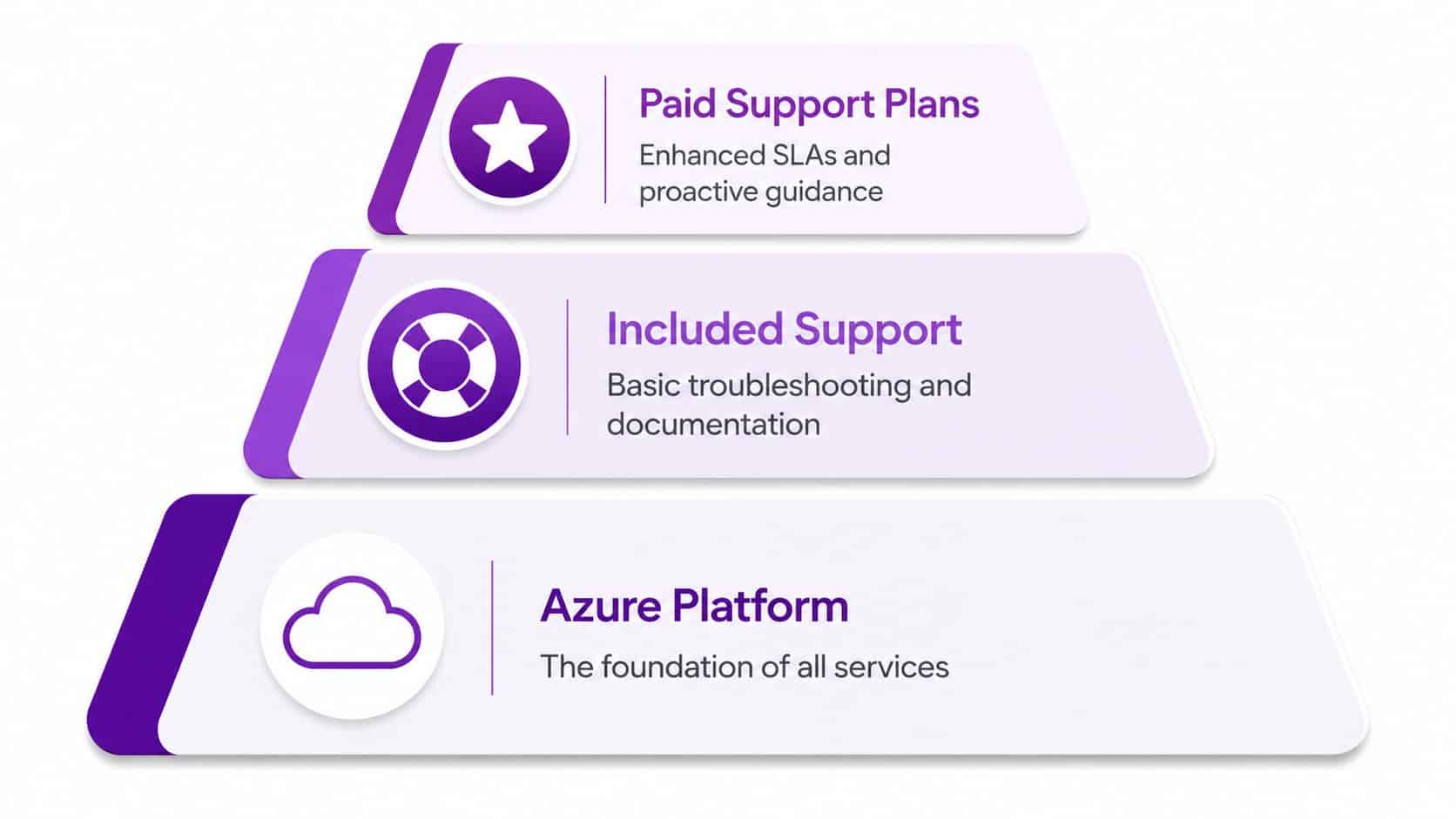
Azure support is a layered system, not one Microsoft offering. The Azure platform is the foundation, providing compute, storage, networking, identity and managed services. Included support covers basic account and billing assistance. Paid Microsoft support plans provide technical help under defined terms. A partner-delivered managed service adds the people who monitor, maintain and improve the environment.
For a Leicester logistics firm, the layers have separate responsibilities. Microsoft investigates a platform fault. The internal team controls user access and business approvals. A partner such as F1Group monitors systems, coordinates incidents and manages agreed operational changes. That division prevents a support contract being mistaken for a complete operating service.
Microsoft states that billing and subscription management support is included for Azure customers, while technical support requires a support plan. Its Azure support information also describes UK contact arrangements and typical local-hour coverage for certain non-severity, non-English-local-hour scenarios. Buyers should check those boundaries before assuming technical assistance is available around the clock.
Three layers, three different jobs
The first layer is self-service and account assistance. Your team can manage subscriptions, raise billing queries and use Microsoft documentation without purchasing technical support. That arrangement suits a low-risk development environment where an internal engineer owns design and troubleshooting.
The second layer is Microsoft's paid support. It gives your team access to technical cases, response targets and varying levels of advisory guidance. Use it when Microsoft needs to investigate an Azure platform or service issue. It remains a support contract, not a replacement for monitoring, change control or application ownership.
The third layer is partner delivery. A partner can monitor the environment, manage changes, coordinate incidents, strengthen security controls, test recovery and convert technical findings into business decisions. For a small East Midlands firm, that means fewer gaps between an alert, an approved action and a clear update to operations.
For regulated organisations planning a Microsoft cloud move, SharePoint migration for regulated sectors provides context on governance, information handling and operational controls, rather than treating migration as a simple data transfer.
Ask which responsibilities belong to Microsoft, which belong to your team and which require a named engineering service. That answer matters more than choosing a plan from the support menu alone.
Support Tiers, Response Times, and SLAs Compared
Microsoft's support ladder is easy to misunderstand because the price and response target don't tell the whole story. A cheaper plan may suit development work, while a production system needs faster escalation. Neither plan automatically patches infrastructure or manages your application.
Microsoft lists Basic as included at no extra charge, followed by paid examples of $29, $100 and $1,000 per month on its support plans page. Those figures are US-dollar examples, so UK buyers should obtain the current GBP price before signing. Microsoft also states that the monthly fee covers one billing account, regardless of how many subscriptions or users sit under that account, as explained in its support-plan FAQ.
| Plan | Price | Response Target, Severity A | Availability | What Microsoft Does | Where a Partner Steps In |
|---|---|---|---|---|---|
| Basic | Included | No technical Severity A case handling | Billing and subscription support | Helps with account and billing matters, plus documentation and self-service resources | Runs monitoring, changes, backups and application troubleshooting |
| Developer | Under £25 per month, confirm current GBP pricing | Business-hours response for non-production issues | Intended for development and test scenarios | Provides technical guidance within the plan's scope | Protects production systems and manages operational work |
| Standard | From around £75 per month, confirm current GBP pricing | One-hour response for production-down Severity A cases | 24/7 coverage for qualifying production-down incidents | Investigates Azure and service-level problems, then advises or escalates | Restores workloads, manages communications and carries out approved changes |
| Professional Direct | Custom pricing, confirm current GBP pricing | Under 15 minutes for Severity A cases | Enhanced support with account management | Adds proactive guidance, a named Technical Account Manager and ProDirect account management | Provides hands-on ownership, engineering execution and local continuity |
Prices and target descriptions should be checked against Microsoft's current Azure support plans before procurement. Microsoft's plan is only one part of the service. The customer remains responsible for defining severity accurately, supplying diagnostics, granting appropriate access and implementing recommended changes.
What the support plan won't do
Microsoft support can help determine whether a platform service is affected, identify configuration problems and escalate issues internally. It won't run your weekly patching cycle, remove idle resources, test a database restore or maintain a clean incident history.
That's where a partner normally takes over. The partner turns Microsoft's technical response into an operational result, with agreed ownership for triage, remediation, communication and follow-up. For a Midlands IT Director, that distinction is more useful than comparing plan names in isolation.
Common Azure Support Tasks and What They Involve
Azure support is a set of operational jobs, not a single Microsoft product. The portal provides the tools. A support layer decides which alerts need action, schedules safe changes and explains a rising Azure bill to a Finance Director at an East Midlands manufacturer.
| Support Task | Azure Tools | Partner Effort |
|---|---|---|
| Monitoring | Azure Monitor, Log Analytics, Service Health, alerts | Sets useful thresholds, routes alerts, reviews trends and confirms who responds |
| Patching | Update Manager, VM management, App Service and database controls | Plans maintenance, tests dependencies, records changes and handles exceptions |
| Backup | Azure Backup, snapshots, storage redundancy and recovery features | Defines recovery objectives, verifies jobs and runs restoration exercises |
| Incident response | Service Health, activity logs, resource logs and diagnostic settings | Triages, communicates, coordinates escalation, restores service and documents causes |
Monitoring must reach a human
Azure Monitor collects metrics and logs. Log Analytics supports investigation, while Service Health identifies relevant platform events. An alert sent to an unattended mailbox is not monitoring. Excessive noise creates the same problem, because the message linked to a production issue gets ignored.
A useful service assigns ownership for every alert. It separates information from conditions requiring action, checks that diagnostic details are sufficient and tests escalation outside normal office routines. For a factory relying on Azure-hosted production systems, that means a named person knows what to do when a service health event or failed transaction appears.
Patching is controlled engineering
Updating a Windows or Linux virtual machine requires more than pressing an update button. Applications may depend on a particular runtime, database version or network rule. App Service, AKS node images and SQL services each have different maintenance requirements.
A partner should set an agreed cadence, identify systems needing exceptions and record the result. The business outcome is reduced exposure without an uncontrolled production change. That matters to an East Midlands distributor whose warehouse or order-processing application cannot be treated like a disposable test server.
Backup is only useful when recovery works
Azure Backup and snapshots can protect files, databases and virtual machines. Recovery design still requires decisions about retention, access control, dependency order and the location of restored workloads.
The IT team should know how to recover an individual file, a database and a complete service. Documented procedures and tested restores provide that confidence. A green backup job alone does not prove that recovery will work.
Incident response brings these tasks together. Teams need triage, a clear communications owner, controlled remediation, Microsoft escalation where appropriate and a post-incident review. A practical support ticket system guide helps structure ownership, priorities and escalation without turning the process into bureaucracy.
For organisations planning a move or rationalisation, Azure cloud migration services should be assessed alongside the future support model. A migration without monitoring, backup and incident ownership transfers the operational problem to Azure.
Why SMBs Struggle Without a Managed Support Layer
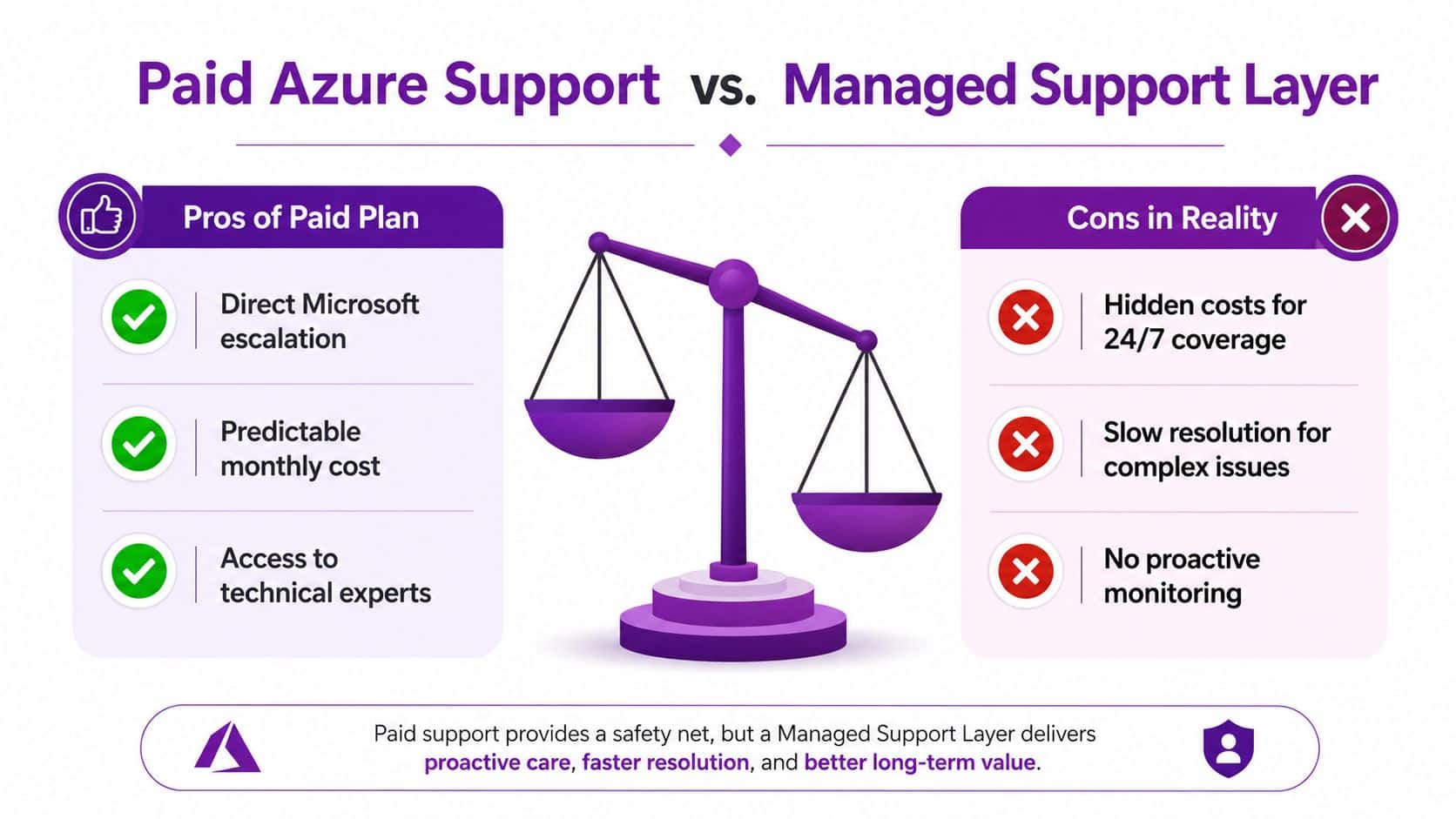
A paid Microsoft plan can solve one problem, access to Microsoft technical support. It doesn't solve the capacity problem inside a small or mid-sized business.
An East Midlands manufacturer may have an IT team already responsible for on-premises servers, printers, connectivity, Microsoft 365, line-of-business applications and user support. Azure then becomes another specialist platform requiring identity administration, networking knowledge, security review, cost control and recovery planning. The work gets postponed until an incident forces it to the front of the queue.
Capacity, cost and risk arrive together
Capacity is usually the first constraint. Azure Advisor recommendations, reservation decisions, storage tiers and access reviews all require attention. An internal engineer may understand the environment but lack protected time to review it properly.
Cost is the second issue. Pay-as-you-go consumption can spread across virtual machines, disks, public IPs, backups, logs and test resources. Without ownership, nobody can confidently explain which services are necessary, which are idle and which can be resized safely.
Risk is the third. A neglected privileged identity, exposed secret, misconfigured network rule or missed security update can create an outage or security incident. Azure provides security controls, but the customer must configure and operate them.
A support plan gives you a route into Microsoft. A managed layer gives you someone responsible for using that route effectively.
The managed model works because it turns platform complexity into a planned service. It assigns people to monitoring, maintenance, incident response and optimisation. It also makes scope visible. Routine work can be included, while projects such as redesigning an application, migrating a database or rebuilding a landing zone can be quoted separately.
The following video provides a useful visual introduction to the difference between buying support access and operating a managed service.
How F1Group Delivers Azure Support Services
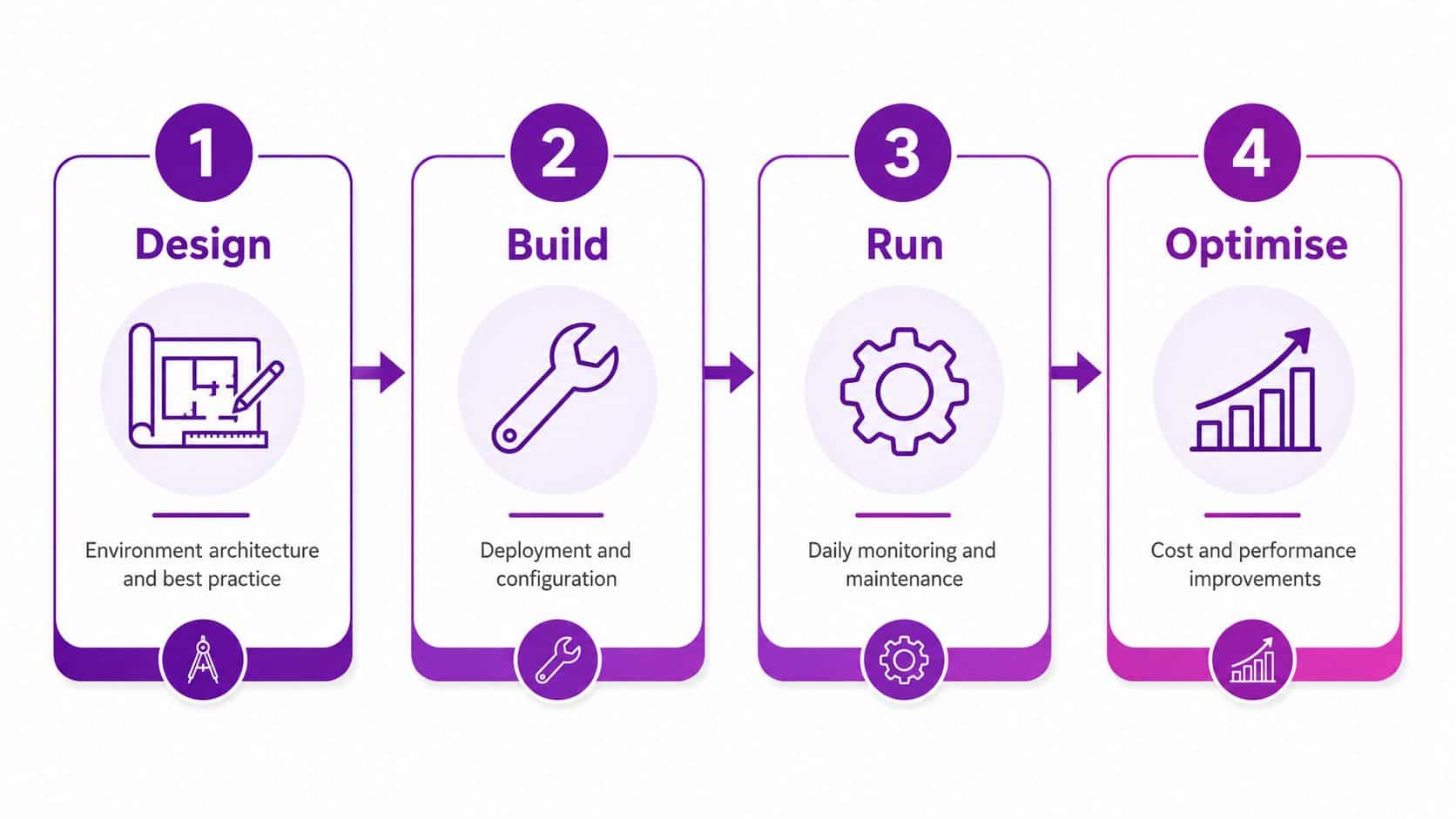
F1Group's Azure service should be judged by what happens after a project closes. For an East Midlands business, that means clear ownership of daily operations, incident cover, migration work and ongoing cost control. Each layer has a defined purpose, scope and business outcome.
Managed Azure operations
An organisation with ageing servers and a small IT team needs accountable ownership once migration is complete. F1Group can cover environment design, identity hygiene, patching coordination, backup verification, alert review and performance tuning.
For a Nottingham manufacturer, the practical result is a production platform that does not rely on one employee remembering every task. The service definition should state what is monitored, what is maintained, which access is needed and which changes require separate project work.
On-call cover
An agreed support rota extends the internal team during incidents and planned changes. The contract should specify how staff raise incidents, who responds, which severity levels receive out-of-hours attention and how Microsoft escalation is managed.
A response commitment has value only when the covered services, escalation route and customer responsibilities are written down. “24/7 support” alone does not explain what happens during a failed application deployment on a Tuesday evening.
Migration support
A move from Hyper-V, ageing physical servers or another cloud starts with discovery. The team must map dependencies, identity, networking, backup, licensing, application behaviour and cutover constraints before recommending a design.
A landing zone and staged migration reduce the chance of transferring existing operational weaknesses into Azure. The statement of work should separate assessment, architecture, build, testing, cutover and post-migration stabilisation. That separation gives an IT Director a clearer view of delivery risk and accountability.
Cost optimisation
Cost control needs regular review. Engineers can examine right-sizing, idle resources, storage tiers, reservations and savings-plan options, then explain the performance and commitment trade-offs.
For a business whose bill changes as teams add test environments or retain obsolete disks, the target is controlled consumption. Cutting resources without checking workload impact can create slower systems and avoidable disruption. Where cloud access also depends on reliable authentication and connectivity, specialist WiFi authentication project help may support the wider design.
F1Group outlines its approach in managed Azure services. Before signing, ask for the service boundary. Confirm routine inclusions, change-request triggers, incident reporting arrangements and the process for working with Microsoft when the fault sits in the Azure platform.
UK-Specific Considerations for Azure Support
UK data residency affects architecture, support procedures and procurement. Microsoft launched Azure from UK datacentres in 2016 and described the UK as its 15th regional base. By 2024, Microsoft reported that it had more than doubled the size of its UK Azure regions and increased compute capacity by more than 1,500% since launch. Its account also records tens of thousands of organisations using Microsoft cloud services delivered from the UK, with more than 1,000 customers joining during the first month of UK cloud availability. These figures appear in Microsoft's UK Azure regions update.
For public-sector workloads, UK South is the primary region and UK West is the paired failover region. Cabinet Office guidance describes UK South as the location for active workloads and availability zones, while UK West supports failover or additional hosting. An East Midlands council or supplier handling resident information should record this regional choice in its design and recovery documentation. Hosting outside the UK requires formal approval because overseas processing can increase data-sovereignty and UK GDPR risk, as set out in the Cabinet Office Azure guidance.
A practical UK checklist
- Confirm residency: Record where production data, backups, logs and support information are stored.
- Design for pairing: Document UK South and UK West failover, including test ownership and test frequency.
- Review assurance: Match the partner's controls to UK GDPR and the UK Data Protection Act. Add Cyber Essentials, ISO 27001, FCA expectations or NHS DSPT controls where they apply.
- Name the engineers: Assign people who understand the workload instead of relying on an anonymous queue.
- Define escalation: Set incident coverage, change approval and Microsoft escalation routes.
- Review commercial terms: Cover data access, portability, switching assistance and egress considerations.
Public-sector buyers should also check available purchasing arrangements. Microsoft and the UK Government signed a five-year agreement effective from 1 November 2024, covering eligible public-sector access to savings across Microsoft 365, Azure, Business Applications and Microsoft 365 Copilot. The Crown Commercial Service also signed a non-binding Azure Pricing Arrangement offering discounted pricing and favourable terms to eligible organisations for up to three years on existing or new Enterprise Agreements. Microsoft's UK Government agreement announcement explains the procurement context, while Microsoft's G-Cloud documentation describes the eligible public-sector bodies.
Commercial organisations still need disciplined cost governance. Pair resilience and compliance planning with a cloud cost optimisation review so regional choices, retention policies and support arrangements do not create avoidable spend.
Choosing the Right Azure Support Path for Your Business
Start with business impact, not the product catalogue. A low-risk development environment can use Basic or Developer support when an internal engineer owns the platform. A production line-of-business application generally needs Standard-level Microsoft escalation or a managed contract around it. A critical revenue system needs Professional Direct or a managed service with explicit operational ownership.
| Business Profile | Recommended Tier | Partner Layer Needed |
|---|---|---|
| Development and test workloads | Basic or Developer | Optional, usually advisory |
| Production business application | Standard | Strongly recommended for monitoring, change and recovery |
| Critical revenue or operational system | Professional Direct or managed contract | Required for ownership, escalation and resilience |
| Small IT team with no Azure specialist | Standard or Professional Direct, depending on risk | Non-negotiable managed engineering layer |
Use three triggers to decide whether to engage F1Group:
- Post-migration stabilisation: The workload has moved, but monitoring, backup verification, documentation and ownership remain incomplete.
- A recurring cost concern: Azure consumption needs a structured review of resource sizing, storage, reservations or savings-plan options.
- No dependable out-of-hours cover: A production incident can occur outside the internal team's working pattern, with no agreed escalation route.
The right Azure support services arrangement combines Microsoft's platform escalation with people who know your environment and are authorised to act. Buy the tier that matches the business risk, then close the operational gap with defined ownership.
F1Group can assess your Azure estate, define the support boundary, provide managed operations and help with migration, incident response and cost control across the East Midlands. Send F1Group a message or phone 0845 855 0000 today to discuss the support model your business needs.