
A Microsoft 365 tenant can look healthy while carrying serious risk. An East Midlands SME may have MFA enabled, a respectable Secure Score and no obvious alerts, yet still allow a former employee to sign in, a legacy application to authenticate, or a user to share sensitive files externally. A dashboard is not an assessment. It's one source of evidence in a structured review of how identity, devices, email, data and applications work together.
For UK organisations, the sensible benchmark goes beyond Microsoft's defaults. The UK Government's Microsoft 365 guidance was formally updated on 5 October 2023, and it frames secure configuration around the NCSC's Secure Configuration Alignment approach. It also builds on the 14 Cloud Security Principles created in 2019, giving UK businesses a recognised reference point for judging whether a tenant is configured safely.
When a Quiet Tenant Becomes a Costly Incident
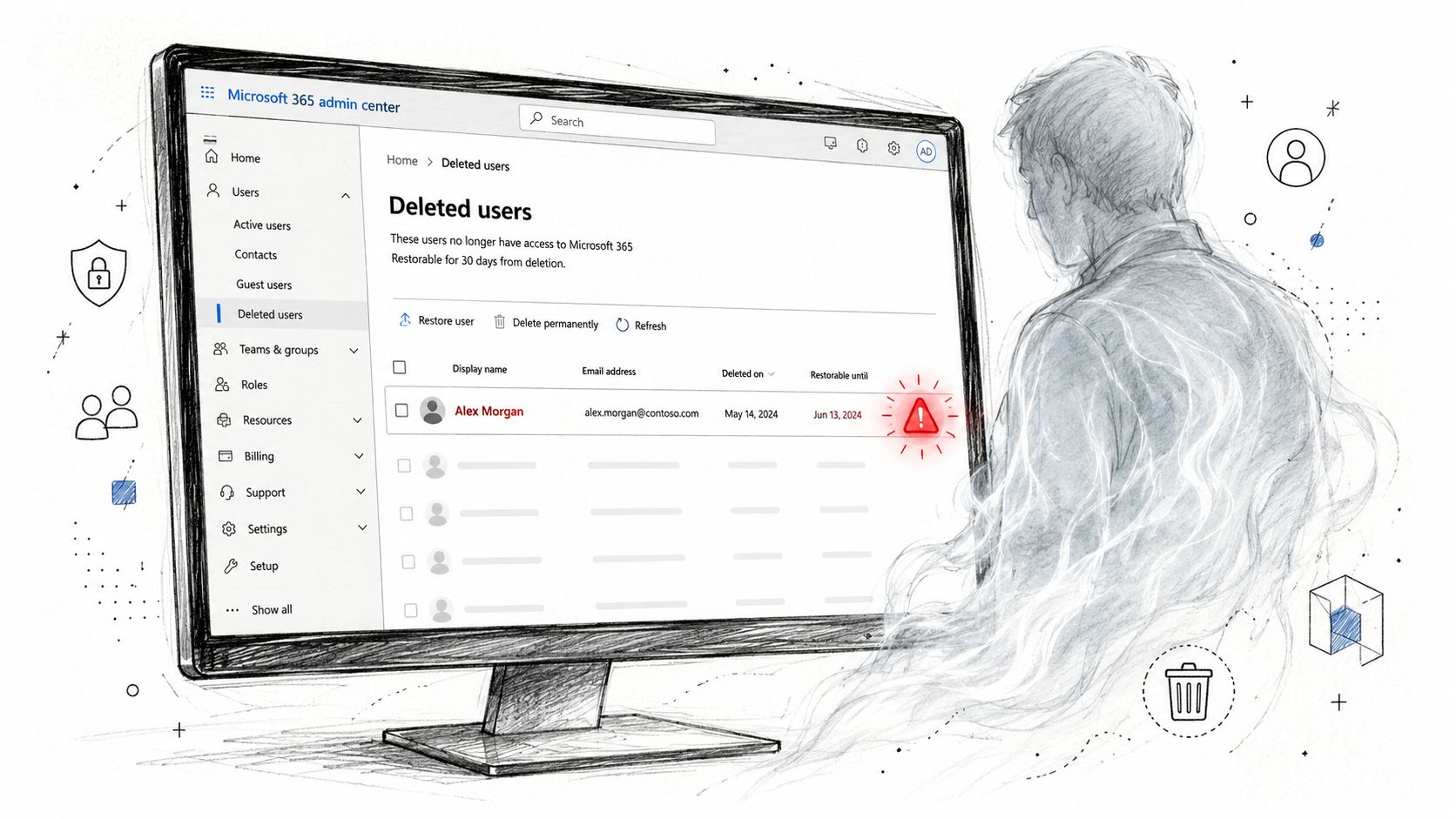
A 35-person engineering firm in Nottingham can drift into danger without anyone making an obviously reckless decision. A department reshuffle leaves a former employee's account active. Someone approves an MFA exemption for a service account because a production process is failing. A shared mailbox remains accessible without sensible sign-in restrictions, while an old connector continues using basic authentication because a line-of-business application still depends on it.
Each exception starts as a practical shortcut. None receives a proper owner or expiry date.
The IT lead sees a familiar Secure Score dashboard. The tenant shows recommendations, but no single screen explains that identity exceptions, device gaps and mail-flow weaknesses combine into one attack path. Audit settings may remain at their default configuration, reducing the evidence available when an incident occurs. A phishing message then reaches an inbox that lacks adequate protection, and the attacker moves through OneDrive using the user's existing permissions.
Drift matters more than intention
The business didn't choose to create a weak tenant. It accumulated changes through staff movement, urgent fixes, inherited settings and applications that nobody has revisited. That's why a Microsoft 365 security assessment must test the configuration against an explicit baseline, not just record whether a feature exists.
The NCSC's Microsoft 365 phishing-reporting guidance gives UK organisations a practical example. Users should be able to report suspicious messages through Outlook's Report Phishing add-in, with reports routed to report@phishing.gov.uk through the Suspicious Email Reporting Service. The service analyses reports and helps identify and remove malicious sites, turning user reporting into part of the response workflow.
Practical rule: Treat every exception as a temporary control failure until someone documents its owner, business reason and review date.
A structured review would have tested the former employee's access, MFA exclusions, shared mailbox controls, legacy authentication, audit evidence and phishing-reporting route before the incident. If an incident has already happened, F1Group's cyber incident response guidance explains why containment and evidence preservation must happen before routine remediation.
What a Microsoft 365 Security Assessment Actually Covers
A Microsoft 365 security assessment is a documented review of the tenant's security controls, operating assumptions and evidence. A qualified internal owner or specialist partner examines how the organisation manages identity and access, endpoints, Exchange Online, SharePoint, OneDrive, Teams and third-party applications.
The work starts with scope. A small business might need a focused review of identity, email and sharing controls. A regulated charity or public-sector supplier may also need deeper checks of retention, audit readiness, privileged administration and application governance. The assessor should agree the boundaries before collecting evidence.
Secure Score is a starting point, not a verdict
Secure Score provides a useful tenant-level benchmark based on Microsoft recommendations. It doesn't prove that a control is enforced across every user, device or workload. It also won't capture every compensating control, operational workaround or dangerous exception.
An assessment interprets the score in context. It validates policy assignments, checks which accounts are excluded, compares intended settings with effective behaviour and identifies controls that the dashboard doesn't weigh meaningfully. The output should explain what's wrong, why it matters and what the business should do first.
A proper engagement normally produces:
- A findings register: Each issue has evidence, affected users or services and a clear risk explanation.
- Prioritised actions: Remediation is ordered by business impact, effort and dependency, not by whichever recommendation appears first.
- An evidence pack: Screenshots, policy exports, audit observations and relevant configuration records support the conclusions.
- A re-test point: The assessor returns to the failed controls after remediation and confirms whether the risk has reduced.
Good reporting matters. A director shouldn't need to understand every Entra ID policy to approve a sensible action. The report should say, for example, that an unmanaged device can access company files, identify the policy responsible and state what change will close the gap.
A score tells you where Microsoft wants attention. An assessment tells you where your organisation is exposed.
Security also starts before a message reaches the tenant. Teams responsible for email operations can use this guide to reduce bounces with better security alongside tenant-level controls, especially where sending reputation and message hygiene affect legitimate business communication. The wider risk-management context is covered in F1Group's security risk management approach.
Five Core Areas an Assessor Reviews
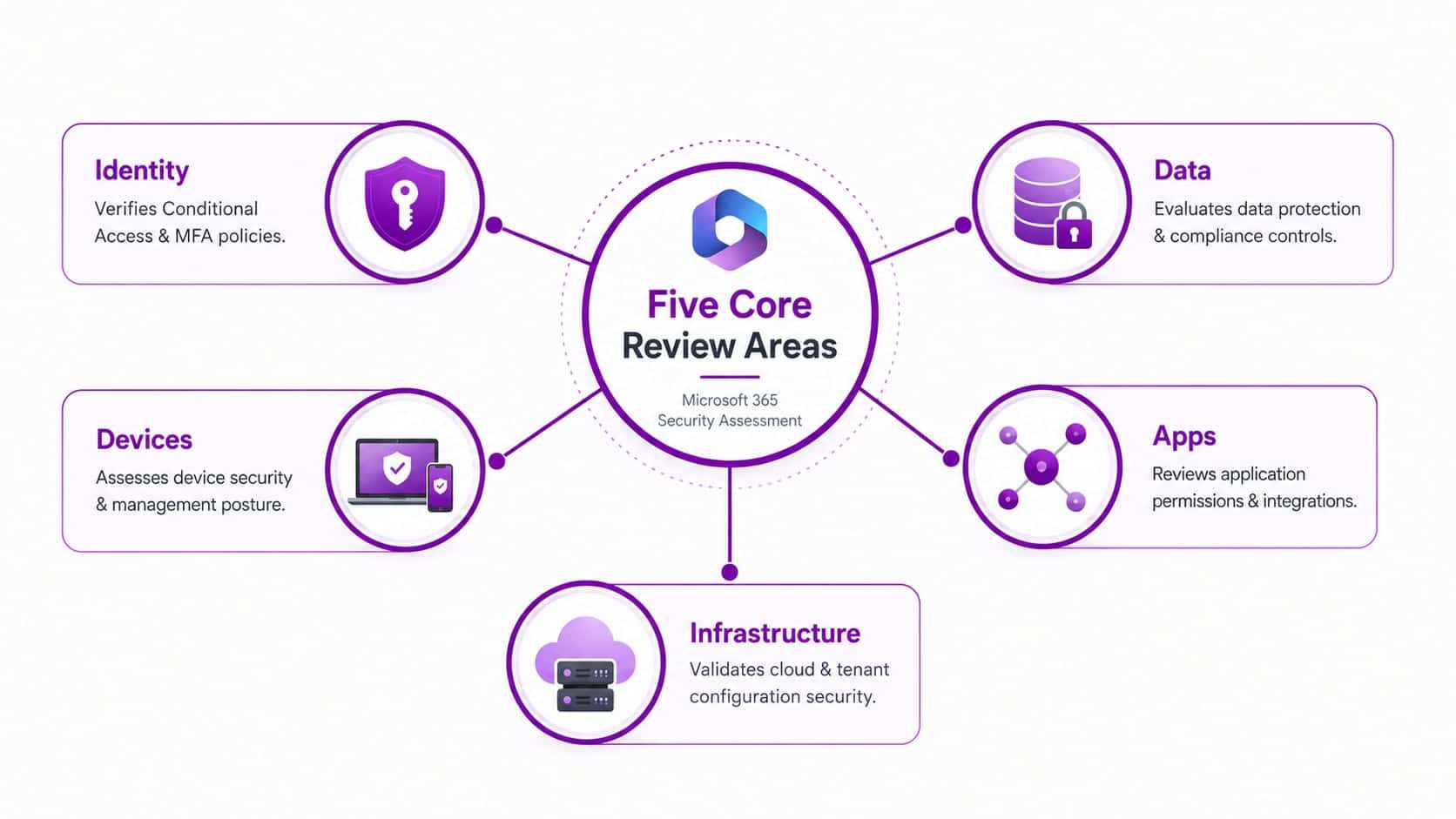
The strongest reviews follow a five-layer control stack. UK government guidance describes secure configuration through identity, device and service settings, with privileged identities protected, devices secured and those protections required before data access is granted. A broader SME assessment adds data and applications, because a secure sign-in is of limited value if an authorised user can overshare files or approve an unsafe application.
Identity
The assessor reviews Entra ID Conditional Access, MFA registration, authentication methods, legacy authentication blocks, guest access and privileged role assignments. They'll inspect exclusions rather than accepting a policy's green status. Break-glass accounts need controlled emergency access, strong protection and monitoring, while administrators should use separate privileged identities instead of carrying global permissions through everyday accounts.
Devices
The device layer asks whether access decisions depend on real device health. The review covers Intune enrolment, compliance policies, operating system patch state, Defender for Endpoint onboarding and BitLocker enforcement. A policy that requires compliant devices is ineffective if most laptops aren't enrolled or if compliance rules aren't assigned to the relevant groups.
Exchange Online controls include anti-phishing policies, Safe Links, Safe Attachments, outbound spam protection, transport rules and mail-flow auditing. UK businesses should also verify the Outlook Report Phishing add-in and its route into the NCSC's Suspicious Email Reporting Service, as described in the earlier guidance.
Microsoft 365 Direct Send deserves a deliberate test. Akita's Microsoft 365 security assessment guidance reports that Direct Send abuse in phishing campaigns had reached over 70 organisations since May 2025. That makes mail-flow abuse, internal spoofing detection and user-verification workflows worth testing alongside SPF, DKIM and DMARC hardening.
Data
The assessor checks sensitivity labels, Data Loss Prevention policies, SharePoint sharing controls, external sharing reviews and retention settings. The question isn't whether a label exists. It's whether finance, customer and personal data receives appropriate protection when users share, download or synchronise it. F1Group's explanation of what Data Loss Prevention does provides useful context for this part of the review.
Apps
Finally, the review examines OAuth consent, third-party permissions, unused application removal, sanctioned app catalogues and session controls. A user approving an application can give it access that survives the original business need, so the assessor should identify who granted consent, what data the app can read and whether administrators control future approvals.
These layers connect. A weak identity policy can expose a compliant device, a trusted mailbox and every SharePoint site the user can reach. Reviewing only one layer creates false confidence.
Secure Score, Defender, and Compliance Center Compared
Microsoft's security tools aren't competing answers. They provide different evidence, and an assessor should use them in sequence.
Secure Score is useful for establishing a baseline and identifying Microsoft-recommended improvements. Its weakness is context. It can reward a completed setting without showing whether the policy applies to the right people, whether an exception creates a route around it or whether the business has a stronger control that Microsoft doesn't score.
Defender products provide operational signals. Defender for Endpoint shows device posture, Defender for Identity highlights identity-related anomalies, and Defender for Cloud Apps adds visibility around cloud application use. These tools are valuable for live detection and investigation, but they depend on appropriate licensing, onboarding and configuration. They also shouldn't be treated as a substitute for preventative policy review.
Purview Compliance Center addresses a different question. It supports data classification, retention, DLP and audit readiness, areas that a Secure Score review may treat as secondary. A business can have a reasonable sign-in posture and still lack a defensible approach to sensitive information.
Secure Score vs Defender vs Compliance Center at a glance
| Tool | Best At | Blind Spots | Workflow Role |
|---|---|---|---|
| Secure Score | Tenant-level recommendations and baseline comparison | Doesn’t prove effective enforcement or capture every compensating control | Establish the initial review agenda |
| Defender | Threat signals, device posture and identity anomalies | Depends on correct licences, onboarding and telemetry | Validate operational exposure and active signals |
| Compliance Center | Classification, retention, DLP and audit readiness | Doesn’t replace identity or endpoint controls | Confirm evidence-ready data governance |
For an East Midlands SME, the sensible workflow is simple. Pull Secure Score, inspect Defender signals and device coverage, then review Purview policies and evidence. Only after that should the assessor create remediation tickets, because each action needs to reflect the tenant's real configuration and business requirements.
A Practical Assessment Checklist for SMEs
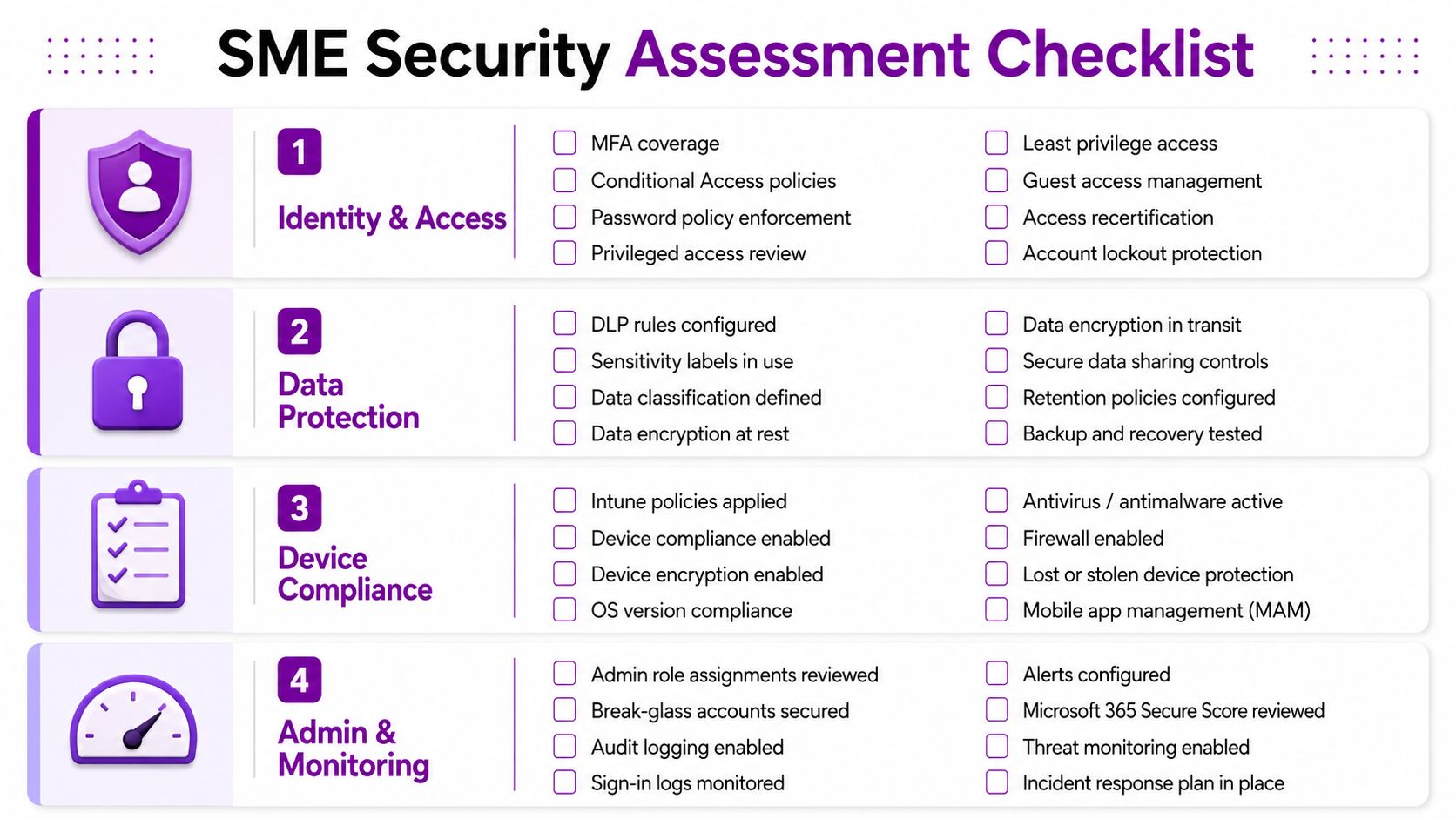
Use this as a working sheet, not a theoretical framework. The order matters because later controls depend on earlier decisions.
Start with identity and access
Confirm that MFA covers every user and that Conditional Access policies apply to employees, guests and administrators. Inspect exclusions, authentication methods and sign-in risk policies rather than relying on a policy's enabled status.
Check these items first:
- MFA coverage: Identify users, service accounts and exceptions that can authenticate without the intended protection.
- Conditional Access: Confirm that access depends on risk, location, application and device condition where appropriate.
- Legacy authentication: Find old protocols and applications that still rely on weaker authentication methods.
- Emergency access: Document break-glass accounts, secure them separately and monitor their use.
- Privileged roles: Separate administration from ordinary work and review role assignments.
- Guest access: Check who can invite guests, what guests can access and whether inactive guests remain present.
Confirm device control
Move to Intune and Defender for Endpoint. Check whether company laptops and mobile devices are enrolled, whether compliance policies have meaningful requirements, and whether non-compliant devices are blocked from sensitive resources.
Review operating system patch state, Defender onboarding and BitLocker status. If a device can access SharePoint while it has no encryption, weak compliance evidence or no endpoint detection, identity controls alone won't protect the data.
Test Exchange Online
Inspect anti-phishing policies, Safe Links, Safe Attachments, outbound spam controls and transport rules. Verify that SPF, DKIM and DMARC are configured for the organisation's sending domains, and test whether suspicious messages can be reported through Outlook's Report Phishing add-in.
Also review mailbox forwarding, inbox rules, shared mailboxes and connectors. Invoice fraud often starts with a rule or forwarding change that nobody monitors.
Finish with data, applications and evidence
Check SharePoint and OneDrive external sharing, sync restrictions, sensitivity labels and DLP policies for financial and personal data. Review Connected Apps consent, application permissions and unused integrations.
Finally, confirm that audit logging is enabled and that someone reviews Secure Score monthly. The UK Government's Secure Configuration Blueprint makes both controls explicit. Without usable logs and regular score review, the business loses evidence for detecting misuse, measuring drift and prioritising changes.
Before approving a supplier or application, assess its access, data handling and administrative controls. An AI Image Detector vendor vetting guide offers a useful reminder that third-party risk belongs in procurement and security decisions, not just in a software catalogue.
Common Findings in East Midlands Tenants
Reviews across Leicester, Nottingham, Derby, Northampton and Lincoln tend to reveal configuration drift, not deliberate neglect. A tenant changes as employees join, roles shift, vendors connect applications and someone creates an exception to keep a business process moving. The exception then becomes part of the permanent design.
MFA is often technically enabled but not enforced for service accounts, shared mailboxes or former staff who still hold licences. Conditional Access may look complete while excluded accounts bypass the policy. A printer or line-of-business application can keep legacy authentication alive, creating an old route into the environment while the dashboard presents a reassuring completion state.
Visibility gaps hide operational risk
Unified Audit Logging may be licensed but disabled, leaving the business without a dependable trail for sign-ins, mailbox changes, file activity and administrator actions. Secure Score may not reveal the practical consequence of that missing evidence. The UK guidance is clearer: tenants should verify audit logging and review Secure Score monthly.
Mail-flow controls also receive too little attention. Without suitable outbound rules and monitoring, a compromised mailbox can forward messages, alter inbox rules or support invoice redirection before anyone notices. The technical issue isn't limited to phishing detection. It includes how quickly the business can identify and investigate suspicious behaviour.
Sharing defaults outlive the migration project
SharePoint and OneDrive settings frequently retain broad external sharing because nobody revisited the tenant-wide configuration after migration. Users may have valid reasons to collaborate with external parties, but an organisation-wide “Anyone” setting removes useful boundaries between approved collaboration and uncontrolled distribution.
Direct Send abuse adds another overlooked risk. As the Akita guidance notes, campaigns had reportedly affected over 70 organisations since May 2025. Assessors should therefore test internal spoofing detection, mail-flow abuse and domain authentication, not just MFA and Secure Score recommendations.
The pattern is consistent: small exceptions accumulate until they form an attack path. A review must connect those exceptions rather than report them as unrelated checkbox failures.
Remediation Priorities That Deliver Real Risk Reduction
Don't turn remediation into a six-month technology programme before fixing the obvious exposure. Sequence the work by risk reduction per hour of effort, then give every change an owner and a test.
Tier one fixes the front door
Start with MFA enforcement for all appropriate users, block legacy authentication and use Security Defaults or Conditional Access where the tenant's licensing and operating model support them. Remove stale accounts, review shared mailboxes and close unnecessary sign-in exclusions.
Privileged accounts deserve stronger treatment than ordinary users. Administrators should use phishing-resistant MFA where the available technology and business process support it, because compromise of a privileged identity can defeat controls across the tenant. Blocking legacy authentication tenant-wide is preferable to leaving an old protocol available broadly, but test business-critical applications first and replace unsupported dependencies rather than preserving them indefinitely.
Tier two improves evidence and response
Enable unified audit logging and configure relevant Defender alert policies. Review mailbox forwarding, inbox rules, transport rules and suspicious administrative changes. Confirm that someone receives alerts and knows what action to take.
A control without an owner is a dormant control. Assign responsibility for monitoring, define an escalation route and re-test after changes.
Tier three governs data and apps
Tighten SharePoint external sharing, introduce sensitivity labels for finance and customer information, apply DLP policies and restrict OAuth consent for third-party applications. Remove unused app permissions and require administrative approval for new integrations where practical.
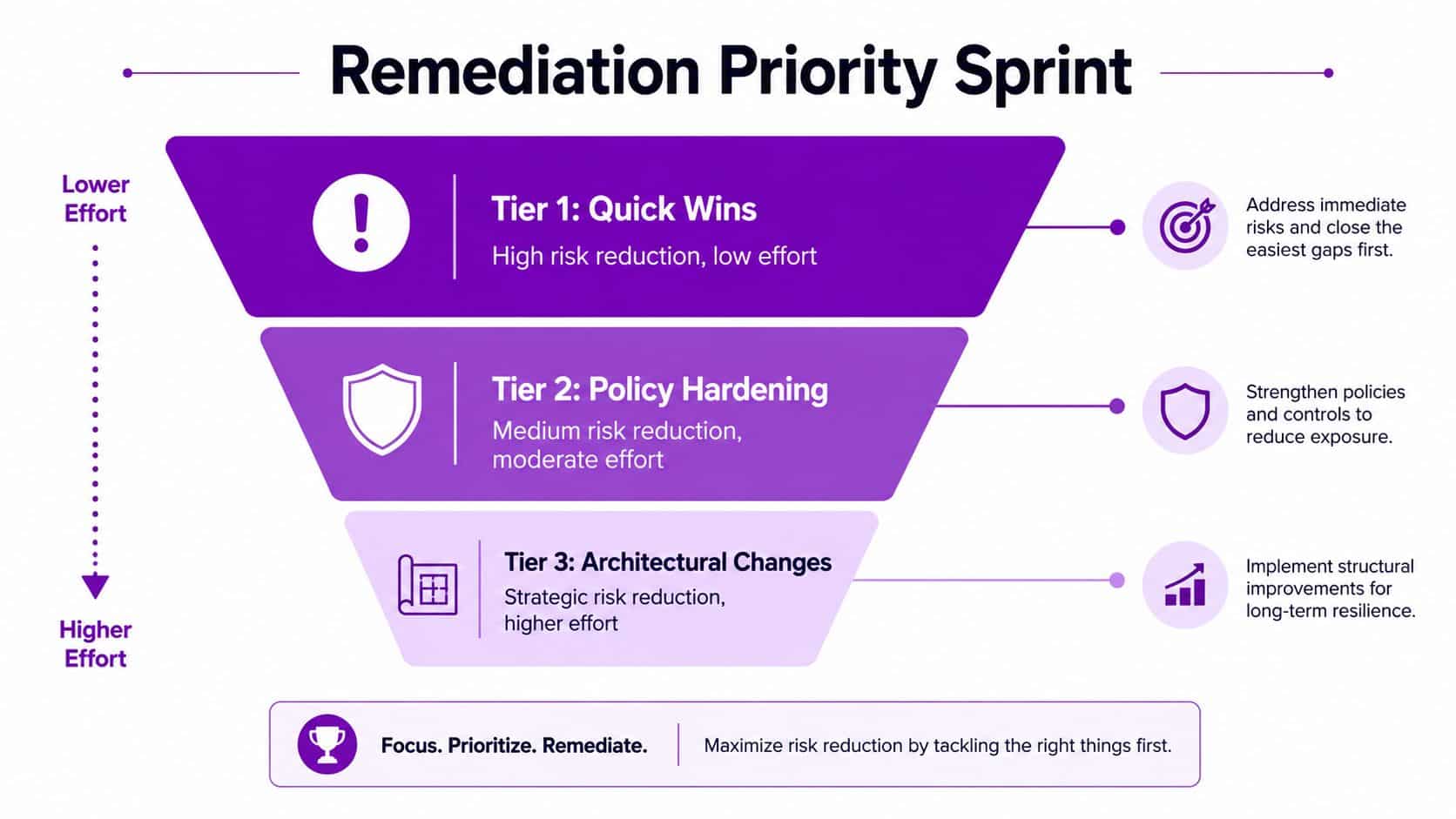
A realistic roadmap keeps a small IT team moving:
- Thirty-day plan: Close identity exceptions, disable legacy authentication dependencies where possible, secure privileged accounts and enable logging.
- Ninety-day plan: Improve endpoint compliance, harden email controls, review sharing and establish alert ownership.
- One-hundred-and-eighty-day plan: Complete data classification, DLP tuning, application governance and repeat testing.
The target isn't a perfect dashboard. It's a tenant where critical controls are enforced, evidence exists and exceptions have accountable owners.
Turning the Assessment Into an Annual Habit
One assessment gives you a baseline. It doesn't guarantee that the tenant remains safe after new starters join, a third-party application receives consent or an administrator bypasses a Conditional Access policy during an urgent fix.
Set a recurring annual review around the budget cycle, then run a lighter quarterly health check covering Secure Score trends, privileged-role changes, new applications, audit logging and major policy exclusions. That cadence catches drift before it becomes normal.
An East Midlands SME without specialist security expertise can use an internal owner, an external assessor or a combination of both. A regional IT partner brings pattern recognition from other tenant reviews and can turn findings into a roadmap that fits the organisation's licences, staff and operational constraints.
Book a scoping call, define the assessment window and agree the written remediation roadmap before changing licences or policies. F1Group can review Microsoft 365 identity, endpoint, email, data and application controls, then provide prioritised remediation and re-testing. Visit F1Group to discuss the right assessment scope for your business, or phone 0845 855 0000 today and send us a message through F1Group's contact page.