
The operations director has just signed for Dynamics 365 Customer Service. The business case is approved, the supplier has promised a smooth rollout, and a 12-month project plan is sitting in front of them that nobody internally wrote. Agents still work from shared mailboxes, spreadsheets and an ageing helpdesk, while finance wants a firm cost envelope and the service manager wants the new platform live without disrupting customers.
That situation is common across UK mid-market organisations and charities. A successful Dynamics 365 Customer Service implementation isn't a configuration exercise. It's a controlled change programme involving processes, data, licensing, integrations, security and people. The roadmap below is designed for organisations with roughly 50 to 500 seats, with practical recommendations for the commercial and technical conditions UK teams face in 2025 and 2026.
The UK Starting Point for a Dynamics 365 Implementation
UK mid-market teams often inherit legacy helpdesks with inconsistent categories, duplicate contacts, undocumented routing rules and personal workarounds. A new platform will not correct those weaknesses by itself. Each one becomes a configuration choice, migration defect or training issue unless the organisation resolves it before build begins.
Commercial planning also needs current UK evidence. Microsoft's UK price list shows Customer Service Professional at £38.40 per user per month, Enterprise at £80.70, and Premium at £149.90, billed yearly and excluding VAT (Microsoft's UK Dynamics 365 Customer Service pricing). UK market commentary records Enterprise moving from £78.10 to £86.30 per user per month, a fall in UK Dynamics 365 contract vacancies from 769 to 544, and a median daily contractor rate of £525 (UK Dynamics 365 market commentary). Use these figures to frame the business case, then confirm the actual licence mix and delivery capacity before approval.
For a 50 to 500 seat organisation, control the rollout through seven phases:
- Discovery and requirements
- Licence and edition selection
- Solution design
- Data migration, integrations and governance
- Testing and training
- Go-live and hypercare
- Post-launch support and optimisation
Practical rule: Configuration follows an agreed service design. Agents and service managers must agree how work enters, moves through and leaves the operation before consultants start building. Otherwise, rework has already begun.
Right-size the first release. A focused case-management deployment can move faster when data, integrations, telephony and security are manageable. A wider programme needs time for users to test real scenarios and for governance owners to approve the result. Release Wave 2 AI features should be assessed against genuine service outcomes, not added because they appear in a product demonstration.
Protect discovery, appoint capable business owners and give the steering group authority to reject attractive extras that do not support the first release. The quality of discovery is the strongest predictor of whether the project stays controlled.
Discovery Workshops and Requirements That Actually Hold Up
Discovery should produce decisions and evidence, not a collection of enthusiastic workshop notes. The UK government G-Cloud service definition recommends a Discovery phase of 4 to 8 weeks to align current and future processes, complete a fit-gap assessment and produce a blueprint and roadmap (Dynamics 365 Customer Service G-Cloud service definition). Use that period as a structured investigation.
Start with the people doing the work
Begin with an executive sponsor and service manager kick-off. Confirm the business outcomes, decision rights, scope boundaries and measures that will determine acceptance. Then shadow agents across the main service channels. Ask them to demonstrate how they open a case, search for knowledge, escalate an issue, record customer contact and close the work.
Agent interviews expose details that senior stakeholders often miss. A queue may exist in practice but not in the organisation chart. A mailbox rule may be doing the work of a formal routing process. A spreadsheet may contain the only reliable record of priority customers. Those findings should shape the design rather than be dismissed as informal behaviour.
Map the operation and inspect the data
Map intake to resolution, including email, web forms, telephone, Teams interactions, internal referrals and customer self-service. Record ownership, hand-offs, approval points, service-level obligations and closure criteria. Build a process taxonomy that uses clear categories and doesn't reproduce every historic label.
Run a data-quality audit against platforms such as Zendesk, Salesforce Service Cloud or an on-premises helpdesk. Review duplicate accounts, incomplete contacts, obsolete cases, inconsistent priorities, unusable knowledge articles and fields that nobody can explain. Baseline current first-contact resolution before migration, otherwise the team won't know whether the new platform improved the service or merely changed the screens.
The discovery pack should include:
- Statement of requirements: Distinguish mandatory capabilities from preferences and future ideas.
- Process taxonomy: Define service areas, case types, priorities, statuses and ownership.
- Channel prioritisation matrix: Rank channels by customer need, operational value, complexity and readiness.
- Data assessment: Identify sources, owners, quality issues, retention requirements and migration decisions.
- AI feature case: Explain where summaries, suggested replies or Copilot agents could help, and identify the knowledge and governance needed first.
- Delivery roadmap: Tie each decision to a release, owner, dependency and acceptance measure.
For a broader view of how governance and ownership should fit into the programme, use this CRM implementation guide alongside the discovery work. Don't approve a build until the service manager signs the process map and the data owner accepts the migration rules.
Choosing the Right Edition and Sizing Your Licence Spend
Choose the edition against service complexity, case volume and operating model, not the feature list in a sales demonstration. A 50-seat UK team handling email and web cases has different needs from a 500-seat organisation with shared queues, contractual SLAs and several service functions.
Compare the editions against the operating model
Microsoft's current UK list gives these annual-billing prices, excluding VAT (Microsoft UK pricing).
| Edition | Indicative GBP price per user/month | Best fit for | Standout features | Common add-ons |
|---|---|---|---|---|
| Professional | £38.40 | A 50-seat team handling mainly email and web cases | Core case management, customer portal, engagement and reporting | Digital messaging, Power Platform capacity, telephony |
| Enterprise | £80.70 | Multiple business units needing knowledge management, routing and SLAs | Advanced service operations, structured routing, knowledge and SLA capability | Digital messaging, Copilot capacity, telephony |
| Premium | £149.90 | Organisations requiring native voice or Customer Care Accelerators | Enterprise capabilities with contact-centre and advanced AI-oriented functionality | Telephony capacity, messaging, Power Platform capacity |
Eligible charities and non-profits should verify their agreement rather than assume the public list applies. A UK public-sector pricing document records non-profit prices of £14.21 for Professional and £26.91 for Enterprise per user per month (UK public-sector non-profit pricing document). Licensing depends on product packaging and eligibility, so confirm it during discovery.
For a 50-seat service with straightforward email and web cases, test Professional first. Enterprise is the stronger starting point when teams share queues, SLAs, knowledge processes or complex routing. Choose Premium only when its contact-centre and accelerator capabilities have a defined business use.
Build the budget beyond the base licence
For a 150-seat Enterprise deployment, the base licence envelope is £12,105 per month before VAT, calculated from the published £80.70 price, or £145,260 per year before VAT. Treat that as the licence baseline, not the implementation budget. Set aside separate allowance for Power Platform capacity, digital messaging, Copilot consumption, telephony, migration, testing, training and partner build hours.
UK contractor pricing and Microsoft packaging can produce a different commercial quote from an earlier business case. Validate the offer at purchase, document which users need which licence, and review assignment, renewal and eligibility decisions with this software licensing best-practices guide.
For teams comparing testing and operational tooling, browse testing plan prices, then apply the same procurement, security and data-handling checks used for the Dynamics implementation. A right-sized rollout funds the capabilities required for the first release, while leaving later AI, messaging or voice decisions tied to measurable demand rather than assumptions.
Solution Design, Workflows and Where to Resist Customisation
A good design makes the standard product do the heavy lifting. A poor design turns every preference into custom code, creates dependencies that future administrators can't understand and leaves agents with a system that reflects the old helpdesk's limitations.
Default to the modern agent experience
For new deployments, default to Customer Service workspace, not legacy Unified Service Desk. UK localisation guidance highlights the need to transition from Unified Service Desk and map existing USD components into the modern workspace (UK Dynamics 365 Customer Service guidance). If a legacy environment contains heavily customised agent desktops, run a staged pilot with focused hypercare. A big-bang desktop migration creates avoidable training and cutover risk.
Keep the principal service entities standard:
- Case: Preserve the standard lifecycle and extend only where a real reporting or operational requirement exists.
- Queue and routing rule: Use native assignment patterns before building bespoke dispatch logic.
- Entitlement and SLA: Model contractual and internal service commitments transparently.
- Knowledge article: Establish ownership, review dates, approval and retirement processes.
- Customer and contact: Define the system of record and avoid competing customer identities.
Custom workflows have a place. A SharePoint-based customer portal may need specific case creation, attachment handling and validation. Sentiment-driven escalation can be valuable when the organisation has agreed what happens after a high-risk signal. Those are controlled extensions with an operational owner. They aren't reasons to redesign every standard process.
Keep AI inside the design boundary
Release Wave 2 features, including case summaries, suggested replies and Copilot agents, should be treated as capabilities within the service model rather than surprise additions. Define the approved knowledge sources, prompt boundaries, human review points, audit requirements and fallback behaviour before enabling them.
| Component | Recommendation | Rationale |
|---|---|---|
| Case lifecycle | Keep standard | Standard states support consistent reporting and reduce upgrade friction. |
| Queues and routing | Keep standard first | Native routing is easier to govern than parallel assignment logic. |
| SLA and entitlement | Keep standard | Service commitments remain visible and auditable. |
| SharePoint portal intake | Customise selectively | Tailor validation and case creation where the portal genuinely requires it. |
| Sentiment escalation | Pilot as a workflow | Test accuracy, ownership and action before operational reliance. |
| Business process flows | Keep simple | Over-engineering creates unnecessary navigation and maintenance. |
| Copilot prompts and knowledge | Design with governance | AI quality depends on trusted content, permissions and review. |
Demand four artefacts before configuration is declared complete: a solution architecture diagram, an entity relationship model, a security role matrix and a signed do-not-customise register. The steering group should approve that register, because it gives the project manager a defensible answer when late requests arrive.
Data Migration, Integrations and Governance Before Go-Live
Migration should be treated as a business decision, not a technical import. The question isn't whether every historic record can be loaded into Dataverse. The question is which information agents need, which records must be retained, what can be archived and how the organisation will prove that the migrated data is trustworthy.
Sequence the migration properly
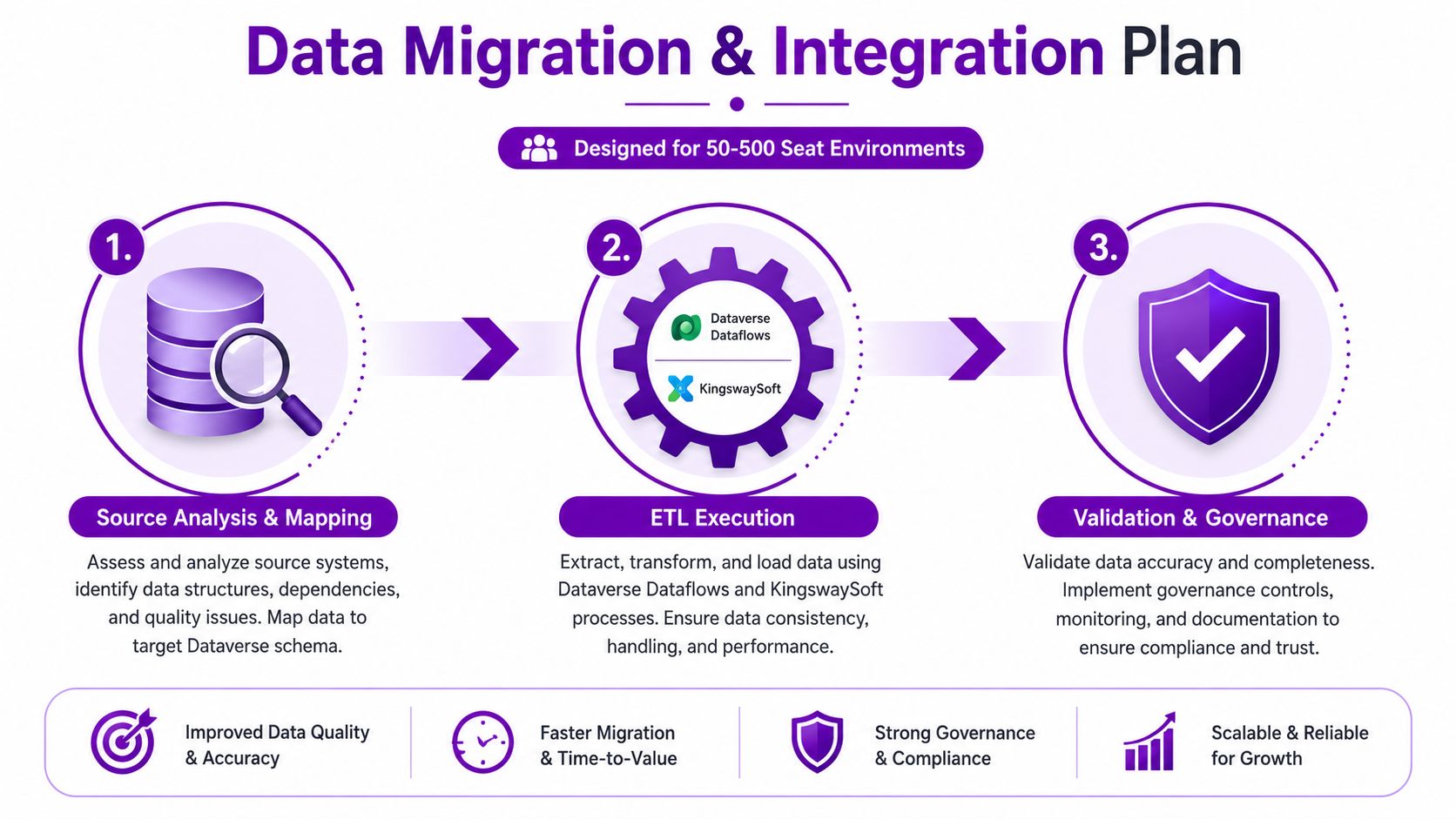
Start with source analysis and mapping. Use Dataverse dataflows or KingswaySoft for the ETL approach, depending on transformation complexity, governance requirements and the team's existing capability. Migrate and validate accounts and contacts before cases and knowledge history, because case relationships fail when the customer foundation is unreliable.
Run the cleansing sprint 6 to 8 weeks before cutover. Assign owners to duplicate resolution, field normalisation, inactive-record decisions, privacy review and knowledge approval. Produce reconciliation reports that compare source totals, rejected records, transformed values and destination outcomes. A migration isn't finished when the load succeeds. It's finished when service managers can find the records they expect and data owners accept the exceptions.
Connect the service estate deliberately
Microsoft 365 should cover the practical collaboration layer, including Outlook, shared mailboxes, Teams presence and Teams collaboration. Power Platform can support approvals, notifications, reporting and a Power Pages knowledge portal, but each flow needs an owner, error handling and monitoring.
Telephony decisions need early involvement from the service manager and IT. Options include Microsoft Teams Phone, certified contact-centre integrations such as Anywhere365, Puzzel and Digital Well, or direct Azure Communication Services. Test call recording, queue behaviour, transfers, presence, headset compatibility and failure handling with real users.
The governance baseline should include:
- Environment strategy: Separate Dev, UAT and Prod, with controlled deployment routes.
- Residency confirmation: Verify UK or EU data-residency requirements against the selected services and contracts.
- Access control: Use environment security groups and role-based access, not informal administrator access.
- Audit review: Align Customer Service Hub access and audit checks with the organisation's security obligations, including the 2025 UK Cyber Essentials refresh.
- DLP controls: Define which connectors, Copilot prompts and knowledge sources are permitted.
- Operational ownership: Name the people responsible for integrations, flows, knowledge and security after launch.
Use this data migration best-practices guide to strengthen the mapping, cleansing and validation work before the cutover window is fixed.
Testing, Training and a Safe Hypercare Window
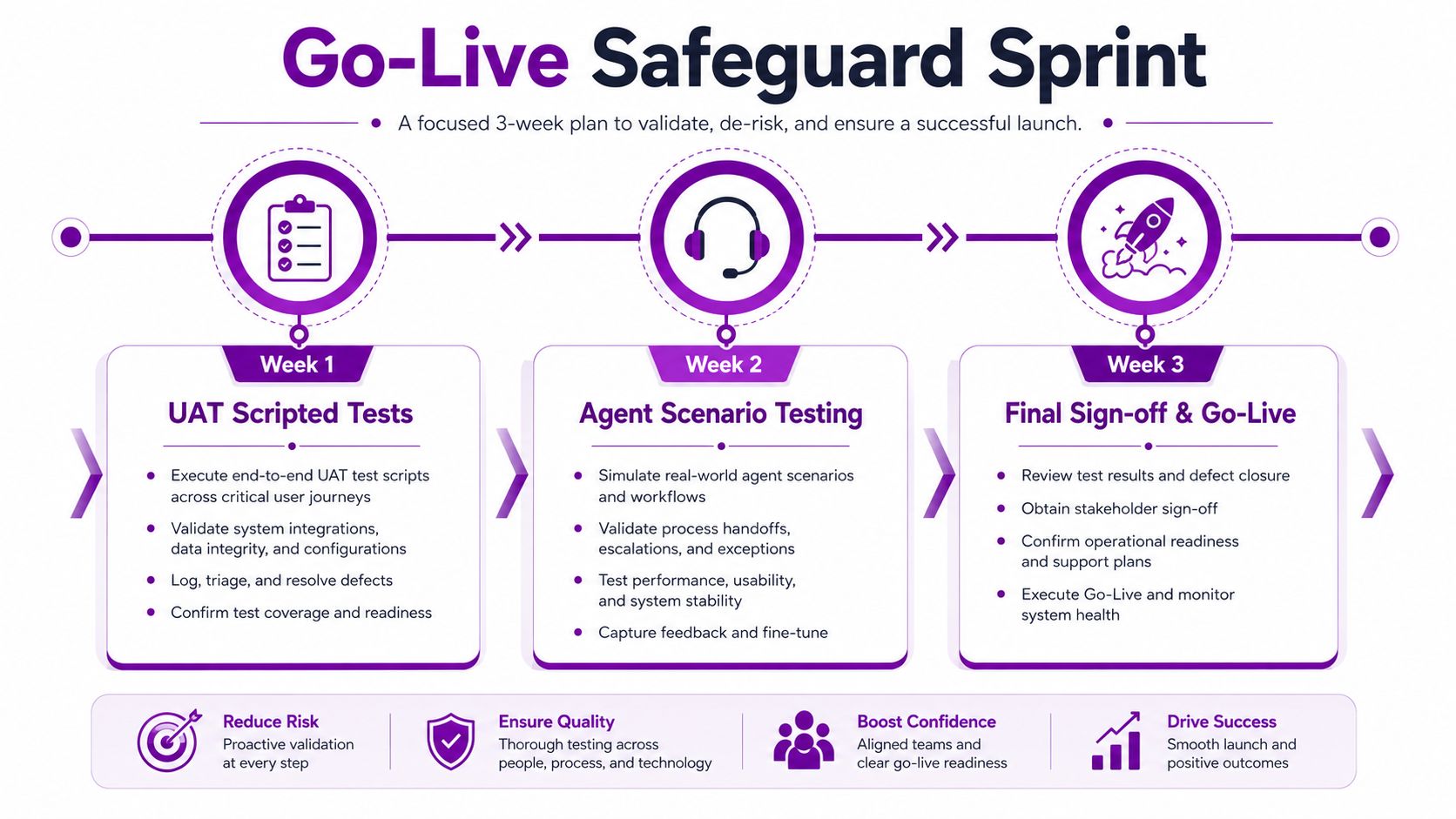
Go-live protection comes from testing realistic work, not from ticking through a list of screens. Start with scripted end-to-end UAT covering intake, routing, agent handling, escalation, knowledge use, SLA behaviour, approval and closure. Every failed script needs an owner, severity, decision and retest result.
Test the day agents actually have
Follow scripted UAT with scenario-based agent sessions. Give agents real headsets, real email patterns and realistic customer histories. Test integrations independently and in combination, because an email-to-case process can pass while the related routing, notification or telephony step fails.
AI deserves its own test pass. Review Copilot prompts, case summaries, suggested replies and sentiment scoring against approved knowledge content. Test permissions, misleading source content, human review and the behaviour when the AI can't provide a reliable answer.
Train roles, not features
Busy service teams don't need a tour of every menu. Give agents short role-based learning paths using Microsoft Learn training, supported by a recorded onboarding video and guided practice. Supervisors need separate training for queues, dashboards, escalations, knowledge approval and service-level monitoring.
A train-the-trainer model gives service managers ownership of floor coaching. It also exposes weak process decisions before launch, because trainers have to explain the new way of working in plain language.
Hypercare should be explicit:
- Week 1: Partner floorwalking or on-site support, rapid triage and daily issue review.
- Weeks 2 and 3: Remote cover with same-day response for P1 incidents.
- Week 4: Transition into steady-state support with agreed ownership and documentation.
Use gated feature flags when AI capabilities arrive mid-project. Collect agent feedback, tune prompts and review Copilot accuracy against knowledge content quarterly. Don't force every new feature into the first release just because it appears during the build.
A concise visual explanation can help stakeholders understand the safeguard sprint before training begins:
Post-Launch Support and When to Call in a Partner
The first live month tells you whether the design works under pressure. The service desk will expose routing gaps, weak knowledge articles, missing permissions and automation failures that workshops can't fully simulate. Treat those findings as controlled optimisation work, not as proof that the platform has failed.
Use a 90-day operating cadence
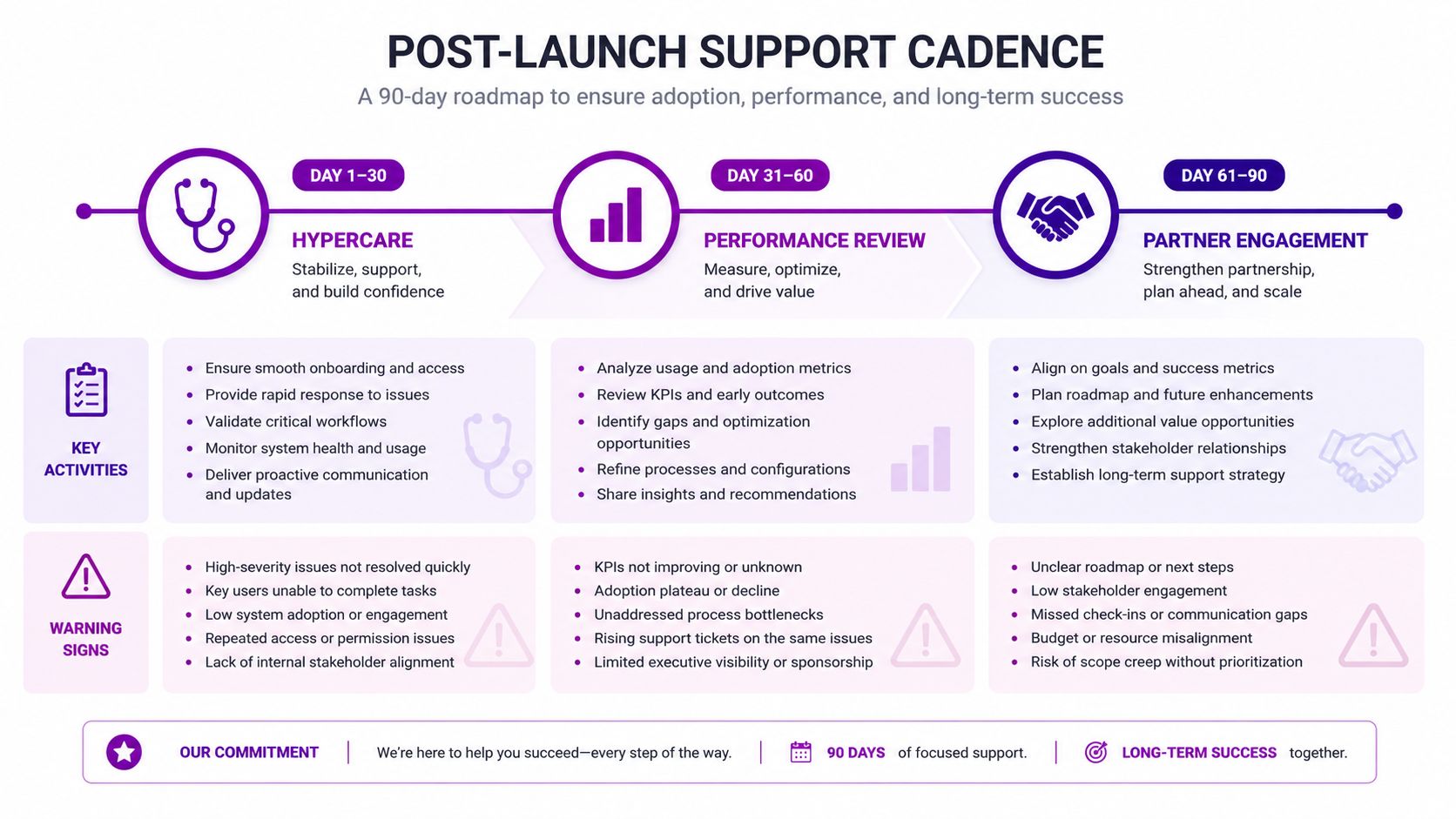
During the first 30 days, focus on incident triage, queue stability, agent questions, data exceptions and critical integration failures. From day 31 to day 60, review SLA performance, unresolved backlog, knowledge usage and Copilot feedback. From day 61 to day 90, move towards a structured optimisation review with a prioritised improvement backlog.
Review licence assignments against the current Microsoft price list at renewal and after organisational changes. Also monitor Dataverse storage consumption, Power Automate failures, security-role exceptions and the quality of AI responses. These are operational controls, not optional reporting extras.
Bring in external support when internal IT can't provide dependable ownership for platform administration, integration monitoring, release management and service improvement. Warning signs include a growing unresolved backlog, stalled agent adoption, repeated automation failures, unexplained storage costs or a service manager who can't obtain reliable SLA reporting. A managed support arrangement can be more predictable than allowing under-resourced internal teams to absorb the productivity drag indefinitely.
F1Group can scope Dynamics 365 Customer Service implementation, integration, user validation, managed support and optimisation around your existing Microsoft 365 and Azure estate. Speak to the team on 0845 855 0000 today, or Send us a message to discuss your service processes, licence position and post-launch support requirements.
F1Group provides practical Dynamics 365 consultancy, implementation and ongoing support for UK organisations that need controlled case management, customer history, shared-mailbox integration, dashboards and user adoption. Visit F1Group to request a customised scope, then call 0845 855 0000 today or send us a message through the contact page.