
An employee copies a customer email into a public AI chatbot to produce a quicker reply. The intention is harmless, but the message may contain personal information, commercially sensitive details or instructions that your business never approved for external processing. Nobody set out to create a security incident. The business failed to define what acceptable technology use means in a workplace where Microsoft 365, cloud storage, personal devices and AI tools sit alongside email and web browsing.
For East Midlands small and mid-sized businesses, an acceptable use policy should be practical, enforceable and kept current. It must tell people what they can do, what they can't do, which tools are approved, how monitoring works and what happens when someone ignores the rules.
Why Every UK Business Needs an Acceptable Use Policy
An acceptable use policy, often shortened to AUP, sets the boundaries for using company technology. It should cover devices, accounts, networks, business applications, cloud services, collaboration platforms and information. It isn't an HR document filed away after onboarding. It's a working security control that helps staff make the right decision before a risky action becomes an incident.

The AI example exposes the gap in many older policies. A rule saying “use the internet responsibly” doesn't answer whether an employee can paste a customer complaint into a public chatbot, upload a spreadsheet to a personal OneDrive account or use an unapproved browser extension to summarise a Teams meeting. Staff need clear, usable instructions tied to the tools they use.
A policy protects more than the business
A well-written AUP protects:
- Customer information: It limits careless copying, forwarding, downloading and sharing of personal or confidential data.
- Company systems: It establishes expectations for passwords, software installation, removable media, remote access and device security.
- Staff members: It gives employees a clear standard to follow and a fair basis for investigating suspected misuse.
- Managers: It provides an agreed framework for handling policy breaches rather than relying on inconsistent judgement.
- The organisation's evidence: It helps demonstrate that users were informed about permitted use, monitoring and security duties.
UK public-sector organisations have treated acceptable use as part of formal governance for many years. London Fire Brigade records an original ICT policy issue date of 18 April 2012, amendments on 3 May 2016, and a review date of 29 September 2017 in its published policy record. NHS Business Services Authority's policy records an initial release on 14.11.2008 and a review on 23 February 2016, showing that these controls pre-date today's cloud and AI adoption.
Small businesses can't rely on informal trust
A smaller workforce doesn't remove the risk. It often means fewer people are watching for unsafe software, unmanaged devices, accidental data sharing and inappropriate access. One person may handle sales, finance, HR data and administration from the same laptop, while contractors and suppliers connect from outside the office.
Without written rules, a manager may struggle to distinguish a genuine mistake from deliberate misuse. Staff may also receive different answers from different supervisors. That inconsistency creates operational confusion and makes disciplinary action harder to defend.
Practical rule: If a user can access it, store data in it or communicate through it, your acceptable use policy should address it.
The UK Government's data protection guidance requires personal data to be used fairly, lawfully and transparently, for specified purposes, limited to what is necessary, kept accurate, retained only as long as needed and protected from unauthorised access, loss, destruction or damage under the UK GDPR and Data Protection Act 2018 government guidance. An AUP can't replace those obligations, but it can translate them into daily behaviour.
Core Components of an Effective Acceptable Use Policy
An effective AUP gives users clear boundaries and gives administrators rules they can enforce. It should cover people, systems, permitted activity, security controls, monitoring and consequences. Write it so a new starter can understand it and an IT administrator can translate it into Microsoft 365 settings.
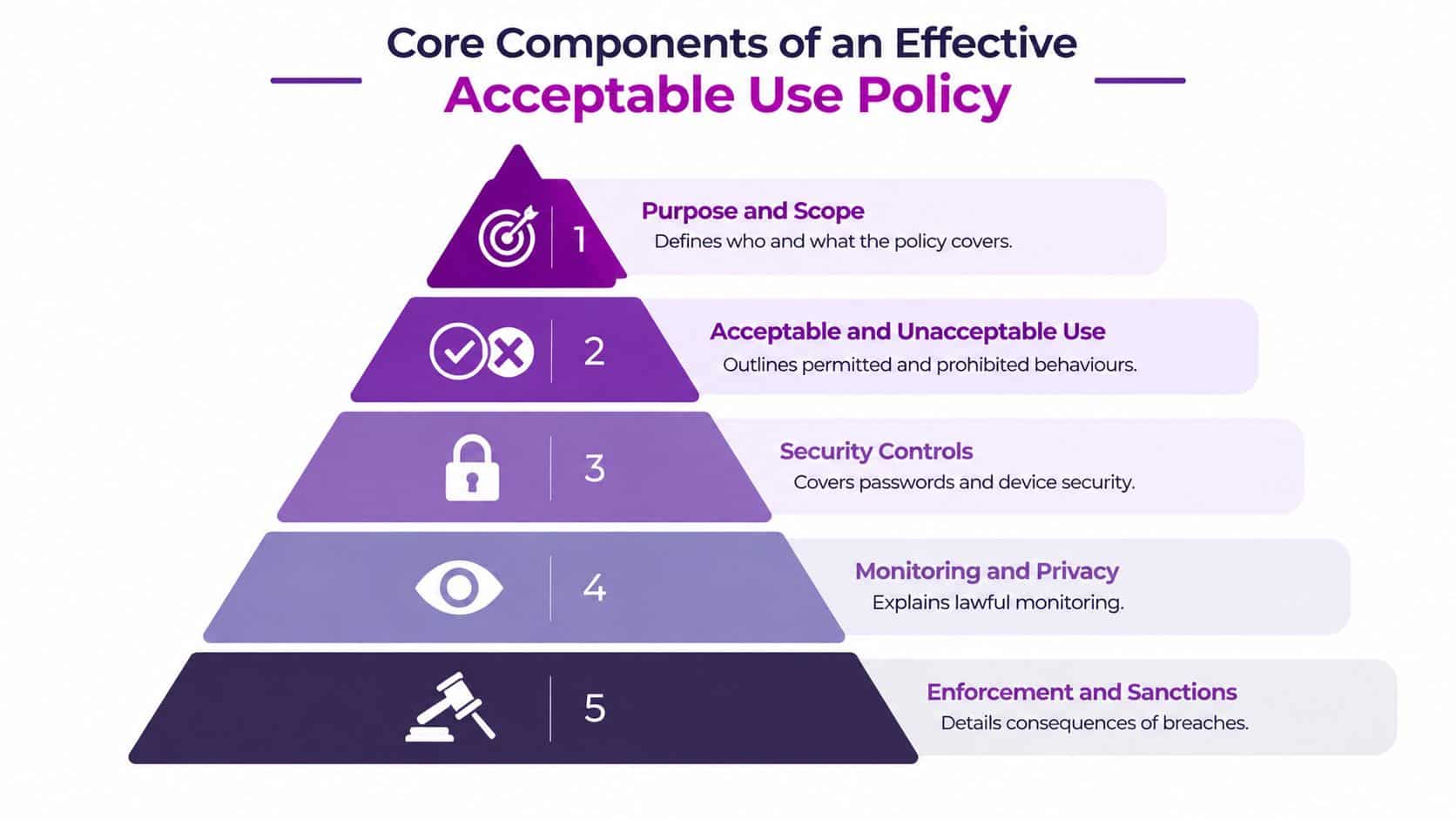
Define the scope before writing the rules
UK public-sector policies offer a useful benchmark. The Department for Work and Pensions applies its policy to employees, contractors, consultants, suppliers and business partners. It covers information systems, hardware, software, email, instant messaging, internet, intranet, voice telephony, social media and video, as set out in the DWP acceptable use policy.
An East Midlands business should apply the same principle to its own environment. Name Microsoft 365 accounts, Teams, SharePoint, OneDrive, Outlook, mobile phones, laptops, home networks, personal devices used for work, SaaS applications, social media accounts and supplier connections. Include AI tools such as Copilot and any external service where staff can submit prompts or business information. A policy that mentions only “company computers” leaves obvious gaps around personal phones, browser extensions, cloud applications and mixed-device working.
State the purpose plainly: protect systems and information, support legal and contractual duties, and set expectations for responsible use. Identify the policy owner, everyone who must comply, related policies and the route for questions.
Separate acceptable use from prohibited use
Permitted use should cover ordinary business activity, approved communications, authorised software, legitimate remote access and limited personal use if the business allows it. Prohibited use should address unauthorised access, credential sharing, malicious software, unlawful content, harassment, unapproved applications, unsafe data transfers and attempts to bypass security controls.
Use examples rather than relying on “use systems appropriately”. Forwarding work documents to a personal email account, uploading confidential files to an unapproved AI service, exposing a Teams link publicly or copying customer information into a prompt should be recognisable policy breaches.
Connect rules to controls and accountability
Link the wording to passwords, MFA, device updates, encryption, screen locking, approved storage, data classification and reporting routes. Explain whether activity is logged, why monitoring takes place, who can access records and how investigations are handled. This matters in Microsoft 365, where audit records may cover sign-ins, file sharing, Teams activity and administrator actions.
The final layer is enforcement. Consequences can include access restriction, retraining, disciplinary action or referral to law enforcement where appropriate. The UK's JSP 740 acceptable use policy states that breaches may lead to disciplinary action or a criminal investigation. A private business should obtain suitable employment and legal advice, then state consequences clearly rather than hiding them.
When connecting policy wording to the wider control framework, it helps to see how an AUP sits alongside a broader IT security policy. Keep it aligned with access control, incident response, data retention and staff training, so the document supports the controls administrators operate.
Essential Clauses for Modern UK Workplaces
A Teams file shared with the wrong person, a personal phone accessing SharePoint, or sensitive text pasted into Copilot can create more risk than traditional email misuse. A modern acceptable use policy must govern these situations directly, while still covering web access, email and general system use.
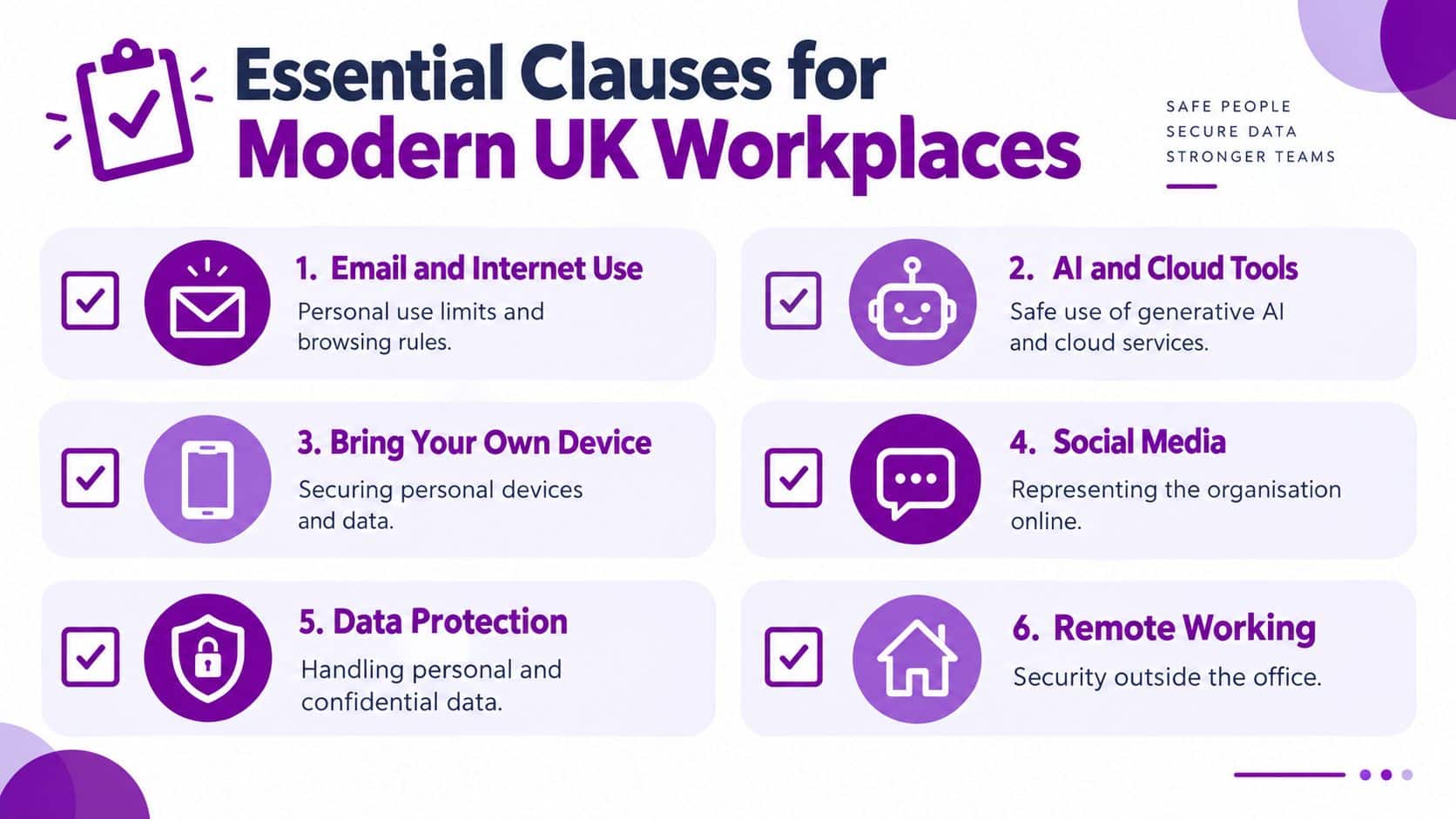
Start with ordinary system use
State that users may access systems only for authorised business purposes and approved limited personal use. Prohibit account sharing, unauthorised access attempts, security bypasses, illegal activity, offensive material and unapproved software installation.
Password clauses should require unique credentials, MFA where available, secure storage and immediate reporting of suspected compromise. “Keep passwords safe” is too vague. State that passwords must not be shared with colleagues, stored in browsers without approval or reused across personal services.
Make data handling specific
Tell users which information may be stored, sent and shared through each approved service. Classify information as public, internal, confidential or restricted, then give examples that fit the organisation. The policy should prohibit sending customer records, payroll information, health information, legal material, source code or commercially sensitive documents to unauthorised destinations.
Personal cloud accounts and unmanaged collaboration tools require explicit rules. The ICO says organisations should identify, document and implement rules for acceptable software use, maintain procedures describing security arrangements and monitor compliance while ensuring staff know that monitoring takes place, as set out in its ICO guidance on acceptable software use.
Write usable AI rules
Public generative AI applications must not receive personal, special-category or commercially sensitive data unless the organisation has assessed and approved the service for that use. Your policy should also explain how Microsoft Copilot, Copilot Chat and other AI tools may be used within the organisation's data protection controls. The published AI and data protection guidance should be checked alongside current UK legal and regulatory guidance before the wording is finalised. Do not claim that a particular Act created obligations unless the cited guidance clearly supports that point.
Your policy should answer practical questions:
- Approved tools: Identify whether Microsoft Copilot, Copilot Chat or another AI service is approved, and specify the users and data types covered.
- Permitted tasks: Allow lower-risk work such as brainstorming or drafting generic content where restricted information is excluded.
- Human review: Require staff to check AI-generated text, code and summaries for accuracy, bias, confidentiality and suitability.
- Controlled decisions: Prohibit AI as the sole basis for HR, legal, disciplinary, recruitment or customer decisions unless an approved process exists.
- Incident reporting: Require prompt reporting of accidental disclosure, incorrect outputs or suspicious AI behaviour.
Cover remote and social working
Remote-working clauses should address home networks, screen privacy, printing, shared spaces, lost devices, public Wi-Fi and removable media. BYOD rules must state whether personal devices are allowed, which security requirements apply and whether the organisation may remove business data or restrict access.
Social media wording should separate personal opinion from authorised representation. Staff must not disclose confidential information, publish customer details or imply that personal comments represent the organisation.
Legal and Privacy Considerations Under UK Law
An acceptable use policy supports compliance, but it does not create compliance on its own. The organisation still needs suitable contracts, processes, access controls, retention arrangements and incident handling. The policy must also govern Copilot, other AI services, personal devices and cloud collaboration, not only legacy internet and email misuse.
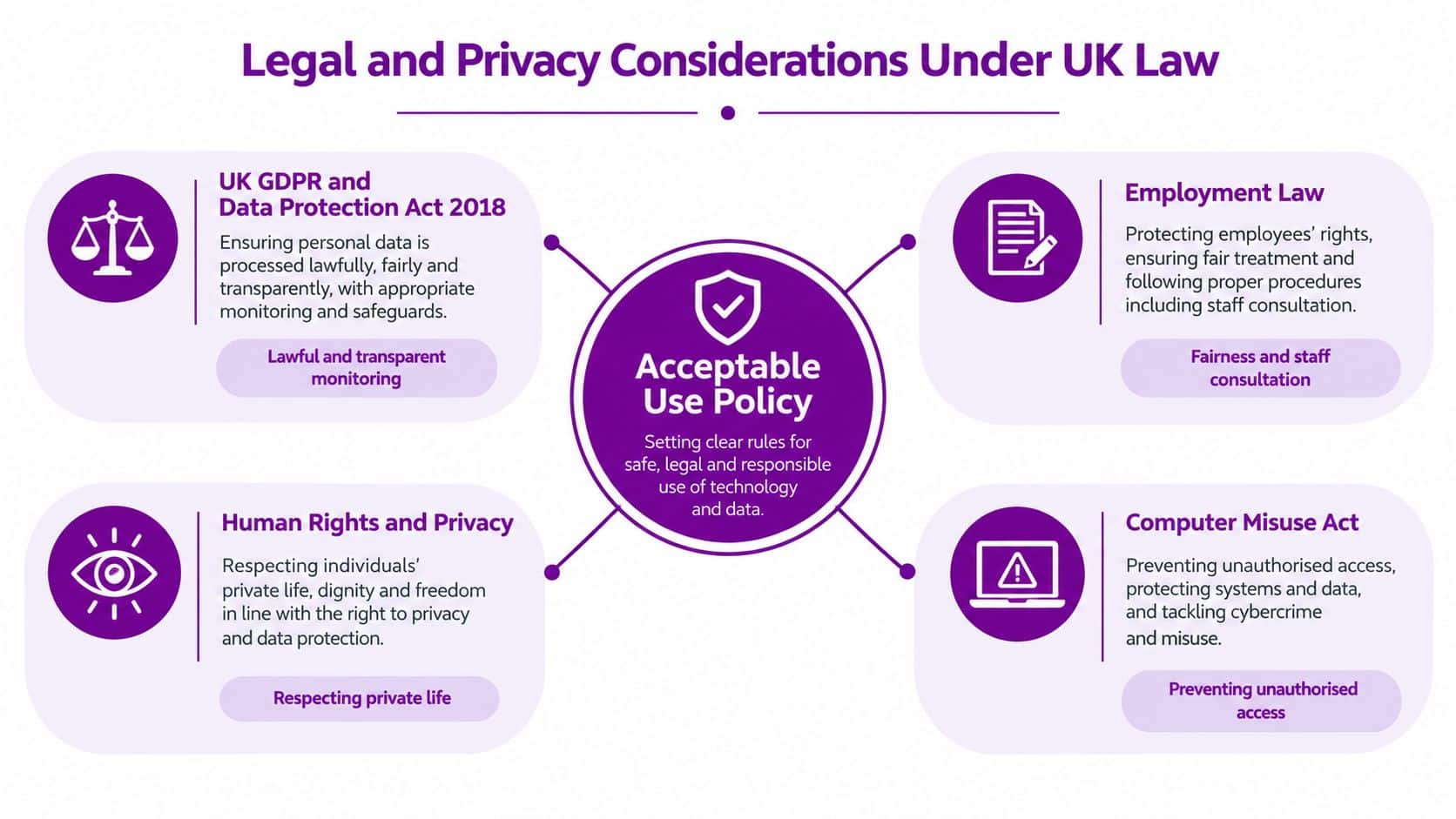
Apply the UK GDPR principles to everyday behaviour
The UK Government's data protection guidance covers fair, lawful and transparent processing, specified purposes, necessary data use, accuracy, limited retention and protection against unauthorised access, loss, destruction or damage. Your AUP should turn those principles into instructions staff can follow.
Do not paste a full customer record into Copilot or another AI tool when a shorter extract would suffice. The policy should identify approved AI services, permitted users and allowed data types. It should allow lower-risk tasks, such as brainstorming or drafting generic content, where restricted information is excluded. Staff must check AI-generated text, code and summaries for accuracy, bias, confidentiality and suitability. AI must not be the sole basis for HR, legal, disciplinary, recruitment or customer decisions unless an approved process exists. Require prompt reporting of accidental disclosure, incorrect outputs and suspicious AI behaviour.
The ICO's purpose-limitation principle requires organisations to explain why personal data is collected, document that purpose and rely on a lawful basis for compatible new uses. Unapproved apps and personal storage therefore create more than a technical risk. They can cause purpose drift and weaken evidence during an investigation.
Set clear rules for devices, monitoring and remote work
A managed laptop enrolled in Microsoft Intune can support stronger access decisions and clearer audit evidence than an unmanaged personal device. The AUP should reflect that difference and state whether BYOD is permitted, which security controls apply, and whether business data may be removed or access restricted.
| Situation | Sensible policy position |
|---|---|
| Managed company device | Require security updates, screen locking, approved software and organisational monitoring. |
| Personal device | Permit access only with agreed security, separation and remote-wipe arrangements. |
| Employee account | Tie access to an identified person and prohibit credential sharing. |
| Contractor or supplier | Limit access to systems and data needed for the agreed service, with contractual obligations. |
| Approved cloud tool | Define permitted data, sharing settings and retention expectations. |
| Shadow IT application | Prohibit business data use until security, privacy and contractual checks are complete. |
Remote-working clauses should cover home networks, screen privacy, printing in shared spaces, public Wi-Fi, lost devices and removable media. Social media wording should separate personal opinion from authorised representation. Staff must not disclose confidential information, publish customer details or imply that personal comments represent the organisation.
Monitoring must be lawful, proportionate and transparent. Tell staff what is monitored, why, who reviews it and how long records are retained. Secretly monitoring everything creates a separate trust and privacy problem.
Address unauthorised access clearly
The University of Bradford’s IT acceptable use policy links IT resource use to the laws of England and Wales and the Computer Misuse Act 1990, under which unauthorised access may constitute a criminal offence. Prohibit attempts to access another person’s account, bypass controls, test systems without permission or use someone else’s credentials.
For retention and deletion decisions, connect the AUP to a documented data retention policy. Both documents should state what users may store and what happens when information is no longer required.
Implementing and Enforcing Your Policy in Microsoft 365
Policy text won’t stop a user sharing a file with “Anyone with the link”. Microsoft 365 enforcement starts with identity, device trust and information controls. Configure the environment so the safest action is also the easiest action.
Build from identity and device assurance
Require MFA for Microsoft 365 access, especially for administrators, remote users and external collaborators. UK Government Microsoft 365 guidance recommends MFA with compliant or hybrid-joined devices to access services, and local-government secure-deployment guidance identifies acceptable usage policy as part of the control set UK Microsoft 365 security guidance.
Use Conditional Access to make decisions based on user identity, application, device compliance and sign-in risk. A contractor may need access to a specific SharePoint site, while an employee using a non-compliant laptop may need to complete remediation before reaching sensitive information.
Turn policy statements into Microsoft 365 controls
Map each important clause to a technical action:
- Data classification: Use sensitivity labels to identify internal, confidential and restricted information.
- Data movement: Apply Microsoft Purview Data Loss Prevention policies to detect and restrict inappropriate sharing.
- Auditability: Enable audit logging and define who reviews relevant events.
- Teams and SharePoint: Restrict external sharing, control guest access and review anonymous links.
- OneDrive: Prevent business files being synchronised to unsuitable devices where the risk justifies it.
- Email: Use mail flow rules and DLP policies to identify sensitive information leaving the organisation.
- AI access: Control Copilot availability, approved connectors and the information users can reach through Microsoft 365 permissions.
Don’t activate every control without testing. Begin with the information and workflows that matter most, use pilot groups, record false positives and adjust the policy where the business process is legitimate.
A sensible implementation sequence is:
- Inventory users and services. Include employees, contractors, suppliers, devices, Teams, SharePoint, OneDrive and connected applications.
- Classify information. Agree which content is public, internal, confidential or restricted.
- Configure access. Apply MFA, Conditional Access and device compliance requirements.
- Create monitoring rules. Use audit records, alerts and DLP policies with defined review ownership.
- Train and test. Give staff realistic examples and run controlled checks against the policy.
Watch the practical demonstration below for additional Microsoft 365 policy context.
F1Group’s Microsoft 365 security best practices can help organisations connect these settings to a wider security plan. The objective is simple. A user who tries to share restricted information should receive a clear warning, a safe alternative and, where necessary, a technical block.
Maintaining Your Policy as a Living Governance Document
An acceptable use policy becomes unreliable when nobody knows which version applies. Treat it as a controlled governance document with an owner, approval record, publication date, review date, change history and named contact for questions or feedback.
The Ministry of Justice provides a strong UK example. Its acceptable use policy is reviewed annually from the publication date, or sooner when legislative or departmental changes require it. The published version is dated 19/12/2025 and marked version 2.0 in the Ministry of Justice policy.
Assign ownership and trigger reviews
The IT lead shouldn’t own the document alone. IT understands the controls, but HR, legal, operations, information governance and senior management all have responsibilities. Assign one accountable owner and require the relevant stakeholders to approve changes.
Review the policy after:
- A new Microsoft 365 service, AI tool or cloud application is introduced.
- The organisation changes its approach to BYOD or remote working.
- A security incident reveals an unclear or missing rule.
- A supplier, customer contract or regulatory requirement changes.
- Monitoring or access controls are redesigned.
- Staff feedback identifies wording that people misunderstand.
Annual review is a useful baseline, not a reason to wait. If Copilot is introduced between formal reviews, update the relevant clauses before staff start using it.
Communicate every change
Publish the approved policy in a location users can reach, such as SharePoint or an employee portal. Tell staff what changed, why it changed and what action they need to take. A short Teams briefing on safe AI prompts is more useful than asking people to reread a long document without context.
Keep evidence of publication, acknowledgement, training and exceptions. Record who approved the version and when it replaced the previous one. If a policy is rescinded, retain the superseded record and explain which document now applies.
A policy proves its value during an incident, audit or investigation. By then, version history and communication records need to be complete.
Use plain language, realistic examples and a clear route for approval requests. Employees should be able to ask whether a tool is permitted before they use it, rather than hiding an uncertain decision after the event.
Next Steps for Securing Your Business
Start by reviewing the systems your staff use, not the technology listed in an old template. Your acceptable use policy should cover every relevant user and channel, include specific AI and cloud rules, align with UK GDPR and ICO expectations, and connect directly to Microsoft 365 controls such as MFA, compliant devices, DLP, sensitivity labels and audit logging.
Then assign an owner, publish the policy, train users and set a formal review cycle. AUP wording without technical enforcement is weak, while technical controls without clear communication create confusion and workarounds.
F1Group can help assess your Microsoft 365 environment, define practical acceptable use rules for AI and cloud collaboration, and implement the identity, device and information controls that support them. Phone 0845 855 0000 today or send us a message to discuss your next steps.
F1Group provides managed IT support, Microsoft 365 and Azure security advice, Copilot AI guidance and policy implementation for organisations across the East Midlands. Visit F1Group to arrange practical support for an acceptable use policy that staff can follow and your systems can enforce.