
Only 36% of UK businesses had formal cyber security policies in place in the latest government survey, yet those same businesses experienced about 8.58 million cyber crimes in the previous 12 months Cyber Security Breaches Survey 2025. That gap matters because a policy isn't paperwork for the drawer. It's the rulebook that tells your people what to do when someone leaves, a laptop goes missing, or a supplier asks for access to Microsoft 365.
For a small Nottingham firm, the weak point is rarely the headline technology. It's the gap between a rule and the day-to-day habit behind it. Someone keeps old access open for a leaver, a manager approves a quick login exception, or an employee pastes sensitive data into the wrong place because nobody made the boundaries clear. In an East Midlands SMB, that kind of drift can turn Microsoft 365, Azure, and Copilot from business tools into unmanaged risk.
Why IT Security Policies Matter for SMBs
The best reason to write IT security policies is simple. They turn security from an informal promise into a management control that people can follow. The UK government's 2025 survey makes the point sharply, because formal policy adoption is still far from universal while breach exposure is widespread Cyber Security Breaches Survey 2025.
A small business doesn't need a legal department to understand the problem. If your team uses Microsoft 365 every day but nobody has set rules for access, devices, data sharing, and incident reporting, then each employee starts making their own judgement calls. That's how one person's “quick favour” becomes a shared risk. A policy gives the business one answer instead of twenty improvised ones.
Practical rule: if a process matters to security, write it down, assign ownership, and tie it to a control someone can test.
Why the policy matters more than the paper
The wording in a policy only matters if it maps to something real. The UK GDPR security principle expects appropriate technical and organisational measures based on risk, and the ICO highlights access control, resilience, and regular testing as core examples of those measures Palo Alto Networks summary of UK GDPR security principle and ICO examples. For an SMB, that means a policy shouldn't just say “protect data”. It should say who can access it, how access is approved, how it's reviewed, and what happens when someone leaves.
That distinction matters in Microsoft-heavy environments because the controls already exist in the platform. Entra ID can manage identities, Intune can manage devices, and Microsoft Purview can help with data controls. The policy's job is to tell your team how to use those tools consistently, not to describe security in broad, comforting language.
The older UK research also shows how policy thinking has shifted over time. Reported outsider attacks rose from 9% in 2012 to 40% in 2015, while malware infection fell from 33% to 10% over the same period, and infringement of laws or regulations reached 20% in 2015, up from 1% in 2012 Cybersecurity journal article. The pattern is useful, because it shows risk management moving beyond viruses and into access, governance, and compliance.
If your business still treats policy as a file rather than a control, you're already behind the risk. The good news is that a clear policy can be written in plain English and enforced with tools you already use.
Defining IT Security Policies Clearly
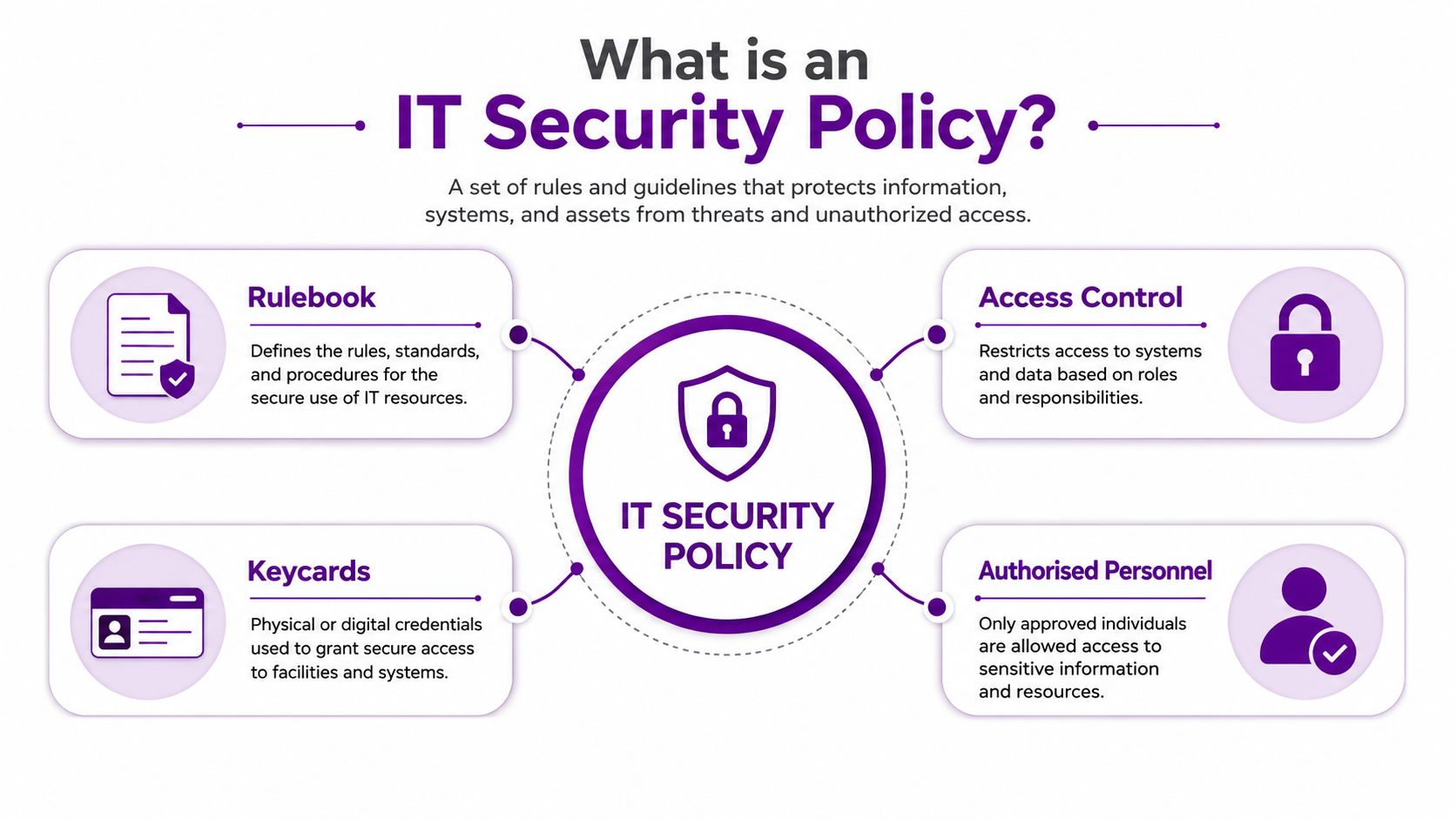
An IT security policy works like the operating logic for a secured office building. Cameras, locks, guards, and alarm systems all matter, but they only protect the building properly when people know who gets a keycard, when it can be used, and what happens when someone hands it back. The policy is the part that sets those rules in motion.
Essential policy content
A policy should state the reason for the policy, who developed and approved it, which laws or regulations it is based on, who enforces it, how it is enforced, whom it affects, what information assets must be protected, and the effective and expiration dates NCES security policy guidance. Those details may look administrative, but they are what make the document useful in day-to-day work. If nobody knows who owns the policy or when it needs review, it quickly becomes shelfware.
For a UK SMB, a simple test helps. Can a manager use the policy to make a real decision about access, data, or device use without phoning three people for permission? If the answer is no, the policy is too vague. A clear policy gives staff a rule they can follow before confusion turns into delay.
Turning principles into controls
The policy also needs to map to real controls. The ICO's risk-based approach means your rules should lead to concrete measures, such as least-privilege access, MFA enforcement, backup restoration testing, and incident escalation Palo Alto Networks summary of UK GDPR security principle and ICO examples. That is the point many businesses miss. A policy is not a mission statement, it is the bridge between legal expectation and operational behaviour.
A useful check is straightforward. If a leaver leaves on Friday, what should happen to their accounts by Monday morning? If someone uploads a file to SharePoint, who can see it, and under what rules? If an employee uses Copilot, what data is off-limits? A strong policy answers those questions in plain language, then points to the Microsoft controls that enforce the answer. For retention and disposal rules, a practical data retention policy guide for SMBs helps show how the written rule connects to the underlying process.
A policy that cannot be linked to an actual control is just a note to self.
Core Types of IT Security Policies
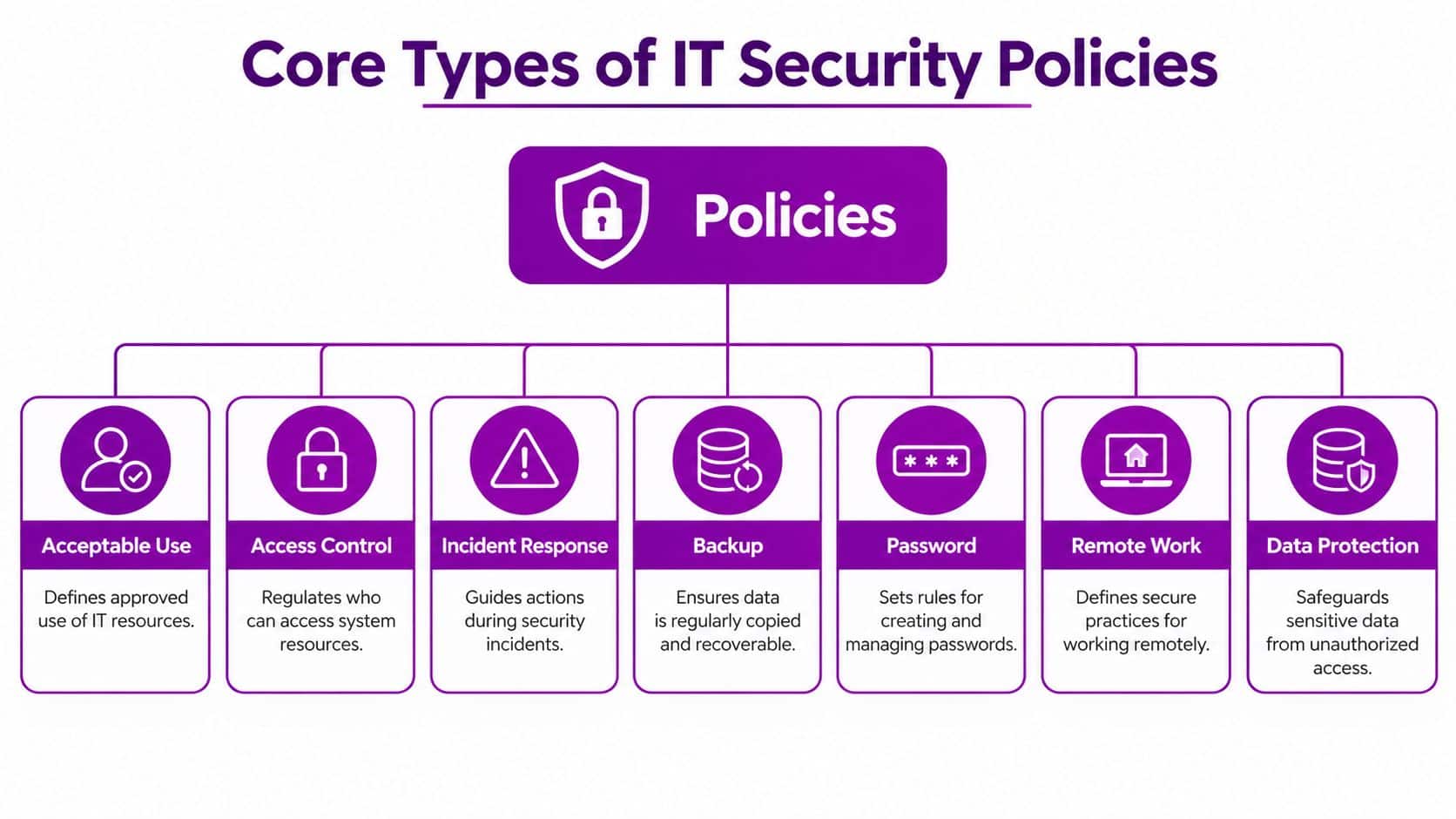
A lot of SMB owners get stuck because they think they need one huge security document. They don't. They need a modular set of policies with one umbrella policy and a few targeted sub-policies that each solve a specific problem. That structure is common in standard policy guidance, which includes purpose, scope, roles and responsibilities, regulatory guidelines, management endorsement, periodic review, and references to related sub-policies and controls Hyperproof policy overview.
The policy stack that works in practice
At the top sits the main information security policy. Under that, the most useful sub-policies for a Microsoft 365 business are usually acceptable use, access control, incident response, backup, password protection, remote work, and data protection Hyperproof policy overview. That list isn't decorative. Each one closes a different gap in how people behave.
An acceptable use policy tells staff what they can and can't do with company systems. An access control policy decides who gets in, and under what conditions. An incident response policy tells people when to escalate suspicious activity. Backup and password rules are obvious until something goes wrong, then they become critical. Remote work matters because home and office networks behave differently. Data protection matters because sensitive files don't stop being sensitive when they move into SharePoint or Teams.
What to write first
If you're starting from scratch, write the policies that reduce immediate operational risk first. For most SMBs, that means access, acceptable use, incident reporting, and backup. Those are the rules staff will touch every week, and they're the ones that shape behaviour in Microsoft 365 fastest.
The CIS sample policy adds another useful discipline. It says systems supporting business functions should undergo information risk assessments at least annually, security should be considered at system inception, and systems should be developed, maintained, and decommissioned under a secure system development life cycle CIS sample policy. That's a strong reminder that policy isn't just about users. It also covers how you introduce, change, and retire systems safely.
For a practical companion on what to retain, review, and archive, see this guide on data retention policies. It fits neatly beside your data protection and backup rules.
Practical Policy Templates and Examples
The easiest way to make a policy usable is to write it like someone will need to follow it on a busy Tuesday morning. Long paragraphs and abstract values don't help when a manager is about to share a file or approve a new app. Short rules, clear ownership, and specific examples do.
Here's a simple acceptable use clause for a Microsoft 365 environment:
Acceptable Use. Staff must not paste confidential HR, finance, client, or payroll information into generative AI tools, including Copilot, unless the data owner has approved that use and the file is protected by the organisation's data handling rules.
That wording works because it names the behaviour, names the risk, and sets a boundary. It doesn't try to ban AI altogether, which would be unrealistic. It draws a line around sensitive material so staff know where judgement stops.
A policy snippet for access and cloud use
An access control clause can be just as direct:
Access Control. Access to Microsoft 365, Azure, and connected SaaS applications must be granted on a least-privilege basis, protected with MFA, and reviewed when a person changes role or leaves the business.
That one sentence gives you the framework for joiners, movers, and leavers. It also gives IT something testable. If an account still has access after someone moves department, the policy has been breached. If a leaver account remains active, the control has failed.
For teams building their own wording, this IT security policy template is a useful reference point because it keeps the language close to operational reality instead of turning the policy into legal wallpaper.
AI boundaries need policy, not guesswork
AI is where many SMB policies are weakest. The practical question is not whether employees may use Copilot or other SaaS tools. It's what data they're allowed to share, which accounts need tighter conditional access, who approves a new app, and how logs are retained. That matters because policy gaps usually show up in execution, especially with mixed remote and on-site working, delayed leaver access removal, and weak identity governance.
Practical rule: if a document would worry your data protection lead, don't paste it into an AI prompt unless the policy says you can.
The wording above should be linked to Microsoft 365 labels, DLP rules, and sharing controls so the policy becomes enforceable. If staff can copy and paste confidential data without any technical guardrail, the policy is only advisory. If Purview labels and DLP block or warn on the behaviour, the policy starts doing real work.
Operationalising Policies in Microsoft 365
Writing the policy is the easy part. Making sure it happens every day is where SMBs usually struggle. That's especially true when one person wears three hats and nobody has time to chase every leaver, exception, or access review.
Where policies usually break down
The most common gaps are predictable. A leaver keeps access too long, a mover retains old permissions, conditional access rules drift between users and devices, or an admin makes a one-off exception and never reverses it. Those aren't policy problems on paper. They're enforcement problems in the live tenant.
The UK context makes that operational gap more urgent. The NCSC's latest annual breach survey found that 50% of UK businesses and 32% of charities reported some form of cyber security breach or attack in the last 12 months, with 16% of businesses and 22% of charities reporting phishing attacks specifically CISA summary referencing the NCSC annual breach survey figures. That kind of pressure means your policy has to survive routine admin, not just board review.
A workable process starts with the joiner-mover-leaver lifecycle. Entra ID handles identity, Intune helps with device control, and conditional access puts rules around where and how accounts can be used. If someone changes role, the policy should trigger a review. If someone leaves, access should be removed promptly. If a device falls out of compliance, access should narrow automatically.
A simple operating rhythm
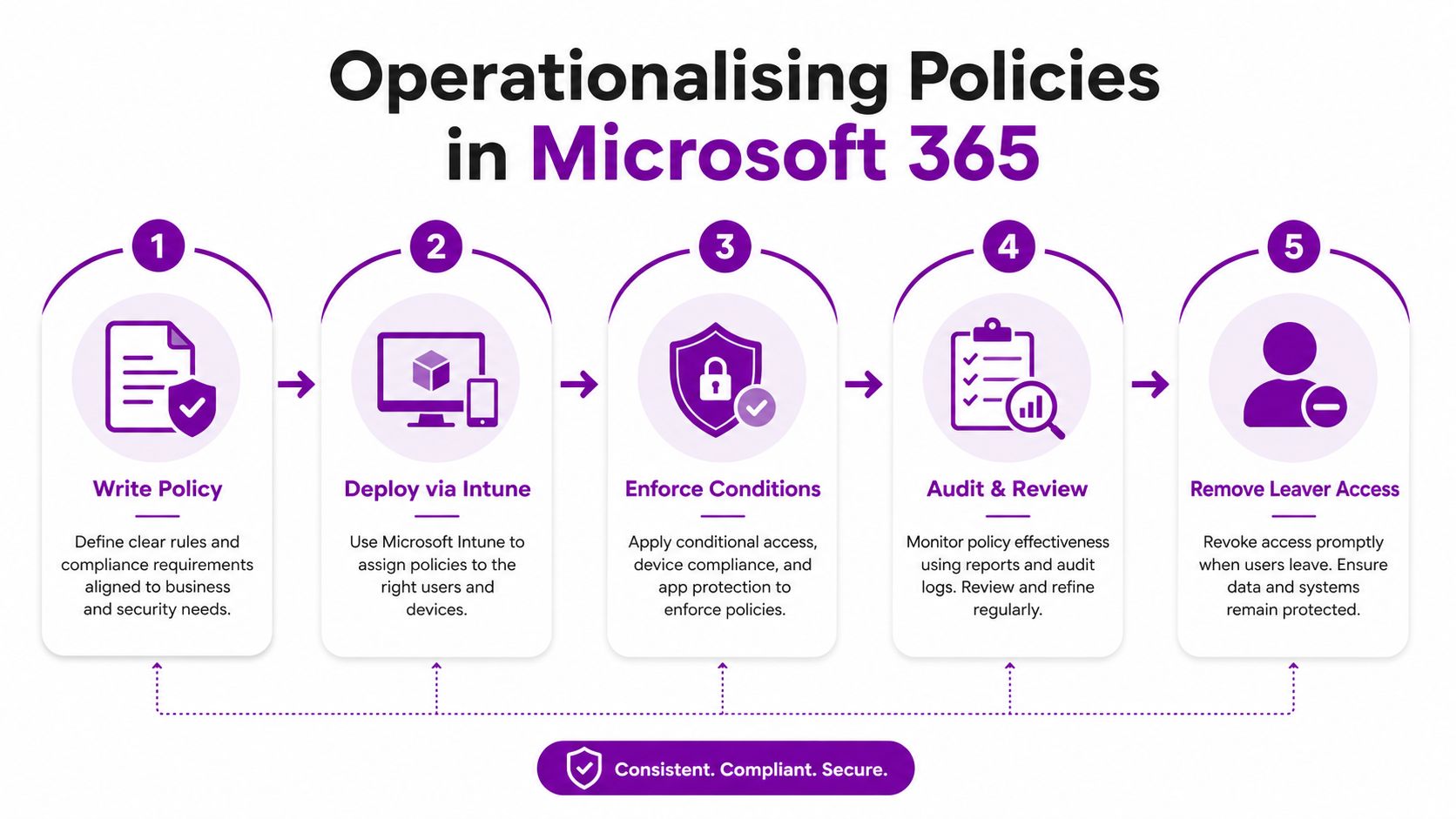
Use the policy as a checklist for daily controls, not a once-a-year document. A practical sequence looks like this.
- Write the rule: define what users may do, what managers must approve, and what IT must enforce.
- Deploy the control: use Intune or related Microsoft 365 settings to apply the rule.
- Enforce the condition: make sure MFA, device compliance, and access rules are active.
- Audit the outcome: check logs and reviews so exceptions don't linger.
- Remove leaver access: make this a closed-loop process, not a manual memory test.
A useful external checklist for the Microsoft 365 side is the Microsoft 365 security checklist for businesses from Accelerate IT Services Inc., which is helpful when you're mapping policy language to platform settings.
If you want a broader Microsoft 365 control baseline, this Microsoft 365 security best practices guide is a solid companion to the policy work.
Your SMB Implementation Checklist
A good policy rollout doesn't need a big security team. It needs owners, dates, and a short list of actions that people can complete without guesswork. That's what turns policy into a habit.
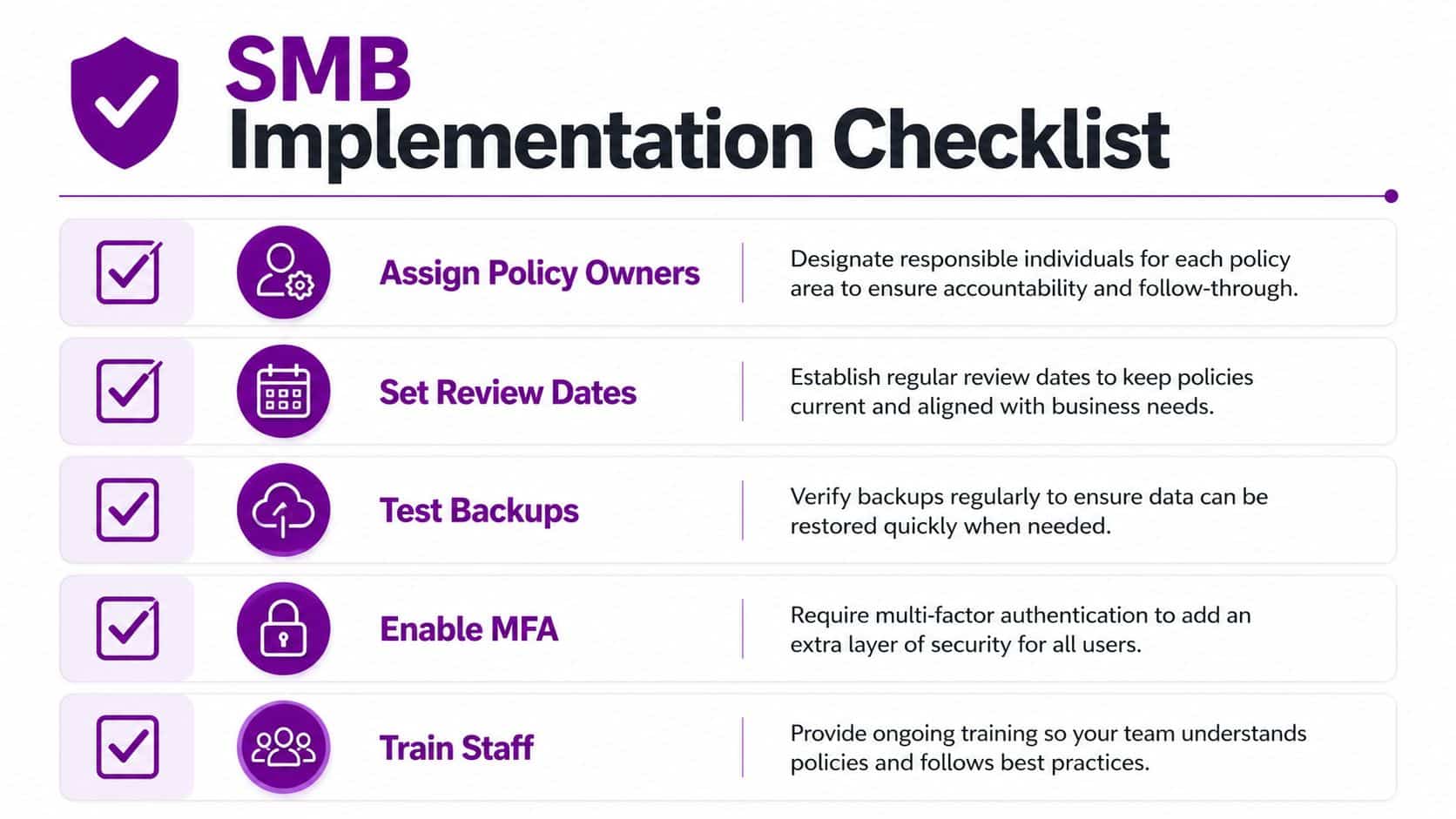
The following sequence works well for SMBs using Microsoft 365, Azure, and Copilot.
- Assign policy owners. Name who owns each policy, who approves changes, and who checks that the control still works.
- Set review dates. Put the review cycle in the calendar and keep it visible to management.
- Test backups. Don't assume recovery works, verify that it does.
- Enable MFA. Make it a baseline for accounts that reach business data.
- Train staff. Explain the rules in plain English, especially around file sharing, AI prompts, and leaver reporting.
A practical audit trail matters here as much as the rule itself. If you need a good reference point for keeping evidence tidy, the audit trail best practices from PDFWix are useful because they reinforce the habit of recording what happened, when, and by whom.
The simplest way to keep this alive is to pair each policy with a named Microsoft control. For example, use Entra ID for identity reviews, Intune for device compliance, and Microsoft Purview for data handling rules. That way, the policy isn't dependent on memory, and a holiday or staff change doesn't weaken the whole control set.
Securing Your Business with Clear Policies
Strong IT security policies don't make your business perfect. They do make it predictable. That matters, because predictable security is easier to test, easier to explain, and much easier to defend when something goes wrong.
The most useful policies are modular, specific, and tied to real tools. They set boundaries for AI use, define joiner-mover-leaver handling, and put conditional access in the right place. They also make it clear who owns each rule and when it gets reviewed, which is what keeps policy from becoming a forgotten document in a shared drive.
For a broader view of the practical controls SMBs should already be thinking about, this 2026 small business cybersecurity checklist is a useful external reference. It complements the policy approach well because it keeps the focus on routine actions, not just theory.
If your team uses Microsoft 365, Azure, or Copilot, your policy needs to match how people work. That means clear AI boundaries, enforced access rules, and a live review cycle. When those pieces line up, the policy becomes part of how the business runs, not an afterthought.
Phone 0845 855 0000 today for practical help with Microsoft 365, Azure, and cyber security policy design, or send us a message at F1Group. F1Group supports East Midlands businesses with managed IT and security services that turn written rules into day-to-day controls, so your team can work with more confidence and less guesswork.