
The Windows 10 support end date for version 22H2 was 14 October 2025 for Home, Pro, Enterprise and Education. Enterprise and IoT long-term servicing editions can follow different support lifecycles, so check the exact edition and channel rather than assuming every Windows 10 device shares that date.
The important management decision now isn't whether to buy new computers alone. It's how to account for every device that remains on Windows 10: its security exposure, the cost of Extended Security Updates (ESU), any data-protection or insurance implications, and the deadline for upgrading or retiring it. A device that still turns on may no longer receive routine security patches.
Windows 10 End of Support Dates by Edition
The edition name decides which extended option a device can buy, so "Windows 10" alone on an asset register is not precise enough for budgeting. For the standard editions, version 22H2 left standard support on 14 October 2025, ending free security updates, feature updates and technical assistance through normal channels.
| Edition | Final version | Standard support ended | Extended option |
|---|---|---|---|
| Windows 10 Home | 22H2 | 14 October 2025 | Consumer ESU, a one-year programme |
| Windows 10 Pro | 22H2 | 14 October 2025 | Business ESU, up to three years |
| Windows 10 Enterprise | 22H2 | 14 October 2025 | Business ESU, up to three years |
| Windows 10 Education | 22H2 | 14 October 2025 | Business ESU; confirm education eligibility through Microsoft licensing |
Choose the option for the device's edition
Home devices may qualify for Microsoft's consumer ESU programme, offered as a one-year term. Commercial and education computers use business ESU instead, and the two programmes are not interchangeable: a Pro device cannot be covered by the consumer offer. Schools and trusts should confirm which education pricing or discounts apply through their Microsoft licensing channel before putting a figure in the budget, since eligibility terms vary by region and agreement.
ESU delivers security patches only. Feature updates and standard technical assistance ended on the date above. Treat each ESU purchase as a costed exception: the per-device fee, the renewal year, and the migration deadline that spending is buying. Weigh that against what an unpatched machine does to cyber insurance terms and data-protection duties in the meantime. If ESU buys enough time to complete a scheduled migration, it earns its place in the budget. If it only delays the same decision, it can cost more than the migration would.
Practical rule: Record the edition, release and support route for each device. A fleet-wide label such as "Windows 10" is not precise enough for licensing or risk management.
Any standard-edition device past the date runs without routine security patches unless it sits in an eligible ESU programme or moves to a supported operating system. The date does not shift because a computer is old, lightly used or assigned to one person. If it can reach business systems or hold sensitive information, it goes on the register with a documented route and a named deadline.
Enterprise, LTSC and IoT Dates That Differ
Some of the hardest devices to replace in a business estate are the ones with the longest published lifecycles. Long-term servicing channel (LTSC) and IoT builds run on their own schedules, and a broad "Windows 10" report will not surface them. Each one needs its own date, its own owner and its own line in the migration budget.
Microsoft's lifecycle documentation sets separate end-of-support dates for each product and build. Do not apply the standard-edition date to an LTSC or IoT device without confirming its channel first. The table below shows the dates Microsoft publishes for these builds; verify each entry against your own licensing and support records before committing to a plan.
| Channel | Build | Listed end of support | Action now |
|---|---|---|---|
| Windows 10 Enterprise LTSB 2015 | Check installed build | 14 October 2025 | Ended: plan migration |
| Windows 10 Enterprise LTSB 2016 | Check installed build | 12 October 2021 | Ended: no routine updates |
| Windows 10 Enterprise LTSC 2019 | Check installed build | 9 January 2024 | Ended: upgrade or replace |
| Windows 10 Enterprise LTSC 2021 | 21H2 | 12 January 2027 | Active: schedule Windows 11 migration |
| Windows 10 IoT Enterprise LTSC 2021 | 21H2 | 12 January 2027 | Active: confirm vendor support |
| Windows 10 IoT Enterprise LTSC 2019 | Check installed build | 9 January 2029 | Active: confirm vendor support and plan ahead |
Check the listed date, then the vendor's position
A listed date of 12 January 2027 can look comfortable on a spreadsheet. It is not. Hardware procurement, application testing and vendor sign-off routinely consume the gap, so an LTSC 2021 fleet should have a migration decision on the calendar now, including an assessment of Windows 11 Enterprise LTSC 2024, rather than a note to revisit it in late 2026.
The governance cost of slipping is real. A device that passes its listed date becomes an exception needing a costed route, whether that is an eligible ESU arrangement, an upgrade or a replacement, plus an answer for the cyber-insurance questionnaire and the data-protection assessment. Leaving it undocumented is how a two-year reprieve turns into an unmanaged risk.
IoT builds appear on ATMs, point-of-sale terminals, medical equipment and factory controllers. The equipment vendor often controls which operating system the hardware supports, and an unapproved upgrade can put the device's intended use at risk. Ask the vendor to confirm the supported operating system, upgrade route and support status in writing, then attach that confirmation to the device record.
To identify the channel, run winver on each device and record the edition and build. Match the result to Microsoft's lifecycle entry and confirm the date with the vendor before assigning budget. Any LTSC or IoT device without a confirmed route belongs on the exception register with an owner and a deadline, priced like the unsupported system it will otherwise become.
What Stopped on 14 October 2025 and Who Is Still Exposed
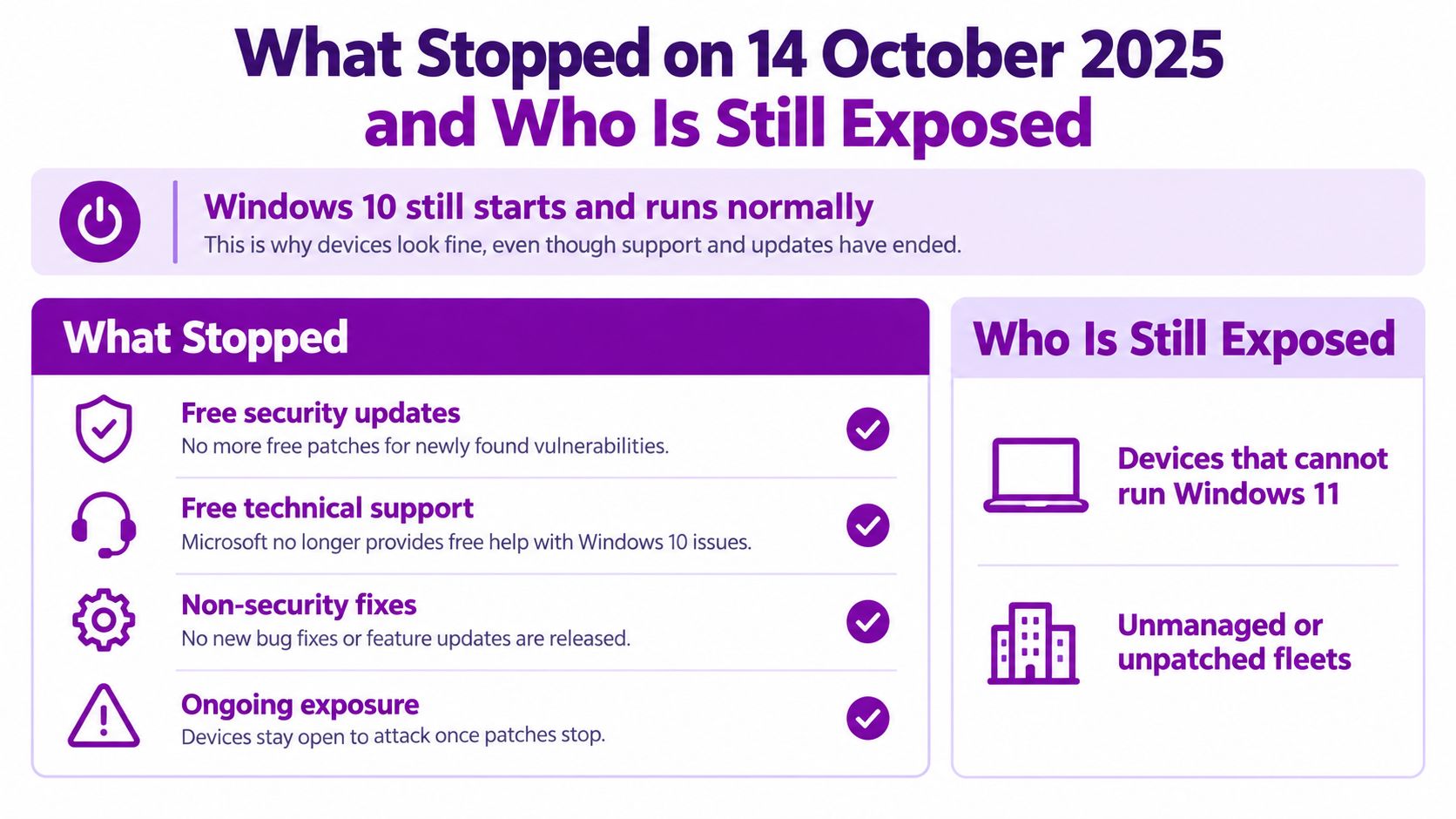
Windows 10 devices booted normally on the morning of 15 October 2025. Nothing crashed and nothing warned the user, which is exactly why the risk gets underestimated in a fleet review.
What ended, and what still runs
For the standard editions, three things ended on 14 October 2025: free security updates, feature updates and technical assistance through standard Microsoft support channels. The machines still boot, installed software still launches and the hardware still works. Continued operation is not continued protection. Vulnerabilities discovered after the cutoff will go unpatched unless a device is upgraded or covered by an eligible ESU arrangement, as Microsoft's published end-of-support guidance makes plain.
The scale of the transition makes this a budgeting and governance exercise rather than a consumer upgrade question. A Which? survey of 2,008 UK adults, conducted by Deltapoll between 5 and 8 September 2025 and weighted against 2024 Office for National Statistics population estimates, estimated that about 21 million UK people used Windows 10. Among those users, 26% intended to keep using it (about 5.4 million people), 39% planned to upgrade their existing device, 14% to replace the computer, 6% to move to another operating system and 11% were unsure. Which? explains its survey findings and estimates.
| Planned response | Share of users | Estimated UK people |
|---|---|---|
| Continue using Windows 10 | 26% | About 5.4 million |
| Upgrade the existing device | 39% | About 8.2 million |
| Replace the computer | 14% | About 2.9 million |
| Move to another operating system | 6% | About 1.3 million |
| Unsure | 11% | About 2.3 million |
These are survey-based estimates rather than a count of devices in service. A separate Restart Project estimate found that 62% of Windows 10 users in Great Britain had no plan to change their computer or operating system, putting almost 13 million computers at greater exposure to malware and hacking. The Restart Project discusses the UK transition and e-waste implications.
Version 22H2 is the final Windows 10 release covered by the standard end-of-support date, so treat every device still on it as an exception that needs managing, not a machine that happens to work. For each one, record a named owner, the reason it cannot migrate yet and the ESU cost for the full length of the delay. Then answer the two questions that set the risk level: does it hold personal or regulated data, and would your cyber insurer still pay a claim that involves an unsupported operating system? Postponement looks free until you price it. One unpatched laptop handling customer data can carry an ESU bill, a UK GDPR security exposure and an insurance dispute at the same time, which is why a planned migration usually costs less than the delay it replaces.
Extended Security Updates Cost and How Long They Last
Business ESU is a temporary mitigation for eligible commercial devices. It provides critical and important security updates, but not feature updates or ordinary technical support. Microsoft's published business price starts at US$61 per device for Year One, with the price doubling in each subsequent year. Microsoft's Windows 10 business ESU guidance describes the commercial programme and its terms.
| ESU year | Microsoft list price per device | Approx. UK price (GBP) | Cumulative per device (GBP) |
|---|---|---|---|
| Year 1 | US$61 | Approx. £46 | £46 |
| Year 2 | US$122 | Approx. £92 | £138 |
| Year 3 | US$244 | Approx. £183 | £321 |
Year One began when standard support ended, in mid-October 2025, and runs for twelve months to around October 2026. Each ESU year follows the same pattern from that point, so treat mid-October as the anchor for your renewal calendar. The exact annual billing dates depend on your agreement, so confirm them with your Microsoft licensing partner before building a payment schedule.
Enrolment is cumulative. An organisation joining in Year Two must also pay for Year One, and a device entering in Year Three owes the full three-year amount. Budgeting only for the year in which a device is enrolled will understate the cost.
Price the delay, not just the first year
At the approximate GBP figures above, 50 devices for one year cost roughly £2,300 before VAT. Keeping those same devices covered through the end of Year Three costs roughly £16,000. Across 1,000 devices, the three-year cumulative cost is around £320,000.
Those figures change how ESU should be governed. Every exception device needs a named owner, a dated retirement or migration deadline, and a cost line in the budget. Expect your cyber insurer and any data-protection audit to ask how unsupported systems are covered, because a device running without security updates weakens your position in both conversations. On that basis, postponement frequently costs more than the migration it delays.
The listed GBP amounts are approximate. Exchange rates and licensing terms can change, so confirm exact prices and edition eligibility with your licensing partner before purchase. Consumer ESU rules shouldn't be applied to business estates, especially devices that are domain-joined, Entra-joined or MDM-managed.
Windows 11 Eligibility and the Right Route for Each Device
The free Windows 11 upgrade is conditional. A computer must run Windows 10 version 22H2 and meet Windows 11's minimum hardware requirements: a supported 64-bit processor, TPM 2.0, UEFI firmware with Secure Boot, at least 4 GB of memory and 64 GB of storage. As Microsoft's guidance on Windows 10 support ending sets out, devices that fail these requirements are not eligible for the free upgrade.
| Device case | Recommended route | What to check |
|---|---|---|
| On 22H2 and meets Windows 11 requirements | Free upgrade to Windows 11 | Application testing and downtime window |
| Not on 22H2 | Update to 22H2 first | Free upgrade route opens only after this step |
| Fails requirements but is business-critical | Business ESU for up to three years | Annual cost rise and a named retirement date |
| Specialist application won't run on Windows 11 | Isolate on a segmented network under ESU | Application-owner sign-off and vendor roadmap |
| Shared kiosk or fixed-function device | Replace or reimage on a supported operating system | Vendor confirmation of supported operating system |
Treat this table as a decision tool, not a reason to put every device on the same route. A computer that passes eligibility still needs application and peripheral testing before deployment. A critical device that fails the requirements needs a funded replacement plan or time-limited ESU, and a specialist system needs its application owner and supplier involved before any network exception is approved.
A large share of older Windows 10 hardware cannot run Windows 11, which makes replacement a material budget line rather than a housekeeping task. That does not justify replacing every computer by default: an older device in good condition can often be repurposed safely for a non-critical role, avoiding unnecessary disposal and procurement costs. Decide per device, based on its condition, purpose, data and support route.
Each exception you approve should carry a named owner, a review date and a recorded reason. That record is what turns eligibility checks into governance: when an auditor, insurer or board asks why a device is still on Windows 10, you can show a costed plan rather than a shrug.
For broader planning, review the Windows 11 features and changes alongside compatibility testing. Then confirm the build, run the eligibility check and assign each device to a route. Do not approve a purchase or an exception until those checks are complete.
Business Risks of Delaying and the Governance Gap
In a UK study commissioned by Panasonic, researchers put the Windows 11 migration question to 100 decision-makers. Of those 100, 62% said devices in their estate had been or still needed to be replaced or upgraded for Windows 11 compatibility. Asked how delay would affect their budgets, 55% expected higher cyber-security expenditure, 48% expected higher support costs and 46% expected higher business-continuity costs. Those figures in Panasonic's commissioned research on Windows 11 migration record expectations, not a measured comparison of delay against migration. Treat them as a signal that experienced buyers expect postponement to be expensive, then prove or disprove it against your own numbers: price the ESU licences for each device that stays, add the cost of isolating and monitoring it, and set that against the cost of replacing it now. Expect the exception list, not the standard fleet, to be where the overspend sits.
The technical risk needs a governance record. The UK National Cyber Security Centre advised organisations to prioritise migration because unsupported devices no longer receive normal security updates or technical support. Follow the NCSC's Windows 11 migration advice for the security position, but national guidance cannot approve your exceptions. Each device that stays on Windows 10 needs a named owner, a documented reason and an expiry date, and someone senior enough to accept the risk in writing.
Keep records that stand up to scrutiny
For every device that cannot migrate immediately, hold an asset record, a signed risk acceptance from a named owner, evidence of network isolation where appropriate, validated backups and a documented replacement deadline. Add application-owner sign-off when specialist software is the reason for delay, and record the supplier's support position in writing rather than relying on an informal assurance.
Cyber insurers increasingly ask how organisations handle unsupported systems. If a device holds personal data, document how the decision fits your data-protection duties, including accountability under UK GDPR. An unsupported device is not automatically a compliance finding, but an undocumented one is far harder to defend when you have to explain your controls.
Charities and regulated firms should keep the reasoning as carefully as the technical controls. A risk exception without an owner or expiry date is effectively an open-ended decision. Use a documented patch-management process to tie the exception register to routine security reviews, so every remaining Windows 10 device is revisited rather than forgotten.
Budget for the full cost of the move as well: application testing, staff time, procurement lead times and disruption during rollout. The organisations that overspend are usually the ones that priced the licences and nothing else.
Migration Steps for IT Managers in Order
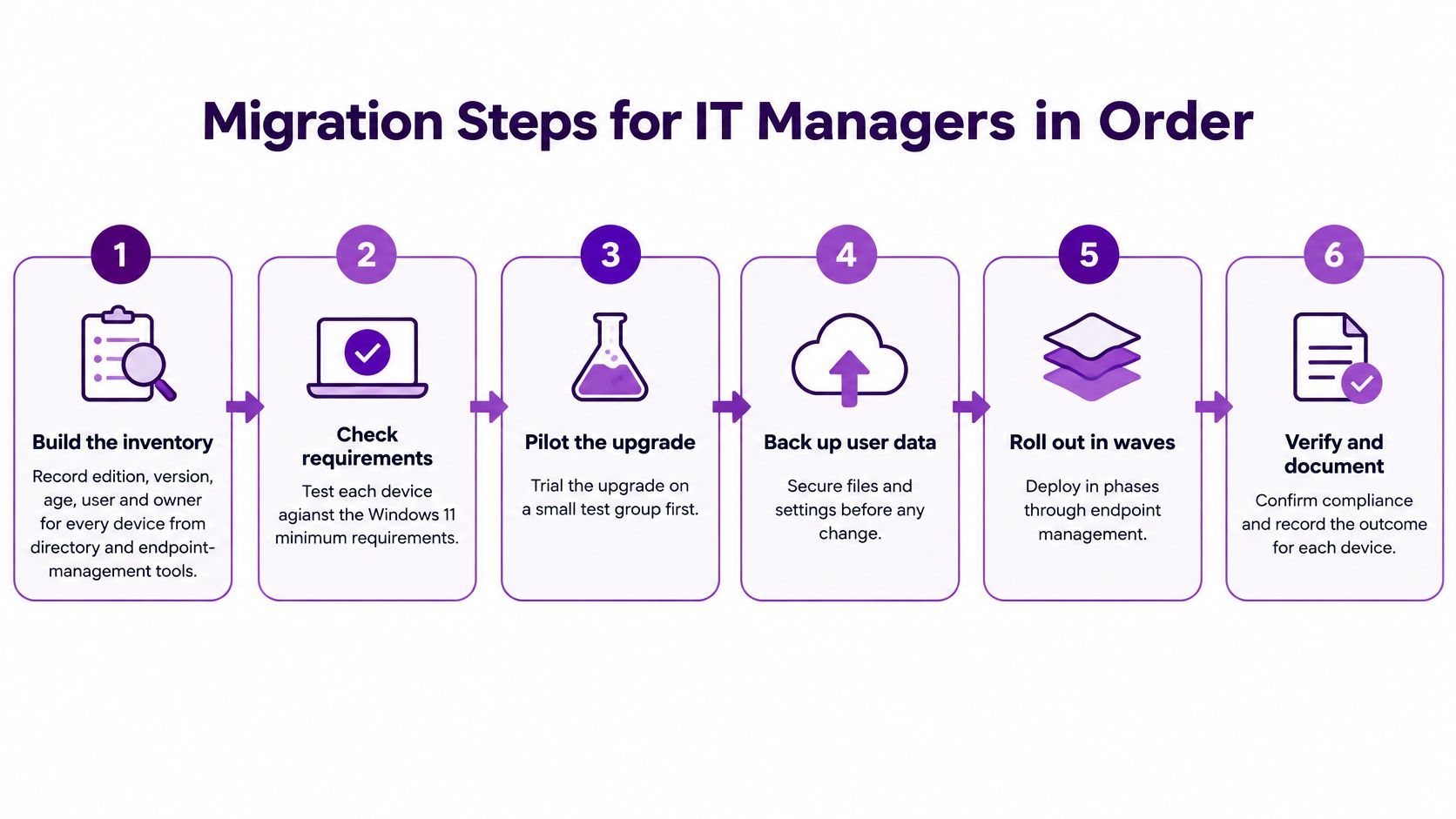
A migration plan fails when it starts with purchasing rather than discovery. Use the sequence below to identify blockers, set a defensible budget and keep exceptions visible.
Build the inventory. Use directory and endpoint-management tools to record each device's edition, version, age, user and owner. The common failure is relying on an old spreadsheet that misses shared computers and devices outside regular management.
Check hardware eligibility. Test every device against Windows 11's minimum requirements and mark those that fail; this determines where replacement funding is needed. Don't assume that a computer bought recently will pass, or that a Windows 10 licence alone makes it eligible.
Classify applications and peripherals. List line-of-business software, printers, scanners, VPN clients and other essential equipment, then record each supplier's Windows 11 support position. A frequent blocker is an application vendor that hasn't confirmed compatibility, leaving the project team without a safe migration decision.
Pilot the upgrade. Trial a representative group of 10 to 20 devices covering Microsoft 365, VPN, printing, endpoint management and security tools. This catches practical problems before broad deployment; a pilot made up only of standard office laptops won't reveal issues affecting specialist teams.
Set the budget. Include hardware, licensing, ESU per device per year and staff time. Allow for procurement lead times that can run to several weeks; leaving orders until testing is complete may delay the rollout even when the technical route is clear.
Migrate in waves. Group deployments by department, keep a rollback image and identify a fallback user for each wave. A common failure is scheduling the change without confirming a support contact or a usable recovery route.
Isolate or retire exceptions. Remove unsupported devices from ordinary network access where possible, and document signed risk acceptance for each retained exception. Don't leave specialist systems in place solely because nobody has confirmed who owns the risk.
Review the estate. Check regularly that no unsupported endpoint reaches the network without a recorded exception, and confirm that each exception still has an owner and deadline. The review fails if the register records a device as “planned for replacement” but nobody tracks whether replacement happened.
Confirm Your Windows 10 Position Before Your Next Audit
Decision rule: move eligible devices to Windows 11 in the next migration wave; replace or place business-critical ineligible devices on business ESU with a named retirement date; isolate, document and review devices that can't be upgraded or replaced in time.
Bring the three routes into one budget: upgrade work, replacement and disposal, and ESU per device per year. Compare that total with the operational and security risk of delay. An IT audit can help establish the estate and its exceptions, but keep the decisions and accountable owners within your own asset and risk records.
Confirm four figures this quarter: the count of Windows 10 devices by edition and channel, the number that fail Windows 11 eligibility, the number of exceptions with signed risk acceptance, and the date of the next review. Those figures show whether the plan is funded, owned and moving forward.
F1Group is a Microsoft-focused managed IT provider that can run inventory and eligibility checks and advise on licensing. Phone 0845 855 0000 today, or send us a message.
F1Group can help East Midlands organisations assess Windows 10 devices, check Windows 11 compatibility and plan migration, licensing and support for exceptions. Contact F1Group to discuss a practical transition plan for your estate.