
Your finance manager has one spreadsheet. Operations has another. Sales keeps key updates in Outlook and Teams. Someone in the warehouse still relies on a paper form that gets typed up later. Everyone knows the process is clunky, slow, and full of avoidable errors, but the thought of commissioning bespoke software feels like a project for bigger firms with deeper pockets.
That's where many SMEs across Lincoln, Nottingham, Leicester, Newark, Grimsby and Scunthorpe get stuck. Off-the-shelf software doesn't quite fit. Traditional software development takes too long. So the business keeps patching the problem with email chains, copied spreadsheets and manual rekeying.
Introduction From Bottlenecks to Breakthroughs
Low code development platforms sit in the middle of that gap. They give businesses a practical way to build internal apps, automate routine work and connect disconnected systems without waiting for a full software project to grind through months of specification, development and testing.
A typical example is staff onboarding. HR collects forms by email, IT gets a separate request for equipment, line managers forget induction tasks, and nobody has a live view of what's complete. That process doesn't need a huge custom system. It needs a simple workflow, a clean app interface, sensible permissions and integration with the Microsoft tools your team already uses.
That's why low code matters. It's not about replacing proper software engineering. It's about solving the right business problems at the right level.
Where SMEs usually go wrong
Many firms either overbuy or underthink.
They overbuy when they sign up for a big software platform to solve one narrow process problem. They underthink when they let departments create workarounds with no structure, no governance and no long-term plan. Both approaches waste time.
Practical rule: If a process is repeated, manual, visible to several teams and prone to errors, it's a strong candidate for low code.
Used properly, low code development platforms can help you:
- Replace spreadsheet-led processes with apps staff effectively use
- Automate repetitive admin such as approvals, notifications and document creation
- Improve visibility with dashboards and centralised data
- Reduce friction between departments that currently work in silos
The key is staying grounded. Some platforms are brilliant for internal business tools. Some are better for public-facing apps. Some look cheap until licensing expands. And some become a governance headache if nobody in IT is setting the rules.
For East Midlands SMEs already working in Microsoft 365, the Microsoft route is often the most sensible. It aligns with tools staff already know, it integrates cleanly, and it avoids creating another disconnected technology island. That doesn't mean it's perfect. It means it's usually the best strategic fit when you want practical outcomes rather than another transformation slogan.
What Are Low Code Development Platforms
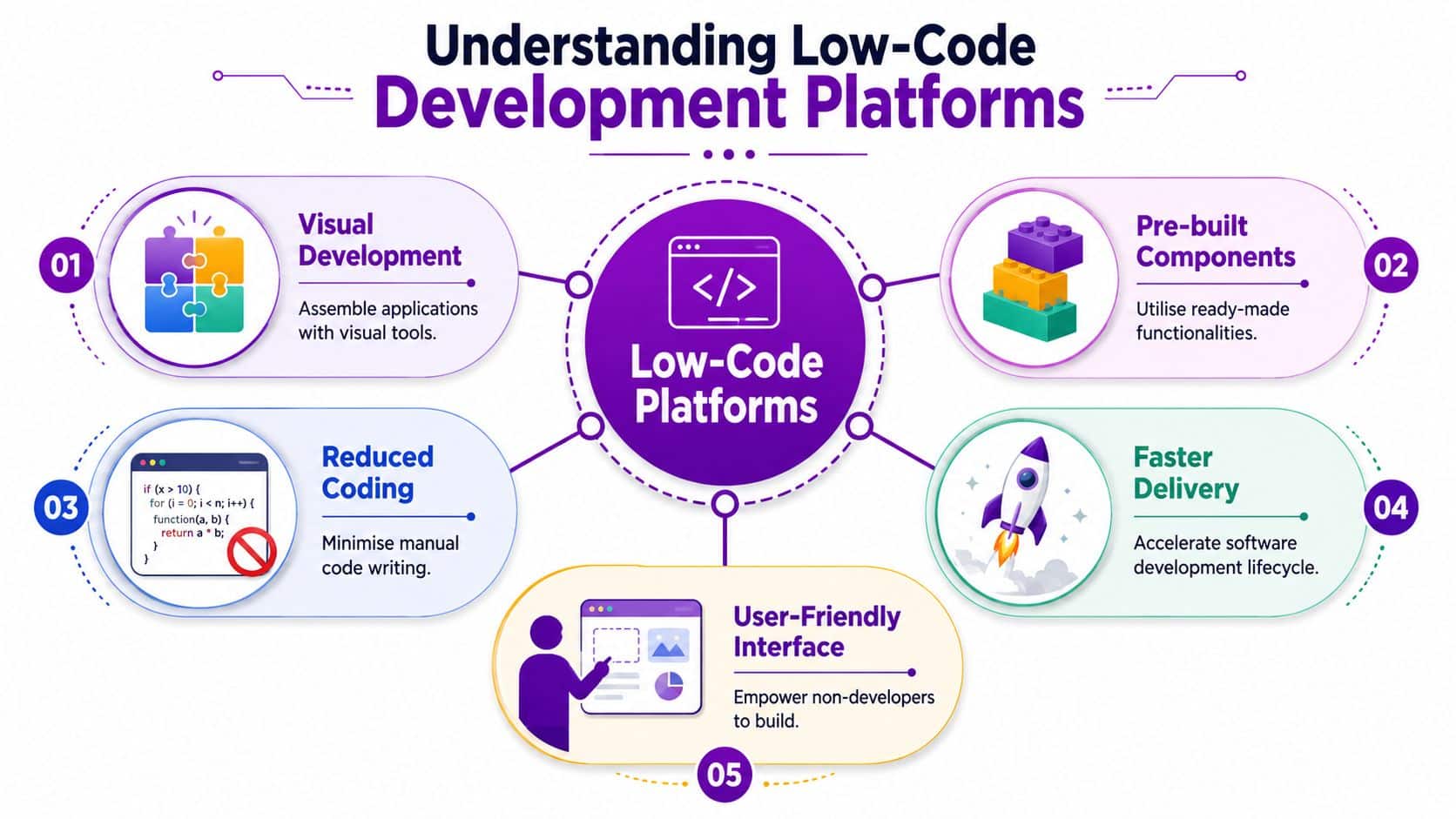
At a basic level, low code development platforms let you build software using visual tools instead of writing everything from scratch. Think of it as building with well-made components rather than shaping every brick by hand.
A developer, analyst or technically confident operations manager can use forms, workflows, connectors, rules and templates to assemble a working app. That app might run on a browser, a mobile device, or both. Some platforms also let you add custom code when the standard building blocks aren't enough.
The simple way to think about it
Traditional development is like building a house from raw materials. You have maximum freedom, but you need specialist trades for every stage.
Low code is more like working from a high-quality modular kit. You still make meaningful design decisions, but the foundations, standard parts and repeatable patterns are already there.
No-code sits further along the simplicity scale. It's easier to pick up, but it usually gives you less room to handle more complex workflows, data structures or integrations.
Where low code fits
This is the practical distinction.
| Approach | Best for | Main trade-off |
|---|---|---|
| Traditional coding | Highly bespoke systems, complex products, full control | Slower delivery, specialist skills needed |
| Low code | Internal apps, workflow automation, connected business tools | Some platform limits and dependency |
| No-code | Simple forms, microsites, lightweight task tools | Less flexibility and weaker extensibility |
Low code works best when the business problem is clear and the process already exists, even if it's messy. You're not inventing a brand-new software category. You're fixing a known operational pain point.
Why businesses are paying attention
The shift isn't technical. It's organisational. Low code allows the people closest to the work to help shape the solution. That's why the term citizen developer keeps coming up. It usually means a capable business user building within an approved framework, not a free-for-all.
That distinction matters. Unchecked app-building causes chaos. Governed app-building solves problems faster.
If you want a useful plain-English contrast between no-code and app building without traditional development, Refact's no-code insights are worth a read. The important thing for most SMEs is knowing where simplicity helps and where it becomes a limitation.
Key Benefits and Limitations for SMEs
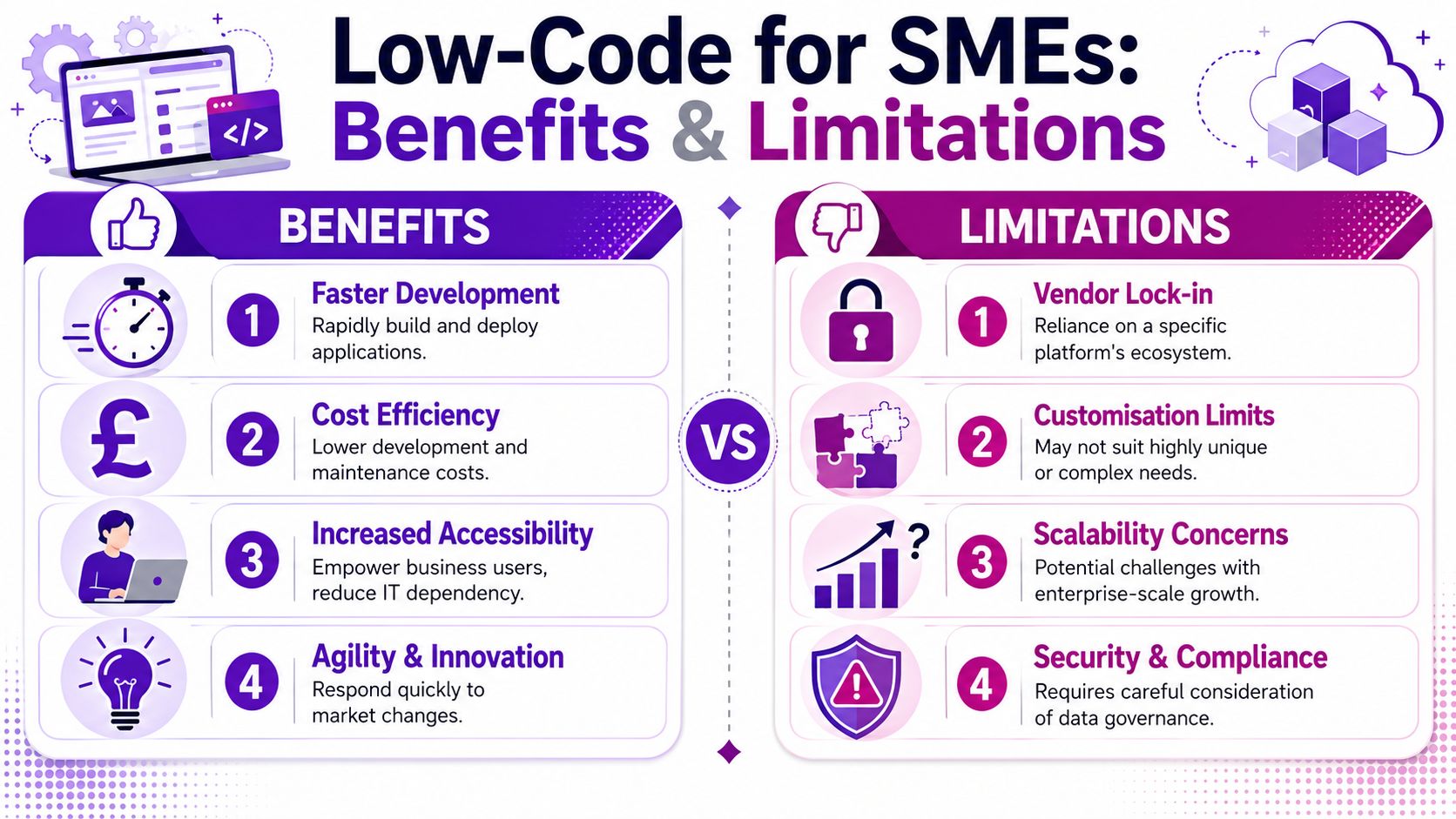
The appeal is obvious. Low code development platforms can help a smaller business move faster without hiring a full internal software team. That's the upside. The downside is that speed without control usually creates another mess, just in a newer interface.
What SMEs gain
The first benefit is speed. If your team needs a holiday approval app, a job tracking tool, a site inspection form or a client onboarding workflow, low code can get you there much faster than a full traditional build.
The second is accessibility. Your IT team doesn't have to do every bit of configuration themselves. Business users can contribute because the tools are visual and process-led rather than code-heavy.
The third is cost control at the start. Many SMEs don't need a giant software programme. They need a well-targeted app or workflow that removes friction from a specific part of the business. If you've ever looked into software development costs for fully bespoke systems, you'll know why low code attracts interest.
Here's the practical upside in SME terms:
- Faster fixes: You can address operational pain points while they're still urgent
- Better fit: Apps can mirror how your business works
- Less duplication: Data can move between tools instead of being retyped
- Visible processes: Managers can see status, bottlenecks and ownership
For teams looking at workflow improvement inside Microsoft tools, Power Automate workflows are often the first sensible place to start.
A short overview can help frame the bigger picture:
Where SMEs get caught out
Licensing is the first trap. A platform can look affordable when you're testing one app with a small team. Costs can become much harder to predict once more users, more automations and premium connectors enter the mix. If you don't model likely usage early, you'll get a nasty surprise later.
Then there's vendor lock-in. Once key processes live inside one platform, moving away isn't simple. That doesn't mean you should avoid low code. It means you should choose a platform that suits your wider technology direction.
Low code is a business tool, not a toy. If nobody owns standards, security and lifecycle management, you'll end up with unsupported apps running critical processes.
The final problem is shadow IT. A department builds a handy app. Then another team creates three more. Nobody knows which one is current, what data is being used, or whether permissions are correct. That's not innovation. That's unmanaged risk.
The balanced view
Low code is a strong option for SMEs when three things are true:
- The process is clear enough to model properly
- The platform fits your existing estate
- Someone governs what gets built
If any of those are missing, you won't get the benefit you expect.
Common Use Cases in Your Business
Low code becomes useful when it stops being abstract. Most SMEs don't care about platform theory. They care about getting rid of wasted effort.
Operations and field work
A logistics firm around Newark might still manage vehicle checks through paper sheets and follow-up emails. Drivers complete inspections, issues get reported inconsistently, and the office has no immediate view of faults that need action.
A low-code mobile app fixes that neatly. Drivers can complete a digital checklist, add photos, submit defects, and trigger notifications to the right people. The process becomes traceable, and nobody has to decipher handwriting or chase missing forms.

Professional services and admin-heavy work
A Nottingham accountancy practice often has the same onboarding problem. New clients arrive through one route, compliance checks happen somewhere else, welcome information sits in a template folder, and internal tasks rely on somebody remembering what should happen next.
That's a perfect low-code scenario. A workflow can trigger when a new client record is created, generate a document set, notify the right staff, create tasks, and keep the whole process visible. The value isn't flashy. It's consistency.
On the ground: The best low-code solutions usually target boring processes people are tired of doing manually.
Manufacturing and shop-floor reporting
A Leicester manufacturer might want hourly production figures, downtime reasons and quality issues captured in real time. If that's handled through whiteboards, ad hoc spreadsheets or delayed email updates, management decisions are always one step behind.
A simple low-code app on shared tablets can standardise data capture and push updates into a dashboard. That gives supervisors a current picture rather than yesterday's best guess.
For firms working around older systems, it's worth understanding Halo AI integration approaches because many useful low-code projects involve bridging a legacy application rather than replacing it overnight.
The common pattern
These use cases look different, but they share the same shape:
- A process already exists
- People are repeating manual steps
- Information is scattered
- Delays or mistakes are costing time
That's where low code earns its keep.
If you're weighing up app-led process improvement inside Microsoft's stack, this guide on how to use Power Apps is a practical next read because it shows how those everyday business scenarios translate into usable applications.
Choosing the Right Platform for Your Business
Don't choose a platform because the demo looked slick. Choose it because it fits your business, your existing systems and your internal capability.
That sounds obvious, but plenty of firms still buy low-code tools backwards. They start with product features and only later ask whether the platform matches their security model, licensing tolerance and long-term roadmap.
Start with business fit
The first test is simple. What exactly are you trying to solve?
If you need lightweight internal apps, approval workflows, reporting and Microsoft 365 integration, your shortlist should look very different from a business that wants to launch a customer-facing digital product with specialist user journeys.
Ask blunt questions:
- Who will use it
- What process will it replace
- What systems must it connect to
- What happens if the app becomes business-critical
If you can't answer those clearly, you're not ready to compare vendors.
Evaluate the platform properly
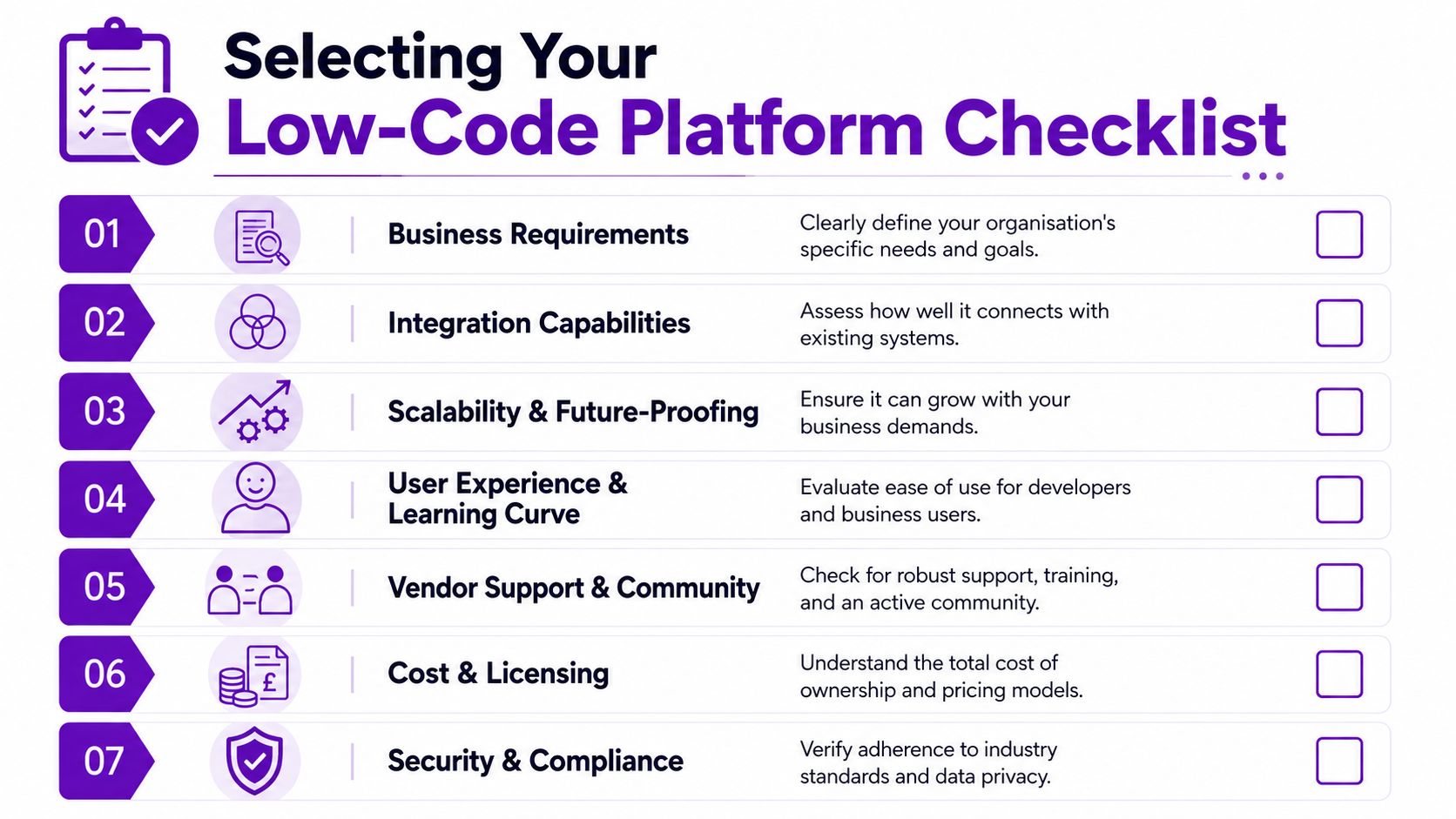
A sensible comparison should cover these areas.
| Criterion | Why it matters for SMEs |
|---|---|
| Security and governance | You need control over who builds, edits, shares and deploys apps |
| Integration | A disconnected low-code platform creates another silo |
| Licensing | Cheap entry can become expensive growth |
| Extensibility | Some processes will eventually outgrow drag-and-drop tools |
| Usability | If it’s too technical, business adoption stalls |
| Support ecosystem | You’ll need training, documentation and implementation help |
| Data handling | Storage, permissions and compliance rules must be clear |
What to challenge vendors on
Most sales pitches focus on ease of use. That matters, but it's not enough.
Push harder on these points:
- Governance controls: Can IT define environments, connectors, roles and approval rules?
- Integration depth: Does it work properly with your CRM, finance software, document platform and authentication setup?
- Exit difficulty: If you needed to move away later, how painful would that be?
- Professional developer support: Can your development team extend what business users build?
One more thing matters for SMEs in particular. You don't want a platform that only works when a champion is constantly holding it together. The right platform should still function when staff change, priorities shift or your first app expands into five.
A practical shortlist mindset
There isn't one universal winner. There is a best fit for your situation.
If your business already lives in Microsoft 365, your natural advantage is using a platform that works with SharePoint, Teams, Outlook, Entra ID, Excel, Dynamics 365 and Power BI without awkward bolt-ons. If your core business systems sit elsewhere, another option may deserve a harder look.
Buy for operational fit, not product theatre.
That's the standard. If a platform can't support secure growth, clean integration and sensible governance, it isn't the right answer no matter how polished the demo feels.
Why Microsoft Power Platform is a Strategic Choice
For East Midlands SMEs already working in Microsoft 365, Microsoft Power Platform is usually the strongest strategic option. Not because Microsoft wins by default, but because it removes friction that other platforms often introduce.
If your staff already use Outlook, Teams, SharePoint, Excel and perhaps Dynamics 365, the last thing you need is another isolated toolset. Power Platform sits close to the environment your business already depends on.
What sits inside Power Platform
The platform is made up of several connected services:
- Power Apps for building custom business applications
- Power Automate for workflow automation
- Power BI for reporting and dashboards
- Power Virtual Agents for chatbot-style interactions
- Dataverse as a managed data layer for business apps
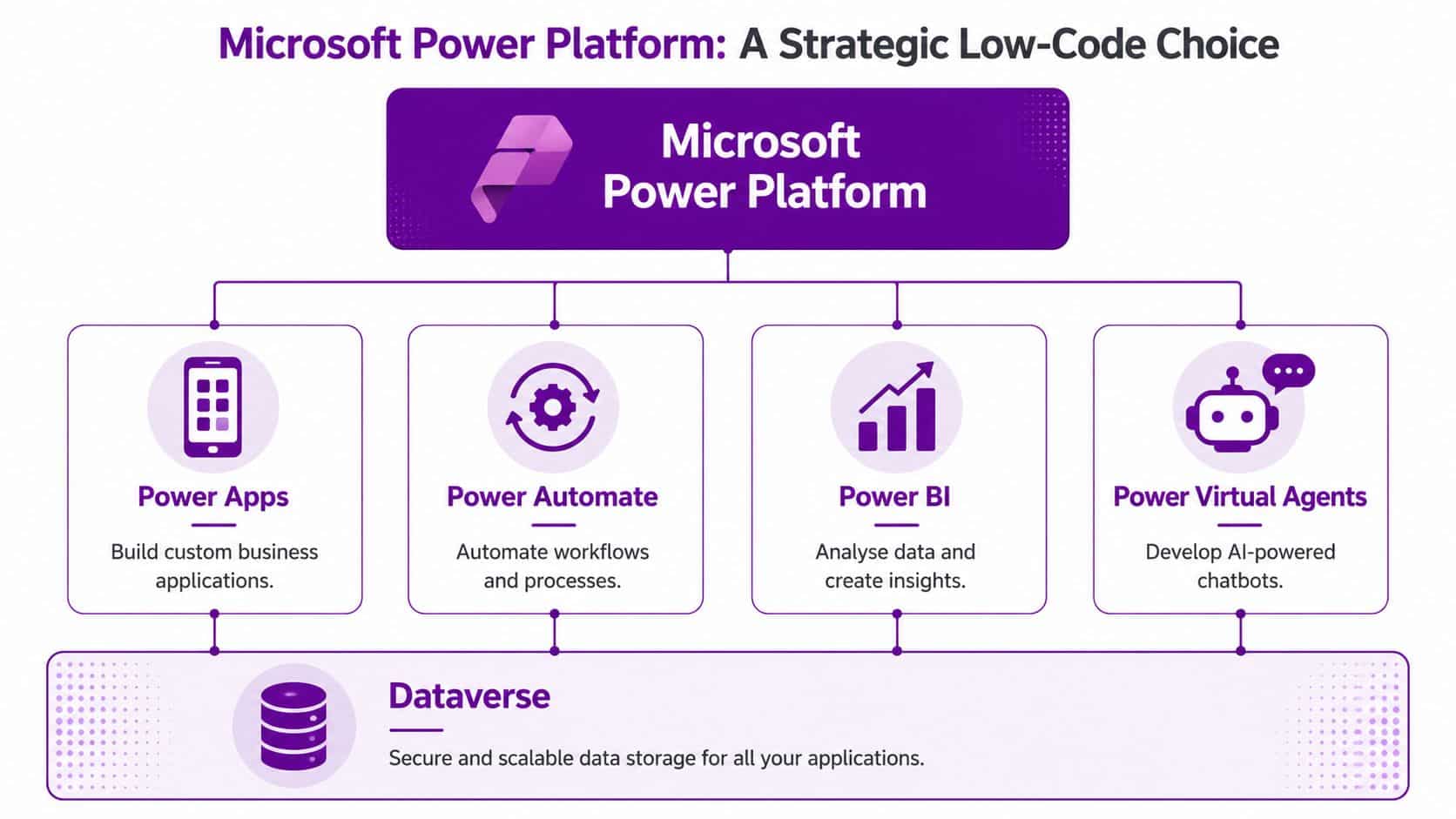
That matters because these tools don't just coexist. They complement each other. An app can capture the information, an automation can route it, Dataverse or SharePoint can store it, and Power BI can report on it.
Why this matters in the real world
Take a construction business in Lincoln managing snagging lists across multiple sites. A site manager spots an issue, takes a photo, notes the location and assigns it to the right subcontractor. Without a proper system, that turns into WhatsApp messages, email chains and incomplete records.
Inside Power Platform, the process can be much cleaner:
- A Power App records the issue on a mobile device
- Power Automate sends alerts and updates the right people
- The data is stored in SharePoint or Dataverse
- Teams becomes the place for discussion and follow-up
- Power BI shows open items, ageing and recurring issues
That's not theory. It's a sensible business workflow built around tools many SMEs already licence and trust.
The Microsoft advantage for SMEs
The strongest argument for Power Platform isn't just app building. It's ecosystem fit.
Here's where it stands out:
- Identity is already there: User access can align with your Microsoft security model
- Documents already live somewhere useful: SharePoint and OneDrive are natural companions
- Communication is built in: Teams and Outlook support approvals and notifications cleanly
- Reporting is native: Power BI turns captured data into something managers can act on
You can get a broader overview from this explanation of what is Power Platform, but the practical case is straightforward. If you're already paying for and relying on Microsoft technologies, building low-code capability inside the same ecosystem is usually more coherent than introducing another vendor's stack.
Where Power Platform isn't the answer
It's not perfect. If you need a highly bespoke public-facing software product with unusual interface demands or very specific architectural requirements, traditional development may still be the better path. If licensing is poorly understood, costs can still spread. If governance is weak, app sprawl is still possible.
That said, those are manageable risks. The integration advantage is hard to ignore.
If your business already runs on Microsoft 365, choosing Power Platform is usually the shortest route from process frustration to working solution.
That's why it makes strategic sense for so many East Midlands organisations. You're not starting from zero. You're building on technology your staff already use every day.
Your Implementation Roadmap and Next Steps
Don't start with a grand programme. Start with one process that annoys people, wastes time and has a clear owner.
Step one with a pilot
Pick a process with visible friction. Staff onboarding, quote approvals, site inspections, service requests or holiday approvals are all common starting points. The right pilot is small enough to control but important enough that people notice the improvement.
Step two with governance
Set rules early. Decide who can build, which data sources are approved, how apps are tested, and who supports them once live. Low code works best when IT enables it properly rather than blocking it or ignoring it.
Step three with adoption
Train users. Keep the interface simple. Fix rough edges quickly. Then use early success to build confidence for the next project. Most low-code initiatives fail on change, not technology.
A sensible low-code strategy gives SMEs a middle path between rigid off-the-shelf software and expensive bespoke development. For many East Midlands businesses, especially those already using Microsoft 365, Power Platform is the clearest way to move from manual workarounds to secure, practical business tools.
F1Group helps organisations across the East Midlands turn messy manual processes into secure, usable Microsoft-based solutions. If you want a practical conversation about Power Apps, Power Automate, Power BI or wider Microsoft 365 transformation, F1Group can help. Phone 0845 855 0000 today or Send us a message.