
Your service desk is probably full before lunch. Emails pile up in one inbox, calls queue on a phone system nobody trusts, Teams messages keep coming from internal users, and someone is still maintaining a spreadsheet of complaints because the CRM feels too clunky to rely on. That is exactly the kind of mess Dynamics 365 Customer Service is built to tame, not by adding another place to log work, but by giving agents one controlled workspace where cases, knowledge, routing and reporting sit together.
For an East Midlands IT Director, the appeal is simple. You need fewer hand-offs, cleaner records, and a system that can stand up to UK GDPR, internal audit, and the board's questions about performance. Microsoft's platform can do that, but only if you treat it as an operating model for service, not a shiny licence line on a procurement form.
The Service Desk Problem Dynamics 365 Customer Service Solves
A lot of UK service teams are still held together by a patchwork. One part of the team works in Outlook, another in a telephony console, managers live in a spreadsheet, and the complete story is split across too many places. By the time a complaint reaches the right person, the customer has often repeated themselves twice, and the original context has gone missing.
Dynamics 365 Customer Service gives that mess one controlled workspace. Microsoft's help-desk overview describes a system for tracking open requests, moving tickets through resolution, recommending next steps with built-in intelligence, and supporting multi-channel access from any device with customisable dashboards Microsoft help-desk overview. That matters because the problem is not ticket logging. It is fragmentation, duplicated effort, and poor control over what happens to customer data.

Why fragmented service fails
When cases are split across systems, managers cannot tell whether the team is improving or just getting better at hiding the backlog. Agents waste time re-keying notes, checking another tab for customer history, and asking a colleague in Teams what happened last week. That is inefficient, and it also creates governance problems, because weak records are harder to audit, harder to retain properly, and harder to defend under UK GDPR.
Microsoft's architecture guidance shows why the product is built around Dataverse and Azure, with routing logic and service data sitting in one operational layer instead of being bolted on afterwards Microsoft architecture guidance. In practice, that means the platform is designed to reduce manual triage and cut down on local workarounds. If your current service desk runs on inbox discipline and tribal knowledge, this is the kind of structure that brings it under control.
For UK teams, there is a practical upside as well. When the case history, ownership, and service actions stay in one place, you have a cleaner record for internal review, a better base for reporting to the board, and a more defensible position if a customer asks where their data went or who touched it.
Practical rule: if your managers cannot explain where a case came from, who owns it, and what happened next, the process is too fragmented for reliable service.
What Dynamics 365 Customer Service Actually Is
A busy service team does not need another pile of tickets. It needs a place where the customer record, the work in progress, and the service rules sit together. Dynamics 365 Customer Service gives you that as a service workspace built around the case, with queues, SLAs, entitlements, knowledge, and channels all tied to the same record.
Microsoft's implementation overview sets out those core capabilities, including unified routing and multichannel conversations including voice Microsoft implementation overview. That matters because the product is built for operational control, not just for logging calls.
The core objects that matter
The platform's data model sits on Dataverse, with Azure providing the wider platform layer. A customer email can become a case, the case can move into a queue, the queue can send it to the right agent, and the SLA can show whether the team is keeping pace. That is a controlled service process, and it beats a generic ticket list that leaves everyone guessing.
The workspace choice matters too. Microsoft says multisession is available in Copilot Service workspace and the deprecated Omnichannel for Customer Service, while the Customer Service Hub does not support multisession or conversations in the same way Microsoft implementation overview. If your agents need to hold several conversations without losing context, choose the workspace that supports that working pattern from the start.
Unified routing changes the operating model
Unified routing is the point where the platform stops behaving like a simple queue and starts behaving like a service engine. Microsoft describes it as using signals such as sentiment, predicted effort, skills, presence, capacity and customer parameters to send work to the right agent with full context. The practical result is plain. A policy engine does the triage, not an admin dragging cases around at 9 a.m.
| Core Feature Map for Service Teams | What it does | Outcome for service teams |
|---|---|---|
| Cases | Holds the customer issue and related activity | Clear ownership and traceability |
| Queues | Organises incoming work for routing | Less chaos at intake |
| SLAs | Measures service promises | Better control over response and resolution |
| Entitlements | Maps contractual support rights | Fewer disputes about who should be helped |
| Knowledge | Surfaces approved guidance | Faster and more consistent answers |
The other thing UK leaders should watch is how this structure supports governance. The same organised flow that helps agents work faster also makes it easier to review activity, keep service records tidy, and defend how work was handled under UK GDPR. If you want to see how this service model connects into broader workflow design, the customer service automation discussion is worth reading.
The best deployments are boring in the right way. Agents know where to work, managers know what to measure, and the customer does not have to repeat the same story three times.
Core Features That Run a Modern UK Service Operation
A service desk falls apart fast when the basics are clumsy. Automatic case creation from email, web forms and phone calls stops work slipping through the cracks because someone forgot to log it. Intelligent case routing based on issue type or agent skills gets the right ticket to the right person sooner, which matters even more if your team works across sites, covers different product lines, or needs to keep pace with UK customers expecting quick answers ScnSoft technical coverage.
Service mechanics that matter
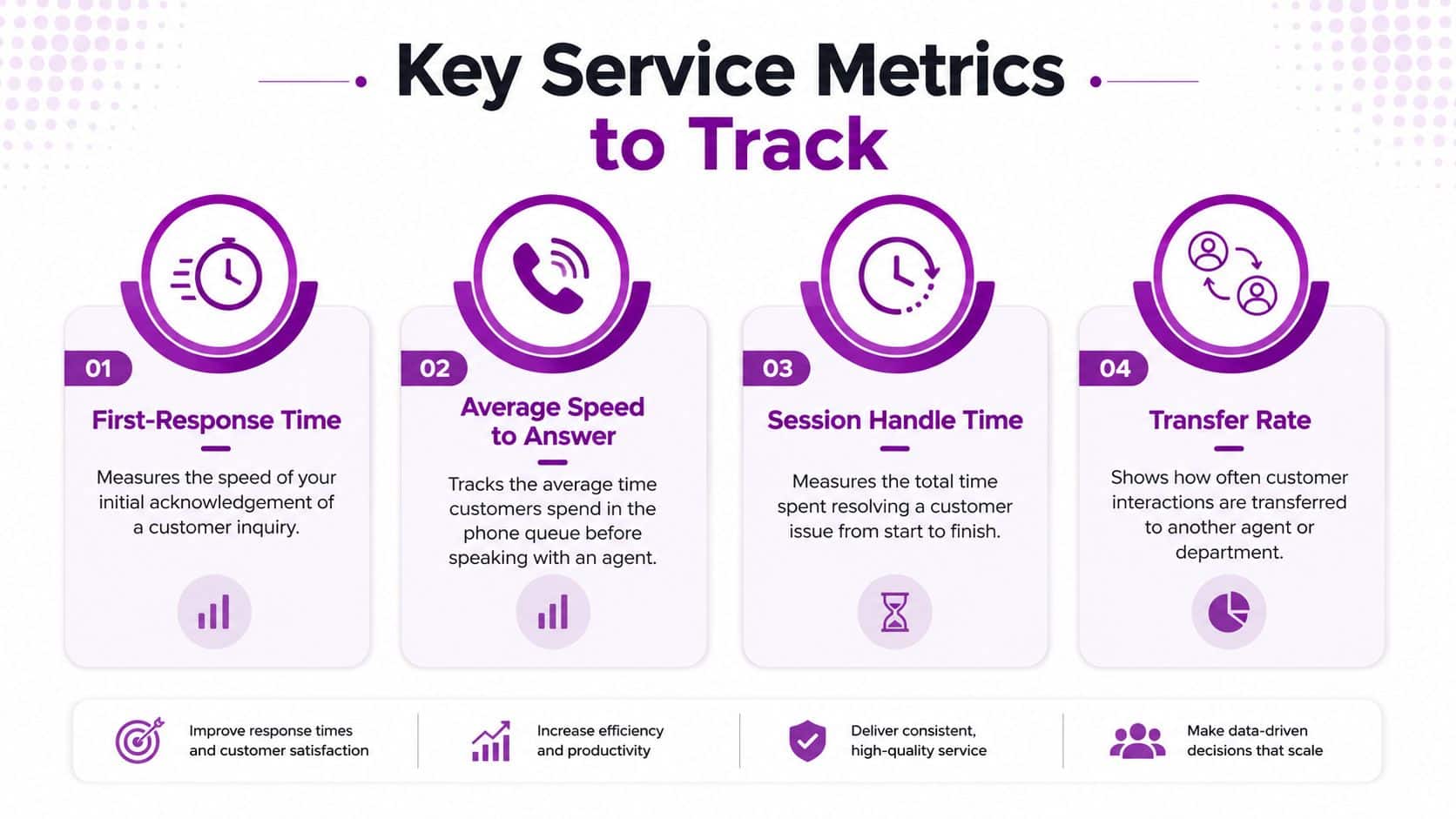
Microsoft's documented analytics include first-response time, average speed to answer, session handle time, transfer rate and session rejection rate. Those are the numbers that tell you whether routing is doing its job, whether the team is stretched, and whether customers are waiting too long before an agent takes ownership.
Knowledge management sits in the same workflow. If your agents keep solving the same issue from scratch, you are paying them to rediscover answers that should already be captured. In a well-run deployment, the knowledge article appears in the agent workspace, is checked against the case context, and keeps answers consistent across the team.
For a practical view of how service automation and workflow design fit together, the customer service automation discussion is worth a look.
How the main capabilities compare
| Capability | What it does | Outcome for service teams |
|---|---|---|
| Automatic case creation | Turns inbound requests into cases | Less manual logging |
| Intelligent routing | Assigns work by skills or issue type | Better first-touch handling |
| SLAs and entitlements | Measure and enforce support commitments | Clearer service control |
| Knowledge management | Makes approved answers available | Faster, more consistent resolution |
| Multisession workspace | Lets agents handle several conversations at once | Better live-channel productivity |
A warranty case in manufacturing is a good example. An entitlement should tell the agent whether the customer is covered, the SLA should show how long they have left to respond, and routing should put the work with someone who understands that product family. If any one of those pieces is missing, the whole process starts to feel like admin theatre.
The Metrics Service Leaders Should Watch
If your team only watches queue length, you are managing by panic. A service lead needs cleaner signals than that. Microsoft's analytics surface measures that show whether the operation is steady, stretched or breaking down. The ones that deserve attention are first-response time, average speed to answer, session handle time, transfer rate and session rejection rate.
What each metric tells you
First-response time shows how quickly a customer gets acknowledgement. For a charity handling donor or beneficiary queries, that can matter more than a polished final resolution time. Average speed to answer is the queue discipline measure, and it matters most in voice environments. Session handle time shows whether the case is straightforward, complex or being dragged out by poor process. Transfer rate shows whether routing is sending work to the wrong place.
Microsoft defines session transfer rate as number of transferred sessions divided by total incoming sessions × 100 Microsoft analytics documentation. That is the figure I would put in front of a service manager first, because it exposes triage weakness fast. A high transfer rate usually means the first person who touched the case was not the right person.
Management rule: if transfers are climbing, check routing rules, knowledge quality and queue design before you blame the agents.
Microsoft also documents service levels in 10-, 20-, 30-, 40-, 50-, 60- and 120-second response windows. Use the tighter windows where customers expect immediate live handling, and use looser targets where the work is more complex or non-urgent. Set the target to fit the service model, not because the software allows it.
The practical choice for UK teams
A three-site business can compare the same metrics across shift patterns and spot weak handover points. A manufacturer may care more about handle time and transfer rate, while a charity board will care more about first acknowledgement and service consistency. Either way, the reporting only helps if someone reviews it weekly and changes the process.
For leaders trying to link service data to AI adoption, this Microsoft AI Copilot briefing is a useful companion, because the reporting quality and the AI output quality rise and fall together.
How It Connects to Microsoft 365, Azure, Power Platform and Copilot
The value of Dynamics 365 Customer Service jumps when it sits inside the rest of the Microsoft stack. An inbound email becomes a Dataverse record, the agent sees it in the workspace, and the case can trigger downstream actions through Power Automate. That's the difference between a ticketing app and an operational system.
The integration chain that matters
A sensible flow looks like this. Outlook captures the inbound message, the case lands in Dynamics 365, Copilot drafts a summary or response, Power Automate checks an entitlement in another business system, and Power BI rolls the activity into management reporting. If an internal team needs help, Teams becomes the escalation path rather than a separate island of communication.
Microsoft's product material emphasises Copilot for case summarisation, troubleshooting and drafting responses Dynamics 365 Customer Service product page. That's useful, but don't rush the rollout just because the demo looks slick. The benefit comes when the case data is clean enough for AI to read and the knowledge base is structured enough for AI to reuse.
The governance gap most buyers ignore
This is the bit most UK guides skip. If your records include personal data, complaint details or consent-sensitive notes, you need classification, role-based access and auditability before you let AI loose on them. UK GDPR doesn't care that the summary was convenient if the underlying data controls were weak.
Microsoft's own material points out that analytics and topics dashboards depend on structured service data and historical views, which is another clue that data hygiene matters before AI features do Dynamics 365 Customer Service product page. My advice is blunt. Don't buy Copilot capability first and governance later. Get your information architecture, retention rules and permissions sorted before you switch anything on.
For a wider view of Microsoft's AI direction in service workflows, this is a sensible companion read on Microsoft AI and Copilot.
Licensing and Deployment Options in the UK
UK SMBs usually trip over the commercial model, not the software. Microsoft's packaging looks straightforward at first glance, then telephony, AI, connectors and implementation land on the quote as separate items. If you do not split those out early, the purchase order looks tidy and the true spend does not.
Start with the licensing shape
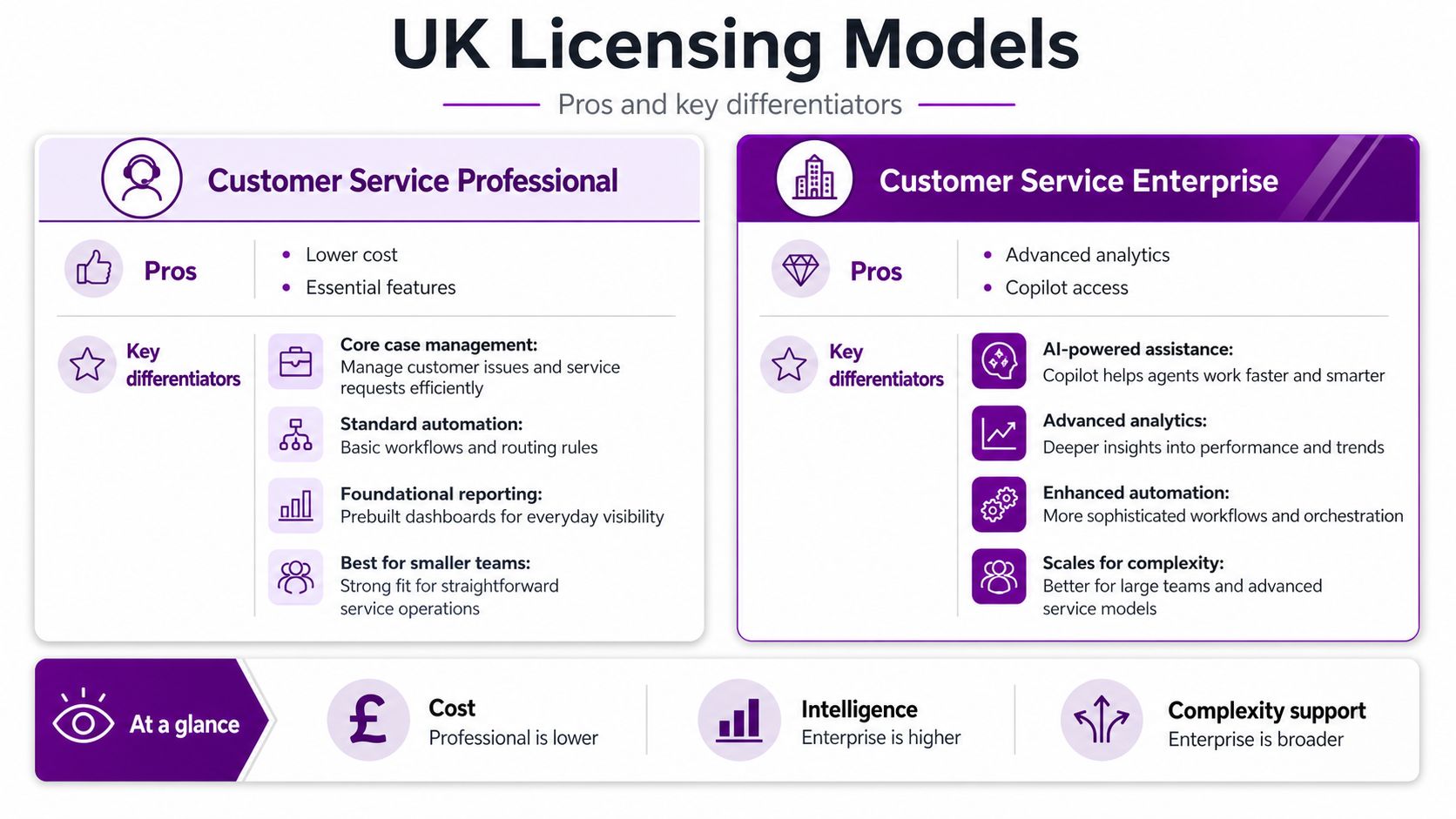
Dynamics 365 Customer Service is usually licensed per user, and the difference between Professional and Enterprise is meaningful. Professional fits straightforward service teams, while Enterprise suits richer analytics, broader service controls and Copilot-aligned use cases. If your agents need advanced routing, deeper reporting and more mature service management, Professional will feel cramped fast.
Microsoft's own 2024 Forrester TEI study is the strongest value reference point here. It reported a 315% ROI, $14.7 million in three-year benefits, a $3.54 million three-year investment, and a payback period of less than six months for the composite organisation studied Microsoft TEI study. That is a global study, not a UK-specific guarantee, but it shows why disciplined service teams treat the platform as operating infrastructure, not a line item on a procurement form.
What usually gets missed in the quote
Telephony is the first trap. If you want voice, you need the right channel licensing and the related communications stack. Copilot usage can also push cost up if you scale it without a plan. Then there are Power Platform premium connectors, migration effort, and the time needed to clean old cases, merge knowledge articles and rebuild workflows.
Commercial rule: if the reseller's proposal does not separate telephony, AI, integration and migration, the quote is not complete enough yet.
For most UK mid-market firms, cloud-first is the right deployment choice. On-premises only makes sense where there is a very specific constraint, and even then the business case needs to be strong. If you need a regional partner to implement and support the stack, one option is F1Group, which works with Microsoft technologies across customer service, Microsoft 365, Azure and the Power Platform.
ROI, TCO and the Case for Adoption
The commercial case for Dynamics 365 Customer Service is strongest when you strip out the sales talk and look at how service work changes. As noted earlier, the Forrester TEI study points to a strong return profile for the platform, but UK buyers should treat that as a benchmark, not a guarantee. Your own case depends on how much time your team loses to rekeying, swivel-chair working, poor routing, duplicate records and slow hand-offs.
How to think about cost in the real world
A proper TCO model for a UK mid-market rollout starts with more than licences. You need to count implementation, data migration, process redesign, user training, integration work, reporting setup and ongoing support. VAT also matters here, because procurement teams often quote and compare numbers inconsistently if they do not agree whether they are looking at net or gross cost.
The biggest mistake is assuming the software cost is the project cost. It is not. The actual spend usually sits in cleaning legacy cases, standardising fields, linking the service desk to the rest of the Microsoft stack and getting the team to use the new process properly. If you are planning a rollout with a local partner, a practical CRM implementation checklist helps you keep the work tied to delivery, not just licensing talk.
What should drive adoption
Financial return is only part of the decision. UK service leaders should care about whether the platform reduces compliance risk, gives cleaner audit trails and makes it easier to handle customer data under UK GDPR. That matters even more if your organisation deals with sensitive cases, regulated complaints or multiple business units that all want their own version of the truth.
Adoption also depends on data quality. Copilot and automation features are useful only when the underlying records are clean, the knowledge base is current and the routing rules match the way the service team works. If those foundations are weak, the AI layer will not rescue the operation, it will just expose the mess faster.
The board-level checklist
- Data quality first: remove duplicate cases, tidy customer records and retire dead knowledge articles.
- Process fit second: define what counts as a case, what belongs in a queue and who owns each hand-off.
- Change control third: train agents on the new workspace before you cut over, not after.
- Governance fourth: make sure access, retention and audit rules are aligned to UK GDPR and internal policy.
For an East Midlands IT Director, the question is simple. Does the platform reduce manual work, improve visibility for managers and give finance a cleaner view of service cost without creating a licensing mess later? If the answer is yes, adoption is easy to justify. If the answer depends on future fixes, the business case is not ready yet.
A Practical Implementation and Migration Checklist
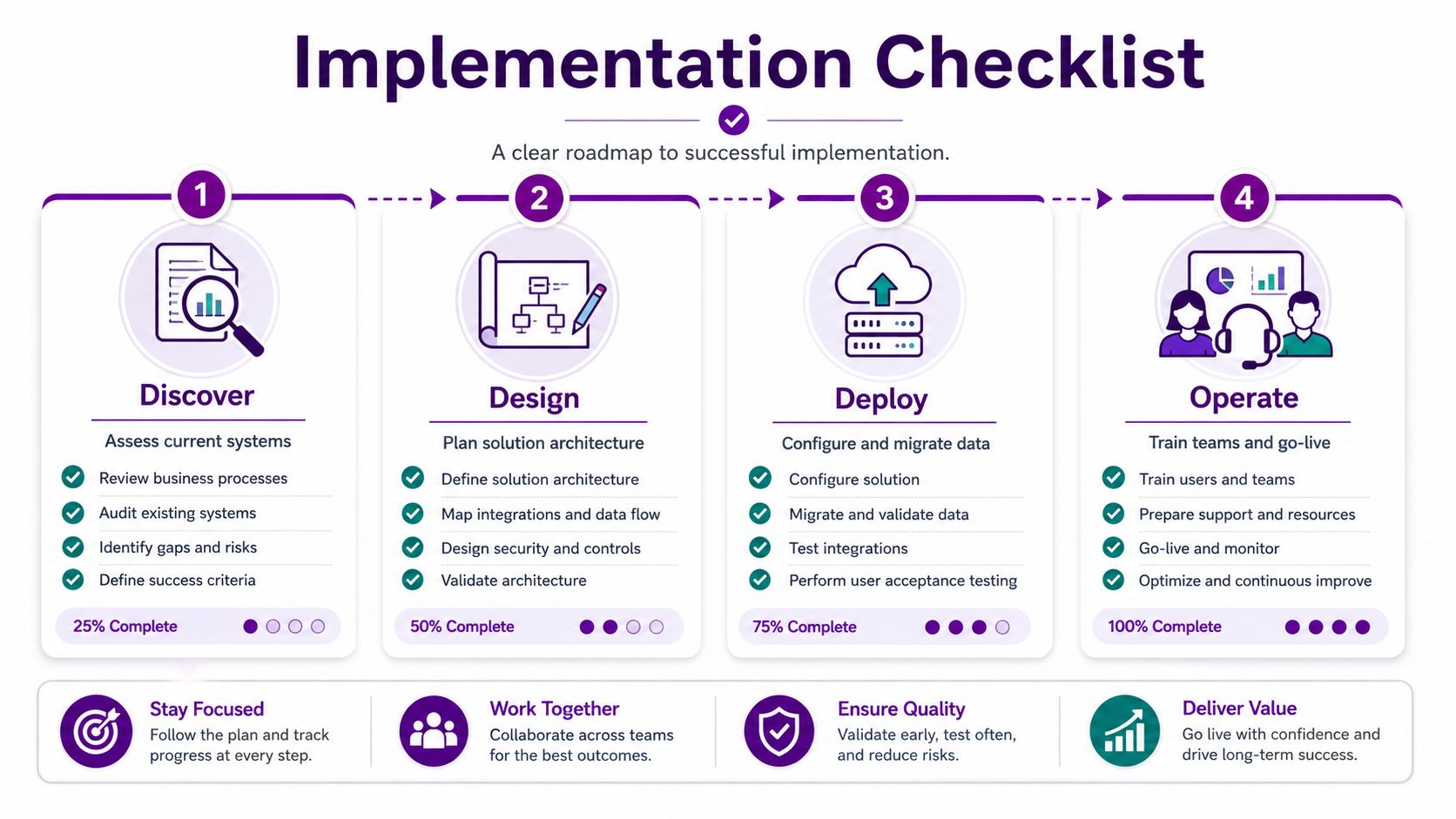
The cleanest rollouts I've seen follow four phases. They don't try to boil the ocean. They map the current mess, design the future state, deploy in controlled stages and then operate with active review. That is the only sensible way to move a service team without breaking it.
Discover, design, deploy, operate
Discover means stakeholder mapping, process mapping, data quality review and an AI-readiness check. You want to know what lands in the service team today, what should become a case, and which records are too messy to trust yet. The checkpoint is simple, you should have a labelled inventory of channels, data sources and service pain points.
Design is where you define the channel strategy, SLAs, routing rules, knowledge taxonomy and security roles. If you skip this and configure the system on instinct, you'll just automate bad habits. The checkpoint is a signed-off service design that your operational manager recognises.
Deploy covers pilot, training, cutover and hyper-care. Keep the pilot small, use real cases, and don't let the team go live without practised workflows. Your checkpoint here is adoption, not technical completion.
Operate is managed support, analytics review and continuous improvement. The system becomes useful instead of merely installed. If the reporting is ignored after go-live, you've spent money on a dashboard, not a service platform.
| Phase | Main work | Checkpoint |
|---|---|---|
| Discover | Current-state mapping, data audit, AI-readiness | Agreed problem list |
| Design | SLAs, routing, roles, knowledge structure | Signed-off future process |
| Deploy | Pilot, training, cutover, hyper-care | Stable adoption |
| Operate | Support, analytics, improvement | Measured service governance |
What a good regional partner should bring
An East Midlands partner should do more than click through setup screens. You want Microsoft competency, local presence, security credentials, references, and a clear managed-service commercial model. You also want someone who will own the issue instead of passing it between vendors when routing, identity or integration gets messy.
For project governance and migration discipline, the same logic applies to any CRM rollout. A good benchmark for the implementation shape is CRM implementation planning.
Phone 0845 855 0000 today and send us a message at https://www.f1group.com/contact/ if you want a straight conversation about whether Dynamics 365 Customer Service fits your service operation, your governance needs and your budget. F1Group helps East Midlands organisations design, implement and support Microsoft service platforms with the kind of practical ownership that keeps projects moving. Visit F1Group to talk through the right licensing, deployment and migration approach for your team.