
Your fee earners are mid-transaction. A bundle needs to go out. Someone can't open the matter file remotely. Outlook is hanging, the scanner has dropped off the network, and nobody knows whether last night's backup successfully ran. At that point, “we'll log a ticket” isn't support. It's delay.
That's the core issue with old-style break-fix IT in legal practice. It waits for failure, then reacts. Law firms can't afford that model any more. You're handling confidential client data, strict deadlines, court timetables, completions, billing pressure, and regulatory obligations that don't pause because a server is misbehaving.
For UK firms, especially smaller and mid-sized practices across the East Midlands, good IT support isn't a nice extra. It's part of how you protect client confidentiality, keep people productive, and show that your controls are proportionate and defensible.
Why Your Law Firm Needs More Than Just IT Support

A law firm doesn't suffer IT problems in isolation. Every outage lands somewhere expensive. A partner loses time, a secretary can't issue documents, a conveyancing team misses momentum, or a fee earner starts working around systems instead of through them. That's when risk creeps in.
The legal sector has already recognised this. In Tabush Group's 2024 Law Firm Technology Survey, nearly 8 in 10 respondents said their firms were outsourcing some or all of their IT management, which tells you something important. External specialist support is no longer unusual. It's standard operating practice.
Break-fix is the wrong model for legal work
If your provider only appears when something has already failed, you're paying for disruption twice. First in lost time, then in the invoice to fix it.
A proper legal IT arrangement should cover prevention, monitoring, user support, security oversight, access control, backups, onboarding, offboarding, and continuity planning. That's because law firms don't just need computers to work. They need systems that support matter management, protect evidence, and preserve trust.
Good legal IT support should reduce avoidable incidents, not just answer the phone once the damage is done.
Your peers have moved on
This shift isn't about fashion. It's about reality. Legal work now depends on Microsoft 365, secure remote access, cloud platforms, scanned documents, email-based collaboration, and increasingly complex supplier chains. A general office IT setup won't cope for long.
If you still treat IT as a background utility, you'll keep getting background problems that interrupt frontline legal work. The firms doing this properly treat IT as an operational and compliance function. They expect more than a helpdesk, and they're right to.
What Specialist IT Support for Law Firms Includes
The phrase it support for law firms gets used loosely. In practice, it should mean a layered service built around legal workflows, not a generic support contract with “law firms” added to the page title.
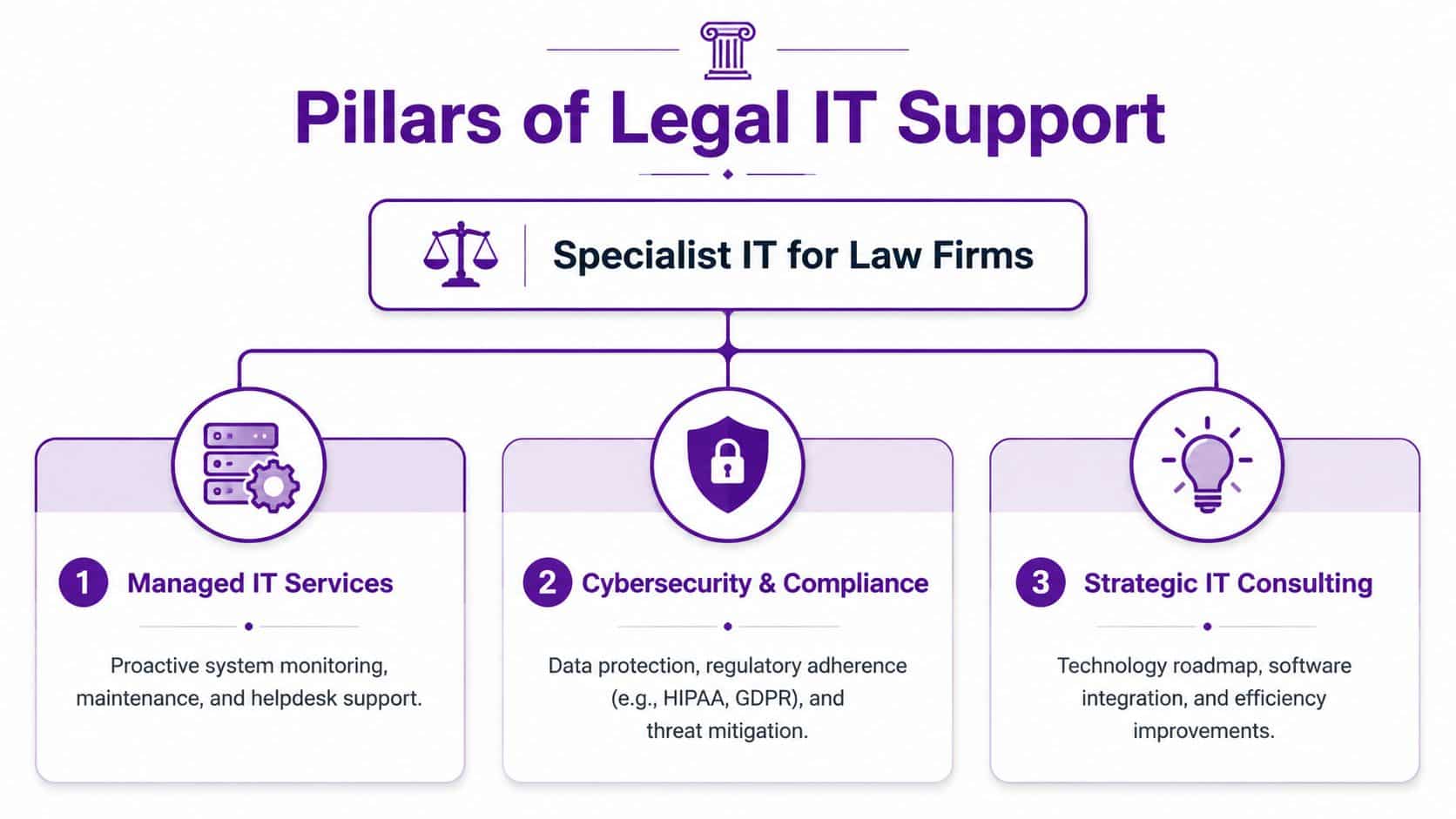
The core service stack
The baseline is broader than most firms first assume. As noted in Uptime Legal's overview of law firm IT support, the IT support ecosystem for legal practices must encompass Microsoft 365 administration, backup monitoring, remote-access protocols, and vendor coordination, creating a layered architecture that supports both user issues and wider system stability.
That's the right way to think about it. Not as one service, but as several interlocking responsibilities.
- Managed support and monitoring means someone is watching the health of servers, endpoints, backups, patches, and core services before users start complaining.
- Microsoft 365 administration covers identity, permissions, Exchange, Teams, SharePoint, OneDrive, security settings, and the daily housekeeping most firms neglect until something breaks.
- Remote access and device control means solicitors and staff can work securely from court, home, client premises, and branch offices without inventing their own workarounds.
- Vendor coordination matters because your users don't care whether the issue sits with the internet provider, the case management supplier, the photocopier, or Microsoft. They want one owner.
Legal systems need joined-up support
A legal practice usually runs on more than email and Word. You may have a case management platform, a document management system, legal accounts software, digital dictation, scanning workflows, and specialist applications for property, private client, family, litigation, or crime.
That means your provider needs to understand how systems interact. A DMS isn't just a filing cabinet. It's your single source of truth for matter documents, version control, and searchability. If it's poorly configured, people save files to desktops, email attachments round the office, and lose control of the record.
If you're reviewing options or modernising your stack, this overview of top technology for legal firms is a useful reference point because it frames technology choices around actual legal operations rather than generic office features.
Microsoft 365 and Copilot change the brief
Most firms now sit somewhere in the Microsoft ecosystem. That's good news if it's set up properly. Microsoft 365 and Azure can give you stronger identity control, better remote working, cleaner collaboration, and less dependence on fragile on-premises kit.
But newer tooling raises the bar. Copilot, document search, Teams collaboration, and automation tools are only safe if your permissions, data classification, retention, and sharing settings are under control. If they aren't, AI will surface your mess faster.
Practical rule: Don't enable AI features on top of poor information governance. Fix permissions first.
A specialist provider should help with structured rollout, testing, governance, and user training. That includes deciding who can access what, what can be shared externally, what needs retention labels, and how matter data is kept separate.
For firms that need external expertise on this wider stack, specialist IT support for regulated organisations should include cloud administration, cyber controls, user lifecycle management, and support for modern legal workflows rather than just desktop troubleshooting.
Navigating Unique Compliance and Security Demands
Law firms don't have the luxury of treating cyber security as a technical side issue. In legal practice, a security failure can become a client confidentiality problem, a professional conduct problem, and a regulatory reporting problem very quickly.

A useful benchmark comes from the UK legal sector itself. A 2024 law-firm statistics roundup reported that cyber threats are a concern for 78% of the top 100 law firms in the UK. That should end the old argument that smaller or regional firms are somehow beneath notice. Criminals target access, weak controls, and busy people. They don't care whether your office is in the City or the East Midlands.
Compliance has to be visible, not assumed
A lot of providers say they'll “help you stay compliant”. That phrase is nearly useless unless they can show what that means in practice.
For a UK law firm, I'd expect evidence around:
- Access control with sensible role-based permissions, prompt joiner and leaver handling, and enforced multi-factor authentication
- Device and patch management so laptops, desktops, and servers aren't left drifting out of date
- Backup discipline with monitoring, testing, and clear recovery expectations
- Email and identity protection because account compromise still causes serious damage
- Logging and incident response so the firm can establish what happened, who was affected, and what actions were taken
- Supplier due diligence covering contracts, responsibilities, and data handling arrangements
That's where a legal specialist earns their keep. They should help you build a system of evidence, not just a pile of tools.
SRA duties and GDPR realities
The SRA expects firms to protect client money and information, maintain proper governance, and manage operational risk competently. UK GDPR and the Data Protection Act 2018 add another layer. So your IT provider isn't just supporting software. They're operating inside a regulated environment where poor controls can have legal consequences.
A firm that can't show how it manages access, backups, breaches, and third-party suppliers is exposed. If an incident happens, “our IT company was dealing with it” won't be enough.
A sound starting point is to review whether your provider's controls line up with practical network security expectations for modern businesses and then translate those controls into legal-sector processes, policies, and audit trails.
The following video gives a helpful overview of the wider security conversation firms need to be having.
If your provider can't explain your incident process in plain English, they probably haven't built one properly.
Solving The Common IT Pains in Legal Practice
Most firms don't start shopping for new support because they suddenly love infrastructure. They do it because day-to-day work has become harder than it should be.
One fee earner can't get a stable connection from home. Another keeps hunting through email chains for the latest draft. Accounts are rekeying information manually because systems don't talk to each other. A new starter arrives and waits too long for the right access. None of that feels dramatic, but it steadily wastes time and irritates staff.
The deeper problem is design. As Straight Edge Technology's analysis of legal IT challenges puts it, law firms experience technology friction when IT systems are architected around generic office needs rather than legal workflows. That friction shows up as inefficient case management, manual billing processes, and fragmented client communication.
What this looks like on a normal week
On Monday, someone saves a document locally because the shared location is slow. By Tuesday, a colleague edits the wrong version. On Wednesday, the partner working remotely can't reach a matter file without phoning the office. On Thursday, a suspicious email lands in a busy inbox and gets opened because everyone is rushing. On Friday, the team is behind and nobody can say exactly where the time went.
That's what bad IT looks like in a law firm. Not one dramatic outage. Repeated drag.
The right fixes are usually structural
You don't solve this with a better password policy alone. You solve it by aligning systems to legal work.
For example:
- Matter-centric document handling reduces version confusion and stops files living in inboxes.
- Reliable remote access lets solicitors work securely without resorting to personal devices or awkward file transfers.
- Integrated billing and workflow removes duplicate effort and shortens the gap between work done and work invoiced.
- Clear client communication channels cut the mess of scattered emails, attachments, and missed updates.
If you're comparing platforms or trying to clean up fragmented legal workflows, this guide for law firm software buyers is worth reading because it focuses on how software choices affect actual legal operations, not just feature lists.
The biggest hidden IT cost in a law firm is billable time lost to avoidable friction.
Your Checklist for Choosing the Right IT Partner
Most firms ask the wrong opening question. They ask, “What do you charge?” before they ask, “Do you understand legal risk, legal systems, and legal working patterns?”
That's backwards. Price matters, but due diligence matters first.
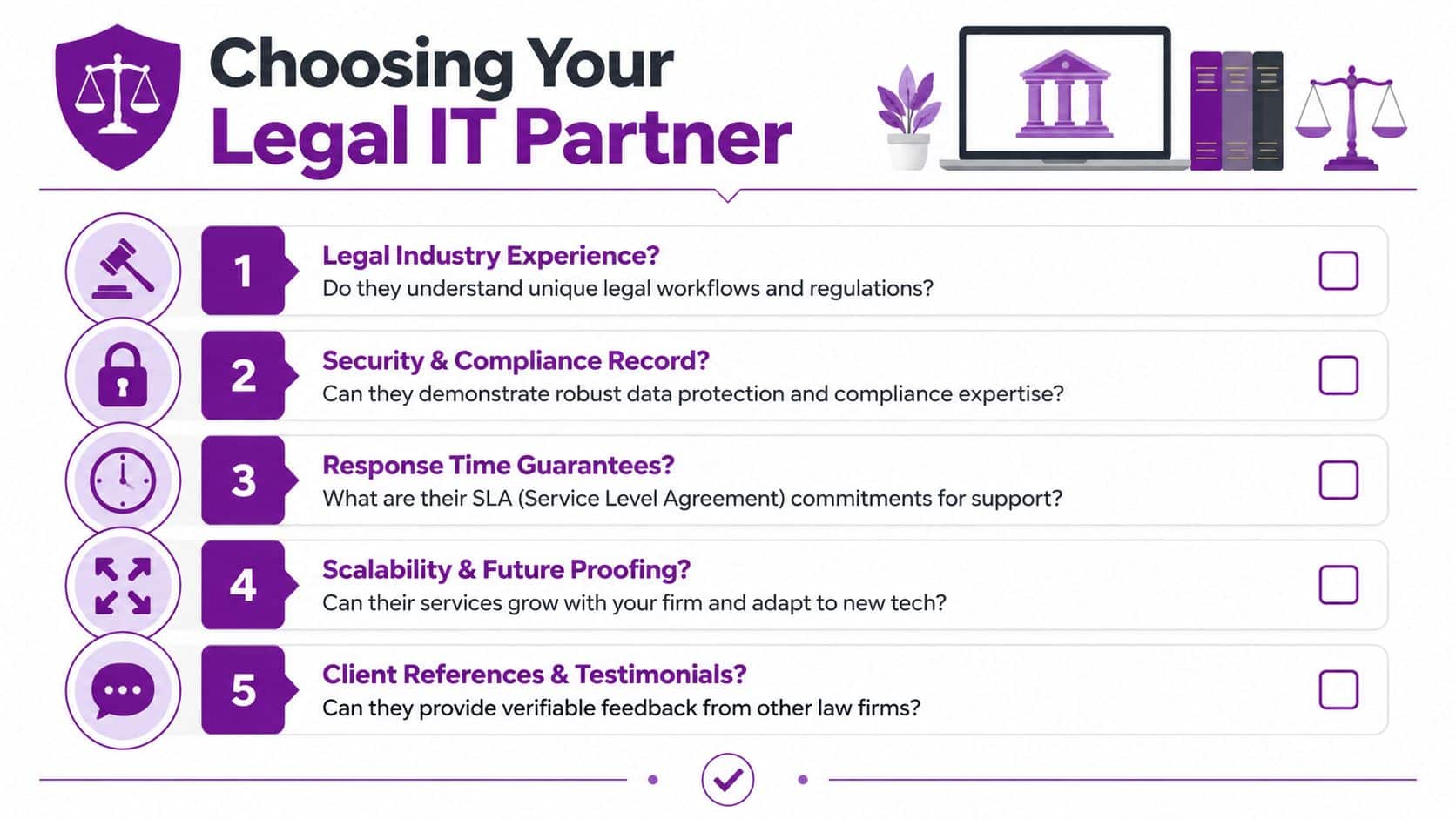
Questions every law firm should ask
The UK threat picture is blunt. The UK government's Cyber Security Breaches Survey 2024, cited here, found that 50% of businesses experienced some kind of cyber security breach or attack in the previous 12 months, with phishing the most common. So don't ask vague questions about security. Ask how the provider helps your firm evidence proportionate controls against common attacks.
Use this checklist.
-
Have you supported law firms with similar workflows to ours
If they only support generic office environments, they'll miss the operational detail. Ask about experience with legal accounts packages, case management systems, DMS platforms, dictation, secure document sharing, and courtroom or remote-working realities. -
How do you handle joiners, leavers, and role changes
This is basic governance. It should be fast, documented, and tied to access rights. Delays create frustration. Sloppy offboarding creates risk. -
What do you actively monitor
“We're proactive” is meaningless without specifics. You want to know whether they monitor backups, endpoints, patch status, Microsoft 365, server health, storage, security alerts, and failed jobs. -
How do you support compliance evidence
Ask what records they provide. You should expect documentation around patching, MFA enforcement, backup checks, incidents, user changes, and supplier responsibilities.
What separates a partner from a supplier
A real partner will give clear answers to practical questions. A weak provider hides behind jargon.
Ask them:
- Escalation ownership. Who owns a problem that spans multiple vendors?
- Legal software familiarity. Can they work with platforms such as Clio, NetDocuments, iManage, and related tools?
- Security posture. How do they reduce phishing exposure, account compromise, and unauthorised access?
- Support coverage. What happens if an urgent issue lands outside normal hours?
- Staff trustworthiness. Are engineers appropriately checked and suitable for access to sensitive environments?
- Roadmapping. Can they help with Microsoft 365, Azure, data governance, and Copilot planning, not just support tickets?
A simple evaluation grid
| Question | Good answer | Weak answer |
|---|---|---|
| Legal sector experience | Can describe legal workflows and systems in detail | Speaks only in generic SME terms |
| Compliance support | Shows documentation and process evidence | Says “we’ll keep you compliant” |
| Security controls | Explains MFA, logging, backups, response steps | Focuses only on antivirus |
| Service ownership | Coordinates vendors and takes responsibility | Tells you to call third parties |
| Future planning | Advises on cloud, governance, and process improvements | Waits for you to ask for everything |
Choose the provider who makes risk easier to manage and operations easier to run. Don't choose the one who answers tickets fastest in a sales meeting.
Understanding Service Models Pricing and Onboarding
Pricing for it support for law firms should be clear, predictable, and tied to scope. If the proposal is vague, expect arguments later.

The service models that matter
Most firms will see three common approaches.
- Per-user managed support works well when you want steady monthly billing and broad coverage for staff, devices, Microsoft 365, and day-to-day support.
- Tiered packages can work if the inclusions are explicit, but they often hide awkward exclusions around security tooling, on-site visits, projects, or backup remediation.
- Ad-hoc support looks cheaper until the firm starts paying for every issue, every change, and every emergency. For regulated legal work, it's usually the wrong choice.
I prefer managed agreements for law firms because they encourage prevention. If the provider only gets paid when things go wrong, don't expect much enthusiasm for reducing incidents.
What to look for in the commercial detail
Don't fixate on the monthly figure alone. Read the service definition.
Check for:
- What's included in helpdesk, monitoring, Microsoft 365 administration, user management, and security tasks
- What counts as a project rather than support
- How on-site work is handled
- Whether backup monitoring and testing are included
- Who manages third-party vendors
- How contract exit and handover work
If you want a broader view of how service providers think about visibility and workforce behaviour, this look at monitoring software adoption and focus time is useful context. It won't replace legal-sector due diligence, but it can help you think more sharply about operational reporting and management insight.
Onboarding should be controlled, not chaotic
A good transition follows a disciplined sequence.
| Stage | What should happen |
|---|---|
| Discovery | Audit users, devices, software, licences, backups, security settings, suppliers, and risks |
| Planning | Agree priorities, responsibilities, access requirements, and migration timing |
| Stabilisation | Fix urgent weaknesses first, especially backups, identity controls, and unsupported systems |
| Handover | Transfer credentials, documentation, monitoring, vendor contacts, and service ownership |
| Improvement | Tackle structural issues such as remote access, permissions, document handling, and cloud cleanup |
If a new provider wants to “take over quickly” without discovery, that's not efficiency. It's negligence.
Your Trusted IT Partner in the East Midlands
East Midlands law firms need practical support, not vague promises. They need a provider who understands Microsoft 365, Azure, security controls, user lifecycle management, and the pressure legal teams work under every day.
That's especially true if your firm is balancing office-based and hybrid working, planning a move away from aging servers, or trying to make sensible use of Copilot and modern collaboration without losing control of matter data. The provider has to understand both the technology and the working environment around it.
For firms comparing options across the region, IT service provider support in the East Midlands should be judged on the same standards set out above. Can they take ownership, work on-site when needed, support Microsoft-focused environments, and deal with real operational issues rather than just generic tickets? That's the standard to hold.
One provider in that space is F1Group, which supports organisations across Lincoln, Nottingham, Leicester, Scunthorpe, Grimsby, and Newark with Microsoft 365, Azure, cyber security, Copilot, managed support, and hands-on engineering.
F1Group Legal IT Support At a Glance
| Service Area | F1Group Capability |
|---|---|
| Managed IT support | Remote and on-site support with ongoing system oversight |
| Microsoft 365 and Azure | Administration, cloud migration, identity, collaboration, and infrastructure support |
| Cyber security | Security-focused support aligned to modern business risk |
| Copilot and Power Platform | Help with adoption, governance, and practical business use |
| On-site engineering | Vendor-certified and DBS-checked engineers for hands-on support |
| East Midlands coverage | Support across key locations including Lincoln, Nottingham, Leicester, Scunthorpe, Grimsby, and Newark |
If your current support is reactive, inconsistent, or too generic for legal work, change it. Waiting rarely improves IT.
If your law firm needs dependable, security-focused support across the East Midlands, speak to F1Group about a more practical approach. Phone 0845 855 0000 today or send us a message.