
Your business probably already runs on the cloud, even if nobody describes it that way internally.
Email sits in Microsoft 365. Files live in SharePoint or OneDrive. Staff sign in from home, on the road, and from phones. Finance may use SaaS platforms. Someone in operations has an Azure workload doing something important that only two people fully understand. That setup is normal for a mid-sized organisation in the East Midlands. So is the uneasy feeling that one bad click, one weak admin account, or one missed setting could turn into a very expensive week.
Cloud security solutions matter because the cloud has become your operating environment, not a side project. The challenge is that a lot of advice on this topic is either too technical, too generic, or packed with vendor jargon. What most businesses need is a practical view of what to enable first, what to leave until later, and when it makes sense to get specialist help.
Why Cloud Security is Business Critical for UK SMBs
A common situation looks like this. A managing director knows the company depends on Microsoft 365 every day, the IT manager knows Azure and SaaS access have grown quickly, and everyone assumes Microsoft “handles the security”. That assumption is where problems start.

For UK firms, this isn't a theoretical risk. The UK government's 2025 Cyber Security Breaches Survey reported that 52% of UK businesses used cloud computing services, rising to 69% among medium businesses. The same survey found that 50% of businesses experienced a cyber security breach or attack in the previous 12 months, and that figure was even higher for medium businesses at 70%, as summarised in this UK cloud security statistics reference.
That combination matters. More businesses rely on cloud platforms, and a large share are still getting hit.
What this means in practice
If your business uses Microsoft 365, Azure, remote access, and cloud file sharing, your security controls need to sit where the risk now lives. For most organisations, that means focusing on:
- Identity security so compromised passwords don't become full account takeovers
- Access control so users and admins only have the permissions they need
- Data protection so sensitive files aren't exposed or lost
- Monitoring and response so suspicious behaviour is spotted quickly
- Backup and recovery so a user mistake or attack doesn't become an outage
Many firms still think of cyber security as antivirus plus a firewall. That isn't enough once your staff, data, and business systems are spread across Microsoft cloud services.
Practical rule: if staff can work from anywhere, attackers can try from anywhere too.
The good news is that cloud security solutions can be made manageable. You don't need to buy every product in the market. You do need a sensible baseline, clear priorities, and an operating model that matches how your business operates. If you're reviewing the basics first, this guide to cyber security for small business is a useful starting point before you go deeper into cloud-specific controls.
The real board-level issue
For mid-sized organisations, cloud security is no longer just an IT housekeeping task. It affects business continuity, insurance conversations, customer trust, compliance duties, and day-to-day productivity. If email, files, collaboration, and line-of-business systems all depend on cloud access, then security failures become operational failures.
The Five Pillars of Modern Cloud Defence
The easiest way to understand cloud security solutions is to think about securing a modern office building. You don't protect the building with one lock on the front door. You use several layers that do different jobs.
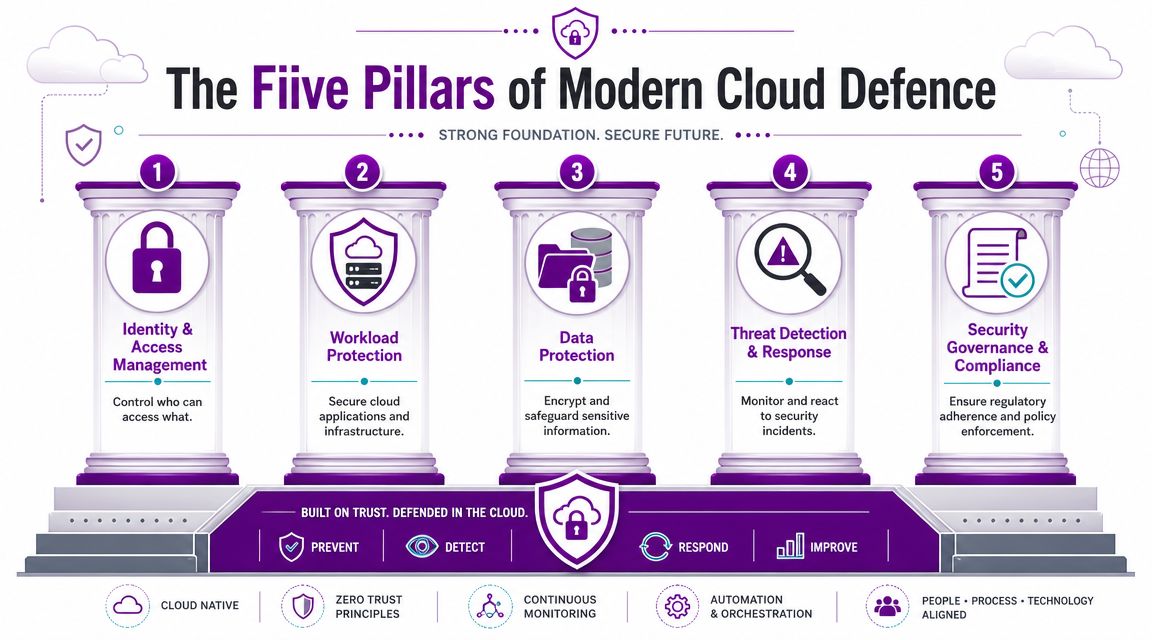
In cloud environments, the same logic applies. The key difference is responsibility. In the UK, cloud security solutions need to follow the NCSC shared-responsibility model, where the provider secures the underlying infrastructure while the customer remains responsible for identity, configuration, data protection, and workload hardening. That also means least-privilege IAM and conditional access are primary controls for reducing breach likelihood, as set out in this guidance reference on cloud security shared responsibility.
Identity and access management
This is your keycard system.
If someone steals a member of staff's password and there is no strong authentication, they may get straight into email, files, Teams, and connected apps. Good identity controls reduce that risk before it spreads.
For a Microsoft-based business, that usually means MFA, conditional access, blocked legacy authentication, sensible admin separation, and regular reviews of privileged accounts.
Workload protection
This is the part that secures the rooms where the important machinery sits.
If you run Azure virtual machines, hosted applications, databases, or cloud workloads tied to operations, they need hardening, patching, and visibility. A cloud platform won't stop you from leaving something exposed through a poor setting or broad permission.
What fails in practice isn't usually “the cloud”. It's an avoidable customer-side gap.
To see how this lines up with a broader security model, the principles behind Zero Trust security are useful. Trust no user or device by default. Verify access continuously.
After the foundations, this short explainer is worth watching:
Data protection
This is your filing room, document safe, and records policy rolled into one.
You need to know where sensitive data lives, who can reach it, whether it is being shared too broadly, and how it is recovered if deleted, encrypted, or overwritten. Data protection in cloud security solutions isn't only about encryption. It's also about governance, retention, sharing rules, and backup.
Threat detection and response
This is your CCTV, alarm panel, and security team.
A control that only blocks known bad activity is useful, but incomplete. If an attacker signs in with valid credentials, prevention alone may not catch it. You need logging, alerting, investigation workflows, and response actions that can contain activity quickly.
Attackers don't need to break the cloud platform if they can simply sign in as a user who has too much access.
Security governance and compliance
This is the policy layer. Who can issue keys, approve visitors, review incidents, and prove the building is being managed properly.
This pillar is where many SMBs struggle. They buy tools but don't define ownership, review cycles, admin standards, or recovery testing. Without governance, controls drift and exceptions become permanent.
Mapping Solutions to the Microsoft Ecosystem
Once the five pillars are clear, the next step is translating them into actual Microsoft products and functions. This makes many cloud security solutions easier to evaluate. Instead of buying tools because of marketing language, map each one to the job it does.
Microsoft Cloud Security Solutions Mapped to Key Pillars
| Security Pillar | Primary Microsoft Solution(s) | What It Protects |
|---|---|---|
| Identity & Access Management | Microsoft Entra ID, Conditional Access, MFA, Privileged Identity Management | User sign-ins, admin access, session control, identity risk |
| Workload Protection | Microsoft Defender for Cloud, Microsoft Defender for Servers, Azure Policy | Azure workloads, virtual machines, cloud posture, insecure configurations |
| Data Protection | Microsoft Purview, Microsoft 365 retention and sensitivity features, backup solutions | Sensitive files, emails, records, sharing controls, information governance |
| Threat Detection & Response | Microsoft Defender XDR, Microsoft Sentinel, Defender for Endpoint | Suspicious activity across identity, endpoint, cloud apps, and investigation workflows |
| Security Governance & Compliance | Microsoft Purview compliance features, Azure Policy, Secure Score-style improvement planning | Policy enforcement, auditability, configuration standards, regulatory support |
What each Microsoft layer actually does
Microsoft Entra ID is the control point for sign-in security. If you only change one area first, start here. Strong authentication and conditional access stop a large amount of avoidable risk.
Microsoft Defender for Cloud is best understood as posture and workload oversight for Azure and connected environments. It helps surface risky configuration, exposed services, and missing protections. It is not a substitute for sound design, but it gives you a much clearer view of where the problems sit.
Microsoft Purview matters when your issue is not just “keep hackers out” but “control what happens to data”. That includes labelling, retention, and oversight of sensitive information moving through Microsoft 365.
Microsoft Sentinel is the point where monitoring becomes a proper operational discipline rather than a pile of disconnected alerts. It pulls together telemetry so someone can investigate events in context.
A practical selection rule
Don't ask, “Which Microsoft security product should we buy first?”
Ask, “What business failure are we trying to prevent first?”
That usually gives a clearer answer:
- Credential theft concern points to Entra ID, MFA, and conditional access
- Azure workload risk points to Defender for Cloud and policy controls
- Data leakage concern points to Purview and sharing governance
- Slow detection concern points to Defender XDR and Sentinel
For many organisations, the right answer is a blend of native Microsoft controls plus external expertise to configure and run them properly. A sensible reference point is this guide to Microsoft 365 security best practices, especially if your environment has grown faster than its security settings.
How to Select the Right Cloud Security Mix
Choosing cloud security solutions isn't about building the biggest stack. It is about matching controls to risk, internal capability, and the way your users work.
In the UK, cloud adoption is now normal business practice. The UK government survey recorded that 68% of businesses used at least one cloud service in 2025, up from 56% in 2020, and the average cost of the most disruptive cyber incident for businesses was £10,830, according to this summary of UK cloud security statistics and cyber incident cost. For a mid-sized firm, that makes poor tool selection a financial issue, not just a technical one.
Start with these decision questions
If you're trying to work out the right mix, ask the following.
- What data would hurt most if exposed or unavailable? Customer records, finance data, HR information, contract files, and operational systems rarely carry equal risk.
- Where does your Microsoft estate stop being simple? One tenant with standard users is different from multiple admins, Azure workloads, third-party integrations, and guest access.
- Who is going to run this daily? Buying a control that nobody monitors properly often creates false confidence.
- What do auditors, insurers, and customers now expect from you? In practice, that usually means evidence of access control, recovery, governance, and incident handling.
Avoid the two common mistakes
The first mistake is under-buying. That happens when a business assumes the built-in defaults are enough and never tightens access, reviews admin rights, or turns on meaningful monitoring.
The second is over-buying. A larger stack can create complexity, duplicate alerts, and a reporting burden your team can't absorb. More tools don't automatically mean more resilience.
A smaller set of well-configured controls usually beats a broad estate of half-managed products.
One category that often helps in Azure-heavy environments is posture management. If you want a plain-English reference for CSPM definitions, it helps to think of CSPM as the discipline of finding and correcting risky cloud settings before they become exposure.
A practical selection model
Use three tiers.
| Priority tier | Focus | Typical outcome |
|---|---|---|
| Essential | Identity, MFA, admin control, backup, baseline logging | Immediate reduction in common compromise routes |
| Important | Workload hardening, data governance, endpoint integration | Better control across Azure and Microsoft 365 |
| Mature | Centralised monitoring, automated response, policy-led governance | Faster containment and stronger audit evidence |
If your internal team is small, select tools you can operate. If your environment is heavily Microsoft-based, keep the design coherent. The strongest cloud security solutions are usually the ones your team can maintain consistently, not the ones with the longest feature list.
Your Phased Cloud Security Implementation Roadmap
A typical pattern looks like this. The business buys extra security tooling after a scare, turns on a few features, then finds six months later that admin rights are still sprawling, Azure settings have drifted, and nobody is sure who will handle an alert outside office hours.
A phased rollout prevents that. For most mid-sized firms in the East Midlands, the goal is not to deploy every control Microsoft offers at once. It is to reduce the biggest risks first, keep the design manageable, and decide early which work your internal team will own and which work is better handled by a specialist partner.
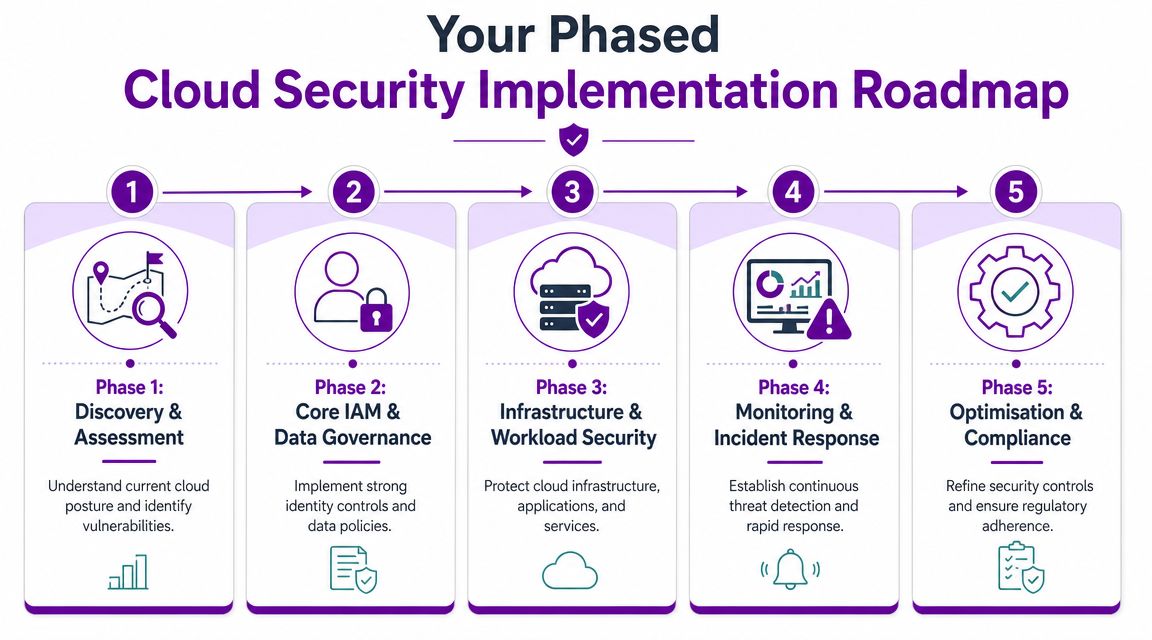
Phase 1 discovery and assessment
Start by getting a clear view of the estate.
Document your Microsoft 365 licences, admin accounts, Azure subscriptions, business-critical SaaS apps, backup arrangements, and external sharing routes. Identify where sensitive data lives, which accounts have privileged access, and which integrations can move or expose data without much visibility.
This phase usually exposes process problems as much as technical ones. Guest access may sit with nobody. Shared mailbox permissions often linger for years. Service accounts are commonly left running without an owner. If those basics are unclear, adding more tooling will not fix the underlying risk.
Phase 2 core IAM and data governance
For most businesses, this marks the point where the fastest risk reduction happens.
Enable MFA across the estate. Tighten Conditional Access. Split admin accounts from day-to-day user identities. Review privileged roles and strip out access people no longer need. Put clear controls around sharing, retention, and the handling of sensitive information in Microsoft 365.
Keep the scope realistic. A well-enforced baseline across identity and data beats a larger policy set full of exceptions nobody reviews.
Phase 3 infrastructure and workload security
With identity under better control, move to Azure, servers, and hosted applications.
Review Microsoft security recommendations, fix obvious configuration gaps, harden internet-facing services, and align resources to approved baselines. If you run line-of-business applications in Azure, include workload protection and configuration monitoring as part of normal operations. One-off hardening exercises age quickly once teams start making changes.
This is also the point to be honest about internal capability. If your team knows Microsoft 365 well but has limited Azure security experience, bring in targeted help for design and hardening rather than leaving high-risk workloads half-configured.
Phase 4 monitoring and incident response
Security tools only matter if somebody can act on what they report.
Connect the right telemetry from Microsoft 365, Azure, endpoints, and identity. Set alert priorities. Define who investigates, who can approve containment steps, and how evidence is stored for audit, insurance, or post-incident review.
A practical test works well here. If an account shows suspicious sign-in activity at 02:00, your team should already know whether to disable the account, revoke sessions, isolate the device, or escalate to management. If that decision still depends on a phone call and guesswork, the monitoring setup is incomplete.
Phase 5 optimisation and compliance
The final phase is about consistency.
Run regular access reviews. Test backups properly. Tune policies to reduce noise without creating blind spots. Review admin governance, rehearse incidents, and keep records that stand up to customer due diligence, cyber insurance questions, and compliance checks.
This is often where businesses decide whether to keep building in-house or use a managed Microsoft-focused partner such as F1Group for ongoing support across Microsoft 365, Azure, backup, and security operations if internal capacity is limited.
What not to do
Poor rollouts tend to fail in familiar ways:
- Too many alerts too early, with no agreed triage process
- MFA exceptions left in place for convenience, then forgotten
- Privileged access that keeps expanding without scheduled review
- Backups treated as a tick-box rather than tested recovery capability
- Policies applied unevenly across departments, sites, or cloud workloads
A good roadmap is methodical. Fix identity first. Bring Azure and workloads into policy. Build response discipline. Then decide, based on your team's time and skill depth, which parts you can run well yourself and which parts need outside support.
The Case for a Managed Security Partner
There is a point where doing cloud security in-house stops being efficient. That point often arrives earlier than businesses expect.
The issue isn't that your internal IT team lacks ability. It is that cloud security solutions need constant attention. Alerts need triage. Configurations drift. Admin rights creep. New apps get connected. Staff change roles. Someone needs to investigate suspicious behaviour and decide whether it is noise, user error, or an active incident.
The build-it-yourself problem
A DIY approach usually runs into three obstacles.
- Coverage gaps because nobody is realistically watching identity, endpoint, Microsoft 365, and Azure activity around the clock
- Skills concentration because one or two people understand the environment and everyone else depends on them
- Response delay because normal IT support work pushes investigation down the queue
That matters because the cost of delay can be severe. IBM's 2024 Cost of a Data Breach Report for the UK found the average breach cost was £3.58 million, as cited in this overview of UK cloud breach cost and response requirements. The same verified data highlights why security needs real-time detection and automated response, and why many SMBs can only achieve that through a managed service.
What a managed partner should actually provide
A good managed security partner doesn't just resell licences. They should help with:
- Baseline design for identity, admin, and access policies
- Continuous monitoring across Microsoft signals that matter
- Alert triage and escalation so internal teams aren't buried in noise
- Incident response coordination when accounts, devices, or workloads need containment
- Ongoing optimisation because cloud environments don't stay still
If your team can configure the tools but can't watch and tune them consistently, you haven't solved the problem. You've only bought software.
When going alone still makes sense
Not every organisation needs a fully managed security service. If you have an experienced internal security function, defined on-call processes, and enough capacity to run monitoring and response properly, keeping operations in-house can work well.
For many East Midlands mid-sized businesses, though, the more realistic model is shared responsibility. Internal IT keeps business knowledge and day-to-day control. A managed partner adds specialist depth, monitoring discipline, and response support where the business would otherwise be thinly covered.
Evaluating Costs and Demonstrating ROI
The wrong way to judge cloud security solutions is by asking whether the licence line looks expensive. The right question is what business risk, downtime, and response burden the investment removes.
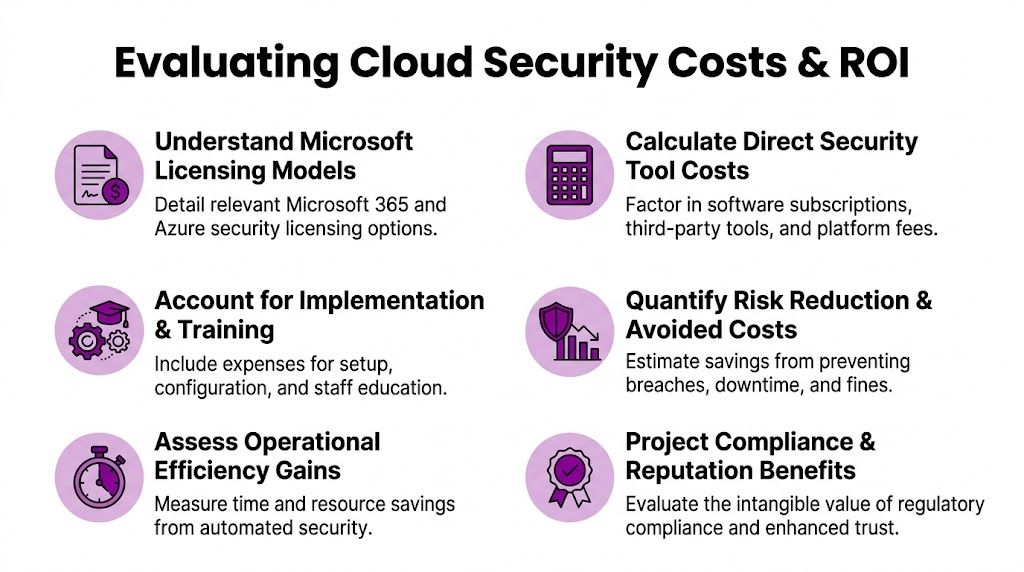
What to include in the cost picture
A realistic cost view should cover:
- Licensing for Microsoft security capabilities and any supporting tools
- Implementation effort for configuration, policy design, and rollout
- Training and process time for admins and users
- Managed support costs if monitoring or response is outsourced
- Recovery and interruption risk if key controls are missing
The ROI side is broader than “did we stop one attack”. The NCSC's Annual Review 2024 reported a record number of cyber incidents, and for mid-sized businesses the highest-ROI response is to improve identity protection, backup recovery, and admin governance in Microsoft 365 and Azure, according to this summary on cloud security priorities under current UK threat conditions.
A practical ROI checklist
- Protect sign-ins first because identity failures open the door to everything else
- Make backup and recovery real by testing it, not just paying for it
- Reduce admin sprawl so privileged access is controlled and reviewable
- Improve detection so incidents are found before they become outages
- Support compliance evidence so audits and customer due diligence become easier
- Lower operational drag by giving internal IT fewer false alarms and clearer processes
Cloud security spending is easiest to justify when it removes a known weakness and supports continuity. That is why the best investments are often the least glamorous ones.
If your organisation relies on Microsoft 365, Azure, remote working, or cloud-based business systems, a clear security plan will pay for itself in resilience, control, and reduced disruption. F1Group supports businesses across the East Midlands with practical Microsoft-focused security, managed IT, backup, and cloud services. Phone 0845 855 0000 today or Send us a message.